# Automatically Post Tweets on Instagram
> Instantly convert your Twitter tweets into images and automatically post on Instagram using TweetHunter/Typefully, Orshot connected using Zapier
- **Author**: Rishi Mohan
- **Published**: 2025-08-01
- **Tags**: Automation, Templates, Zapier
- **Read time**: 3 min read
- **URL**: https://orshot.com/blog/automate-tweet-to-instagram
---
A lot of creators schedule their tweets and to save time, cross-post to other social sites. Ever wondered how?
With this powerful automation, you can instantly convert your Twitter content into beautiful Instagram posts using Typefully or Typefully, Orshot, and Instagram for Business - all connected seamlessly through Zapier
If you prefer a tool that can help you convert tweets to images or even carousel for Instagram, you can try out [Twitter Carousel Generator](https://orshot.com/tools/twitter-carousel-generator)
## Tweet to Instagram Automation using Zapier
This Zapier template creates a streamlined 3-step workflow that:
1. **Triggers on new tweets** from Typefully or TweetHunter
2. **Converts tweets to images** using Orshot's tweet to image template
3. **Automatically posts** the generated image to your Instagram Business account
## Need help?
Setting up the automation could be complex, **feel free to use the chat button on bottom right** or
[**send us an email**](mailto:hi@orshot.com) to ask for help and we'll help you setup the automation
## Video Tutorial
## Setting up the Zap
1. Create a new Zap on Zapier
2. Select Typefully or TweetHunter in trigger for first step, connect your account in Setup tab and use following settings:
- Setup Tab: **Trigger Event** → Draft published
- Configure Tab: **Enabled for** → Tweets/Threads
3. Test the step to get a test record
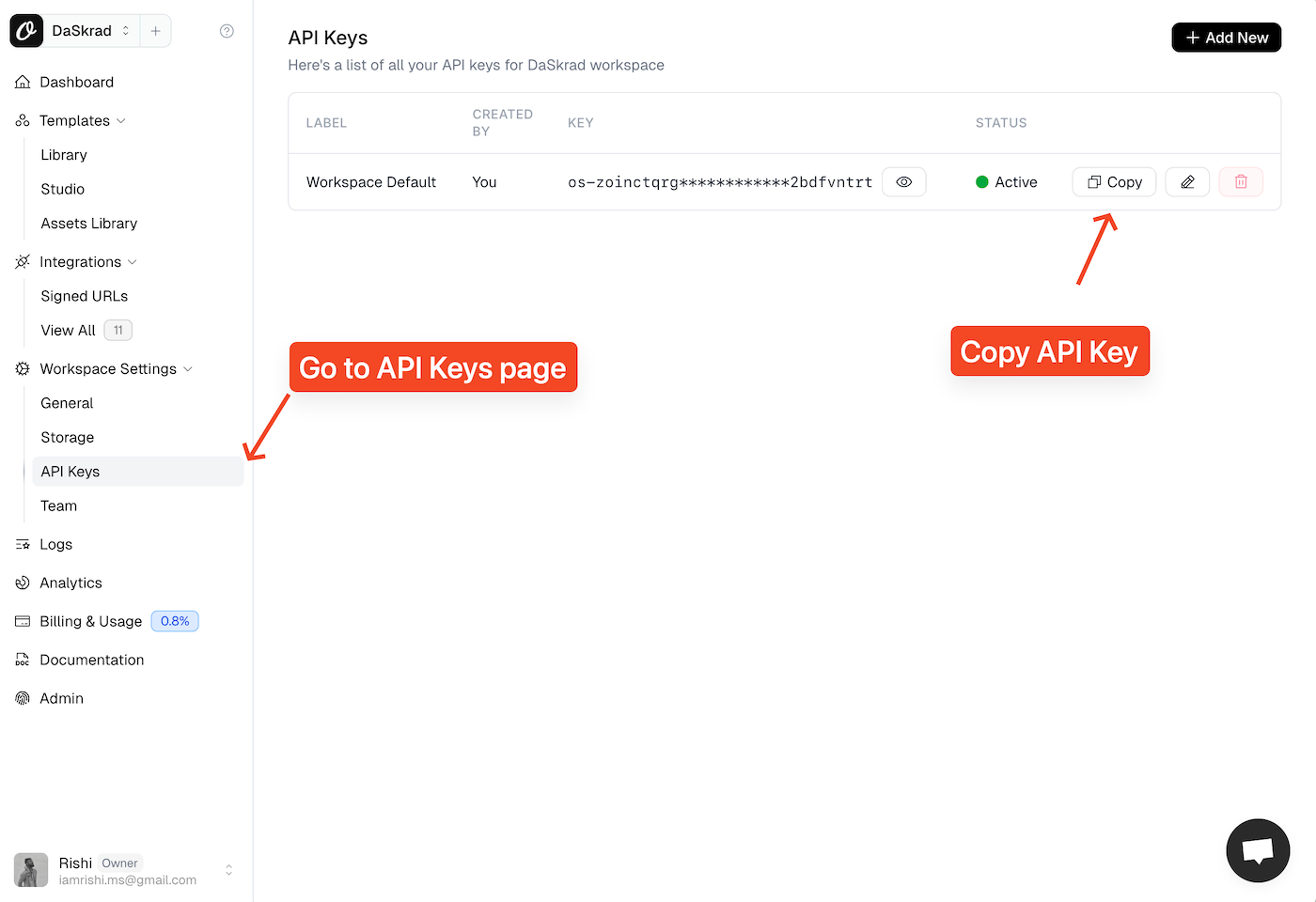
4. In next step, add Orshot using your Orshot API Key from Settings > API Key page
- Setup Tab: **Action Event** → Render from Template
- Configure Tab: **Template ID** → "tweet-image", **Tweeturl** → use the Twitter URL from Typefully record, **Response Type** → "url", **Response Format** → "png"
5. Test the step to get a test record 6. Add Instagram for Business in last step
- Setup Tab: **Action Event** → Publish Photo(s)
- Configure Tab: **Instagram Account to Use** → connect your Instagram account, **Media** → select "Data Content" from Orshot step
7. In Step 6 for Orshot under Configure Tab, feel free to customize the look of the tweet image
8. In Step 9, feel free to set caption, location etc. as you like
9. Once done, save the Zap and mark it as active
Now whenever you will post a tweet on Twitter, it'll automatically be posted on your Instagram account
with the customizations you've set in Step 4 in Orshot step
## Tweet Image Customization
In Step 4 in Orshot, you can customize the tweet image by selecting different colors
for background, text etc.
You can also choose to hide or show tweet media, metrics, date time etc.
## Zapier Filters
Set up filters to only post certain types of tweets:
- Tweets with specific hashtags
- Tweets above a certain length
- Tweets containing images or links
## Best Practices
- Consider Instagram's audience when crafting tweets
- Add relevant Instagram hashtags in the automation
- Set up delays if needed to avoid overwhelming your Instagram feed
- Use Typefully's draft feature to review before publishing
- Set up the automation to trigger only on final published tweets
## Even Easier: Use Orshot Social Publish
Instead of connecting Orshot to Instagram via Zapier, you can now use [Orshot Social Publish](https://orshot.com/docs/publish/introduction) to post directly to Instagram (and 12 other platforms) from Orshot itself. Connect your Instagram account in your workspace, and Orshot handles the posting — no Zapier step needed.
You can publish from the dashboard or [automate it via the API](https://orshot.com/docs/publish/publish-from-api) by adding a `publish` object to your render request.
## Conclusion
By connecting Typefully, Orshot, and Instagram through Zapier, you're not just saving time; you're creating a professional, consistent brand presence across platforms
 5. Test the step to get a test record 6. Add Instagram for Business in last step
- Setup Tab: **Action Event** → Publish Photo(s)
- Configure Tab: **Instagram Account to Use** → connect your Instagram account, **Media** → select "Data Content" from Orshot step
7. In Step 6 for Orshot under Configure Tab, feel free to customize the look of the tweet image
8. In Step 9, feel free to set caption, location etc. as you like
9. Once done, save the Zap and mark it as active
Now whenever you will post a tweet on Twitter, it'll automatically be posted on your Instagram account
with the customizations you've set in Step 4 in Orshot step
## Tweet Image Customization
In Step 4 in Orshot, you can customize the tweet image by selecting different colors
for background, text etc.
You can also choose to hide or show tweet media, metrics, date time etc.
## Zapier Filters
Set up filters to only post certain types of tweets:
- Tweets with specific hashtags
- Tweets above a certain length
- Tweets containing images or links
## Best Practices
- Consider Instagram's audience when crafting tweets
- Add relevant Instagram hashtags in the automation
- Set up delays if needed to avoid overwhelming your Instagram feed
- Use Typefully's draft feature to review before publishing
- Set up the automation to trigger only on final published tweets
## Even Easier: Use Orshot Social Publish
Instead of connecting Orshot to Instagram via Zapier, you can now use [Orshot Social Publish](https://orshot.com/docs/publish/introduction) to post directly to Instagram (and 12 other platforms) from Orshot itself. Connect your Instagram account in your workspace, and Orshot handles the posting — no Zapier step needed.
You can publish from the dashboard or [automate it via the API](https://orshot.com/docs/publish/publish-from-api) by adding a `publish` object to your render request.
## Conclusion
By connecting Typefully, Orshot, and Instagram through Zapier, you're not just saving time; you're creating a professional, consistent brand presence across platforms
5. Test the step to get a test record 6. Add Instagram for Business in last step
- Setup Tab: **Action Event** → Publish Photo(s)
- Configure Tab: **Instagram Account to Use** → connect your Instagram account, **Media** → select "Data Content" from Orshot step
7. In Step 6 for Orshot under Configure Tab, feel free to customize the look of the tweet image
8. In Step 9, feel free to set caption, location etc. as you like
9. Once done, save the Zap and mark it as active
Now whenever you will post a tweet on Twitter, it'll automatically be posted on your Instagram account
with the customizations you've set in Step 4 in Orshot step
## Tweet Image Customization
In Step 4 in Orshot, you can customize the tweet image by selecting different colors
for background, text etc.
You can also choose to hide or show tweet media, metrics, date time etc.
## Zapier Filters
Set up filters to only post certain types of tweets:
- Tweets with specific hashtags
- Tweets above a certain length
- Tweets containing images or links
## Best Practices
- Consider Instagram's audience when crafting tweets
- Add relevant Instagram hashtags in the automation
- Set up delays if needed to avoid overwhelming your Instagram feed
- Use Typefully's draft feature to review before publishing
- Set up the automation to trigger only on final published tweets
## Even Easier: Use Orshot Social Publish
Instead of connecting Orshot to Instagram via Zapier, you can now use [Orshot Social Publish](https://orshot.com/docs/publish/introduction) to post directly to Instagram (and 12 other platforms) from Orshot itself. Connect your Instagram account in your workspace, and Orshot handles the posting — no Zapier step needed.
You can publish from the dashboard or [automate it via the API](https://orshot.com/docs/publish/publish-from-api) by adding a `publish` object to your render request.
## Conclusion
By connecting Typefully, Orshot, and Instagram through Zapier, you're not just saving time; you're creating a professional, consistent brand presence across platforms