# A Designer Friendly Creatomate Alternative with Better Pricing
> A Creatomate alternative with a visual editor, predictable pricing without credit math, and a white-label embed on every plan. Get 60 free renders to start.
- **Author**: Rishi Mohan
- **Published**: 2026-04-23
- **Tags**: Alternative
- **Read time**: 7 min read
- **URL**: https://orshot.com/blog/creatomate-api-alternative
---
When people search for a Creatomate alternative, it usually comes down to three things:
- First, your designers can't actually work in JSON, so every small tweak requires a developer
- Second, the credit system makes monthly costs impossible to predict
- Or third, you've outgrown the Essential plan, but the $109 Growth jump feels unnecessarily steep.
Creatomate is a solid product if you're a developer-only team rendering complex video at scale. But it was built around JSON templates and resolution-based credits. That structure breaks the moment you need a designer to edit a template, or when you start rendering more images than videos.
I built [Orshot](https://orshot.com/) to fix exactly that.
Here's a live demo of a template for this blog post in Orshot's Studio. You can try playing the animation in the demo itself. This same template can generate an image, PDF, or a video.
It gives you a visual drag-and-drop editor your designers will actually enjoy using. It uses simple render-based pricing with zero credit math. It gives you multi-page templates and a full white-label editor on every paid tier.
[**Try Orshot Free**](https://orshot.com/pricing) **— 60 renders, no card — Image + PDF + Video Generation**
## The friction with Creatomate
- **JSON templates.** Designers can't iterate without a developer in the loop.
- **Credits, not renders.** 1080p eats more than 720p. Budgeting becomes guesswork.
- **No multi-page.** Carousels, PDFs, and slideshows have to be stitched together manually.
- **JS Preview SDK gated.** Locked behind the $109 Growth plan (and it's only a preview widget, not the editor).
- **Renders auto-delete.** Files vanish after 30 days. No first-party limits to push to your own S3/Drive.
- **Tutorials over help.** You get feature walkthroughs when you actually just need a quick answer.
## Where Creatomate makes you pay extra
A few specific differences worth flagging before you renew your plan.
- **Friction round the editor widget.**
Creatomate's JS Preview SDK is gated to the Growth plan ($109/mo). [Orshot Studio Embed](https://orshot.com/blog/orshot-studio-embed) is a full white-label editor on every paid plan from $30/mo. We include [React](https://orshot.com/docs/orshot-embed/react-sdk) and [Vue](https://orshot.com/docs/orshot-embed/vue-sdk) SDKs out of the box.
- **Credits ≠ renders.**
With Creatomate, a 1080p video at 30fps eats more credits than a 720p clip at 24fps. You can't budget cleanly. Orshot is purely render-based: an image or a PDF page is 2 renders, and a video is 2 renders per second. That's the whole formula.
- **No multi-page support.**
Need a PDF or a carousel? You're assembling them yourself. Orshot handles [multi-page templates](https://orshot.com/blog/introducing-carousel-templates) in [one single API call](https://orshot.com/docs/api-reference/render-from-studio-template). Multi-page videos work just the same.
- **No public-facing generators.**
Creatomate doesn't let you turn a template into a self-serve tool. [Orshot Playground Embeds](https://orshot.com/blog/playground-embed) let you do exactly that. You can share a template as a public generator with rate limits and format controls. It's great for lead magnets or internal tools.
- **Your renders disappear.**
Creatomate hosts on their CDN and auto-deletes after 30 days. With Orshot, you can [push every render automatically to Google Drive, Dropbox, S3, or R2](https://orshot.com/features/bring-your-own-storage).
## Pricing comparison (images)
Since Creatomate's credit math makes a true apples-to-apples comparison tough, here is how image generation stacks up.
| Monthly volume | Creatomate | Orshot |
| -------------- | ------------------ | ----------------------- |
| Free tier | 50 credits, trial | **60 renders, ongoing** |
| 1,500 / 2,000 | $45/mo (Essential) | $30/mo |
| 10,000 | $109/mo (Growth) | $75/mo |
| 50,000 | $329/mo (Beyond) | $160–$280/mo |
| 100,000+ | Custom | $349/mo |
_Annual plans are 20% off across the board. See [Full pricing](https://orshot.com/pricing)._
## What Orshot adds on top
Here are a few things Orshot handles that Creatomate doesn't do at all:
- **[AI Design Agent](https://orshot.com/blog/introducing-design-agent)** — Tell the agent what you need (e.g., "Instagram promo with headline and logo"), and it builds the layers and parameters for you.
- **[Variant Generation](https://orshot.com/blog/introducing-variant-generation)** — Auto-resize one design into every standard aspect ratio instantly.
- **[Studio Embed](https://orshot.com/blog/orshot-studio-embed)** — White-label the full editor directly inside your own app.
- **[Playground Embeds](https://orshot.com/blog/playground-embed)** — Share any template as a simple, public, self-serve generator.
- **[Per-layer animations](https://orshot.com/blog/introducing-animations-in-studio)** — Visually configure fades, slides, springs, and staggered enters, then override them via API (`.enterType`, `.showAt`).
- **[Brand Kit](https://orshot.com/features/brand-assets-library)** — Centralize colors, fonts, logos, and videos with tag filtering.
- **[Bring your own storage](https://orshot.com/features/bring-your-own-storage)** — Pipe renders directly into Drive, Dropbox, S3, or R2.
- **[Built-in social publishing](https://orshot.com/docs/publish/introduction)** — Render and post to 13+ platforms in a single call.
- **Developer tools everywhere** — We support [OAuth 2.0 apps](https://orshot.com/blog/orshot-for-developers), an [MCP server](https://orshot.com/docs/integrations/mcp-server), a [VS Code extension](https://orshot.com/blog/orshot-ide-extension), and native SDKs (Node, Python, Ruby, PHP).
## When Creatomate is still the right call
I want to be honest here: if 80%+ of what you produce is video requiring complex programmatic cuts and multi-track audio mixing, stay with Creatomate. If you're perfectly comfortable writing JSON, their video engine is genuinely good.
But if your mix is image-heavy, or you need carousels and PDFs, you should switch. If you have a designer who wants to actually touch the templates without writing code, Orshot wins. And if you want a white-label editor without a $109 floor price — Orshot easily wins.
## Switching
Most people are done migrating in an afternoon.
### 1. Recreate templates visually
You have three options (fastest first):
- **[AI Design Agent](https://orshot.com/blog/introducing-design-agent)** — Describe the template or paste a screenshot, and get a working draft.
- **[Import from Canva](https://orshot.com/solutions/canva-template-to-api)** or **[Figma](https://orshot.com/solutions/figma-automation-via-rest-api)** — Perfect if you already have the source files.
- **Build in [Orshot Studio](https://orshot.com/studio)** — Drag-and-drop everything using [Smart Stacking](https://orshot.com/blog/smart-stacking) and your Brand Kit.
### 2. Swap the API call
Here's how the API call changes.
**Creatomate:**```javascript
const response = await fetch("https://api.creatomate.com/v1/renders", {
method: "POST",
headers: {
Authorization: "Bearer YOUR_CREATOMATE_API_KEY",
"Content-Type": "application/json",
},
body: JSON.stringify({
template_id: "creatomate_template_id",
modifications: {
"Title.text": "Hello World",
"Image.source": "https://example.com/photo.jpg",
},
}),
});
```**Orshot:**```javascript
const response = await fetch("https://api.orshot.com/v1/studio/render", {
method: "POST",
headers: {
Authorization: "Bearer YOUR_ORSHOT_API_KEY",
"Content-Type": "application/json",
},
body: JSON.stringify({
templateId: "orshot_template_id",
modifications: {
title: "Hello World",
image: "https://example.com/photo.jpg",
// Override any style property natively
"title.fontFamily": "Space Mono",
"image.borderRadius": "32px",
},
response: {
type: "url", // url, base64, binary
format: "png", // png, jpg, webp, avif, pdf, mp4, webm, gif
},
}),
});
```It uses the same Bearer pattern, but with flat parameter keys (plus dot notation for style overrides), and an explicit output format. Check the [API docs](https://orshot.com/docs/api-reference), [SDKs](https://orshot.com/docs/sdks), or [Dynamic parameters](https://orshot.com/docs/dynamic-parameters) for more.
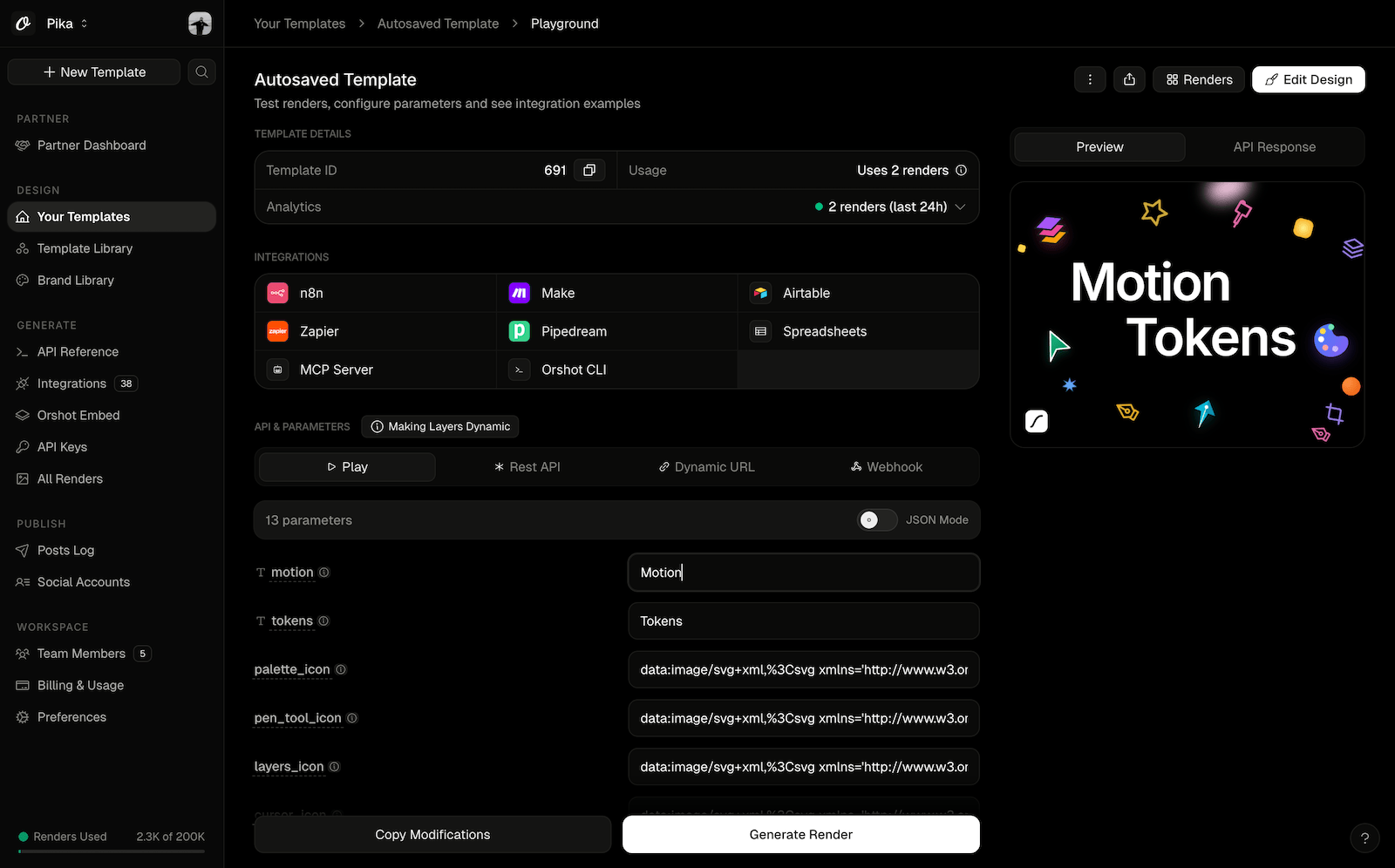
Here's a live demo of the API renders for the same template we have above. Orshot lets you [share or embed the Playground](https://orshot.com/docs/orshot-studio/embedding-playground) for any template so your users or clients can try the template in real-time
### 3. Run both in parallel for a day
Compare the outputs side-by-side, tweak margins in Studio, and cut over when you're ready. If anything acts weird, just hit the chat button. I (or someone on the team) will help you migrate.
## Common questions
## Useful Tutorials
Here are some of the Orshot features you might like
### Designing Templates with Claude
### Video Generation flow
### Designing Carousel Templates
## Try it
[Sign up](https://orshot.com), recreate one template (or let our AI do it for you), and run a few real renders against it. You'll start with 60 free renders and we don't ask for a card.
If something isn't working right, or you just want help migrating your existing templates, hit the chat button on the bottom right. I'll generally be the one on the other end.