# Configuration
> Configure your embed settings, permissions, and customization options
- **URL**: https://orshot.com/docs/orshot-embed/configuration
---
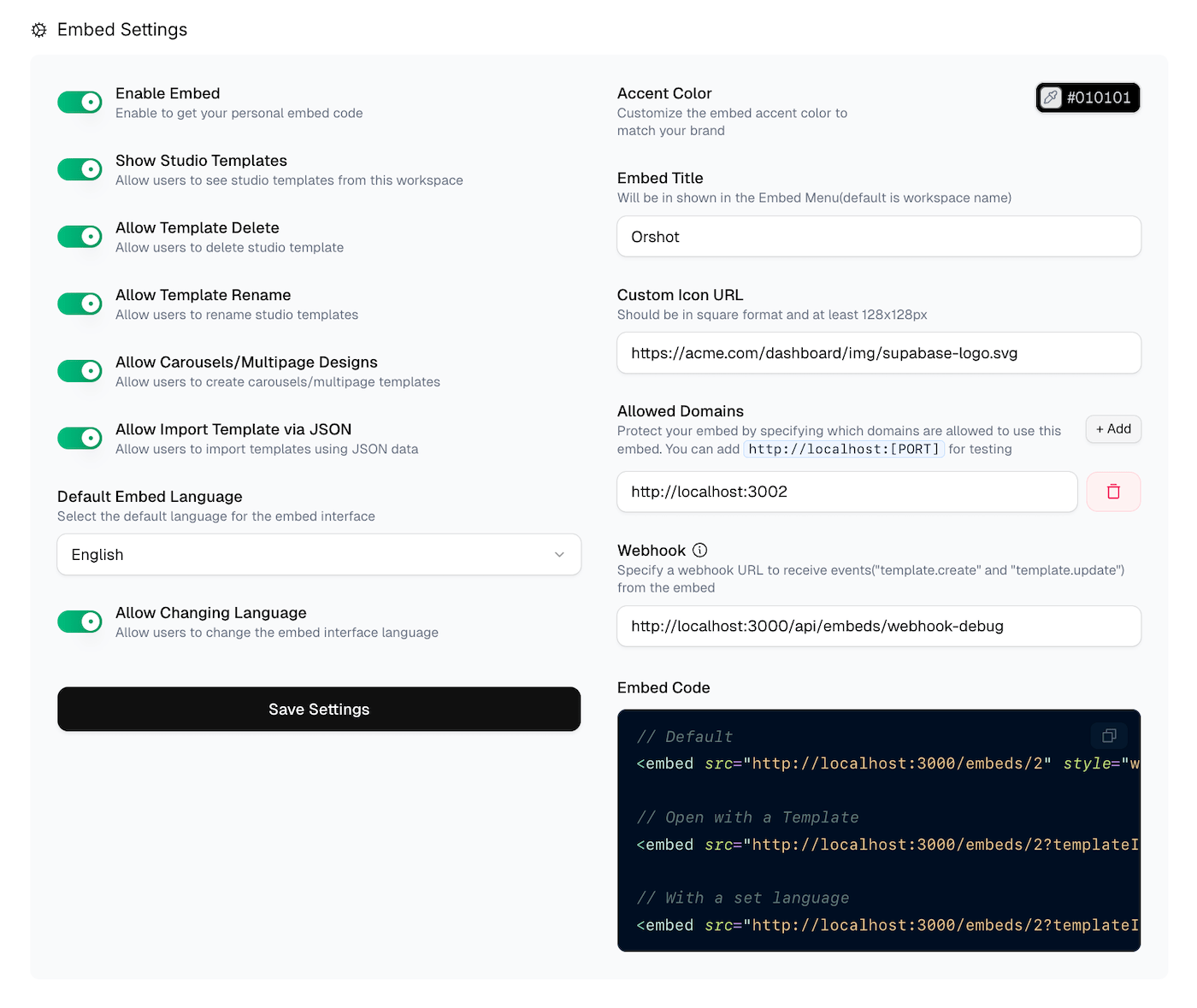 Configure your embed to match your app's needs and branding. All settings are managed from your workspace embed page.
## Getting Started
1. Navigate to your workspace settings
2. Go to the **Embed** section
3. Toggle **Enable Embed** to activate
4. Configure your settings and click **Save**
## Basic Settings
### Enable Embed
Turn on embed functionality to get your unique embed code. When disabled, existing embeds will stop working.
### Show Studio Templates
Allow users to access templates from your workspace. Disable if you want users to start from scratch only.
### Allow Template Operations
Control what users can do with templates:
- **Delete Templates**: Let users remove templates they created
- **Rename Templates**: Allow changing template names
- **Multipage Designs**: Enable carousel/slideshow templates
- **Import Template via JSON**: Allow users to import templates using JSON data
### Allow Downloads
Let users download their designs directly from the embed. When enabled, users can export templates as PNG, JPEG, WEBP, PDF, or HTML. Disable if you want to handle exports through your own application using [Events](https://orshot.com/docs/orshot-embed/events).
### Enable Events
Send real-time events to your parent page via `postMessage` when users interact with the embed. Events are fired for:
- Template creates and updates
- Downloads in any format
- Content requests from your app
See [Events](https://orshot.com/docs/orshot-embed/events) for detailed usage and code examples.
## Language Settings
### Default Language
Set the interface language for your embed. Choose from available languages including English, Spanish, French, and more.
### Allow Language Change
Let users switch languages themselves, or lock it to your default choice.
### Show Templates Sidebar
Control whether the templates panel is visible in the sidebar. Disable if you only want users to work with a specific template loaded via URL parameter.
### Show API Tab
Control whether the API tab is visible in the sidebar. Disable if your users don't need direct API access.
## Branding & Customization
### Embed Title
Replace the default workspace name with your brand name in the embed interface.
### Custom Icon
Upload your logo (square format, minimum 128x128px) to replace the default Orshot icon.
### Accent Color
Choose a color that matches your brand. This affects buttons, highlights, and interactive elements throughout the embed.
## Custom Asset Picker
Replace the default upload dialogs with your own asset selection UI. When enabled, the embed sends events to your parent page instead of showing the built-in file picker, letting users select assets from your own library.
You can enable this per asset type: images, videos, fonts, and colors.
See [Custom Asset Picker](https://orshot.com/docs/orshot-embed/custom-asset-picker) for integration details.
## Security & Domains
### Allowed Domains
Protect your embed by specifying which domains can use it:```
https://yourapp.com
https://staging.yourapp.com
http://localhost:3000
```Only these domains will be able to load your embed. Leave empty to allow any domain (not recommended for production).
## Webhooks
### Webhook URL
Get notified when users create or update templates:```
https://yourapp.com/api/studio-webhook
```Your endpoint will receive POST requests with template data whenever users:
- Create new templates (`template.create`)
- Update existing templates (`template.update`)
### Example Webhook Handler```javascript
export async function POST(request) {
try {
const body = await request.json();
const { event_type, template_id, user_data } = body;
console.log("Event:", event_type);
console.log("Template ID:", template_id);
// Process the webhook data
// Save to your database, send notifications, etc.
return Response.json({ success: true });
} catch (error) {
return Response.json({ error: error.message }, { status: 500 });
}
}
```## Embed Codes
Once configured, you'll get embed codes for different use cases:
### Default Embed
Opens with an empty workspace:```html
```### Template-Specific Embed
Opens with a specific template loaded:```html
```### With Language Parameter
Set a specific language (overrides default):```html
```## Testing Your Configuration
Use the live preview to test your settings before going live. The preview shows exactly how users will see your embed with current settings applied.
## Permissions Summary
| Setting | Description | Default |
| --------------------- | ----------------------------------- | -------- |
| Show Studio Templates | Access workspace templates | Enabled |
| Show Templates Sidebar | Show templates panel in sidebar | Enabled |
| Show API Tab | Show API tab in sidebar | Enabled |
| Allow Template Delete | Users can delete templates | Enabled |
| Allow Template Rename | Users can rename templates | Enabled |
| Allow Multipage | Create carousel templates | Enabled |
| Allow Import Template | Import templates via JSON | Enabled |
| Allow Downloads | Export as PNG, PDF, HTML, etc. | Enabled |
| Enable Events | Send postMessage events | Disabled |
| Allow Language Change | Switch interface language | Disabled |
| Custom Asset Picker | Use your own asset selection UI | Disabled |
## Best Practices
- **Test First**: Always test your embed in a staging environment
- **Secure Domains**: Always specify allowed domains for production
- **Brand Consistently**: Use your brand colors and logo for seamless integration
- **Monitor Webhooks**: Set up proper error handling for webhook endpoints
- **Update Regularly**: Keep your embed settings updated as your app evolves
Configure your embed to match your app's needs and branding. All settings are managed from your workspace embed page.
## Getting Started
1. Navigate to your workspace settings
2. Go to the **Embed** section
3. Toggle **Enable Embed** to activate
4. Configure your settings and click **Save**
## Basic Settings
### Enable Embed
Turn on embed functionality to get your unique embed code. When disabled, existing embeds will stop working.
### Show Studio Templates
Allow users to access templates from your workspace. Disable if you want users to start from scratch only.
### Allow Template Operations
Control what users can do with templates:
- **Delete Templates**: Let users remove templates they created
- **Rename Templates**: Allow changing template names
- **Multipage Designs**: Enable carousel/slideshow templates
- **Import Template via JSON**: Allow users to import templates using JSON data
### Allow Downloads
Let users download their designs directly from the embed. When enabled, users can export templates as PNG, JPEG, WEBP, PDF, or HTML. Disable if you want to handle exports through your own application using [Events](https://orshot.com/docs/orshot-embed/events).
### Enable Events
Send real-time events to your parent page via `postMessage` when users interact with the embed. Events are fired for:
- Template creates and updates
- Downloads in any format
- Content requests from your app
See [Events](https://orshot.com/docs/orshot-embed/events) for detailed usage and code examples.
## Language Settings
### Default Language
Set the interface language for your embed. Choose from available languages including English, Spanish, French, and more.
### Allow Language Change
Let users switch languages themselves, or lock it to your default choice.
### Show Templates Sidebar
Control whether the templates panel is visible in the sidebar. Disable if you only want users to work with a specific template loaded via URL parameter.
### Show API Tab
Control whether the API tab is visible in the sidebar. Disable if your users don't need direct API access.
## Branding & Customization
### Embed Title
Replace the default workspace name with your brand name in the embed interface.
### Custom Icon
Upload your logo (square format, minimum 128x128px) to replace the default Orshot icon.
### Accent Color
Choose a color that matches your brand. This affects buttons, highlights, and interactive elements throughout the embed.
## Custom Asset Picker
Replace the default upload dialogs with your own asset selection UI. When enabled, the embed sends events to your parent page instead of showing the built-in file picker, letting users select assets from your own library.
You can enable this per asset type: images, videos, fonts, and colors.
See [Custom Asset Picker](https://orshot.com/docs/orshot-embed/custom-asset-picker) for integration details.
## Security & Domains
### Allowed Domains
Protect your embed by specifying which domains can use it:```
https://yourapp.com
https://staging.yourapp.com
http://localhost:3000
```Only these domains will be able to load your embed. Leave empty to allow any domain (not recommended for production).
## Webhooks
### Webhook URL
Get notified when users create or update templates:```
https://yourapp.com/api/studio-webhook
```Your endpoint will receive POST requests with template data whenever users:
- Create new templates (`template.create`)
- Update existing templates (`template.update`)
### Example Webhook Handler```javascript
export async function POST(request) {
try {
const body = await request.json();
const { event_type, template_id, user_data } = body;
console.log("Event:", event_type);
console.log("Template ID:", template_id);
// Process the webhook data
// Save to your database, send notifications, etc.
return Response.json({ success: true });
} catch (error) {
return Response.json({ error: error.message }, { status: 500 });
}
}
```## Embed Codes
Once configured, you'll get embed codes for different use cases:
### Default Embed
Opens with an empty workspace:```html
```### Template-Specific Embed
Opens with a specific template loaded:```html
```### With Language Parameter
Set a specific language (overrides default):```html
```## Testing Your Configuration
Use the live preview to test your settings before going live. The preview shows exactly how users will see your embed with current settings applied.
## Permissions Summary
| Setting | Description | Default |
| --------------------- | ----------------------------------- | -------- |
| Show Studio Templates | Access workspace templates | Enabled |
| Show Templates Sidebar | Show templates panel in sidebar | Enabled |
| Show API Tab | Show API tab in sidebar | Enabled |
| Allow Template Delete | Users can delete templates | Enabled |
| Allow Template Rename | Users can rename templates | Enabled |
| Allow Multipage | Create carousel templates | Enabled |
| Allow Import Template | Import templates via JSON | Enabled |
| Allow Downloads | Export as PNG, PDF, HTML, etc. | Enabled |
| Enable Events | Send postMessage events | Disabled |
| Allow Language Change | Switch interface language | Disabled |
| Custom Asset Picker | Use your own asset selection UI | Disabled |
## Best Practices
- **Test First**: Always test your embed in a staging environment
- **Secure Domains**: Always specify allowed domains for production
- **Brand Consistently**: Use your brand colors and logo for seamless integration
- **Monitor Webhooks**: Set up proper error handling for webhook endpoints
- **Update Regularly**: Keep your embed settings updated as your app evolves