MCP server
Connect Orshot to Claude, Cursor, VS Code, ChatGPT and any MCP client to design templates, render and publish by chatting.
Updated
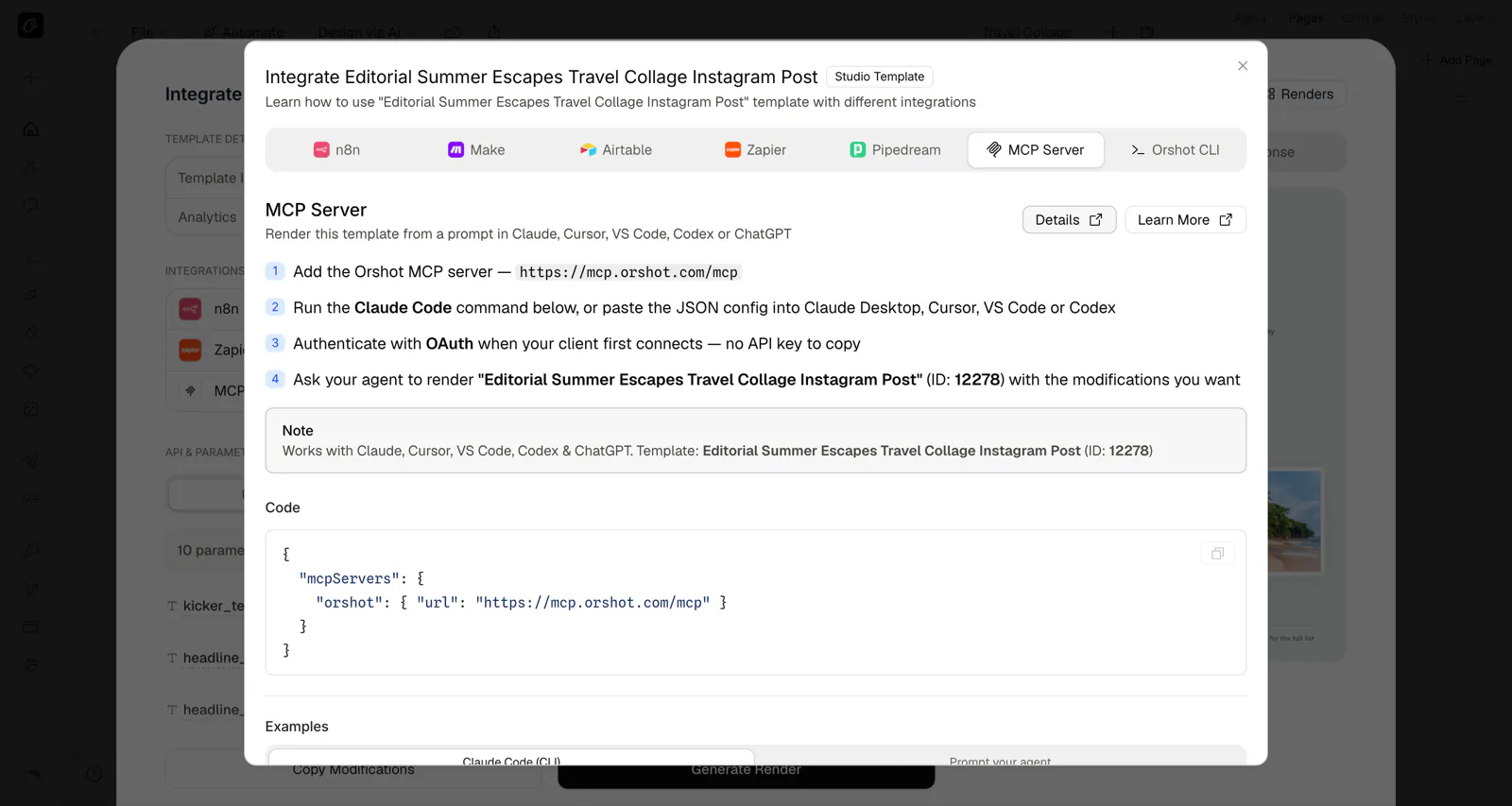
MCP Server URL: https://mcp.orshot.com/mcp




Introduction#
Every template also has an MCP tab in its Automate panel — it gives you the server config and a ready prompt to render that specific template from Claude, Cursor, VS Code, Codex, or ChatGPT.
The Orshot MCP Server gives an AI agent 103 tools across the whole loop: design branded templates from a brief, add stock media, voiceovers, ambient audio, captions and waveforms, render images, PDFs and videos, publish to social accounts, and build scheduled workflows. All in natural language, directly inside AI tools like Cursor, VS Code (GitHub Copilot), Claude Desktop, Claude Code, Windsurf, ChatGPT, Codex, Cline, LM Studio, Zed, Goose, Antigravity, OpenCode, Hermes, and any other MCP-compatible client.
No API keys needed. Authentication is handled automatically via OAuth — just connect and approve access through your browser.
Connect + Generate Templates#
Setup#
Connect to the hosted Orshot MCP server. Authentication happens automatically via OAuth when you first use a tool.
Cursor#
- Open Settings → General → MCP Servers
- Click + Add new MCP server
- Select Type: URL
- Enter URL:
https://mcp.orshot.com/mcp - Click Add
- When prompted, complete OAuth authorization in your browser
Or add manually to ~/.cursor/mcp.json:
{
  "mcpServers": {
    "orshot": {
      "url": "https://mcp.orshot.com/mcp"
    }
  }
}
VS Code (GitHub Copilot)#
Add to your .vscode/mcp.json (workspace) or global settings:
{
  "servers": {
    "orshot": {
      "url": "https://mcp.orshot.com/mcp"
    }
  }
}
Or use the Command Palette:
- Press
Cmd+Shift+P(macOS) /Ctrl+Shift+P(Windows/Linux) - Run MCP: Add Server
- Select HTTP
- Enter URL:
https://mcp.orshot.com/mcp - Name it
Orshot
Claude Desktop#
Claude Desktop shares the connectors directory with claude.ai, so the Orshot listing works here too: click Connect and sign in.
Or add it to your Claude Desktop MCP configuration file:
macOS: ~/Library/Application Support/Claude/claude_desktop_config.json
Windows: %APPDATA%\Claude\claude_desktop_config.json
{
  "mcpServers": {
    "orshot": {
      "url": "https://mcp.orshot.com/mcp"
    }
  }
}
Restart Claude Desktop after saving.
Claude.ai (Web)#
The fastest way: Orshot is in the Claude connectors directory. Open the Orshot listing, click Connect and sign in with your Orshot account.
Or add it manually as a custom connector:
- Go to claude.ai → Settings → Connectors
- Click Add custom connector
- Enter URL:
https://mcp.orshot.com/mcp - Complete OAuth authorization when prompted
Claude Code#
claude mcp add orshot --transport http https://mcp.orshot.com/mcpWindsurf#
- Click the MCP icon in the Cascade panel (top right)
- Click Manage plugins → View raw config
- Add the Orshot configuration and save
Config file location: ~/.codeium/windsurf/mcp_config.json
{
  "mcpServers": {
    "orshot": {
      "serverUrl": "https://mcp.orshot.com/mcp"
    }
  }
}ChatGPT#
The fastest way: Orshot is in the ChatGPT plugin directory. Open the Orshot plugin listing and click Install plugin.
Or add it manually as a connector:
- Go to chatgpt.com → Settings → Connections
- Click Add Connection
- Enter URL:
https://mcp.orshot.com/mcp - Complete OAuth authorization when prompted
Codex (OpenAI CLI)#
The fastest way: ChatGPT and Codex share one plugin directory, so you can install the Orshot plugin in Codex in one click, or run /plugins in Codex, search for Orshot, and select Install plugin.
Or add the MCP server to ~/.codex/config.json:
{
  "mcpServers": {
    "orshot": {
      "url": "https://mcp.orshot.com/mcp"
    }
  }
}
Or add via CLI:
codex mcp add orshot --url https://mcp.orshot.com/mcpCline#
- Open Cline settings in VS Code
- Go to MCP Servers section
- Click Add Server
- Enter:
- Name:
orshot - URL:
https://mcp.orshot.com/mcp
- Name:
- Click Save
LM Studio#
- Open Settings → MCP
- Add a new MCP server with this configuration:
{
  "orshot": {
    "url": "https://mcp.orshot.com/mcp"
  }
}Zed#
Add to your Zed settings (~/.config/zed/settings.json):
{
  "context_servers": {
    "orshot": {
      "url": "https://mcp.orshot.com/mcp"
    }
  }
}Goose#
goose mcp add orshot --transport http https://mcp.orshot.com/mcpOr add to ~/.config/goose/config.yaml:
extensions:
  orshot:
    type: http
url: https://mcp.orshot.com/mcpAntigravity#
- Open Antigravity and go to Settings → MCP Servers
- Add a new server with URL:
https://mcp.orshot.com/mcp - Complete OAuth authorization when prompted
OpenCode#
opencode mcp add orshot --url https://mcp.orshot.com/mcpOr add it to the mcp block of your opencode.json:
{
  "$schema": "https://opencode.ai/config.json",
  "mcp": {
    "orshot": {
      "type": "remote",
      "url": "https://mcp.orshot.com/mcp",
      "enabled": true
    }
  }
}
OpenCode detects the auth challenge and registers itself over dynamic client registration, so there is no client ID to paste — it just opens your browser. Re-authenticate with opencode mcp auth orshot, or diagnose a bad connection with opencode mcp debug orshot.
Hermes#
hermes mcp add orshot --url https://mcp.orshot.com/mcp --auth oauthOr add it to ~/.hermes/config.yaml by hand:
mcp_servers:
  orshot:
    url: "https://mcp.orshot.com/mcp"
    auth: oauth
auth: oauth is all Hermes needs — it handles discovery, dynamic client registration, PKCE and token refresh itself.
If you edited the YAML by hand, authenticate from a fresh terminal:
hermes mcp login orshotRun it outside a running session: editing the config from inside one triggers a reload that times out after 30 seconds, which is not long enough to finish the browser flow.
Other MCP Clients#
Any client that supports remote MCP servers can connect using:
URL: https://mcp.orshot.com/mcp
Look for "Remote MCP", "HTTP", or "Streamable HTTP" in your client's MCP settings and enter the URL above.
For example, you can ask it to generate a tweet screenshot from a Tweet URL, update the copy, and render the final image without leaving your AI client.
Authentication#
The MCP server uses OAuth to securely connect to your Orshot account. No API keys to copy or manage.
How It Works#
- Connect — Add the MCP server URL to your client
- Authorize — When you first use an Orshot tool, your browser opens to the Orshot login page
- Select workspaces — Choose which workspace(s) the MCP server can access
- Done — Your client receives an OAuth token and all subsequent tool calls are authenticated
Token Details#
- Access tokens are short-lived (15 minutes) and automatically refreshed
- If your session expires, you'll be prompted to re-authorize
- You can revoke access anytime from your Orshot dashboard
- Each user's data is completely isolated — the server never stores tokens
Available Tools#
The MCP server provides 103 tools across twelve categories:
Workspace & Auth#
| Tool | Description |
|---|---|
orshot_auth_status | Check if you're authenticated and see available workspaces |
orshot_list_workspaces | List all workspaces you have access to |
orshot_set_active_workspace | Switch which workspace to use |
orshot_get_workspace | Read the active workspace and its saved onboarding answers |
orshot_update_workspace | Update the workspace title or onboarding answers |
orshot_update_profile | Update the signed-in user's profile |
Template Management#
| Tool | Description |
|---|---|
orshot_list_studio_templates | List all studio templates in the active workspace |
orshot_get_studio_template | Get full template details including design structure |
orshot_get_studio_template_modifications | Get available modification parameters for a template (dynamic fields listing) |
orshot_place_image | Place an image into a template design at a chosen position |
orshot_verify_design | Check a design for layout problems before rendering |
orshot_create_template_design | Create a new template with design elements |
orshot_update_template_design | Update an existing template's design, name, or dimensions |
orshot_patch_template_elements | Update individual elements by parameterId without re-sending the whole design |
orshot_delete_template | Delete a studio template |
orshot_duplicate_template | Create a copy of an existing template |
orshot_get_template_sharing | Read a template's public sharing state |
orshot_update_template_sharing | Turn public sharing on or off for a template |
Template Folders#
One flat level of folders per workspace, shared with the dashboard sidebar. Names are unique and capped at 50 characters. Creating a folder requires a paid plan; listing, renaming, deleting and filing are available on every plan that already has folders. Deleting a folder never deletes templates — they return to All templates.
| Tool | Description |
|---|---|
orshot_list_template_folders | List the workspace's folders, in dashboard order |
orshot_create_template_folder | Create a folder (paid plans only) |
orshot_rename_template_folder | Rename a folder, leaving its templates untouched |
orshot_delete_template_folder | Delete a folder; its templates become unfiled |
orshot_move_template_to_folder | File a template into a folder, or pass folderId: null to unfile it |
Rendering#
| Tool | Description |
|---|---|
orshot_render_template | Render an image, PDF, or video from a studio template with modifications |
orshot_render_library_template | Render images from library templates (website screenshots, tweet images, etc.) |
orshot_batch_render_template | Render one template against many modification sets in a single call |
orshot_get_render_job | Poll a background render or AI generation job (server-side long-poll) |
The former names orshot_generate_image, orshot_generate_image_from_library and orshot_batch_render still work as deprecated aliases.
AI Generation#
| Tool | Description |
|---|---|
orshot_generate_ai_video | Footage from a prompt, animate an image, or make a portrait speak; saved to the Brand Library. estimate: true returns the cost without generating |
orshot_get_ai_video_presets | Role and look presets with preview clips, tiers and the credit rate card |
orshot_generate_ai_audio | A standalone voiceover or ambient track on AI credits |
orshot_get_audio_authoring_options | AI credit position, speech models and the voice catalog for template narration |
Stock Media#
| Tool | Description |
|---|---|
orshot_search_stock_media | Search free stock photos and videos (Pixabay, Unsplash) with stable refs |
orshot_use_stock_media | Resolve a stock ref to a hosted URL and add it to the Brand Library |
Account & Plans#
| Tool | Description |
|---|---|
orshot_get_account | Profile, workspaces, current plan, credits and AI credits, AI video caps |
orshot_get_plans | Which tier includes a feature, with AI credits and clip/speech caps per tier |
Dynamic URLs#
Public, signed render links for a template. Unlike a one-off render, a dynamic URL is stable and cacheable — the right fit for Open Graph images, email images and embeds. Pass modification values as query parameters to vary the output from one URL.
| Tool | Description |
|---|---|
orshot_create_dynamic_url | Mint or update a template's signed dynamic URL |
orshot_get_dynamic_url | Read the current configuration, limits and view count |
orshot_reset_dynamic_url_signature | Rotate the signature, invalidating every link already shared |
orshot_delete_dynamic_url | Remove the dynamic URL for a template |
Library Templates#
| Tool | Description |
|---|---|
orshot_list_library_templates | List all available pre-built Orshot library templates |
orshot_get_library_template_modifications | Get available parameters for a library template |
Brand Assets#
Manage your workspace brand kit — images, colors, fonts, and videos used across templates.
| Tool | Description |
|---|---|
orshot_get_brand_kit | Fetch all brand assets at once (images, colors, fonts, videos) with optional tag filtering |
| Import from a website | |
orshot_scan_brand_website | Read a public site and report the logos, colours and fonts it uses, saving nothing |
orshot_import_brand_website | Save the picked rows, or take everything above a confidence bar |
orshot_undo_brand_import | Remove everything one import wrote, for 7 days afterwards |
| Direct upload (large files) | |
orshot_create_upload_url | Mint a short-lived upload URL for an image, font, video or audio file |
orshot_confirm_upload | Store the uploaded file in the Brand Library once the transfer finishes |
orshot_create_image_upload_url | Image-only alias of orshot_create_upload_url, kept for older clients |
orshot_confirm_image_upload | Image-only alias of orshot_confirm_upload, kept for older clients |
| Images | |
orshot_get_brand_images | List brand images, optionally filtered by tag |
orshot_upload_brand_image | Upload a new brand image from a URL |
orshot_update_brand_image_tags | Update tags on a brand image |
orshot_delete_brand_image | Delete a brand image |
| Colors | |
orshot_get_brand_colors | List brand colors, optionally filtered by tag |
orshot_add_brand_color | Add a new brand color (hex value + tags) |
orshot_update_brand_color_tags | Update tags on a brand color |
orshot_delete_brand_color | Delete a brand color |
| Fonts | |
orshot_get_brand_fonts | List brand fonts, optionally filtered by tag |
orshot_upload_brand_font | Upload a new brand font from a URL |
orshot_update_brand_font_tags | Update tags on a brand font |
orshot_delete_brand_font | Delete a brand font |
| Videos | |
orshot_get_brand_videos | List brand videos, optionally filtered by tag |
orshot_upload_brand_video | Upload a new brand video from a URL |
orshot_update_brand_video_tags | Update tags on a brand video |
orshot_delete_brand_video | Delete a brand video |
| Audio | |
orshot_get_brand_audio | List brand audio files, optionally filtered by tag |
orshot_upload_brand_audio | Upload a new brand audio file from a URL or base64 |
orshot_update_brand_audio_tags | Update tags on a brand audio file |
orshot_delete_brand_audio | Delete a brand audio file |
Embed#
Configure the Orshot embed editor for your own users.
| Tool | Description |
|---|---|
orshot_get_embed_config | Read the workspace's embed configuration |
orshot_configure_embed | Update embed settings such as theme and allowed actions |
Workflows#
Build and run the automations that render on their own — a trigger, an Orshot render, and one or more destinations.
| Tool | Description |
|---|---|
orshot_list_workflow_nodes | Discover every available trigger, source and destination node |
orshot_list_connected_integrations | See which integrations this workspace has already connected |
orshot_get_workflow_connection_data | Fetch pickable values for a node (sheets, bases, folders, channels) |
orshot_suggest_workflows | Get draft-ready automation ideas that fit a given template |
orshot_validate_workflow | Check a workflow's steps before saving it |
orshot_create_workflow | Create a workflow, as a draft or active |
orshot_list_workflows | List the workspace's workflows |
orshot_get_workflow | Get a workflow's full step configuration |
orshot_update_workflow | Change a workflow's steps, name or status |
orshot_delete_workflow | Delete a workflow |
orshot_run_workflow | Trigger a run on demand |
orshot_list_workflow_runs | List recent runs with their status |
orshot_get_workflow_run | Inspect a single run, step by step, for debugging |
orshot_get_workflow_webhook | Get the inbound webhook URL for a webhook-triggered workflow |
orshot_get_workflow_sharing | Read a workflow's public sharing state |
orshot_update_workflow_sharing | Turn public sharing on or off for a workflow |
Social Publishing#
| Tool | Description |
|---|---|
orshot_list_social_accounts | List connected social media accounts in the active workspace |
orshot_publish_social_post | Publish a render to one or more connected accounts |
orshot_publish_social_draft | Publish a post that was saved as a draft |
orshot_list_social_posts | List posts in the workspace, filtered by status or account |
orshot_get_social_post | Read one post, its media and its per-account results |
orshot_update_social_post | Change a scheduled or draft post before it goes out |
orshot_discard_social_post | Discard a draft or cancel a scheduled post |
orshot_get_social_analytics | Impressions, engagement and reach per account |
orshot_get_social_analytics_daily | The same figures broken down by day |
orshot_get_social_post_analytics | Performance for a single published post |
orshot_get_social_followers | Follower counts and growth per connected account |
orshot_get_best_time_to_post | Suggested posting times from the account's own history |
Use orshot_list_social_accounts to get the numeric account IDs, then pass them in the publish parameter of orshot_render_template to post renders directly to connected social accounts.
Activity#
| Tool | Description |
|---|---|
orshot_list_workspace_logs | Review recent render activity, filter by status, and recover output URLs |
Example Prompts#
Once connected, try natural language prompts like:
Image Generation:
- "Generate a website screenshot of github.com using Orshot"
- "Create an ad banner with heading 'Grow your business' using studio template 64"
- "Generate a tweet screenshot of this tweet https://x.com/example/status/123"
- "Render my certificate template with the name 'Jane Doe'"
- "Generate a PNG and a PDF of template 100 with my updated headline"
Template Management:
- "List all my studio templates"
- "Show me the details of template 222"
- "What modification parameters does template 150 accept?"
- "Create a new social media template at 1080x1080 with my brand colors"
- "Update template 100 with a new background color"
- "Duplicate template 200 so I can create a variant"
- "Delete template 300"
Video and Audio:
- "Create a 15-second product reel with a voiceover, subtle ambient audio, animated captions and a waveform"
- "Make the narration dynamic so each customer receives personalized spoken copy"
- "Render the reel as an MP4 and publish it to my connected social account"
Brand Assets:
- "Show me all my brand assets"
- "What brand colors do I have tagged as 'primary'?"
- "Upload this logo image to my brand kit with tags 'logo' and 'dark'"
- "Add a new brand color #FF5733 tagged as 'accent'"
- "Create a social media post template using my brand fonts and colors"
- "Design a YouTube thumbnail using my brand images tagged 'product'"
Workspace:
- "Which workspaces do I have access to?"
- "Switch to my marketing workspace"
Need Help?#
- Check the Orshot API documentation
- Contact support at hi@orshot.com
- Use the chat button in your Orshot dashboard
Ready to automate?
Start rendering images, PDFs and videos from your templates in under 2 minutes. Free plan, no credit card.
Get your API key- Image, PDF and video generation via API
- Visual editor with AI and smart layouts
- Zapier, Make, MCP and 40+ integrations
- White-label embed for your own app
- 100 free credits a month, no credit card required