
AI Template Generator
Generate templates using AI prompts directly in your embedded Studio
AI Template Generator in Embed is an Enterprise-only feature. Contact sales to enable it for your workspace.
The AI Template Generator allows your embed users to create templates using natural language prompts. You can integrate this feature in two ways: through the built-in dialog UI or programmatically via postMessage for a completely invisible experience.
Enabling AI Template Generator#
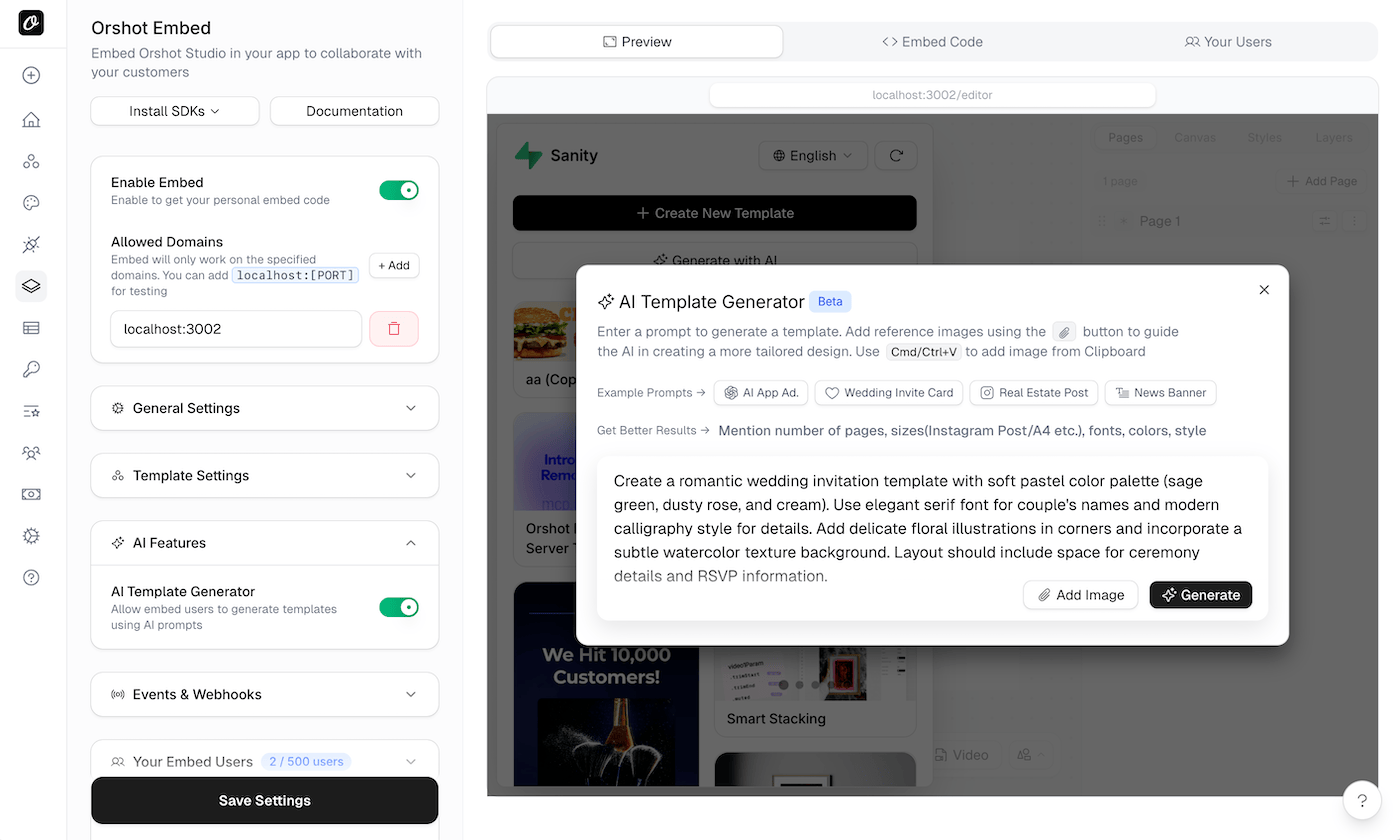
- Ensure your workspace has an Enterprise plan with AI Template Generator enabled
- Go to your embed settings
- Enable AI Template Generator under the AI Features section
Usage Modes#
Dialog Mode#
When enabled, an "Generate with AI" button appears in the embed sidebar. Users can click it to open a dialog where they can:
- Enter a text prompt describing the template they want
- Optionally attach a reference image for style guidance
- Generate and load the template directly into the canvas
This mode requires no additional code from your side.
Invisible Mode (postMessage)#
For complete control over the AI generation experience, you can trigger template generation programmatically from your parent page. The embed shows only a loading overlay while generating, and your app receives events about the progress.
Invisible Mode Integration#
Triggering AI Generation#
Send a postMessage to start AI template generation:
const iframe = document.querySelector("iframe");

iframe.contentWindow.postMessage(
  {
    type: "orshot:ai:generate",
    prompt: "Create a modern social media post about a tech product launch",
    requestId: "unique-request-id-123",
    referenceImage: "https://example.com/reference.jpg", // optional
  },
  "*",
);
Parameters
| Parameter | Type | Required | Description |
|---|---|---|---|
type | string | Yes | Must be "orshot:ai:generate" |
prompt | string | Yes | Natural language description of the template |
requestId | string | Yes | Unique identifier for tracking this request |
referenceImage | string | No | URL of an image to use as style/layout reference |
Listening to AI Events#
Set up event listeners to track generation progress and completion:
window.addEventListener("message", (event) => {
  if (!event.origin.includes("orshot.com")) return;

  const { type, data } = event.data;

  switch (type) {
    case "orshot:ai:progress":
      console.log("Generation progress:", data.message);
      // Update your UI with progress
      break;

    case "orshot:ai:complete":
      console.log("Template generated:", data);
      // Template is now loaded in the embed
      break;

    case "orshot:ai:error":
      console.error("Generation failed:", data.error);
      // Handle the error
      break;
  }
});
AI Event Reference#
orshot:ai:progress#
Sent during template generation to indicate progress.
{
  type: "orshot:ai:progress",
  timestamp: "2024-01-15T10:30:00.000Z",
  data: {
    requestId: "unique-request-id-123",
    message: "Connecting to AI..."
  }
}orshot:ai:complete#
Sent when template generation completes successfully. The generated template is automatically loaded into the embed canvas.
{
  type: "orshot:ai:complete",
  timestamp: "2024-01-15T10:30:05.000Z",
  data: {
    requestId: "unique-request-id-123",
    id: 486,
    name: "Tech Product Launch Post"
  }
}orshot:ai:error#
Sent when template generation fails.
{
  type: "orshot:ai:error",
  timestamp: "2024-01-15T10:30:02.000Z",
  data: {
    requestId: "unique-request-id-123",
    error: "Failed to generate template"
  }
}
React Example#
import { useRef, useState, useEffect, useCallback } from "react";

function AiEmbedController() {
  const iframeRef = useRef(null);
  const [prompt, setPrompt] = useState("");
  const [referenceImage, setReferenceImage] = useState("");
  const [isGenerating, setIsGenerating] = useState(false);
  const [status, setStatus] = useState("");

  useEffect(() => {
    const handleMessage = (event) => {
      if (!event.origin.includes("orshot.com")) return;

      const { type, data } = event.data;

      switch (type) {
        case "orshot:ai:progress":
          setStatus(data.message);
          break;
        case "orshot:ai:complete":
          setStatus(`Template "${data.name}" created!`);
          setIsGenerating(false);
          break;
        case "orshot:ai:error":
          setStatus(`Error: ${data.error}`);
          setIsGenerating(false);
          break;
      }
    };

    window.addEventListener("message", handleMessage);
    return () => window.removeEventListener("message", handleMessage);
  }, []);

  const generateTemplate = useCallback(() => {
    if (!prompt.trim() || !iframeRef.current) return;

    setIsGenerating(true);
    setStatus("Starting generation...");

    const payload = {
      type: "orshot:ai:generate",
      prompt: prompt.trim(),
      requestId: `ai-${Date.now()}`,
    };

    if (referenceImage.trim()) {
      payload.referenceImage = referenceImage.trim();
    }

    iframeRef.current.contentWindow.postMessage(payload, "*");
  }, [prompt, referenceImage]);

  return (
    <div>
      <div className="controls">
        <textarea
          value={prompt}
          onChange={(e) => setPrompt(e.target.value)}
          placeholder="Describe the template you want to create..."
        />
        <input
          type="text"
          value={referenceImage}
          onChange={(e) => setReferenceImage(e.target.value)}
          placeholder="Reference image URL (optional)"
        />
        <button onClick={generateTemplate} disabled={isGenerating || !prompt}>
          {isGenerating ? "Generating..." : "Generate with AI"}
        </button>
        {status && <p className="status">{status}</p>}
      </div>

      <iframe
        ref={iframeRef}
        src="https://orshot.com/embeds/your-embed-id"
        style={{ width: "100%", height: "600px" }}
      />
    </div>
  );
}Ready to automate?
Start rendering images, PDFs and videos from your templates in under 2 minutes. Free plan, no credit card.
Get your API key- Image, PDF and video generation via API
- Visual editor with AI and smart layouts
- Zapier, Make, MCP and 50+ integrations
- White-label embed for your own app
- 60 free renders — no credit card required