How do I let my users connect their social accounts?
Give a client or team member a one-time link that connects their social account to your workspace. No Orshot login needed.
Published
Connect accounts from your app#
When the person who owns a social account is not an Orshot user (a client of your agency, a location manager, a customer of your product), you can still bring their account into your workspace. Your app asks the API for a connect link, the person opens it, approves the platform login, and the account is ready for publishing.
Enterprise for third-party links
A link made for someone else (external_id or return_url set) is enabled
per workspace on the Enterprise plan; contact hi@orshot.com to turn it on.
The endpoints accept the workspace's API keys and first party clients like
the Orshot MCP server; third-party OAuth apps
are refused. A workspace connecting its own account from the MCP (no
external_id, no return_url) works on every paid plan, as the dashboard
does.
The flow, end to end:
- Your app calls Create a Connect Link with the platform. You get a
connect_urland a sessionid. - You show or send the link to the person. It works once and for five minutes.
- The link opens a page on orshot.com that names your workspace and the platform. The person clicks Continue and approves the login on the platform. The approval screen names Zernio, the service Orshot publishes through.
- Orshot stores the account in your workspace. The person's browser goes to your
return_urlwith?orshot_connect_session=<id>&status=connected, or to Orshot's own result page when you gave noreturn_url. - Your app reads the session with Get a Connect Session.
account.idis the id you pass to the publish endpoints.
// 1. Ask for a link
const created = await fetch("https://api.orshot.com/v1/social/connect-sessions", {
  method: "POST",
  headers: {
    Authorization: "Bearer <ORSHOT_API_KEY>",
    "Content-Type": "application/json",
  },
  body: JSON.stringify({
    platform: "instagram",
    return_url: "https://crm.example.com/socials/done",
    external_id: "office_142",
  }),
}).then((r) => r.json());

// 2. Send created.data.connect_url to the person

// 5. Later, read the outcome
const session = await fetch(
  `https://api.orshot.com/v1/social/connect-sessions/${created.data.id}`,
  { headers: { Authorization: "Bearer <ORSHOT_API_KEY>" } },
).then((r) => r.json());

if (session.data.status === "connected") {
  console.log("account id", session.data.account.id);
}
What the person sees#
The connect page shows your workspace's name and icon (set them in workspace settings) with the platform's logo, what your workspace will be able to do, and a note that the platform's approval screen will name Zernio. Nothing happens until they press Continue: a link preview or an early click on a shared message does not use the link up. After the platform login, LinkedIn and Facebook users pick the profile or page to connect. The result page confirms the account, or sends them back to your return_url.
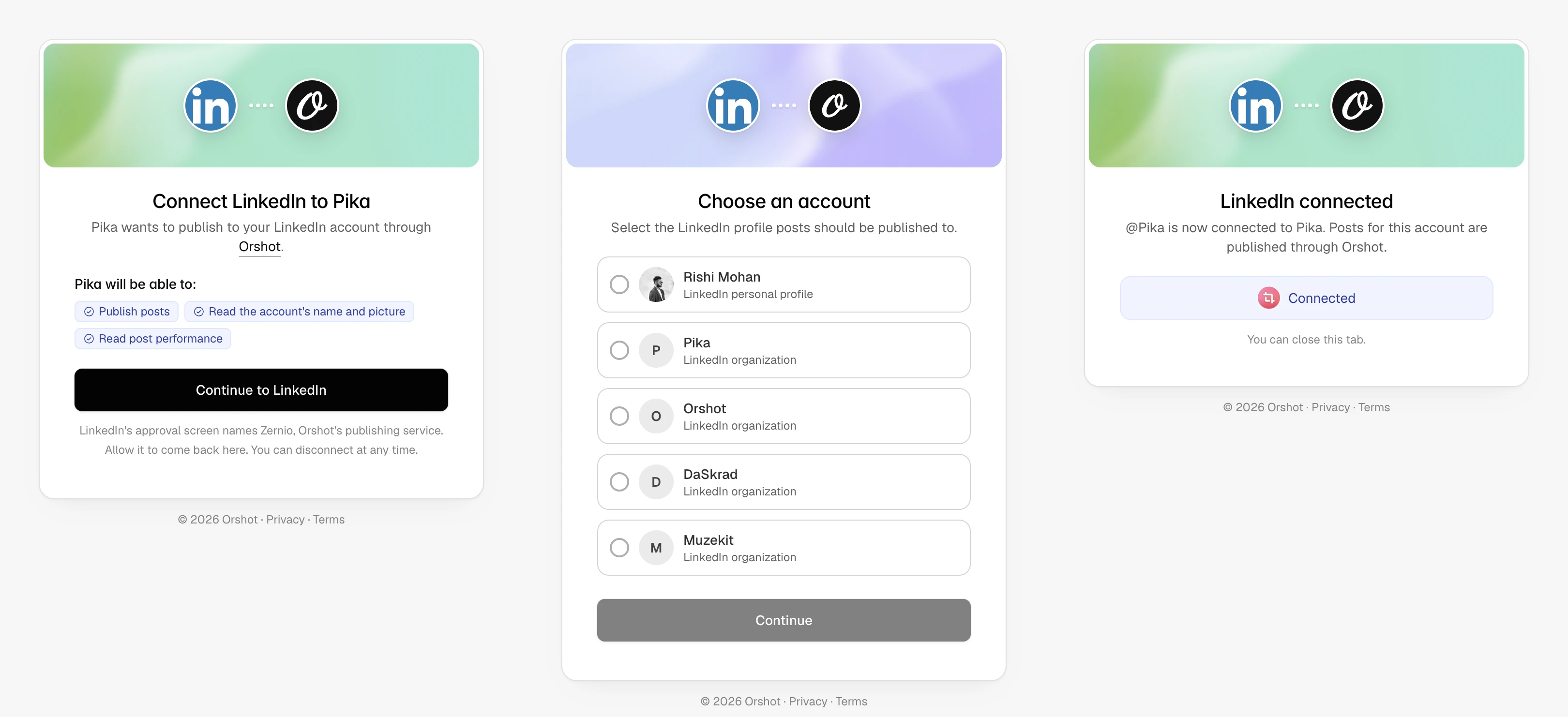
In-app browsers (the one inside Instagram, Facebook or LinkedIn) often cannot finish a platform login. The page says so and suggests Safari or Chrome.
Your reference: external_id#
Pass your own id for the person or location as external_id. It is stored on the account and comes back from List Social Accounts, which also filters by it: GET /v1/social/accounts?external_id=office_142. Keep it free of emails and other personal data.
Where the person lands: return_url#
return_url must use https and its host must be one of your workspace's allowed domains (the same list the Embed settings use) or orshot.com. Orshot adds orshot_connect_session and status to it and nothing else, so read the account from the API rather than from the URL.
Without a return_url, the person sees Orshot's result page and can close the tab.
One link, one account#
A link is for one platform and connects one account. The first click binds the session to that browser; a link forwarded to someone else, or opened again, shows "This link has expired". For a second account, create a second link.
If the person must sign in as a specific account, pass expected_username. Any other identity fails with account_mismatch and nothing is stored.
Reconnecting#
When an account needs a new login (requires_reconnect on List Social Accounts), create a link with reconnect_account_id. The login is pinned to that account, the existing account id stays the same, and the session reports account.reconnected: true.
Disconnecting#
Call Disconnect a Social Account. The charge for the account stops from the next billing cycle.
Billing#
Each connected account adds the social add-on to the workspace owner's subscription, see Pricing. The create response carries a billing object with the amount, so your app can show it before sending the link. Third-party links are an Enterprise feature; the workspace owner also needs a paid Stripe subscription for the add-on to be billed.
Limits#
A workspace can create 30 connect links per hour and complete 100 connections per day, on top of the 20 requests per minute shared by all social endpoints. Sessions stay readable for 24 hours.
Agents#
The same flow is available to AI agents through the Orshot MCP server, on every paid plan when the workspace connects its own account: the agent asks for a link and shows it; the person approves in their browser. The agent never sees the platform login. Third-party OAuth apps cannot create links.
Ready to automate?
Start rendering images, PDFs and videos from your templates in under 2 minutes. Free plan, no credit card.
Get your API key- Image, PDF and video generation via API
- Visual editor with AI and smart layouts
- Zapier, Make, MCP and 40+ integrations
- White-label embed for your own app
- 100 free credits a month, no credit card required