How do approval notifications work?
Review requests, approvals, change requests and comments show in the Approvals inbox. Emails come right away or in one daily digest.
Published
Orshot tells you when a template needs you: a review request, an approval, a change request, a comment or a blocked render. Notifications always show in the app. Email is up to you.
The Approvals inbox#
The Approvals inbox is the seal with a check mark in the top bar. The number on it counts your unread notifications.
- Notifications lists everything that involves you. Click a line to open the template.
- Waiting on you lists the templates that need your approval.
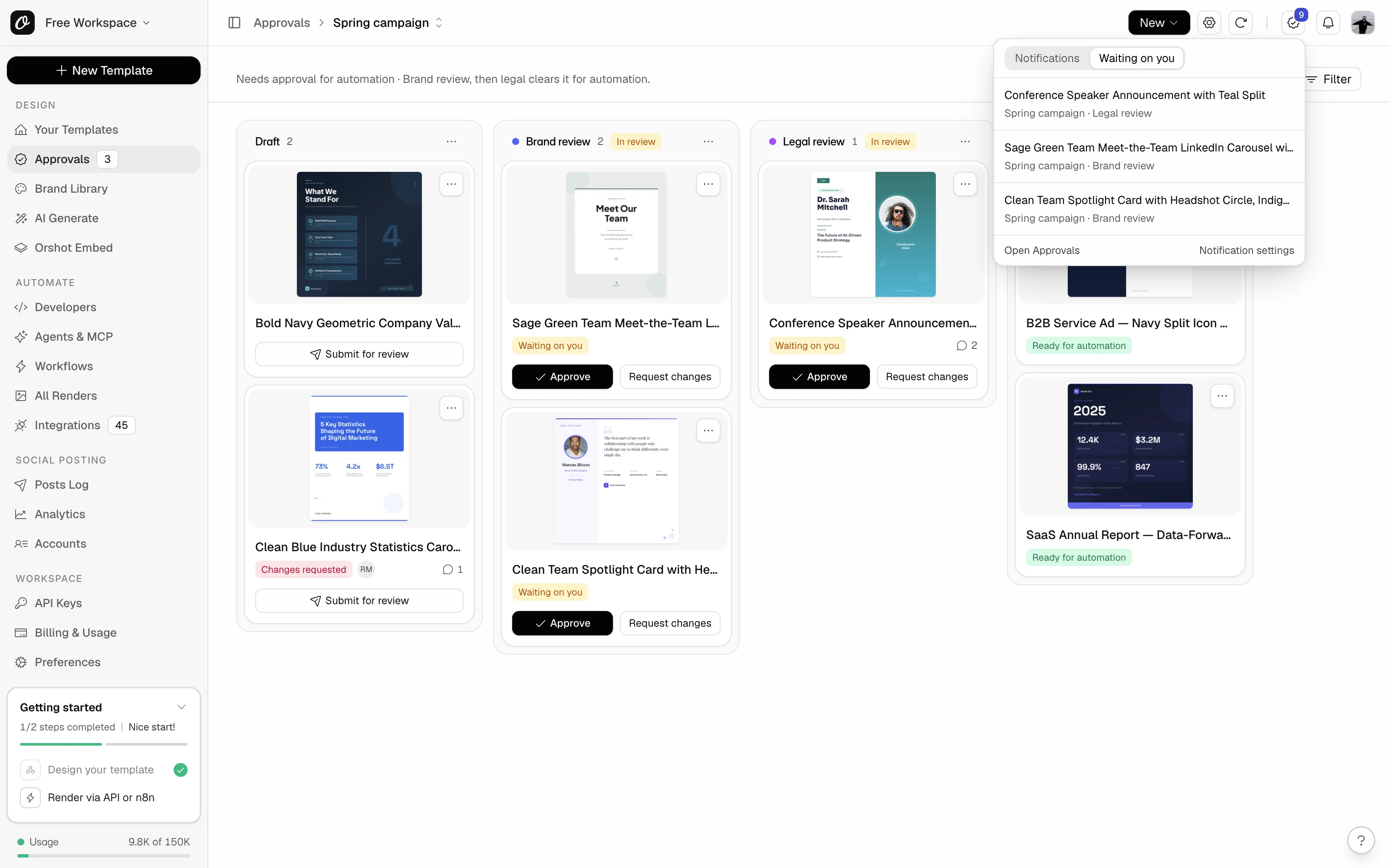
Mark all read clears the count, Open Approvals opens the Approvals page, and Notification settings takes you to your email settings.
In-app notifications are always on. You never get notified about your own actions.
Email#
Pick how approval and comment emails reach you:
| Setting | What you get |
|---|---|
| Right away | One email per action, as it happens. This is the default. |
| Daily digest | One email a day, around 9:00 in the morning in the time zone you pick. |
| Off | No approval or comment emails. The Approvals inbox still shows everything. |
Each subject starts with what's needed, like Review needed, Changes needed, Approved or Render blocked, then names the template.
A bulk action sends one email, so 30 templates moved at once make one email, not 30. Several comment emails to you in the same minute also arrive as one.
Move without approval emails always come right away, even with the daily digest on.
What triggers what#
| When | Who hears about it | |
|---|---|---|
| A template is submitted for review | Approvers in that review stage, and people involved | Yes |
| A template moves to another stage | People involved | Yes |
| Someone approves or requests changes | Whoever submitted it, whoever created the template, people involved | Yes |
| Someone withdraws their approval | People involved | Yes |
| Someone comments | People @mentioned, people in the thread, whoever created the template | Yes |
| A comment is resolved | People in the thread | No |
| A template is added to a flow | People involved, people @mentioned | No |
| A template is taken out of a flow | People involved, and people who manage the flow | Yes |
| Someone moves a template without approval | Owners, admins, people who manage the flow, and people involved | Yes, always right away |
| A render for automation is blocked | Whoever created the template, and the approvers in its stage | Yes, at most once a day per template |
| An approval flow is archived | Owners, admins and people who manage the flow | Yes |
People involved are whoever created the template, the approvers of its review stage, people who commented on it, and people following the template or the flow.
An approval that moves a template on is one notification, not two. The next stage's approvers still get their own review request.
Reviewers only hear about templates they can see.
Notifications follow your access. Leave a workspace and its notifications drop out of your inbox and unread count. A reviewer who loses access to a flow stops seeing what it sent them. Nothing is deleted, so they come back if the access does.
Change your settings#
- Email for this workspace: go to Preferences, Notifications, then Approvals and comments. Choose Right away, Daily digest or Off, and set the digest time zone. Only you see these settings.
- Every workspace at once: the Approval and comment emails switch on your Account page turns these emails off everywhere. In-app notifications stay on.
- One template: open its comments (Comments in the studio, or the comment count on its board card) and use the bell at the top. Follow gets you everything about the template, Mute gets you nothing (not even mentions or approval requests), and Default gets you only what involves you.
- One flow: someone who manages the flow can give you Follow access on its Access tab, so you hear about everything in it.
Reviewers set their email on their Account page. Notification settings in the inbox takes them there.
Step by step: how to choose your approval notifications.
Ready to automate?
Start rendering images, PDFs and videos from your templates in under 2 minutes. Free plan, no credit card.
Get your API key- Image, PDF and video generation via API
- Visual editor with AI and smart layouts
- Zapier, Make, MCP and 50+ integrations
- White-label embed for your own app
- 100 free credits a month, no credit card required