
Embedding Playground
Let anyone generate images, PDFs, and videos from your template — embedded on your site or shared via link
Playground Embeds turn your Orshot Studio template into a self-serve generator that anyone can use. Visitors pick parameters, hit Generate, and download the result — all without needing an Orshot account. You control formats, scale, rate limits, and expiration.
Demo#
Here's a demo of the embed in real-time:
Creating a Playground Embed#
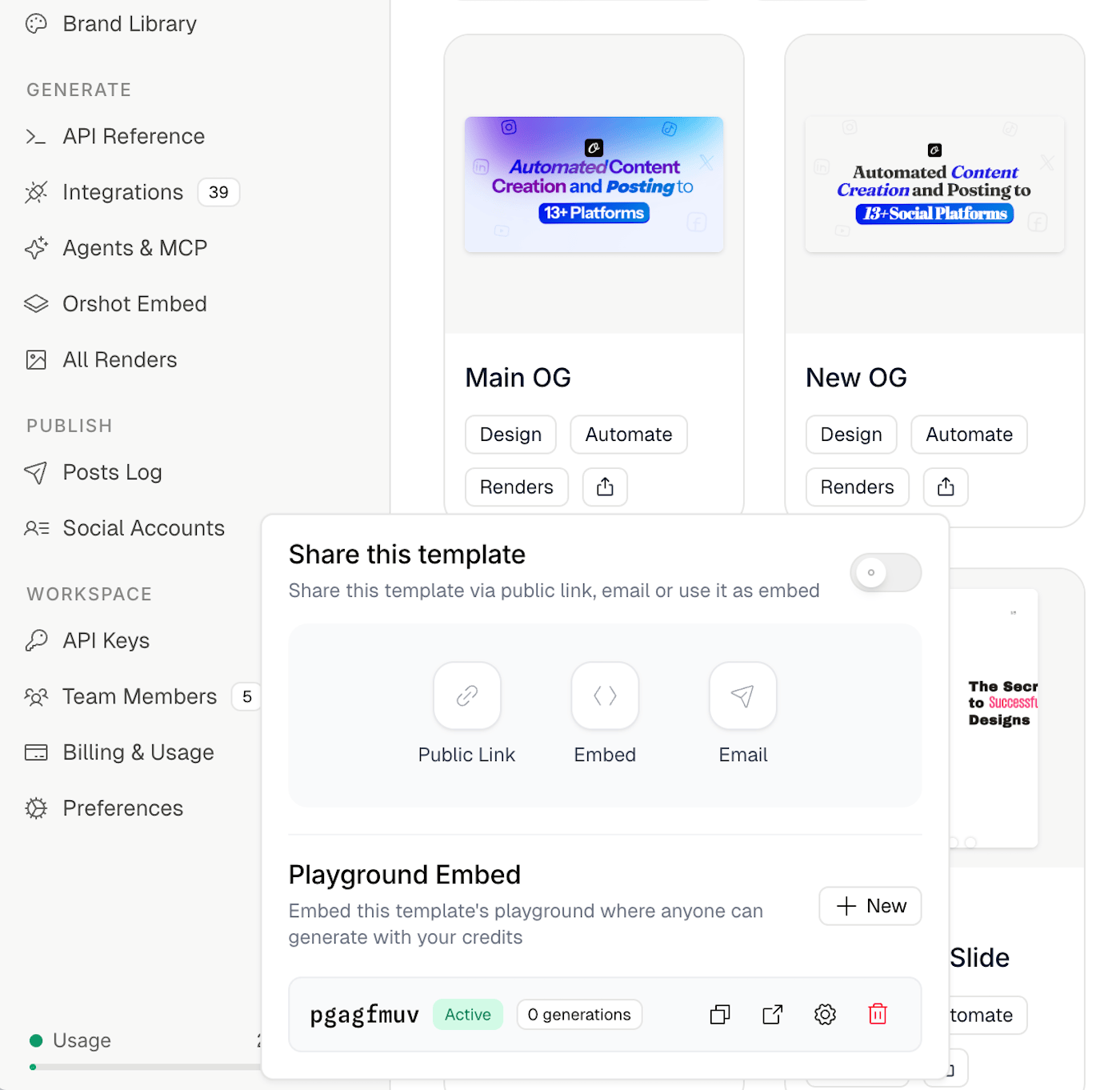
- Open your template in Orshot Studio
- Click the Share button in the toolbar
- Scroll to the Playground Embed section
- Click New to create an embed
Each embed gets a unique URL and its own settings. You can create multiple embeds per template with different configurations.
How It Works#
When someone opens a Playground Embed — either via direct link or embedded on your site — they see:
- A preview of the template
- Parameter inputs for every editable field (text, images, etc.)
- Format and scale selectors
- A Generate button that generates the output and returns a downloadable result
Generations use your workspace's API credits. Each click of the Generate button counts as one generation against the embed's limits.
Settings#
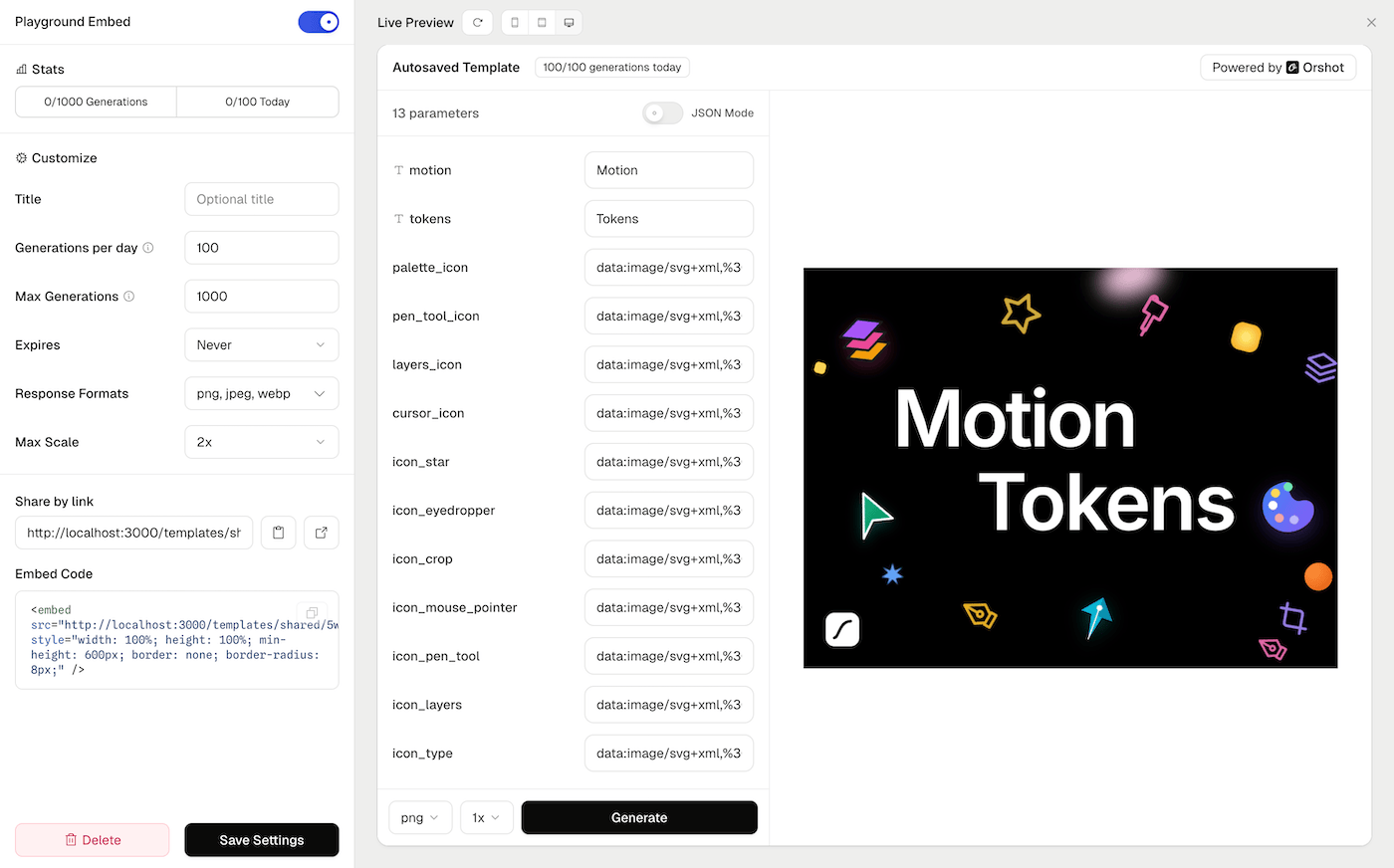
Title#
Optional display name shown in the embed header. Falls back to the template name if left empty.
Generations per day#
Maximum number of times the Generate button can be clicked per day, across all visitors. Resets daily. Use this to prevent unexpected credit usage spikes.
Max Generations#
Total lifetime generation limit. Once reached, the embed stops accepting new generations. Useful for time-limited campaigns or trials.
Expires#
Set an expiration date after which the embed becomes inaccessible. Options range from 1 day to 1 year, or never.
Response Formats#
Choose which output formats visitors can select. Available formats: PNG, JPEG, WebP, AVIF, PDF, MP4, WebM, GIF. At least one format must be enabled.
Max Scale#
Maximum resolution multiplier visitors can choose (1x to 4x). Higher scales produce larger, higher-resolution output.
Enabled / Disabled#
Toggle the embed on or off. Disabled embeds return a "not available" message. The URL is preserved so you can re-enable later.
Sharing an Embed#
Direct Link#
Copy the embed URL and share it directly. The link opens a full-page playground where visitors can generate outputs.
Embed Code#
Paste the provided HTML snippet into your website:
<iframe
  src="https://orshot.com/templates/shared/[hash]/playground"
  title="Orshot Embed"
  allow="clipboard-write"
  style="width: 100%; height: 100%; min-height: 600px; border: none; border-radius: 8px;"
></iframe>
The embed is responsive and works in any container that provides width and height.
Security#
- Nonce-based tokens: Each generation request uses a single-use token to prevent replay attacks
- Rate limiting: IP-based rate limiting protects against abuse
- No authentication required: Visitors don't need an Orshot account
- Your API key is never exposed: Generations are proxied through Orshot's servers using your workspace credentials server-side
Managing Embeds#
From the Share dialog, you can:
- View stats: See total and daily generation counts
- Edit settings: Update limits, formats, or expiration
- Copy link: Share the embed URL
- Preview: Open the embed in a new tab
- Delete: Permanently remove the embed
Playground Embeds are independent of template sharing. You can have an embed active even if public sharing is disabled on the template.
Ready to automate?
Start rendering images, PDFs and videos from your templates in under 2 minutes. Free plan, no credit card.
Get your API key- Image, PDF and video generation via API
- Visual editor with AI and smart layouts
- Zapier, Make, MCP and 50+ integrations
- White-label embed for your own app
- 30 free credits — no credit card required