How do I style individual words?
Apply separate colors, fonts, sizes and gradients to words inside a single text element.
Published ·Updated
Orshot Studio lets you mix different styles within a single text layer — bold one word, change the color of another, or even apply a gradient to a selection. No need to split your text across multiple layers.
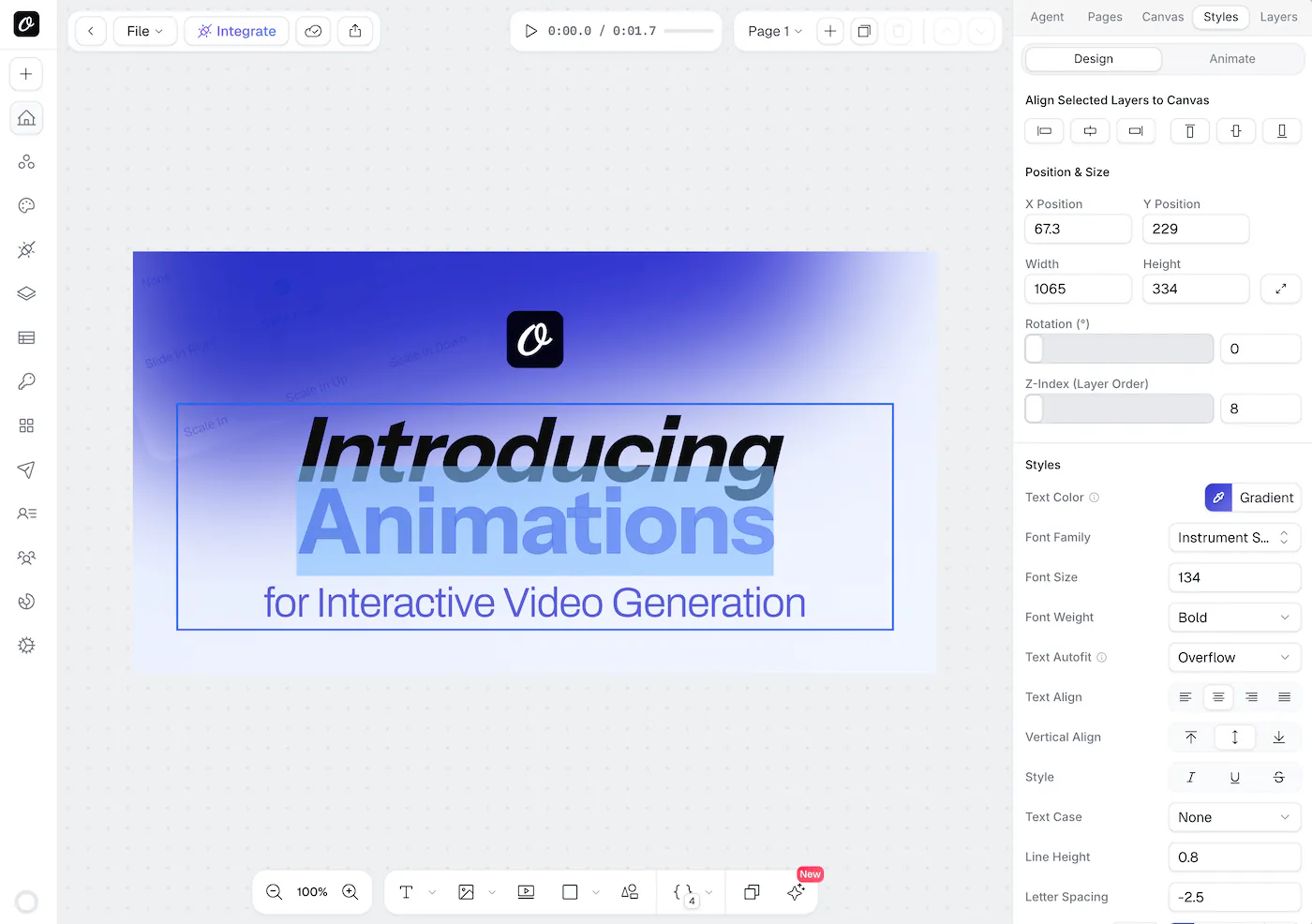
How It Works#
- Double-click a text layer to enter edit mode
- Select the word(s) you want to style
- Use the sidebar controls to change the style for just the selected text
That's it — the rest of the text stays as-is.
What You Can Style Inline#
| Property | How to apply |
|---|---|
| Bold | Select text → press Cmd+B (or Ctrl+B on Windows) |
| Italic | Select text → press Cmd+I (or Ctrl+I) |
| Underline | Select text → press Cmd+U (or Ctrl+U) |
| Color | Select text → pick a color from the sidebar |
| Gradient | Select text → pick a gradient from the color picker |
| Font | Select text → choose a different font in the sidebar |
| Font Size | Select text → change the font size in the sidebar |
| Font Weight | Select text → adjust the weight in the sidebar |
Gradient Text#
You can apply a gradient color to selected words:
- Double-click the text layer and select some text
- Open the Color picker in the sidebar
- Switch to the Gradient tab
- Choose your gradient — it applies instantly to the selection
The gradient is rendered using CSS background-clip: text, so it works in both the editor and in your final rendered images.
Using Inline Styles via the API#
When you send text with inline styles through the API, you can include HTML tags directly in the text value. Orshot sanitizes the content and only allows safe tags and CSS properties.
Allowed HTML Tags#
| Tag | Purpose |
|---|---|
<b> | Bold |
<strong> | Bold |
<i> | Italic |
<em> | Italic |
<u> | Underline |
<s> | Strikethrough |
<br> | Line break |
<span> | Inline styling |
<p> | Paragraph |
Allowed CSS Properties#
You can use the style attribute on <span> and <p> tags with these CSS properties:
color, font-family, font-size, font-weight, font-style, text-decoration, background-color, background-image, background-clip, -webkit-background-clip, border-radius, letter-spacing, line-height, text-transform, padding
Examples#
Bold and italic words
{
  "modifications": {
    "heading": "This is <b>bold</b> and this is <i>italic</i> text"
  }
}
Colored words
{
  "modifications": {
    "heading": "Hello <span style=\"color: #FF5733\">world</span>, welcome to <span style=\"color: #3498DB\">Orshot</span>"
  }
}
Mixed font sizes and weights
{
  "modifications": {
    "heading": "<span style=\"font-size: 48px; font-weight: 700\">Big Bold</span> and <span style=\"font-size: 24px; font-weight: 400\">small regular</span>"
  }
}
Gradient text on specific words
{
  "modifications": {
    "heading": "This word is <span style=\"background-image: linear-gradient(90deg, #ff6b6b, #feca57); -webkit-background-clip: text; color: transparent\">gradient</span> styled"
  }
}
Custom font on specific words
{
  "modifications": {
    "heading": "Default font with <span style=\"font-family: 'Georgia'\">Georgia styled</span> words"
  }
}
Combining multiple styles
{
  "modifications": {
    "heading": "<b><span style=\"color: #E74C3C; font-size: 40px\">Sale</span></b> — get <u><span style=\"color: #27AE60\">50% off</span></u> today"
  }
}
Line breaks in plain text
For plain text (without HTML tags), use \n to add line breaks:
{
  "modifications": {
    "heading": "Line one\nLine two\nLine three"
  }
}
REST API Example#
curl -X POST https://api.orshot.com/v1/studio/render \
  -H "Authorization: Bearer YOUR_API_KEY" \
  -H "Content-Type: application/json" \
  -d '{
    "templateId": "your-template-id",
    "modifications": {
      "heading": "Welcome to <b><span style=\"color: #FF5733\">Orshot</span></b>"
    },
    "response": {
      "format": "png",
      "type": "url"
    }
  }'
Any HTML tags or CSS properties not in the allowed lists above will be stripped during rendering for security. Only style attributes on <span> and <p> elements are preserved.
Tips#
- Keyboard shortcuts (
Cmd+B,Cmd+I,Cmd+U) work while editing text — no need to reach for the sidebar - You can combine multiple inline styles — e.g. a word can be bold, italic, and gradient all at once
- Inline styles are preserved when rendering via the API — what you see in the editor is what you get in the output
- To reset a word's color back to the layer default, select it and pick the layer's base color again
Ready to automate?
Start rendering images, PDFs and videos from your templates in under 2 minutes. Free plan, no credit card.
Get your API key- Image, PDF and video generation via API
- Visual editor with AI and smart layouts
- Zapier, Make, MCP and 50+ integrations
- White-label embed for your own app
- 30 free credits — no credit card required