What is Translate?
Translate turns a template's text into another language with AI, in the Studio or on every API render. What it does, where it works and what it costs.
Published
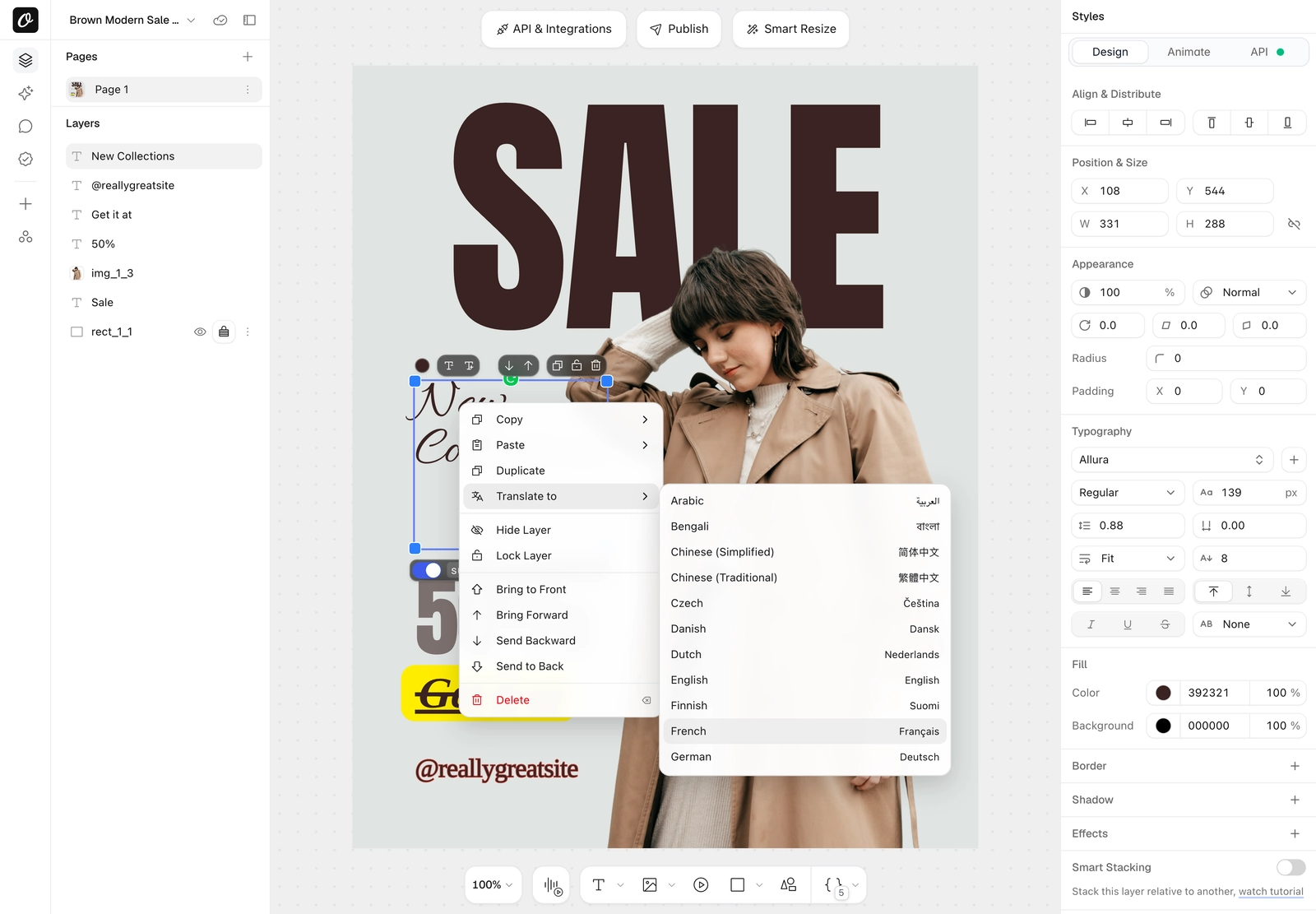
Translate rewrites the text layers of a template in another language with AI, before the image, PDF or video renders. The design, fonts, images and layout stay as they are; only the words change. It costs 1 AI credit per 100 words, and text Orshot has translated before is free.

Why use it#
- One design per market, not one per language. Keep a single set of templates and render each campaign, listing or report in the language of the market it goes to.
- No copy round-trips. Your feed, CRM or spreadsheet can stay in one language. Orshot translates at render time, so nobody pastes translated copy into dozens of layers.
- Typography stays correct. Translated text renders with the capitals, characters and line breaking its language expects.
- Pay per word, once. Repeat renders of the same text cost nothing, so a weekly job only pays for what changed.
Where it works#
| Where | What it does |
|---|---|
| Studio | Right-click text layers, Translate to, or Translate Template from the template menu. Replaces the text in the template. Step-by-step guide |
| API | translate on a render request, or .translate on a parameter. Translates for that render only; the template doesn't change |
| Orshot Embed | Translate to inside the embedded editor, on by default. It spends your workspace's AI credits, so switch it off per user or session through user permissions if you need to |
| Integrations | n8n and Make accept .translate keys as extra modifications today. Top-level translate and lang come with the next integration release |
Translate on every render#
Send translate with your render request. The template's text and your modifications are translated before the image, PDF or video is rendered.
{
  "templateId": <TEMPLATE_ID>,
  "translate": "el",
  "modifications": {
    "headline": "Bright apartment with sea views",
    "price": "€245.000"
  }
}
Translate single layers, or keep one as it is, with .translate on the parameter:
{
  "templateId": <TEMPLATE_ID>,
  "translate": "el",
  "modifications": {
    "headline": "Bright apartment with sea views",
    "agent_name": "Maria Papadopoulou",
    "agent_name.translate": false,
    "subtitle.translate": "de"
  }
}
On multi-page templates, add the page: "page2@title.translate": "hi".
For more control, pass an object:
"translate": {
  "to": "es-MX",
  "from": "en",
  "context": "real estate listing",
  "glossary": { "walk-in shower": "regadera tipo walk-in" },
  "strict": true
}| Field | What it does |
|---|---|
to | Language to translate into, as a language tag: el, de, ja, es-MX, pt-BR, zh-Hans. See language codes |
from | Language the text is in. Leave it out and the model detects it |
context | A few words about the design, for industry terms (for example how rooms are counted in listings) |
glossary | Terms that must always be translated a certain way, or kept as they are (brand names) |
strict | true fails the render if any layer can't be translated (layers that did translate are still charged, and are free next time). Without it, those layers keep their text and the response carries a warning |
The response includes what the translation used:
"ai": { "type": "text:translate", "words": 142, "wordsCached": 30, "credits": 2 }Dynamic URLs don't translate: they're public links, so translate and .translate keys are ignored on them. &lang= still works. Translate in the Studio instead, or render through the API.
Set the language without translating#
lang tells Orshot what language the text is in, so capitals and characters render the way that language writes them: Greek capitals drop their accents, Turkish i becomes İ, and Chinese and Japanese use their own character shapes. It never translates and costs nothing.
- Whole template:
"lang": "tr"in the request, or Template Language in the template menu. - One layer:
"headline.lang": "tr", or the Language setting in the layer's API tab.
Language codes#
Use these codes for translate, lang, .translate and .lang. They're the languages in the Studio menus; the API also accepts any other standard language tag, such as fr-CA, es-AR, sw or ta.
| Language | Native name | Code |
|---|---|---|
| Arabic | العربية | ar |
| Bengali | বাংলা | bn |
| Chinese (Simplified) | 简体中文 | zh-Hans |
| Chinese (Traditional) | 繁體中文 | zh-Hant |
| Czech | Čeština | cs |
| Danish | Dansk | da |
| Dutch | Nederlands | nl |
| English | English | en |
| Finnish | Suomi | fi |
| French | Français | fr |
| German | Deutsch | de |
| Greek | Ελληνικά | el |
| Hebrew | עברית | he |
| Hindi | हिन्दी | hi |
| Hungarian | Magyar | hu |
| Indonesian | Bahasa Indonesia | id |
| Italian | Italiano | it |
| Japanese | 日本語 | ja |
| Korean | 한국어 | ko |
| Malay | Bahasa Melayu | ms |
| Norwegian | Norsk | no |
| Polish | Polski | pl |
| Portuguese (Brazil) | Português (Brasil) | pt-BR |
| Portuguese (Portugal) | Português (Portugal) | pt-PT |
| Romanian | Română | ro |
| Russian | Русский | ru |
| Spanish (Spain) | Español (España) | es |
| Spanish (Latin America) | Español (Latinoamérica) | es-MX |
| Swedish | Svenska | sv |
| Thai | ไทย | th |
| Turkish | Türkçe | tr |
| Ukrainian | Українська | uk |
| Vietnamese | Tiếng Việt | vi |
Pricing#
| What | AI credits |
|---|---|
| Up to 100 words | 1 |
| Each further 100 words | 1 more |
| Text translated before (same text, languages, context and glossary, within 90 days) | Free |
| A translation that fails | Free |
Words are counted across every layer and page of one render or one Studio action. Chinese, Japanese and Thai count every 2 characters as one word. Every translation shows up in AI History with its words, languages and credits.
Good to know#
- Translations are often longer than the original (German runs about 30% longer than English). Set long layers to Fit so the text shrinks to its box. Renders warn you when a translated layer may not fit.
- Numbers, prices, URLs and
{{inline parameters}}stay as they are, and bold or coloured words keep their formatting. - Layers that use
.prompt(AI-written text) aren't translated. Write the prompt in the language you want instead.
Ready to automate?
Start rendering images, PDFs and videos from your templates in under 2 minutes. Free plan, no credit card.
Get your API key- Image, PDF and video generation via API
- Visual editor with AI and smart layouts
- Zapier, Make, MCP and 40+ integrations
- White-label embed for your own app
- 100 free credits a month, no credit card required