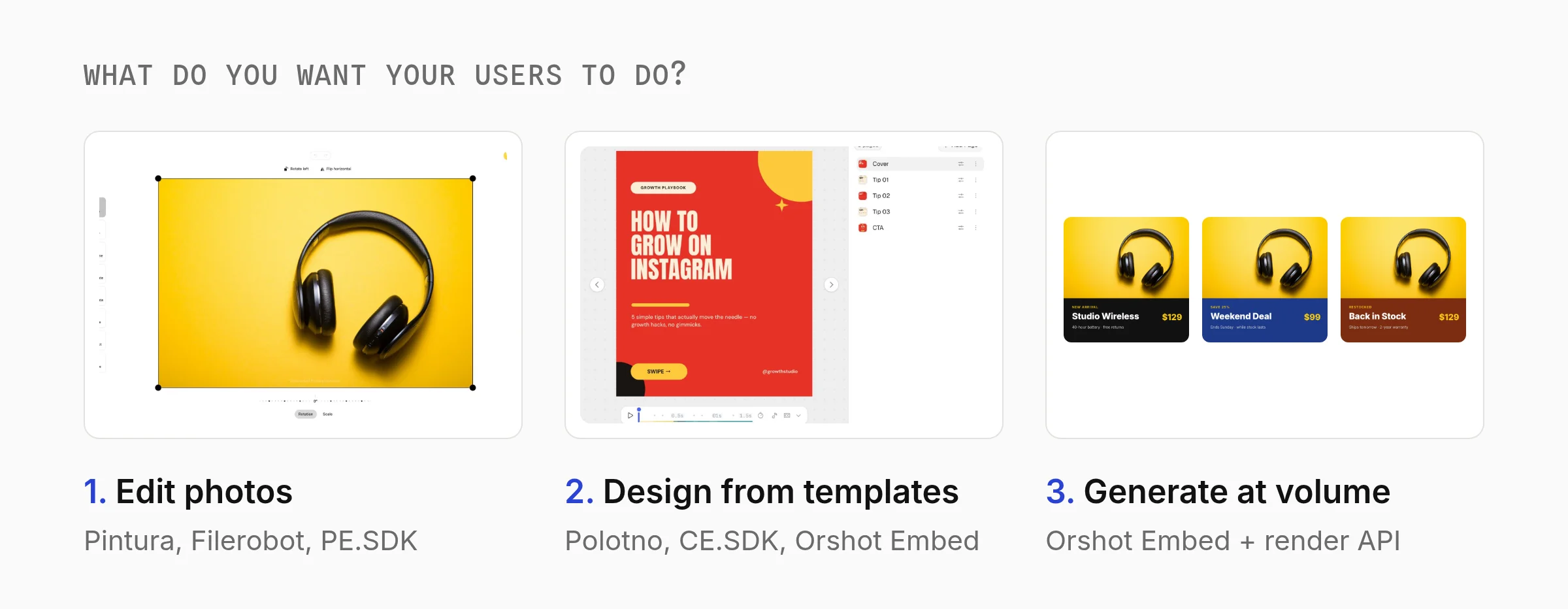
The right image editor SDK depends on what your users make. Use Pintura or the free Filerobot for photo edits, Polotno or IMG.LY CE.SDK for Canva-style design, and Orshot Embed when your backend must generate images from those designs.
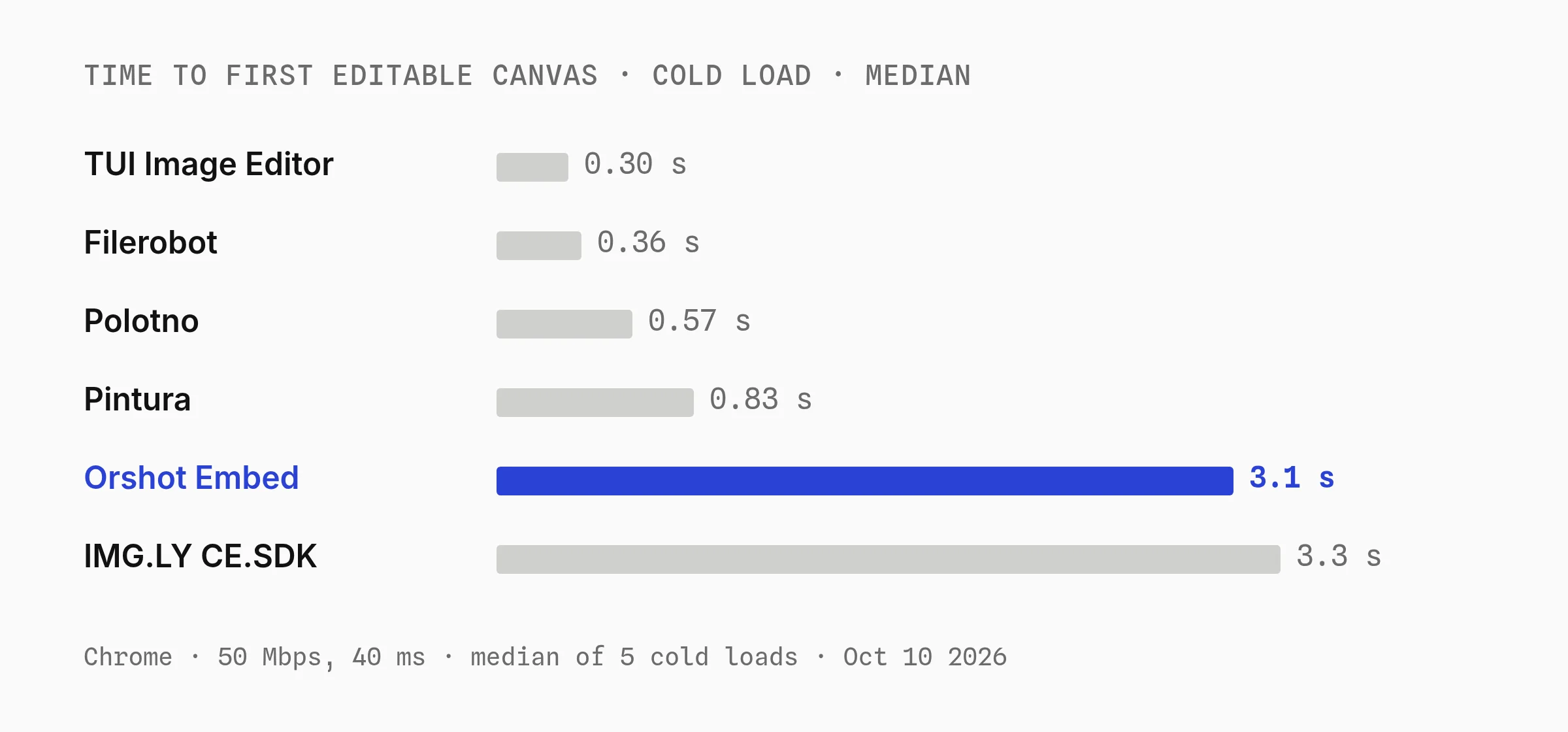
How heavy is an image editor SDK? In my test, the self-hosted ones added 195 KB to 914 KB of gzipped JavaScript to a blank React app, and opened a canvas in 0.3 to 3.3 seconds.
Image Editor SDKs at a Glance
An image editor SDK is a ready-made editing UI you drop into your own web app, so users edit images without leaving it. These are the options I tested on October 10, 2026, grouped by the job they do.
| Goal | SDK | Open source? | Price shape |
|---|---|---|---|
| Photo edits | Filerobot | Yes, MIT | Free |
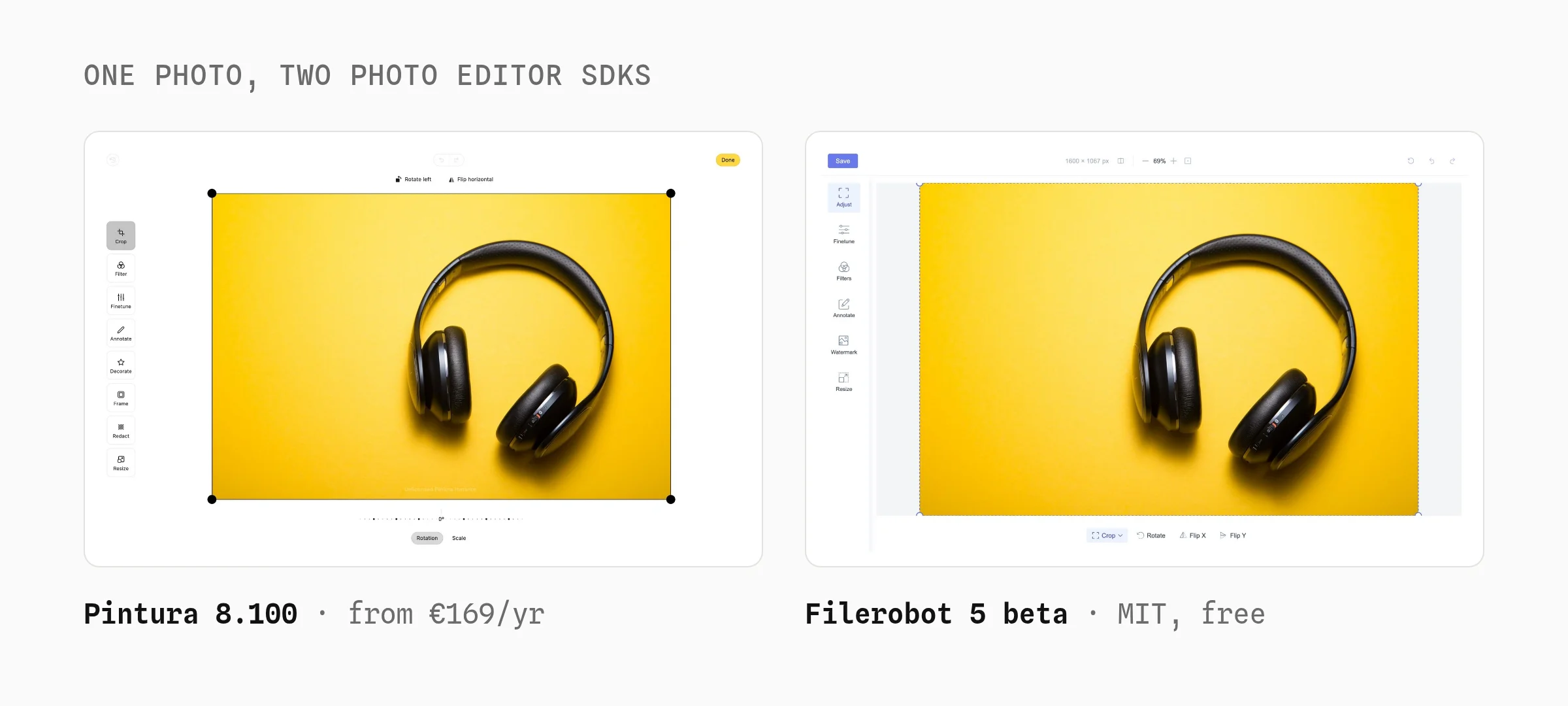
| Photo edits | Pintura | No | From €169/yr |
| Photo edits | IMG.LY Photo Editor SDK | No | Sales quote |
| Design editor | Polotno | No | Sales quote |
| Design editor | IMG.LY CE.SDK | No | Sales quote |
| Design + render API | Orshot Embed | Wrapper only | From $39/mo |
If you would rather build the editor yourself on a canvas library, my Konva vs Fabric.js comparison shows how much of the editor each one leaves to you. For the fill and gradient controls, Colorshot is the open source React color picker we built for Orshot Studio.
1. Add Photo Editing to Your App with Pintura or Filerobot
A photo editor SDK handles one image at a time: crop, rotate, filters, finetune, annotations and resize, usually right before an upload.
Pick this if your users upload photos (avatars, listings, product shots) and need to fix them, not design a layout.
Step 1: Try Filerobot for free
Filerobot Image Editor by Scaleflex is MIT licensed, with 1,920 GitHub stars and a React package that gets about 73,000 npm downloads a week.
npm install react-filerobot-image-editor react-konva styled-componentsimport FilerobotImageEditor, { TABS, TOOLS } from "react-filerobot-image-editor";
<FilerobotImageEditor
source="/photo.jpg"
onSave={(saved) => upload(saved.imageBase64)}
tabsIds={[TABS.ADJUST, TABS.FILTERS, TABS.ANNOTATE, TABS.RESIZE]}
defaultTabId={TABS.ADJUST}
defaultToolId={TOOLS.CROP}
/>The v5 line is still published as a beta (5.0.0-beta.159, June 2026) and needs React 19. It added 331 KB of gzipped JS in my test, the most of the three photo editors.
Step 2: Pay for Pintura when you need a supported license
Pintura by PQINA is a paid JavaScript image editor with no dependencies. It added 218 KB in my test and works with React, Vue, Angular, Svelte or plain JS.
import { appendDefaultEditor } from "@pqina/pintura";
import "@pqina/pintura/pintura.css";

const editor = appendDefaultEditor("#editor", { src: "/photo.jpg" });
editor.on("process", ({ dest }) => upload(dest));
Pricing: Pintura costs €169 a year for one product or €749 per developer seat a year, with a 60-day refund, per its pricing page checked October 10, 2026.
The npm package is a test build that stamps "Unlicensed Pintura instance" on the image until you add a license.
Step 3: Get native mobile with IMG.LY's Photo Editor SDK
IMG.LY sells a Photo Editor SDK for web, iOS, Android, React Native and Flutter. Use it when the same editor has to ship inside native apps.
IMG.LY publishes no prices. You get a 30-day trial, then a quote based on platforms, components and AI features.
Picsart Create Editor is another hosted photo and video editor SDK, billed in usage credits (5 free on signup). It needs a Picsart account, so I didn't benchmark it.
Things That Bit Me
- TUI Image Editor is frozen. Toast UI's GitHub repo is archived and its last npm release was April 2022. It still loads fastest (0.30 s), but nobody fixes bugs.
- ente's photo-editor-sdk isn't on npm. The MIT React editor from ente has 15 GitHub stars, and its README's package name returns a 404 on npm.
- Pintura's OEM clause. If your customers build products with the editor, Pintura's pricing page says you likely need a custom OEM license.
- Small next to design editors: 195 to 331 KB gzipped in my test
- Opens an editable photo in under a second
- A free MIT option (Filerobot) exists
- One image at a time: no pages, templates or layouts
- You still build storage, users and permissions
- Paid options charge per product or seat, plus OEM terms for platforms
Best for: Pintura and Filerobot fit apps where users fix one uploaded photo. Choose Filerobot to stay free and Pintura for a paid license with vendor support.
2. Embed a Design Editor with Polotno, CE.SDK or Orshot Embed
A design editor SDK gives users a Canva-style canvas: layers, text, shapes, pages and saved templates. It is heavier than a photo editor SDK because it ships a layout engine.
Pick this if your users build social posts, ads, flyers or print files from your templates.
Polotno for a Self-Hosted React Editor
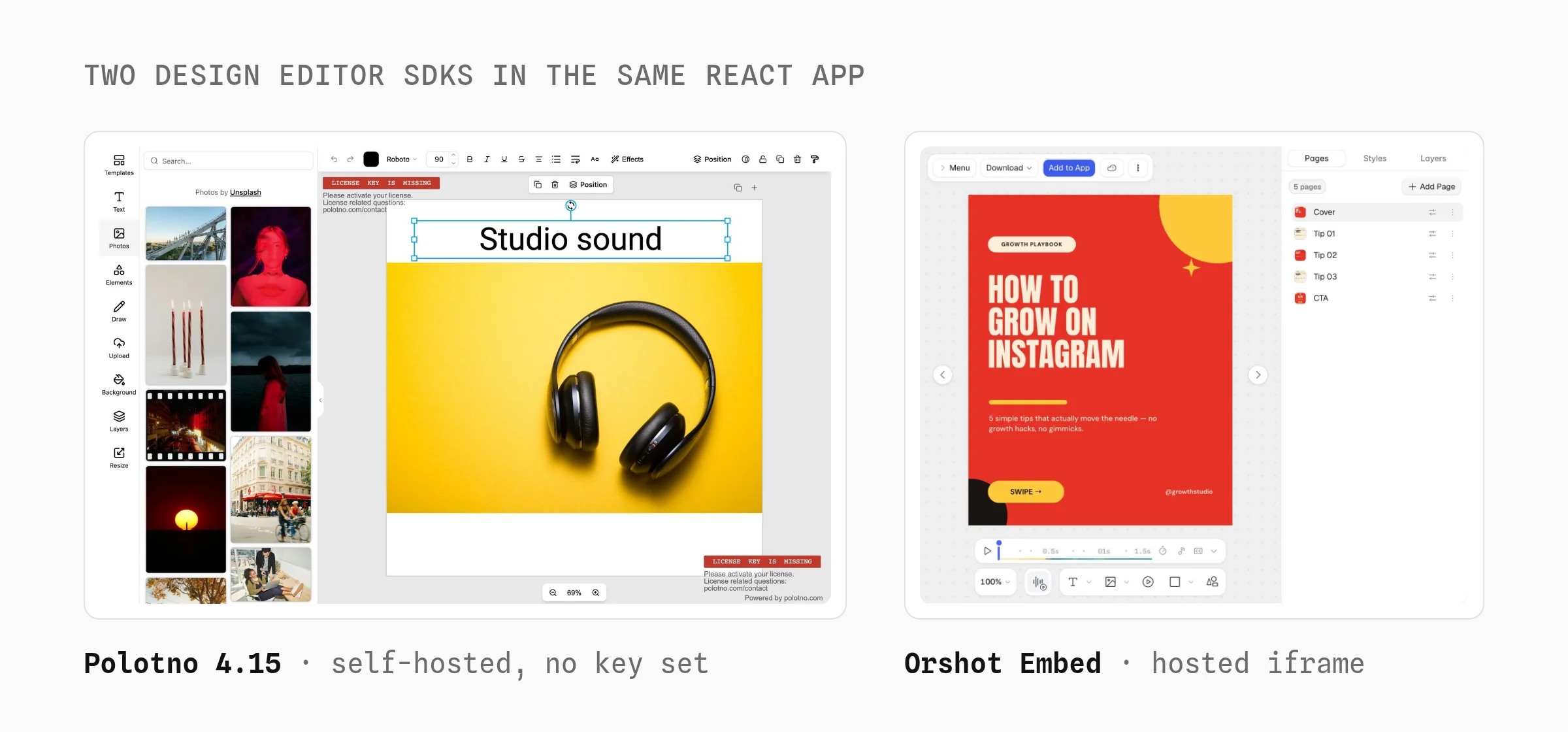
Polotno is a React design editor SDK built on Konva. It runs entirely in your app and exports PNG, JPEG, PDF, SVG, PPTX, MP4 and GIF in the browser.
npm install polotno # React 19; use polotno@react18 on React 18Polotno added 914 KB of gzipped JS in my test, the largest bundle here. Without a key it shows a "License key is missing" badge on the canvas.
Pricing: Polotno now quotes one license per use case, from "low hundreds" to "20-30k+" for enterprise, per its pricing page on October 10, 2026. My Polotno Studio alternative post covers the build work around it, and the Polotno migration guide shows how existing designs move over.
IMG.LY CE.SDK for Web and Native Apps
IMG.LY CE.SDK (CreativeEditor SDK) is the design editor IMG.LY ships for web, iOS, Android and a Node renderer. Use it when the same design editor has to run in web and native apps.
npm install @cesdk/cesdk-jsCE.SDK added 764 KB to the bundle, then fetched 8.2 MB of WebAssembly and assets from IMG.LY's CDN on first load. IMG.LY recommends hosting those files yourself in production.
Pricing: CE.SDK has no public price. IMG.LY's pricing page offers a 30-day trial and a sales quote; without a license, CE.SDK watermarks exports. The img.ly alternative post goes deeper, and the IMG.LY migration guide covers moving scenes out.
Orshot Embed for a Hosted Editor
Orshot Embed puts the Orshot Studio editor in your app as an iframe, with optional React and Vue wrappers. The editor and its storage run on Orshot, so your bundle grows by about 1.8 KB.
Try the live editor below. It's a demo workspace, so edits aren't saved.
Press “Add to App” in the editor and this page receives the PNG, the way your app would.
The trade-off is load time. The iframe downloaded 1.4 MB of JS and took 3.1 seconds to show an editable template, slower than every self-hosted editor except CE.SDK.
- Polotno and CE.SDK run in your app, so user designs stay with you
- Both export PNG and PDF in the browser with no server
- CE.SDK also ships native iOS and Android editors
- 764 to 914 KB of JS before your own code, plus 8.2 MB of CE.SDK assets
- No public prices: both need a sales call
- You still build users, storage and server rendering
Best for: Polotno suits a React team that wants full control of a self-hosted design editor. CE.SDK suits teams that need the same editor on web and native mobile.
3. Let Users Edit Templates and Generate Images via API
Orshot Embed pairs the hosted editor with a render API, so a template your user edits can generate images, PDFs or videos on your server at volume.
Disclosure: I built Orshot.
Pick this if your users edit a design once and your backend then generates many files from it: a product card per SKU, a certificate per attendee, a listing image per property.
Step 1: Add the embed with a userId
Paste the iframe into your app. Passing a userId gives each of your users a private template library*, created on their first visit.
<iframe
  src="https://orshot.com/embeds/YOUR_EMBED_ID?userId=customer_123"
  allow="clipboard-write"
  style="width: 100%; height: 640px; border: none;"
></iframe>
On React, npm install @orshot/embed-react gives you an <OrshotEmbed embedId="…" /> component instead.
Step 2: Listen for template updates
Orshot sends a webhook* to your server when a user creates, updates or deletes a template. The template.update event carries the template id you render from next. The Embed launch post shows the settings screen.
Step 3: Render each row with the API
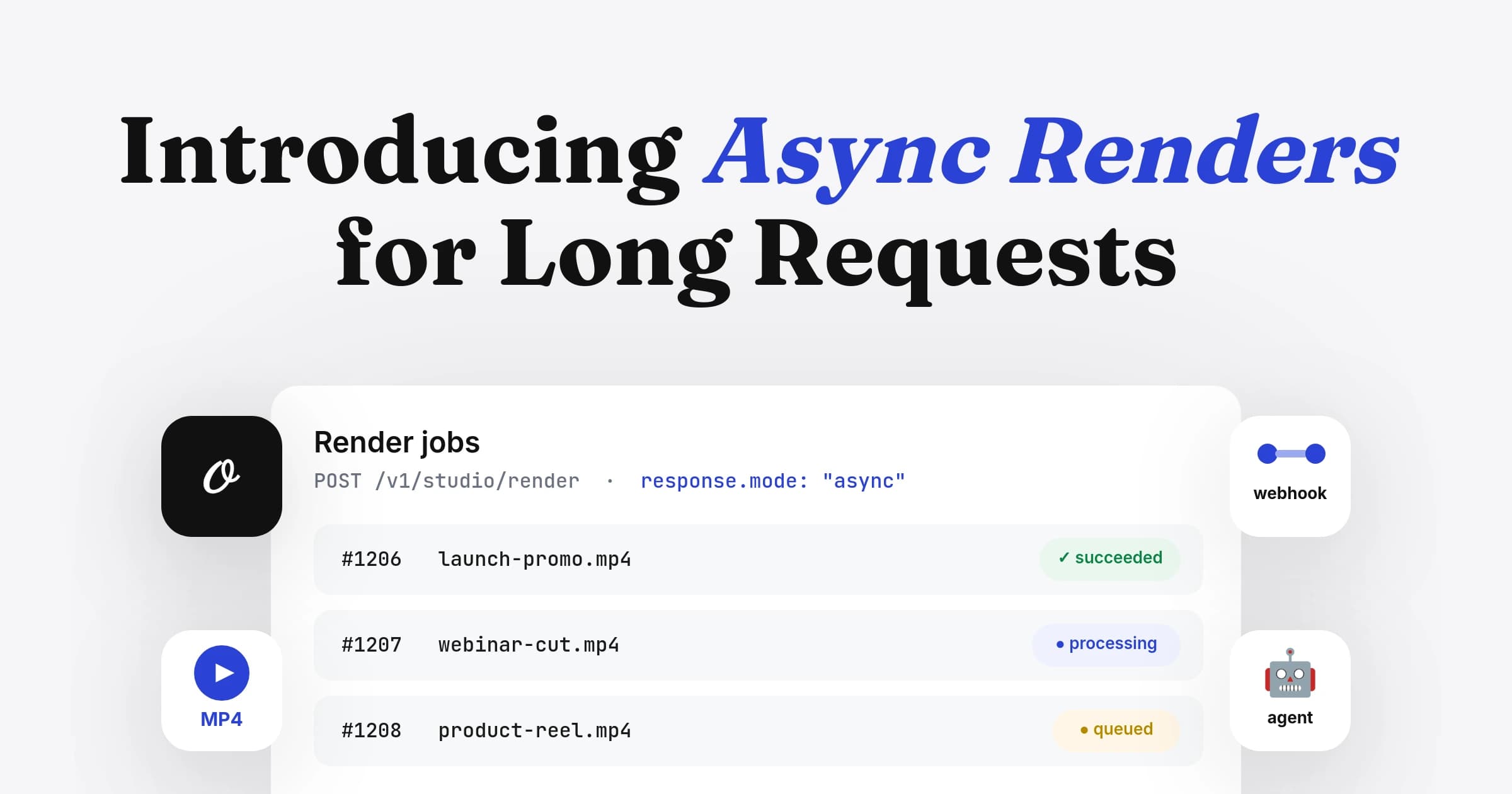
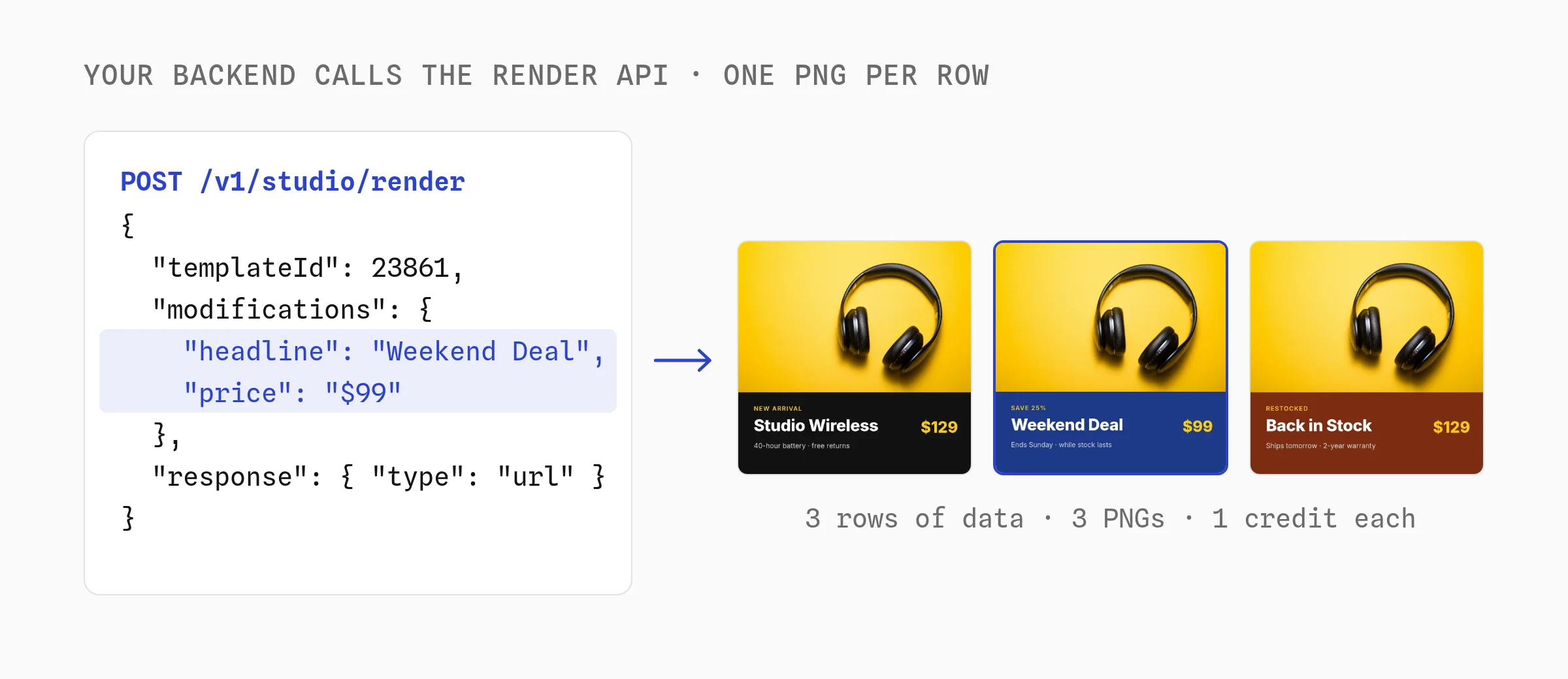
Call the render API with that template id and one row of your data. Each image costs 1 credit, and the response is a file URL.
const res = await fetch("https://api.orshot.com/v1/studio/render", {
  method: "POST",
  headers: {
    Authorization: `Bearer ${process.env.ORSHOT_API_KEY}`,
    "Content-Type": "application/json",
  },
  body: JSON.stringify({
    templateId: 23861,
    modifications: { headline: "Weekend Deal", price: "$99" },
    response: { type: "url", format: "png" },
  }),
});
const { data } = await res.json(); // data.content is the PNG URL
The same Orshot templates also render from n8n, Make, Zapier or Orshot for agents, so non-developers on your team can run the job too.
Things to Know Before You Pick Orshot
- It's an iframe, not an npm canvas. You can't fork the editor's source or run it offline. It loads from orshot.com and took 3.1 s to open in my test.
- It's template-first. Users edit designs you or they built in Orshot Studio. It is not a photo retouching tool.
- It's locked to your domains. Loaded anywhere else, the embed shows "Access denied". That's good for security, but it means you add every staging domain.
- Some features sit on higher plans. Items marked * are available on specific plans.

- About 1.8 KB added to your bundle; editor, storage and users are hosted
- The same template renders by API, n8n, Make, Zapier or an AI agent
- Per-user libraries*, webhooks* and white-label* without building a backend
- Slower first open than self-hosted editors (3.1 s in my test)
- Hosted by Orshot: there is no npm source to self-host
- Embed starts on a paid plan; the free plan has no embed
Verdict: Orshot Embed fits SaaS products where users edit a template once and the backend generates files from it at volume. For one-off photo fixes, a photo editor SDK is lighter and faster.
How Much Does Each Image Editor SDK Add to Your App?
The self-hosted image editor SDKs added between 195 KB and 914 KB of gzipped JavaScript to a blank React 19 app built with Vite 6.3. Orshot Embed added 1.8 KB because its editor lives in an iframe.
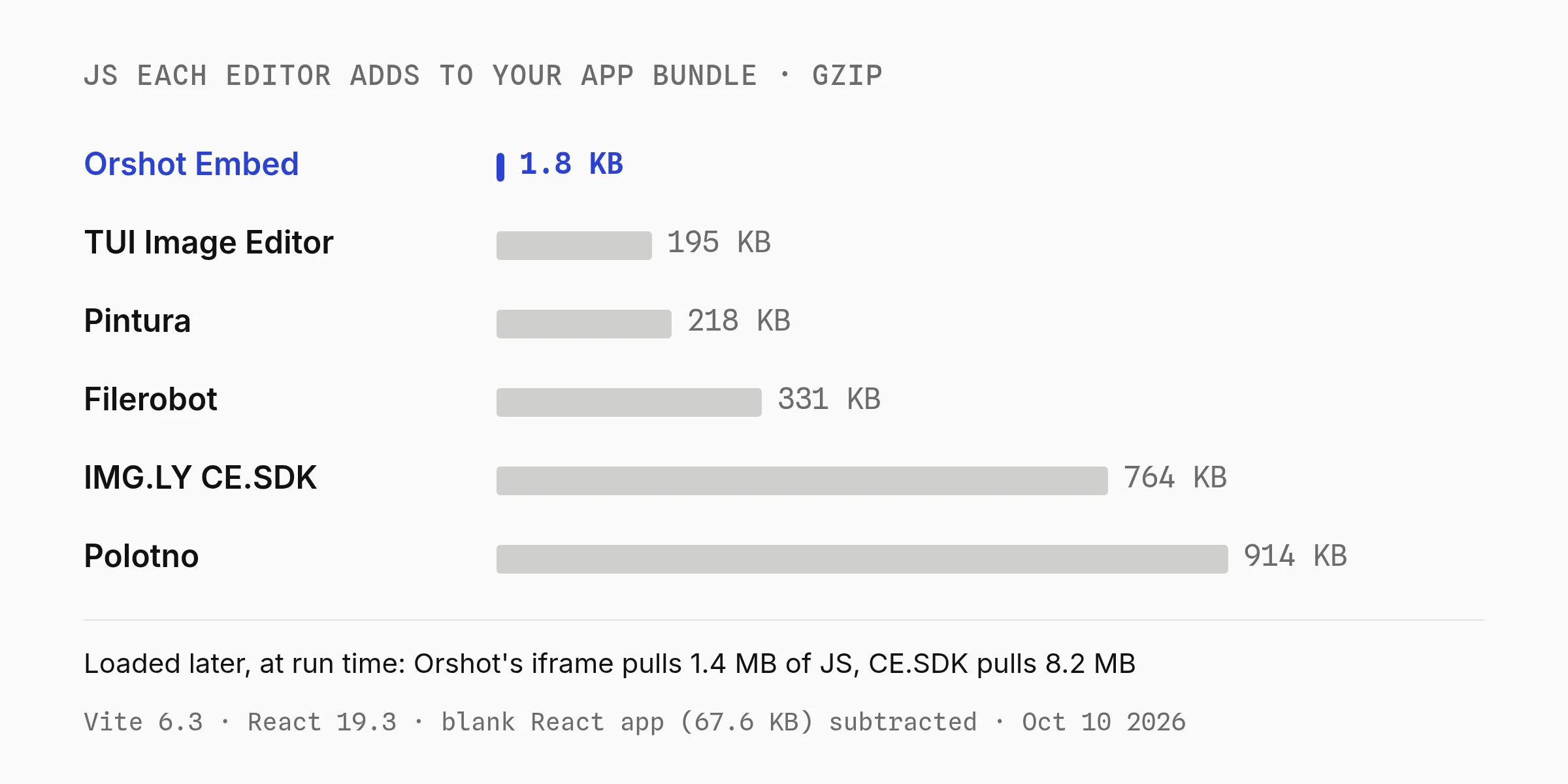
Bundle size is only half of it. What users feel is the wait before they can edit, so I timed that too.
How I ran the test
- Setup: one Vite 6.3 build per editor, React 19.3, the same 1600×1067 photo, the setup code from each README, and no license keys.
- Bundle: gzipped JS in the production build, minus a blank React app (67.6 KB).
- Time: headless Chrome on an Apple Silicon Mac, throttled to 50 Mbps and 40 ms, from navigation to the first editable canvas. I took the median of 5 cold loads.
- Caveat: CE.SDK assets and the Orshot iframe came over the real internet; the rest came from a local server. Their times include real network latency.
Image Editor SDKs Side by Side
These tables use public data only: each vendor's pricing page and npm, checked on October 10, 2026.
| SDK | License | Price | White-label |
|---|---|---|---|
| Filerobot | MIT | Free | Yes |
| TUI Image Editor | MIT, archived | Free | Yes |
| Pintura | Paid | €169/yr | OEM license |
| Polotno | Paid | Quote | Yes |
| IMG.LY CE.SDK | Paid | Quote | Yes |
| Orshot Embed | Hosted | From $39/mo | Yes* |
| SDK | Frameworks | JS (gzip) | Runs on |
|---|---|---|---|
| Filerobot | React, JS | 331 KB | Your app |
| TUI Image Editor | JS | 195 KB | Your app |
| Pintura | Any JS | 218 KB | Your app |
| Polotno | React | 914 KB | Your app |
| IMG.LY CE.SDK | Web, mobile | 764 KB | Your app |
| Orshot Embed | Any, iframe | 1.8 KB | Orshot |
CE.SDK also fetches 8.2 MB of assets at run time, and the Orshot iframe loads 1.4 MB of JS. Pintura says platforms whose customers build with it likely need an OEM license.
Is There a Free Image Editor SDK?
Yes. Filerobot Image Editor and TUI Image Editor are free and MIT licensed, though TUI's repo is archived. Both cover crop, filters and annotations. No free option includes a template design editor with users and storage.
Pintura, Polotno and CE.SDK let you try them free: Pintura and Polotno with a watermark or badge, CE.SDK with a 30-day trial key or watermarked exports. Orshot's free plan includes 100 render credits a month but no embed.
How I Picked and Tested These SDKs
I started from the Google top 10 for "image editor sdk" on October 10, 2026: IMG.LY, Pintura, Picsart, ente on GitHub, npm and Polotno. Every result was a vendor page, with no neutral comparison.
I installed each public npm package into the same scratch app, without keys or sign-ups. I opened every pricing page the same day and dropped any price I couldn't confirm. Picsart needs an account, so it isn't in the test.
Image Editor SDK FAQ
What is the best image editor SDK?
Is there a free JavaScript image editor?
How much does Pintura cost?
How much does IMG.LY cost?
What is a good img.ly alternative?
Is there a React image editor?
Can I white-label an image editor SDK?
Does Polotno include a UI?
What is Orshot?
Ship an Image Editor in Your App This Week
Start with the job. Add Filerobot or Pintura for photo edits, Polotno or CE.SDK for a self-hosted design editor, or Orshot Embed when your backend has to generate files from what users design.
Sign up to try the Orshot render API with 100 free credits a month; Embed starts on paid plans. If you get stuck, hit the chat button. I'm usually the one on the other end.