Contentdrips has built something cool - an AI-powered content creation tool focused on LinkedIn and social media. The carousel generators, AI post writers and scheduling features are genuinely useful for personal branding.
Where it runs out is scope. Contentdrips posts to two platforms, LinkedIn and Instagram, and its API returns PNG and PDF — so no Reels, no TikToks, no audio, no subtitles. If your content plan is wider than carousels on two networks, you end up bolting a scheduler and a video tool onto the side.
I built Orshot to do the whole loop: design the template once, then render carousels, video or stills from your own data and post them to 15+ platforms — from the editor or the API, on a schedule, without a second subscription.
Install the Orshot agent skill in Claude Code, Cursor, or Windsurf to automatically translate your Contentdrips API calls to Orshot. The skill knows both APIs and handles the mapping for you.
npx skills add orshot-hq/orshot-agent-skillsThis is Orshot Studio, live. It's a four-page animated carousel template — click through the pages, change the text, and see what the API would render:
What's Different
If you're looking at Contentdrips' API, here's how Orshot compares:
| Feature | Orshot | Contentdrips |
|---|---|---|
| Social publishing | 15+ platforms, instant/scheduled/draft | LinkedIn and Instagram |
| Carousels | Native LinkedIn PDF and Instagram multi-slide | Yes — their core product |
| Video | Full timeline, audio tracks, auto-subtitles — MP4/WebM/GIF | None — PNG and PDF only |
| Scheduling | Built in, plus drafts for approval | Built in |
| Template editor | Orshot Studio — any dimension, any use case | Social media sizes only |
| Template import | Canva, Figma, or AI from a screenshot | Social templates only |
| Brand assets | Logos, colours and custom fonts across every template | Brand profiles (1 on free, 3 on Starter) |
| Core focus | API-first image/video generation | Social media tool, API came later |
| Free tier | 100 credits a month, resets monthly | 10 API calls, one-time |
| Entry plan | $39/mo — 1,500 credits (~25 video mins) | $39/mo — 1,000 API calls (Basic) |
| Mid plan | $99/mo — 5,000 credits (~83 video mins) | $149/mo — 6,000 API calls (Advanced) |
| Pricing ladder | $39 → $99 → $160 → $280 → $349 → $480 → $600 | $39 → $149 → $359 (unlimited) |
| Webhooks | Every plan | Advanced ($149) and above |
| Commercial use | Every plan, including free | Listed as a Pro ($359) feature |
| Native workflows | Trigger, render and publish on a schedule | Make, Zapier or n8n |
| Embed editor in your app | White-label Studio Embed | Embed SDK in their docs |
| MCP server | Yes | Yes — 24 tools, basic access on the free plan |
| SDKs | Node, Python, PHP, Ruby | None |
| Own storage | AWS S3, Cloudflare R2, Google Drive, Dropbox | Not documented |
See the full integrations list →
Post to 15+ Platforms, Not Two
Contentdrips schedules to LinkedIn and Instagram. That's the list, and it's the half of the job they do well.
Orshot renders and posts — Instagram, LinkedIn, X, TikTok, Facebook, Pinterest, YouTube, Threads, WhatsApp, Discord and more — and it isn't API-only. Pick the accounts, write the caption, choose Now, Schedule or Draft, and publish straight out of Studio:
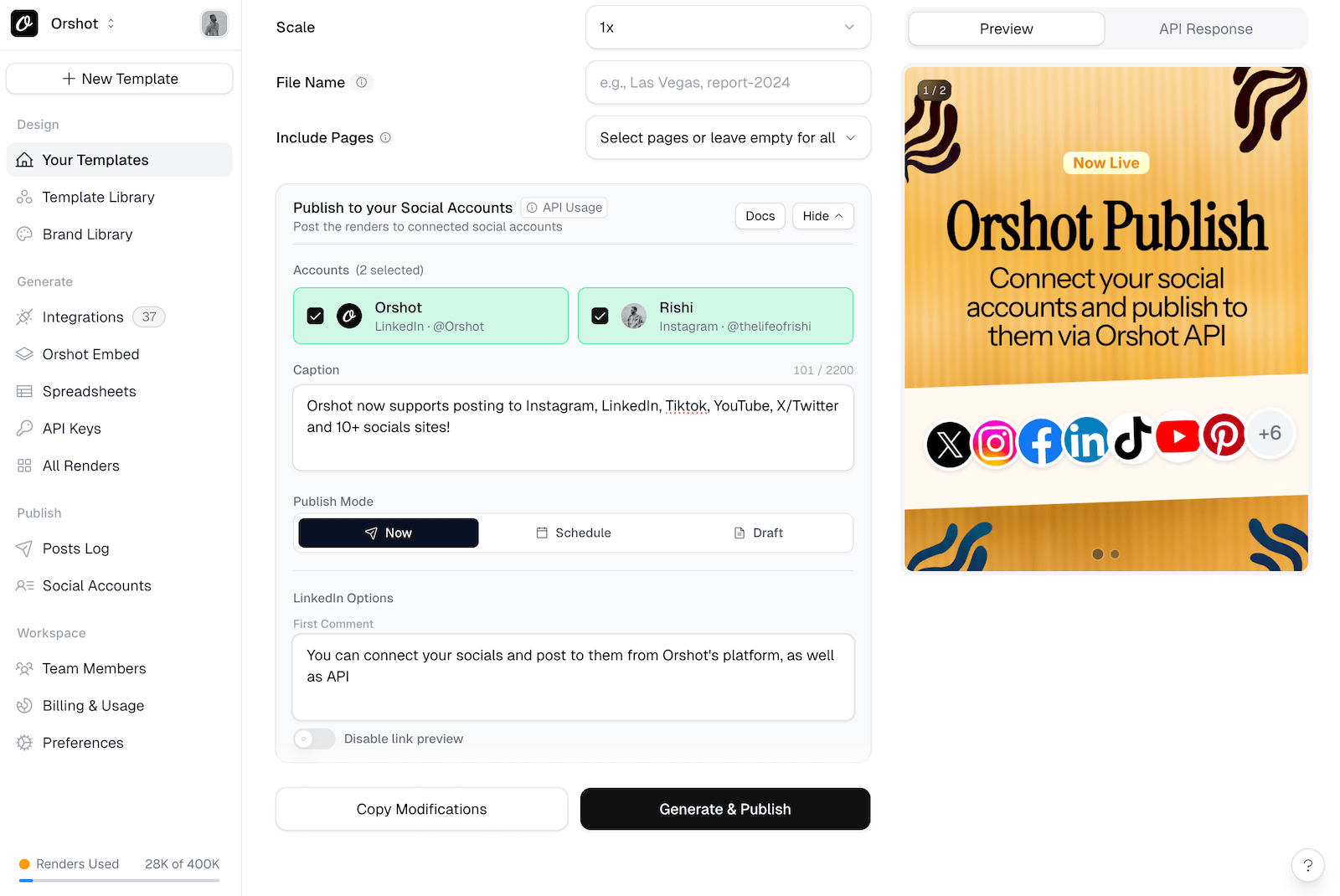
The per-platform details come with it — LinkedIn first comment, drafts for someone to approve, per-account platform settings, scheduled posting — so there's no separate scheduler subscription sitting between the design and the post.
Carousels, Video and Audio From One Template
Contentdrips' API outputs PNG and PDF. That's the whole list. If the brief is a Reel, a TikTok or an animated LinkedIn post, there's nothing to call.
One Orshot template covers all of it:
- Carousels — a multi-page design posts as a native LinkedIn PDF carousel or an Instagram multi-slide, from one call
- Video — MP4, WebM or GIF straight to Reels, TikTok or YouTube, with a real timeline and per-layer animation
- Audio — page-level audio tracks, trimmed, muted or looped from the API
- Subtitles — auto-generated and burned into the render, not a separate captioning step
- Any size — not locked to social presets, so the same design becomes a story, a square and a thumbnail
Brand assets — logos, colours, custom fonts — are saved once and reused across every template, so the output stays on-brand whoever triggers it.
Use case: a sheet of quotes becomes a new quote video posted to TikTok every day, on a schedule, with nobody opening an editor.
Automate the Whole Loop, Not Just the Render
Contentdrips will render the carousel and it will schedule to LinkedIn and Instagram. The gap is the middle: pulling this week's copy out of wherever you write it, and getting the finished slides anywhere else. That part is Make, Zapier or n8n — a second subscription, a second thing to break, and a task bill that grows with your posting cadence.
Orshot Workflows put that inside the product:
- Trigger from Google Sheets, Airtable, Notion, Google Forms, HubSpot, Shopify, Drive or a plain webhook
- Render one template or a whole batch
- Publish straight to Instagram, LinkedIn, X, TikTok, Facebook, Pinterest, YouTube, Threads and more
- Repeat on a schedule, without you
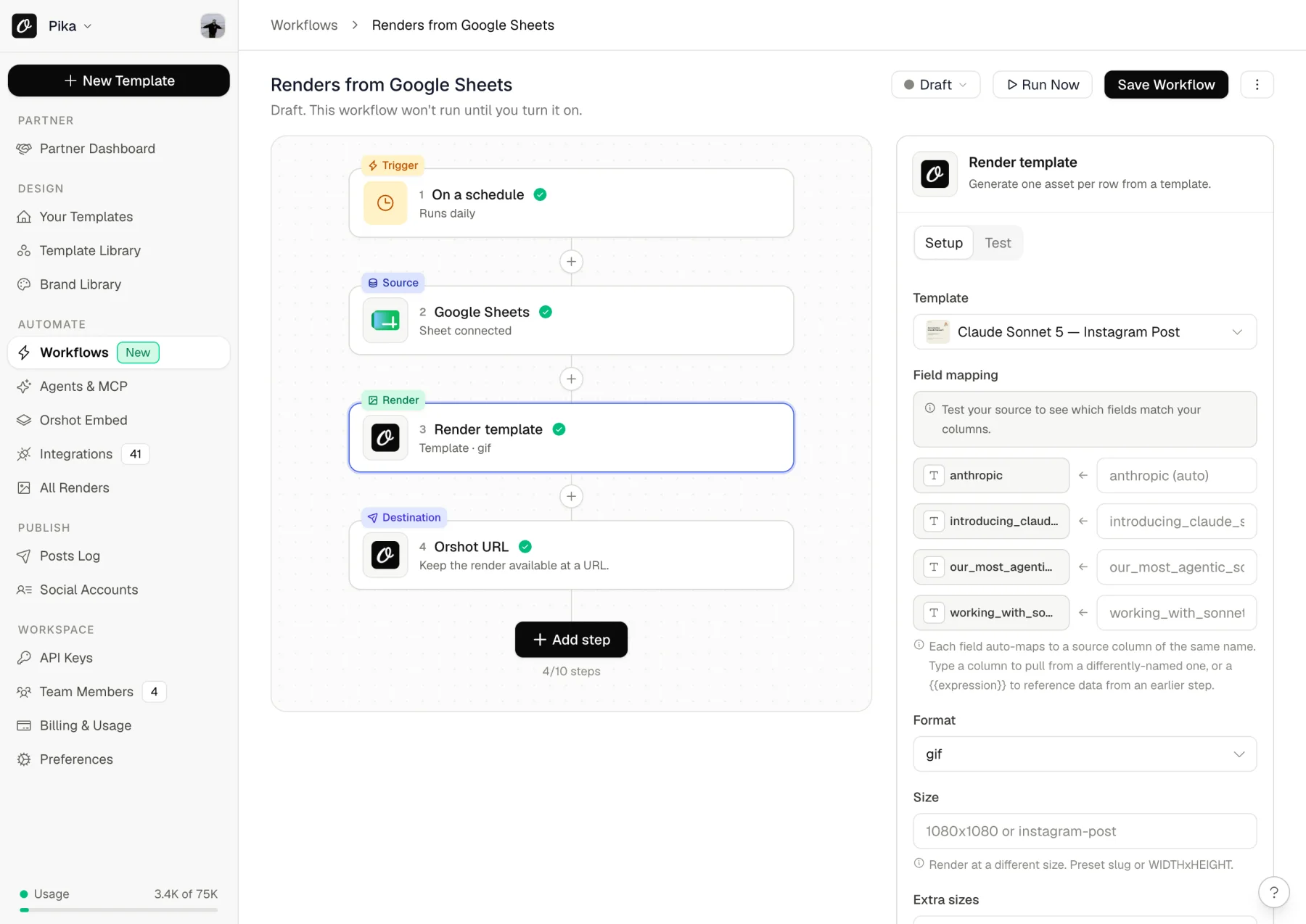
Once the render exists, Orshot Publish posts it to 15+ platforms — immediately, on a schedule, or as a draft for someone to approve. So the full chain (trigger → copy → design → post) lives in one place with one bill. Contentdrips covers the scheduling half for LinkedIn and Instagram, but the render and the orchestration stay in separate tools.
Social Workflows You Can Copy
Here's the one that maps most directly onto what Contentdrips is used for — LinkedIn carousels. Write the slides as spreadsheet columns, and Orshot renders a native LinkedIn PDF carousel and posts it on schedule. Copy it into your workspace and turn it on:
Same idea for Instagram, where each row becomes a multi-slide post:
The rest, all working presets rather than concepts:
- LinkedIn carousels from Notion — add a page to your content calendar, get a carousel posted and the post link written back onto the page
- LinkedIn carousels from Airtable — same idea, driven from a base
- One row, a post on every channel — render a branded image per row and push it to Instagram, LinkedIn and X
- Quote videos to TikTok — a sheet of quotes becomes a daily short video
- Pinterest pins from a spreadsheet — branded pins on a schedule, instead of an afternoon in Canva
- Tweets into visuals — turn a post into a shareable graphic

The Real Problems with Contentdrips API
Based on what teams switching from it tell us:
1. It's a Social Media Tool First
Contentdrips built their API on top of a LinkedIn content creation tool. The templates are optimized for carousels and social posts. If you need OG images, product mockups, certificates, or anything that isn't social media content, you're bending the tool.
Orshot is API-first. Every feature is built around programmatic image generation, not tacked on to a social media scheduler.
2. Awkward Pricing Tiers
Their API has four tiers:
- Free: 10 API calls, one-time
- Basic ($39/month): 1,000 calls
- Advanced ($149/month): 6,000 calls
- Pro ($359/month): unlimited
The gaps are the problem. Basic to Advanced is a 282% price rise for 6x the calls. Advanced to Pro is another 141%. Need 8,000 images a month? You're on the $359 plan, paying the same as someone rendering half a million.
Orshot moves in smaller steps: $39 for 1,500 credits, $99 for 5,000, $160 for 20,000, $280 for 40,000, $349 for 75,000, $480 for 150,000, $600 for 300,000.
3. Fewer Places to Plug It In
Credit where it's due: Contentdrips ships native Make, Zapier and n8n nodes, and they launched an MCP server that works with Claude and Cursor, with basic access on their free plan. That's a real integration story and I'm not going to pretend otherwise.
What they don't have is a dedicated integrations page (contentdrips.com/integrations returns a 404), SDKs in any language, spreadsheet import, design-tool import, or storage you control.
Orshot has 15+ purpose-built integrations, and the ones that matter for social are first-party: native workflows with a publish step, Google Sheets, Airtable and Notion as triggers, plus n8n, Make, Zapier and Pipedream if you would rather orchestrate elsewhere.
I am glad to quit Canva, they make it difficult to use API.
I really want to use Orshot in my content production app. Orshot is perfect product to fit my needs.
 Francesca OlingaFounder, Experience Care
Contentdrips API Pricing in 2026 (and How Orshot Compares)
Contentdrips runs four API tiers, all billed monthly — there's no annual option on the API. Here's each one against the closest Orshot plan. Prices checked against contentdrips.com/api in July 2026:
| Contentdrips plan | Contentdrips | Closest Orshot plan | Orshot | Orshot video |
|---|---|---|---|---|
| Free · 10 API calls, one-time | $0 | Free · 100 credits/mo | $0 | ~100 secs |
| Basic · 1,000 calls/mo | $39 | Launch · 1,500 credits | $39 | ~25 mins |
| Advanced · 6,000 calls/mo | $149 | Launch · 5,000 credits | $99 | ~83 mins |
| Pro · unlimited calls | $359 | Grow · 20,000 credits | $160 | ~333 mins |
| Pro · unlimited calls | $359 | Scale · 75,000 credits | $349 | ~1,250 mins |
On Orshot 1 credit is 1 image, 1 PDF page or 1 second of video, so the video column is just the credit allowance in minutes. Contentdrips' API returns PNG and PDF only, so there's no video figure to compare.
Two things their pricing page gates that ours doesn't: webhooks start on the $149 Advanced plan, and "commercial use rights" is listed as a $359 Pro feature. Both are on every Orshot plan, including the free one. Worth checking against your own use before you pick a tier.
And be honest about where they win: Pro is unlimited. Past roughly 75,000 renders a month their $359 is the smaller number, and no amount of table formatting changes that. Below that, the middle of the range is where the gap lives — at 6,000 renders their $149 against $135 on Orshot ($99 Launch plus 1,000 overage credits at $36), and at 20,000 you're comparing $359 to $160.
Their app plans are separate from the API and default to yearly billing on their pricing page: Starter shows $15/mo and Teams $29/mo on the yearly toggle, but month-to-month they're $19 and $35.
When Contentdrips Makes Sense
I'll be fair - if your use case is specifically LinkedIn carousels and you also want the AI post writing and personal branding features, Contentdrips is purpose-built for that.
But if you're here because you need a dedicated image generation API with social posting built in, Orshot covers both — render an image and post it to 15+ platforms in the same API call, no separate scheduler needed.
Switching from Contentdrips
Here's how to migrate:
Step 1: Recreate Your Templates (15-30 min)
Use the visual editor - Open Orshot Studio and recreate your designs. If you have carousel templates, use our multi-page feature.
Use AI - Screenshot your Contentdrips output, drop it into the AI Template Generator. It'll recreate the layout, you fine-tune.
Import from design tools - If you have source files in Canva or Figma:
Try it now — paste a public Canva share link and see it as an Orshot template:
In Canva: Share → “Public View Link” → copy the link.
You can create multi-page templates, share them through public links or embeds with different view modes — the editor at the top of this page is one — and invite your team to collaborate on design and template integration.
Step 2: Update Your API Calls (10 min)
Here's what changes:
Contentdrips API Call:
const response = await fetch(
  "https://generate.contentdrips.com/render?tool=carousel-maker",
  {
    method: "POST",
    headers: {
      "Content-Type": "application/json",
      Authorization: "Bearer YOUR_API_KEY",
    },
    body: JSON.stringify({
      template_id: "your_template_id",
      output: "png",
      branding: {
        name: "Jane Doe",
        handle: "@janedoe",
      },
      carousel: {
        intro_slide: { heading: "Start Here" },
        slides: [{ heading: "Tip 1", description: "Details" }],
      },
    }),
  },
);
Orshot API Call:
const response = await fetch("https://api.orshot.com/v1/studio/render", {
  method: "POST",
  headers: {
    Authorization: "Bearer YOUR_ORSHOT_API_KEY",
    "Content-Type": "application/json",
  },
  body: JSON.stringify({
    templateId: "orshot_template_id",
    modifications: {
      name: "Jane Doe",
      handle: "@janedoe",
      heading: "Start Here",
      // Dynamic parameters - override any style property
      // Docs: https://orshot.com/docs/dynamic-parameters
      "heading.fontFamily": "Space Mono",
      "name.color": "#FF5733",
    },
    response: {
      type: "url", // url, base64, binary
      format: "png", // png, jpg, webp, avif, pdf, mp4, webm, gif
    },
  }),
});
Main differences:
- Simpler modification structure (flat object)
- Element names you define in the template
- Explicit response format specification
- Multi-page templates handled natively
Helpful docs:
- API Reference - Complete API documentation
- Render from Template - Main endpoint you'll use
- SDKs - Node, Python, Ruby, PHP libraries
- Setting Parameters - How to make templates dynamic
Step 3: Test It (5 min)
Render one carousel through the API and put it next to your Contentdrips output. Then send the same render to a connected social account as a draft — that's the step Contentdrips' API can't do, and it's the fastest way to see whether the render-then-post loop really collapses into one tool for you.
Need Help?
There's a chat button on the bottom right, and it's me or someone on the team behind it. Send over your Contentdrips carousel and branding kit — we'll rebuild them as a multi-page Studio template you can render from a single call.
Common Questions
Can Orshot post to social media, or only generate the image?
Can I post carousels to LinkedIn and Instagram?
Can I build my own app on top of Orshot?
Does Orshot support multi-page carousels?
Can I generate videos using Orshot?
Does Orshot integrate with n8n?
Is Orshot good for bulk generation?
Can I generate multi-page PDFs with Orshot?
Is there an agency partner program?
Examples and Tutorials
Carousel Templates
How to create multi-page templates and automate them:
Import from Canva
Clone your existing Canva designs and turn them into API endpoints:
Import from Figma
Use the Figma plugin to import your designs directly:
Bottom Line
Contentdrips is good at LinkedIn content creation, and the AI post writing is genuinely useful if that is the job. But if you post to more than two platforms, need video, or want the render and the post to happen in one place, that is what Orshot is built for.
If you're also comparing other image generation APIs like Bannerbear, Placid, or Abyssale: Bannerbear is the closest to Contentdrips' API model but has no publishing side; Placid is the cheapest for plain sub-4000px images and nothing else. Each of those pages walks the same verified pricing you saw above.
Test everything free with 100 credits a month.
For Agencies
Building social image and video automation for multiple clients? Check out the Agency Partner Program — free to join, unlimited sandbox workspaces, pooled credits up to 100k/month, and client handoff tools.
Weighing up the AI-generator route instead? Predis.ai writes and designs the whole post from a prompt — faster to start, but you don't get to keep the layout.
Try It
- Sign up - 100 free credits every month, no card needed
- Recreate one of your templates (or use AI)
- Test with your actual data
- See if it works for you
If you get stuck, hit the chat button. I'll help you out.