Automate Image Generation from Your Templates
Design a template once, then send new text and photos by API, no-code tool or AI agent to get a finished social post, OG image or ad.
100 free credits every month · no credit card · 1 credit per image
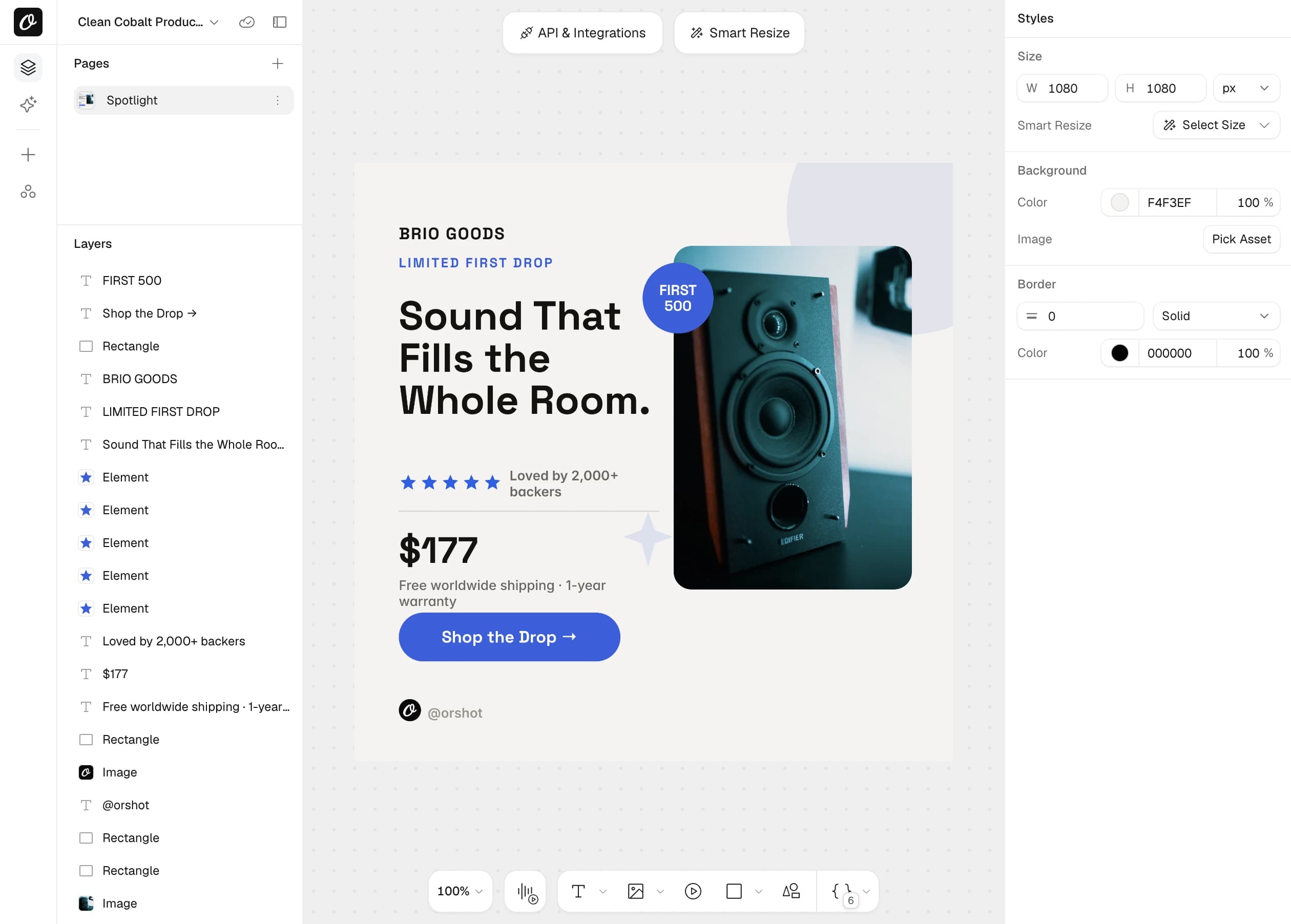
Live in an afternoon
Design or import a template, copy the request, ship it.
REST API and four SDKs
Call it over REST or use the Node, Python, Ruby and PHP SDKs.
Every size from one design
Smart Resize adapts the layout to any canvas.
AI text and images, optional
Generate the copy or the picture inside the same request.
One API call for an image or a carousel
Send a template ID and your values, and get back a link to the image. Works over REST, Node.js, Python, Ruby and PHP.
npm install orshotcurl -X POST https://api.orshot.com/v1/studio/render \
-H "Authorization: Bearer $ORSHOT_API_KEY" \
-H "Content-Type: application/json" \
-d '{
"templateId": 1234,
"modifications": {
"title": "Flash Sale: 50% Off Everything",
"hero_image": "https://example.com/product.jpg"
},
"response": { "type": "url", "format": "png" }
}'Node.js install: npm install orshot
import { Orshot } from 'orshot';
const orshot = new Orshot(process.env.ORSHOT_API_KEY);

const { data } = await orshot.renderFromStudioTemplate({
  templateId: 1234,
  modifications: {
    title: 'Flash Sale: 50% Off Everything',
    hero_image: 'https://example.com/product.jpg',
  },
  response: { type: 'url', format: 'png' },
});

// data.content → the rendered image URL
Python install: pip install orshot
import orshot
client = orshot.Orshot("<ORSHOT_API_KEY>")

response = client.render_from_studio_template({
  "template_id": 1234,
  "modifications": {
    "title": "Flash Sale: 50% Off Everything",
    "hero_image": "https://example.com/product.jpg",
  },
  "response": { "type": "url", "format": "png" },
})
Ruby install: gem install orshot
require 'orshot'
client = Orshot::Client.new("<ORSHOT_API_KEY>")

response = client.render_from_studio_template({
  'template_id' => 1234,
  'modifications' => {
    'title' => 'Flash Sale: 50% Off Everything',
    'hero_image' => 'https://example.com/product.jpg',
  },
  'response' => { 'type' => 'url', 'format' => 'png' },
})
PHP install: composer require rishimohan/orshot
<?php require 'vendor/autoload.php';

use Orshot\Client;
$client = new Client("<ORSHOT_API_KEY>");

$response = $client->renderFromStudioTemplate([
  'templateId' => 1234,
  'modifications' => [
    'title' => 'Flash Sale: 50% Off Everything',
    'hero_image' => 'https://example.com/product.jpg',
  ],
  'response' => [ 'type' => 'url', 'format' => 'png' ],
]);





One template can be an image, a PDF or a video
The template, the parameters and the SDKs are the same for all three. Set response.format and you get an image, a PDF or a video.
Images
This pageSocial posts, OG images, ads and carousels from one template.
- Every layer changeable per request
- AI text and AI images from a prompt
- Any size from one design with Smart Resize
PDFs
Invoices, certificates, reports and tickets, ready to print.
- Multi-page documents in one file
- Clickable links and page ranges
- Text that flows onto new pages
Videos
Reels, product clips and slideshows with sound and captions.
- Voiceover, music and captions per video
- AI footage from a prompt or a photo
- Pages become scenes with transitions
Design a template and mark what changes
Design in Orshot Studio, our visual editor, start from 2,000+ templates or import from Canva and Figma. Mark a layer as dynamic and it becomes a field you fill.
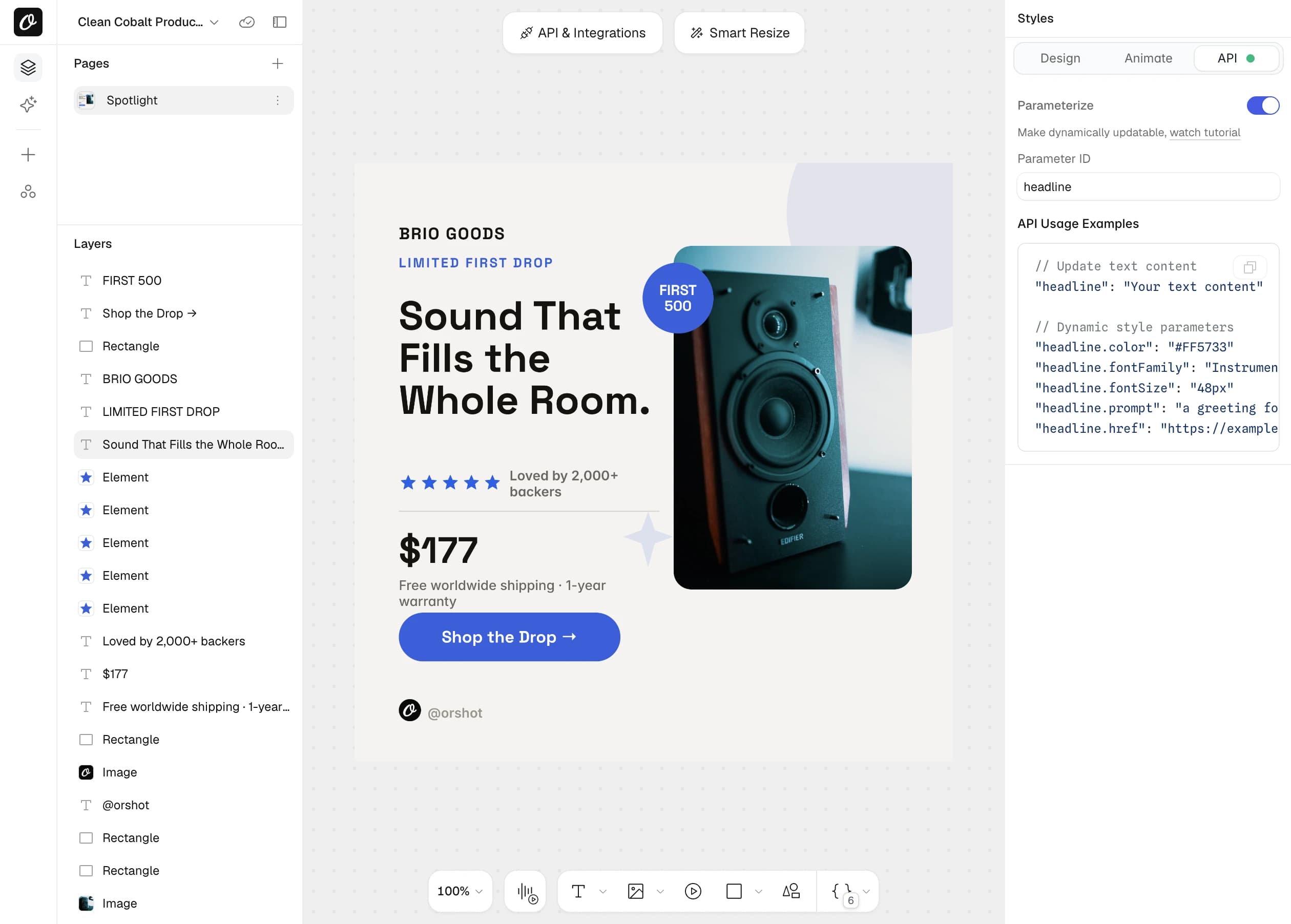
- Text, images, shapes and the canvas itself
- Your fonts, colors and logos from the brand library
- See the exact key to send, right on the layer
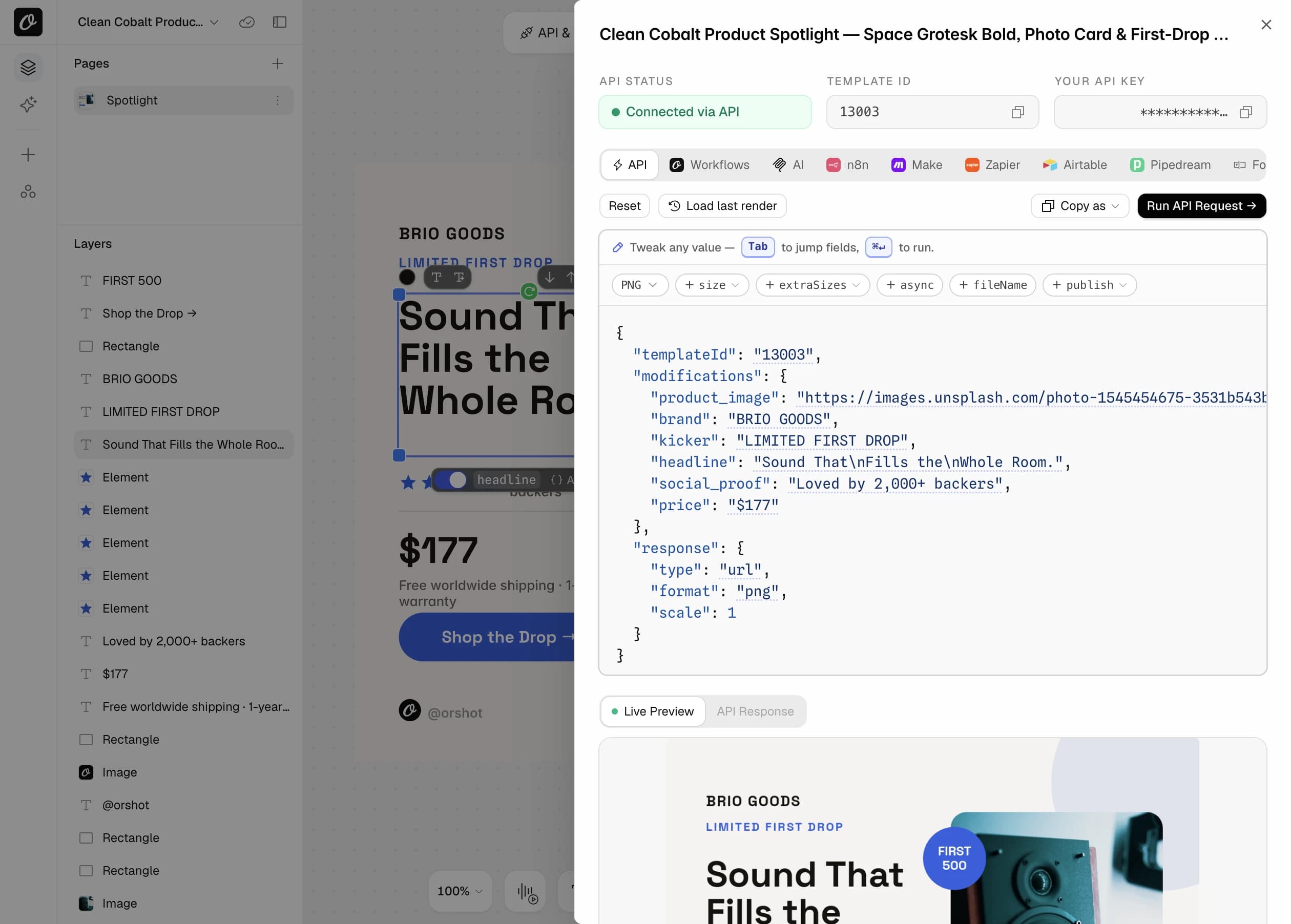
One-click copy requests, workflows for n8n, Make
Every template comes with its request filled in, with your template ID, fields and key. Change a value and watch the preview update.
- Copy as cURL or an SDK snippet
- Tabs for Workflows, n8n, Make, Zapier and agents
- Test a request before you write any code
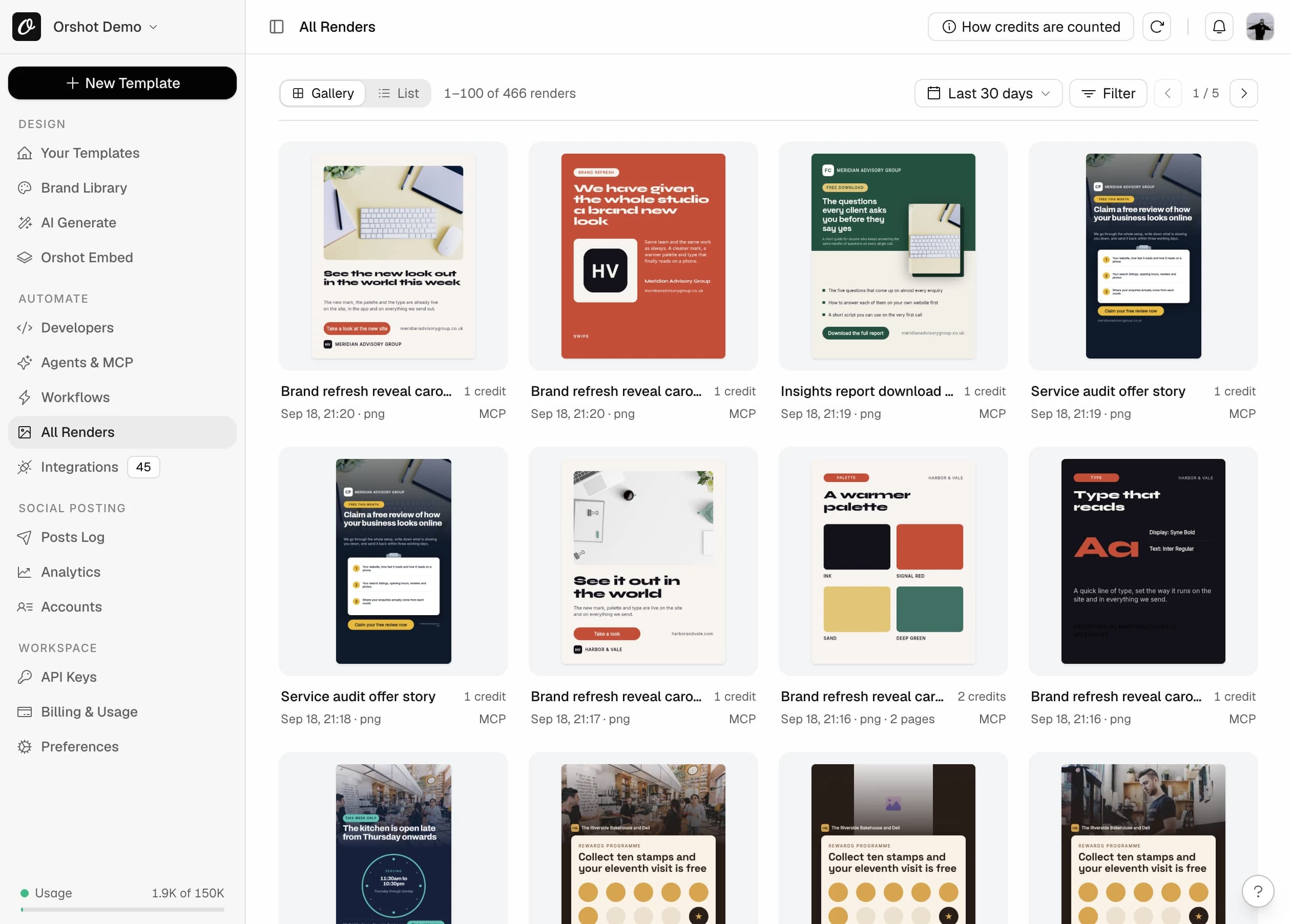
Generate images in bulk from one template
Send your rows through one template and each image is saved with a preview and the values you sent.
- Every file in a searchable log
- Signed, time-limited links
- Deliver to your own S3, R2, Dropbox or Drive
Popular image automations with the code
Each example is a complete request body for POST /v1/studio/render.
A share image for every page you publish
Send the title, the author and a cover photo. Every link to your site gets a preview that looks designed.
- 1Design a 1200×630 template once
- 2Call the API when a page is published
- 3Put the returned URL in your og:image tag
{
  "templateId": 1234,
  "modifications": {
    "title": "How we cut build times by 60%",
    "author": "Priya Shah",
    "avatar": "https://example.com/priya.jpg",
    "cover": "https://example.com/cover.jpg"
  },
  "response": { "format": "png", "type": "url" }
}Every slide from one request
A multi-page template comes back as one image per page. Prefix a value with its page, or leave the prefix off to set it on every slide.
- 1Design each slide as a page
- 2Use page1@, page2@ for slide content
- 3Read the array of image URLs in the response
{
  "templateId": 1234,
  "modifications": {
    "handle": "@acmehq",
    "page1@title": "5 pricing mistakes",
    "page2@title": "1. Charging by the hour",
    "page3@title": "2. No annual plan"
  },
  "response": {
    "format": "png",
    "type": "url",
    "includePages": [1, 2, 3]
  }
}One design, every placement
Smart Resize adapts the layout to a new canvas. No AI, so the same input always gives the same output. Ask for extra sizes in the same call.
- 1Design at one size
- 2Set size to replace it, or extraSizes to add more
- 3Get every size back in one response
{
  "templateId": 1234,
  "modifications": { "headline": "Spring sale, 30% off" },
  "response": {
    "format": "png",
    "type": "url",
    "extraSizes": {
      "story": "1080x1920",
      "square": "1080x1080",
      "og": "1200x630"
    }
  }
}AI writes the copy and makes the picture
Add .prompt to a text layer for AI copy, or to an image layer for an AI image. Send a normal value too and it is used if generation fails.
- 1Give the text and image layers an id
- 2Send a prompt for each one
- 3Add a plain value as a fallback
{
  "templateId": 1234,
  "modifications": {
    "headline": "Work from anywhere",
    "headline.prompt": "A short, punchy headline about remote work",
    "background.prompt": "a calm home office at sunrise, soft light"
  },
  "response": { "format": "webp", "type": "url" }
}An image that changes per reader
Turn on Dynamic URL for a template. Put merge tags in the query string and each person sees their own name, plan or offer. No API call.
- 1Enable Dynamic URL on the template
- 2Set a usage limit, cache time and expiry
- 3Use the link as an image in your email tool
https://api.orshot.com/v1/studio/dynamic-url/welcome.png
?templateId=1234&name={{first_name}}&plan={{plan}}&sign=...Sale banners for the whole catalog
Drop in the product photo, the price and the badge. Round the photo, fit it to the frame and change colors per category.
- 1Design one product card
- 2Loop your catalog
- 3Style layers per product when needed
{
  "templateId": 1234,
  "modifications": {
    "product_photo": "https://example.com/sneaker.png",
    "product_photo.objectFit": "contain",
    "name": "Trail Runner 2",
    "price": "$89",
    "badge": "30% OFF",
    "badge.backgroundColor": "#E11D48"
  },
  "response": { "format": "jpg", "type": "url" }
}Generated, then posted, in one request
Add a publish block and the image or carousel goes to Instagram, LinkedIn, X and more. Post now, schedule it or save a draft.
- 1Connect your social accounts in Orshot
- 2Add publish with the account ids and a caption
- 3Read each account's status from the response
{
  "templateId": 1234,
  "modifications": { "title": "New blog post is live" },
  "response": { "format": "png", "type": "url" },
  "publish": {
    "accounts": [1, 2],
    "content": "Check out our latest post"
  }
}Ask for the image in plain words
Connect Orshot to Claude, ChatGPT or Cursor. The agent can design the template in your brand, find stock photos, make the image and post it.
- 1Connect Orshot to Claude, ChatGPT, Cursor or another AI agent
- 2Describe what you need
- 3Get the image link back
Design a square launch post for our new headphones in our brand colors, generate it, and also give me story and OG sizes.
Change any layer on a single API call
The template sets the defaults. Anything below can be set for a single image.
Text, images and single words
Replace a whole layer, only the placeholder words inside it, or the canvas itself.
{id}- New text or image URL for a layer
{id}:{placeholder}- Fill a {{placeholder}} inside a sentence
{imageId}.alt- Alt text for an image layer
canvasBackgroundColor- HEX, RGBA or a CSS gradient
canvasBackgroundImage- A background image URL
{
  "modifications": {
    "headline": "Work from anywhere",
    "avatar": "https://example.com/photo.jpg",
    "avatar.alt": "Portrait of Dana Whitfield",
    "greeting:name": "Sarah",
    "canvasBackgroundColor": "linear-gradient(135deg, #667eea 0%, #764ba2 100%)"
  }
}Restyle a layer without a new template
Position, size, color, fonts and effects are set by adding a key to the layer id.
.x .y .width .height- Move or resize any layer
.color .fontSize .fontFamily .fontWeight- Text color, size, weight and any Google or custom font
.backgroundColor .textStrokeWidth- Text highlight and outline
.objectFit .borderRadius .borderColor- Fit, round and frame images
.fill .stroke- Shape colors
.opacity .filter .dropShadowBlur- Fade, blur and shadows
{
  "modifications": {
    "headline.color": "#FFE14D",
    "headline.fontFamily": "Archivo Black",
    "headline.fontSize": "72px",
    "photo.objectFit": "cover",
    "photo.borderRadius": "24px",
    "badge.fill": "#E11D48",
    "logo.opacity": "0.8"
  }
}Write the text or make the image with AI
What the layer is decides what AI makes: text layers get copy, image layers get a picture.
{textId}.prompt- AI writes the text
{imageId}.prompt- AI generates the image
{id}.contentType- Treat a text slot as an image, or the reverse
{id} + {id}.prompt- The plain value is the fallback
{
  "modifications": {
    "headline": "Fallback headline",
    "headline.prompt": "A catchy headline about sustainability",
    "background.prompt": "a serene mountain landscape at sunset",
    "slot.contentType": "image",
    "slot.prompt": "minimal coffee shop logo, flat design"
  }
}Any size, and several at once
Smart Resize adapts the layout to a new canvas. Use a preset name, WIDTHxHEIGHT, or width and height. Up to 50 extra outputs per call.
response.size- Generate at this size instead
response.extraSizes- Add more sizes to the same response
response.scale- 1, 2 or 3 times the resolution
{
  "response": {
    "format": "png",
    "type": "url",
    "size": "1200x630",
    "extraSizes": ["1080x1920", "1080x1080"],
    "scale": 2
  }
}Carousels and multi-page designs
Each page comes back as its own image. Flow text adds pages on its own when the copy is long.
page2@{id}- Set a value on one page
{id}- No prefix sets it on every page
response.includePages- Include only these pages
{
  "modifications": {
    "handle": "@acmehq",
    "page1@title": "Cover",
    "page2@title": "The problem"
  },
  "response": {
    "format": "png",
    "type": "url",
    "includePages": [1, 2]
  }
}Format, delivery and posting
Pick the format and how you want the file back. Post it in the same call.
response.format- png, jpg, webp or avif
response.type- url, base64 or binary
response.fileName- Your own file name
response.mode- async returns a job at once
publish- Post to connected social accounts
{
  "templateId": 1234,
  "response": {
    "format": "webp",
    "type": "url",
    "fileName": "spring-sale-hero"
  },
  "publish": {
    "accounts": [1],
    "content": "Spring sale starts today"
  }
}Generate images from a sheet without code
Ready-made workflows take a trigger and your template, then deliver or post the finished image.




Post images to social from a Google Sheet
Render a branded image for each new spreadsheet row and post it to Instagram, LinkedIn, or X automatically.
Turn spreadsheet rows into Instagram carousels
Fill a row, get a finished multi-slide carousel ready to post. No design step.

Give every blog post an on-brand share image
New posts get a matching Open Graph image so links look great everywhere they're shared.
Everything the image API does
Every image feature, grouped by where you use it.
Design it once, visually
- 2,000+ ready templates
- Import from Canva and Figma
- Brand colors, fonts and logos in one library
- Custom fonts and every Google Font
- Layer groups and version history
- Fit, truncate, overflow and flow text modes
- Different styles inside one text box
- Placeholders inside sentences
- Smart Stacking moves layers when the one above grows
- Smart Resize a design to any canvas size
- Public forms that generate the image
- Embed the editor in your own app
- Share a template by link, embed or email
One endpoint, every option
- PNG, JPG, WebP and AVIF
- URL, base64 or binary responses
- 1x, 2x and 3x resolution
- Carousels as one image per page
- Async jobs with polling or webhooks
- Swap text and images per request
- Fill single words inside a sentence
- Change color, size and font per request
- Canvas color, gradient or image
- Alt text per image
- Smart Resize to any size
- Up to 50 extra sizes in one call
- AI text and AI images from a prompt
- Images from a signed URL, no API call
- Post to socials in the same request
Claude, ChatGPT, Cursor and other AI agents
- Design a template from a brief
- Use your brand colors, fonts and logos
- Search free stock photos
- Edit a template by describing the change
- Generate one image or a whole batch
- Tweet images and website screenshots from library templates
- Post to connected social accounts
- Build scheduled workflows
Generate your first image in five minutes
The free plan includes 100 credits every month. An image costs 1 credit.