RenderForm offers a straightforward image generation API. They've built something functional - design templates, call the API, get images. The basics work.
But if you've been using RenderForm, you've noticed some friction. Watermarks on free tier images that make testing awkward. Images that disappear after 14 days on lower plans. A template editor that feels dated compared to modern design tools. The pay-as-you-go pricing that seems cheap until you do the monthly math.
I built Orshot because I needed something more complete. Same core concept (turn templates into API endpoints), but with an editor that feels like Figma and pricing without the gotchas.
Try Orshot Free (100 free credits a month, no watermarks, no card needed)
Install the Orshot agent skill in Claude Code, Cursor, or Windsurf to automatically translate your RenderForm API calls to Orshot. The skill knows both APIs and handles the mapping for you.
npx skills add orshot-hq/orshot-agent-skills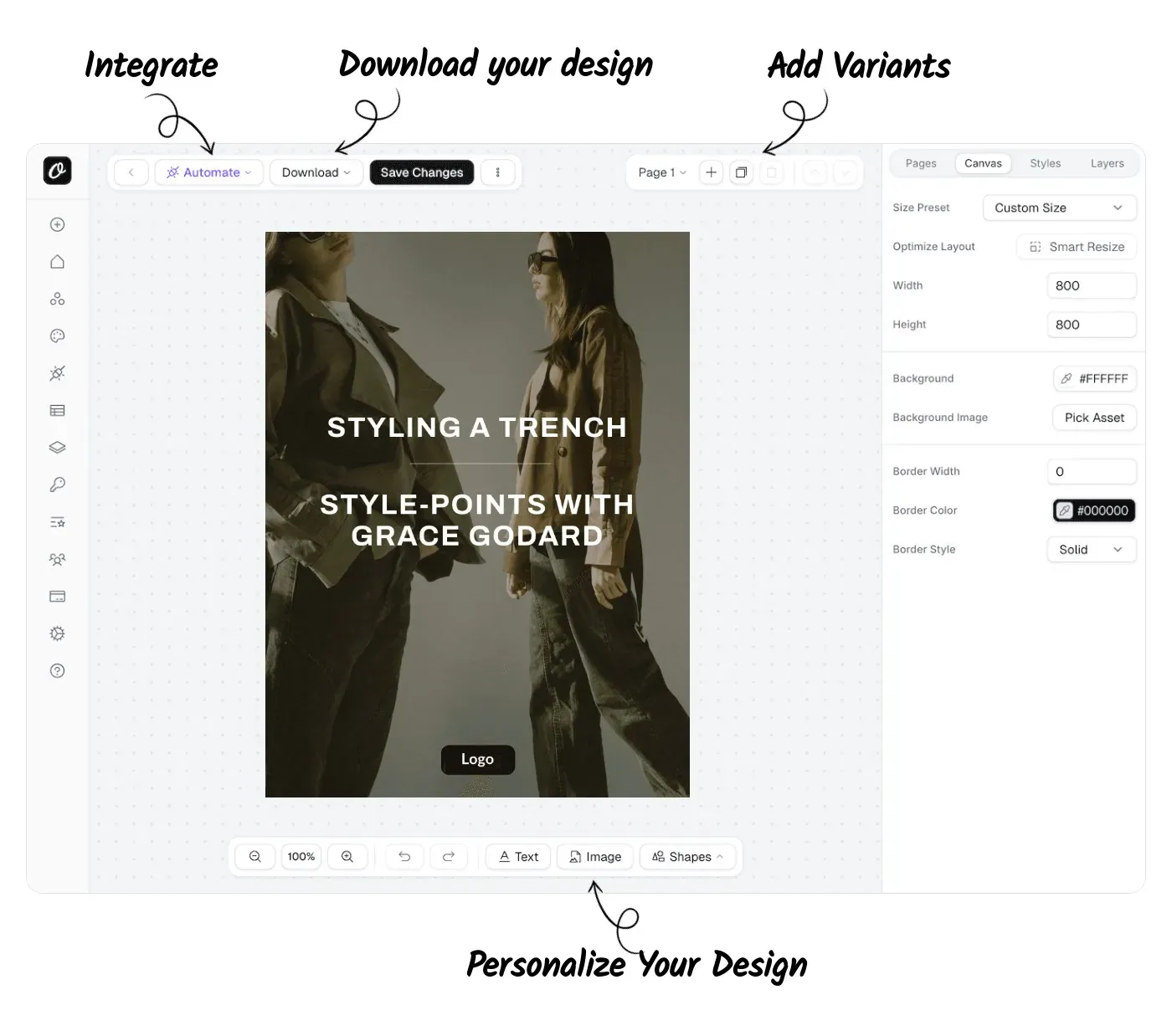
What's Different
If you're on RenderForm, here's what changes when you switch:
| Feature | Orshot | RenderForm |
|---|---|---|
| Watermarks | Never, even on free tier | Yes, on free tier |
| Image Retention | Permanent (or bring your own S3/R2) | 14 days on free tier |
| Video Generation | MP4/WebM/GIF with per-layer controls | No |
| Multi-page Templates | Carousels, PDFs & videos in one API call | No |
| Embed Editor in App | White-label Studio Embed | No |
| Free Tier | 100 free credits a month, no watermarks, resets monthly | Watermarked images only |
| Starter Plan | $39/month for 1,500 credits (1 credit = 1 image) | €9/month for 250 credits |
| Mid Plan | $99/month for 5,000 credits | €89/month for 10,000 (Pro) |
| Template Editor | Orshot Studio - Figma-like with Smart Stacking | RenderForm Editor |
| Template Import | Canva, Figma, AI | Editor only |
| Own Storage | AWS S3, Cloudflare R2, Dropbox, Google Drive | RenderForm hosting only |
| Social Publishing | Built-in — 15+ platforms | No |
The Real Problems with RenderForm
Based on what I've seen from users switching over:
1. Watermarks on Free Tier
RenderForm's free tier adds watermarks to your images. If you're testing with real use cases or need to show stakeholders, watermarked images don't work. You're forced to pay before you can properly evaluate.
Orshot's free tier gives you 100 credits a month with no watermarks and the full editor and API. Test with real content, show real results.
2. Images Disappear After 14 Days
On RenderForm's free and lower tiers, your generated images are deleted after 14 days. If you're using images for anything long-term - blog posts, product pages, documentation - this is a dealbreaker.
Orshot images are permanent. Or bring your own S3/R2 storage if you want full control.
3. No Video Generation
RenderForm is images only. No animated exports, no GIFs, no video. If your workflow needs motion, you need another tool.
Orshot does images, PDFs, and video (MP4, WebM, GIF) with per-layer controls for trimming, muting, and looping.
4. No Multi-Page Templates
Need Instagram carousels, LinkedIn slideshows, or multi-page PDFs? RenderForm can't do it. You'd generate each page separately and combine them yourself.
Orshot has native multi-page template support. Design once, generate the whole carousel with one API call.
5. No Embeddable Editor
Want to let your users design their own images within your app? RenderForm doesn't offer this.
Orshot's Studio Embed lets you integrate a full white-label design editor into your product - complete with custom branding, permission controls, and webhook events.
6. Pay-As-You-Go Gets Expensive
RenderForm's pay-as-you-go seems flexible: €9 for 250 credits, €19 for 500, up to €349 for 25,000. But do the math:
- 1,500 images/month = roughly €55-60 in credits
- 5,000 images/month = €180-200
Orshot's subscription model is cleaner: $39 for 1,500 credits, $99 for 5,000 — and 1 credit is always 1 image. Predictable costs, better value at volume.
What You Get Extra with Orshot
Beyond solving RenderForm's limitations:
No watermarks ever - Free tier, paid tier, doesn't matter. Your images are clean.
Permanent storage - Images don't expire. Or use your own S3/R2 for complete control.
Modern editor - Orshot Studio feels like Figma or Canva. Drag-and-drop, Smart Stacking for relative positioning, keyboard shortcuts. Your designers can use it directly.
White-label embed - Studio Embed is a full Canva-like editor you can drop into your app. Custom branding, permission controls, webhook events.
Multi-page templates - Create carousels, multi-page PDFs, and multi-page videos. See how it works.
Video generation with animations - Export to MP4, WebM, or GIF. Control each video layer with .trimStart, .trimEnd, .muted, and .loop parameters. Add per-layer animations like fade in, slide, and scale with visibility timing and staggered choreography. Support for multiple videos per page, multiple pages per template - generate all with one API call. Learn more
More integrations - MCP Server for AI apps, CLI for terminal workflows, plus Make, Zapier, n8n. Full list here.
Import from design tools - Clone from Canva, import from Figma, or use AI to generate templates. Way faster than starting from scratch.
Try it now — paste a public Canva share link and see it as an Orshot template:

In Canva: Share → “Public View Link” → copy the link.
Social Publishing - Render and publish to 15+ social platforms in one API call. No need for a third-party scheduler — post instantly, schedule, or save as draft.
Actual support - I respond to chat messages. Usually within an hour. Sometimes I'll hop on a call if something's complicated.
Utility Templates (The Handy Extras)
We've got pre-built API templates that solve common problems:
- Twitter Screenshot API - Clean tweet screenshots with customization
- Website Screenshot API - Full page captures, any viewport
- Dynamic Image Resizer API - Resize on the fly
These work great on their own or combined with your custom templates.
Switching from RenderForm
Here's how most people do it:
Step 1: Recreate Your Templates (15-30 min)
Use the visual editor - Open Orshot Studio and recreate your designs. The editor is more capable, so you might actually improve your templates in the process.
Use AI - Screenshot your RenderForm output, drop it into the AI Template Generator. It'll recreate the layout, you fine-tune.
Import from design tools - If you have source files in Canva or Figma:
You can create multi-page templates, share through public links or embeds like the one below with different view modes. You can also invite your team to collaborate on design + template integration.
Step 2: Update Your API Calls (10 min)
Here's what changes:
RenderForm API Call:
const response = await fetch("https://get.renderform.io/api/v2/render", {
  method: "POST",
  headers: {
    "X-API-KEY": "YOUR_RENDERFORM_API_KEY",
    "Content-Type": "application/json",
  },
  body: JSON.stringify({
    template: "renderform_template_id",
    data: {
      title: { text: "Hello World" },
      image: { src: "https://example.com/photo.jpg" },
    },
  }),
});
Orshot API Call:
const response = await fetch("https://api.orshot.com/v1/studio/render", {
  method: "POST",
  headers: {
    Authorization: "Bearer YOUR_ORSHOT_API_KEY",
    "Content-Type": "application/json",
  },
  body: JSON.stringify({
    templateId: "orshot_template_id",
    modifications: {
      title: "Hello World",
      image: "https://example.com/photo.jpg",
      // Dynamic parameters - override any style property
      // Docs: https://orshot.com/docs/dynamic-parameters
      "title.fontFamily": "Space Mono",
      "image.borderRadius": "32px",
    },
    response: {
      type: "url", // url, base64, binary
      format: "png", // png, jpg, webp, avif, pdf, mp4, webm, gif
    },
  }),
});
Main differences:
- Bearer token authentication (industry standard)
- Flat modifications object (simpler)
- Explicit response format specification
Helpful docs:
- API Reference - Complete API documentation
- Render from Template - Main endpoint you'll use
- SDKs - Node, Python, Ruby, PHP libraries
- Setting Parameters - How to make templates dynamic
Step 3: Test It (5 min)
- Make a few test calls
- Compare the output
- Tweak styling if needed in Studio
- Deploy
You can run both RenderForm and Orshot in parallel. Most people switch fully within a day or two.
Need Help?
Just hit the chat button on bottom right. I or someone from the team will help you migrate templates, check your API calls, whatever you need.
Common Questions
Why choose Orshot's Subscription over RenderForm's Pay-as-you-go?
Is the Orshot editor easier to use than RenderForm?
Can I switch my Make/Zapier workflows from RenderForm?
Does Orshot support video generation?
Can I generate images via URL without API calls?
Does Orshot support multi-page templates?
Is there an agency partner program?
Can I embed the Orshot editor in my own app?
Pricing (The Real Comparison)
Here's what you're actually paying (on Orshot, 1 credit = 1 image):
| Monthly Volume | RenderForm (Subscription) | Orshot | Yearly Savings |
|---|---|---|---|
| Testing | Free (watermarked) | Free (100 credits a month, no watermarks) | - |
| 1,500 images | ~€55/month pay-as-you-go | $39/month | $250+ |
| 5,000 images | €89/month (~$97) Pro | $99/month | Parity — more included |
| 25,000 images | Custom | $280/month (40,000 credits) | Significant |
| 50,000 images | Custom | $349/month (75,000 credits) | Significant |
| 100,000 images | Custom | $480/month (150,000 credits) | Significant |
Note: RenderForm's pay-as-you-go is more expensive per image than subscription.
Also worth noting:
- 100 free credits a month to test, no watermarks, no card required
- Images never expire
- API, dynamic URLs and the editor on every plan, including free
- Video generation included
- White-label embed included on all paid plans
The Editor
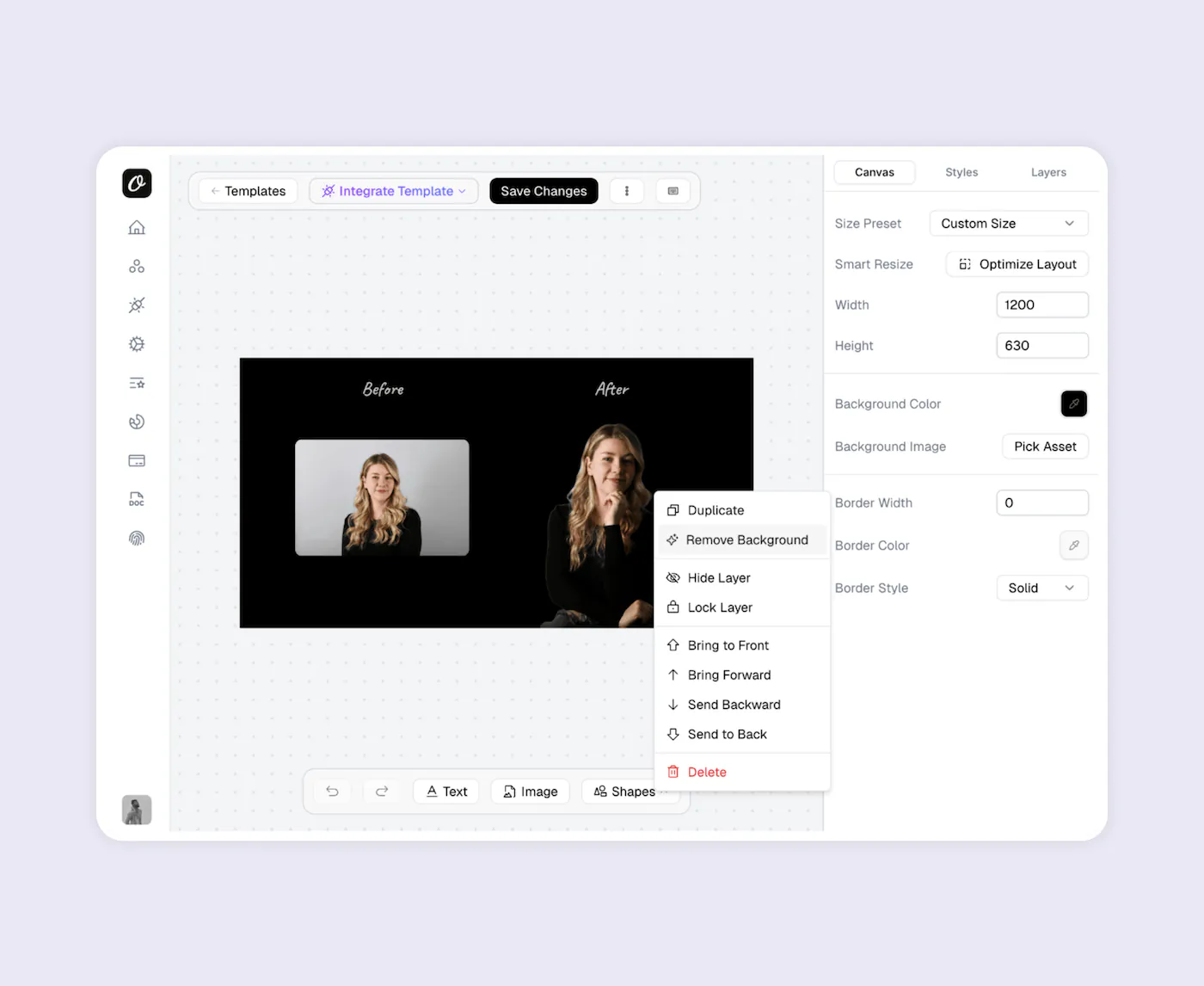
Orshot Studio is more capable than RenderForm's editor.
Key features:
- Smart Stacking - Position elements relative to each other. They auto-adjust when content changes
- Brand Assets - Save your logos, colors, and fonts. Use across all templates for consistency
- Custom Fonts - Upload any font. No limits on typography
- Personalization - Make any element dynamic - text, images, colors, styling
- Studio Embed - Integrate the editor into your own app with custom branding
- Multi-page Support - Create carousels and PDF templates with different pages
How It Works
Every template becomes an API endpoint. You can:
- Generate templates with AI or import from Canva/Figma
- Automate with REST API, SDKs, Zapier, Make, n8n, or Dynamic URLs
- Bulk generate with parallel processing
- Generate multi-page PDFs and carousels
- Export video (MP4, WebM, GIF)
If there's an integration missing, just ask. We'll probably add it.
Examples and Tutorials
Carousel Templates
How to create multi-page templates and automate them:
Import from Canva
Clone your existing Canva designs and turn them into API endpoints:
Import from Figma
Use the Figma plugin to import your designs directly:
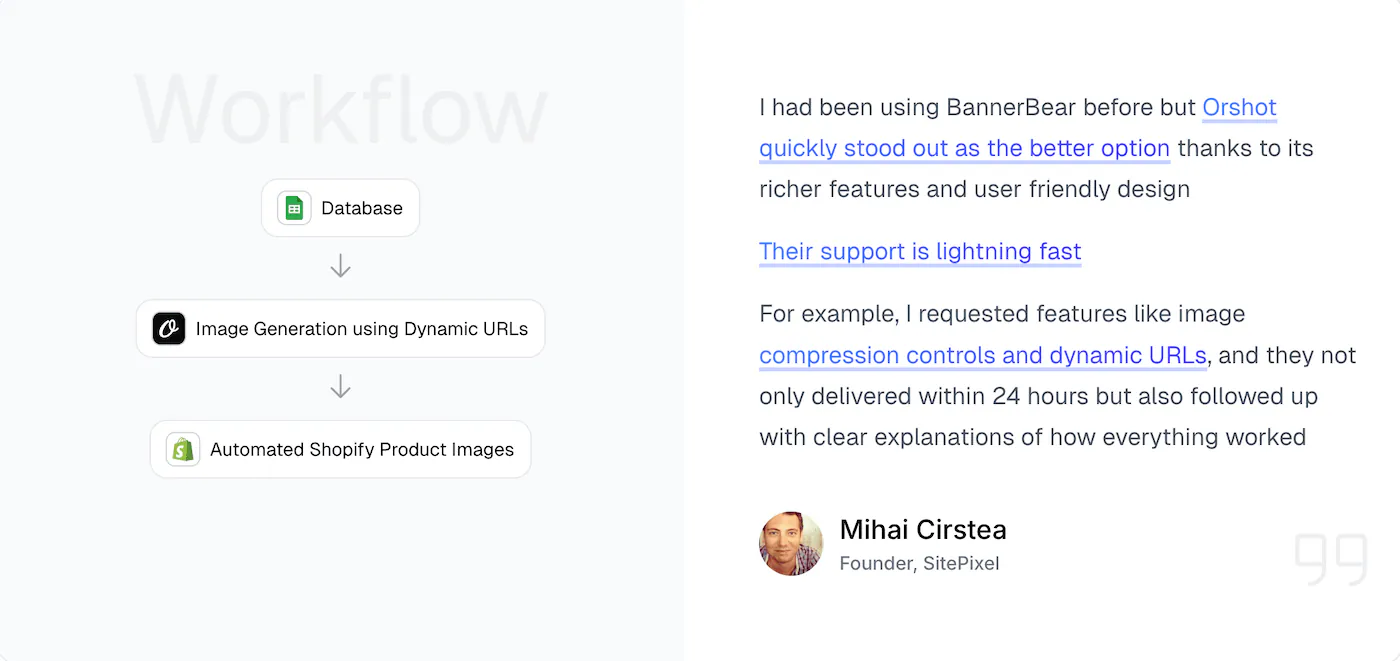
eCommerce Automation
Example workflow - automating product images from your data sources:
Dynamic URLs
Generate images just by changing URL parameters - no API calls needed:
Bottom Line
RenderForm works for basic image generation, but the watermarks, expiring images, and lack of video/embed features hold it back. Orshot does the same core thing (turn templates into API endpoints) but with a modern Figma-like editor, white-label embed capabilities, video generation, and pricing without gotchas.
The switch takes a couple hours. You can test everything free with 100 credits a month, no watermarks. If you're also weighing PDF-first tools, the APITemplate.io comparison covers that side of the market.
Try It
- Sign up - 100 free credits every month, no card needed
- Recreate one of your templates (or use AI to do it)
- Test with your actual data
- See if it works for you
If you get stuck, hit the chat button. I'll help you out.