PDF Automation API for Invoices and Documents
Design the document in a visual editor or import your HTML. Send your data and get back a PDF with your fonts, links and page breaks right.
100 free credits every month · no credit card · 1 credit per page
No browser to babysit
No headless Chrome server to run. You make one HTTP call.
Multi-page in one file
Every page takes its own data and lands in the same file.
Your fonts, sharp at any size
Text and shapes are vectors. Upload TTF, OTF or WOFF.
Ready for the print shop
CMYK, 300 dpi and margins, set per document.
Send JSON and get a finished PDF back
Send a template ID and your document data, and get back a link to the PDF. Multi-page templates come back as one file, over REST or any SDK.
npm install orshotcurl -X POST https://api.orshot.com/v1/studio/render \
-H "Authorization: Bearer $ORSHOT_API_KEY" \
-H "Content-Type: application/json" \
-d '{
"templateId": 1234,
"modifications": {
"recipient_name": "Zara Adeyemi",
"title": "Certificate of Excellence",
"date": "Mar 6, 2026"
},
"response": { "type": "url", "format": "pdf" }
}'Node.js install: npm install orshot
import { Orshot } from 'orshot';
const orshot = new Orshot(process.env.ORSHOT_API_KEY);

const { data } = await orshot.renderFromStudioTemplate({
  templateId: 1234,
  modifications: {
    recipient_name: 'Zara Adeyemi',
    title: 'Certificate of Excellence',
    date: 'Mar 6, 2026',
  },
  response: { type: 'url', format: 'pdf' },
});

// data.content → the rendered PDF URL
Python install: pip install orshot
import orshot
client = orshot.Orshot("<ORSHOT_API_KEY>")

response = client.render_from_studio_template({
  "template_id": 1234,
  "modifications": {
    "recipient_name": "Zara Adeyemi",
    "title": "Certificate of Excellence",
    "date": "Mar 6, 2026",
  },
  "response": { "type": "url", "format": "pdf" },
})
Ruby install: gem install orshot
require 'orshot'
client = Orshot::Client.new("<ORSHOT_API_KEY>")

response = client.render_from_studio_template({
  'template_id' => 1234,
  'modifications' => {
    'recipient_name' => 'Zara Adeyemi',
    'title' => 'Certificate of Excellence',
    'date' => 'Mar 6, 2026',
  },
  'response' => { 'type' => 'url', 'format' => 'pdf' },
})
PHP install: composer require rishimohan/orshot
<?php require 'vendor/autoload.php';

use Orshot\Client;
$client = new Client("<ORSHOT_API_KEY>");

$response = $client->renderFromStudioTemplate([
  'templateId' => 1234,
  'modifications' => [
    'recipient_name' => 'Zara Adeyemi',
    'title' => 'Certificate of Excellence',
    'date' => 'Mar 6, 2026',
  ],
  'response' => [ 'type' => 'url', 'format' => 'pdf' ],
]);




One template can be an image, a PDF or a video
The template, the parameters and the SDKs are the same for all three. Set response.format and you get an image, a PDF or a video.
Images
Social posts, OG images, ads and carousels from one template.
- Every layer changeable per request
- AI text and AI images from a prompt
- Any size from one design with Smart Resize
PDFs
This pageInvoices, certificates, reports and tickets, ready to print.
- Multi-page documents in one file
- Clickable links and page ranges
- Text that flows onto new pages
Videos
Reels, product clips and slideshows with sound and captions.
- Voiceover, music and captions per video
- AI footage from a prompt or a photo
- Pages become scenes with transitions
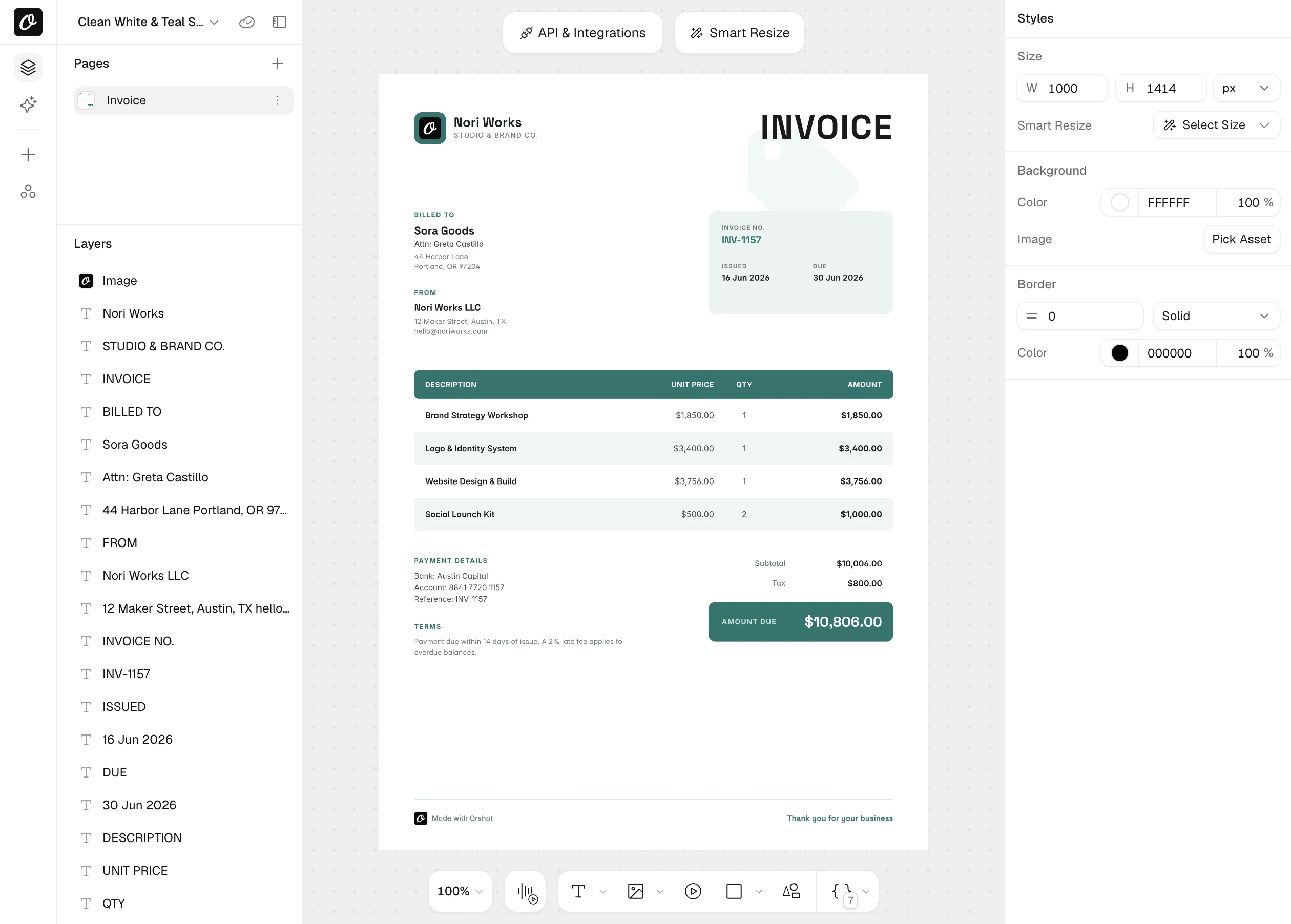
Design the document once and let your data fill it in
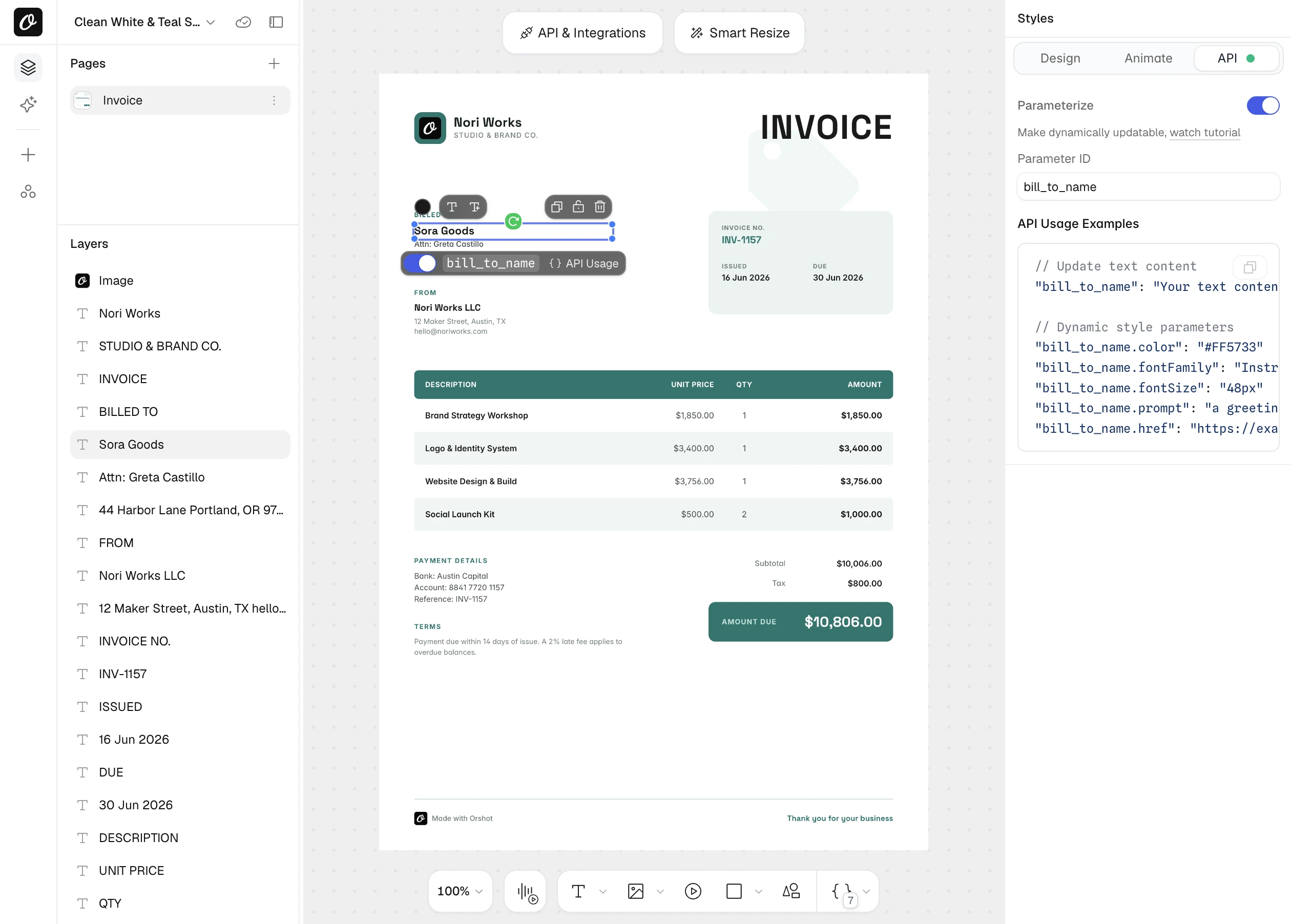
Build invoices, certificates and reports in Orshot Studio, our visual editor, or import your HTML. Mark a layer as dynamic and it becomes a field you fill.
- A4, US Letter and custom sizes
- Custom fonts and your brand library
- Flow text for documents of any length
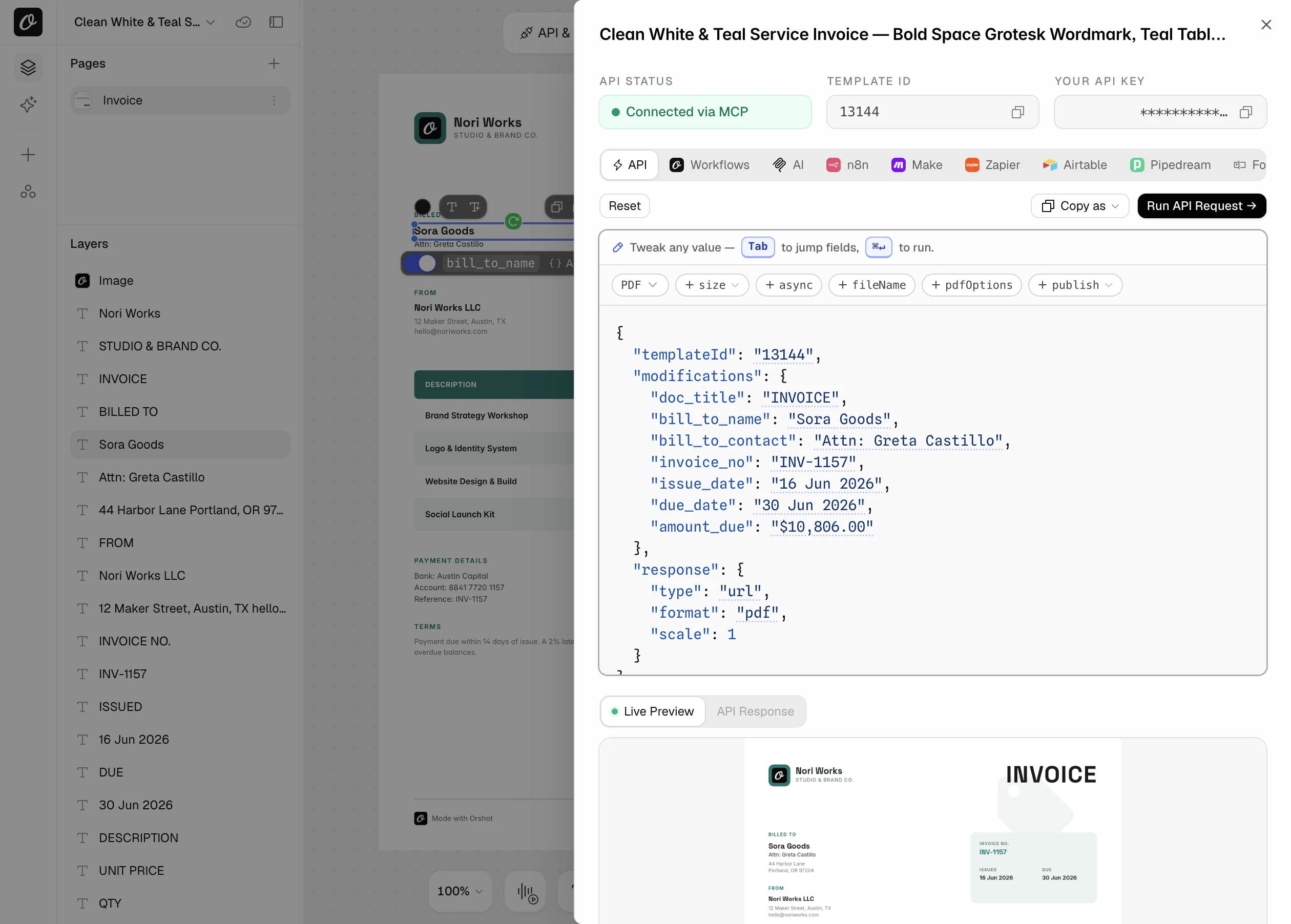
A working PDF request that is ready to copy
Every template comes with its request filled in, with your template ID, fields and key. Switch the format to PDF and test it on the page.
- Copy as cURL or an SDK snippet
- Tabs for Workflows, n8n, Make, Zapier and agents
- Test a request before you write any code
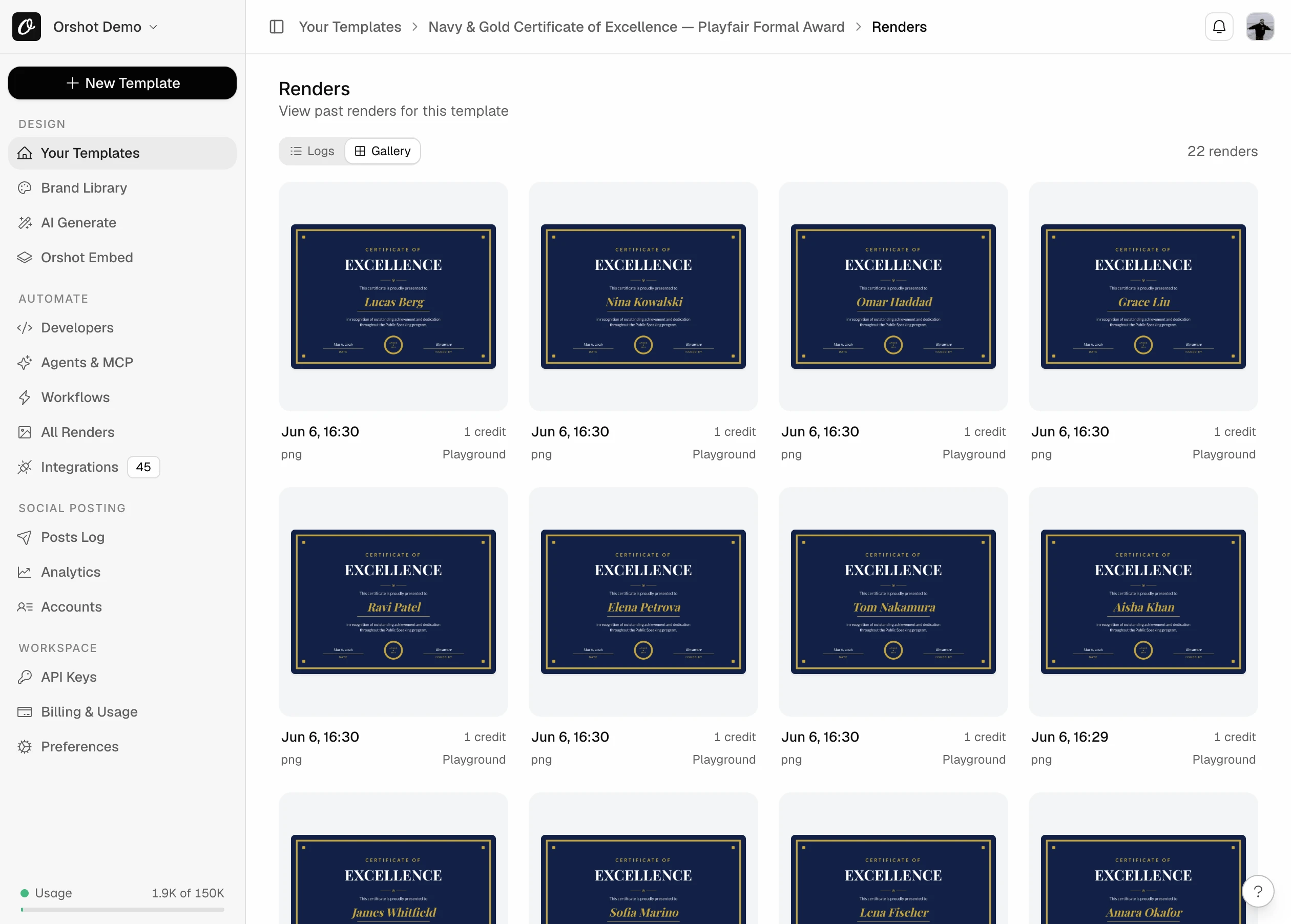
Bulk generate PDFs that are each personal
Send your rows through one template and each document is saved with a preview and the values you sent.
- Every file in a searchable log
- Signed, time-limited links for private files
- Deliver to your own S3, R2, Dropbox or Drive
PDFs people generate, with the request
Each example is a complete request body for POST /v1/studio/render.
A branded invoice on every payment
Send the customer, the line items and the total. Name the file, set the document title and make the pay button clickable.
- 1Design the invoice once in Studio
- 2Send the values from your billing event
- 3Attach the PDF URL to the receipt email
{
  "templateId": 1234,
  "modifications": {
    "invoice_no": "INV-1042",
    "customer": "Acme Corp",
    "item_1": "Design retainer, March",
    "amount_1": "$2,000.00",
    "item_2": "Hosting, 12 months",
    "amount_2": "$480.00",
    "total": "$2,480.00",
    "pay_button": "Pay online",
    "pay_button.href": "https://pay.example.com/inv-1042"
  },
  "response": {
    "format": "pdf",
    "type": "url",
    "fileName": "invoice-1042"
  },
  "pdfOptions": { "title": "Invoice INV-1042" }
}A certificate for every name on the list
One template, one request per person. Add a verification link so each certificate can be checked.
- 1Mark the name, course and date as dynamic
- 2Loop your rows and send one request each
- 3Email each person their own PDF
{
  "templateId": 1234,
  "modifications": {
    "recipient_name": "Zara Adeyemi",
    "course": "Advanced Data Analysis",
    "date": "Mar 6, 2026",
    "verify_link": "Verify this certificate",
    "verify_link.href": "https://example.com/verify/8F2K1"
  },
  "response": { "format": "pdf", "type": "url" }
}Multi-page reports in one PDF
Multi-page templates come back as one document. Prefix a value with its page, or leave the prefix off to set it on every page.
- 1Build a cover, a summary and detail pages
- 2Use page1@, page2@ for page content
- 3Skip the prefix for footers and logos
{
  "templateId": 1234,
  "modifications": {
    "footer_text": "© 2026 Acme Corp",
    "page1@title": "Q1 2026 Report",
    "page2@title": "Summary",
    "page2@revenue": "$1.2M",
    "page3@title": "Details"
  },
  "response": {
    "format": "pdf",
    "type": "url",
    "includePages": [1, 2, 3]
  }
}Design one page. Get as many as the text needs
Set a text box to Flow and it continues onto new pages on its own. Headers, footers and logos can repeat on every page.
- 1Set Text Autofit to Flow on the body text
- 2Turn on repeat for the header and footer
- 3Send text of any length
{
  "templateId": 1234,
  "modifications": {
    "title": "Service agreement",
    "body": "Your full document text. It can be one page or forty."
  },
  "response": { "format": "pdf", "type": "url" }
}Files a print shop will accept
Text and shapes are vectors, so they stay sharp at any size. Switch to CMYK, set the resolution and control the margins.
- 1Set colorMode to cmyk for the print shop
- 2Pick 72, 150 or 300 dpi
- 3Use 0px margin for full bleed designs
{
  "templateId": 1234,
  "modifications": { "headline": "Spring sale" },
  "response": { "format": "pdf", "type": "url" },
  "pdfOptions": {
    "colorMode": "cmyk",
    "dpi": 300,
    "margin": "0px"
  }
}Photo heavy PDFs, a fraction of the size
Compress the photos inside the PDF. Text, shapes and transparency are never touched, and QR codes still scan.
- 1Set imageFormat to jpeg
- 2Tune imageQuality, 85 is print quality
- 3Cap image resolution with maxImageDpi
{
  "templateId": 1234,
  "response": { "format": "pdf", "type": "url" },
  "pdfOptions": {
    "imageFormat": "jpeg",
    "imageQuality": 85,
    "maxImageDpi": 300
  }
}A PDF from a URL, no API call
Turn on Dynamic URL for a template. Put the values in the query string and the link returns the PDF. Set a usage limit and an expiry.
- 1Enable Dynamic URL on the template
- 2End the file name with .pdf
- 3Fill the values in the query string
https://api.orshot.com/v1/studio/dynamic-url/ticket-482.pdf
  ?templateId=1234&name=Sam%20Lee&seat=B14&sign=...
Let anyone make their own PDF
Template Forms turn a template into a public form. People fill it in, press Generate and download the file. No Orshot account needed.
- 1Open the template and enable the form
- 2Choose the formats, rate limit and expiry
- 3Share the link
Ask for the document in plain words
Connect Orshot to Claude, ChatGPT or Cursor. The agent can design the template from a brief, fill it in and hand you the PDF.
- 1Connect Orshot to Claude, ChatGPT, Cursor or another AI agent
- 2Describe the document you want
- 3Get the PDF link back
Create an A4 invoice template in our brand colors, then generate invoice INV-1042 for Acme Corp with two line items as a PDF.
Set margins, links and pages per document
The template sets the defaults. Anything below can be set for a single document.
Text, images and single words
Replace a whole layer, or only the placeholder words inside it.
{id}- New text or image URL for a layer
{id}:{placeholder}- Fill a {{placeholder}} inside a sentence
page2@{id}- Target a layer on one page
canvasBackgroundColor- Page color, HEX, RGBA or a gradient
{
  "modifications": {
    "customer": "Acme Corp",
    "logo": "https://example.com/logo.png",
    "greeting:name": "Sarah",
    "greeting:city": "New York",
    "page2@title": "Summary",
    "page1@canvasBackgroundColor": "#0f172a"
  }
}Restyle a layer without a new template
Position, size, color, fonts and effects are set by adding a key to the layer id.
.x .y .width .height- Move or resize any layer
.color .fontSize .fontFamily- Text color, size and any Google or custom font
.textAlign .lineHeight .letterSpacing- Paragraph settings
.fill .stroke .strokeWidth- Shape colors and outlines
.opacity .borderRadius- Fade layers, round images
{
  "modifications": {
    "total.color": "#0F766E",
    "total.fontSize": "32px",
    "total.fontFamily": "Space Grotesk",
    "status_badge.fill": "#DCFCE7",
    "stamp.opacity": "0.6"
  }
}Clickable text and images
Add .href to any dynamic text or image. Links work in PDF output only.
{id}.href- Open a URL when the layer is clicked
mailto:- Email links work too
{
  "modifications": {
    "pay_button": "Pay online",
    "pay_button.href": "https://pay.example.com/inv-1042",
    "support_email": "support@acme.com",
    "support_email.href": "mailto:support@acme.com",
    "qr_image.href": "https://example.com/verify/8F2K1"
  }
}Write the text or make the image with AI
Add .prompt to a text layer for AI copy, or to an image layer for an AI image. Send a normal value too and it is used if generation fails.
{textId}.prompt- AI writes the text
{imageId}.prompt- AI generates the image
{id}.contentType- Treat a text slot as an image, or the reverse
{
  "modifications": {
    "summary": "Fallback summary text",
    "summary.prompt": "Summarise Q1 results in two friendly sentences",
    "cover_image.prompt": "abstract teal waves, soft light, minimal"
  }
}Title, margins, resolution and color
Everything about the file itself lives in pdfOptions.
pdfOptions.title- Title shown in browser tabs and PDF readers
pdfOptions.margin- Space around the design, in px
marginTop / Bottom / Left / Right- Override one side
pdfOptions.dpi- 72 for screen, 150 or 300 for print
pdfOptions.colorMode- rgb for screens, cmyk for print shops
{
  "pdfOptions": {
    "title": "Spring Sale Flyer",
    "margin": "20px",
    "marginBottom": "60px",
    "dpi": 300,
    "colorMode": "cmyk"
  }
}Compress the photos, keep the text sharp
Only embedded photos are re-encoded. Vectors, transparency, links and fonts stay as they are.
pdfOptions.imageFormat- auto leaves images untouched, jpeg compresses them
pdfOptions.imageQuality- 1 to 100, default 85
pdfOptions.maxImageDpi- Downsample above this, default 300
{
  "pdfOptions": {
    "imageFormat": "jpeg",
    "imageQuality": 85,
    "maxImageDpi": 300
  }
}Which pages end up in the file
Pick pages one by one, give a range, or let flow text add pages for you. You are billed per page in the final PDF.
response.includePages- Only these pages, for example [1, 3, 5]
pdfOptions.rangeFrom / rangeTo- A continuous range of pages
Flow text- Overflow pages are added automatically
{
  "response": {
    "format": "pdf",
    "type": "url",
    "includePages": [1, 3, 5]
  }
}

// or a range
{
  "pdfOptions": { "rangeFrom": 2, "rangeTo": 4 }
}How you get the file
A hosted URL or the raw file, with your own file name. Run big documents in the background.
response.type- url or binary
response.fileName- Your file name. Also used as the title
response.mode- async returns a job at once
webhook_url- Called when the job finishes
{
  "templateId": 1234,
  "response": {
    "format": "pdf",
    "type": "url",
    "fileName": "q1-report",
    "mode": "async"
  },
  "webhook_url": "https://acme.com/hooks/orshot"
}Generate invoices from a spreadsheet without code
Ready-made workflows take a trigger and your template, then deliver the finished PDF where it needs to go.



Generate an invoice PDF for every order
Turn a spreadsheet of orders into clean invoice PDFs, one per row, filed automatically.
Issue certificates for everyone on your list
Generate a personalized certificate for every row in a Google Sheet, in one run.

Generate invoice PDFs from Airtable records
Turn each Airtable record into an invoice or receipt PDF and save it to Google Drive or Dropbox.
Everything the PDF API does
Every PDF feature, grouped by where you use it. Weighing your options? See PDF generator APIs compared.
Design it once, visually
- A4, US Letter and custom sizes
- Multi-page templates
- Flow text that adds pages on its own
- Repeat headers and footers on every page
- Smart Stacking moves layers when the one above grows
- Custom fonts and every Google Font
- Fit, truncate, overflow and flow text modes
- Different styles inside one text box
- Placeholders inside sentences
- Import designs from Canva and Figma
- Brand colors, fonts and logos in one library
- Version history
- Public forms that generate the PDF
One endpoint, every option
- Single and multi-page PDFs
- Pick pages or a page range
- Hosted URL or the raw file
- Async jobs with polling or webhooks
- PDFs from a signed URL, no API call
- Swap text and images per request
- Fill single words inside a sentence
- Change color, size and font per request
- Clickable links on text and images
- AI text and AI images from a prompt
- RGB or CMYK
- 72, 150 or 300 dpi
- Margins, overall or per side
- Document title and file name
- Photo compression for smaller files
Claude, ChatGPT, Cursor and other AI agents
- Design a document template from a brief
- Use your brand colors, fonts and logos
- Edit a template by describing the change
- Generate one PDF or a whole batch
- Wait on big documents without timing out
- Build scheduled workflows
Generate your first PDF in five minutes
The free plan includes 100 credits every month. A PDF costs 1 credit per page.