The best Node.js PDF generator depends on what your PDF starts from. Use Puppeteer for HTML, pdfmake for data with tables, PDFKit for fixed layouts and pdf-lib to edit existing PDFs. All are free on npm.
To generate a PDF from HTML in Node.js, install puppeteer, load the HTML with page.setContent() and call page.pdf(). That took 90 ms per PDF with a warm browser in my October 2026 test.
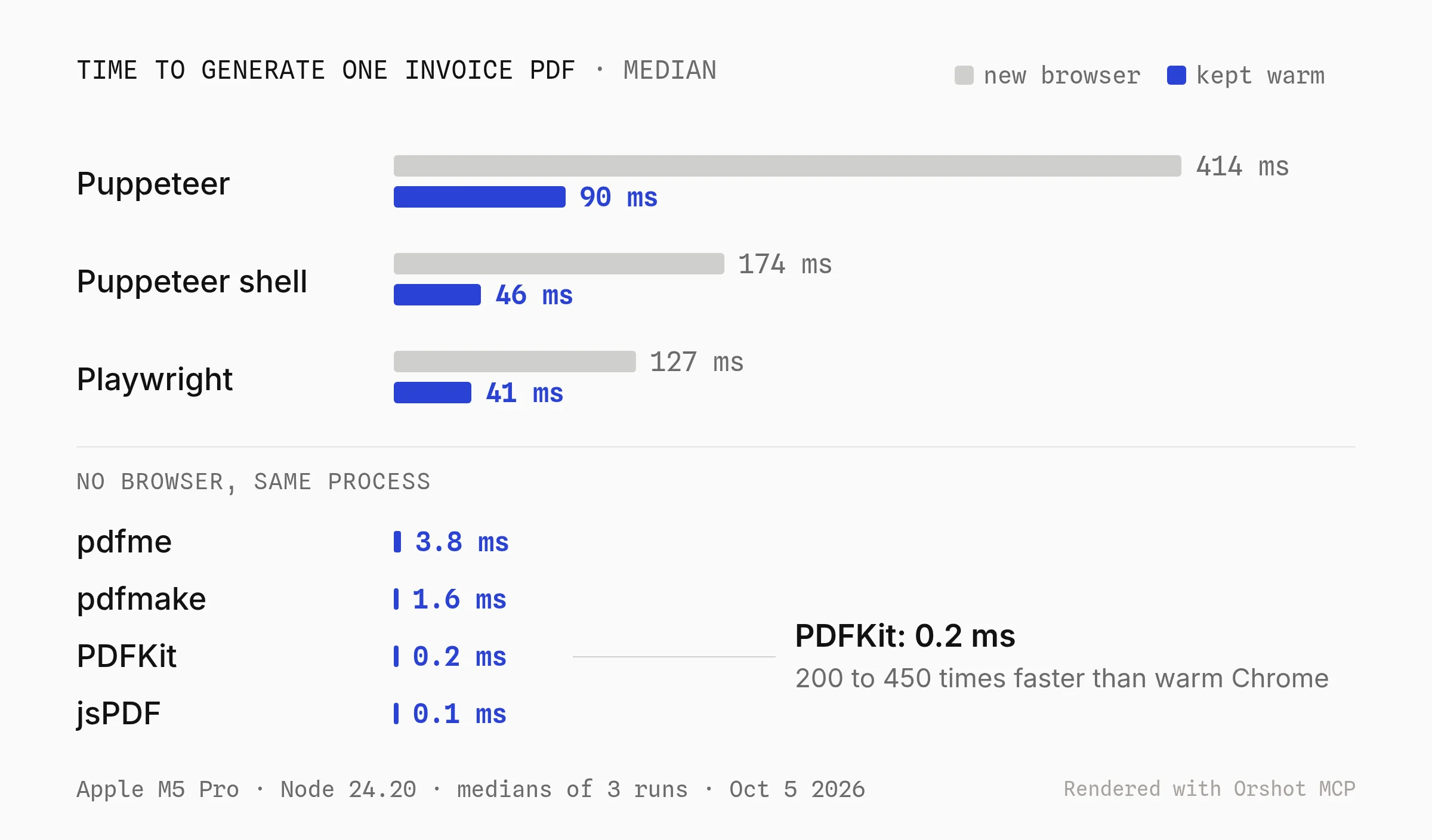
PDFKit drew the same invoice in 0.2 ms with no browser at all. The catch with Puppeteer is size: Chrome is 261 MB or more, over AWS Lambda's 250 MB limit.
Compare Node.js PDF Libraries
The Node.js PDF libraries worth comparing in 2026 are Puppeteer, Playwright, PDFKit, pdfmake, jsPDF, pdfme and pdf-lib. All are free and open source.
Puppeteer and Playwright render real HTML and CSS in a browser. The rest install in 22 to 74 MB and run without one.
| Library | Weekly downloads | Installed size |
|---|---|---|
| Puppeteer | 11.5M | 24 MB + Chrome |
| Playwright | 109.6M | 18 MB + Chromium |
| PDFKit | 10.2M | 21.7 MB |
| pdfmake | 2.9M | 34.8 MB |
| jsPDF | 15.5M | 42.4 MB |
| pdfme | 183K | 74.0 MB |
Downloads are for October 1 to 7, 2026, from the npm downloads API. I tested Puppeteer 25.12, Playwright 1.63, PDFKit 0.20, pdfmake 0.3, jsPDF 4.2 and pdfme 6.2.
Playwright's count is mostly test suites, and pdfmake installs also count as PDFKit downloads. pdf-lib (17.1M a week) edits PDFs rather than creating them, so it has its own part.
How I Tested
I wrote one invoice (title, client, two line items, total) in each library's own style and opened every PDF to check it. All the code in this post is that code.
- Machine. Apple M5 Pro, Node 24.20, October 5, 2026.
- Speed. Browsers: 10 launches and 30 warm renders. JavaScript libraries: 100 renders in one process. Medians of three runs, which varied 10 to 20%.
- Size.
node_modulesafternpm install, in MB of 1,024 KB (the way AWS counts), plus the Chrome for Testing 154 Linux builds. - Not tested. I didn't deploy to Lambda or Vercel. Limits come from their docs, read the same day.
How Fast Each Library Generates a PDF
PDFKit generated the invoice in 0.2 ms and pdfmake in 1.6 ms. Puppeteer took 90 ms with a warm browser and 414 ms when it launched Chrome for each PDF.
That makes PDFKit 200 to 400 times faster than a warm Chrome page.
Speed rarely decides it on its own. At 90 ms, one warm Chrome page still makes about 40,000 PDFs an hour. What decides it is where your layout lives (HTML, code or a design file) and where the code runs.
1. Convert HTML to PDF in Node.js With Puppeteer
To convert HTML to PDF in Node.js, launch Puppeteer, load the HTML with page.setContent(), then call page.pdf(). Chrome does the layout, so flexbox, grid, web fonts and @page rules all work.
Pick this if you already have HTML and CSS for the document, or your team styles it like a web page.
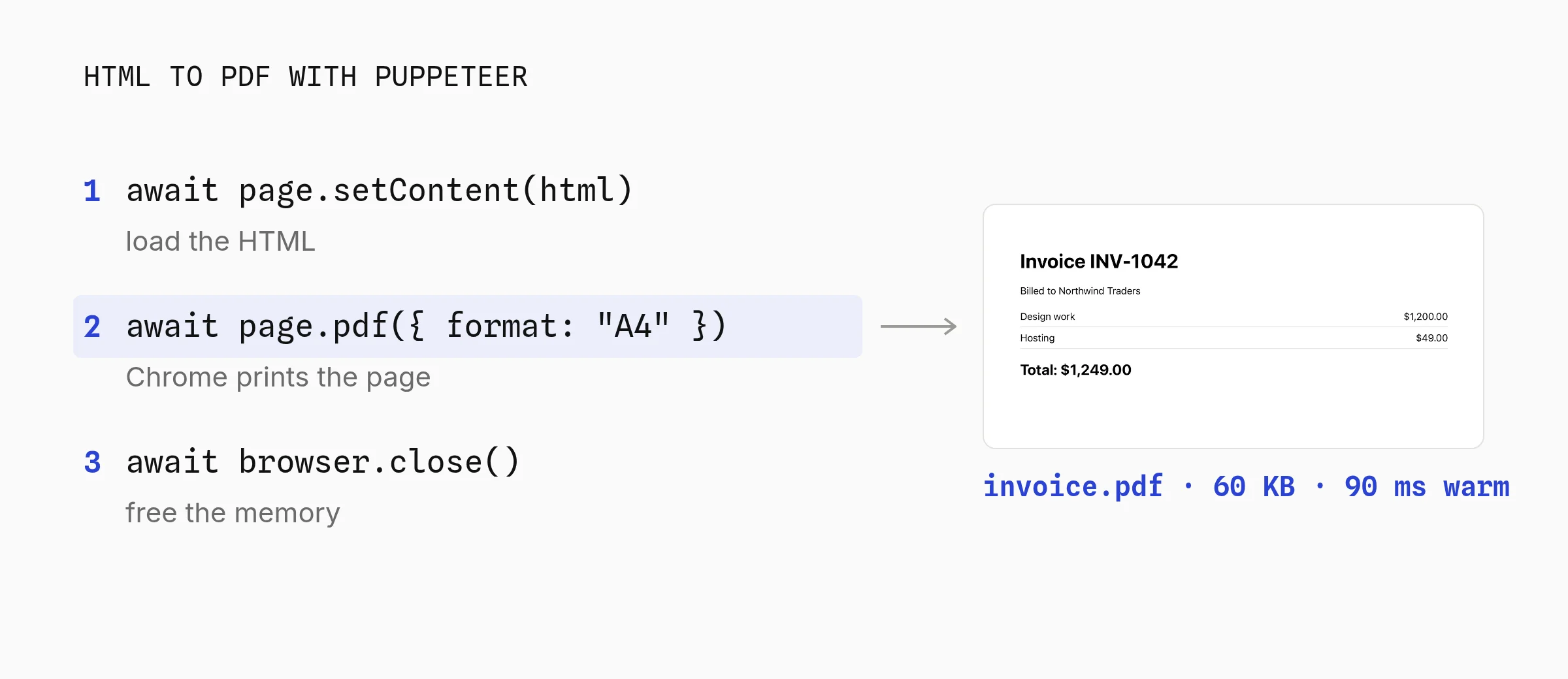
Step 1: Install Puppeteer and print your HTML
npm install puppeteer also downloads Chrome. Puppeteer 25 needs Node 22.12 or newer.
import puppeteer from "puppeteer";

const html = `
  <style>
    body { font-family: system-ui, sans-serif; padding: 40px; }
    table { width: 100%; border-collapse: collapse; }
    td { padding: 8px 0; border-bottom: 1px solid #ddd; }
  </style>
  <h1>Invoice INV-1042</h1>
  <p>Billed to Northwind Traders</p>
  <table>
    <tr><td>Design work</td><td align="right">$1,200.00</td></tr>
    <tr><td>Hosting</td><td align="right">$49.00</td></tr>
  </table>
  <h2>Total: $1,249.00</h2>`;

const browser = await puppeteer.launch();
const page = await browser.newPage();
await page.setContent(html, { waitUntil: "load" });
await page.pdf({ path: "invoice.pdf", format: "A4", printBackground: true });
await browser.close();
Playwright uses the same three calls. Install the browser once with npx playwright install chromium. Its page.pdf() only works in Chromium, not Firefox or WebKit.
import { chromium } from "playwright";

const html = `<h1>Invoice INV-1042</h1><p>Billed to Northwind Traders</p>`;

const browser = await chromium.launch();
const page = await browser.newPage();
await page.setContent(html);
await page.pdf({ path: "invoice.pdf", format: "A4", printBackground: true });
await browser.close();
To turn a live URL into a PDF instead of a string, swap setContent() for page.goto(url, { waitUntil: "networkidle0" }). For a page behind a login, set the session cookie with page.setCookie() before goto().
Step 2: Serve PDFs from Express with one warm browser
Launching Chrome is most of the cost. In a server, start it once and open a page per request. That's the "warm" number in the chart: 46 ms with headless: "shell".
import express from "express";
import puppeteer from "puppeteer";

const browser = await puppeteer.launch({ headless: "shell" });
const app = express();
app.use(express.json());

app.post("/pdf", async (req, res) => {
  const page = await browser.newPage();
  try {
    await page.setContent(req.body.html, { waitUntil: "networkidle0" });
    const pdf = await page.pdf({ format: "A4", printBackground: true });
    res.type("application/pdf").send(Buffer.from(pdf));
  } finally {
    await page.close();
  }
});

app.listen(3000);
Fix Common Puppeteer PDF Problems
Most Puppeteer PDF problems come from Chrome's print mode, not from your code.
- Missing backgrounds. Chrome drops background colors when printing unless you pass
printBackground: true. - It looks different from the screen.
page.pdf()usesprintmedia. Callpage.emulateMedia({ media: "screen" })first. - Blank fonts or images. Wait for them with
waitUntil: "networkidle0"before printing. - Rows split across pages. Add
tr { break-inside: avoid; }to your CSS. - Page numbers. Pass
displayHeaderFooter: trueand afooterTemplatethat uses thepageNumberandtotalPagesclasses. - Slow launches.
headless: "shell"uses the lighter chrome-headless-shell build: 2.4 times faster to launch in my test.
To preview how a page prints before writing code, paste it into the free HTML to PDF converter.
- Any HTML and CSS your browser renders, including flexbox, grid, web fonts and SVG charts
- Chrome handles page breaks, long tables and headers and footers
- The same code turns a live URL into a PDF
- Chrome is 261 MB or more, over the Lambda limit without a special build
- 46 to 414 ms per PDF and a browser's worth of memory
- Print CSS is its own skill: page breaks, margins and fonts need tuning
Best for: Puppeteer suits PDFs that must match existing HTML and CSS, run from a server or container where Chrome can stay warm.
2. Generate Invoices and Reports Without a Browser
PDFKit, pdfmake and jsPDF write PDF bytes directly from JavaScript. They make a one-page invoice in under 2 ms and fit any serverless function, but you lay out the page in code, not CSS.
Pick this if your PDF is built from data (orders, statements, labels, tickets) and you'd rather not run Chrome.
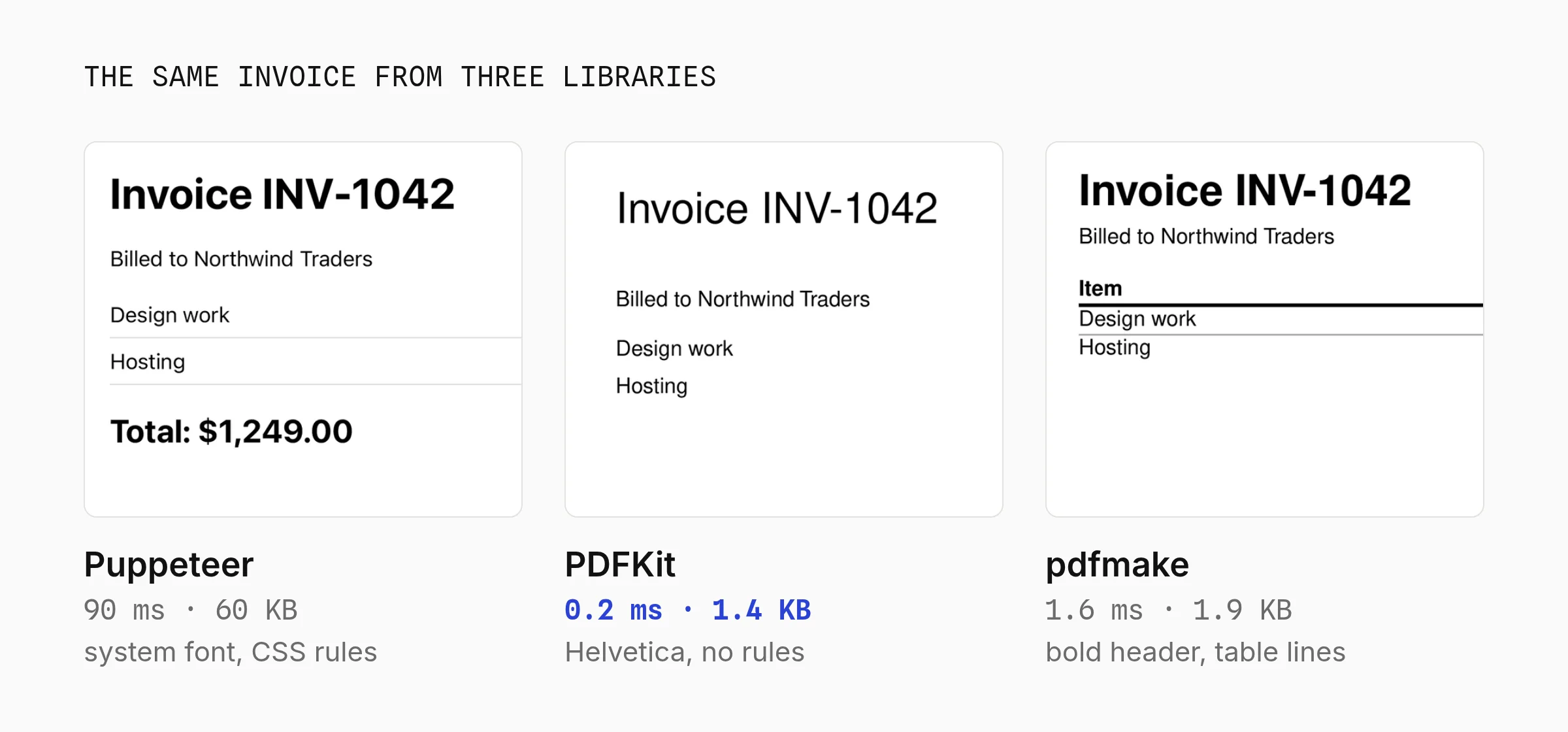
File size splits the same way as speed: 60 KB from Puppeteer, which embedded the system font, and 1.4 KB from PDFKit, which used built-in Helvetica.
Step 1: Pick pdfmake, PDFKit or jsPDF
You describe the document as JSON and pdfmake does the layout: tables that break across pages with repeated header rows, columns, headers and footers. The best fit for invoices and reports.
import pdfmake from "pdfmake";

// The 14 standard PDF fonts ship with pdfmake, so no .ttf files needed
pdfmake.addFonts({
  Helvetica: {
    normal: "Helvetica",
    bold: "Helvetica-Bold",
    italics: "Helvetica-Oblique",
    bolditalics: "Helvetica-BoldOblique",
  },
});
pdfmake.setUrlAccessPolicy(() => false); // never fetch remote URLs
pdfmake.setLocalAccessPolicy((path) => path.startsWith("Helvetica")); // only the fonts

const docDefinition = {
  defaultStyle: { font: "Helvetica" },
  content: [
    { text: "Invoice INV-1042", fontSize: 24, bold: true },
    { text: "Billed to Northwind Traders", margin: [0, 8, 0, 16] },
    {
      table: {
        headerRows: 1,
        widths: ["*", "auto"],
        body: [
          [{ text: "Item", bold: true }, { text: "Amount", bold: true }],
          ["Design work", "$1,200.00"],
          ["Hosting", "$49.00"],
        ],
      },
      layout: "lightHorizontalLines",
    },
    { text: "Total: $1,249.00", fontSize: 16, bold: true, alignment: "right", margin: [0, 16, 0, 0] },
  ],
};

await pdfmake.createPdf(docDefinition).write("invoice.pdf");
You place each item yourself. Good for labels, tickets and forms with fixed positions.
import PDFDocument from "pdfkit";
import fs from "node:fs";

const doc = new PDFDocument({ size: "A4", margin: 50 });
doc.pipe(fs.createWriteStream("invoice.pdf"));

doc.fontSize(24).text("Invoice INV-1042");
doc.moveDown().fontSize(12).text("Billed to Northwind Traders");
doc.moveDown();

const items = [["Design work", "$1,200.00"], ["Hosting", "$49.00"]];
for (const [name, price] of items) {
  const y = doc.y;
  doc.text(name, 50, y);
  doc.text(price, 50, y, { align: "right" });
  doc.moveDown(0.5);
}

doc.moveDown().fontSize(16).text("Total: $1,249.00", { align: "right" });
doc.end();
jsPDF is built for the browser first, but its drawing API works in Node. Positions are in millimeters here.
import { jsPDF } from "jspdf";

const doc = new jsPDF({ format: "a4", unit: "mm" });

doc.setFontSize(24).text("Invoice INV-1042", 20, 25);
doc.setFontSize(12).text("Billed to Northwind Traders", 20, 35);
doc.text("Design work", 20, 50);
doc.text("$1,200.00", 190, 50, { align: "right" });
doc.text("Hosting", 20, 58);
doc.text("$49.00", 190, 58, { align: "right" });
doc.setFontSize(16).text("Total: $1,249.00", 190, 75, { align: "right" });

doc.save("invoice.pdf");
Step 2: Stream the PDF from your server
PDFKit is a stream, so an Express route can send it without a temp file: res.type("application/pdf"); doc.pipe(res); doc.end();. With pdfmake, call createPdf(doc).getBuffer() and send the Buffer.
What to Know Before You Pick One
PDFKit, pdfmake and jsPDF each have one catch that older tutorials miss.
- pdfmake 0.3 changed its Node API. Older tutorials use
new PdfPrinter(fonts); now it'spdfmake.addFonts()thencreatePdf(doc).write(). Skip the access policies and it warns on every run. - jsPDF can't turn HTML into a PDF in Node. Its
html()method needs a browser DOM, and since version 4 it blocks local file reads in Node by default. - Writing React? @react-pdf/renderer (6.5M weekly downloads) lets you write the PDF as components. It runs on PDFKit, so no browser.
- Design changes go through you. When marketing wants a new logo spot or font, it's a code change and a deploy. That's the gap part 3 covers.
- 0.1 to 1.6 ms per invoice in one Node process
- 22 to 42 MB installed, fits Lambda and Vercel with no config
- pdfmake breaks long tables across pages and repeats header rows
- No HTML or CSS: you lay out the page in code
- Custom fonts must be registered as .ttf or .otf files
- Every design change is a code change and a deploy
Best for: pdfmake suits invoices and reports with growing tables; PDFKit suits labels, tickets and receipts at high volume, both with no browser to deploy.
3. Generate PDFs From a Template in Node.js
To generate PDFs from a template in Node.js, design the layout once, mark the fields that change, and send only data from your code. A hosted API like Orshot or the open source pdfme library does the rest.
Pick this if someone other than a developer owns the layout (certificates, branded invoices, reports, quotes), or every design tweak costs you a deploy.
Step 1: Design the template in Orshot Studio
Orshot is a PDF generation API with a visual editor, Orshot Studio. It works like Figma: every layer you mark as dynamic becomes an API parameter. (Disclosure: I built Orshot.)
Below is the invoice I used for this post. Click a layer to see its parameter name, or copy the template into your own workspace.
Step 2: Generate the PDF from Node.js with one API call
Your code sends the template ID and the values, and gets back a hosted PDF link in data.content. No Chrome, no fonts to install, nothing extra in your deploy.
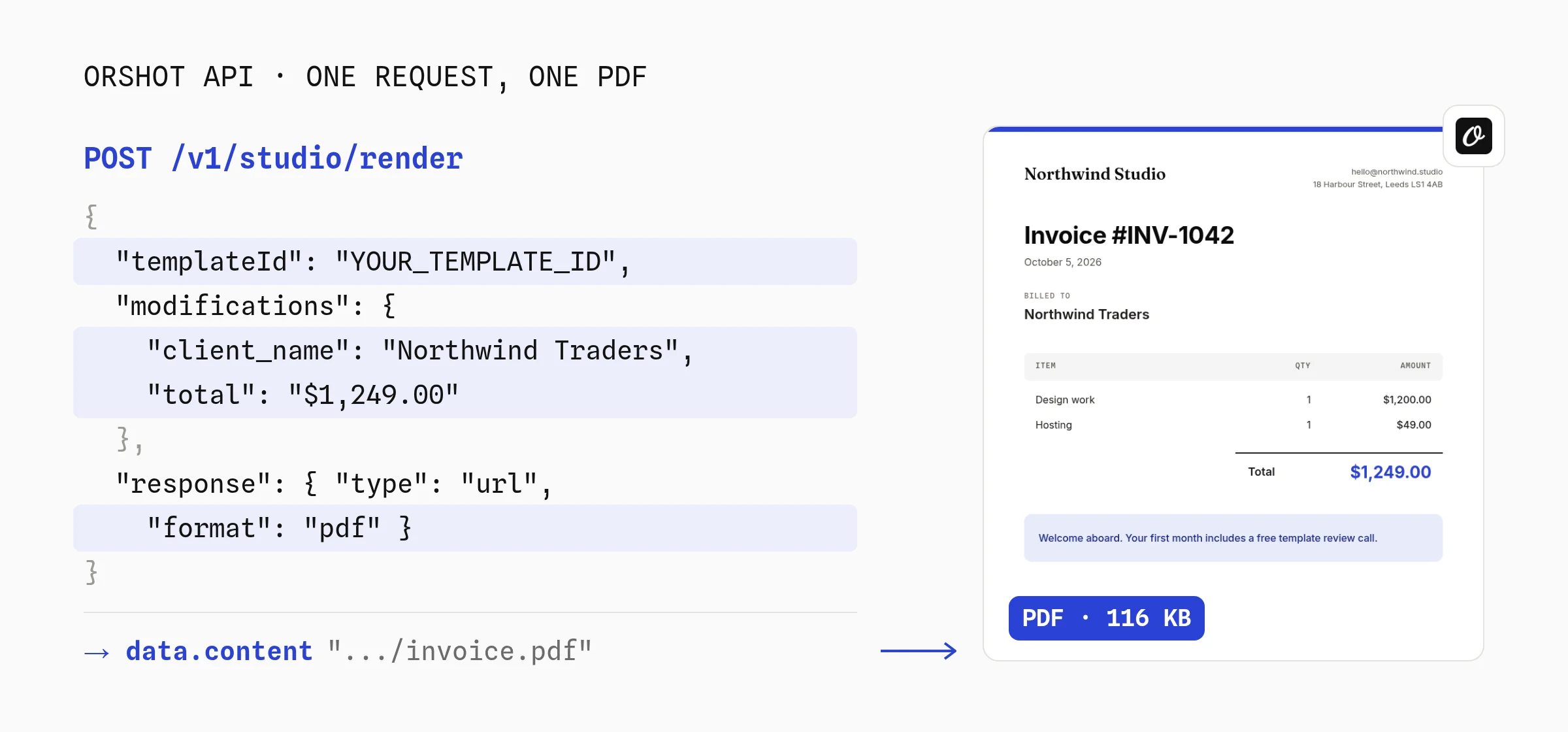
No dependencies. Line items are one text layer per column, joined with \n.
const res = await fetch("https://api.orshot.com/v1/studio/render", {
  method: "POST",
  headers: {
    Authorization: `Bearer ${process.env.ORSHOT_API_KEY}`,
    "Content-Type": "application/json",
  },
  body: JSON.stringify({
    templateId: "YOUR_TEMPLATE_ID",
    modifications: {
      "title:invoiceNumber": "INV-1042",
      client_name: "Northwind Traders",
      items_product: "Design work\nHosting",
      items_qty: "1\n1",
      items_total: "$1,200.00\n$49.00",
      total: "$1,249.00",
    },
    response: { type: "url", format: "pdf" },
  }),
});

const { data } = await res.json();
console.log(data.content); // https://storage.orshot.com/.../invoice.pdf
The same call with the orshot package from npm, plus print settings.
import { Orshot } from "orshot";

const orshot = new Orshot(process.env.ORSHOT_API_KEY);

const { data } = await orshot.renderFromStudioTemplate({
  templateId: "YOUR_TEMPLATE_ID",
  modifications: { client_name: "Northwind Traders", total: "$1,249.00" },
  response: { type: "url", format: "pdf" },
  pdfOptions: { dpi: 300, colorMode: "cmyk" },
});
I rendered exactly these values with the invoice above on October 9, 2026. The PDF came back at 116 KB with its fonts embedded, and both line items lined up under their headers with no CSS work.
What's built in that you'd otherwise write yourself:
- Multi-page and long content. Fill every page in one call with
page2@fieldkeys, or set a text layer to Flow and it spills onto as many pages as it needs, with page numbers. - Print settings.
pdfOptionssets margins, DPI, CMYK and JPEG compression for photo-heavy files (often 80 to 90% smaller). - Async renders. Set
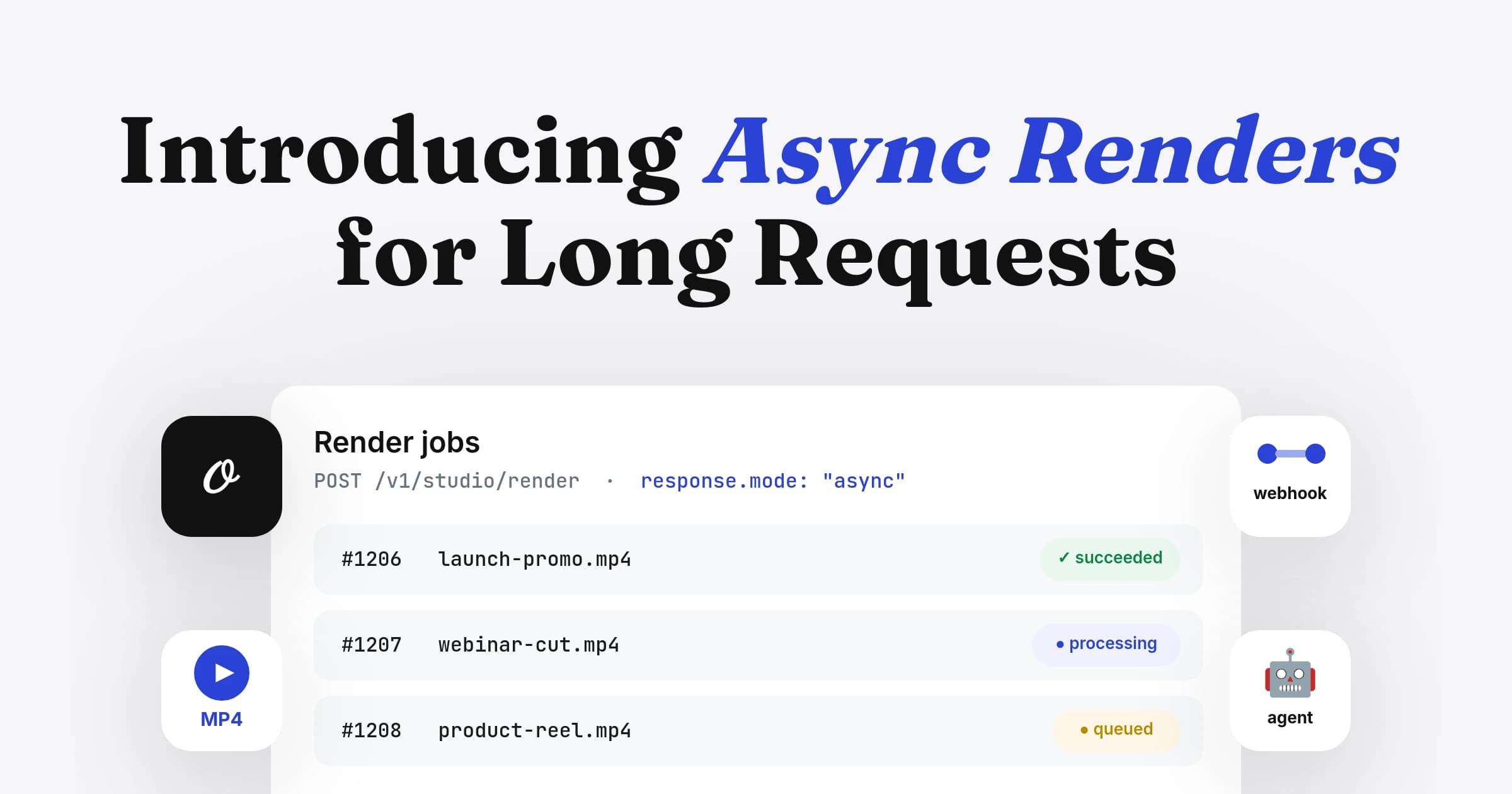
response.modetoasyncwith awebhook_urlfor long documents. - Hosting. Files are kept for at least a year, or renders go to your own S3, R2, Google Drive or Dropbox.
- Other formats from the same design. The invoice can also render as a PNG for an email preview.
Full options are in the PDF generation docs and the Node.js SDK reference.
We're using Orshot as a template builder inside an existing workflow, and the speed of shipping features has been impressive.
 Michael OssendrijverCEO, Incubeta
Or Fill a PDF Template With pdfme
pdfme is the open source option: it fills a JSON template (a base PDF plus named fields at fixed positions) in about 4 ms per PDF. You can build the template in pdfme's React designer.
import { generate } from "@pdfme/generator";
import { BLANK_PDF } from "@pdfme/common";
import { text } from "@pdfme/schemas";
import fs from "node:fs";

const template = {
  basePdf: BLANK_PDF,
  schemas: [
    [
      { name: "invoice_no", type: "text", position: { x: 20, y: 20 }, width: 170, height: 12, fontSize: 24 },
      { name: "client", type: "text", position: { x: 20, y: 36 }, width: 170, height: 8 },
      { name: "total", type: "text", position: { x: 20, y: 60 }, width: 170, height: 10, fontSize: 16, alignment: "right" },
    ],
  ],
};

const inputs = [
  { invoice_no: "Invoice INV-1042", client: "Billed to Northwind Traders", total: "Total: $1,249.00" },
];

const pdf = await generate({ template, inputs, plugins: { text } });
fs.writeFileSync("invoice.pdf", pdf);
Install @pdfme/generator, @pdfme/common and @pdfme/schemas. The schemas package makes it 74 MB, mostly an icon set (22 MB), a barcode library (12 MB) and date-fns (12 MB).
The pdfme designer is a React component you host, so letting non-developers edit templates means building that page into your app.
When a Template API Is the Wrong Choice
- A designer changes the layout without a deploy
- No Chrome, fonts or PDF code in your app: one HTTP call
- Hosted links, print settings and multi-page fills built in
- A network round trip, so it suits queues and background jobs more than a synchronous click
- Paid per page after 100 free credits a month, while PDFKit costs nothing per page
- You send data, not HTML, so arbitrary HTML belongs in part 1
Orshot pricing, checked October 9, 2026: 100 free credits a month (1 credit = 1 PDF page), then $39 for 1,500 pages, $160 for 20,000 or $349 for 75,000.
Orshot fits PDFs that run on a schedule or trigger, like certificates from a spreadsheet (the Google Sheets certificate tutorial walks through it) or a Google Sheets invoice generator that saves each PDF to Drive.
The PDF generation API page covers reports, quotes and more.
Best for: Orshot suits PDFs a designer owns that run on a schedule or trigger; pdfme suits teams that want an open source template engine and will host its designer themselves.
4. Merge or Fill Existing PDFs With pdf-lib
pdf-lib (17.1M weekly downloads) runs in plain Node with no browser. pdf-lib doesn't lay out new documents, so pair it with one of the generators above.
Pick this if the PDF already exists and you need to merge files, fill a form, or stamp text on it.
import { PDFDocument } from "pdf-lib";
import fs from "node:fs";

const merged = await PDFDocument.create();
for (const file of ["invoice.pdf", "terms.pdf"]) {
  const src = await PDFDocument.load(fs.readFileSync(file));
  const pages = await merged.copyPages(src, src.getPageIndices());
  pages.forEach((page) => merged.addPage(page));
}
fs.writeFileSync("merged.pdf", await merged.save());
import { PDFDocument } from "pdf-lib";
import fs from "node:fs";
const pdfDoc = await PDFDocument.load(fs.readFileSync("form.pdf"));
const form = pdfDoc.getForm();
form.getTextField("client_name").setText("Northwind Traders");
form.flatten(); // bake the values in so they can't be edited
fs.writeFileSync("filled.pdf", await pdfDoc.save());I ran both on October 9, 2026. The merge produced a two-page file, and the filled form had no editable fields left after flatten().
pdf-lib's latest release, 1.17.1, is from November 6, 2021. pdf-lib still works on Node 24, but there has been no release since.
Best for: pdf-lib suits merging generated PDFs with existing files, filling form fields and stamping text, never laying out new pages.
5. Generate PDFs on AWS Lambda and Vercel
Stock Chrome doesn't fit in AWS Lambda: its smallest Linux build is 261 MB, over the 250 MB code limit. The fix is puppeteer-core with @sparticuz/chromium, a 67 MB package that unpacks Chromium into /tmp on cold start.
Pick this if your PDF code runs in a serverless function.
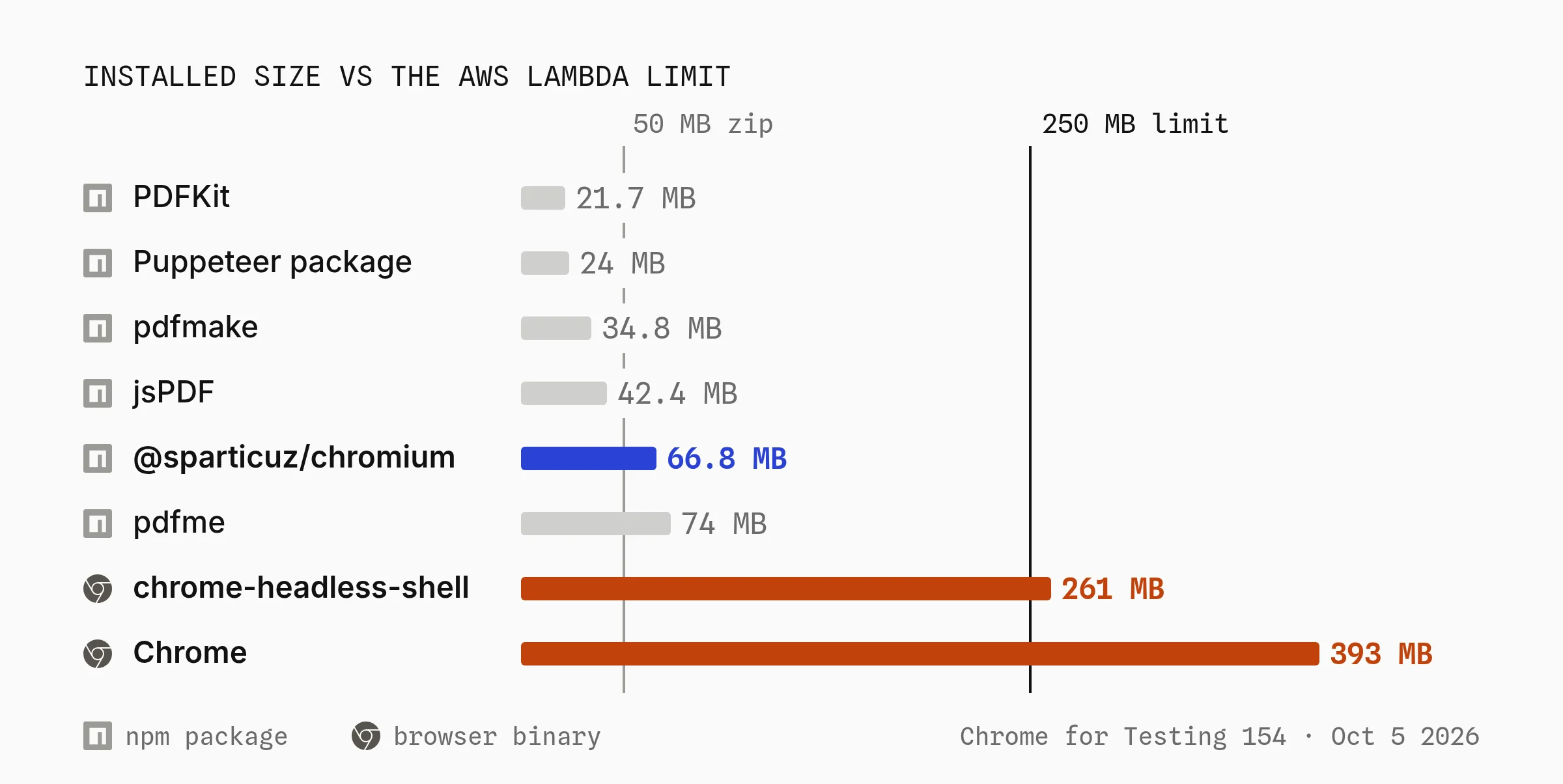
Every library without a browser fits with room to spare. The limits that matter, from the AWS Lambda quotas and Vercel Functions limits pages on October 5, 2026:
| Limit | AWS Lambda | Vercel Functions |
|---|---|---|
| Code size, unzipped | 250 MB, including layers | 250 MB (enforced by AWS), 5 GB in beta |
| Zip upload | 50 MB direct, larger through S3 | Handled by the build |
| Memory | 128 MB to 10,240 MB | 2 GB on Hobby, 4 GB on Pro |
| Response body | 6 MB synchronous | 4.5 MB |
| Max duration | 15 minutes | 300 s on Hobby, 800 s on Pro |
Step 1: Run Puppeteer on AWS Lambda
Install puppeteer-core and @sparticuz/chromium, launch with the package's path and flags, and upload the PDF to S3 instead of returning it.
import chromium from "@sparticuz/chromium";
import puppeteer from "puppeteer-core";
import { S3Client, PutObjectCommand } from "@aws-sdk/client-s3";

const s3 = new S3Client({});

export const handler = async (event) => {
  const browser = await puppeteer.launch({
    args: await puppeteer.defaultArgs({ args: chromium.args, headless: "shell" }),
    executablePath: await chromium.executablePath(),
    headless: "shell",
  });

  try {
    const page = await browser.newPage();
    await page.setContent(event.html, { waitUntil: "networkidle0" });
    const pdf = await page.pdf({ format: "A4", printBackground: true });

    // Return a key, not the bytes: Lambda responses cap at 6 MB
    const key = `invoices/${event.invoiceId}.pdf`;
    await s3.send(new PutObjectCommand({ Bucket: process.env.BUCKET, Key: key, Body: pdf, ContentType: "application/pdf" }));
    return { key };
  } finally {
    await browser.close();
  }
};
What bites on Lambda, per the @sparticuz/chromium README and my own measurements:
- The package is over the 50 MB zip upload. Most of it is one 64 MB Brotli file. Deploy through S3, or put Chromium in a Lambda layer.
- x86_64 only. The npm package ships x64 binaries. For arm64 (Graviton), use
@sparticuz/chromium-minwith the arm64 pack from its GitHub releases. - Pin matching versions. @sparticuz/chromium 153.0.0 ships Chromium 153, which pairs with puppeteer-core 25.11.0. Newer Puppeteer releases expect newer Chrome (25.13.0, out October 8, expects Chrome 155).
- Memory. The README asks for 512 MB at least and recommends 1,600 MB or more. At 1,769 MB a Lambda gets one full vCPU.
- Cold starts unpack 199 MB. That took 0.5 to 0.8 s on my laptop; a Lambda vCPU is slower.
- Fonts. Lambda has no fonts, and the package only ships Open Sans. Put your
.ttffiles in afontsfolder in the bundle (/var/task/fonts) or a layer at/opt/fonts. - Await
defaultArgs(). In puppeteer-core 25 it returns a Promise, so withoutawaityou pass a Promise instead of the list of flags. - Bundlers break it. If esbuild or webpack bundles @sparticuz/chromium, you get
The input directory ".../bin" does not exist. Mark it as external.
Step 2: Run Puppeteer on Vercel
Vercel Functions run on AWS, so the same limit and package apply. In Next.js, keep both packages out of the bundle and ship Chromium's bin folder:
import chromium from "@sparticuz/chromium";
import puppeteer from "puppeteer-core";

export const maxDuration = 60;

export async function POST(req) {
  const { html } = await req.json();
  const browser = await puppeteer.launch({
    args: await puppeteer.defaultArgs({ args: chromium.args, headless: "shell" }),
    executablePath: await chromium.executablePath(),
    headless: "shell",
  });

  try {
    const page = await browser.newPage();
    await page.setContent(html, { waitUntil: "networkidle0" });
    const pdf = await page.pdf({ format: "A4", printBackground: true });
    return new Response(pdf, { headers: { "Content-Type": "application/pdf" } });
  } finally {
    await browser.close();
  }
}
/** @type {import('next').NextConfig} */
const nextConfig = {
serverExternalPackages: ["@sparticuz/chromium", "puppeteer-core"],
outputFileTracingIncludes: {
"/api/pdf": ["./node_modules/@sparticuz/chromium/bin/**"],
},
};
export default nextConfig;- Large functions. Vercel's beta raises the limit to 5 GB, on by default for new projects (
VERCEL_SUPPORT_LARGE_FUNCTIONS=1for existing ones). That fixes size, not cold starts. - Response size. The body limit is 4.5 MB. For photo-heavy PDFs, upload to storage and return a link.
Or Skip Chrome in Your Function
Three ways out of the Chromium setup above:
- No HTML needed? pdfmake or PDFKit in a normal route handler deploys with no config.
- Need Chrome anyway? Run it in a long-lived container (ECS, Cloud Run, Fly, a VM) and reuse the browser, the 41 to 90 ms case in the speed chart.
- Designed documents? Call a template API from the function. The function stays a few KB and the PDF comes back as a link, so the 4.5 MB and 6 MB response limits never apply.
Verdict: On Lambda or Vercel, pick PDFKit or pdfmake when you can skip HTML, and puppeteer-core with @sparticuz/chromium (1,600 MB memory, pinned versions) when you can't.
PDFKit vs Puppeteer: Which to Use
Use PDFKit for fixed, high-volume documents like receipts, labels and statements: 0.2 ms each and no browser in your deploy.
Use Puppeteer when the PDF has to match HTML you already have. Puppeteer took 46 to 90 ms per PDF warm and needs a Chrome build of 261 MB or more.
| Question | PDFKit | Puppeteer |
|---|---|---|
| Layout | Coordinates in code | HTML and CSS |
| Time per PDF, warm | 0.2 ms | 46 to 90 ms |
| What you deploy | 21.7 MB of JavaScript | 24.0 MB plus Chrome (261 to 393 MB) |
| Long text and tables | You handle page breaks | Chrome handles page breaks |
Want PDFKit's footprint without placing coordinates? pdfmake runs on PDFKit and handles tables and page breaks for you.
Pick the Right Node.js PDF Library
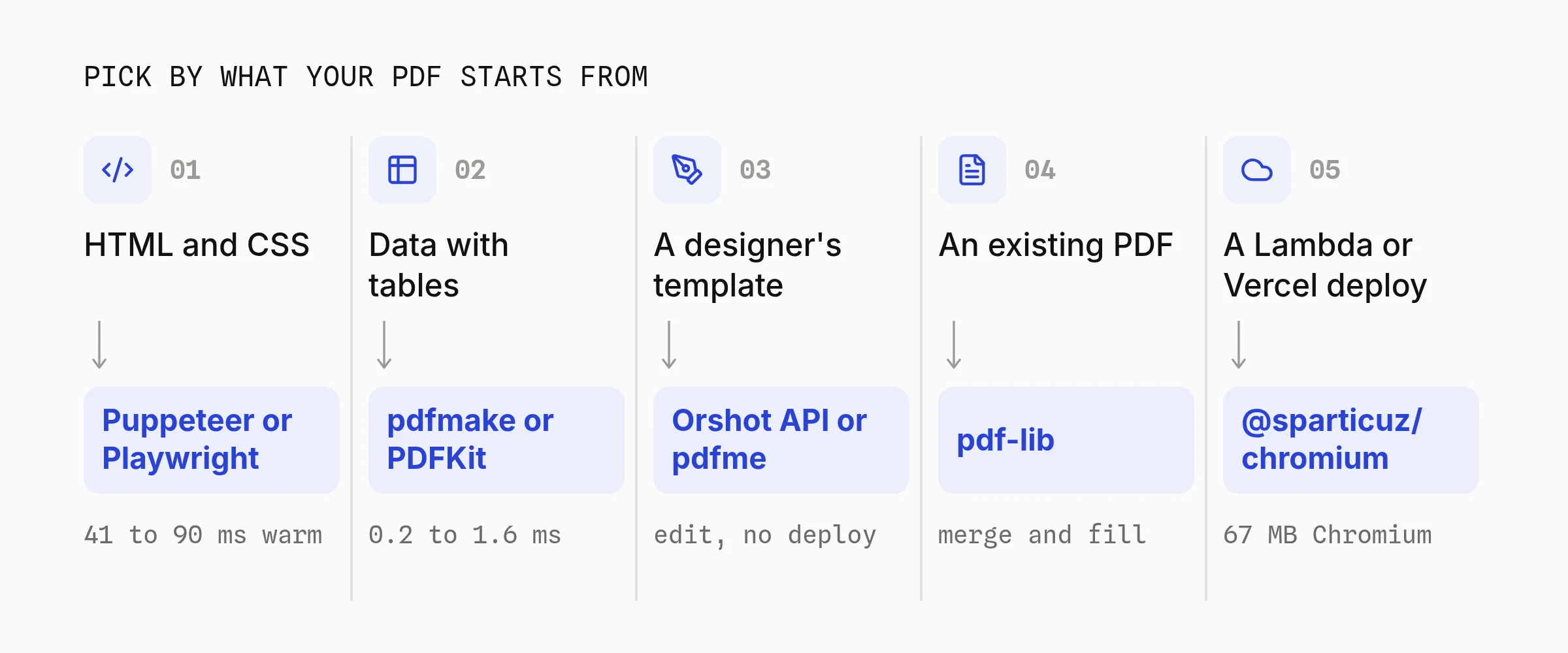
Pick by what your PDF starts from. HTML points to Puppeteer or Playwright, data with growing tables to pdfmake, fixed layouts to PDFKit and existing PDFs to pdf-lib.
A layout a designer owns points to a template API like Orshot, or pdfme if you'll host the designer yourself.
For hosted options beyond Orshot, I keep a comparison of PDF generation APIs, with verified pricing at three volumes. If you're moving off a hosted HTML template tool, the PDFMonkey alternative post maps the switch step by step.
Node.js PDF Generator FAQ
What is the best PDF library for Node.js?
Is Puppeteer or Playwright better for PDF generation?
Can I generate a PDF in Node.js without Puppeteer?
How do I automate PDF generation in Node.js?
How do I generate a PDF in memory without saving a file in Node.js?
How do I use a custom font in PDFKit?
How do I password-protect a PDF in Node.js?
How do I convert DOCX to PDF in Node.js?
Is pdf-lib still maintained?
Is html-pdf, html-pdf-node or wkhtmltopdf still a good choice?
Is there a free PDF library for Node.js?
What is Orshot?
Generate Your First PDF From Node.js
Sign up, copy the invoice template above and call it from Node with the fetch example in part 3. You get 100 free credits a month, no card needed.
If something doesn't work the way you expect, hit the chat button. I'm usually the one on the other end.
Researched and drafted with Claude, tested and edited by Rishi. Benchmarks run locally on October 5, 2026; visuals rendered with Orshot.