I build a design editor for a living, and developers building a Canva clone inside their product keep asking me the same question before they start: Konva or Fabric.js?
The pages that rank for it are either from 2022, vendor pages, or quote fps benchmarks nobody ran. So this post does two things. It gives you the real numbers, then walks through the editor features you'll actually build (text, images, pages, export, locking, server rendering) with the code for Konva, Fabric.js and Orshot Embed side by side.
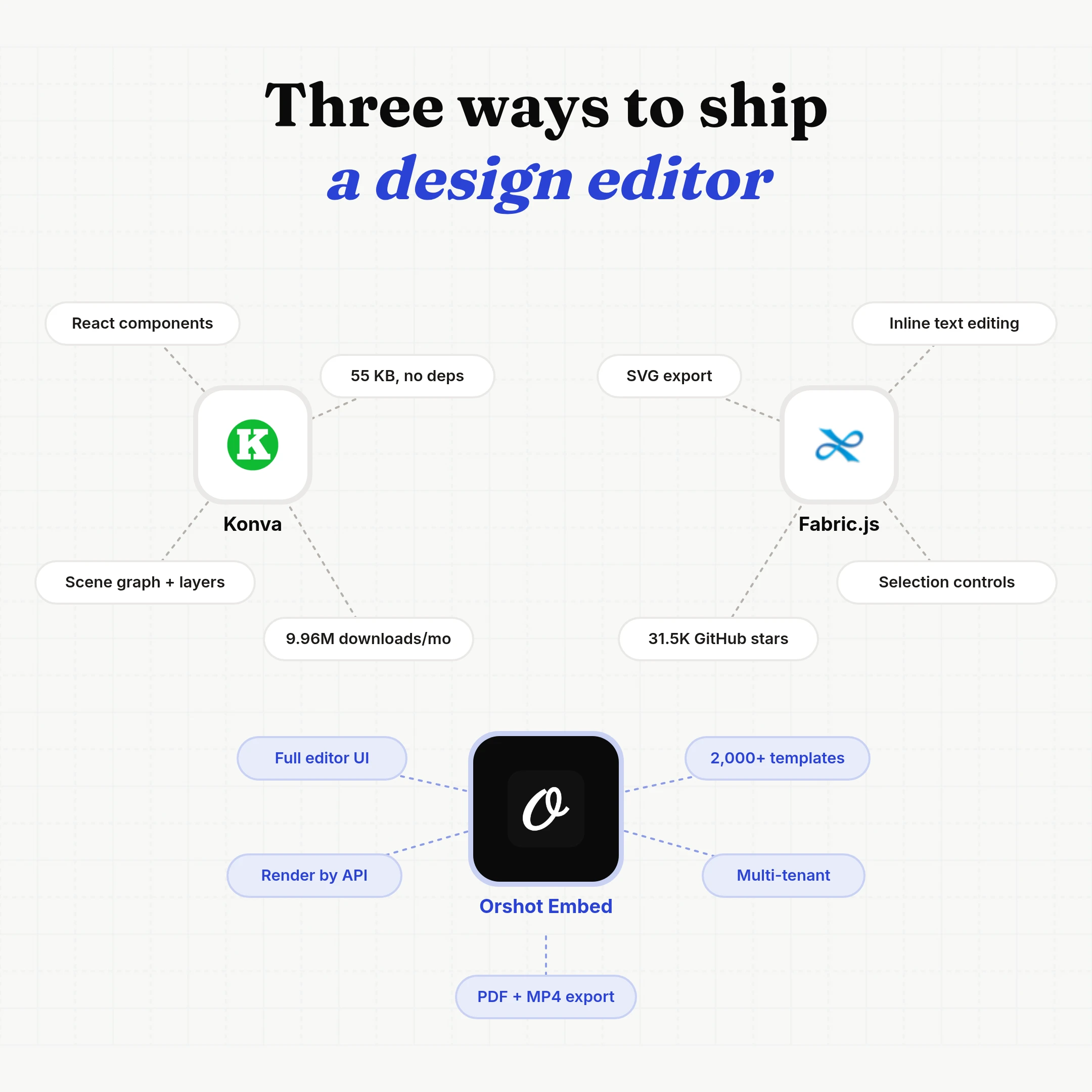
The short answer: use Konva if you're building in React and drawing lots of shapes, and Fabric.js if your users edit text on the canvas or you need SVG export. Neither gives you undo/redo, pages, PDF export, per-user storage or server rendering, so budget for those either way.
Konva vs Fabric.js by the numbers
 Konva Konva |  Fabric.js Fabric.js | |
|---|---|---|
| npm downloads / month | 9.96M | 3.58M |
| React bindings / month | 7.58M (react-konva) | None official |
| GitHub stars | 14.8K | 31.5K |
| First released | 2015 | 2010 |
| Latest version | 10.7.0 | 7.4.0 |
| Size, min + gzip | 55 KB | 92 KB |
| Dependencies | None | Optional canvas + jsdom |
| Open / closed issues | 1 / 1,603 | 468 open |
| Contributors | 186 | 295 |
| Official framework bindings | React, Vue, Svelte, Angular | None |
| Inline text editing | ||
| SVG export | ||
| License | MIT | MIT |
Stars say Fabric. Downloads say Konva, almost three to one, with react-konva alone at 7.58M a month. Konva is smaller, has zero dependencies and official React, Vue, Svelte and Angular bindings. Fabric is older and ships more editor behavior out of the box, mainly text editing and SVG export.
Konva's single open issue doesn't mean zero bugs: its maintainer closes issues fast. Numbers are from npm, bundlephobia and GitHub (Konva, Fabric.js), checked September 27, 2026.
Or skip the canvas: Orshot Embed
Both libraries draw shapes. Neither is an editor. Konva's own maintainer called them low-level when launching Polotno, the editor SDK built on top of Konva.
Orshot Embed is the editor itself, already built and hosted. You drop it into your app as an iframe or a React/Vue component, and your users design in it under your brand. When I built it, I skipped the canvas library entirely: every layer is a real HTML element, text is edited with a rich-text editor, and the server renders the same HTML and CSS in headless Chrome. So there's no textarea overlay, no blurry text on zoom, and PNG, PDF and MP4 come out of the same design.
| Konva | Fabric.js |  Orshot Embed Orshot Embed | |
|---|---|---|---|
| Inline text editing | Build it | ||
| Image replace, crop and masks | Build it | Build it | |
| Multi-page designs | Build it | Build it | |
| Undo / redo, snap guides | Build it | Build it | |
| PNG, PDF and MP4 export | PNG, JPEG | PNG, JPEG, SVG | |
| Per-user templates and permissions | Build it | Build it | |
| Render the same design by API | node-canvas | node-canvas | |
| Starter templates | 0 | 0 | 2,000+ |
| SVG export | |||
| Your own engine, plugins, self-hosting |
We're using Orshot as a template builder inside an existing workflow, and the speed of shipping features has been impressive.
 Michael OssendrijverCEO, Incubeta
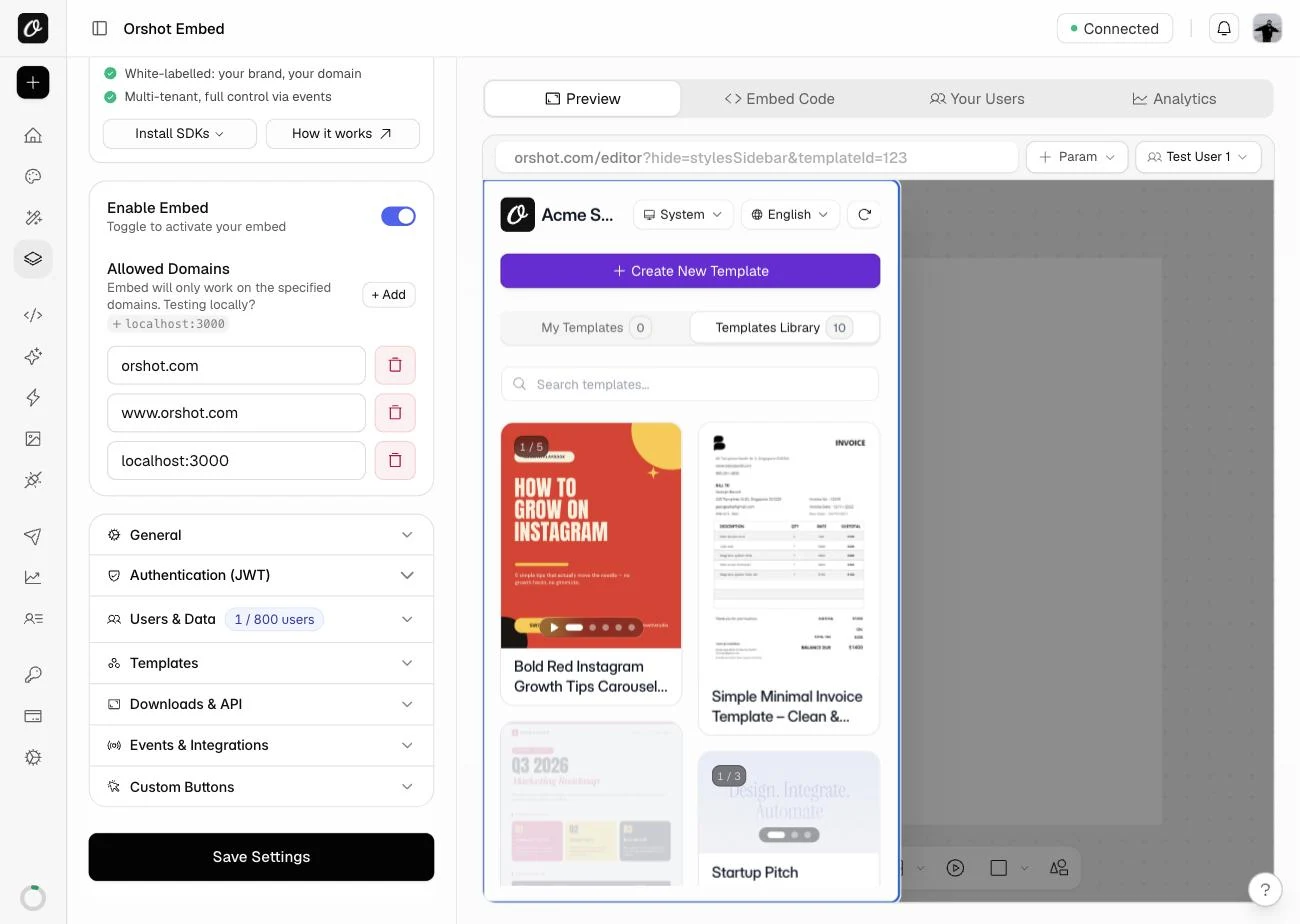
Your users start from any of our 2,000+ templates, forked into your workspace, or from yours.
Try it: a live Orshot Embed
"Acme Studio" is a made-up brand running a real embed. Switch templates, edit text, swap images; nothing is saved.
Press “Add to App” in the editor and this page receives the PNG, the way your app would.
Driving the editor from your own page (the orshot:embed:control messages below) needs the $349/mo plan. Already on Polotno? The Polotno migration guide maps each SDK call to its Orshot equivalent.
The rest of this post is the same editor feature built three ways.
How to add an editable text layer
Fabric ships IText and Textbox: double-click, a caret appears, selection and wrapping work on the canvas. Konva has no text editing. Its docs tell you to lay a <textarea> over the node and copy the value back on blur.
const text = new Konva.Text({
  x: 60, y: 60, text: "Summer sale", fontSize: 40, draggable: true,
});
layer.add(text);

// No built-in editing: overlay a textarea on double-click
text.on("dblclick dbltap", () => {
  const pos = text.absolutePosition();
  const box = stage.container().getBoundingClientRect();
  const area = document.createElement("textarea");
  Object.assign(area.style, {
    position: "absolute",
    top: `${box.top + pos.y}px`,
    left: `${box.left + pos.x}px`,
    width: `${text.width()}px`,
    fontSize: `${text.fontSize()}px`,
  });
  area.value = text.text();
  document.body.appendChild(area);
  area.focus();
  area.addEventListener("blur", () => {
    text.text(area.value);
    area.remove();
  });
});
import { Canvas, Textbox } from "fabric";
const canvas = new Canvas("editor");
const text = new Textbox("Summer sale", {
left: 60, top: 60, width: 320, fontSize: 40,
originX: "left", originY: "top", // v7 defaults to center
});
canvas.add(text);
canvas.setActiveObject(text);// Users edit text in the editor already. From your app,
// set the value of any text layer by its parameter name.
const iframe = document.querySelector("iframe");
iframe.contentWindow.postMessage(
{ type: "orshot:embed:control", modifications: { headline: "Summer sale" } },
"*",
);Watch out for:
- The Konva overlay is the happy path. Konva's own page says it doesn't re-wrap while resizing, the caret goes stale when a web font loads late, and one style applies to the whole node.
- Rich text is the long tail in Fabric too. Its curved-text request has 119 comments and text wrapping 76.
- Someone sells a react-konva rich-text editor for $149. That's the size of the job.
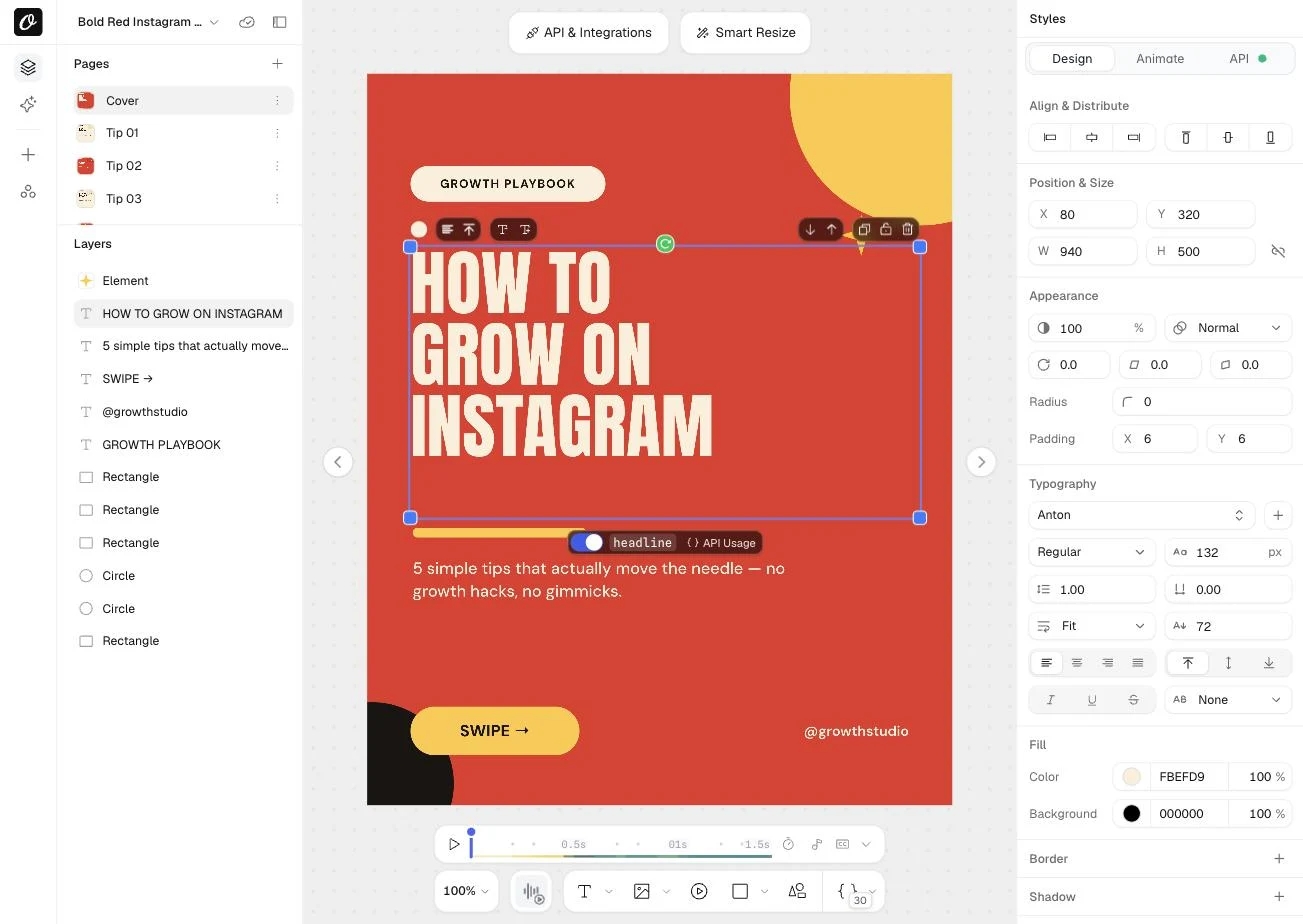
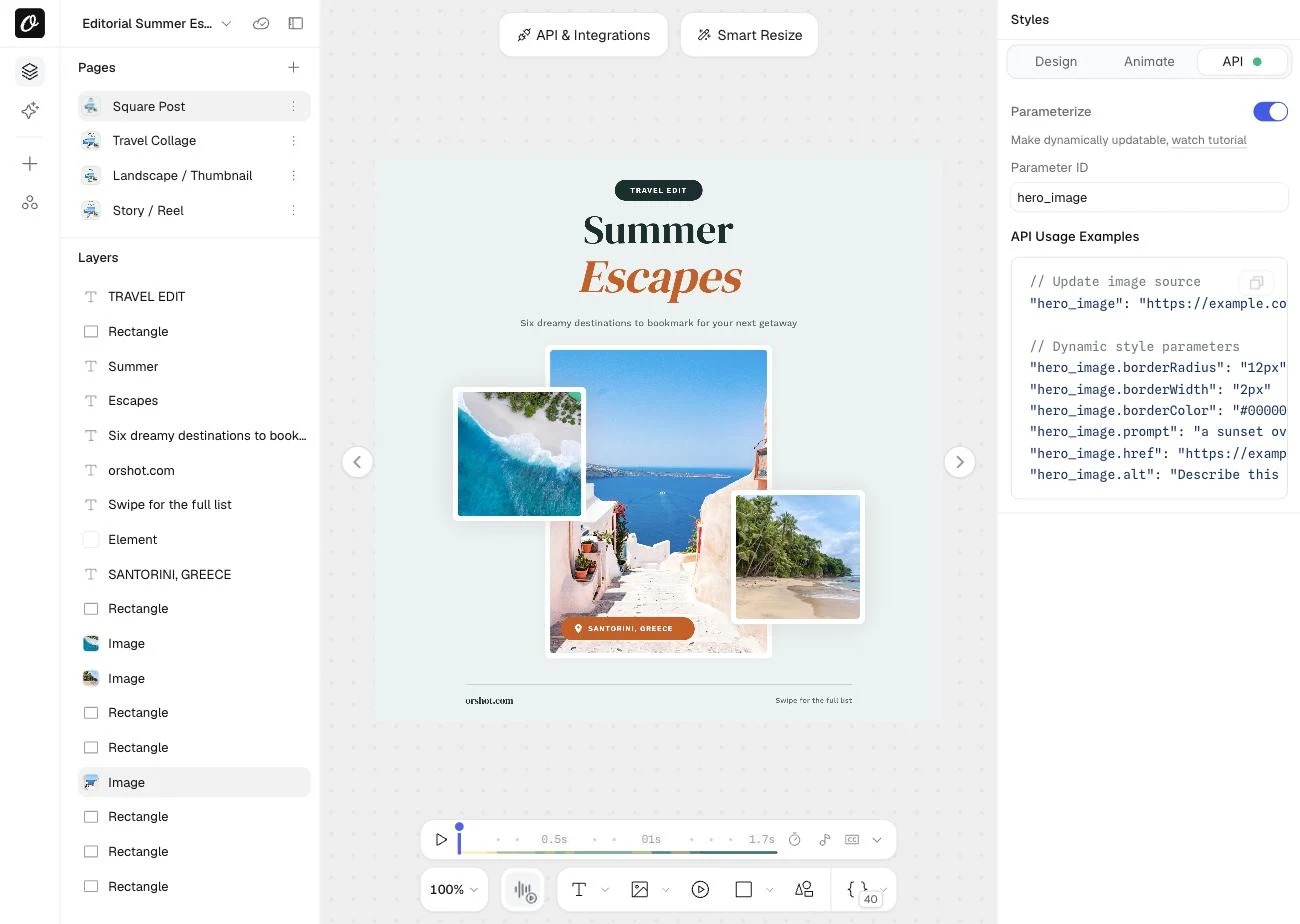
With Orshot Embed: mixed styles, fit-to-box, Google and custom fonts work out of the box, and any text layer can be toggled into an API field like the headline above. Edit text in the live editor.
How to add an image layer
Both libraries load an image and give you drag handles. Replacing, cropping, masking and background removal are yours.
Konva.Image.fromURL("https://example.com/photo.jpg", (img) => {
  img.setAttrs({ x: 80, y: 60, width: 400, height: 300, draggable: true });
  layer.add(img);
  layer.add(new Konva.Transformer({ nodes: [img] }));
});
import { FabricImage } from "fabric";
const img = await FabricImage.fromURL("https://example.com/photo.jpg", {
crossOrigin: "anonymous",
});
img.set({ left: 80, top: 60, originX: "left", originY: "top" });
img.scaleToWidth(400);
canvas.add(img);
canvas.setActiveObject(img);// Swap the photo in any image layer by its parameter name
iframe.contentWindow.postMessage(
{
type: "orshot:embed:control",
modifications: { hero_image: "https://example.com/photo.jpg" },
},
"*",
);Watch out for:
- Cross-origin images taint the canvas. Without CORS headers and
crossOrigin: "anonymous",toDataURL()throws the moment a user exports. - Crop is a separate feature. Both need a crop mode with its own handles; Fabric only added cropping controls, as an extension, in recent 7.x releases.
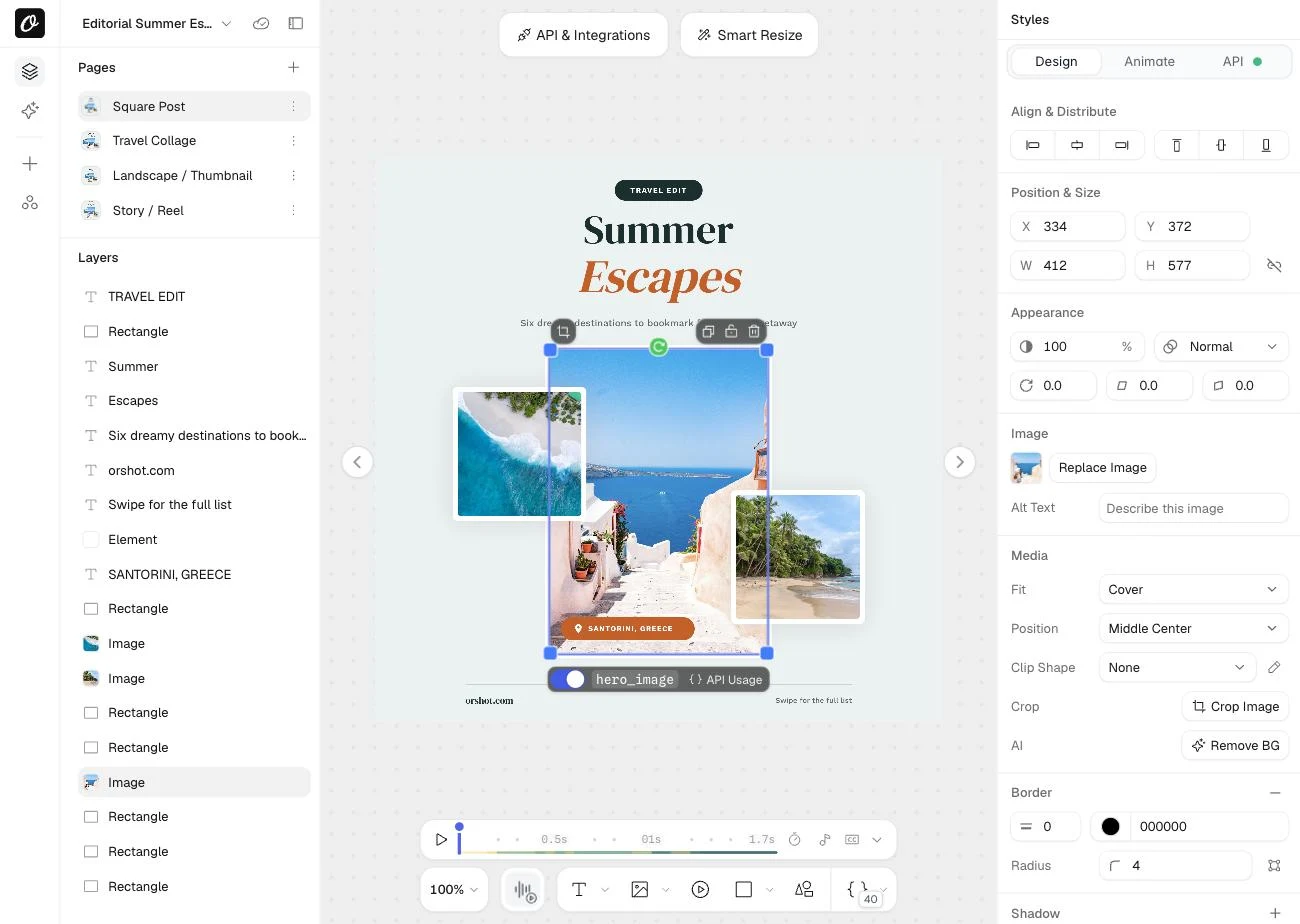
With Orshot Embed: users replace, crop and mask images from the image panel, and your app can swap photos in by URL. Swap a photo in the live editor.
How to build multi-page designs
Carousels, decks and "one design in four sizes" all need pages. Neither library has the concept, so you keep a list of page states and swap them in.
const pages = [{ shapes: [] }, { shapes: [] }];
let current = 0;

function showPage(i) {
  current = i;
  layer.destroyChildren();
  pages[i].shapes.forEach((s) => layer.add(new Konva.Rect(s)));
}
const pages = [canvas.toJSON()];
let current = 0;
async function showPage(i) {
pages[current] = canvas.toJSON(); // save the page you're leaving
current = i;
await canvas.loadFromJSON(pages[i] ?? {});
canvas.requestRenderAll();
}// Jump to page 2 and fill its layers
iframe.contentWindow.postMessage(
{ type: "orshot:embed:control", pageIndex: 2, modifications: { headline: "Tip 01" } },
"*",
);
// Or fill any page without switching to it
iframe.contentWindow.postMessage(
{ type: "orshot:embed:control", modifications: { "page3@headline": "Tip 02" } },
"*",
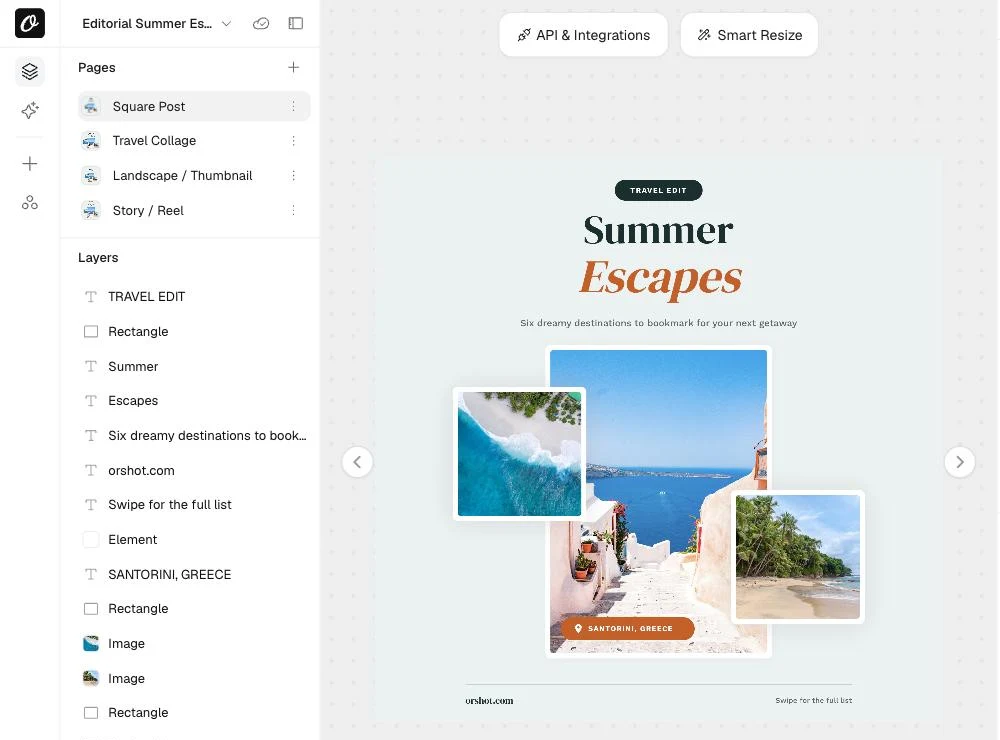
);With Orshot Embed: pages, page thumbnails, reordering and Smart Resize (one design re-laid out for every size) are built in, and a multi-page design exports as one PDF. Flip through the carousel in the live editor.
How to load a saved design or template
Saving is easy. Loading a design back months later, after a library upgrade, is where it bites. Konva's own docs warn that toJSON() suits only very small apps and recommend keeping your own state.
// Recommended: store your own document and rebuild nodes from it
const doc = await db.designs.get(designId);
layer.destroyChildren();
doc.shapes.forEach((s) => layer.add(new Konva.Rect(s)));

// Quick but fragile: Konva's own JSON
const stage = Konva.Node.create(doc.konvaJson, "container");
const json = await db.designs.get(designId);
// JSON saved by v5 can render differently in v6/v7
// (renamed classes, center origin by default in v7)
await canvas.loadFromJSON(json);
canvas.requestRenderAll();// Open any template in the user's editor, pre-filled
iframe.contentWindow.postMessage(
{
type: "orshot:embed:control",
templateId: "481",
modifications: { headline: "Acme spring launch" },
},
"*",
);With Orshot Embed: designs are stored per user (pass a userId) and your server hears about every save through a webhook. Users start from your templates or any of the 2,000+ you fork from our library, and the originals stay protected. Switch templates in the live editor.
How to export PNG and PDF
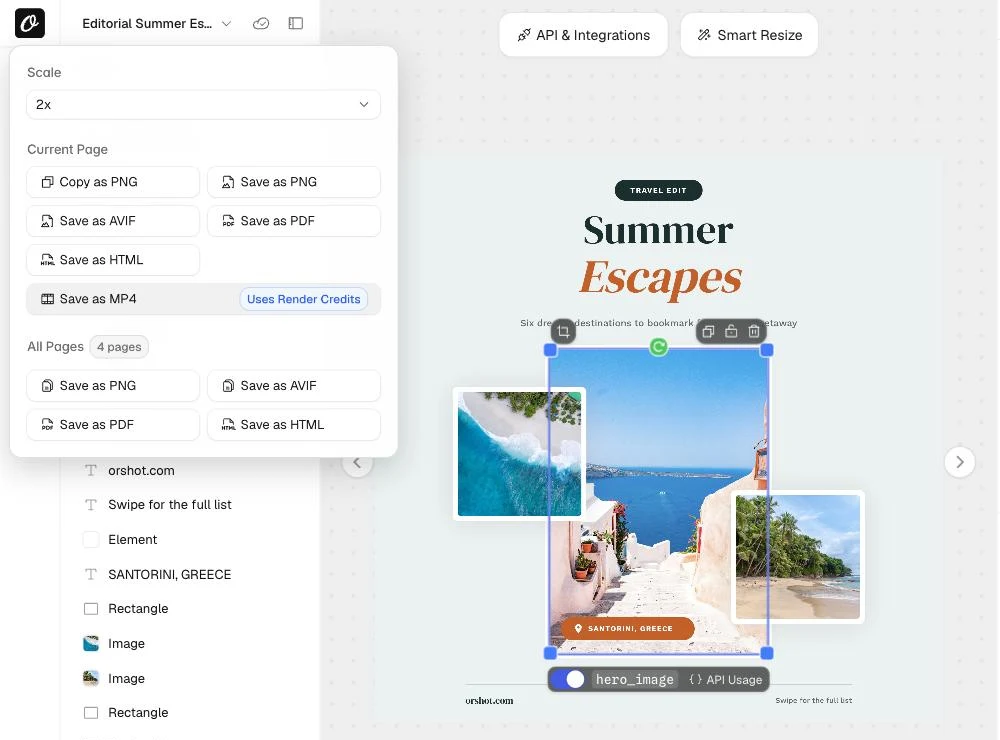
PNG at 2x works in both libraries. SVG is where they split: Fabric has toSVG(), Konva doesn't and won't. PDF is DIY in both, and Fabric's "how do I convert to PDF" issue has 69 comments.
import { jsPDF } from "jspdf";

const png = stage.toDataURL({ pixelRatio: 2 });

// PDF: rasterize, then place the image yourself
const pdf = new jsPDF({ unit: "px", format: [stage.width(), stage.height()] });
pdf.addImage(png, "PNG", 0, 0, stage.width(), stage.height());
pdf.save("design.pdf");
const png = canvas.toDataURL({ format: "png", multiplier: 2 });
const svg = canvas.toSVG();
// PDF: convert the SVG (svg2pdf.js) or rasterize with jsPDF// Ask the embed for the user's current design
iframe.contentWindow.postMessage(
{ type: "orshot:request:template", requestId: "export-1", format: "pdf" },
"*",
);
window.addEventListener("message", (e) => {
if (!e.origin.includes("orshot.com")) return;
if (e.data.type === "orshot:template:content") upload(e.data.data.content);
});With Orshot Embed: users download PNG, AVIF, PDF, HTML and MP4 (one page or all), and every download fires an event your app can catch. No SVG, though: if your users need vector SVG, that's a point for Fabric. Download a design from the live editor.
How to lock layers and user actions
Users will break templates if you let them. Both libraries can freeze an object on the canvas. Deciding who may delete, upload or add pages is app logic you write.
logo.draggable(false);
logo.listening(false); // no clicks, no transformer

// Per-user rules (who can delete, upload...) are yours to enforcelogo.set({
selectable: false,
evented: false,
lockMovementX: true,
lockMovementY: true,
});
// Per-user rules (who can delete, upload...) are yours to enforceimport jwt from "jsonwebtoken";
// Sign who the user is and what they can't do
const token = jwt.sign(
{ sub: user.id, permissions: { "template/delete": true, "page/add": true } },
process.env.ORSHOT_SIGNING_SECRET,
{ expiresIn: "15m" },
);
const src = `https://orshot.com/embeds/YOUR_EMBED_ID?token=${token}`;With Orshot Embed: locked layers, master templates that open as copies, and per-user permissions for saving, deleting, uploads, fonts, pages and downloads, set in the dashboard or per session in the token.
How to render a design on a server
The moment users design something, someone asks for bulk exports, scheduled posts or an API. Then the design has to render without a browser.
// Konva 10: Node backends are opt-in now
import Konva from "konva";
import "konva/canvas-backend"; // npm i konva canvas

const stage = new Konva.Stage({ width: 1080, height: 1080 });
// rebuild layers from your stored document, then:
const png = stage.toDataURL({ pixelRatio: 1 });
// Fabric 7, Node 20+
import { StaticCanvas, FabricText } from "fabric/node"; // npm i fabric canvas jsdom
const canvas = new StaticCanvas(null, { width: 1080, height: 1080 });
canvas.add(new FabricText("Summer sale", { left: 540, top: 540 }));
canvas.renderAll();
const png = canvas.toDataURL();curl -X POST "https://api.orshot.com/v1/studio/render" \
-H "Authorization: Bearer YOUR_API_KEY" \
-H "Content-Type: application/json" \
-d '{
"templateId": "TEMPLATE_ID",
"modifications": {
"headline": "Summer sale",
"hero_image": "https://example.com/photo.jpg"
},
"response": { "type": "url", "format": "png" }
}'Watch out for:
- Konva 10 dropped built-in Node support. Code that worked on v9 fails until you import
konva/canvas-backendorkonva/skia-backend(setup docs). - Fonts must be registered with node-canvas separately, or server output falls back to a default font.
- You now ship native
canvasbinaries, and Fabric in Node has a history of memory leaks under load.
With Orshot Embed: the template a user saves is already an endpoint. Change text and images per request and get PNG, PDF or MP4 back from REST, n8n, Make or Zapier.
How to use it in React
If you want a React canvas library, Konva wins: react-konva turns shapes into components. Fabric has no official bindings, so you keep its object tree in sync with your state by hand.
import { Stage, Layer, Rect, Text } from "react-konva";

export function Editor({ items }) {
  return (
    <Stage width={1080} height={1080}>
      <Layer>
        {items.map((it) => (
          <Rect key={it.id} {...it} draggable />
        ))}
        <Text text="Summer sale" x={40} y={40} fontSize={48} />
      </Layer>
    </Stage>
  );
}
import { useEffect, useRef } from "react";
import { Canvas, Rect } from "fabric";
export function Editor({ items }) {
const el = useRef(null);
const fc = useRef(null);
useEffect(() => {
fc.current = new Canvas(el.current, { width: 1080, height: 1080 });
return () => fc.current.dispose();
}, []);
useEffect(() => {
fc.current.clear();
items.forEach((it) => fc.current.add(new Rect(it)));
}, [items]);
return <canvas ref={el} />;
}import { OrshotEmbed } from "@orshot/embed-react";
export function Editor({ user }) {
return (
<div style={{ height: 720 }}>
<OrshotEmbed
embedId="YOUR_EMBED_ID"
templateId="TEMPLATE_ID"
onTemplateUpdate={(t) => saveDesign(user.id, t)}
/>
</div>
);
}Watch out for:
- react-konva 19.3 needs React 19.3 or newer. On an earlier React 19, pin an older 19.x.
- Both libraries break on server render in Next.js (see react-konva's SSR issue). Load the canvas with
dynamic(() => import(...), { ssr: false }).
With Orshot Embed: it's an iframe, so the same editor runs in React, Vue, Rails, PHP or WordPress, with no SSR edge cases.
What building it costs
The "Watch out for" lists above are where editor projects run long. Toggle what your editor needs, set your costs, and compare building against buying over one to three years.
Building costs about $77.7k over 2 years. Orshot Embed: $3.8k.
Which one should you pick?
- Konva if you're drawing lots of interactive shapes in React and text is a label, not a document.
- Fabric.js if users edit text on the canvas and you need SVG for print, and you're fine pinning versions.
- Orshot Embed if the goal is "let our users make designs from templates, then render them." That's a product, not a library choice.
Add Orshot Embed with your coding agent
Using Claude Code, Cursor or Codex? Paste this and it will wire the editor into your app, with per-user templates and a render endpoint.
Add Orshot Embed (a white-label design editor) to this app.

Docs to read first:
- https://orshot.com/docs/orshot-embed/introduction
- https://orshot.com/docs/orshot-embed/react-sdk (or vue-sdk, or the plain iframe)
- https://orshot.com/docs/orshot-embed/per-user-data
- https://orshot.com/docs/orshot-embed/jwt-authentication
- https://orshot.com/docs/orshot-embed/events
- https://orshot.com/docs/orshot-embed/webhooks
- https://orshot.com/docs/api-reference/render-from-studio-template

Requirements:
1. Add an editor page that renders the embed for the signed-in user. Use @orshot/embed-react in React apps, otherwise the iframe at https://orshot.com/embeds/<EMBED_ID>.
2. Identify each user with a signed JWT created on the server (sub = our user id, short expiry) and pass it as ?token=. Never expose the signing secret or the Orshot API key to the browser.
3. Listen for orshot:template:create and orshot:template:update events and store the template id against our user.
4. Add a server endpoint that renders a saved template through POST https://api.orshot.com/v1/studio/render with modifications, using the API key from an environment variable.
5. Read EMBED_ID, ORSHOT_API_KEY and ORSHOT_SIGNING_SECRET from environment variables and add them to the example env file with empty values.

Before writing code: inspect the codebase, then propose a short plan (files to add or change, where the JWT is signed, where events are stored) and stop for my approval.
Fabric.js vs Konva: which is faster?
Konva or Fabric.js for a Canva clone?
What's the best React canvas library for a design editor?
Does Konva support SVG export?
Is upgrading Fabric.js to v6 or v7 a breaking change?
Can I render Konva or Fabric designs on a server?
Is Polotno built on Konva?
Can users start from templates in Orshot Embed?
The bottom line
Konva and Fabric are both good, MIT-licensed and maintained. Pick Konva for React and shapes, Fabric for text and SVG, then budget for every "Build it" in the table above, because that's where editor projects go long.
If what you really want is your users designing inside your app, skip the canvas and embed the editor.