A white-label design editor. Inside your product.
Your users design inside your app, under your brand. Hosted, multi-tenant, and every design renders by API.
React & Vue SDKs · JWT auth · Webhooks
Full Studio via iframe, React & Vue
Templates, layers, text, images, multipage. Drop-in React and Vue components, or a plain iframe.
Multi-tenant ready
Per-user template storage, JWT-scoped sessions and isolated data, built for platforms with many end users.
White-label
Custom title, icon, accent color. Remove Orshot branding on higher tiers.
Video Timelines, Audio, Subtitles ready
A white-label video editor in the same embed. Renders to MP4, WebM or GIF.
Copy, paste, your users are designing.
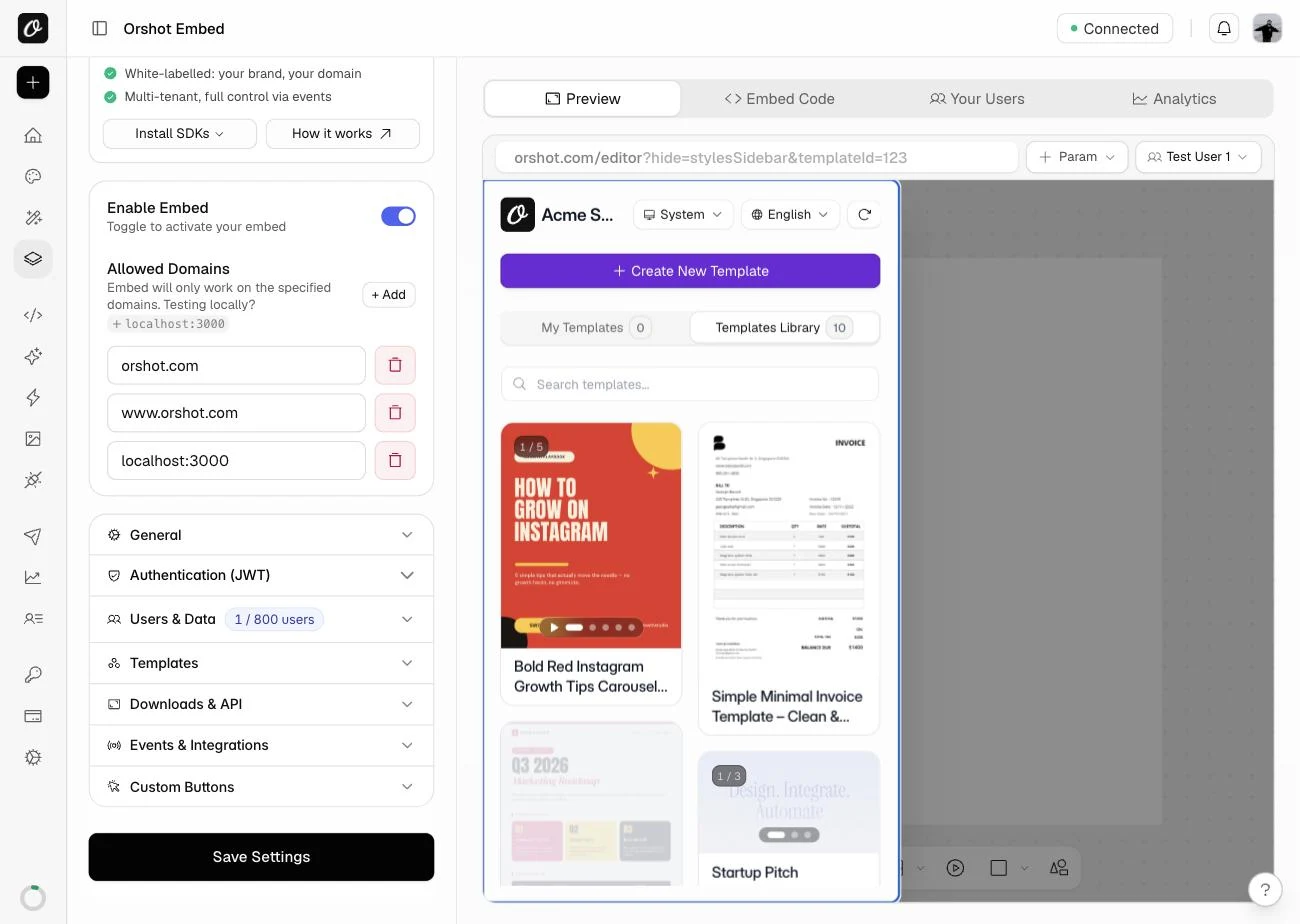
Turn on Embed, choose what users can do, and drop in an iframe or the React or Vue component.
- Enable Embed in workspace settings in one click
- Configure what users can and can't do
- Copy the embed code or use the React/Vue SDK
- Open with a specific template via URL params
npm i @orshot/embed-react<iframe
src="https://orshot.com/embeds/YOUR_EMBED_ID?userId=user_123"
title="Design editor"
allow="clipboard-write"
style="width: 100%; height: 720px; border: none;"
></iframe>React install: npm i @orshot/embed-react
import { OrshotEmbed } from "@orshot/embed-react";

export function Editor() {
  return (
    <div style={{ height: 720 }}>
      <OrshotEmbed
        embedId="YOUR_EMBED_ID"
        templateId="TEMPLATE_ID"
        modifications={{ headline: "Summer sale" }}
        onTemplateUpdate={(t) => save(t)}
      />
    </div>
  );
}
Vue install: npm i @orshot/embed-vue
<script setup>
import { OrshotEmbed } from "@orshot/embed-vue";
</script>

<template>
  <div style="height: 720px">
    <OrshotEmbed
      embed-id="YOUR_EMBED_ID"
      template-id="TEMPLATE_ID"
      :modifications="{ headline: 'Summer sale' }"
      @template:update="save"
    />
  </div>
</template>One embed. Thousands of users.
Pass a userId and each user gets a private template library. Workspace templates stay shared.
- Per-user template storage: each user sees only their own
- Workspace templates shared across all embed users
- JWT authentication for session security
- User IDs hashed server-side, no PII stored
Listen to events. Control from your app.
Hear every save and download, drive the editor from your code, and add buttons that call back into your app.
- Real-time events for every user action
- Post events to control the embed programmatically
- Custom buttons with callbacks to your app
- Webhook notifications for server-side workflows
window.addEventListener("message", (event) => {
  if (!event.origin.includes("orshot.com")) return;
  const { type, data } = event.data;

  switch (type) {
    case "orshot:template:update":
      saveDesign(data.id, data.pagesMeta);
      break;
    case "orshot:download:png":
    case "orshot:download:pdf":
      trackDownload(data);
      break;
  }
});
const iframe = document.querySelector("iframe");
// Fill layers by parameter name, or open another template pre-filled
iframe.contentWindow.postMessage(
{
type: "orshot:embed:control",
templateId: "481",
modifications: {
headline: "Summer sale",
hero_image: "https://example.com/photo.jpg",
"page2@headline": "Only on slide 2",
},
},
"*",
);// Ask for the user's current design (png, pdf or html)
iframe.contentWindow.postMessage(
{ type: "orshot:request:template", requestId: "export-1", format: "pdf" },
"*",
);
window.addEventListener("message", (event) => {
if (event.data.type === "orshot:template:content") {
upload(event.data.data.content); // data URI
}
});JWT authentication
Secure user sessions with signed tokens. Per-user templates and data isolation.
Webhooks
Get notified server-side when users create, update or delete templates.
Downloads
Let users download their designs directly from the embed. Configurable per embed.
Custom buttons
Add your own action buttons to the embed toolbar with callbacks to your app.
Multi-language
English, Portuguese, Spanish, French and more. Pass a language param and the UI adapts.
Domain-locked
Restrict the embed to your domains only. Wildcard support for staging environments.
Konva and Fabric.js draw the canvas. You build the editor.
Both are great canvas libraries. The toolbar, layers, pages, storage and renders around them are yours to build.
 Konva Konva |  Fabric.js Fabric.js |  Orshot Embed Orshot Embed | |
|---|---|---|---|
| Editing text on the canvas | You build it | ||
| Undo / redo and snap guides | You build it | You build it | |
| Multi-page designs | You build it | You build it | |
| PNG, PDF and MP4 export | PNG, JPEG | PNG, JPEG, SVG | |
| Per-user templates and permissions | You build it | You build it | |
| Render saved designs by API | Your servers | Your servers | |
| Starter templates | 0 | 0 | 2,000+ |
img.ly and Polotno sell an SDK. Orshot Embed is the running editor.
With an SDK you still host it, store each user's work and run the renders. Orshot Embed does all three for you.
 img.ly img.ly |  Polotno Polotno | Orshot Embed | |
|---|---|---|---|
| Price on the website | Sales quote | $249 or $899/mo | From $39/mo |
| Editor hosted for you | You host it | You host it | |
| Per-user templates and brand library | You build it | You build it | |
| Per-user permissions | Scopes in your code | Partly your code | |
| Render API for edited designs | Run the engine | Self-host or pay per render | |
| Zapier, Make and n8n apps | Not offered | Not offered | |
| Your own plugins and self-hosting | Not offered |
Frequently asked questions
What is a white-label editor?
Can you white-label Canva?
Does Orshot Embed include a white-label video editor?
How do I embed the design editor in my app?
Should I build my editor on Konva or Fabric.js instead?
Is the embedded editor multi-tenant?
Your app. Their designs.
Embed starts at $39/mo. Multi-tenancy, webhooks and no branding from $160/mo.







