
 Move Your Polotno Editor to Orshot
Give your users a Canva-like editor inside your app without hosting it. Your Polotno designs import as JSON, and the same templates render by API.
For Polotno SDK apps and Studio designs. Embed from $39/mo, API free to try. Updated September 22, 2026.
Try the hosted editor that replaces your Polotno build
“Acme Studio” is a fake brand running a real Orshot embed. Open the video or the invoice and change anything. The demo keeps none of your edits.
“Add to App” is a custom button. Click it to send the design here as a PNG, with no store.toDataURL() code on your side.
- for a white-label editor
- $160/mo
- Orshot$160/moPolotno$249/mo
- extra for 20,000 renders a month
- $0
- Orshot$0Polotno$80
- domains on one plan
- 5
- Orshot5Polotno1
Swap the Polotno packages for one iframe
React and Vue apps can drop in a component instead. Either way the editor loads from Orshot, and the polotno package leaves your bundle.
<iframe
  src="https://orshot.com/embeds/your-embed-id?templateId=123&userId=user_42"
  allow="clipboard-write"
  style="width: 100%; height: 100%; min-height: 600px; border: none;"
></iframe>
import { OrshotEmbed } from "@orshot/embed-react";
<OrshotEmbed embedId="your-embed-id" templateId={123} height={700} /><script setup>
import { OrshotEmbed } from "@orshot/embed-vue";
</script>
<template>
<OrshotEmbed embed-id="your-embed-id" template-id="123" height="700px" />
</template>Polotno's license next to Orshot's plans
Both publish prices. Polotno licenses an SDK you host yourself, while an Orshot plan includes the hosted editor and renders.
| Feature | Launch | Grow | Scale | Polotno SDK |
|---|---|---|---|---|
| Price | from $39/mo | from $160/mo | from $349/mo | $249/mo or $899/mo |
| Editor inside your productOne iframe, or the React and Vue components | Included | Included | Included | npm package, React |
| White-labelYour name and icon, no Orshot logo | Not included | Included | Included | Paid license; trial shows a credit |
| Private library per userTheir own templates and brand library | Not included | 50 to 100 users | 500 to 1,500 users | You build it |
| Masters open as copiesNobody overwrites your originals | Not included | Included | Included | You build it |
| Domains it can run on | 2 | 5 | 8 | One domain on Self-Serve |
| Download from the editorPNG, AVIF, PDF, HTML, plus MP4 for video | Not included | Included | Included | Included |
| Save events and webhooksYour app hears every save and download | Not included | Included | Included | Store events, you add webhooks |
| Drive the editor from your codeLoad a design, fill in text and images | Not included | Not included | Included | Included |
| Custom toolbar buttons"Add to App", "Send for review" | Not included | Not included | Included | Your own UI code |
| Your asset library in the side panel | Not included | Not included | Included | Custom side panel, your code |
| Smart Resize in the editorAdapt a design to new sizes | Not included | Not included | Included | Magic resize, scales elements |
| Renders a month by APIA credit per image, PDF page or video second | 1,500 to 5,000 credits | 20,000 to 40,000 credits | 75,000 to 300,000 credits | Self-host, or $0.004 per image |
Orshot columns come from the live plans, smallest to largest size. Details on pricing. Polotno prices are the Grass Roots and Self-Serve licenses listed on Sep 22, 2026. Grass Roots needs a manual review; Self-Serve covers one domain.
| Feature | Orshot | Polotno SDK |
|---|---|---|
| The editor | ||
| Editor hosted by OrshotAn iframe, or a React or Vue component | Yes | npm package you host |
| Works in any stackPHP, Rails, WordPress, no-code | Yes | React core; plain JS, Vue and Angular wrap it |
| Each user's templates and brand library stored for youImages, video, audio, colors and fonts, private to each userId | Yes | You build it |
| Your masters stay untouched | Yes | You build it |
| Per-user action locksSet in the dashboard or in a signed JWT | Yes | Element locks, the rest in your code |
| Each user's brand library loaded by API | Yes | Custom side panel, your code |
| Usage stats for the embedSee who comes back and who tried it once | Yes | You build it |
| Build your own side panels and pluginsOrshot lets you hide panels and add buttons | No | Yes |
| Self-host the editor | No | Yes |
| Built-in interface languagesEnglish, Spanish, Portuguese, French, German, Russian | 6 built in | Any, via translations |
| Renders and automation | ||
| An API for the designs users editPNG, JPG, WebP, AVIF, PDF, MP4, WebM, GIF | Yes | polotno-node, or Cloud Render |
| Send values, not the whole designTemplate ID plus the fields that change | Yes | Full design JSON on every call |
| Video renders included in the planNot on your servers or your user's browser | Yes | Self-host, or Cloud Render billed extra |
| Async render jobs with a webhook | Yes | On Cloud Render |
| Native Zapier, Make and n8n appsPipedream and Airtable too, same parameter names | Yes | HTTP calls you write |
| Scheduled workflows without codeRender from a source and send it on | Yes | No |
| Renders from a URLDynamic URLs, a new file per query value | Yes | No |
| Forms non-developers render with | Yes | No |
| AI agents and publishing | ||
| Claude, ChatGPT and Cursor on your templatesHosted MCP, nothing to run locally | Yes | Local only: a docs MCP and a Mac app |
| Publish to 15 social networks on a schedule | Yes | No |
| Import from Canva, Figma, HTML and Polotno | Yes | PSD, PDF and SVG; Figma via SVG export |
| Cost | ||
| Lowest price for a white-label editorPolotno's $249 tier needs a manual review | $160/mo | $249/mo or $899/mo |
| Renders come with the plan | Yes | Self-host, or $0.004 per image |
| Several domains on one planPolotno's Self-Serve tier | Up to 8 | One domain and brand family |
Import your Polotno designs
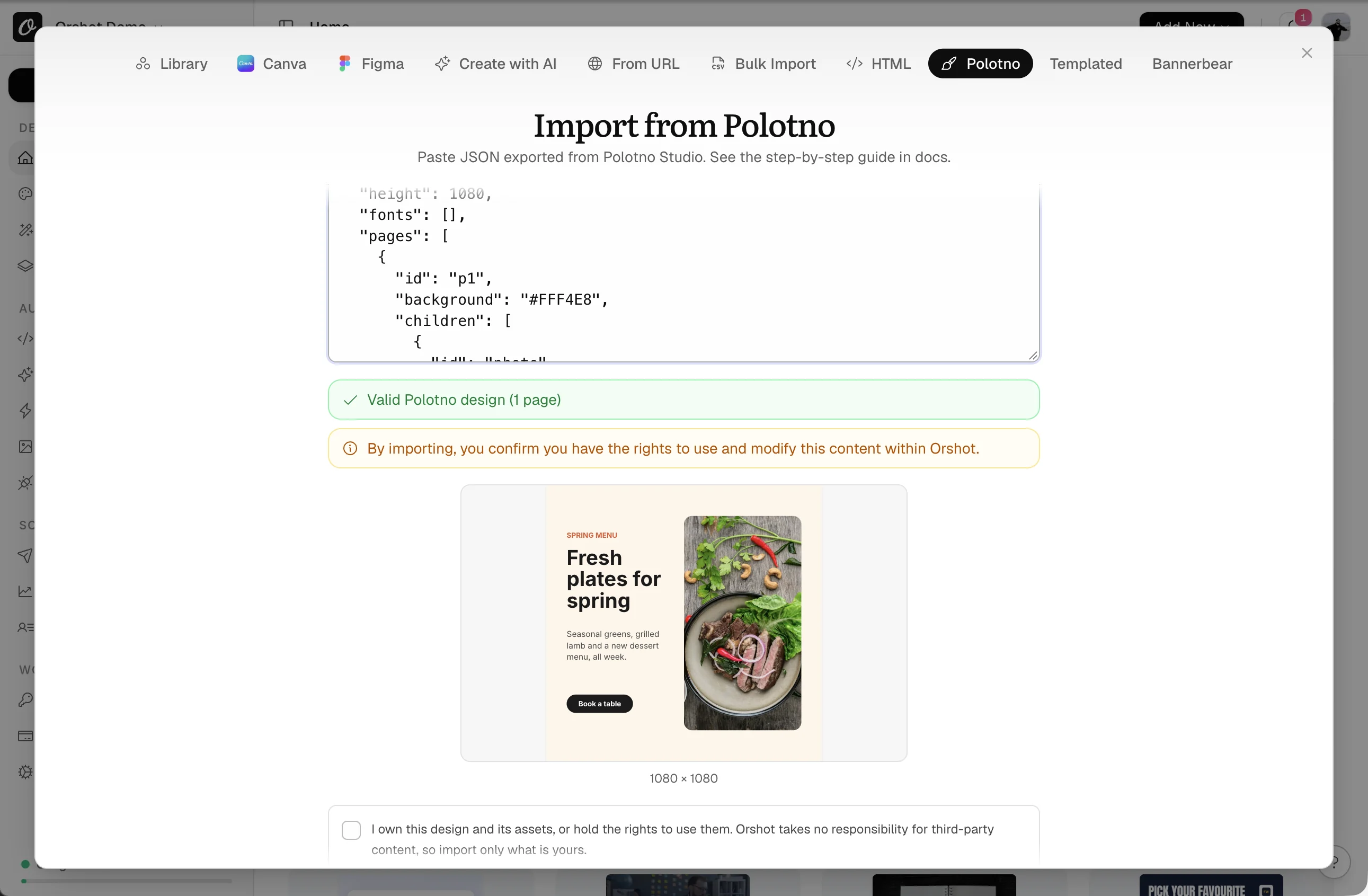
Polotno designs are already JSON. Paste one, or bulk import ten at a time, and every text and image layer becomes a parameter.
- 1Get the JSON from
store.toJSON()in your app, or export it from Polotno Studio. - 2Paste it under New Template, Polotno. A preview renders right away.
- 3Confirm you own the design and hit Import Design to open it in the editor.
- 1Save one
.jsonfile per design, straight fromstore.toJSON(). - 2New Template, Polotno, Bulk import (paid plans). Pick up to 10 files at a time.
- 3Each file gets a preview, and one click saves them all to Your Templates.
- 1Send the JSON files and custom fonts, plus a render of each animated design.
- 2Up to 5 designs are free on any paid plan, and we patch what didn't convert.
- 3Each
text_1_1gets renamed back to your{variable}name. Send your files
| Polotno | Orshot |
|---|---|
| text | text layer, parameter text_1_1 |
| image, svg | image layer, parameter img_1_1 |
| figure | circle stays a circle, other shapes become rectangles |
| line | thin rectangle |
| page background color | page background color |
| draggable: false | locked layer |
| Hello {name} | Stays as typed. Edit to {{name}}, then send text_1_1:name |
Done when each design opens in the Studio with parameters like text_1_1 and img_1_1.
Put the hosted editor where Polotno was
Your React tree mounts one iframe where PolotnoContainer sits today. The polotno package comes out, and the client never sees a Polotno key.
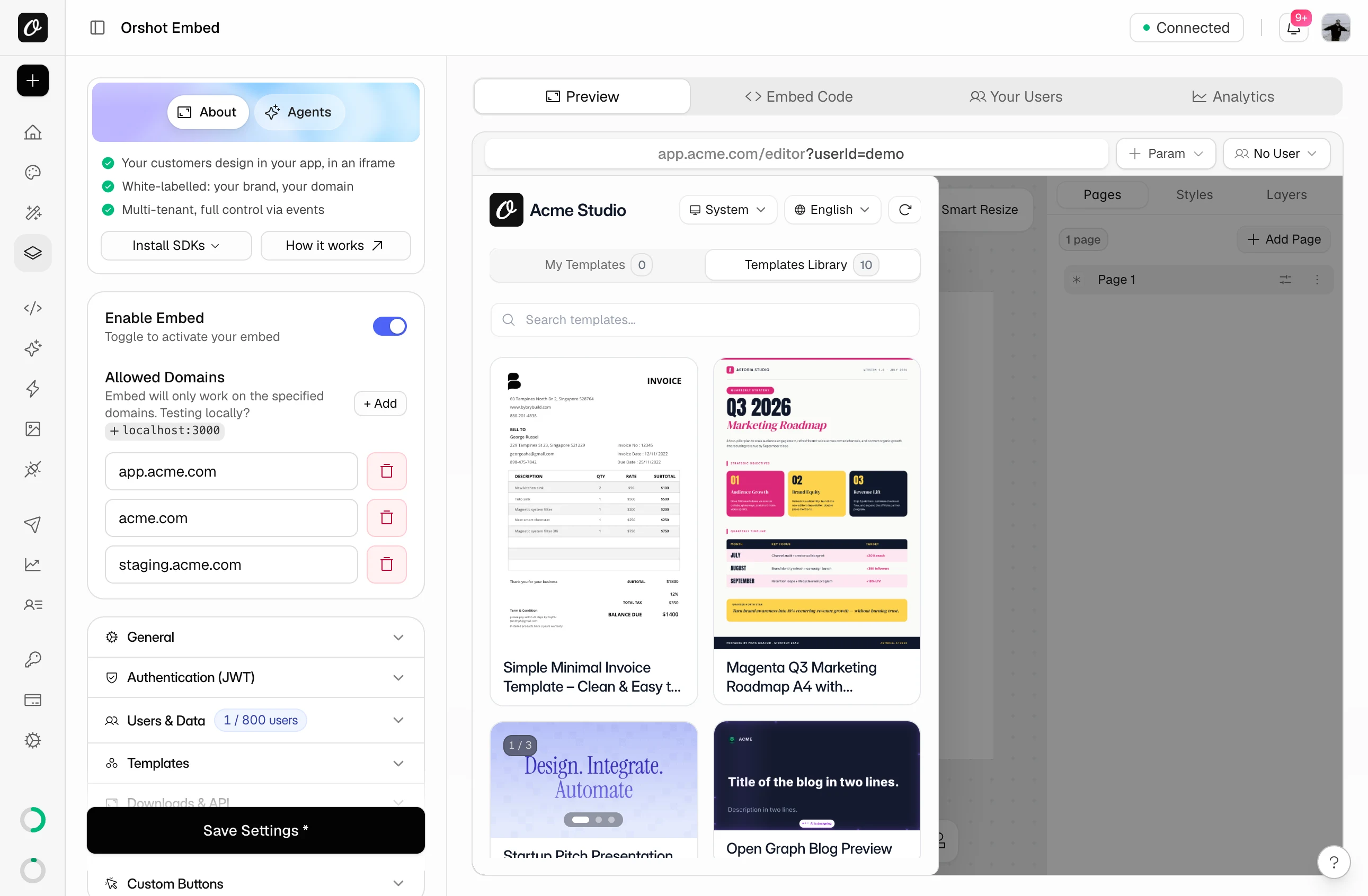
- 1In the dashboard, open Orshot Embed. Enable Embed is the first switch.
- 2Under Allowed Domains, add every site that loads the editor, plus localhost for testing.
- 3Grab the iframe from Embed Code, or install the React component.
<iframe
  src="https://orshot.com/embeds/your-embed-id?templateId=123&userId=user_42"
  allow="clipboard-write"
  style="width: 100%; height: 100%; min-height: 600px; border: none;"
></iframe>
import { OrshotEmbed } from "@orshot/embed-react";
<OrshotEmbed embedId="your-embed-id" templateId={123} height={700} />| Polotno | Orshot Embed |
|---|---|
| createStore({ key }) | embed ID in the URL |
| <PolotnoContainer>… | <iframe> or <OrshotEmbed /> |
| polotno, polotno/ui.css | not needed |
| store.loadJSON(json) | ?templateId=123 |
| setTranslations(…) | ?lang=spanish |
| showCredit: false | Grow plan and up |
token.Brand the editor without CSS overrides
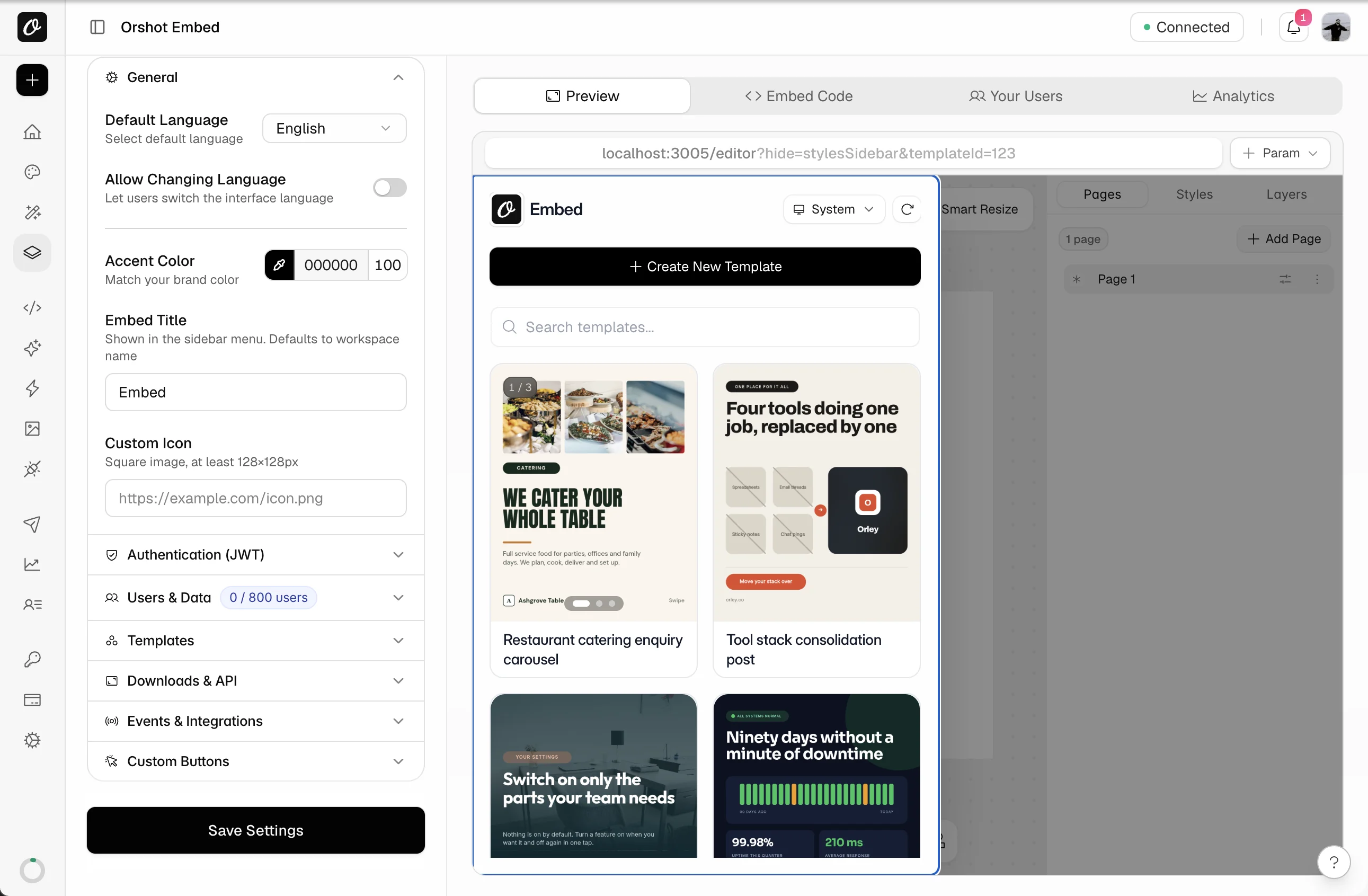
Your theme overrides can go. Color and icon are dashboard settings now, and ?hide in the URL drops whole panels.
- 1Upload your icon and pick an accent color under General. Title and language are there too.
- 2
?hide=stylesSidebar,pagesBarin the URL hides the styles sidebar and pages bar. - 3Save once the live preview looks right.
| Polotno | Orshot Embed |
|---|---|
| CSS theme overrides | Accent color |
| dark theme class | ?theme=dark |
| <Toolbar />, Layers section | ?hide=stylesSidebar |
| <PagesTimeline /> | ?hide=pagesBar |
| <SidePanel> insert sections, <ZoomButtons /> | ?hide=toolsBar |
stylesSidebar or toolsBar, so hide both. templateBar stays, since it holds Save and downloads. All tokensDone when the editor shows your color and name, minus the panels you hid.
Let Orshot store each user's templates and brand library
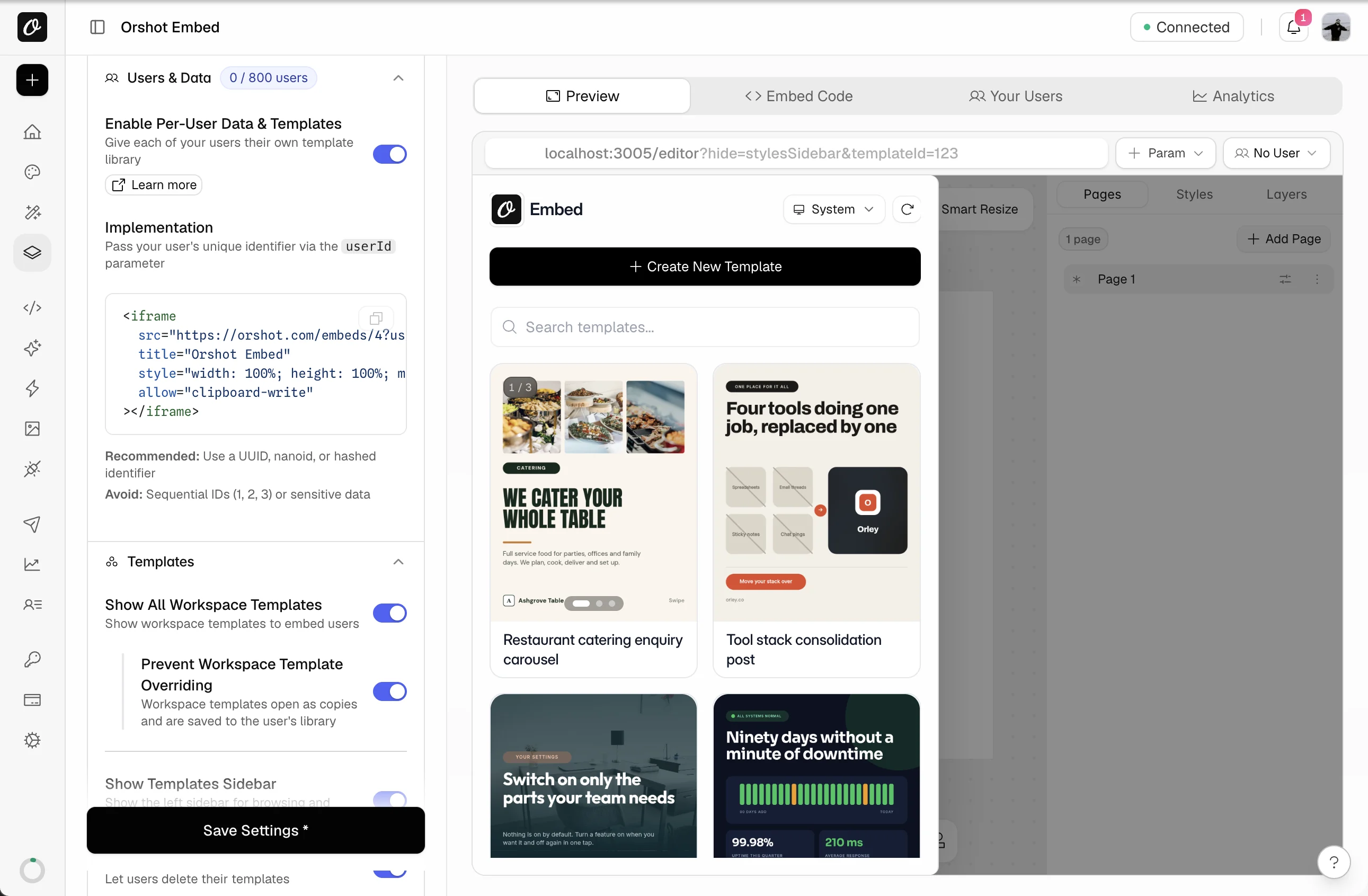
Drop the table and bucket you keep per user. With a userId in the embed URL, every user gets their own templates and a brand library of images, videos, audio, colors and fonts.
- 1Enable Per-User Data & Templates (under Users & Data). This replaces your per-user JSON storage.
- 2Append
userIdto the iframesrc, which the React and Vue components can't do yet. A user is created when they first open the editor. - 3Protect your masters with Prevent Workspace Template Overriding under Templates. Edits land in a copy.
| Polotno | Orshot Embed |
|---|---|
| store.toJSON() saved per user | ?userId=abc, a private library |
| your designs table | My Templates, per user |
| user uploads in your own bucket | a Brand Library for each user |
| master designs in your code | Workspace Templates, protected |
| draggable, removable: false | Locked layers + ?hide=stylesSidebar |
| hiding UI per user in your code | Per-user permissions, dashboard or JWT |
Done when a second test user can't see the first user's templates or brand library.
Get every save and download in your app
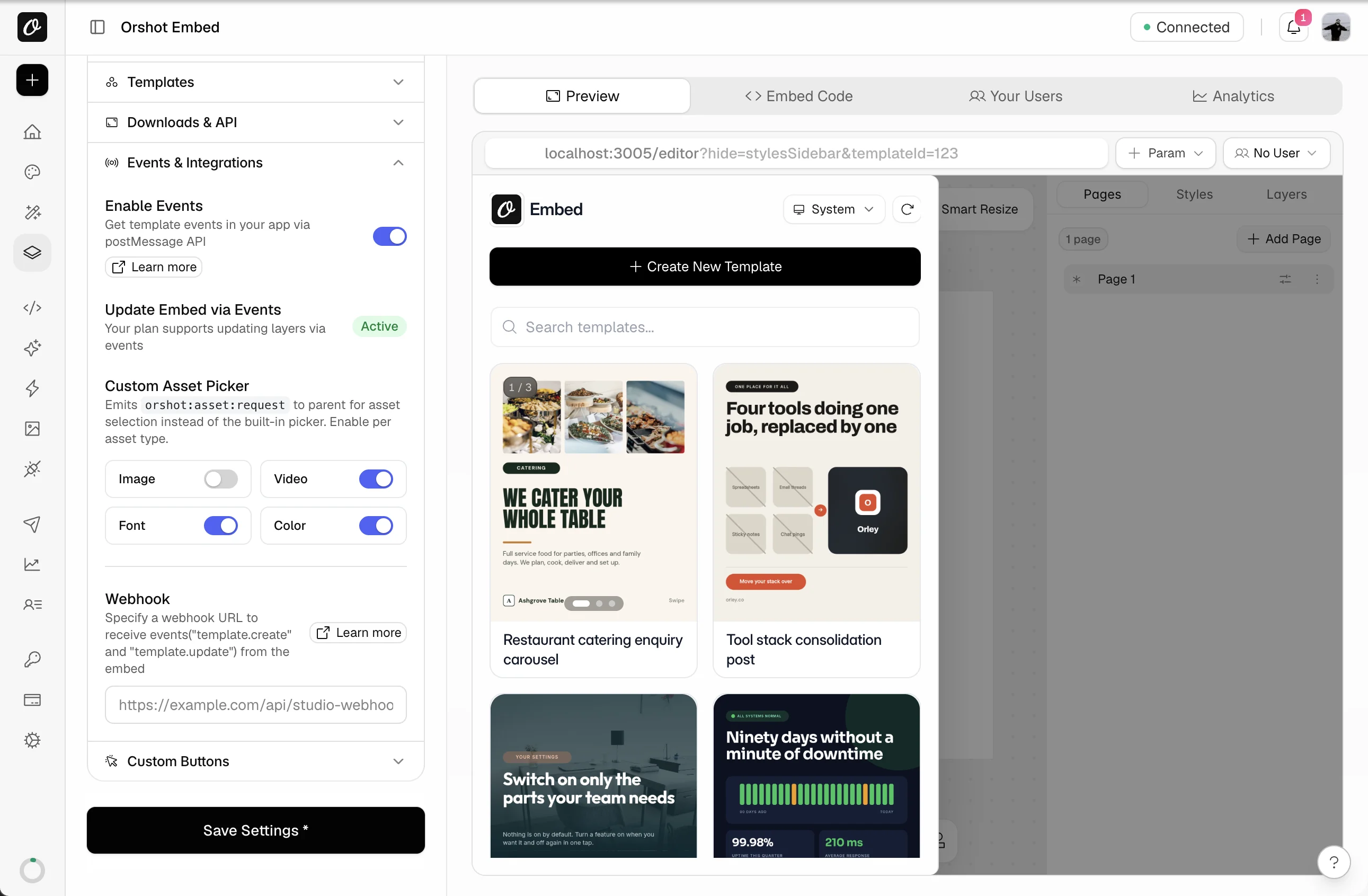
From Grow up, saves and downloads reach your page as events, and each save also calls your webhook.
- 1Switch events on in Events & Integrations, and paste the URL your server listens on.
- 2On the page, a
messagehandler onwindowreceivesorshot:template:updateafter each save.
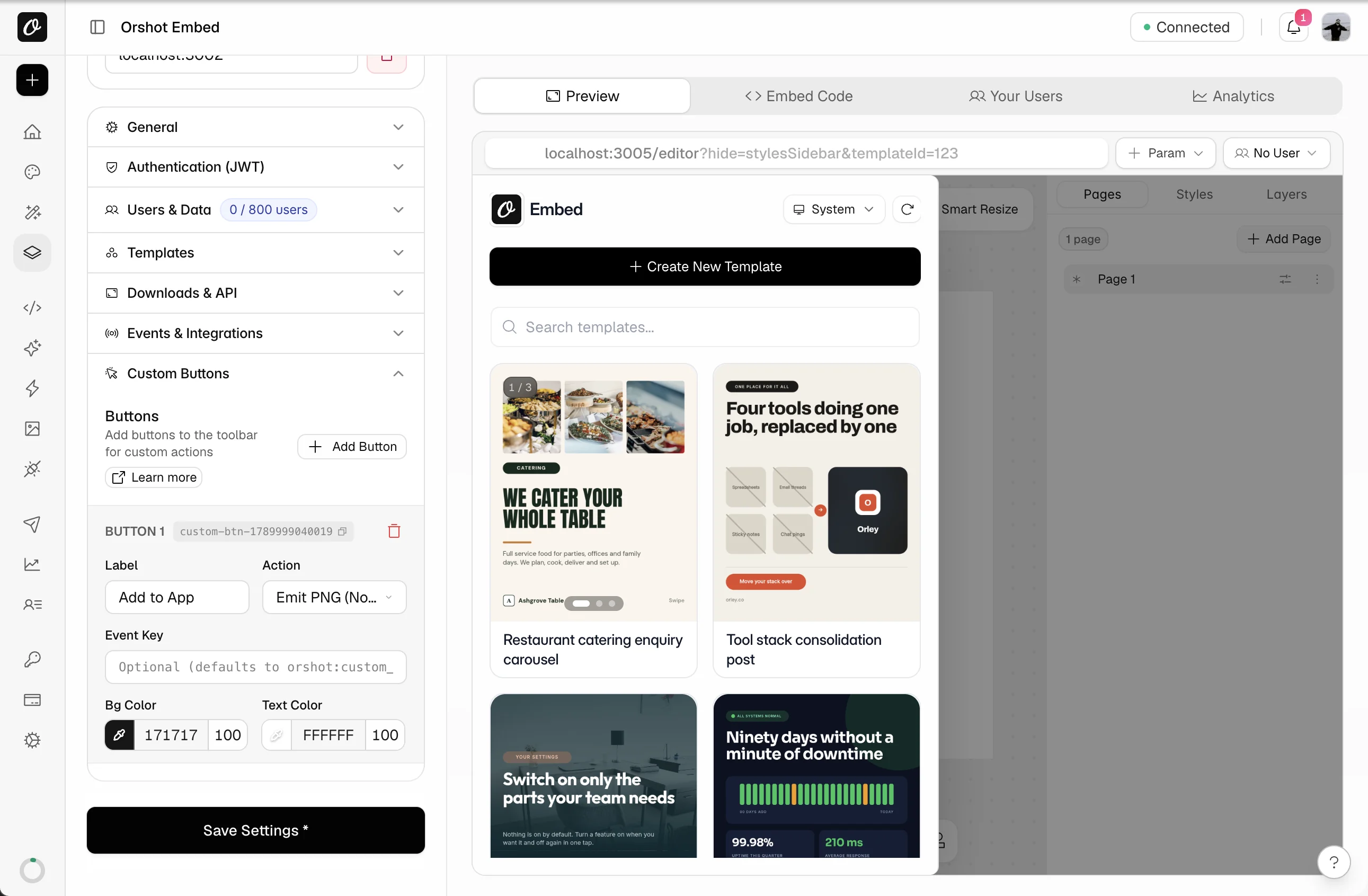
- 1Custom buttons need Scale. Add one under Custom Buttons and name it, for example Add to App.
- 2Choose Emit PNG as the action. Your page gets the image, the way the demo above does.
| Polotno | Orshot Embed |
|---|---|
| store.on("change", save) | orshot:template:update + webhook |
| store.toDataURL(), saveAsPDF() | Custom button: Emit PNG or PDF |
| store.loadJSON(other) | orshot:embed:control { templateId } |
| element.set({ text }) | orshot:embed:control { modifications } |
| custom side panel of your assets | Custom asset picker |
Done when one save shows up on your page and at your webhook URL.
Render from the API, not polotno-node
Send a template ID and the values that change, and the API returns a file URL. That retires polotno-node and Cloud Render.
| Polotno | Orshot |
|---|---|
| POST /api/renders + design JSON | POST /v1/studio/render + templateId |
| {headline} swapped by your backend | { "headline": "…" } |
| polotno-node + Puppeteer | nothing to run |
| format: "mp4" | response.format: "mp4" |
| $0.004 per image on Cloud Render | credits in your plan |
Three common renders, before and after
Cloud Render wants the whole design, while Orshot needs the template ID and values.
One image from the template imported in step 1, with text_1_1 and img_1_1 renamed to quote and avatar.
Polotno|POST api.polotno.com/api/renders{
"design": {
"width": 1080, "height": 1080,
"pages": [{ "children": [
{ "type": "text", "text": "Art is where emotion finds form." },
{ "type": "image", "src": "https://example.com/avatar.jpg" }
]}]
},
"pixelRatio": 2,
"format": "png"
}{
"templateId": 12345,
"modifications": {
"quote": "Art is where emotion finds form.",
"avatar": "https://example.com/avatar.jpg"
},
"response": {
"type": "url",
"format": "png"
}
}The template is already in Orshot. Read the file link from data.content.
A two-page certificate, returned as a single PDF file.
Polotno|POST api.polotno.com/api/renders{
"design": { "pages": [ … ] },
"format": "pdf"
}{
"templateId": 12345,
"modifications": {
"page1@name": "Cassandra Maughne",
"page2@course": "Studio Foundations"
},
"response": {
"type": "url",
"format": "pdf"
}
}Polotno pages map to PDF pages in order. page1@name only changes name on page 1.
A video render, with no Puppeteer or render server on your side.
Polotno|POST api.polotno.com/api/renders{
"design": { "pages": [ … ] },
"format": "mp4"
}{
"templateId": 12345,
"modifications": {
"headline": "Spring launch",
"clip": "https://example.com/product.mp4"
},
"response": {
"type": "url",
"format": "mp4"
}
}A 15-second clip uses 15 credits, on any plan. Polotno video designs don't import. Build those in the Studio.
Switch users over one group at a time
Your Polotno setup keeps working while you test.
- 1Keep PolotnoContainer live and show the Orshot embed only to users behind a feature flag.
- 2Have one flagged user save a design, then render it once by API. Check both arrive.
- 3Widen the flag in batches. A clean week later, uninstall
polotnoandpolotno-node, and delete the env key.
Done when every flagged save and render has come through for seven days. Plans are at the top of the page.
We import up to 5 designs free on any paid plan
- Fixes for anything that didn't convert
- The embed set up with you, from domains to per-user data
- You get every imported design back, rendered with your own data
Got a large library, or designs for several clients? A call is the fastest start.
Hand the Polotno swap to your AI agent




Your coding agent can do the rewrite. Give Claude Code, Cursor, Codex or ChatGPT this prompt and it replaces each polotno and polotno-node call, citing the docs as it goes.
# Replace the Polotno SDK in this project with Orshot Embed

You are helping me move this project off the Polotno SDK (the `polotno` npm package, `polotno-node` and api.polotno.com) and onto Orshot (orshot.com). Orshot runs the template editor for me: I embed it through an iframe or a React/Vue component, and Orshot's API renders images, PDFs and videos from the same templates. Orshot also has native n8n, Make, Zapier, Pipedream and Airtable apps and an MCP server (https://mcp.orshot.com/full, setup at https://orshot.com/agents). Connect to that MCP server first if you can: with it you can list my Orshot templates, read their parameters and run test renders. Read the linked docs before you change anything, then work through the steps in order.

## 1. List every place this project uses Polotno

Search for, and list with file paths:
- imports from `polotno`, `polotno/…`, `polotno-node`, `polotno/ui.css`
- `createStore(`, `store.toJSON`, `store.loadJSON`, `store.on(`, `store.toDataURL`, `store.saveAsImage`, `store.saveAsPDF`
- `<PolotnoContainer`, `<SidePanel`, `<Workspace`, `<Toolbar`, `<PagesTimeline`, custom side panel sections
- `api.polotno.com` render calls and the Polotno key (env vars, `key:` in createStore)
- code that stores or serves design JSON per user (database tables, S3 keys, API routes)
- code that substitutes `{variable}` tokens in design JSON before rendering

## 2. Import the designs

Designs cannot be converted from code alone. I will export each design as JSON (`store.toJSON()`, or the JSON export in Polotno Studio) and import it in Orshot myself (New Template → Polotno tab → paste the JSON, or bulk import up to 10 files on a paid plan). Guide: https://orshot.com/migrate/from-polotno · Importer docs: https://orshot.com/docs/importing-templates/import-from-polotno

After import every text and image layer is an Orshot parameter with an automatic ID (`text_1_1`, `img_1_2`), which I can rename in the Studio.
- Groups, animations, video layers, background images and image crops don't convert, and figure shapes other than circles become rectangles. Flag designs that use them; ungrouping before export keeps grouped layers. A video layer comes in as an image pointing at the video file and fails the image copy, so delete video layers before export.
- A `{name}` token inside a text layer: in Orshot the whole layer is one parameter. Rename it, or change the token to `{{name}}` and send `"<parameterId>:name"`. Docs: https://orshot.com/docs/orshot-studio/inline-parameters

Ask me for the Orshot template IDs, or read the parameters with:
- GET /v1/studio/templates/{id}: https://orshot.com/docs/api-reference/studio-template-get
- List templates: https://orshot.com/docs/api-reference/studio-templates-list

Build a mapping table: Polotno design (file or DB row) → Orshot templateId, and Polotno `{variable}` → Orshot parameter name. Show it to me before editing code.

## 3. Replace the editor

Reference: https://orshot.com/docs/orshot-embed/integration · React: https://orshot.com/docs/orshot-embed/react-sdk · Vue: https://orshot.com/docs/orshot-embed/vue-sdk

Polotno:
```jsx
const store = createStore({ key: POLOTNO_KEY, showCredit: false });
<PolotnoContainer><SidePanelWrap><SidePanel store={store} /></SidePanelWrap>
  <WorkspaceWrap><Toolbar store={store} /><Workspace store={store} /></WorkspaceWrap></PolotnoContainer>
```

Orshot (plain HTML):
```html
<iframe src="https://orshot.com/embeds/EMBED_ID?templateId=12345&userId=USER_ID" title="Editor" allow="clipboard-write" style="width:100%;height:100%;min-height:600px;border:none"></iframe>
```

Orshot (React):
```jsx
import { OrshotEmbed } from "@orshot/embed-react";
<OrshotEmbed embedId="EMBED_ID" templateId={12345} />
// Per-user libraries: use the iframe URL with &userId=… (the SDK props are embedId, templateId, modifications)
```

Rules:
- The embed ID comes from my Orshot workspace (Embed → Embed Code). Store it as `ORSHOT_EMBED_ID`. Remove the Polotno key, the `polotno` package, its CSS import and every Polotno component.
- `store.loadJSON(json)` becomes the `templateId` query parameter. `?lang=` sets the language. Docs: https://orshot.com/docs/orshot-embed/integration
- One store per user becomes the `userId` (plus optional `userName`, `userEmail`) query parameters; Orshot keeps each user's templates and brand library (images, videos, audio, colors, fonts) apart. Docs: https://orshot.com/docs/orshot-embed/per-user-data
- Appearance is set in the dashboard (accent color, title, icon, language) and with the `hide` query parameter for panels (`templateBar,pagesBar,metaBar,toolsBar,videoBar,stylesSidebar,smartResize`). Docs: https://orshot.com/docs/orshot-embed/appearance
- If the app runs on Safari or inside webviews, sign a JWT and pass it as `token`. Docs: https://orshot.com/docs/orshot-embed/jwt-authentication
- Per-user action locks (upload, delete, create) go in the `permissions` claim of the JWT. Docs: https://orshot.com/docs/orshot-embed/user-permissions

## 4. Replace store events and exports

Reference: https://orshot.com/docs/orshot-embed/events · Control: https://orshot.com/docs/orshot-embed/controlling-embed · Custom buttons: https://orshot.com/docs/orshot-embed/custom-buttons · Asset picker: https://orshot.com/docs/orshot-embed/custom-asset-picker

- `store.on('change', …)` and your own save endpoint become the `orshot:template:create` / `orshot:template:update` postMessage events plus a webhook URL set in the dashboard. Orshot stores the design; keep only the template ID in my database.
- `store.toDataURL()` / `saveAsImage()` / `saveAsPDF()` become downloads inside the embed, or a custom toolbar button that emits the PNG/PDF to the parent window (`orshot:custom_action`).
- `store.loadJSON()` at runtime becomes an `orshot:embed:control` message with `templateId`; setting element text or images becomes the same message with `modifications`.
- A custom side panel that lists my own assets becomes the Custom Asset Picker: answer `orshot:asset:request` with `orshot:asset:response`.
- Always check `event.origin` includes `orshot.com`.

## 5. Rewrite the render calls

Reference: https://orshot.com/docs/api-reference/render-from-studio-template

Polotno:
```http
POST https://api.polotno.com/api/renders?KEY=…
{ "design": { …full JSON with {variables} already substituted… }, "format": "png", "pixelRatio": 2 }
```

Orshot:
```http
POST https://api.orshot.com/v1/studio/render
Authorization: Bearer ORSHOT_KEY
{ "templateId": 12345, "modifications": { "headline": "Hello", "photo": "https://…" }, "response": { "type": "url", "format": "png" } }
```

Rules:
- The design stays in Orshot. Send only `templateId` and `modifications` keyed by parameter name. Delete the JSON substitution code.
- Style overrides use dot keys: `"headline.fontSize": 48`, `"headline.color": "#111"`. Docs: https://orshot.com/docs/dynamic-parameters
- Multi-page templates prefix the page: `"page2@headline"`.
- `response.format`: png, jpg, webp, avif, pdf, mp4, webm, gif. `response.type`: url, base64, binary.
- Sync is the default and returns `data.content`. For a webhook use `"mode": "async"` inside `response` plus top-level `webhook_url`; you get `202 { id, status: "queued" }` and can poll GET /v1/studio/render-jobs/{id}. Docs: https://orshot.com/docs/api-reference/async-render-start
- Remove `polotno-node`, Puppeteer and the Chromium layer from the server, Dockerfile and CI.
- Auth is Bearer. Store the key as `ORSHOT_API_KEY`. Keys: https://orshot.com/docs/quick-start/get-api-key
- Official SDKs (Node, Python, Ruby, PHP): https://orshot.com/docs/sdks · Errors: https://orshot.com/docs/error-reference

## 6. Automations

If a Zapier, Make or n8n step calls Polotno, add the Orshot step next to it with the same parameters, run it once, then remove the old step. Ready-made workflows are in Quick Connect (Copy as n8n workflow / Make blueprint). Docs: https://orshot.com/integrations

## 7. Verify, then switch

Put the Orshot embed behind a feature flag next to the Polotno editor. Open the same design in both, save from Orshot, confirm the webhook and postMessage events arrive, render each template once from the API and compare with the Polotno output. After a week of matching results, remove the Polotno code and the key. Tell me what you removed.With Orshot for agents connected, the same agent can test-render the imported templates.
What Polotno teams ask before switching
What is Orshot?
Do my Polotno designs import as they are?
Do my {name} placeholders still work?
Can I import many designs at once?
What about custom fonts and images?
My app isn't React. Does the embed still work?
How heavy is the editor for my app?
Can I stop some users from uploading or deleting?
What if more users sign up than my plan allows?
Can I host the editor myself or use it offline?
Which Orshot plan replaces my Polotno license?
How do I render without polotno-node or Cloud Render?
Can I get my designs back out of Orshot?
Should I keep my Polotno license during the move?
What do you do in the free migration?
Moving other tools to Orshot too?
Every tool below has its own step-by-step guide. All guides

Bannerbear
The original image generation API, still used by big teams.
Templated.io
Straightforward automation for images, PDFs and videos through one render call.

Canva
The design tool everyone starts on, with Bulk Create for making many by hand.
IMG.LY
The CreativeEditor SDK engine, licensed per platform and quoted through sales.

Placid
Creative automation with images, PDFs and video, billed in credits that grow with size.

Abyssale
Multi-format banner automation, priced per seat with a monthly credit allowance.
Not sure yet? See how Orshot compares with the Polotno SDK.
Book a call