
 Migrate from Abyssale to Orshot
Paste your Abyssale API key and pick designs. Every format lands as a page, so your ad sets keep generating from the Orshot API.
Built on Abyssale's public API. Checked September 26, 2026.
Your formats, your automations, no seat math
Everything your Abyssale designs do today keeps working, and the parts billed per seat stop being a line item.
- Plans without per-seat pricing$39 gets 1,500 credits and two team members. Abyssale Pro: 450 credits per $36 seat.
- Every format in one callEach format is a page, and one request returns all of them. No batch to poll.
- Automations built inWorkflows connect a sheet, a template and a destination. No Zapier needed.
- Publishing after the renderPost or schedule the image to 15+ social platforms from the same API call.
- Agents that build the templates tooClaude, ChatGPT or Cursor can design templates, set parameters and render over MCP.
- An editor inside your productOrshot Embed puts a white-label template editor in your app on every paid plan.
- Orshot Studio for the design sideLayers, brand kit, multi-page, video timeline and Smart Resize for new sizes.
- Signed Dynamic URLsLinks that render on open, signed so nobody can reuse them on your credits.
Copy an Abyssale API key
The importer reads your designs through Abyssale's own API. No files to save.
- 1In Abyssale, open Workspace settings, then API key.
- 2Copy a key, or click Create new API key. Give it about 30 seconds.
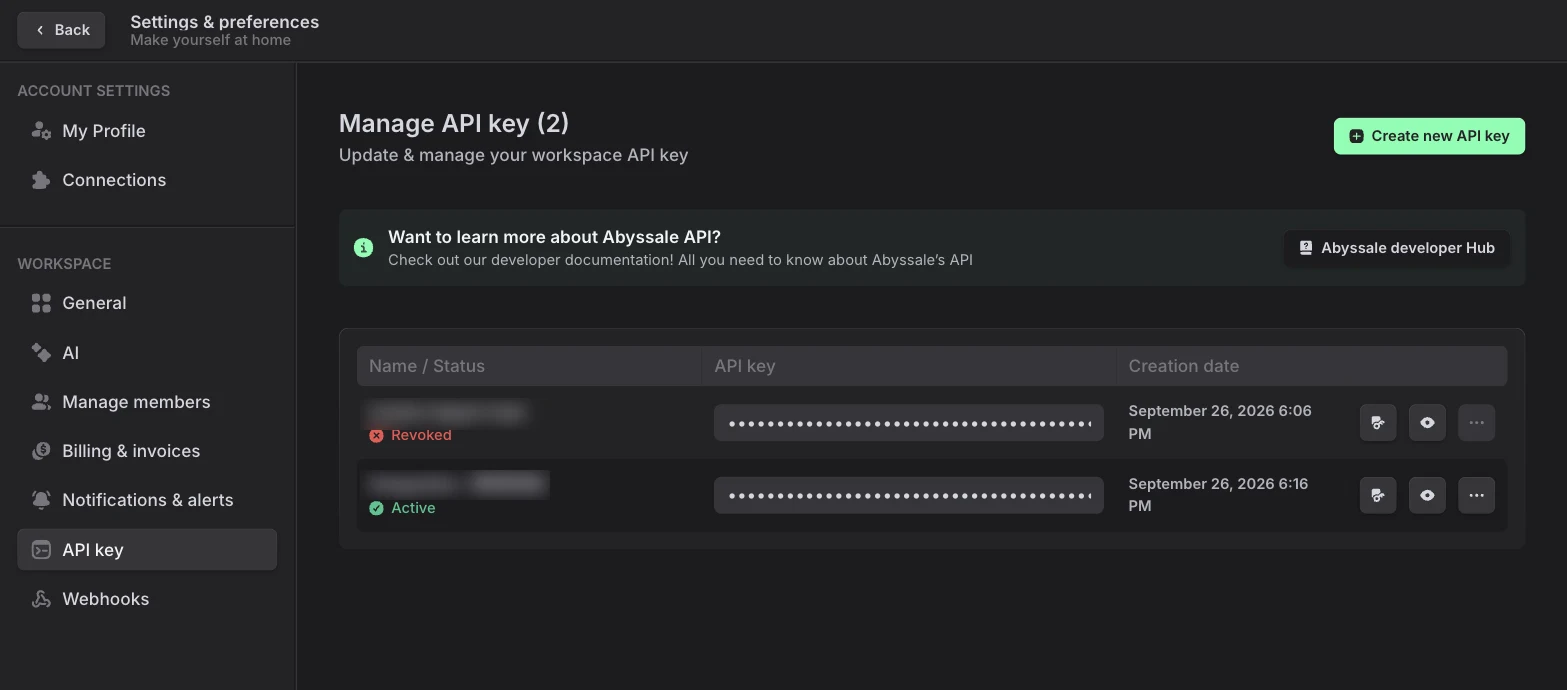
Done when you have a key copied, from an Admin account.
Import the designs
Connect once and every design in the workspace is listed with its preview.
- 1Orshot, New Template, Abyssale tab. Paste the key, Connect.
- 2Pick one design to open it in the Studio, or up to 10 to save them in one go (paid plans).
- 3The key is kept encrypted for the workspace, so next time you just press Connect.
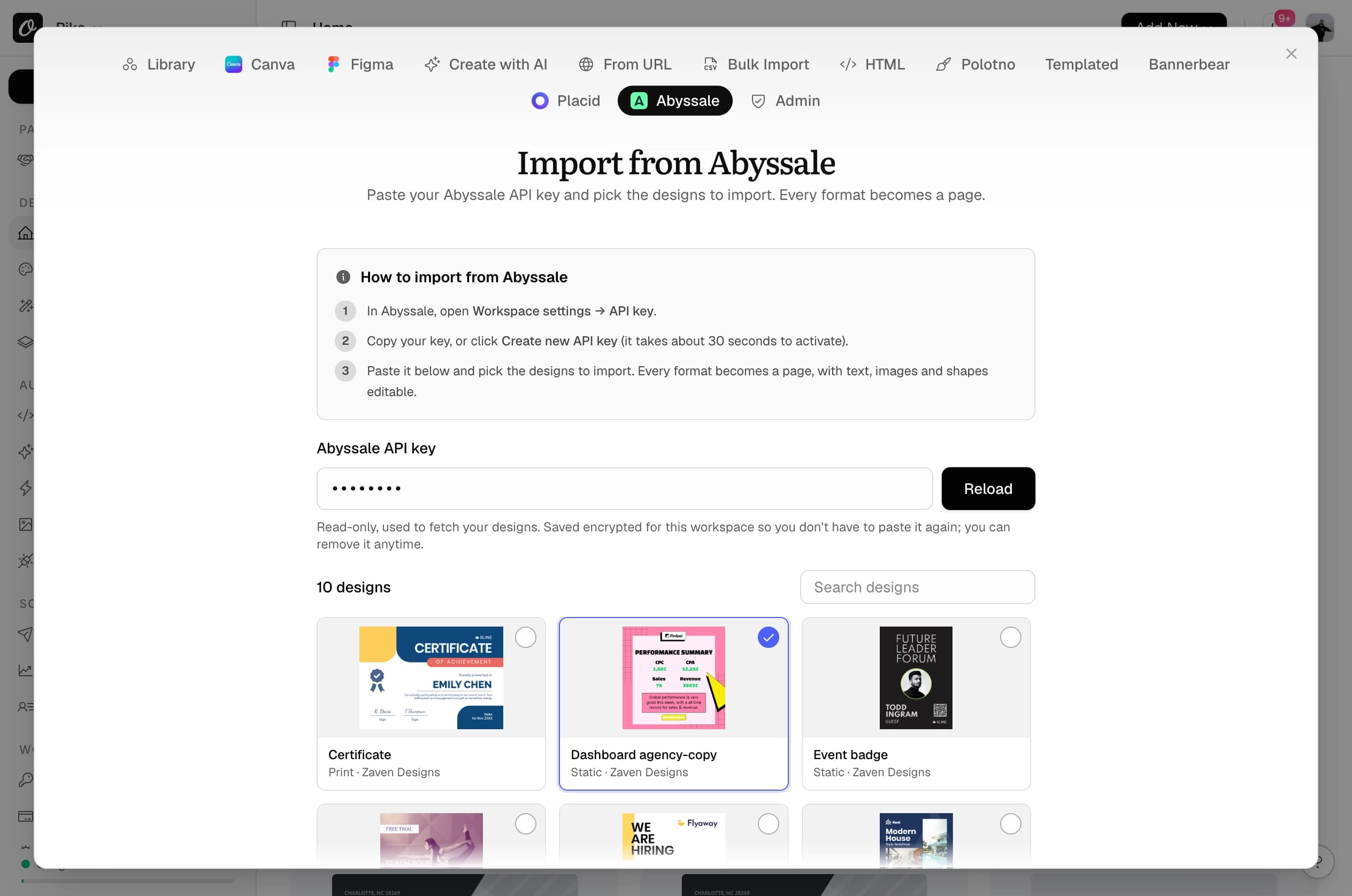
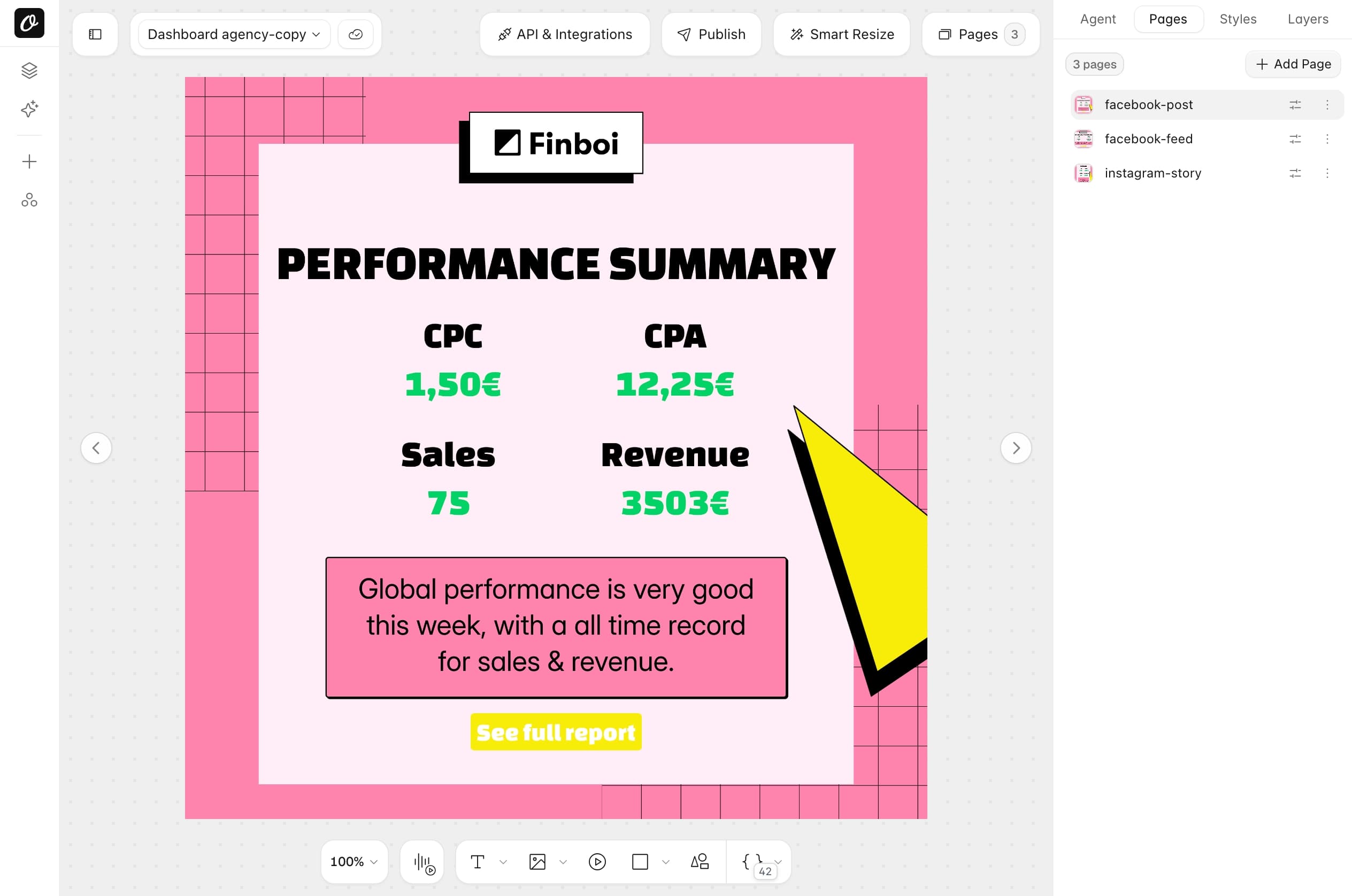
Done when your design opens in the Studio with all its formats as pages.
Match formats and parameters
Formats turn into pages in their original order. Layer names stay as they are.
| In Abyssale | In Orshot |
|---|---|
| facebook-post | Page 1, facebook-post |
| facebook-feed | Page 2, facebook-feed |
| instagram-story | Page 3, instagram-story |
| layer revenue_sum | parameter revenue_sum |
| layer Hero Image | parameter hero_image |
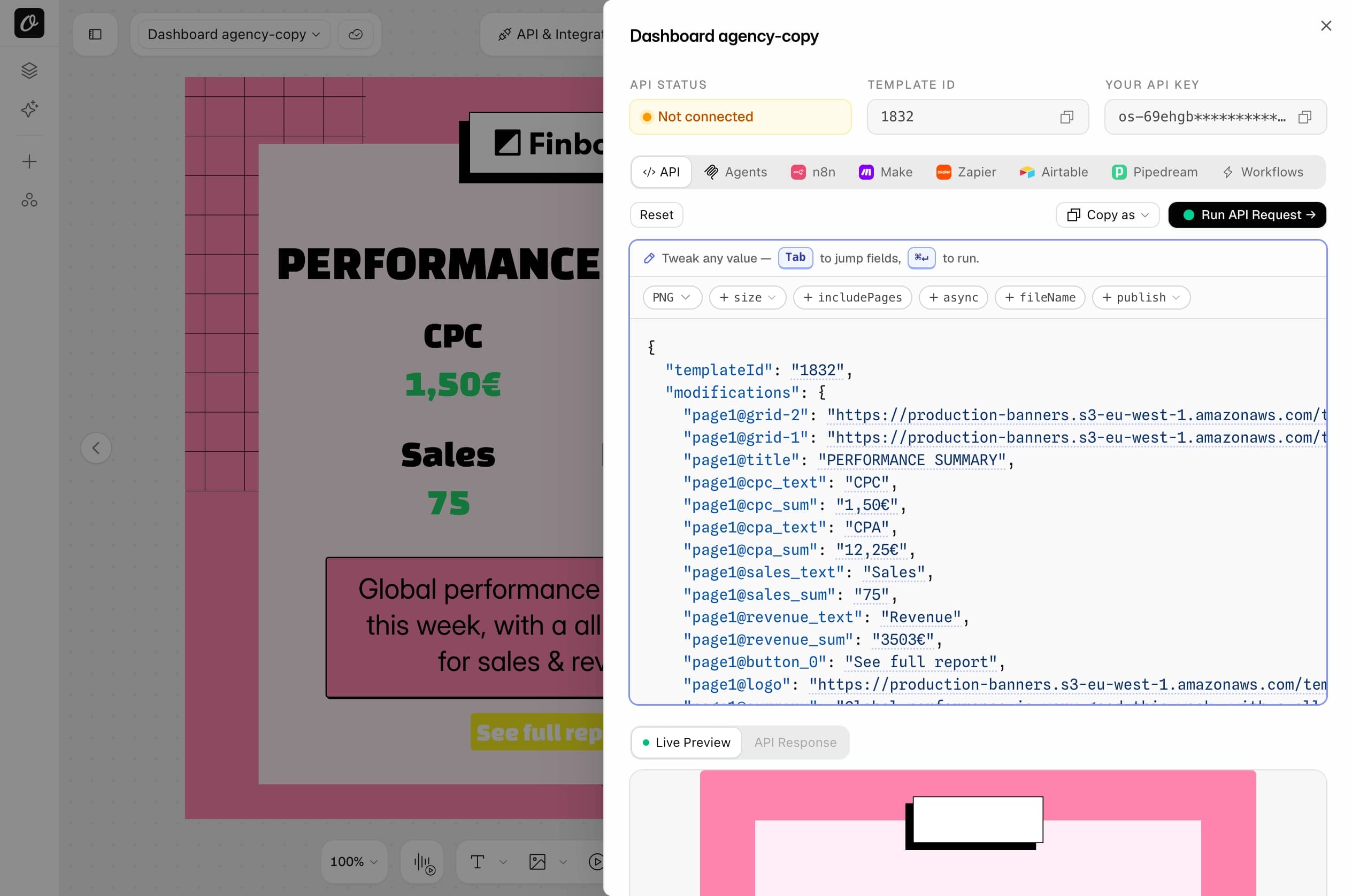
Done when you know the page number of each format your code asks for.
Swap the API call
Drop the wrapper objects, change the header, and pick formats with includePages.
Convert your request
Replace the example with your own Abyssale request body, or the code that sends it. Runs in your browser, nothing leaves the page.
POST https://api.abyssale.com/banner-builder/{design}/generatePOST https://api.orshot.com/v1/studio/render{
"templateId": <YOUR_ORSHOT_TEMPLATE_ID>,
"modifications": {
"title": "Performance summary",
"title.color": "#111111",
"revenue_sum": "4,120€",
"logo": "https://example.com/logo.png",
"button_0.opacity": 0
},
"response": {
"type": "url",
"format": "png",
"includePages": [
1
],
"mode": "async"
},
"webhook_url": "https://yourapp.com/webhooks/abyssale"
}- Add your Orshot template ID. It is in the API tab after import.
- Formats "facebook-post" are pages in the imported template, named after the format. Set includePages to their page numbers (shown in the Studio), or drop it to render every format.
- callback_url kept as webhook_url. The request runs in async mode and Orshot POSTs the finished job to it (one job, not a NEW_BANNER_BATCH).
| Abyssale | Orshot |
|---|---|
| x-api-key header | Authorization: Bearer |
| design ID (UUID) | templateId (number) |
| elements: { name: { payload } } | { name: "text" } |
| elements: { name: { image_url } } | { name: "https://…" } |
| elements: { name: { color } } | { "name.color": "#f00" } |
| elements: { name: { hidden: true } } | { "name.opacity": 0 } |
| template_format_name | response.includePages: [n] |
| async generate + callback_url | response.mode: "async" + webhook_url |
| img.abyssale.com/{id}?name=… | Signed Dynamic URL, name=… |
Side by side
The calls Abyssale teams send most, and what they become.
The call most integrations make: one design, one format, a few overrides.
Abyssale|POST api.abyssale.com/banner-builder/64238d01-d402-474b-8c2d-fbc957e9d290/generate{
"template_format_name": "facebook-feed",
"elements": {
"title": { "payload": "Autumn drop is live" },
"hero": { "image_url": "https://example.com/coat.jpg" }
}
}{
"templateId": 12345,
"modifications": {
"title": "Autumn drop is live",
"hero": "https://example.com/coat.jpg"
},
"response": {
"type": "url",
"format": "png",
"includePages": [2]
}
}No wrapper objects: the value goes straight in. The format is a page of the imported template, so includePages picks it.
Your whole ad set, one request, no batch to wait for.
Abyssale|POST api.abyssale.com/async/banner-builder/64238d01-d402-474b-8c2d-fbc957e9d290/generate{
"template_format_names": [],
"elements": {
"title": { "payload": "Autumn drop is live" }
},
"callback_url": "https://yourapp.com/hooks/abyssale"
}{
"templateId": 12345,
"modifications": {
"title": "Autumn drop is live"
},
"response": {
"type": "url",
"format": "png"
}
}Every page renders in the same synchronous call and data comes back as an array, one URL per format. Keep a webhook with response.mode async if you prefer.
Recolour, hide or resize a layer per render.
Abyssale|POST api.abyssale.com/banner-builder/64238d01-d402-474b-8c2d-fbc957e9d290/generate{
"elements": {
"title": { "payload": "Sale", "color": "#E4002B", "font_size": 72 },
"badge": { "hidden": true },
"root": { "background_color": "#111111" }
}
}{
"templateId": 12345,
"modifications": {
"title": "Sale",
"title.color": "#E4002B",
"title.fontSize": 72,
"badge.opacity": 0,
"canvasBackgroundColor": "#111111"
},
"response": { "type": "url", "format": "png" }
}Properties become dot keys on the parameter. hidden becomes opacity 0, and root.background_color becomes canvasBackgroundColor.
A flyer or certificate as a PDF from the same template.
Abyssale|POST api.abyssale.com/async/banner-builder/64238d01-d402-474b-8c2d-fbc957e9d290/generate{
"image_file_type": "pdf",
"elements": {
"name": { "payload": "Sarah Chen" }
},
"callback_url": "https://yourapp.com/hooks/abyssale"
}{
"templateId": 12345,
"modifications": { "name": "Sarah Chen" },
"response": { "type": "url", "format": "pdf" },
"pdfOptions": { "dpi": 300 }
}Any template renders as PDF by changing the format, on every plan. Multi-page templates become one document.
A link that renders when it is opened, for emails and pages.
AbyssaleGET https://img.abyssale.com/{dynamicImageId}/facebook-feed
?title=Welcome%20back
&logo.hidden=trueGET https://api.orshot.com/v1/studio/dynamic-url/welcome.png
?templateId=12345
&title=Welcome%20back
&sign=YOUR_SIGNATURESame short form, name=value. Orshot links are signed, so nobody can change the query string and render on your credits.
Done when a converted request returns your image with your data in it.
Move the automations
Pick where your renders come from. Each one points at the imported template with the same parameters.
- 1Make or n8n: Quick Connect, Copy as, then paste the blueprint or workflow.
- 2Zapier: the Orshot action Generate Image from Studio Template.
- 3Map the same fields, test once, then turn off the Abyssale step.
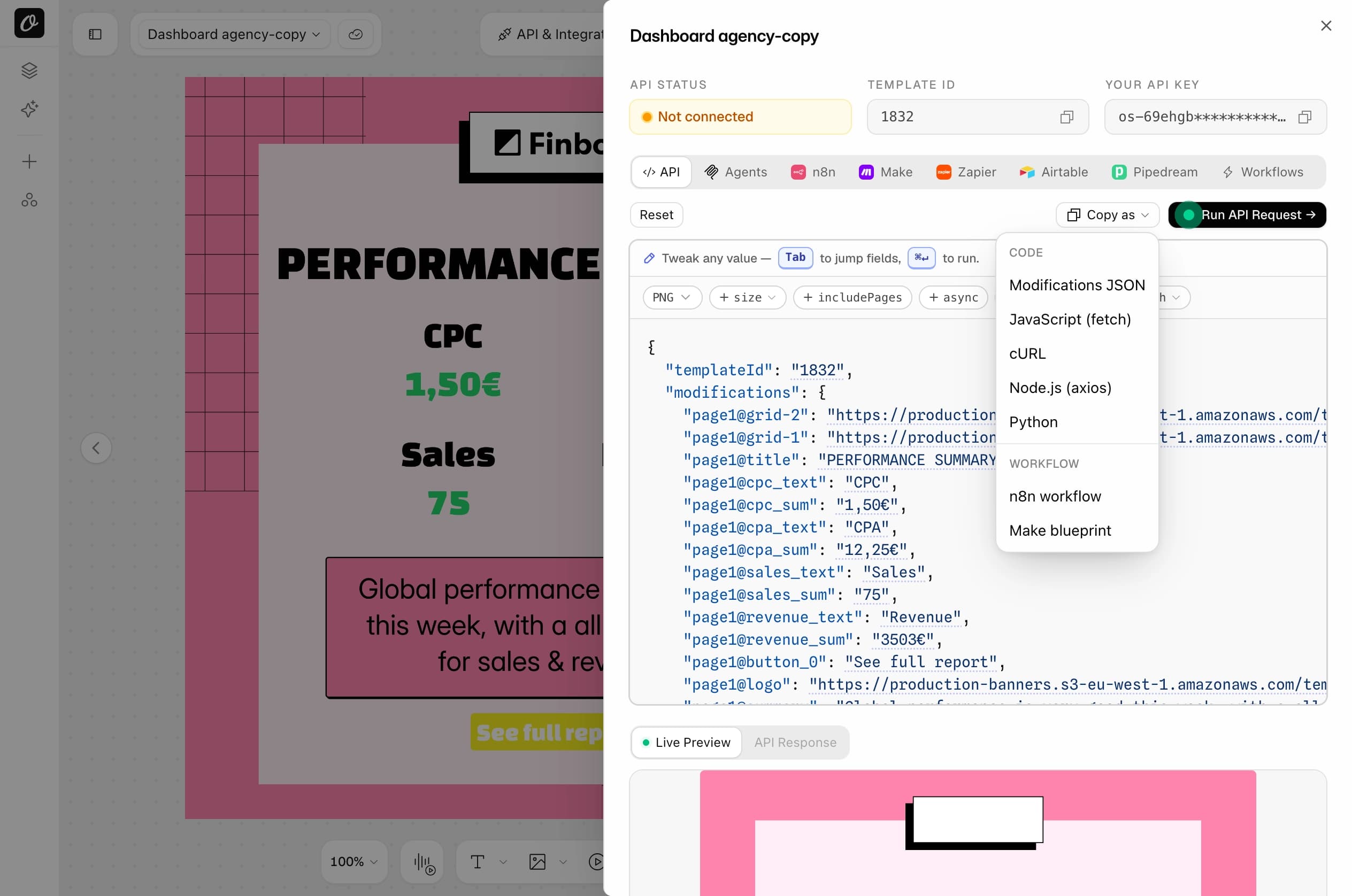
No third-party tool needed: Workflows connect a trigger, the template and a destination inside Orshot.
- 1Start from a sheet, a schedule or a webhook.
- 2Add the imported template and map each column to a parameter.
- 3Send the file to Dropbox, S3, Slack or a social account.
- 1Connect Claude, ChatGPT or Cursor under Agents & MCP.
- 2Ask for a render of the imported template in any format. It reads the parameters itself.
- 3Porting code? Hand it the migration prompt below.
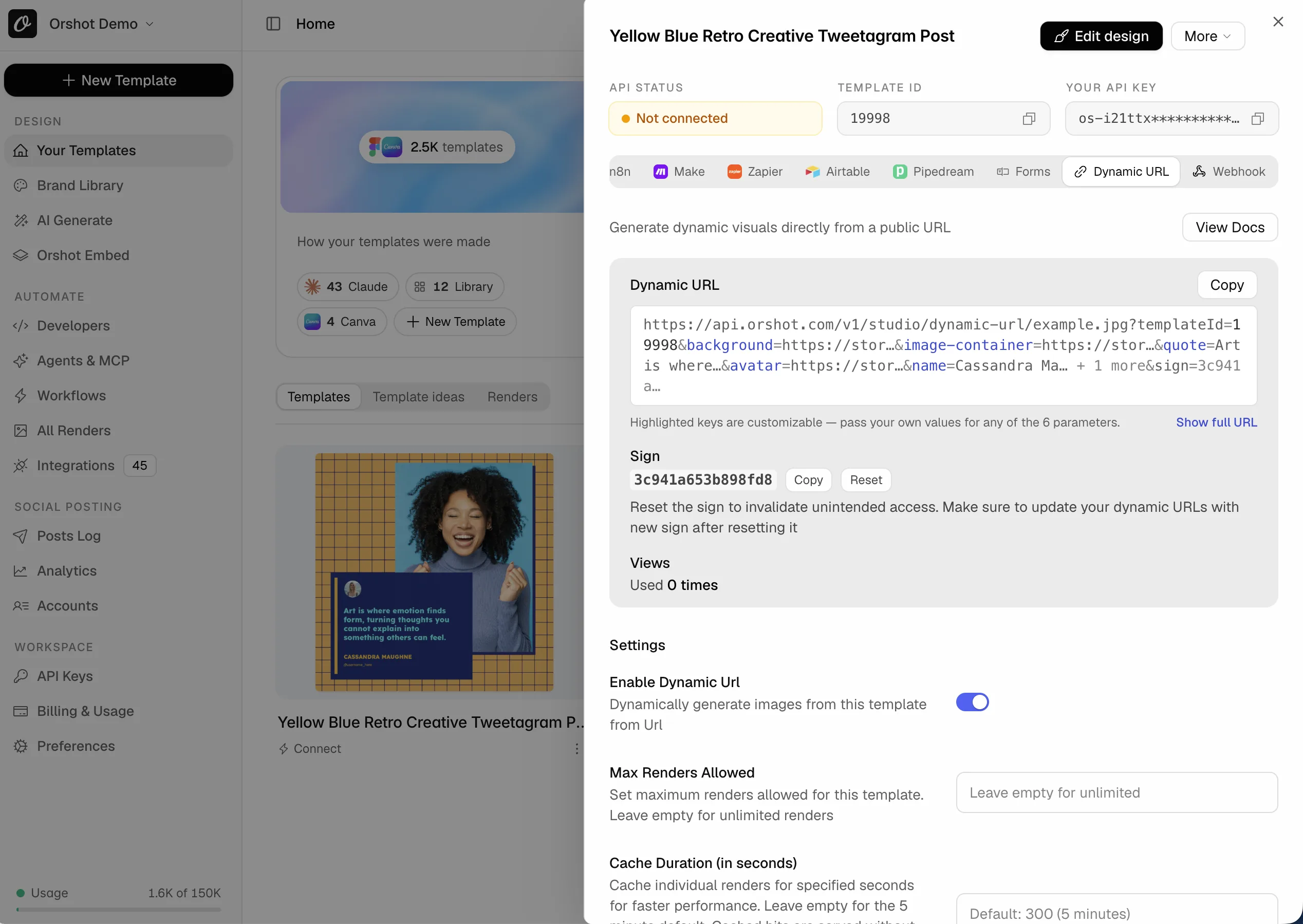
Your img.abyssale.com links become Dynamic URLs: same name=value query, plus a signature.
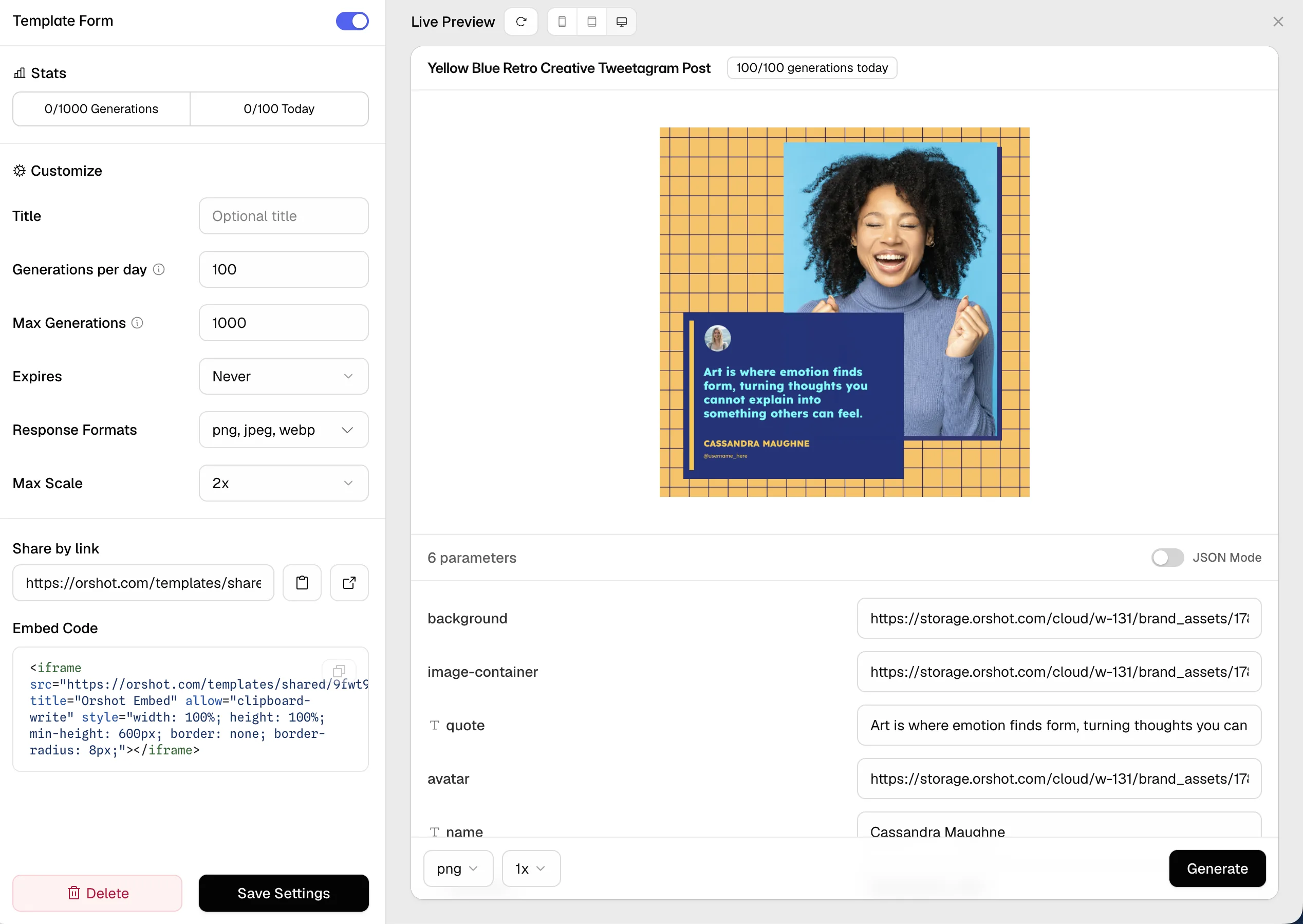
Teammates who used Abyssale's quick generation form get a Template Form: fields in, image out, no account needed.
Done when one automation generates from Orshot, with Abyssale still running as a fallback.
Free for up to 5 templates on any paid plan
- We import your designs with every format and layer name
- We rebuild the Make, n8n or Zapier steps that call them
- You get one test render per format on your own data
More than 5 designs, or a workspace per client? Book a call and we plan it with you.
Let your agent update the code and workflows




Copy this prompt into Claude Code, Cursor, Codex or ChatGPT. It finds your Abyssale calls, rewrites them for Orshot and links every doc it needs.
# Move this project from Abyssale to Orshot

I am switching image generation from Abyssale (api.abyssale.com) to Orshot (api.orshot.com). Orshot generates images, PDFs and videos from templates through one REST endpoint, and has native n8n, Make, Zapier, Pipedream and Airtable apps plus an MCP server (https://mcp.orshot.com/mcp, setup at https://orshot.com/agents). Connect to the MCP server first if you can: it lists my Orshot templates, their parameters, and runs test renders. Read the linked docs before you change code.

## 1. Inventory

List every Abyssale touchpoint with file paths:
- calls to `api.abyssale.com`: `/banner-builder/{designId}/generate`, `/async/banner-builder/{designId}/generate`, `/generation-request/{id}` polling, `/designs`
- the `@abyssale/sdk` (Node) or `abyssale` (Python) packages
- `ABYSSALE_API_KEY` or any `x-api-key` header sent to Abyssale
- design IDs (UUIDs), `template_format_name` / `template_format_names`, `elements` objects keyed by layer name
- webhook handlers for `NEW_BANNER_BATCH` events and `callback_url` values
- dynamic image links on `img.abyssale.com`
- n8n, Make or Zapier exports in the repo with Abyssale steps

## 2. Templates

I import the designs myself: New Template → Abyssale tab → paste the Abyssale API key → pick designs. Guide: https://orshot.com/migrate/from-abyssale

After import:
- one Orshot template per Abyssale design
- one page per Abyssale format, named after the format (`facebook-feed`, `instagram-story`…), in the design's order
- each layer name is a parameter with the same name (names with spaces become lowercase with underscores)

Ask me for the Orshot template IDs, or read them: https://orshot.com/docs/api-reference/studio-templates-list and https://orshot.com/docs/api-reference/studio-template-get
Build a table: Abyssale design ID → Orshot templateId, format name → page number. Show it to me before editing code.

## 3. Rewrite the calls

Reference: https://orshot.com/docs/api-reference/render-from-studio-template

Abyssale:
```http
POST https://api.abyssale.com/banner-builder/DESIGN_ID/generate
x-api-key: ABYSSALE_KEY
{ "template_format_name": "facebook-feed", "elements": { "title": { "payload": "Hello", "color": "#111" }, "hero": { "image_url": "https://…" }, "badge": { "hidden": true } } }
```

Orshot:
```http
POST https://api.orshot.com/v1/studio/render
Authorization: Bearer ORSHOT_KEY
{ "templateId": 12345, "modifications": { "title": "Hello", "title.color": "#111", "hero": "https://…", "badge.opacity": 0 }, "response": { "type": "url", "format": "png", "includePages": [2] } }
```

Rules:
- `elements` becomes a flat `modifications` object. `payload`, `image_url` and `video_url` become the value itself.
- Properties become dot keys: `color` → `"name.color"`, `background_color` → `"name.backgroundColor"`, `font_size` → `"name.fontSize"`, `font_weight` → `"name.fontWeight"`, `opacity: 40` → `"name.opacity": 0.4`, `hidden: true` → `"name.opacity": 0`. Docs: https://orshot.com/docs/dynamic-parameters
- `root.background_color` → `canvasBackgroundColor`.
- `font` is a UUID in Abyssale; use `"name.fontFamily": "Font Name"` or leave the font set on the layer.
- `template_format_name` → `response.includePages: [pageNumber]` using my mapping table. `template_format_names` (or none) → drop includePages: one call renders every page and `data` is an array, one entry per page with `page` and `pageId`.
- `vars` → a parameter per variable, after I make those texts parameters in the Studio.
- Layer settings (`fitting_type`, `alignment`, masks, filters, shadows, `auto_resize`, `max_lines`) are set once on the layer in Orshot, not per request. Flag any that change per render.
- `remove_bg`, `auto_focus`, `expand`, `text_to_image` have no equivalent; flag them.
- `image_file_type` → `response.format` (png, jpg, webp, avif, pdf, mp4, gif). `html5` has no equivalent. Video: `video.fps` → `videoOptions.fps`. Docs: https://orshot.com/docs/video-generation/video-options
- Orshot is synchronous by default: the file URL is in `data.content`. Remove `/generation-request` polling.
- If the code needs a webhook (`callback_url`), set `"mode": "async"` inside `response` and top-level `webhook_url`. The webhook body is `{ event: "render_job.finished", job }` per job, not a `NEW_BANNER_BATCH` list. Docs: https://orshot.com/docs/api-reference/async-render-start
- Auth: `x-api-key` → `Authorization: Bearer`. Store the key as `ORSHOT_API_KEY`. https://orshot.com/docs/quick-start/get-api-key
- SDKs (Node, Python, Ruby, PHP): https://orshot.com/docs/sdks. Errors: https://orshot.com/docs/error-reference

## 4. Dynamic image links

`https://img.abyssale.com/{dynamicImageId}/{format}?title=Hi` becomes an Orshot Dynamic URL: https://orshot.com/docs/integrations/dynamic-urls
Shape: `https://api.orshot.com/v1/studio/dynamic-url/{name}.png?templateId=12345&title=Hi&sign=SIGNATURE`
- Same `name=value` short form. Only text parameters travel in the URL.
- Orshot links are signed. The signature comes from the template's Quick Connect → Dynamic URL panel; ask me for it.
- Old img.abyssale.com links keep serving their cached variants; update only new sends.

## 5. Automations

- n8n: swap the Abyssale node for the Orshot node (`n8n-nodes-orshot`), or paste Quick Connect → Copy as → n8n workflow. https://orshot.com/docs/integrations/n8n
- Make: swap the module, or import Quick Connect → Copy as → Make blueprint. https://orshot.com/docs/integrations/make
- Zapier: Orshot → "Generate Image from Studio Template". https://orshot.com/docs/integrations/zapier
- Airtable: https://orshot.com/docs/integrations/airtable
- Plain HTTP callers: the template webhook maps any JSON to parameters. https://orshot.com/docs/integrations/webhooks
- AI agents: https://orshot.com/agents (MCP server https://mcp.orshot.com/mcp)

## 6. Verify, then switch

- Keep the Abyssale path behind a flag until each Orshot render matches on real data.
- Render every mapped template and format once and send me the URLs.
- Then remove the Abyssale SDK, key and batch webhook handler.

Everything else: https://orshot.com/llms.txt
Want the agent to render and check templates too? Connect Orshot for agents.
Priced by credits, not seats
One credit is one image at any size, one PDF page or one second of video. Team members are included in the plan.
| Credits per month | Orshot plan | Over that |
|---|---|---|
| 1,500 credits1,500 images, PDF pages or video seconds | $39/mo | $0.036 per credit |
| 5,000 credits5,000 images, PDF pages or video seconds | $99/mo | $0.036 per credit |
| 20,000 credits20,000 images, PDF pages or video seconds | $160/mo | $0.03 per credit |
| 40,000 credits40,000 images, PDF pages or video seconds | $280/mo | $0.03 per credit |
1 credit = one image, one PDF page or one second of video. Free for up to 5 templates on any paid plan. Higher volumes and every plan detail on pricing.
Before you switch from Abyssale
What is Orshot?
Which Abyssale designs can I import?
Who can create the API key?
Is my Abyssale key safe with Orshot?
What happens to my formats?
What does not carry over?
Do fonts and images come across?
What about my img.abyssale.com links?
What does the free migration cover?
Can I run Abyssale and Orshot side by side?
Moving from another tool as well?
Each guide covers the import and the API swap. See them all.

Bannerbear
The original image generation API, still used by big teams.

Templated.io
Straightforward automation for images, PDFs and videos through one render call.

Canva
The design tool everyone starts on, with Bulk Create for making many by hand.

Polotno
The React design editor SDK you host yourself, with cloud rendering billed on top.

IMG.LY
The CreativeEditor SDK engine, licensed per platform and quoted through sales.

Placid
Creative automation with images, PDFs and video, billed in credits that grow with size.
Weighing it up first? Read Orshot vs Abyssale. Several workspaces or a big library? Let's talk it through.
Book a call