
 Migrate from Canva to Orshot
Paste the share link of a Canva design. Every page, text box and image comes across, ready to fill in from your data.
Works with public view links on every Canva plan. Checked September 17, 2026.
Get API for your designs, not just downloads
In Canva you finish a design and download it. In Orshot the same design fills itself in from your data, on its own, as often as you need.
- Every design gets an APIEach text box and image becomes a field your code, or a tool, can fill in.
- A spreadsheet row becomes an imageGoogle Sheets or Airtable in, finished images out. No Bulk Create, no downloading.
- Works with Zapier, Make and n8nAdd an Orshot step and pick which text goes where.
- Ask an AI to do the setupClaude, ChatGPT or Cursor can design templates and connect them to your data.
- Post straight to socialsMake the image and publish it to Instagram, LinkedIn, X or Facebook in one go.
- Every size at oncePost, story and link preview from the same design. No Magic Resize copies to keep in sync.
- An image link that updates itselfPut one link in an email or a web page and change the text in the link. No file to upload.
- Keep designing in Canva if you likeChange the design there, import it again. Your automations keep working.
Get the public view link
No export needed. Orshot reads the design from the link Canva already gives you.
- 1Open the design and click Share, top right.
- 2Click Public view link. If it is not Live yet, Canva turns it on.
- 3Click Copy. The link looks like
canva.link/wfx0d58p1efm9tl. - 4One link per design. A six-page carousel is one link.
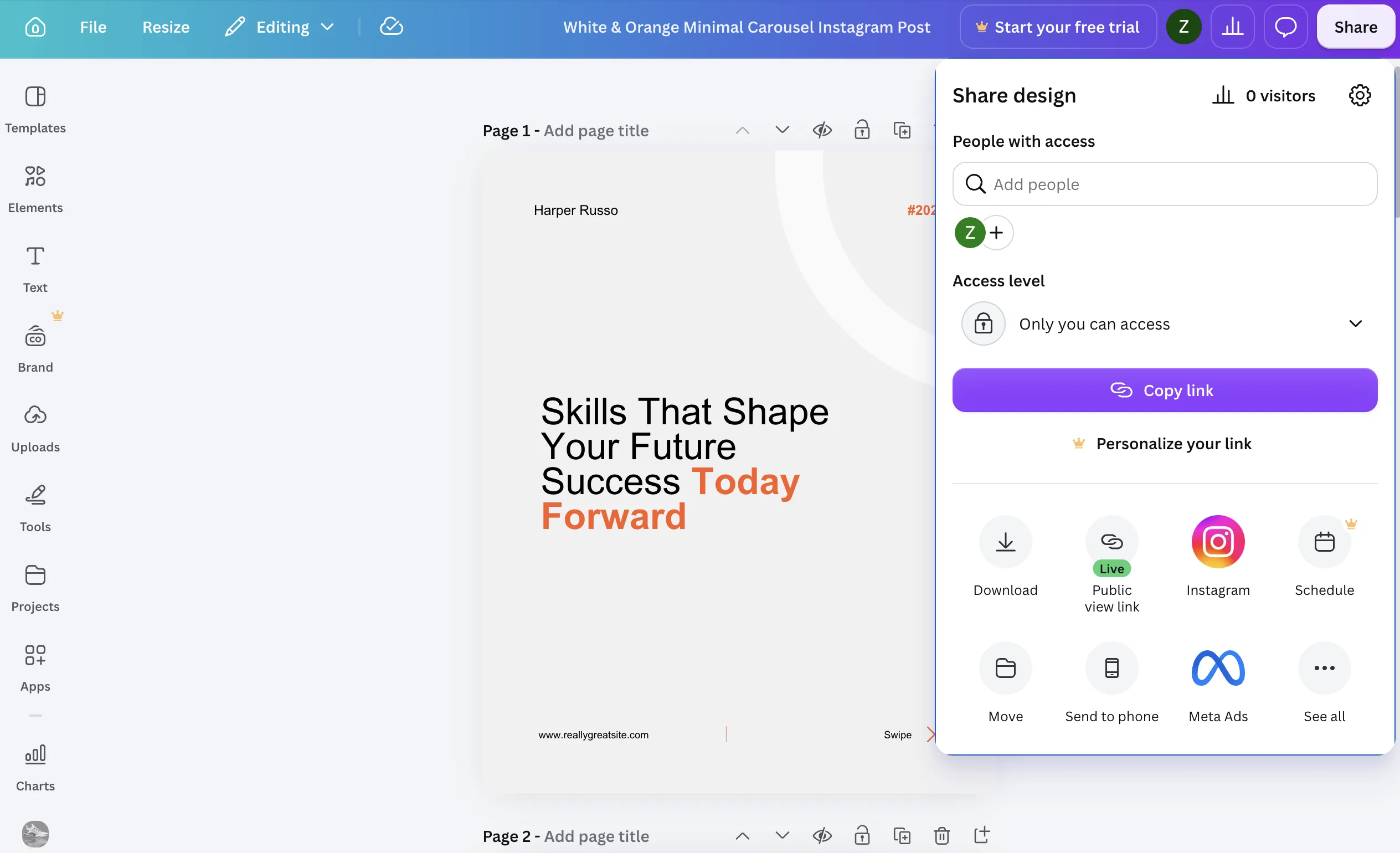
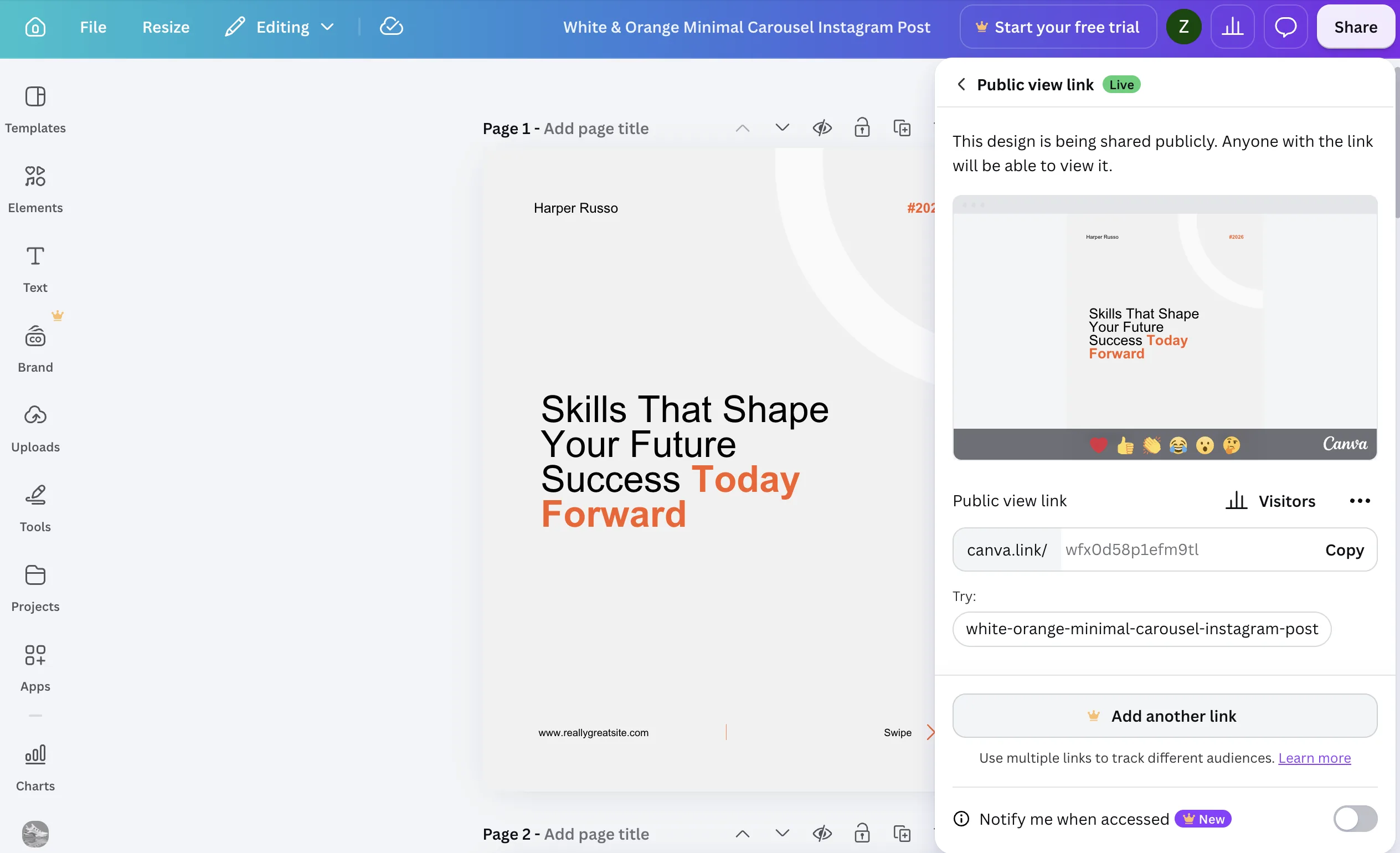
/edit at the end, is private to your account and will not import. Use the link from the Share panel.Done when you have one canva.link address per design.
Paste the link into Orshot
One link per design, or a list of links at once.
- 1New Template, then the Canva tab.
- 2Paste the link and click Import Design. Orshot reads every page and shows them.
- 3Tick the ownership box. Import in Studio.
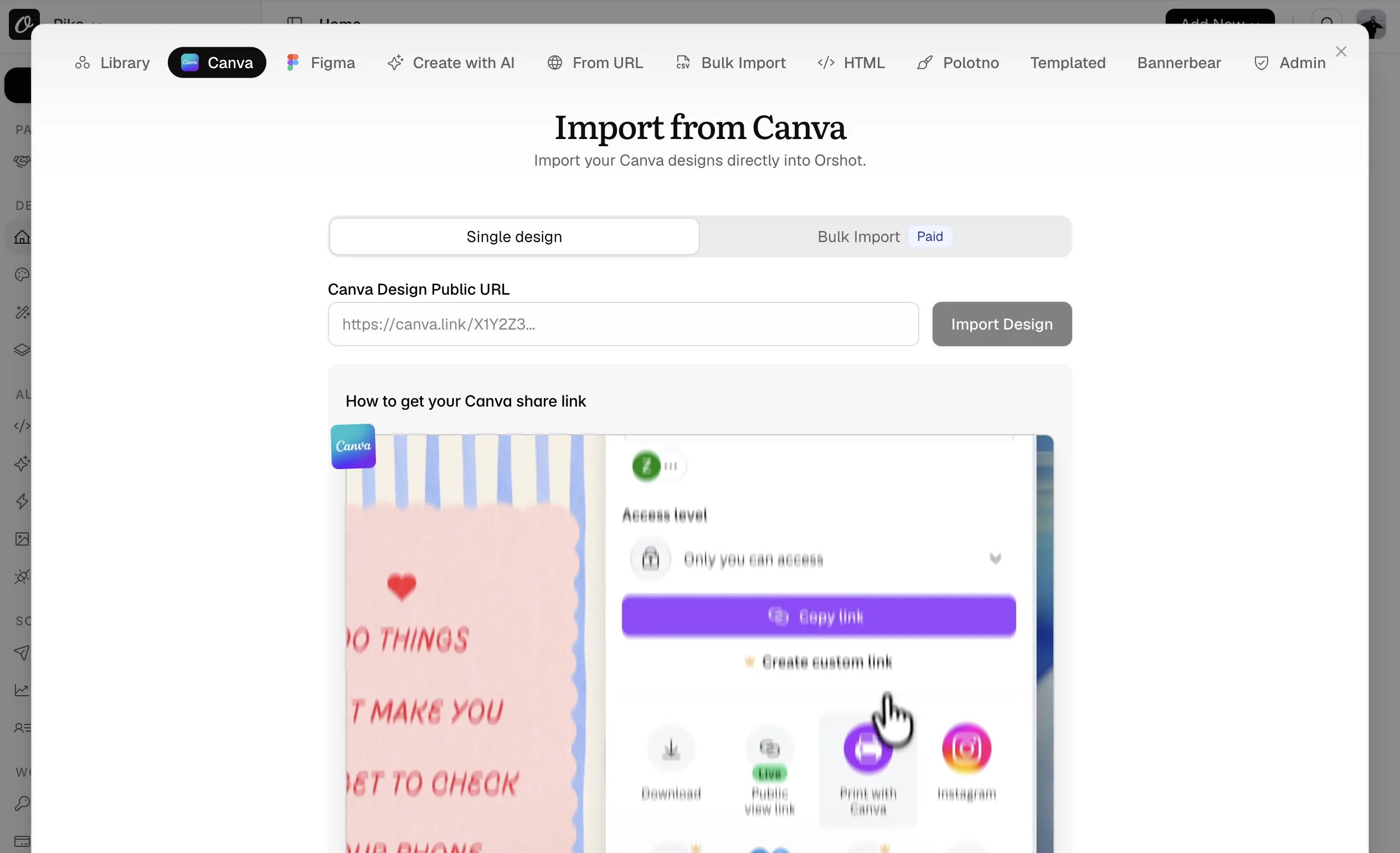
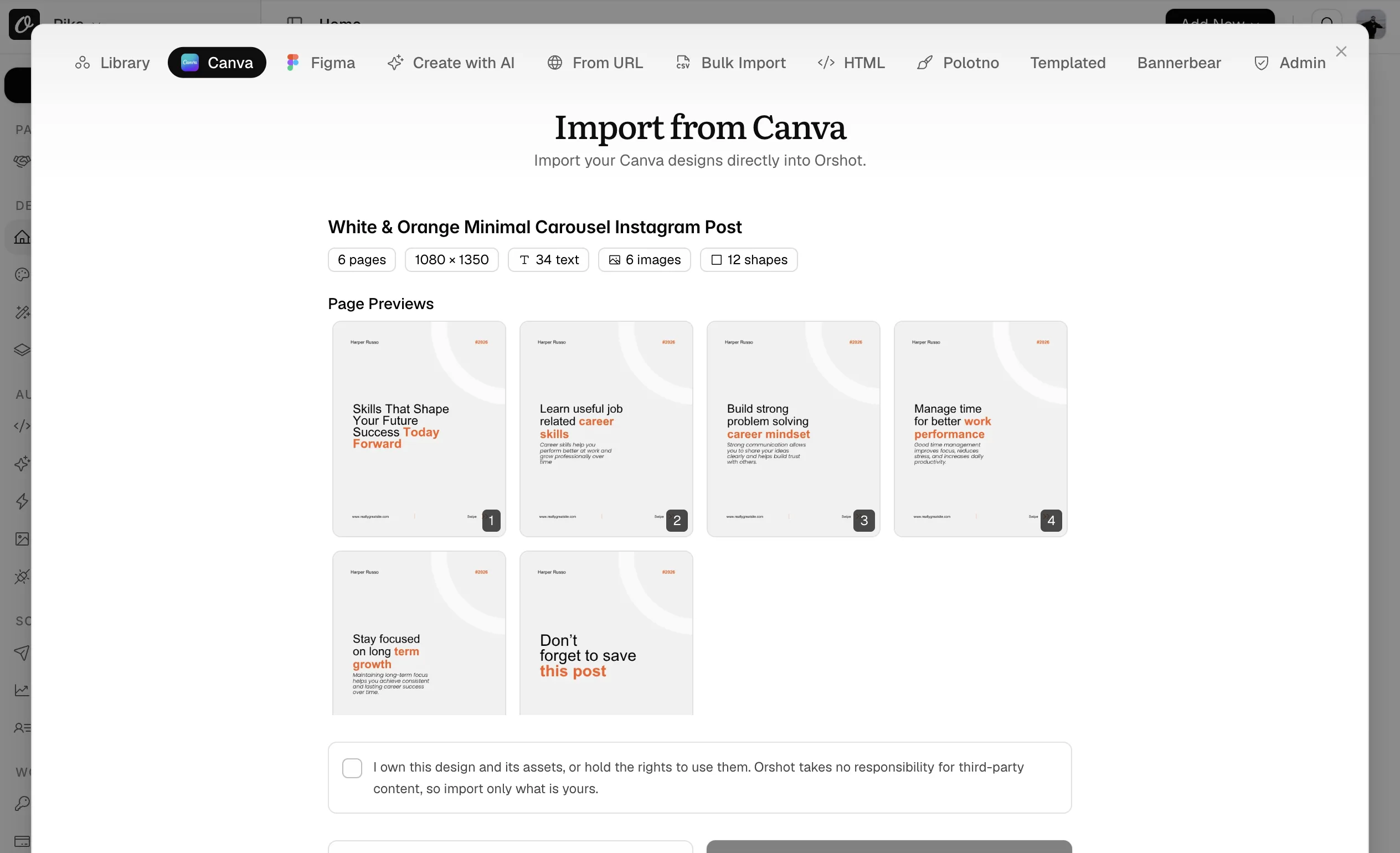
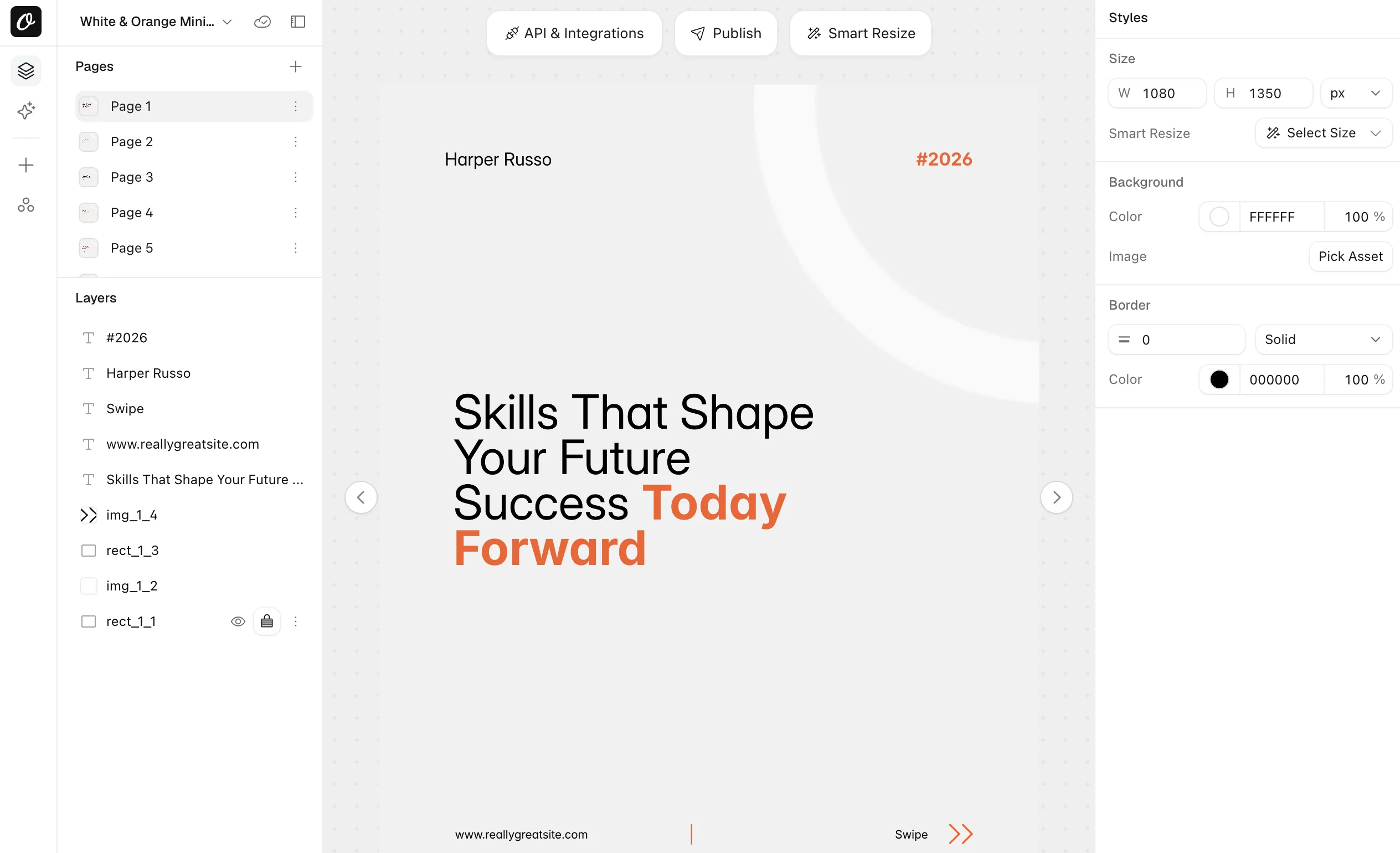
Done when the design shows in Your Templates with every page.
See what you can change
Canva has no layer names, so Orshot names each text box and image by what it is and where it sits.
| In the Canva design | Orshot API parameter |
|---|---|
| Heading: Skills That Shape… | heading_1_6 |
| Subheading on page 2 | subtitle_2_5 |
| Body text on page 1 | text_1_8 |
| Photo on page 1 | img_1_4 |
| Renamed in the Studio | headline |
headline instead of heading_1_6? Rename the layer in the Studio. Setting parameters in the Studio shows how. Text you locked in Canva is imported but not listed.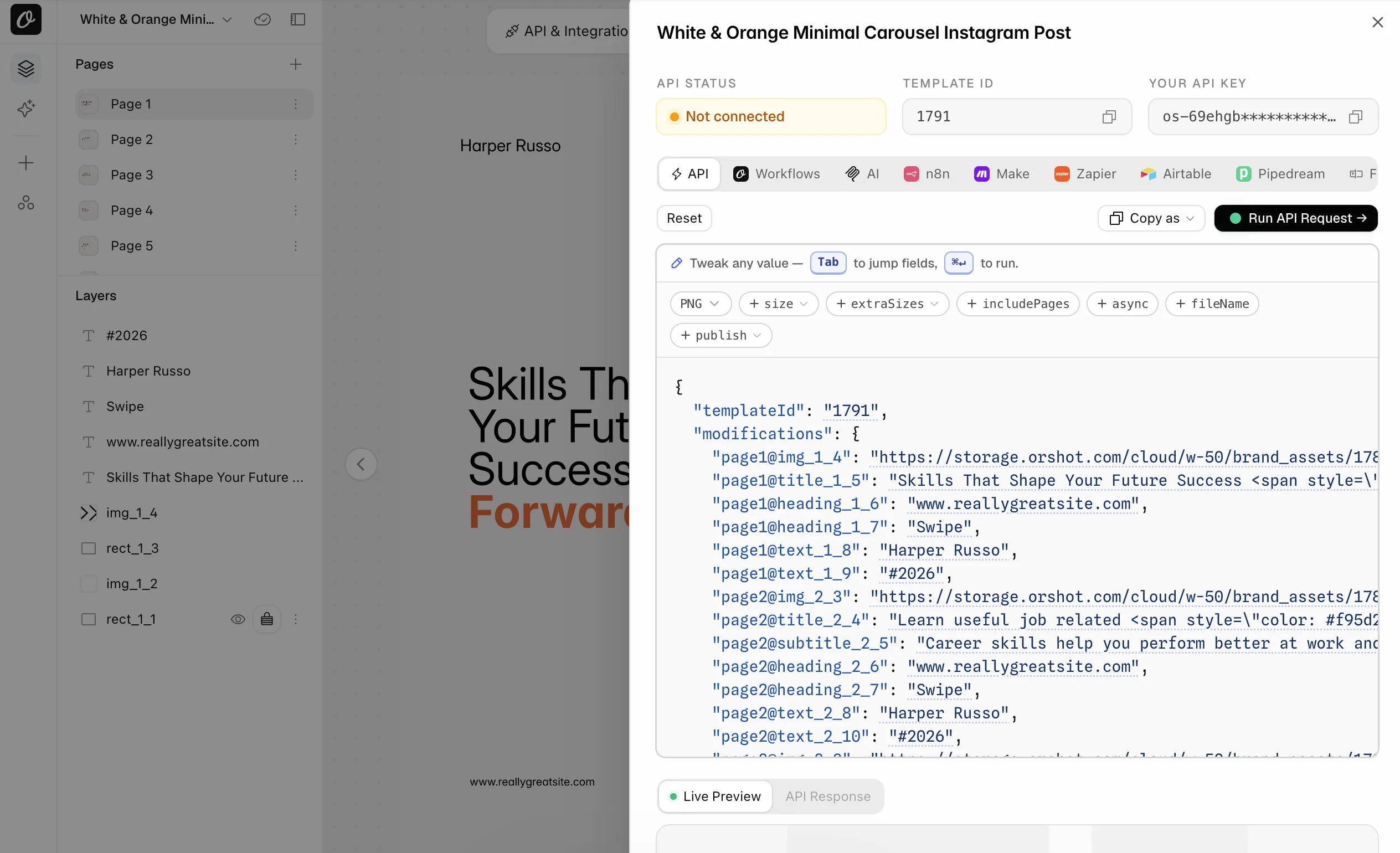
Done when the API tab lists every field with the name your automation will use.
Automate what Bulk Create did by hand
Canva has no render API for individual accounts. Bulk Create takes a sheet and gives you designs to download, every time, by hand. Here the same sheet becomes one request per row.
Convert your request
Replace the example with the sheet you feed Bulk Create: a header row, then one row per design. The first row becomes the request. Runs in your browser, nothing leaves the page.
Bulk Create sheet (CSV)POST https://api.orshot.com/v1/studio/render{
"templateId": <YOUR_ORSHOT_TEMPLATE_ID>,
"modifications": {
"name": "Harper Russo",
"headline": "Skills That Shape Your Future Success",
"accent": "Today Forward",
"photo": "https://example.com/harper.jpg"
},
"response": {
"type": "url",
"format": "png"
}
}- 4 columns became parameters. Rename the matching layers in the Studio to these names, or use the names the import gave them (title_1_5, img_1_4) in this request instead.
- photo holds an image URL, so it maps to an image layer.
- 2 rows in the sheet: send this request once per row, or hand the sheet to a Zapier, Make or n8n loop.
- Bulk Create makes one design per row; a multi-page design uses page prefixes instead: "page2@title".
| Canva | Orshot |
|---|---|
| Bulk Create column | Parameter name |
| One row | One API call |
| Generate, then Download all | data.content URL in the response |
| Page 2 of the design | "page2@heading_2_6" |
| Magic Resize copies | response.extraSizes: ["instagram-story"] |
| Download as PDF | response.format: "pdf" |
| Content Planner | publish.accounts on the same call |
Popular use cases
What most Orshot customers build, next to the nearest thing in Canva.
One post from the carousel, page 1, with a new name and headline.
Canva|Bulk Create sheetname,headline,accent
Harper Russo,Skills That Shape Your Future Success,Today Forward{
"templateId": 12345,
"modifications": {
"name": "Harper Russo",
"headline": "Skills That Shape Your Future Success",
"accent": "Today Forward"
},
"response": {
"type": "url",
"format": "png"
}
}A Bulk Create row and an API call carry the same values. The difference is who presses the button.
All six pages of the carousel in one call, one file per page.
CanvaOrshot|POST api.orshot.com/v1/studio/render{
"templateId": 12345,
"modifications": {
"name": "Harper Russo",
"page1@heading_1_6": "Skills That Shape Your Future",
"page2@heading_2_6": "Learn useful job related skills",
"page6@heading_6_4": "Don't forget to save this post"
},
"response": {
"type": "url",
"format": "png"
}
}Bulk Create makes one single-page design per row. Here the pages stay together and the response is an array, one URL per page.
The same design as a post, a story and an OG image.
CanvaOrshot|POST api.orshot.com/v1/studio/render{
"templateId": 12345,
"modifications": { "headline": "Skills That Shape Your Future" },
"response": {
"type": "url",
"format": "png",
"extraSizes": ["instagram-story", "1200x630"]
}
}Magic Resize needs a click per size and saves a copy. Here every size comes back from the one render.
A certificate as a print-ready PDF, one per name.
Canva|Bulk Create sheetname,course
Sarah Chen,UX Design{
"templateId": 12345,
"modifications": {
"name": "Sarah Chen",
"course": "UX Design"
},
"response": {
"type": "url",
"format": "pdf"
},
"pdfOptions": { "title": "UX Design Certificate", "dpi": 300 }
}Canva exports a PDF by hand after Bulk Create. Here the PDF is the response.
Render and publish to connected accounts in the same call.
CanvaOrshot|POST api.orshot.com/v1/studio/render{
"templateId": 12345,
"modifications": { "headline": "New post is live" },
"response": {
"type": "url",
"format": "png"
},
"publish": {
"accounts": [1, 2],
"content": "Skills that shape your future. Swipe."
}
}Canva's Content Planner schedules what you drag in. Here the render and the post are one call, or a Workflow on a schedule.
A link that renders on request, for emails, pages or a CMS.
CanvaOrshotGET https://api.orshot.com/v1/studio/dynamic-url/post.png
?templateId=12345
&headline=Skills%20That%20Shape%20Your%20Future
&sign=YOUR_SIGNATURECanva has no on-demand link. Enable it in Quick Connect, Dynamic URL. Text parameters only.
Done when a test render from the converted request comes back with your data in it.
Pick how the renders happen
Not writing code? Pick how you render. Same idea every time: point it at the Orshot template, map the same fields, drop the download step.
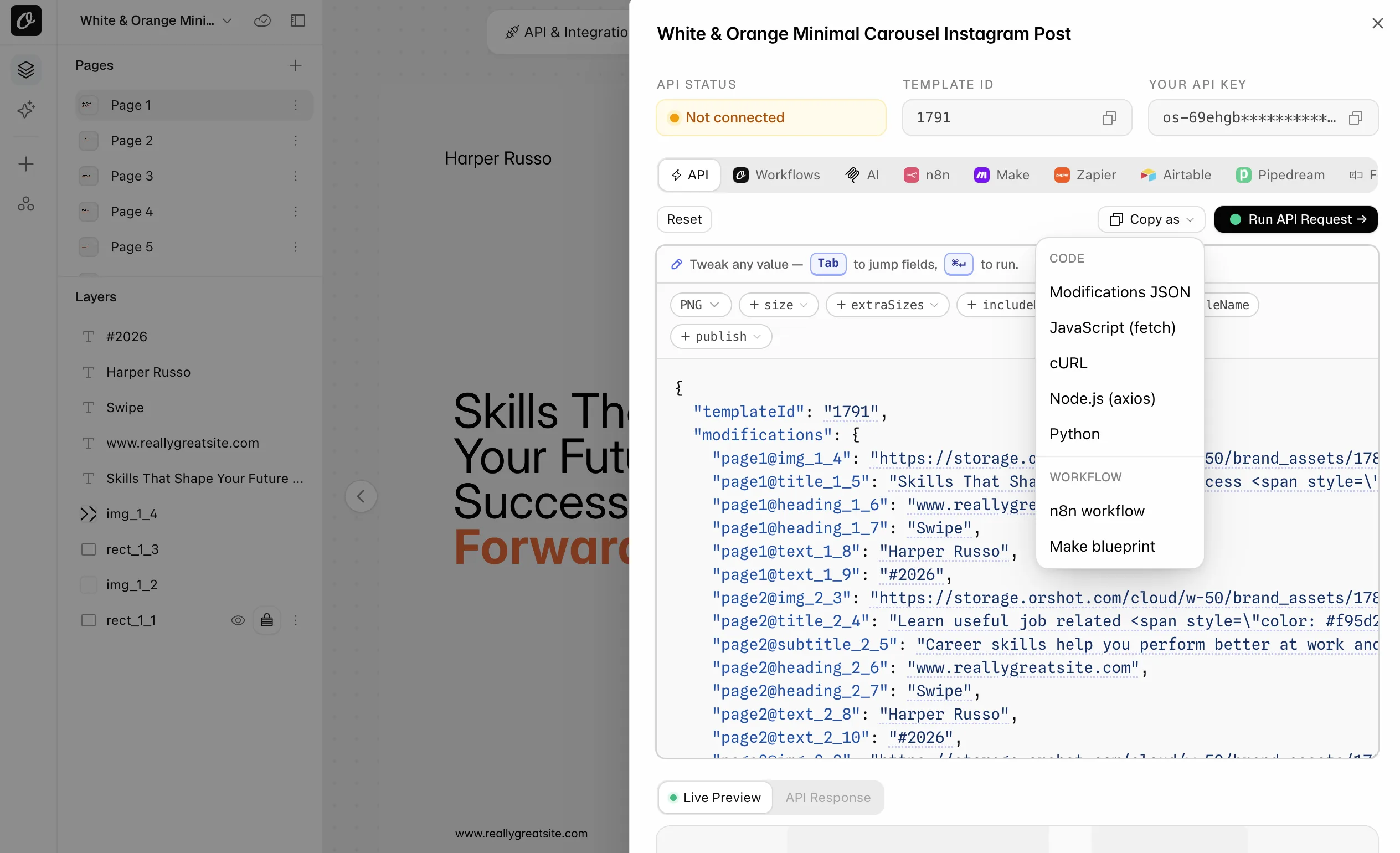
- 1n8n / Make: Quick Connect, Copy as, n8n workflow or Make blueprint. Paste it into your editor.
- 2Zapier: add the Orshot action Generate Image from Studio Template.
- 3Feed it the rows you used to paste into Bulk Create: a sheet, a form, a CRM. Run once.
- 1Connect Orshot to Claude, ChatGPT, Cursor or any MCP client from Agents & MCP in your workspace.
- 2Ask it to render the imported design with your data, or a whole sheet of it. It reads the parameter names from the template.
- 3Turning a Bulk Create routine into code? Use the prompt at the top of this page.
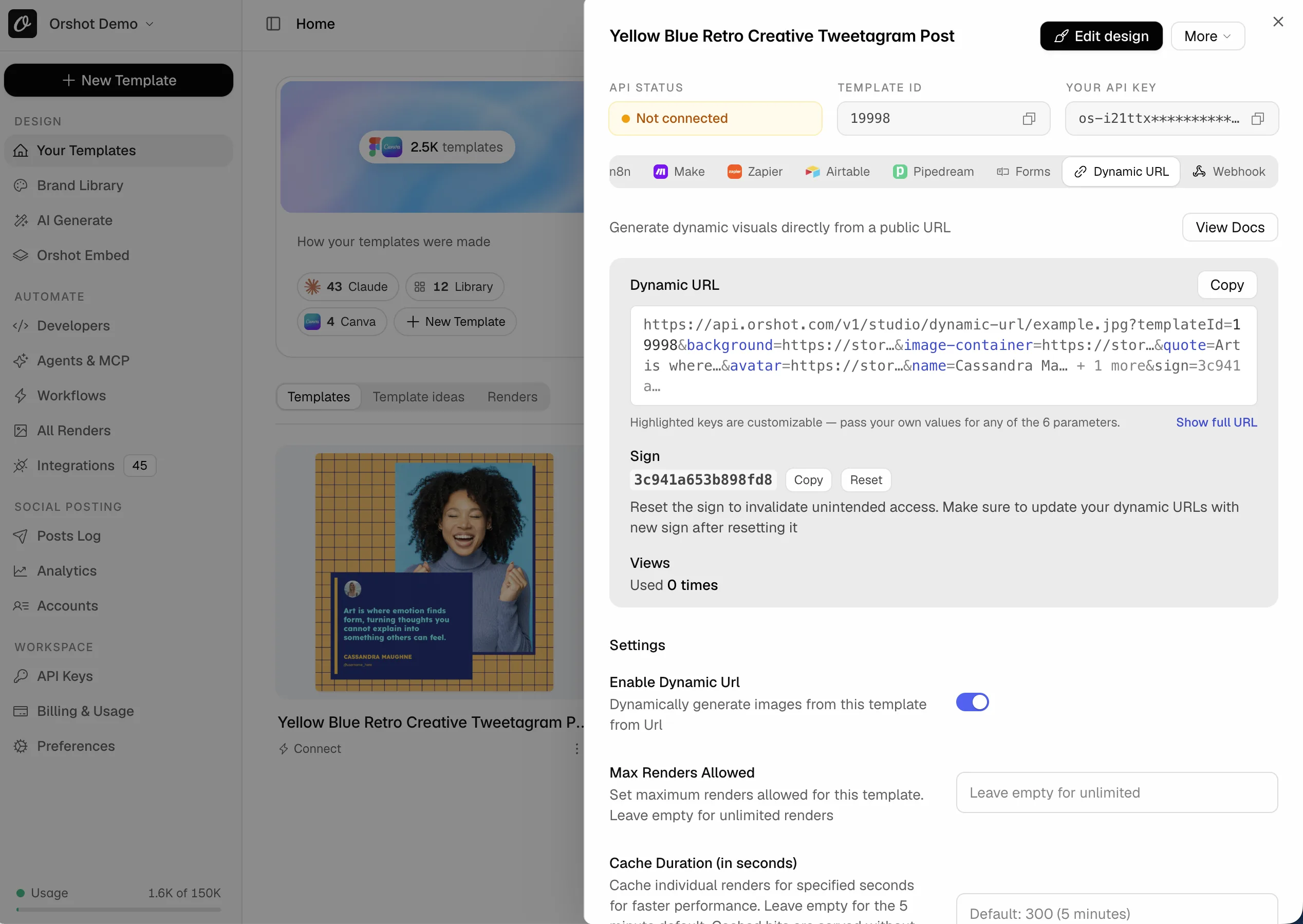
Need a link that renders on request, for emails, pages or a CMS? That is a Dynamic URL in Orshot.
- 1Quick Connect, Dynamic URL, enable, save.
- 2Copy the signed link. Change a query value, the image changes.
- 3Use it wherever a render URL is embedded: emails, pages, CMS.
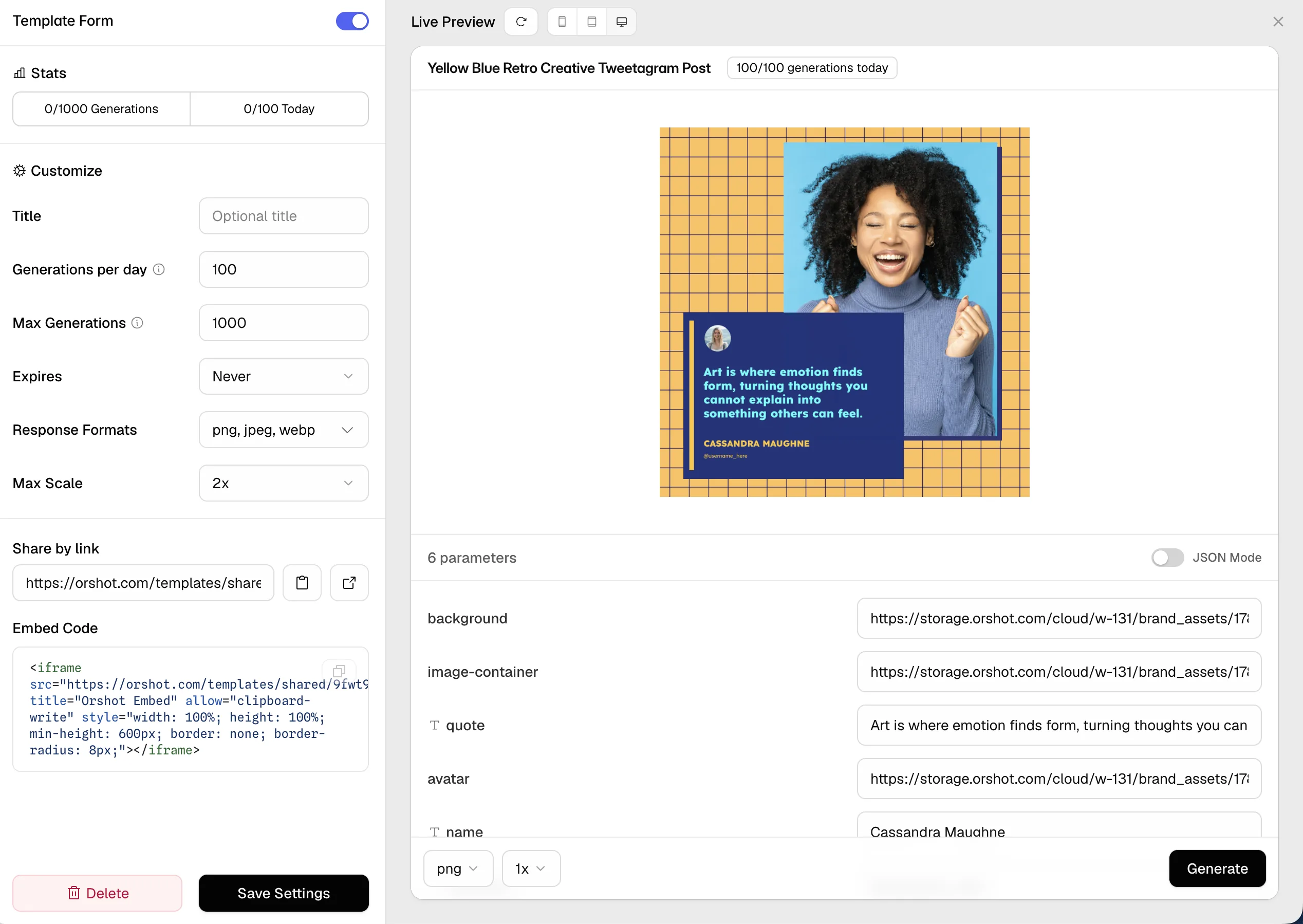
For teammates who never touch code: publish the template as a Template Form. They fill the fields, the image renders, no account needed.
- 1Quick Connect, Forms, Create a form.
- 2Set the daily limit, formats and expiry. Share the link or paste the embed code.
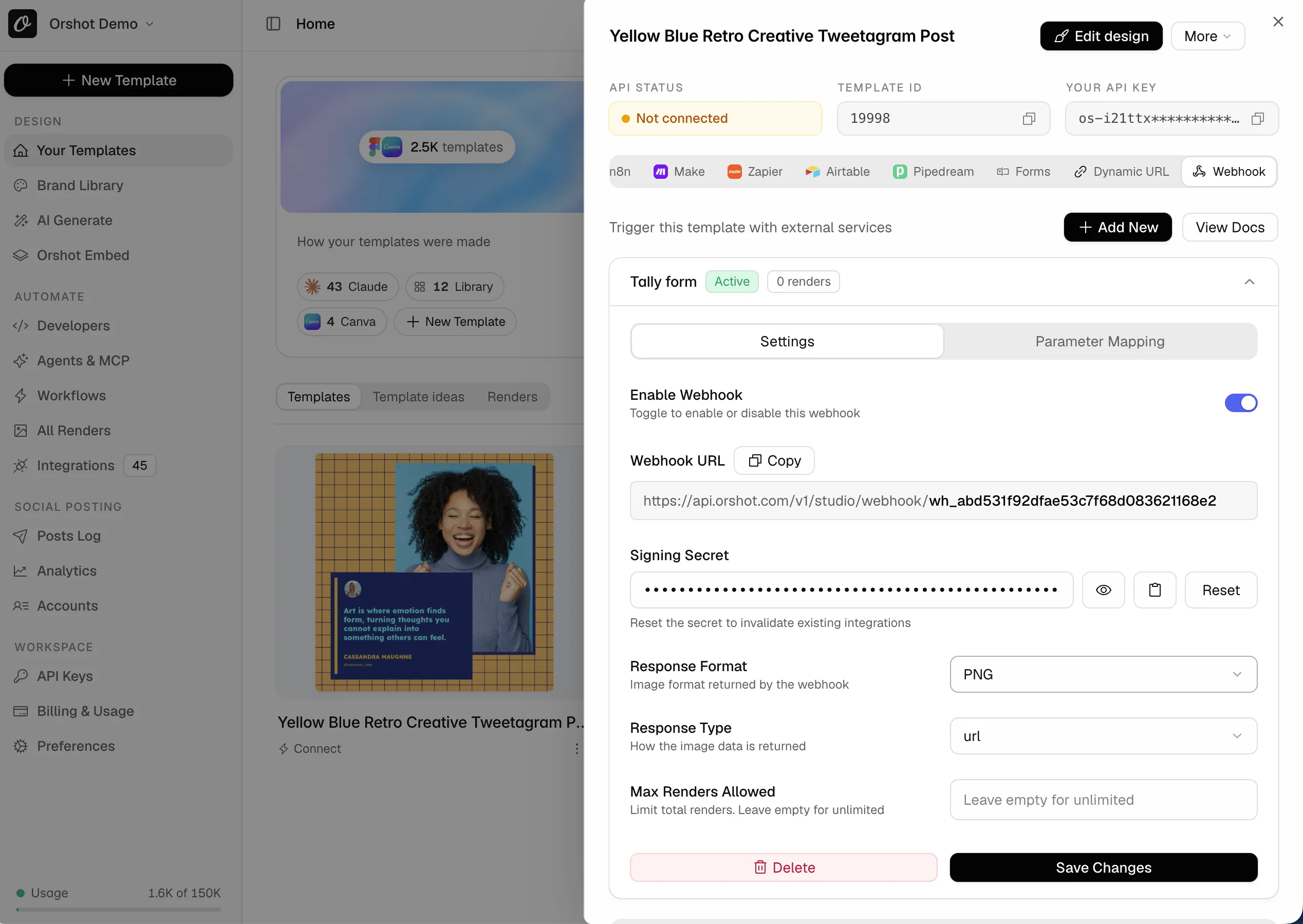
Rendering from a form tool or your own backend? A template webhook is a URL that renders on every POST, no API key in the caller.
- 1Quick Connect, Webhook, Add New. Pick the response format.
- 2Paste the webhook URL into Tally, Typeform, Zapier, Make, n8n or your code.
- 3Trigger it once. Orshot reads the payload and you map each field under Parameter Mapping.
Done when one routine renders from Orshot with the same inputs.
Keep Canva open, watch a week of renders
Nothing has to be switched off. Keep designing in Canva if that is where you are happiest.
- 1Render each design with real data from the API tab. Compare with the Canva download.
- 2Move one routine over. Watch a week of output.
- 3Decide if Orshot works for you. Keep whichever you prefer.
Done when a week of renders matched and you know which routine you are keeping. Then pick a plan below.
Free for up to 5 templates on any paid plan
- We import every design, pages and parameters kept
- We help you build your API, Zapier, Make or n8n automations
- You get a test render of each on your own data
More than 5 designs, or several client accounts? Book a call and we scope it together.
Let your agent update the code and workflows




Copy this prompt into Claude Code, Cursor, Codex or ChatGPT. It finds your Canva calls, rewrites them for Orshot and links every doc it needs.
# Automate my Canva designs with Orshot

I make designs in Canva and want them rendered automatically through Orshot (api.orshot.com) instead of by hand. Orshot renders images, PDFs and videos from templates through an API, has native n8n, Make, Zapier, Pipedream and Airtable apps, and an MCP server (https://mcp.orshot.com/full, setup at https://orshot.com/agents). If you can connect to that MCP server, do it first: it lets you list my Orshot templates, read their parameters and test renders directly. Read the docs linked below before changing anything, then do the work in the order given.

## 1. Find every place a Canva design is produced by hand or by script

Search for, and list with file paths:
- Canva links (`canva.com/design/…`, `canva.link/…`) in code, docs, spreadsheets or CMS content
- Bulk Create sheets: CSV or XLSX files whose columns are text fields (name, title, price…) or image URLs
- Scripts or Zaps that download Canva exports, rename files or upload them somewhere
- Places where the rendered images end up: a CMS, an email tool, a social scheduler, a folder

## 2. Templates

I will import each Canva design into Orshot myself (New Template → Canva tab → paste the public view link). Guide: https://orshot.com/migrate/from-canva

Every page of a design becomes a page of one Orshot template. Every text box and image becomes a parameter, named by its role, page and position: `title_1_5`, `heading_2_6`, `text_1_8`, `img_1_4`. Multi-page keys carry a page prefix: `page2@title_2_4`. Ask me for the Orshot template IDs, or read the parameters with:
- GET /v1/studio/templates/{id}: https://orshot.com/docs/api-reference/studio-template-get
- List templates: https://orshot.com/docs/api-reference/studio-templates-list

Build a mapping table: Bulk Create column (or the thing I change by hand) → Orshot parameter. Show it to me before writing code. If the generated names are unreadable, tell me which layers to rename in the Studio and I will do it.

## 3. Replace Bulk Create with API calls

Reference: https://orshot.com/docs/api-reference/render-from-studio-template

Bulk Create row:
```csv
name,headline,photo
Harper Russo,Skills That Shape Your Future Success,https://…/harper.jpg
```

Orshot, one call per row:
```http
POST https://api.orshot.com/v1/studio/render
Authorization: Bearer ORSHOT_KEY
{ "templateId": 12345, "modifications": { "name": "Harper Russo", "headline": "Skills That Shape Your Future Success", "photo": "https://…/harper.jpg" }, "response": { "type": "url", "format": "png" } }
```

Rules:
- `modifications` is a flat object keyed by parameter name. Text is a plain string; an image is its URL.
- Styles use dot keys: `"headline.color": "#111"`, `"headline.fontSize": 48`. Docs: https://orshot.com/docs/dynamic-parameters
- Multi-page designs: `"page2@heading_2_6": "…"`. A key without a prefix applies to every page. A carousel comes back as one URL per page.
- `response.format`: png, jpg, webp, avif, pdf, mp4, webm, gif. `response.type`: url, base64, binary. `response.size` renders the same design at another size, for example `"instagram-story"`: https://orshot.com/docs/api-reference/render-from-studio-template#smart-resize
- Sync by default: the response carries `data.content` (the file URL or data). For long batches use `"mode": "async"` inside `response` with `webhook_url`: https://orshot.com/docs/api-reference/async-render-start
- Auth is Bearer. Store the key as `ORSHOT_API_KEY`. Keys: https://orshot.com/docs/quick-start/get-api-key
- Official SDKs (Node, Python, Ruby, PHP): https://orshot.com/docs/sdks
- Error codes: https://orshot.com/docs/error-reference

## 4. Publishing

If the images went to a social scheduler, Orshot can post them in the same call: add `publish: { accounts: [ids], content: "caption" }`. Ask me which accounts are connected under Accounts. Docs: https://orshot.com/docs/api-reference/render-from-studio-template#publish-to-social

## 5. Automations

- n8n: Orshot node (community package `@thelifeofrishi/n8n-nodes-orshot`). Docs: https://orshot.com/docs/integrations/n8n. A ready workflow can be copied from the template's Quick Connect → Copy as → n8n workflow.
- Make: Orshot module, or import the blueprint from Quick Connect → Copy as → Make blueprint. Docs: https://orshot.com/docs/integrations/make
- Zapier: Orshot → "Generate Image from Studio Template". Docs: https://orshot.com/docs/integrations/zapier
- Google Sheets or Airtable as the source of rows: https://orshot.com/docs/integrations/airtable and the inbound template webhook that accepts any JSON: https://orshot.com/docs/integrations/webhooks
- AI agents: https://orshot.com/agents, MCP server https://mcp.orshot.com/full, docs: https://orshot.com/docs/integrations/mcp-server

## 6. Verify

- Render each mapped template once with a real row and show me the URLs next to the Canva export of the same row.
- Only then retire the Bulk Create sheet and the manual download step.

Full API index for anything not covered: https://orshot.com/llms.txt
Want the agent to render and check templates too? Connect Orshot for agents.
What the renders cost
Decided? One credit is one image, one PDF page or one second of video. No per-template fee.
| Credits per month | Orshot plan | Over that |
|---|---|---|
| 1,500 credits1,500 images, PDF pages or video seconds | $39/mo | $0.036 per credit |
| 5,000 credits5,000 images, PDF pages or video seconds | $99/mo | $0.036 per credit |
| 20,000 credits20,000 images, PDF pages or video seconds | $160/mo | $0.03 per credit |
| 40,000 credits40,000 images, PDF pages or video seconds | $280/mo | $0.03 per credit |
1 credit = one image, one PDF page or one second of video. Free for up to 5 templates on any paid plan. Higher volumes and every plan detail on pricing.
Questions Canva users ask
It says the design could not be fetched.
Do I need Canva Pro?
What are the parameter names?
Canva has no API for me. How is this a migration?
Do I have to leave Canva first?
What does the free migration include?
Do multi-page designs and carousels work?
Do my fonts and Brand Kit come across?
Can I keep using Zapier, Make or n8n?
What does not carry over?
How is rendering priced?
Can I import designs in bulk?
Coming from somewhere else?
Every guide has the steps and the code swap, plus the importer where there is one. All migration guides.

Bannerbear
The original image generation API, still used by big teams.

Templated.io
Straightforward automation for images, PDFs and videos through one render call.

Polotno
The React design editor SDK you host yourself, with cloud rendering billed on top.

IMG.LY
The CreativeEditor SDK engine, licensed per platform and quoted through sales.

Placid
Creative automation with images, PDFs and video, billed in credits that grow with size.

Abyssale
Multi-format banner automation, priced per seat with a monthly credit allowance.
Still comparing? Canva Bulk Create comparison. Bigger move, or several client accounts? Book a call.
Book a call