
 Swap IMG.LY CE.SDK for Orshot Embed
Put a template editor in your app, backed by the Orshot API. It's ready in 1 to 3 seconds, with no license key or sales call.
For CreativeEditor SDK on the web. Try the API free. The embed starts at $39/mo. Checked September 22, 2026.
This is the editor your users would get
A live Orshot embed, branded as a made-up “Acme Studio”. Switch templates with the tabs above the editor, or open Menu for more. Nothing you edit gets saved.
Press “Add to App” in the editor and this page receives the PNG, the way your app would.
- until everything has loaded
- 3.9 s
- Orshot3.9 sCE.SDK5.1 s
- downloaded on first load
- 2.6 MB
- Orshot2.6 MBCE.SDK9.8 MB
- of WASM engine to download
- 0 MB
- Orshot0 MBCE.SDK6.2 MB
One iframe, or a React or Vue component
This is the whole integration. Orshot hosts the editor, so your bundle gains at most a small wrapper.
<iframe
  src="https://orshot.com/embeds/your-embed-id?templateId=123&userId=user_42"
  allow="clipboard-write"
  style="width: 100%; height: 100%; min-height: 600px; border: none;"
></iframe>
import { OrshotEmbed } from "@orshot/embed-react";
<OrshotEmbed embedId="your-embed-id" templateId={123} height={700} /><script setup>
import { OrshotEmbed } from "@orshot/embed-vue";
</script>
<template>
<OrshotEmbed embed-id="your-embed-id" template-id="123" height="700px" />
</template>Orshot vs IMG.LY, side by side
Orshot lists its prices, and each plan adds more of the editor. IMG.LY quotes each deal through sales.
| Feature | Launch | Grow | Scale | IMG.LY CE.SDK |
|---|---|---|---|---|
| Price | from $39/mo | from $160/mo | from $349/mo | Quote from sales |
| The editor inside your appiframe, React or Vue component | Included | Included | Included | npm package, any framework |
| Only your brandingNo Orshot mark in the editor | Not included | Included | Included | Yes. Lapsed license adds a watermark |
| Users with their own libraryTheir own templates and brand library | Not included | 50 to 100 users | 500 to 1,500 users | You build it |
| Master templates stay untouchedUsers edit a copy, never the original | Not included | Included | Included | Roles, with your own storage |
| Allowed domains | 2 | 5 | 8 | Per license |
| Downloads inside the editorPNG, AVIF, PDF, HTML, and MP4 for video | Not included | Included | Included | Counted per export |
| Events and webhooks to your appSaves, downloads, template changes | Not included | Included | Included | Callbacks; you build webhooks |
| Control the editor from your codeSwitch templates, set text and images | Not included | Not included | Included | Included |
| Your own toolbar buttons"Save to app", "Send for approval" | Not included | Not included | Included | You write the UI |
| Your own asset library in the editor | Not included | Not included | Included | Custom asset source, your code |
| Smart Resize for usersFit one design to every size | Not included | Not included | Included | Resize panel via a starter kit |
| API renders per month1 credit = 1 image, PDF page or video second | 1,500 to 5,000 credits | 20,000 to 40,000 credits | 75,000 to 300,000 credits | Headless engine, counted per export |
Orshot columns come from the live plans, smallest to largest size. Details on pricing. IMG.LY lists no prices. This column follows their licensing docs.
| Feature | Orshot | IMG.LY CE.SDK |
|---|---|---|
| Editor and hosting | ||
| Hosted editor, no engine to bundleiframe, React or Vue | Yes | npm package + WASM engine |
| Smaller first load2.6 MB and no WASM engine | Yes | 9.8 MB, about 6 MB of it WASM |
| Templates and brand library per userImages, video, audio, colors and fonts, private to each userId | Yes | You build it |
| Master templates open as copies | Yes | Roles; storage is yours |
| Lock actions per end userFrom the dashboard or a signed token | Yes | Scopes set in your code |
| Brand assets seeded per user by API | Yes | Custom asset source code |
| Embed analyticsReturning vs one-time users | Yes | No |
| Video, audio and subtitles in one editor | Yes | Yes, in the same SDK |
| Add your own panels and pluginsOrshot: show, hide, brand, custom buttons | No | Yes |
| Run the editor on your own servers | No | Yes |
| Interface languagesEnglish, Spanish, Portuguese, French, German, Russian | 6 built in | Any, via translations |
| Rendering and automation | ||
| API for the templates users editPNG, JPG, WebP, AVIF, PDF, MP4, WebM, GIF | Yes | Run the headless engine |
| Async renders with webhooks | Yes | Your own queue |
| Zapier, Make, n8n, Pipedream, Airtable | Yes | No |
| Workflows from source to template to destinationNo code, runs on a schedule | Yes | No |
| Render from a linkDynamic URLs, change a query value | Yes | No |
| Forms that render for non-developersHosted, no code | Yes | You build the form in code |
| AI and distribution | ||
| Hosted MCP for Claude, ChatGPT, CursorDesign and render your templates | Yes | CoDesign, a local MCP |
| Post and schedule to 15 social networks | Yes | No |
| Import from Canva, Figma, Polotno, HTML | Yes | PSD, InDesign, PDF and PPTX importers |
| Pricing | ||
| Price on the website | From $39/mo | Quote from sales |
| Renders included in the plan | Yes | Counted per export |
Move your CE.SDK templates to Orshot
CE.SDK scenes don't import into Orshot. Bring in the source design instead, then rename its parameters to match your variables.
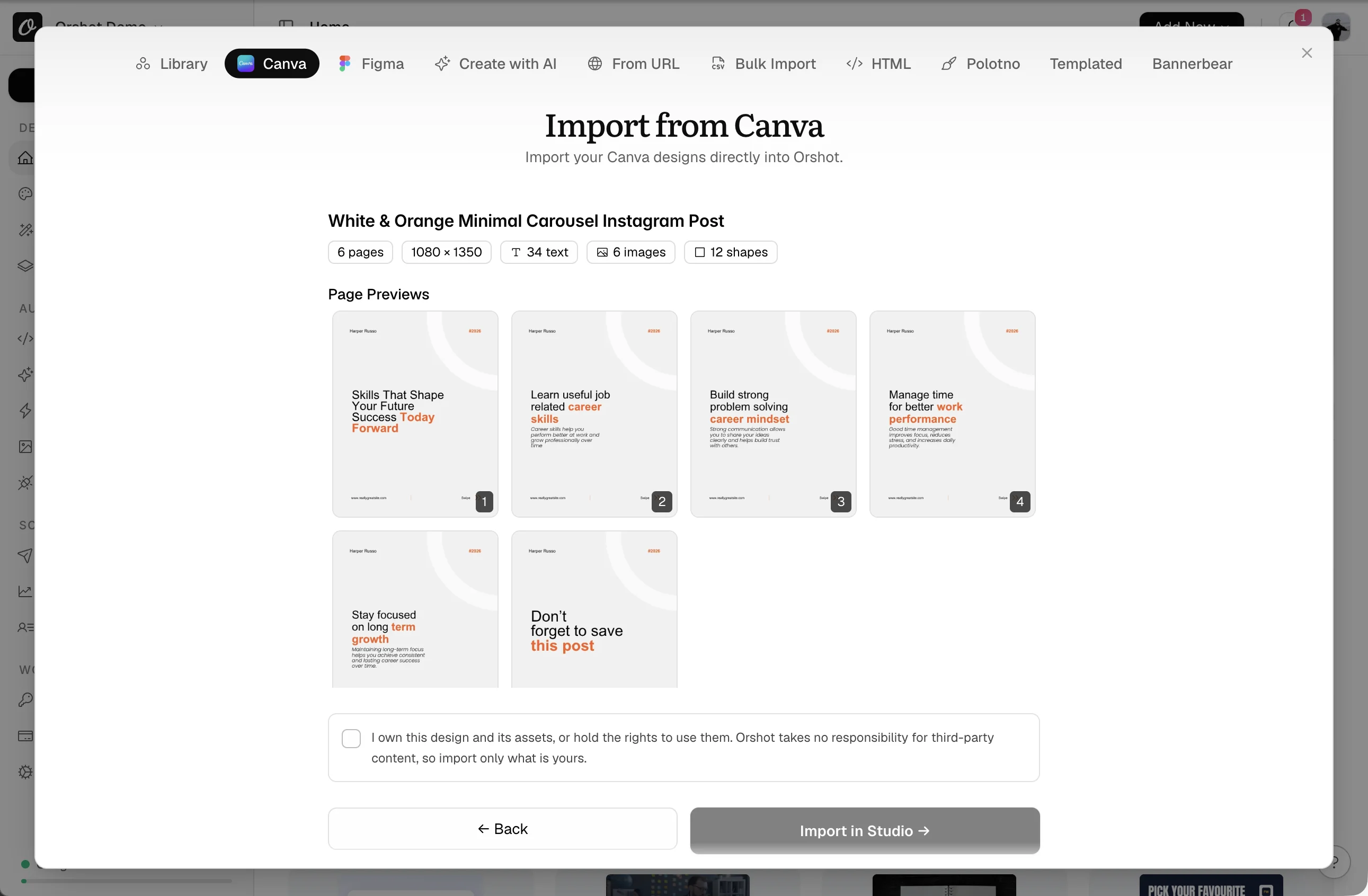
- 1In Canva, copy the Public view link under Share.
- 2In Orshot, New Template, Canva, paste the link.
- 3Check the pages, tick the ownership box, Import in Studio.
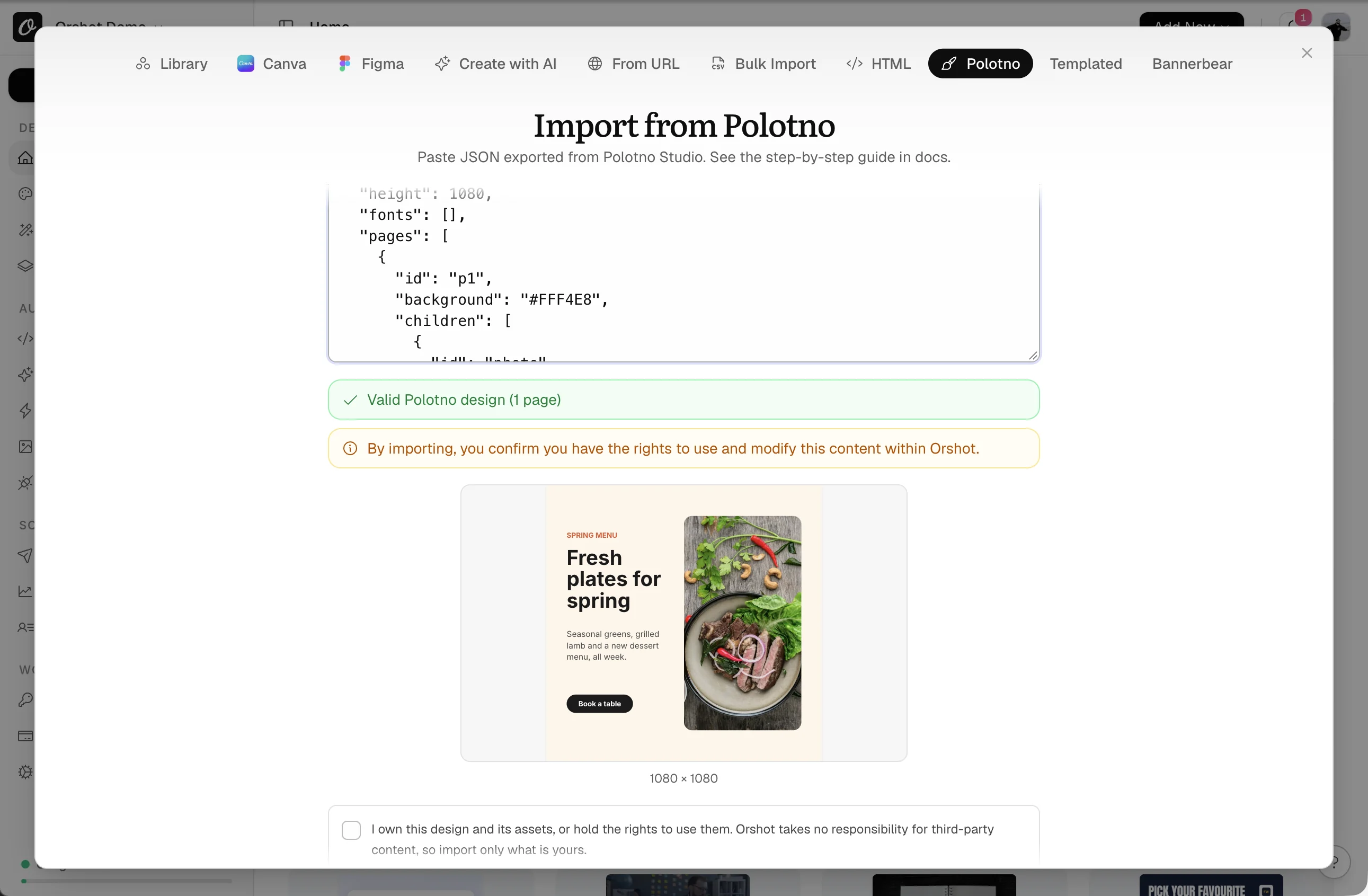
- 1Export the design as JSON from Polotno.
- 2New Template, Polotno, paste it. The preview checks it.
- 3Tick the ownership box and import. Text and images become parameters.
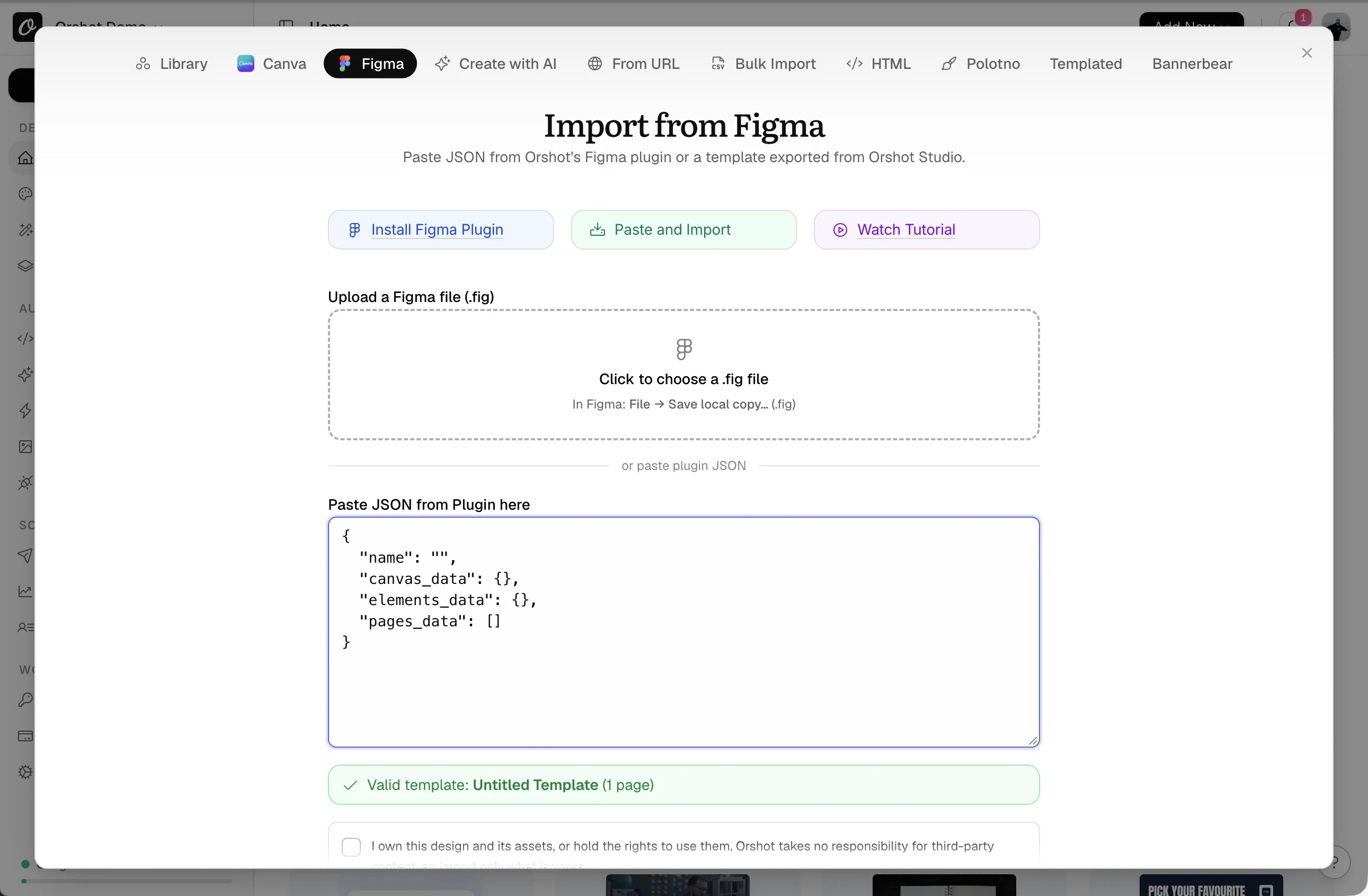
- 1Save the file as
.fig, or send frames with the Orshot Figma plugin. - 2New Template, Figma, upload the file or paste the plugin JSON.
- 3Import. Each frame becomes a page.
- 1Send each scene file with its fonts and images, plus its export.
- 2We rebuild up to 5 for free on any paid plan.
- 3Your
{{variables}}keep their names. Request it
| CE.SDK | Orshot |
|---|---|
| {{firstName}} variable | firstName parameter |
| placeholder block | editable layer |
| locked block | locked layer |
| multi-page scene | multi-page template |
| custom asset source | Brand Library or your picker |
Done when Your Templates lists every template with its parameters.
Add the Orshot editor to your app
Since Orshot hosts the editor, one iframe replaces the CE.SDK engine and license.
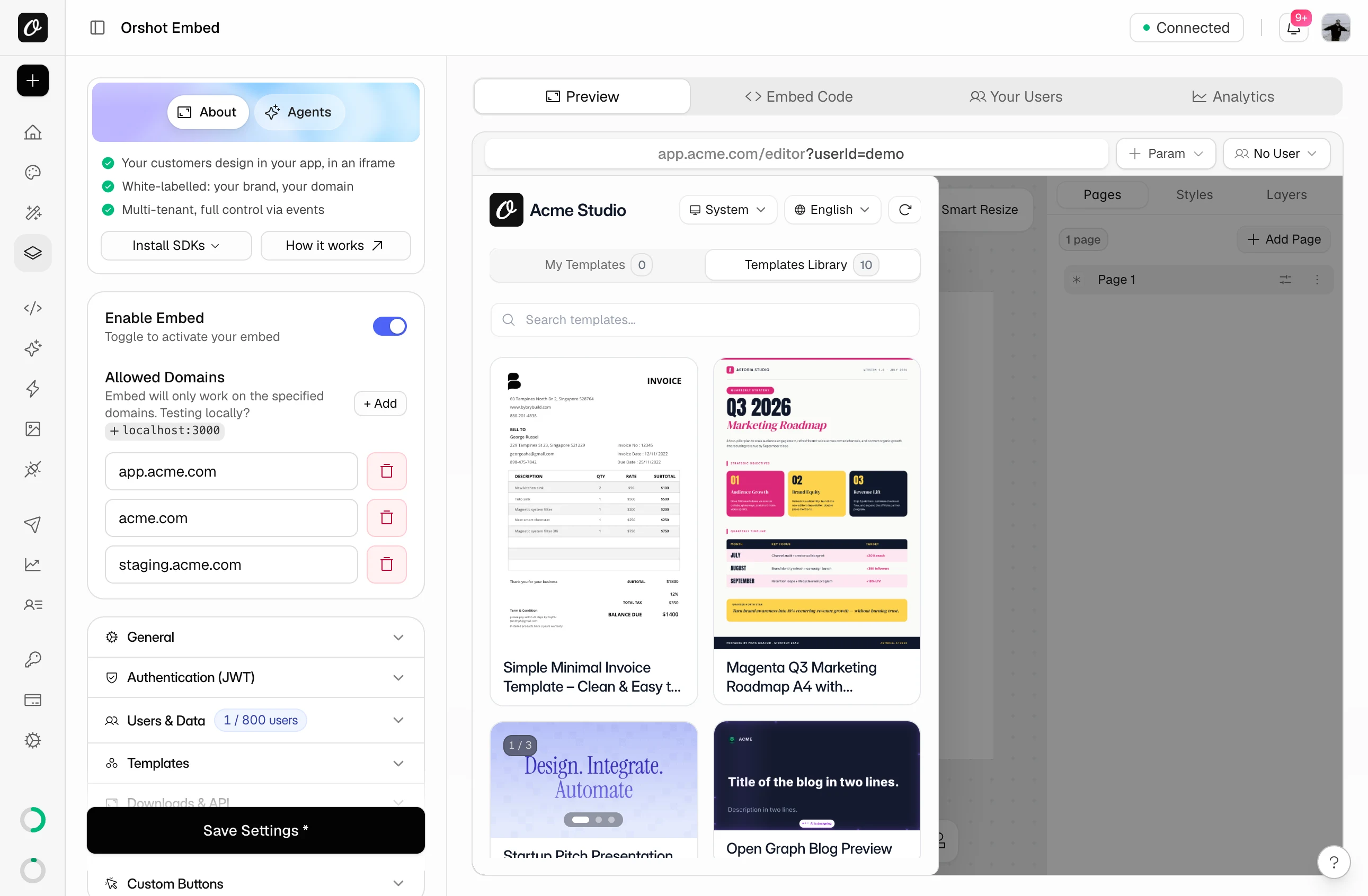
- 1Open Orshot Embed and turn on Enable Embed.
- 2Add your domains under Allowed Domains, localhost too.
- 3Copy the snippet from Embed Code, or use the React component.
<iframe
  src="https://orshot.com/embeds/your-embed-id?templateId=123&userId=user_42"
  allow="clipboard-write"
  style="width: 100%; height: 100%; min-height: 600px; border: none;"
></iframe>
import { OrshotEmbed } from "@orshot/embed-react";
<OrshotEmbed embedId="your-embed-id" templateId={123} height={700} />| CE.SDK | Orshot Embed |
|---|---|
| CreativeEditorSDK.create(…) | <iframe> or <OrshotEmbed /> |
| license: 'YOUR_KEY' | not needed |
| baseURL: 'cdn.img.ly/…' | not needed |
| scene.loadFromString(scene) | ?templateId=123 |
| i18n.setLocale('es') | ?lang=spanish |
token.Match the editor to your brand
Set your color and logo in the Orshot dashboard. The URL can hide any panel.
- 1In General, pick the accent color, title, icon and language.
- 2Add
?hide=stylesSidebar,pagesBarto strip panels you don't need. - 3Check it in the live preview, then save.
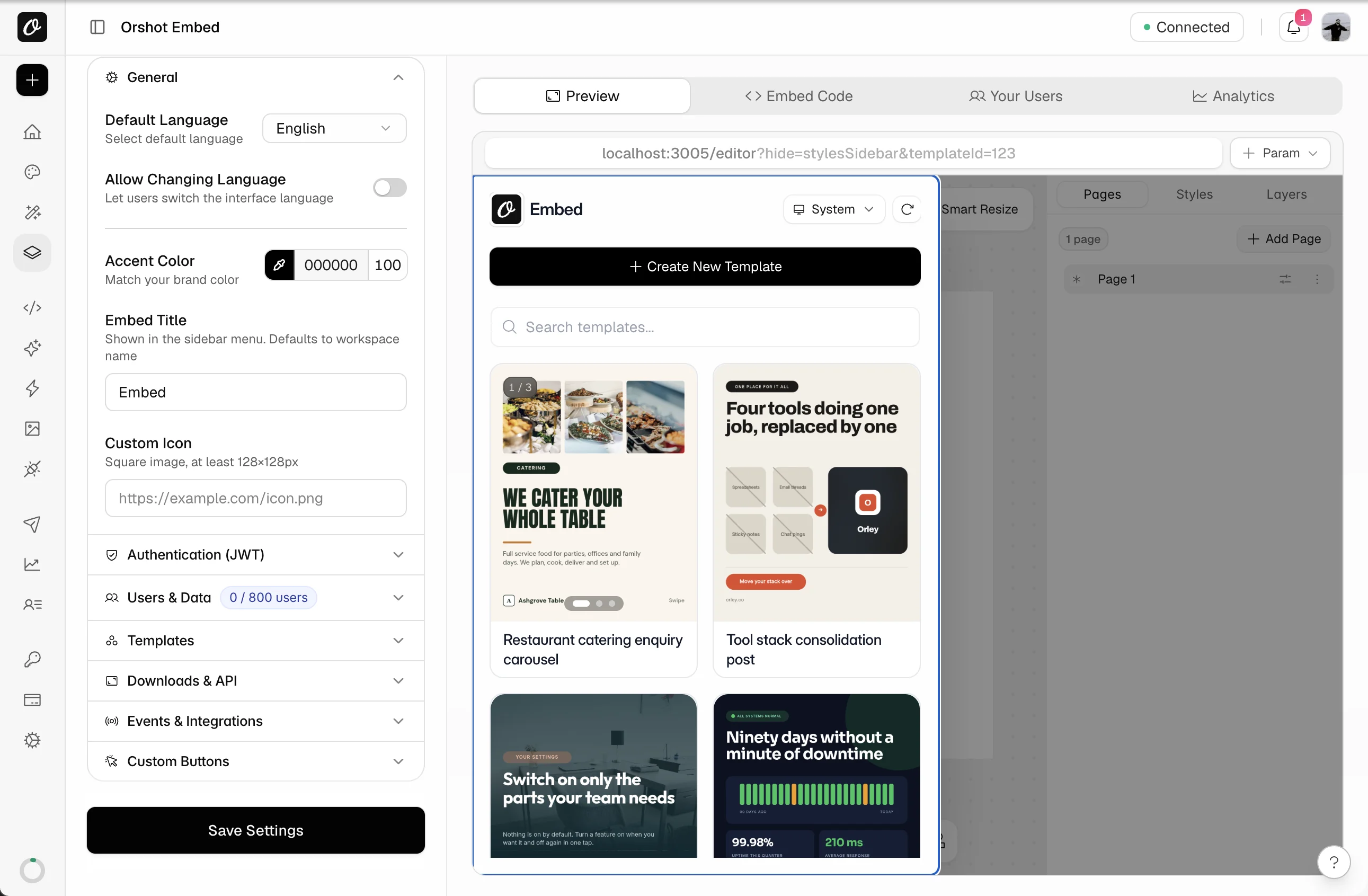
| CE.SDK | Orshot Embed |
|---|---|
| --ubq-* CSS variables | Accent color |
| ui.setTheme('dark') | ?theme=dark |
| dock and inspector components | ?hide=stylesSidebar,toolsBar |
| navigation bar components | ?hide=templateBar,pagesBar |
stylesSidebar and toolsBar for a fill-in-the-blanks editor. templateBar has Save and downloads, so keep it. All tokensGive each user their own templates and brand library
Pass your user's ID and each user gets their own templates, images, videos, audio, colors and fonts. CE.SDK left that storage to you.
- 1Under Users & Data, turn on Per-User Data & Templates.
- 2Add
userIdto the iframe URL. The React and Vue components don't take it yet. Users appear on first visit. - 3Templates: turn on Prevent Workspace Template Overriding. Masters open as copies.
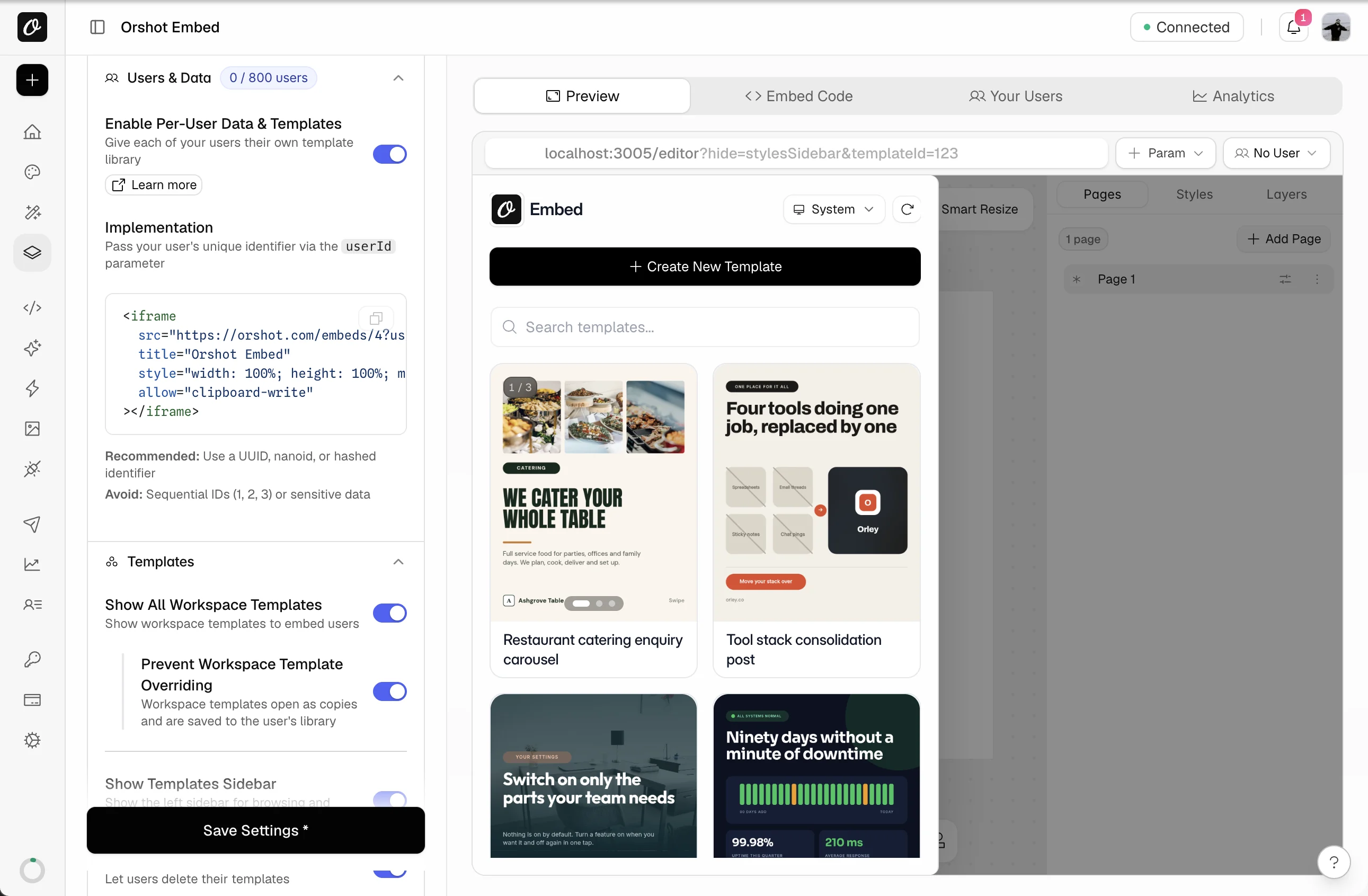
| CE.SDK | Orshot Embed |
|---|---|
| userId, for MAU billing | ?userId=abc, for a private library |
| scenes per user in your DB | My Templates, per user |
| asset sources per user in your code | each user's own Brand Library |
| Creator role | Workspace Templates, protected |
| Adopter role | Locked layers + ?hide=stylesSidebar |
| editor.setGlobalScope(…, 'Deny') | Per-user permissions, dashboard or JWT |
Done when two test users each see only their own templates and uploads.
Connect the editor to your app
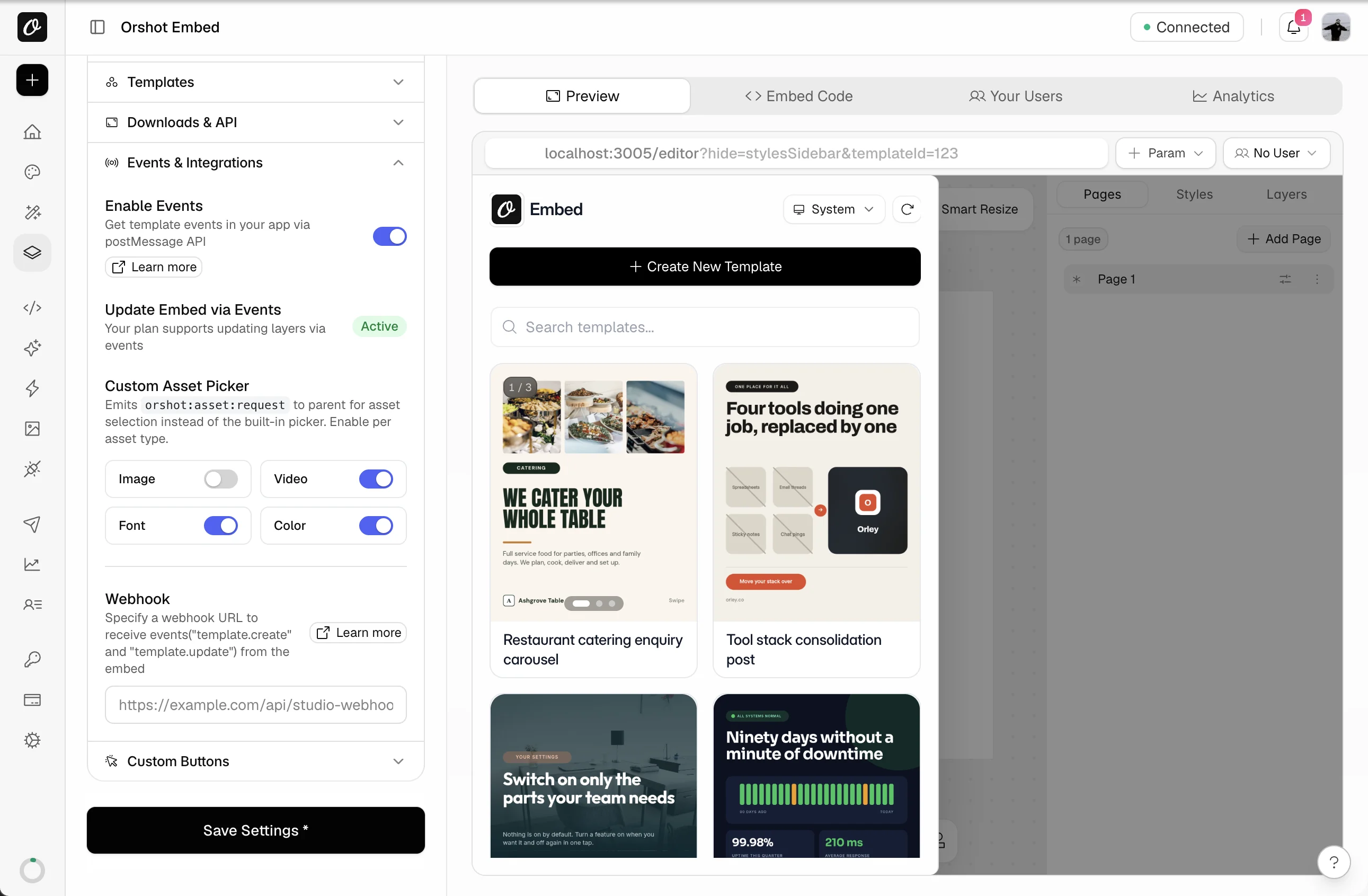
Orshot tells your page about every save and download, and calls your webhook. Events start on Grow.
- 1Events & Integrations: turn on events and add a webhook URL.
- 2Listen for
messageonwindowand matchorshot:template:update.
- 1Custom Buttons (Scale): add one, like Add to App.
- 2Pick Emit PNG and the file lands on your page, not in Downloads.
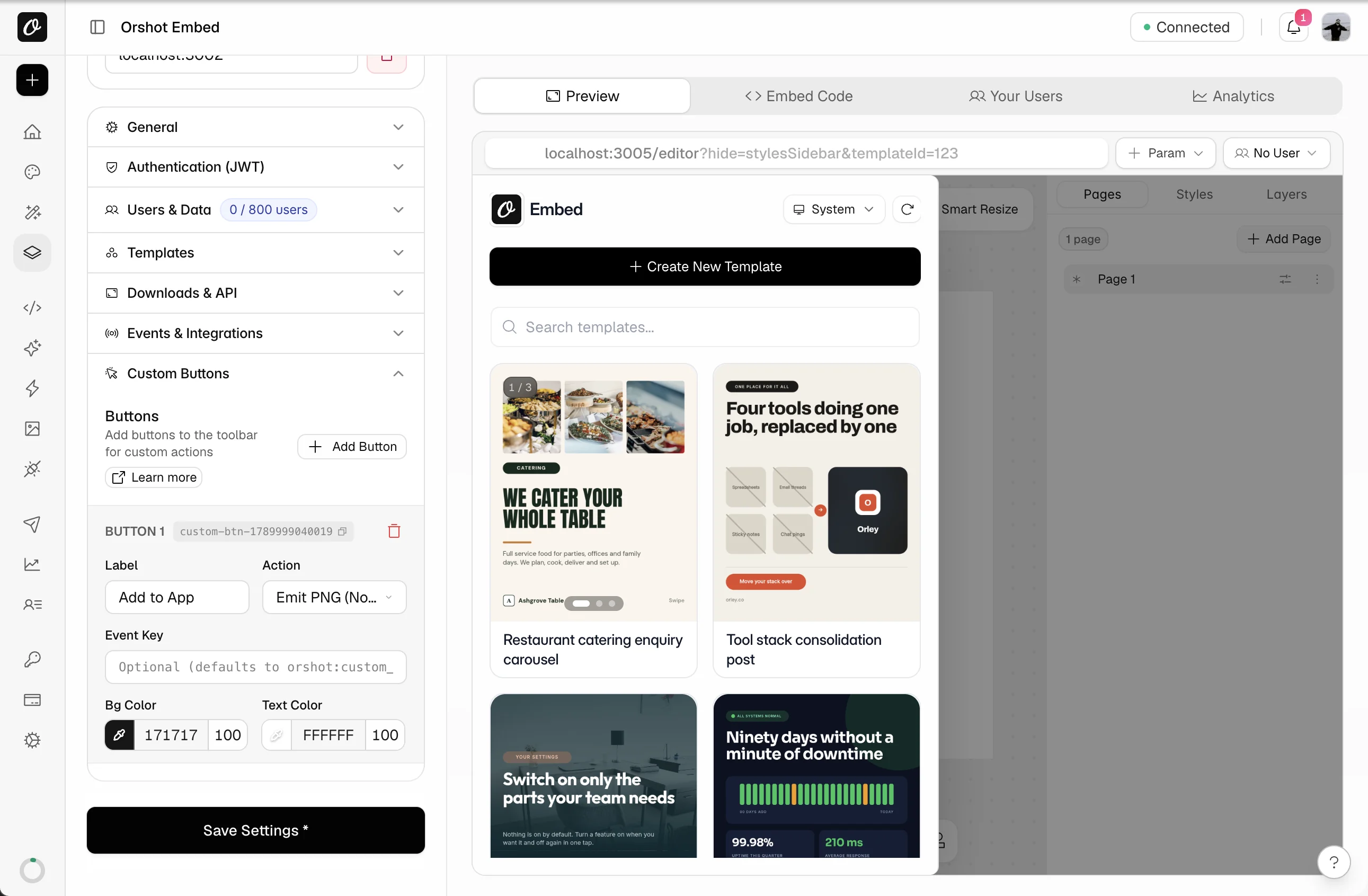
| CE.SDK | Orshot Embed |
|---|---|
| saveToString() on change | orshot:template:update + webhook |
| actions 'exportDesign' (onExport) | Custom button: Emit PNG or PDF |
| variable.setString(k, v) | orshot:embed:control { modifications } |
| actions 'uploadFile', asset sources | Custom asset picker |
Done when your page and webhook both hear about a save.
Fill templates from your code, in the editor or by API
Send values to the open editor, like CE.SDK's engine calls. Or skip the editor and render the same templates by API, which CE.SDK doesn't host.
Messages replace engine calls in the editor
The embed needs Enable Events, and control messages are on Scale.
Set text and swap an image in the editor your user has open.
IMG.LY|cesdk.engine, in the browserconst engine = cesdk.engine;
engine.variable.setString('quote', 'Art is where emotion finds form.');
const [avatar] = engine.block.findByName('avatar');
engine.block.setString(engine.block.getFill(avatar), 'fill/image/imageFileURI', 'https://example.com/avatar.jpg');const iframe = document.querySelector('iframe');
iframe.contentWindow.postMessage({
type: 'orshot:embed:control',
modifications: {
quote: 'Art is where emotion finds form.',
avatar: 'https://example.com/avatar.jpg',
},
}, '*');Keys are the template's parameter names, the same ones the API takes.
Load a different template with values already filled in, without reloading the page.
IMG.LY|cesdk.engine, in the browserawait cesdk.engine.scene.loadFromURL('https://cdn.example.com/scenes/certificate.scene');
cesdk.engine.variable.setString('name', 'Cassandra Maughne');iframe.contentWindow.postMessage({
type: 'orshot:embed:control',
templateId: '481',
modifications: { name: 'Cassandra Maughne' },
}, '*');The embed waits for the new template to load, then fills it in. You don't host scene files.
Take the finished design into your app.
IMG.LY|cesdk.engine, in the browserconst [page] = cesdk.engine.scene.getPages();
const blob = await cesdk.engine.block.export(page, { mimeType: 'image/png' });// Sent each time the user downloads a PNG in the editor
window.addEventListener('message', (event) => {
if (event.data?.type !== 'orshot:download:png') return;
const png = event.data.data.content; // data:image/png;base64,…
});PDF and HTML downloads send their own events, on Grow and up.
Without the editor, use Orshot's API for templates
Your server renders images, PDFs and video from the same templates in one call. On IMG.LY you'd run the headless engine yourself.
| CE.SDK | Orshot |
|---|---|
| CreativeEngine.init() in Node | POST /v1/studio/render |
| variable.setString('name', …) | { "name": "…" } |
| block.export(page, …) | response.format: "png" |
| block.exportVideo(…) | response.format: "mp4" |
| export counting | credits per plan |
One image from the template rebuilt in step 1, with the same variable names.
IMG.LYOrshot|POST api.orshot.com/v1/studio/render{
"templateId": 12345,
"modifications": {
"quote": "Art is where emotion finds form.",
"avatar": "https://example.com/avatar.jpg"
},
"response": {
"type": "url",
"format": "png"
}
}A {{quote}} variable becomes a quote parameter. There's no engine or scene to load, and the file URL comes back as data.content.
A certificate or a multi-page brochure as one PDF.
IMG.LYOrshot|POST api.orshot.com/v1/studio/render{
"templateId": 12345,
"modifications": {
"page1@name": "Cassandra Maughne",
"page2@course": "Studio Foundations"
},
"response": {
"type": "url",
"format": "pdf"
}
}Every page of the template is one PDF page. Prefix a parameter with the page to target it.
An MP4 rendered on Orshot's side.
IMG.LYOrshot|POST api.orshot.com/v1/studio/render{
"templateId": 12345,
"modifications": {
"headline": "Spring launch",
"clip": "https://example.com/product.mp4"
},
"response": {
"type": "url",
"format": "mp4"
}
}Orshot encodes the MP4 for you, at one credit per second on every paid plan.
Done when your code fills the editor, and one API call returns your file.
Run both, then switch
Nothing has to be switched off today.
- 1Put the embed behind a flag next to CE.SDK.
- 2Save once and check the events arrive, then render once by API.
- 3Move a group of users. After a week, remove
@cesdkand the license.
Done when saves and renders match for a week. Then pick a plan above.
Free for up to 5 templates on any paid plan
- We rebuild your templates, variable names kept
- Domains, look, users and events, set up together
- A test render of each template, on your data
More than 5 templates, or several client accounts? Book a call.
Let your agent update the code and workflows




Copy this prompt into Claude Code, Cursor, Codex or ChatGPT. It rewrites your IMG.LY calls for Orshot and links every doc it needs.
# Migrate this project from IMG.LY CE.SDK to Orshot Embed

You are helping me replace IMG.LY's CreativeEditor SDK (`@cesdk/cesdk-js`, `@cesdk/engine`, `@cesdk/node`) with Orshot (orshot.com). Orshot hosts a template editor that I embed in my app through an iframe or a React/Vue component, and renders images, PDFs and videos from the same templates through an API. It also has native n8n, Make, Zapier, Pipedream and Airtable apps and an MCP server (https://mcp.orshot.com/full, setup at https://orshot.com/agents). If you can connect to that MCP server, do it first: it lets you list my Orshot templates, read their parameters and test renders directly. Read the docs linked below before changing anything, then do the work in the order given.

## 1. Find every IMG.LY touchpoint in this project

Search for, and list with file paths:
- imports from `@cesdk/cesdk-js`, `@cesdk/engine`, `@cesdk/node`, `@cesdk/node-native`, and `cdn.img.ly` script tags
- `CreativeEditorSDK.create(`, `CreativeEngine.init(`, the `license` and `baseURL` config, `userId` passed for MAU tracking, `role:`
- `engine.scene.loadFromString`, `saveToString`, `loadFromArchiveURL`, scene and archive files (`.scene`, `.zip`) in storage
- `engine.variable.setString`, `{{variable}}` tokens, placeholder blocks
- `engine.block.export`, `exportVideo`, `onExport`, `onUpload`, custom asset sources, `cesdk.ui.*` and `ly.img.*` component customization, `--ubq-` CSS variables, `i18n.setTranslations`
- the Renderer CLI or any server that runs the headless engine (Dockerfile, CI, cron)

## 2. Templates

Scenes cannot be imported into Orshot. Each template is rebuilt once, one of three ways; do not try to convert scene files in code:
- If the design also exists in Figma, Canva, HTML or Polotno, I import it from there: https://orshot.com/docs/importing-templates
- Otherwise I send Orshot the scene or archive, the assets and one export per template, and they rebuild up to 5 for free: https://orshot.com/migrate/from-imgly
- Or I rebuild it in the Orshot Studio.

After a rebuild, every `{{variable}}` is an Orshot parameter with the same name, and placeholder blocks are editable layers. Imported designs get automatic parameter IDs (like `text_1_1`); I rename those to the old variable names in the Studio. Ask me for the Orshot template IDs, or read the parameters with:
- GET /v1/studio/templates/{id}: https://orshot.com/docs/api-reference/studio-template-get
- List templates: https://orshot.com/docs/api-reference/studio-templates-list

Build a mapping table: scene file → Orshot templateId, and `{{variable}}` → Orshot parameter name. Show it to me before editing code.

## 3. Replace the editor

Reference: https://orshot.com/docs/orshot-embed/integration · React: https://orshot.com/docs/orshot-embed/react-sdk · Vue: https://orshot.com/docs/orshot-embed/vue-sdk

IMG.LY:
```js
const cesdk = await CreativeEditorSDK.create('#cesdk_container', { license: LICENSE, baseURL: ASSETS_CDN, userId: user.id });
await cesdk.engine.scene.loadFromString(scene);
```

Orshot (plain HTML):
```html
<iframe src="https://orshot.com/embeds/EMBED_ID?templateId=12345&userId=USER_ID" title="Editor" allow="clipboard-write" style="width:100%;height:100%;min-height:600px;border:none"></iframe>
```

Orshot (React):
```jsx
import { OrshotEmbed } from "@orshot/embed-react";
<OrshotEmbed embedId="EMBED_ID" templateId={12345} />
// Per-user libraries: use the iframe URL with &userId=… (the SDK props are embedId, templateId, modifications)
```

Rules:
- The embed ID comes from my Orshot workspace (Embed → Embed Code). Store it as `ORSHOT_EMBED_ID`. Remove the license key, the `baseURL` asset hosting and every `@cesdk` package.
- `loadFromString` becomes the `templateId` query parameter. `i18n.setLocale` becomes `?lang=`. Docs: https://orshot.com/docs/orshot-embed/integration
- The `userId` you passed for MAU tracking becomes the `userId` query parameter (plus optional `userName`, `userEmail`); Orshot keeps each user's templates and brand library (images, videos, audio, colors, fonts) apart. Docs: https://orshot.com/docs/orshot-embed/per-user-data
- The Adopter role (users fill a locked layout) becomes template protection (masters open as copies) plus locked layers and `?hide=stylesSidebar`. Docs: https://orshot.com/docs/orshot-embed/template-protection
- `editor.setGlobalScope(…, 'Deny')` and role scopes become per-user permissions: lock actions per user in the dashboard (Your Users → Permissions, needs per-user data) or per session with a `permissions` claim in the signed JWT. Docs: https://orshot.com/docs/orshot-embed/user-permissions
- Theming and component visibility are set in the dashboard (accent color, title, icon, language) and with the `hide` query parameter (`templateBar,pagesBar,metaBar,toolsBar,videoBar,stylesSidebar,smartResize`). Delete the `--ubq-` overrides and `cesdk.ui` calls. Docs: https://orshot.com/docs/orshot-embed/appearance
- If the app runs on Safari or inside webviews, sign a JWT and pass it as `token`. Docs: https://orshot.com/docs/orshot-embed/jwt-authentication

## 4. Replace callbacks and exports

Reference: https://orshot.com/docs/orshot-embed/events · Control: https://orshot.com/docs/orshot-embed/controlling-embed · Custom buttons: https://orshot.com/docs/orshot-embed/custom-buttons · Asset picker: https://orshot.com/docs/orshot-embed/custom-asset-picker

- Your save handler (`saveToString` on change, stored in my database) becomes the `orshot:template:create` / `orshot:template:update` postMessage events plus a webhook URL set in the dashboard. Orshot stores the design; keep only the template ID in my database.
- `onExport` (or the registered `exportDesign` action) and `engine.block.export` in the browser become downloads inside the embed, or a custom toolbar button that emits the PNG/PDF to the parent window (`orshot:custom_action`).
- `onUpload` (or the `uploadFile` action) and custom asset sources become the Custom Asset Picker: answer `orshot:asset:request` with `orshot:asset:response`.
- `engine.variable.setString` at runtime becomes an `orshot:embed:control` message with `modifications`; loading another scene becomes the same message with `templateId`.
- Always check `event.origin` includes `orshot.com`.

## 5. Rewrite the headless exports

Reference: https://orshot.com/docs/api-reference/render-from-studio-template

IMG.LY:
```js
const engine = await CreativeEngine.init({ license: LICENSE });
await engine.scene.loadFromString(scene);
engine.variable.setString('headline', 'Hello');
const blob = await engine.block.export(engine.scene.getPages()[0], { mimeType: 'image/png' });
```

Orshot:
```http
POST https://api.orshot.com/v1/studio/render
Authorization: Bearer ORSHOT_KEY
{ "templateId": 12345, "modifications": { "headline": "Hello", "photo": "https://…" }, "response": { "type": "url", "format": "png" } }
```

Rules:
- `modifications` is keyed by parameter name; a `{{headline}}` variable is the `headline` key.
- Style overrides use dot keys: `"headline.fontSize": 48`, `"headline.color": "#111"`. Docs: https://orshot.com/docs/dynamic-parameters
- Multi-page templates prefix the page: `"page2@headline"`.
- `response.format`: png, jpg, webp, avif, pdf, mp4, webm, gif. `response.type`: url, base64, binary.
- Sync is the default and returns `data.content`. For a webhook use `"mode": "async"` inside `response` plus top-level `webhook_url`; you get `202 { id, status: "queued" }` and can poll GET /v1/studio/render-jobs/{id}. Docs: https://orshot.com/docs/api-reference/async-render-start
- Remove `@cesdk/node`, the Renderer CLI and the WASM/GPU layer from the server, Dockerfile and CI.
- Auth is Bearer. Store the key as `ORSHOT_API_KEY`. Keys: https://orshot.com/docs/quick-start/get-api-key
- Official SDKs (Node, Python, Ruby, PHP): https://orshot.com/docs/sdks · Errors: https://orshot.com/docs/error-reference

## 6. Automations

If a Zapier, Make or n8n step calls the headless engine or a server you run, add the Orshot step next to it with the same parameters, run it once, then remove the old step. Ready-made workflows are in Quick Connect (Copy as n8n workflow / Make blueprint). Docs: https://orshot.com/integrations

## 7. Verify, then switch

Put the Orshot embed behind a feature flag next to the IMG.LY editor. Open the same template in both, save from Orshot, confirm the webhook and postMessage events arrive, render each template once from the API and compare with the engine's output. After a week of matching results, remove the IMG.LY packages and the license. Tell me what you removed.Connect Orshot for agents and it can render and check templates too.
Questions about moving from IMG.LY
What is Orshot?
Can I import my CE.SDK scenes?
What happens to my {{variables}}?
How fast does the editor load?
Can I lock actions per user, like CE.SDK scopes?
What happens when I reach my plan's user limit?
Can I take my templates with me?
Does it work offline or in a native app?
Which plan do I need?
What replaces the headless engine?
Do I have to cancel IMG.LY first?
What does the free migration include?
Coming from somewhere else?
Every guide has the steps and the code swap, plus the importer where there is one. All guides

Bannerbear
The original image generation API, still used by big teams.
Templated.io
Straightforward automation for images, PDFs and videos through one render call.

Canva
The design tool everyone starts on, with Bulk Create for making many by hand.

Polotno
The React design editor SDK you host yourself, with cloud rendering billed on top.

Placid
Creative automation with images, PDFs and video, billed in credits that grow with size.

Abyssale
Multi-format banner automation, priced per seat with a monthly credit allowance.
Still comparing? Read the IMG.LY comparison.
Book a call