Bannerbear more or less created this category — automated image generation via API — and it's still a solid product. If you're on it today, though, you've probably noticed the pricing adds up fast, and there are features you keep wishing it had.
I built Orshot because I ran into these exact limitations. Started as a side project, turned into something that actual teams use daily. Same core idea as Bannerbear (turn templates into API endpoints), but with the stuff I wish Bannerbear had.
What's Different
If you're already on Bannerbear, here's what changes when you switch:
| Feature | Orshot | Bannerbear |
|---|---|---|
| Starting price | $39/month for 1,500 credits (~25 video mins) | $49/month for 1,000 |
| Cost per image, base plan | $0.026 | $0.049 |
| Next tier up | $99/month for 5,000 credits (~83 video mins) | $149/month for 10,000 |
| Free tier | 100 credits a month, resets monthly, no card | One-time 30-credit trial, features limited |
| Native automation workflows | Built in, with triggers and destinations | Through Zapier or Make |
| Social publishing | Built in, 15+ platforms | No |
| Carousels & multi-page | Yes, one template exports carousel, PDF or video | No |
| Video generation | Timeline, per-layer animation, audio tracks, auto-subtitles, MP4/WebM/GIF | Basic |
| Template creation | Clone from Canva, Figma import, or AI | Manual |
| White-labeled editor | Yes, embed it in your own product | No |
| Integrations | n8n, Zapier, Make, Pipedream, MCP server, Dynamic URLs | Zapier, Make, n8n |
Bannerbear Pricing in 2026 (and How Orshot Compares)
Bannerbear runs three plans — Automate, Scale and Enterprise — all billed monthly, with no annual option. Here's their ladder against the closest Orshot plan (they also sell 30,000 credits at $247 and a 500,000-credit Enterprise tier at $617, which I've left out for space). Prices checked against bannerbear.com/pricing in July 2026:
| Bannerbear plan | Bannerbear | Closest Orshot plan | Orshot | Orshot video |
|---|---|---|---|---|
| Automate · 1,000 credits | $49 | Launch · 1,500 credits | $39 | ~25 mins |
| Scale · 10,000 credits | $149 | Grow · 20,000 credits | $160 | ~333 mins |
| Scale · 20,000 credits | $198 | Grow · 20,000 credits | $160 | ~333 mins |
| Scale · 40,000 credits | $296 | Grow · 40,000 credits | $280 | ~666 mins |
| Enterprise · 50,000 credits | $299 | Scale · 75,000 credits | $349 | ~1,250 mins |
| Enterprise · 100,000 credits | $458 | Scale · 150,000 credits | $480 | ~2,500 mins |
On Orshot 1 credit is 1 image, 1 PDF page or 1 second of video, so the video column is just the credit allowance expressed in minutes. Bannerbear draws video from the same credit pool but bills it differently — their help docs put it at one credit per five seconds of processing plus one per overlay — and they don't publish a per-plan video figure.
Read the table honestly: in the 10,000-credit row and the last two, the Orshot bill is higher, because our nearest tier carries more credits than you asked for — $160 for 20,000 against their $149 for 10,000, $349 for 75,000 against their $299 for 50,000. Per credit Orshot stays cheaper ($0.008 against $0.015 at 10,000; $0.0047 against $0.006 at 50,000), but if those volumes really are your ceiling, their monthly number is the smaller one.
Bandwidth is 10 GB on Automate, 50 GB on Scale and 100 GB on Enterprise. Simple URLs, Signed URLs and team members aren't on the $49 plan — those start at Scale.
Where the 2x holds: on the base plan. $39 buys 1,500 credits against Bannerbear's 1,000 for $49 — $0.026 an image versus $0.049, so roughly half the unit cost. Higher up the ladder the gap narrows: at 20,000 credits it's $160 against $198, and at 40,000 it's $280 against $296. Still cheaper, not half.
Also worth noting:
- 100 free credits a month to test with, and they come back every month (Bannerbear's trial is one-time)
- Nothing is plan-gated — the one thing priced separately is social publishing, a flat $12/month per connected account on any plan
- Overages are pay-as-you-go, so renders never stop

The Editor
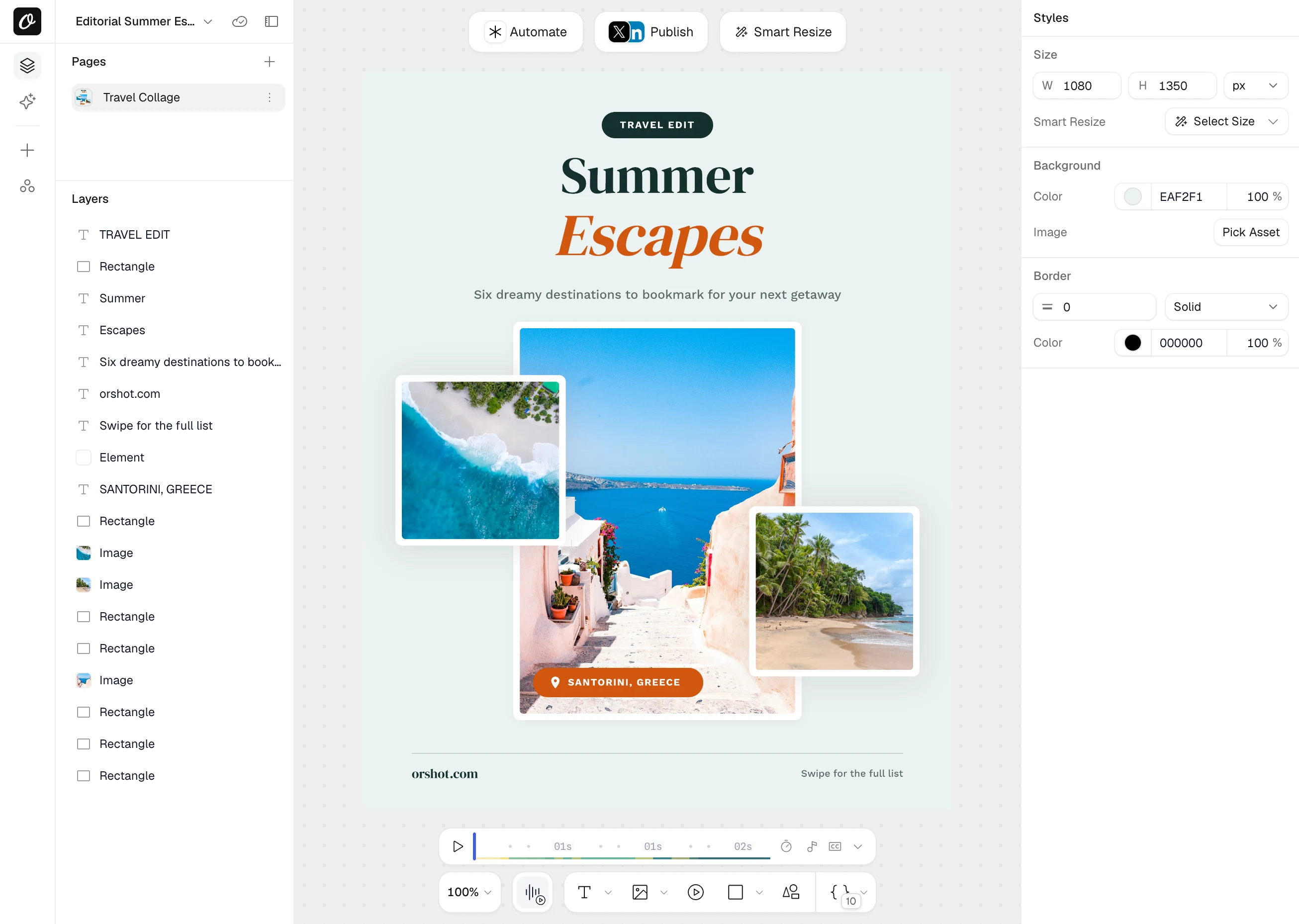
Orshot Studio is the part people notice first. Clean interface, less clicking around, more visual. If you've used Bannerbear's editor, the difference is obvious in about a minute.
You don't have to start from a blank canvas either. Bring a design over from Canva or Figma, or screenshot something and let AI rebuild it as a template.
What you get in the editor:
- Smart Stacking - Position elements relative to each other. They auto-adjust when content changes
- Brand Assets - Save your logos, colors and fonts, then reuse them across every template
- Custom Fonts - Upload any font. No limits on typography
- Personalization - Make any element dynamic: text, images, colors, styling
- Studio Embed - Put the editor inside your own product with your branding
- Multi-page Support - One template exports as an Instagram carousel, a multi-page PDF, or a video
That last one is worth dwelling on, because Bannerbear can't do it. A multi-page template gives you a full video timeline: per-layer animations, page-level audio tracks, auto-generated subtitles, and trim, mute and loop controls you can drive from the API. Export to MP4, WebM or GIF.
Whatever you build, every template becomes an API endpoint you can call directly, bulk-render in parallel, or hit through Dynamic URLs with no API call at all.
Automate the Whole Loop, Not Just the Render
This is the part that changed most since I first wrote this page.
A render API gives you one endpoint. Something still has to decide when to call it, where the data comes from, and what happens to the file afterwards. Usually that's Zapier or Make - a second subscription, a second thing to break, and a task bill that grows with your volume.
Orshot Workflows put that inside the product:
- Trigger from Google Sheets, Airtable, Notion, Google Forms, HubSpot, Shopify, Drive or a plain webhook
- Render one template or a whole batch
- Send it to social, storage, email or your own endpoint
- Repeat on a schedule, without you
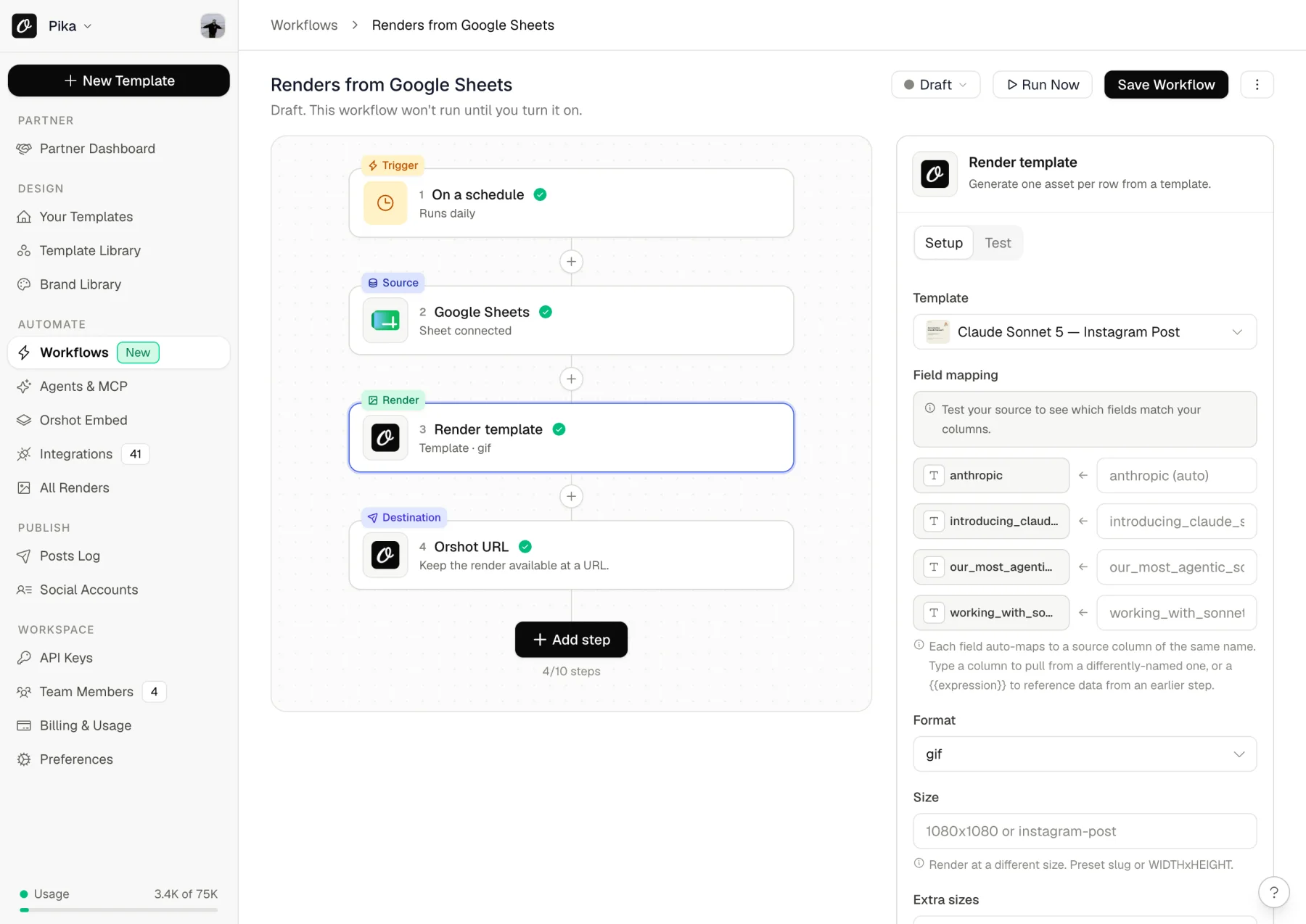
That one runs daily, reads a sheet, renders a row per asset, and keeps each result at a URL. Four steps, no second subscription. There are ready-made presets for the common ones — Instagram carousels from a sheet, OG images from your CMS, YouTube thumbnails at scale.
Bannerbear has no equivalent. Scheduling and orchestration happen in Zapier, Make or n8n on their side.
Publishing Without a Third Tool
Once the render exists, Orshot Publish posts it to 15+ platforms - Instagram, LinkedIn, X, TikTok, Facebook, Pinterest, YouTube, Threads, WhatsApp, Discord and more. Post immediately, schedule it, or save it as a draft for someone to approve.
So the full chain - trigger, data, render, post - lives in one place with one bill. On their side that's Bannerbear plus Zapier plus Buffer.
If you'd rather keep orchestration where it already lives, that works too. Orshot has a first-party n8n node, plus Zapier, Make, Pipedream and an MCP server so Claude or Cursor can drive it directly. If something you use is missing from the full list, just ask. We'll probably add it.
When Bannerbear Is Still the Right Call
I'd rather you pick the right tool than switch and regret it. Two honest reasons to stay put:
- You've already sunk real work into it. Templates built and tuned, API calls wired into production, Zapier and Make scenarios running, teammates who know where everything lives. That's a genuine cost, and no price table cancels it out.
- It works and you're not annoyed. If Bannerbear is quietly doing its job and nothing on this page describes a problem you actually have, stay. A migration you didn't need is worse than a slightly higher bill.
Switching from Bannerbear
Honestly, it's not that hard. Below is the short version; the full walkthrough with screenshots lives on its own page.

Step 1: Recreate Your Templates (15-30 min)
You have a few options:
Just rebuild it - Open your Bannerbear template, rebuild it in Orshot Studio. The editor's actually easier to use, so it usually goes faster than you think.
Use AI - Screenshot your Bannerbear output, drop it into the AI Template Generator. It'll recreate it, you fine-tune.
Import existing designs - If you have the original in Canva or Figma, import it directly.
Try it now, paste a public Canva share link and see it as an Orshot template:
In Canva: Share → “Public View Link” → copy the link.
Step 2: Update Your API Calls (10 min)
The APIs are pretty similar. Here's what changes.
Bannerbear API Call:
const response = await fetch("https://api.bannerbear.com/v2/images", {
  method: "POST",
  headers: {
    Authorization: "Bearer YOUR_BB_API_KEY",
    "Content-Type": "application/json",
  },
  body: JSON.stringify({
    template: "bb_template_uid",
    modifications: [
      {
        name: "title",
        text: "Hello World",
      },
      {
        name: "image",
        image_url: "https://example.com/photo.jpg",
      },
    ],
  }),
});
Orshot API Call (Nearly Identical):
const response = await fetch("https://api.orshot.com/v1/studio/render", {
  method: "POST",
  headers: {
    Authorization: "Bearer YOUR_ORSHOT_API_KEY",
    "Content-Type": "application/json",
  },
  body: JSON.stringify({
    templateId: "orshot_template_id",
    modifications: {
      title: "Hello World",
      image: "https://example.com/photo.jpg",
      // Dynamic parameters - override any style property
      "title.fontFamily": "Space Mono",
      "image.borderRadius": "32px",
    },
    response: {
      type: "url", // url, base64, binary
      format: "png", // png, jpg, webp, avif, pdf, mp4, webm, gif
    },
  }),
});
Main differences:
- Modifications are an object instead of an array (cleaner IMO)
- You specify response format explicitly
- Auth is the same Bearer token pattern
Helpful docs:
- API Reference - Complete API documentation
- Render from Template - Main endpoint you'll use
- SDKs - Node, Python, Ruby, PHP libraries
- Style Parameters - Override styles you set in Studio from your API requests
Step 3: Test It (5 min)
Every template has a connect sheet: your API key, an editable request body you can run right there, a live preview of the result, and one-click setup for Workflows, n8n, Make, Zapier, Airtable or Pipedream.
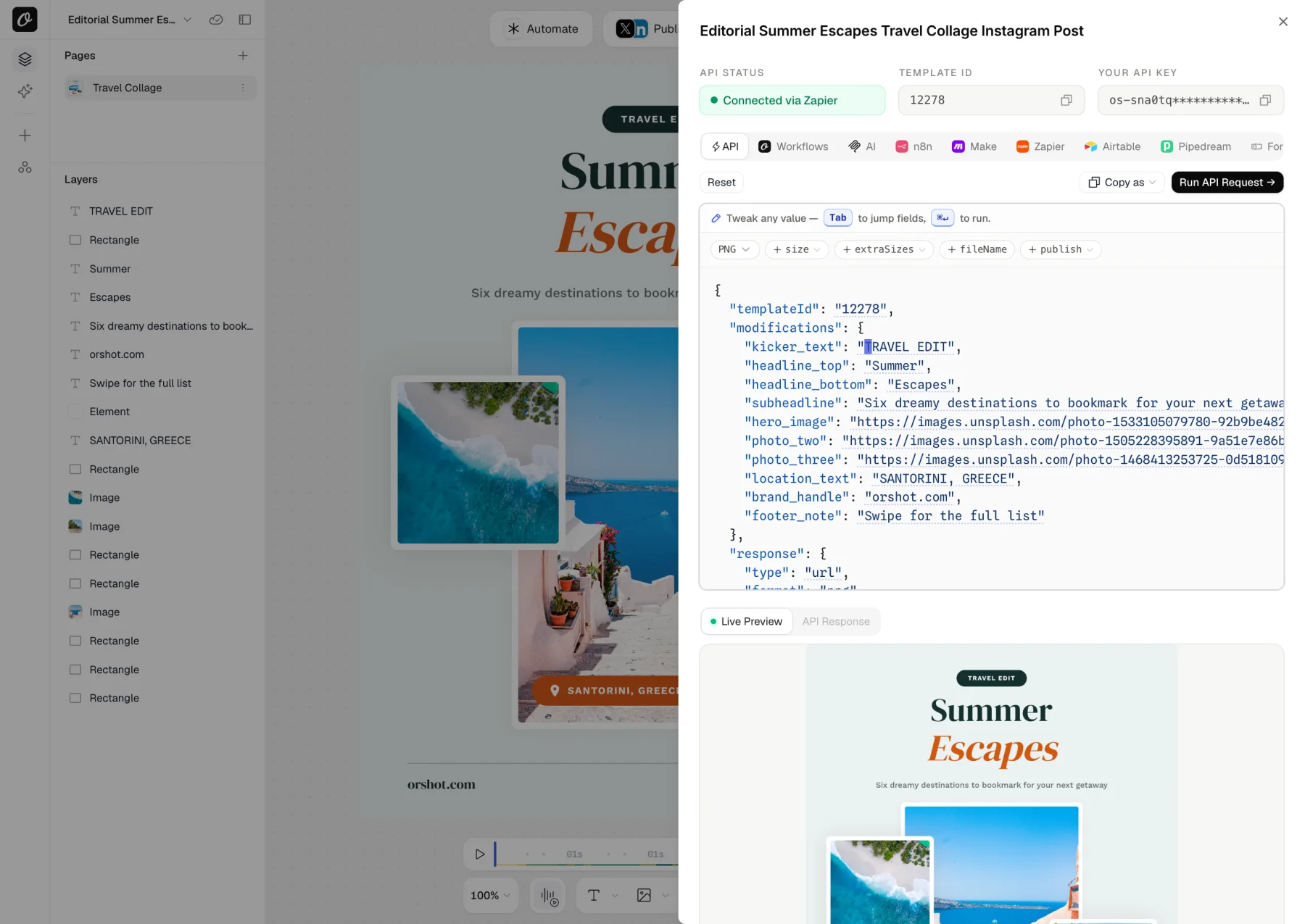
Hit Run on the prefilled request body and put the output next to your old Bannerbear render. If the fonts look off, it's almost always a missing font file — upload it under Brand Assets and re-render.
You can run both Bannerbear and Orshot in parallel for as long as you like — there's no cutover moment you have to get right.
Need Help?
Just hit the chat button on bottom right. I or someone from the team will help you migrate templates, check your API calls, whatever you need. Usually takes about 2 hours total for a complete workflow.
Examples and Tutorials
Video Generation using Orshot
Demo of Orshot's Video Generation API:
Import from Canva
Clone your existing Canva designs and turn them into API endpoints:
Import from Figma
Use the Figma plugin to import your designs directly:
eCommerce Automation
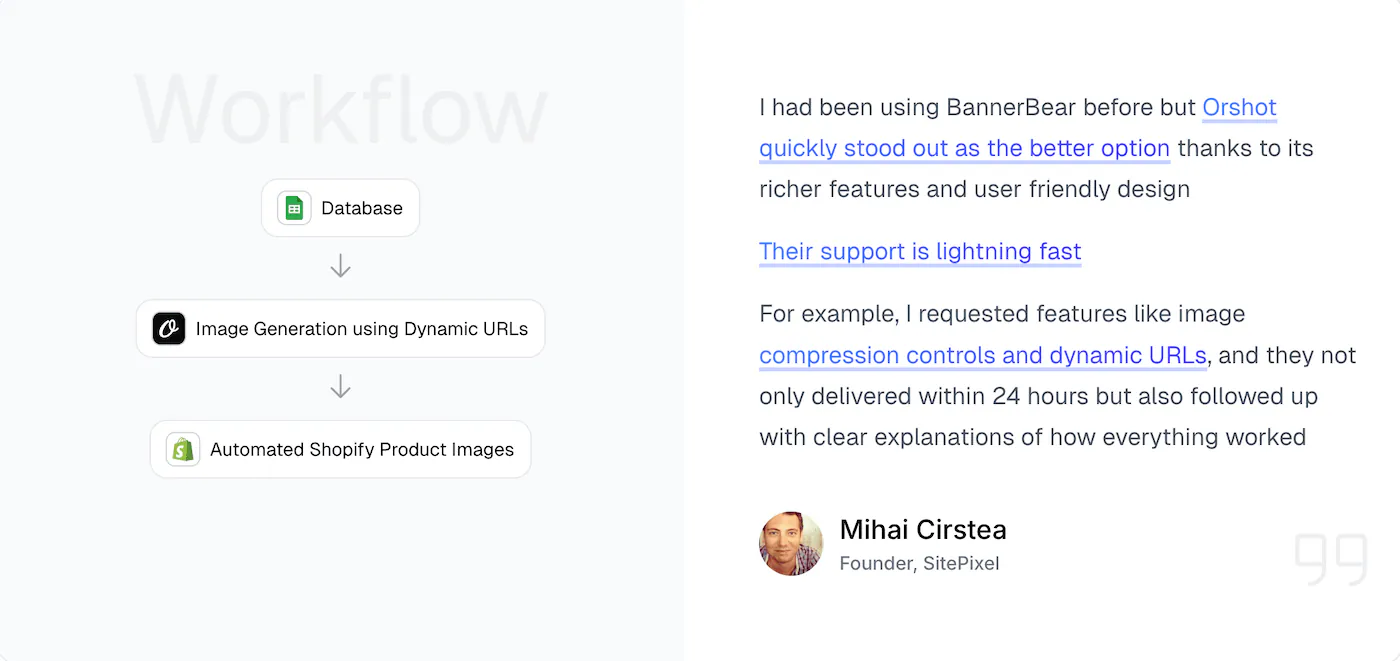
Example workflow, automating product images from your data sources:
Common Questions
How much cheaper is Orshot compared to Bannerbear?
How much does Bannerbear cost in 2026?
How much does Bannerbear's video API cost?
Does Bannerbear have a free plan?
What does Bannerbear charge per image?
Can I import my designs from Canva or Figma to Orshot?
Does Orshot support multi-page PDFs and carousels?
Does Orshot support video generation?
Can Orshot replace my Zapier or Make setup?
How do I migrate templates from Bannerbear to Orshot?
Is there an agency partner program?
Does Orshot support webhooks?
Bottom Line
One thing that doesn't show up in a feature table: I answer the chat myself, usually within the hour, and I'll hop on a call if something's genuinely stuck. When users need something specific we tend to build it. Ivan wanted automated cross-posting for Twitter threads, so we shipped it.
Bannerbear works, but it's expensive and missing some stuff. Orshot does the same core thing (turn templates into API endpoints) but costs less and has the features people keep asking for: multi-page templates, scheduled workflows, social publishing, better integrations, easier editor.
The switch is four steps:
- Sign up: 100 free credits every month, no card needed
- Recreate one of your templates (or use AI to do it)
- Test with your actual data
- See if it works for you
Building image, PDF or video automation for multiple clients? The Agency Partner Program is free to join, with unlimited sandbox workspaces, pooled credits up to 100k/month, and client handoff tools.
If you're also comparing Placid or Contentdrips, the short version: Placid is cheaper per raw credit but multiplies credits once a render passes 4000px; Contentdrips outputs PNG and PDF only, with no video. Abyssale is covered separately. Each page runs the same verified-pricing format as this one.
If you get stuck, hit the chat button. I'll help you out.