Placid has been around since 2019 and they've built a solid creative automation platform. They were one of the early players in the image automation API space, and that experience shows. Good integrations, decent editor, reliable service.
But if you're using Placid right now, you've probably noticed some friction. Credits that multiply the moment a render gets bigger than 4000px. PDF pages that cost double what an image does. The Editor SDK sitting behind their top plan. It adds up in ways that are hard to forecast.
Orshot started from the same premise Placid did — a template becomes an API endpoint — and then went at the parts I kept getting stuck on: flat credits, multi-page templates, workflows and publishing that don't need a third-party tool in between.
What's Different
If you're already on Placid, here's what changes when you switch:
| Feature | Orshot | Placid |
|---|---|---|
| Free Tier | 100 free credits a month, no watermarks, resets monthly | Free trial, credit count not published |
| Entry Plan | $39/month for 1,500 credits | $19/month for 500 credits (Basic) |
| At $39 | 1,500 credits (Launch) | 2,500 credits (Pro) |
| At $89–99 | $99/month for 5,000 credits | $89/month for 25,000 credits (Business) |
| Image credits | 1 credit at any size | 1 credit to 4000px, then 8 / 16 / 32 |
| PDF credits | 1 credit per page | 2 credits per page, ×2 for high-res |
| Video credits | 1 credit per second | 1 credit per second |
| Overages | Pay-as-you-go, renders never stop | None - generation blocked until upgrade |
| Unused credits | Reset monthly | Roll over, up to 2× your monthly budget |
| Video Editor | Full timeline, per-layer animation, audio tracks, auto-subtitles | No visual video editor |
| Embed Editor in App | White-label Studio Embed - all paid plans | Editor SDK on VIP only ($249/month) |
| Multi-page Templates | Carousels, PDFs & videos in one API call | Merged PDFs yes, carousels & video no |
| Native workflows | Trigger, render and publish on a schedule | Zapier, Make or n8n |
| Social Publishing | Built-in — 15+ platforms | No |
| Template Editor | Orshot Studio - Figma-like with Smart Stacking | Placid Editor |
| Template Import | Placid, Canva, Figma, AI | Placid Editor |
The Real Problems with Placid
Based on what I've seen from users switching over:
-
Credits multiply with size, and you have to remember that — a Placid image is 1 credit up to 4000px, then 8, then 16, then 32 as the longest side grows. A PDF page starts at 2 credits and doubles again for high-resolution output. So a batch of A2 posters at 300dpi bills at 8 credits a page, not 1. Orshot is a flat 1 credit for an image at any size, 1 per PDF page, 1 per second of video — the number you budget is the number you spend.
-
Editor SDK is a $249/month feature — embedding Placid's editor into your product means the VIP plan; their comparison table shows Canvas Previews and the Editor Component unavailable all the way up through Business at $89. Orshot's Studio Embed is on every paid plan from $39 — white-label, with custom branding and webhook events.
-
No carousels or multi-page video — Placid's PDF API will merge pages into one document, so that part is covered. What it won't do is a multi-page template you can export as an Instagram carousel or an animated multi-page video. Orshot treats those as the same object: one template, one API call, out as a carousel, a PDF or an MP4.
-
Run out of credits and generation stops — Placid doesn't charge overage fees, which sounds generous until a campaign stops rendering mid-flight and the only fix is upgrading the plan. Orshot bills overages pay-as-you-go so renders never stop.
-
The render is where it ends — Placid gives you an endpoint. Deciding when to call it, where the copy comes from and where the file goes is still Zapier, Make or n8n. Orshot has workflows and publishing in the product, so the trigger, the render and the post live in one place.
Where Placid Wins
Two things I'm not going to pretend away, because you'll find them the moment you open their pricing page:
- At $39 they give you more raw credits. Placid Pro is $39 for 2,500 credits; Orshot Launch is $39 for 1,500. If your work is plain images under 4000px and nothing else, that's more headroom for the same money.
- Placid credits roll over, up to twice your monthly budget. Orshot credits reset each month.
Where it flips is per output rather than per credit: PDF pages take half the credits on Orshot, large images don't multiply, the embed isn't a $249 feature, and a carousel or a video is one call instead of a stitching job.
What You Get Extra with Orshot
Beyond solving Placid's pain points:
-
Intuitive visual editor - Orshot Studio feels like designing in Figma or Canva. Drag-and-drop, Smart Stacking for relative positioning, keyboard shortcuts that just work. Your designers can use it directly.
-
White-label embed - Studio Embed lets you drop a full design editor into your app. Custom branding, permission controls, webhook events. It's like giving your users their own Canva.
-
Multi-page templates - Create carousels, multi-page PDFs, and even multi-page videos in a single template. Each page can have multiple video layers. Generate all pages with one API call. Placid's API will merge PDF pages into one document, but there's no multi-page template — no carousel export, no multi-page video. See how it works.
-
Full video editor - Visual video timeline with per-layer animations, page-level audio tracks, and auto-generated subtitles. Design video templates visually in Studio, then control every property via API. Placid doesn't offer this level of video editing.
-
Scale from solo to enterprise - Plans go from free (100 credits a month) to 300k credits/month. No awkward jumps in pricing.
-
More integrations - MCP Server for AI apps like Claude, CLI for terminal workflows, plus Make, Zapier, n8n. Full list here.
-
Import from anywhere - Clone from Canva, import from Figma, or use AI to generate templates. Way faster than starting from scratch.
-
Social Publishing - Render and post to 15+ social platforms in one API call. No need for Buffer or any third-party scheduler. Publish instantly, schedule, or save as draft.
-
Actual support - I respond to chat messages. Usually within an hour. Sometimes I'll hop on a call if something's complicated.
Compared to Placid, for example, Orshot offers far more options for creating content.
Thank you very much for this great tool. So far, we've been very happy with it.
 Max MüllerExcavatorScout
Let Agents do it for you
This is the AI part the title promises. Orshot ships an MCP server so Claude, Cursor or ChatGPT can render straight from your templates. Describe the asset, the agent calls Orshot, and an on-brand PNG, PDF or MP4 comes back. No image microservice to babysit.
- Generate stunning templates on auto-pilot - ask Claude or Codex to design for you, just pass the details.
- Render from a prompt - your agent turns a brief, a ticket or a webhook into a finished, on-brand render.
- OAuth per workspace - scoped access for each client or environment, with no keys to rotate.
- Brand kit applied automatically - every agent render inherits your fonts, colors and logos.
- One call, one or thousands - fire a single render or a whole batch from the same thread.
In Studio, the AI Design Agent can build a template from a plain-English description too, so you start from something instead of a blank canvas.
You Shouldn't Need Zapier to Call an API
Placid does the render well. The awkward part is everything either side of it — noticing there's a new blog post, pulling the title and author, deciding where the finished PNG goes. That lives in Zapier, Make or n8n, which means a second subscription, a second set of credentials, and a task bill that climbs with your volume.
Orshot Workflows collapse that into the same product as the template:
- Trigger from Google Sheets, Airtable, Notion, Google Forms, HubSpot, Shopify, Drive or a plain webhook
- Render one template or a whole batch
- Send it to storage, your own endpoint, or straight to social
- Repeat on a schedule, without you
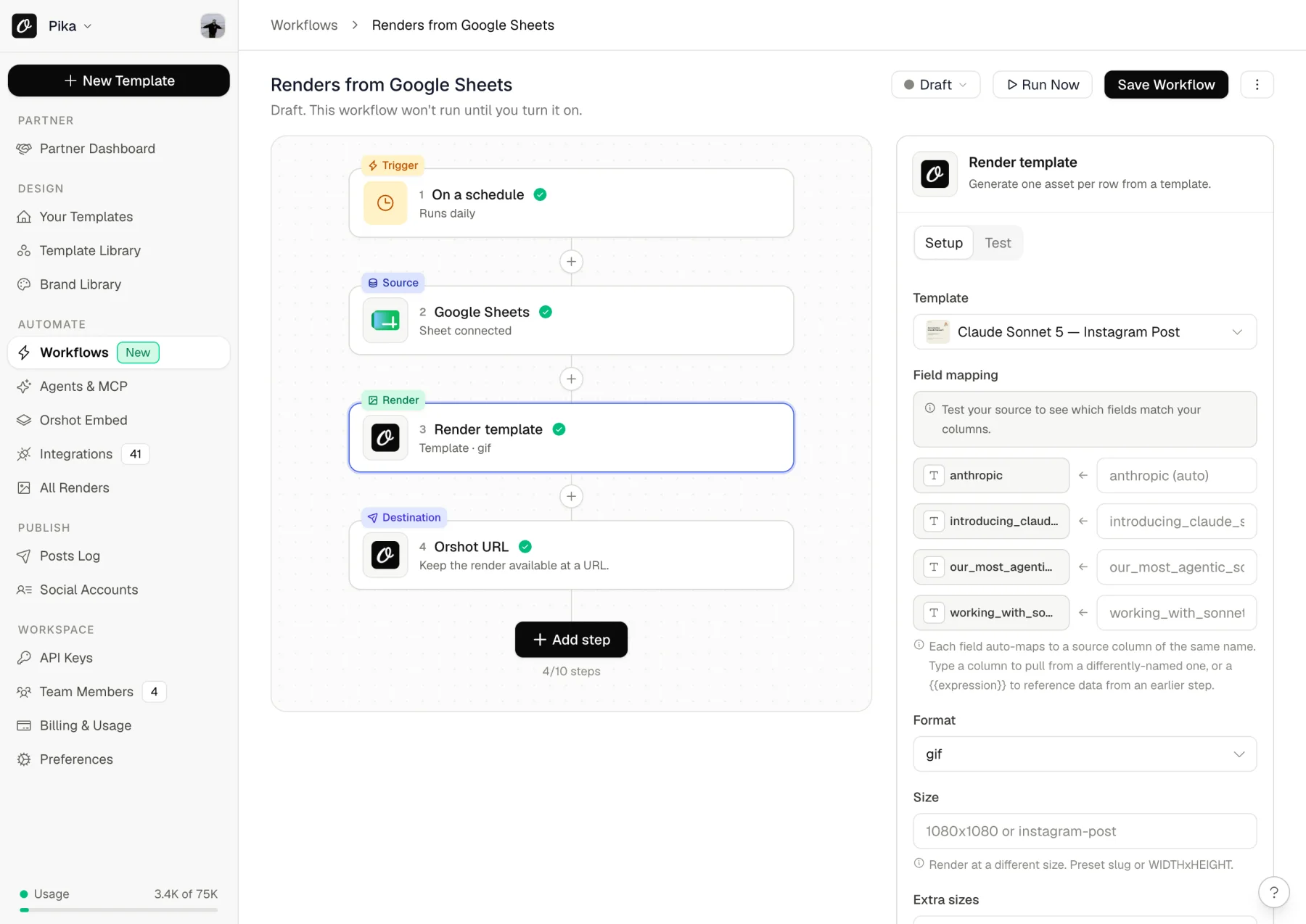
The one most Placid users want first is an OG image for every post, without wiring anything. Copy it into your workspace and turn it on:
A few others worth stealing, all working presets rather than concepts:
- Return an OG image from a webhook — your CMS calls, the render comes back
- Product marketing images from your catalog — one row per SKU, on-brand every time
- YouTube thumbnails at scale — from a sheet, batched
- Customer reviews into testimonial cards — form or sheet in, shareable graphic out
- Sale and discount banners — driven off a pricing sheet
If you'd rather keep orchestration where it already lives, that works too — there are first-party n8n, Zapier, Make and Pipedream integrations, plus an MCP server.

Utility Templates (The Handy Extras)
We've got pre-built API templates that solve common problems:
- Twitter Screenshot API - Clean tweet screenshots with customization
- Website Screenshot API - Full page captures, any viewport
- Dynamic Image Resizer API - Resize on the fly
These work great on their own or combined with your custom templates.
Switching from Placid
It's pretty straightforward. Below is the short version; the full walkthrough with screenshots lives on its own page.

Step 1: Move Your Templates (5-30 min)
You have a few options:
Import it - Open the template in the Placid editor, save the page as a single file (.mhtml) and upload it under New Template, then the Placid tab. Layers, images and layer names come across, and the layer names become your API parameters. The guide above walks through it with screenshots.
Just rebuild it - Open your Placid template, rebuild it in Orshot Studio. The editor is intuitive, usually goes faster than you think.
Use AI - Screenshot your Placid output, drop it into the AI Template Generator. It'll recreate it, you fine-tune.
Import existing designs - If you have the original in Canva or Figma, import directly:
Try it now — paste a public Canva share link and see it as an Orshot template:
In Canva: Share → “Public View Link” → copy the link.
You can create multi-page templates, share through public links or embeds like the one below with different view modes. You can also invite your team to collaborate on design + template integration.
Step 2: Update Your API Calls (10 min)
The APIs are similar in concept. Here's what changes:
Placid API Call:
const response = await fetch("https://api.placid.app/api/rest/images", {
  method: "POST",
  headers: {
    Authorization: "Bearer YOUR_PLACID_API_KEY",
    "Content-Type": "application/json",
  },
  body: JSON.stringify({
    template_uuid: "placid_template_id",
    layers: {
      title: {
        text: "Hello World",
      },
      image: {
        image: "https://example.com/photo.jpg",
      },
    },
  }),
});
Orshot API Call:
const response = await fetch("https://api.orshot.com/v1/studio/render", {
  method: "POST",
  headers: {
    Authorization: "Bearer YOUR_ORSHOT_API_KEY",
    "Content-Type": "application/json",
  },
  body: JSON.stringify({
    templateId: "orshot_template_id",
    modifications: {
      title: "Hello World",
      image: "https://example.com/photo.jpg",
      // Dynamic parameters - override any style property
      // Docs: https://orshot.com/docs/dynamic-parameters
      "title.fontFamily": "Space Mono",
      "image.borderRadius": "32px",
    },
    response: {
      type: "url", // url, base64, binary
      format: "png", // png, jpg, webp, avif, pdf, mp4, webm, gif
    },
  }),
});
Main differences:
- Modifications are a flat object (cleaner)
- You specify response format explicitly
- Same Bearer token authentication pattern
Helpful docs:
- API Reference - Complete API documentation
- Render from Template - Main endpoint you'll use
- SDKs - Node, Python, Ruby, PHP libraries
- Setting Parameters - How to make templates dynamic
Step 3: Test It (5 min)
- Make a few test calls
- Compare the output
- Tweak styling if needed in Studio
- Deploy
Nothing says you have to cut over at once. Point a few routes at Orshot, leave the rest on Placid, and move the rest when you've seen the output side by side.
Need Help?
Hit the chat button on the bottom right and you'll get me or someone on the team, not a bot. Send us a Placid template and we'll rebuild it in Studio for you — the fiddly part is usually the auto-fitting text, and that's the bit we can do fastest.
Placid Pricing in 2026 (and How Orshot Compares)
Placid runs four plans, billed monthly by default — the yearly toggle shows the same plans as annual totals. Prices checked against placid.app/pricing in July 2026:
| Placid plan | Placid | Closest Orshot plan | Orshot |
|---|---|---|---|
| Basic · 500 credits | $19 | Launch · 1,500 credits | $39 |
| Pro · 2,500 credits | $39 | Launch · 1,500 credits | $39 |
| Business · 25,000 | $89 | Grow · 20,000 credits | $160 |
| VIP · 100,000 | $249 | Scale · 150,000 credits | $480 |
Read that honestly: from Pro up, Placid is cheaper on raw credits. Their $89 buys 25,000 credits against our $160 for 20,000. (The $19 Basic tier is the one exception — $0.038 a credit against Launch's $0.026.)
The comparison only works per output, which is where their multipliers live:
- An image over 4000px costs 8, 16 or 32 credits on Placid. On Orshot it's 1 at any size.
- A PDF page is 2 credits, doubling again for high-resolution output. On Orshot it's 1.
- A carousel or a multi-page video isn't a Placid template at all, so the credits aren't the constraint — the capability is.
- Studio Embed is on every Orshot paid plan from $39. Placid's Editor SDK is VIP, at $249.
So if your workload is plain sub-4000px images and nothing else, Placid is the cheaper bill and I'd rather you knew that from this page than from their pricing page. If it involves PDFs, large renders, carousels, video or an embedded editor, the per-output maths turns over.
Common Questions
How do I migrate templates from Placid to Orshot?
How does Orshot price video against Placid?
Does Orshot support multi-page templates?
How does the Orshot template editor compare to Placid?
Will my automations break if I switch from Placid?
Can I embed the Orshot editor into my app?
Does Orshot support video generation?
Is there an agency partner program?
The Editor
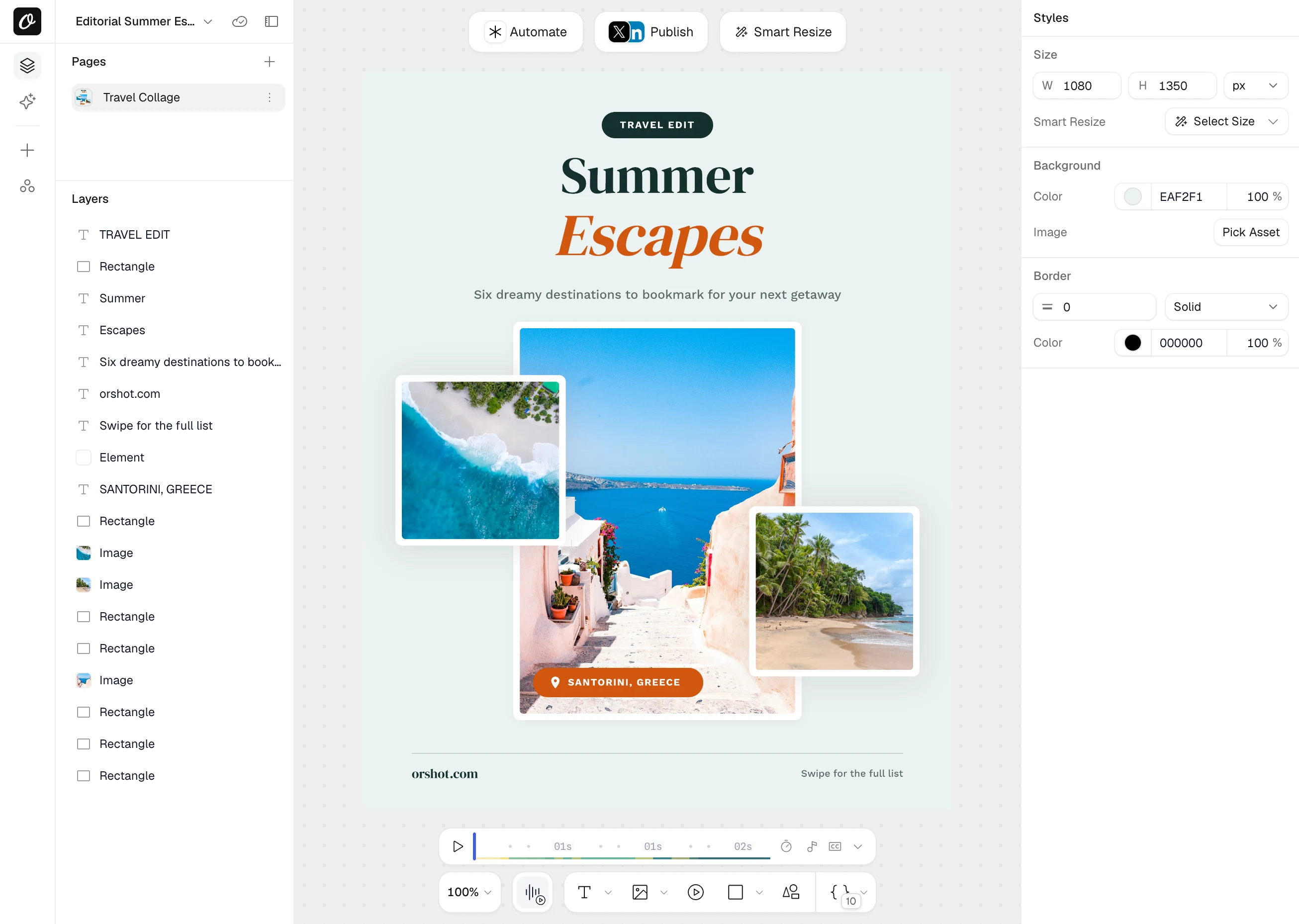
Orshot Studio is clean and intuitive. If you've used Placid's editor, you'll immediately notice the difference.
Key features:
- Smart Stacking - Position elements relative to each other. They auto-adjust when content changes
- Brand Assets - Save your logos, colors, and fonts. Use across all templates for consistency
- Custom Fonts - Upload any font. No limits on typography
- Personalization - Make any element dynamic - text, images, colors, styling
- Studio Embed - Integrate the editor into your own app with custom branding
- Multi-page Support - Create carousels and PDF templates with different pages
How It Works
Every template becomes an API endpoint. You can:
- Generate templates with AI or import from Canva/Figma
- Automate with REST API, SDKs, Zapier, Make, n8n, or Dynamic URLs
- Bulk generate with parallel processing
- Generate carousels and multi-page videos from one template (Placid merges PDF pages, but has no multi-page templates)
If there's an integration missing, just ask. We'll probably add it.
Examples and Tutorials
Video Generation
Adding videos in your templates and automating via Orshot's Video Generation API:
Carousel Templates
How to create multi-page templates and automate them:
Import from Canva
Clone your existing Canva designs and turn them into API endpoints:
Import from Figma
Use the Figma plugin to import your designs directly:
eCommerce Automation
Example workflow - automating product images from your data sources:
Dynamic URLs
Generate images just by changing URL parameters - no API calls needed:
Bottom Line
Placid works, but the credit multipliers are confusing and you're missing features like multi-page templates unless you pay more. Orshot does the same core thing (turn templates into API endpoints) but with the simplest credit in the industry — 1 credit = 1 image, 1 PDF page, or 1 video second — and no feature gating.
If you're also comparing Bannerbear, Abyssale, or Contentdrips, the same advantages apply - simpler pricing, no feature gating, and multi-page support that most competitors lack.
The switch takes a couple hours. You can test everything free with 100 credits a month.
For Agencies
Building image automation for multiple clients? Check out the Agency Partner Program — free to join, unlimited sandbox workspaces, pooled credits up to 100k/month, and client handoff tools.
Try It
- Sign up - 100 free credits every month, no card needed
- Recreate one of your templates (or use AI to do it)
- Test with your actual data
- See if it works for you
If you get stuck, hit the chat button. I'll help you out.