VistaCreate is a solid tool for manual, one-off designs like social media posts or banners. However, it bottlenecks teams that need scale. Without an API or bulk generation features, you can't automate creating hundreds of variations or integrate design generation into your product.
That's where Orshot comes in. It combines a professional visual editor with powerful API automation. Design once, then generate thousands of on-brand images, PDFs, or videos programmatically—giving you the best of both design and code.
Install the Orshot agent skill in Claude Code, Cursor, or Windsurf to automatically translate your VistaCreate API calls to Orshot. The skill knows both APIs and handles the mapping for you.
npx skills add orshot-hq/orshot-agent-skillsHere's a preview of Orshot Studio for you to try:
The Problems with VistaCreate
While VistaCreate is a solid manual design tool, users switching to automated solutions often cite these key limitations:
1. Manual Bottlenecks
VistaCreate relies entirely on point-and-click manual work. Creating or updating 100 variations means 100 manual downloads. There is no bulk generation or API to automate repetitive tasks, making it unscalable for agencies or product teams needing high volume.
2. No API or Integrations
It lacks a public API, meaning you cannot generate images programmatically or connect to tools like Zapier, Make, or your own database. It is strictly a standalone tool, isolating your design process from your automated workflows.
3. Subscription & Billing Issues
Users frequently report difficulty canceling subscriptions and unexpected auto-renewals. The seat-based pricing ($10-13/user/mo) also becomes costly for teams compared to usage-based models.
4. Restrictive Free Tier
The free plan includes watermarks and download limits, obstructing testing and small projects. You pay per seat regardless of how much you use it, rather than paying for what you generate.
Enter Orshot: The Automated Alternative
Here's the fundamental difference:
VistaCreate: Design one by one, manually, in their editor. Download individually.
Orshot: Design once in the editor, then generate thousands of variations via API, spreadsheets, or integrations.
VistaCreate is a design tool. Orshot is a design automation platform.
You can still use a visual editor (Orshot Studio). You can still create beautiful templates. But then you can turn each template into an API endpoint and generate unlimited variations programmatically.
Key Features (What Makes Orshot Different)
1. Orshot Studio - Professional Design Tool
- Orshot Studio is a full-featured design editor. Clean interface, professional capabilities, no limitations. But with features VistaCreate lacks:
- Smart Stacking - Position elements relative to each other using flexbox-like layouts. When content changes size (longer text, different images), everything auto-adjusts. VistaCreate doesn't have this - you're manually repositioning elements.
- Smart Layouts - Create responsive designs that adapt to different content automatically.
- Custom Fonts - Upload any font. No restrictions.
- Multi-page Templates - Create carousels, PDF reports, and multi-page designs. See how it works.
- Brand Assets - Save your logos, colors, and fonts. Reuse across all templates for consistency.
2. API-First Design Automation
Every template you create becomes an API endpoint. Here's what that means in practice.
With VistaCreate (Manual):
- Open editor
- Change text/images manually
- Download file
- Repeat 99 more times for 100 variations
With Orshot (Automated):
const response = await fetch("https://api.orshot.com/v1/studio/render", {
  method: "POST",
  headers: {
    Authorization: "Bearer YOUR_API_KEY",
    "Content-Type": "application/json",
  },
  body: JSON.stringify({
    templateId: "your_template_id",
    modifications: {
      title: "Dynamic Title",
      description: "Dynamic description text",
      productImage: "https://example.com/product1.jpg",
      // Override any style property
      "title.fontFamily": "Space Mono",
      "productImage.borderRadius": "16px",
    },
    response: {
      type: "url", // url, base64, binary
      format: "png", // png, jpg, webp, avif, pdf, mp4, webm, gif
    },
  }),
});

// Returns image URL instantly
One API call. Instant generation. Scale to 10,000 variations if needed.
Complete docs:
3. Embed SDK - White-Label Your Design Tool
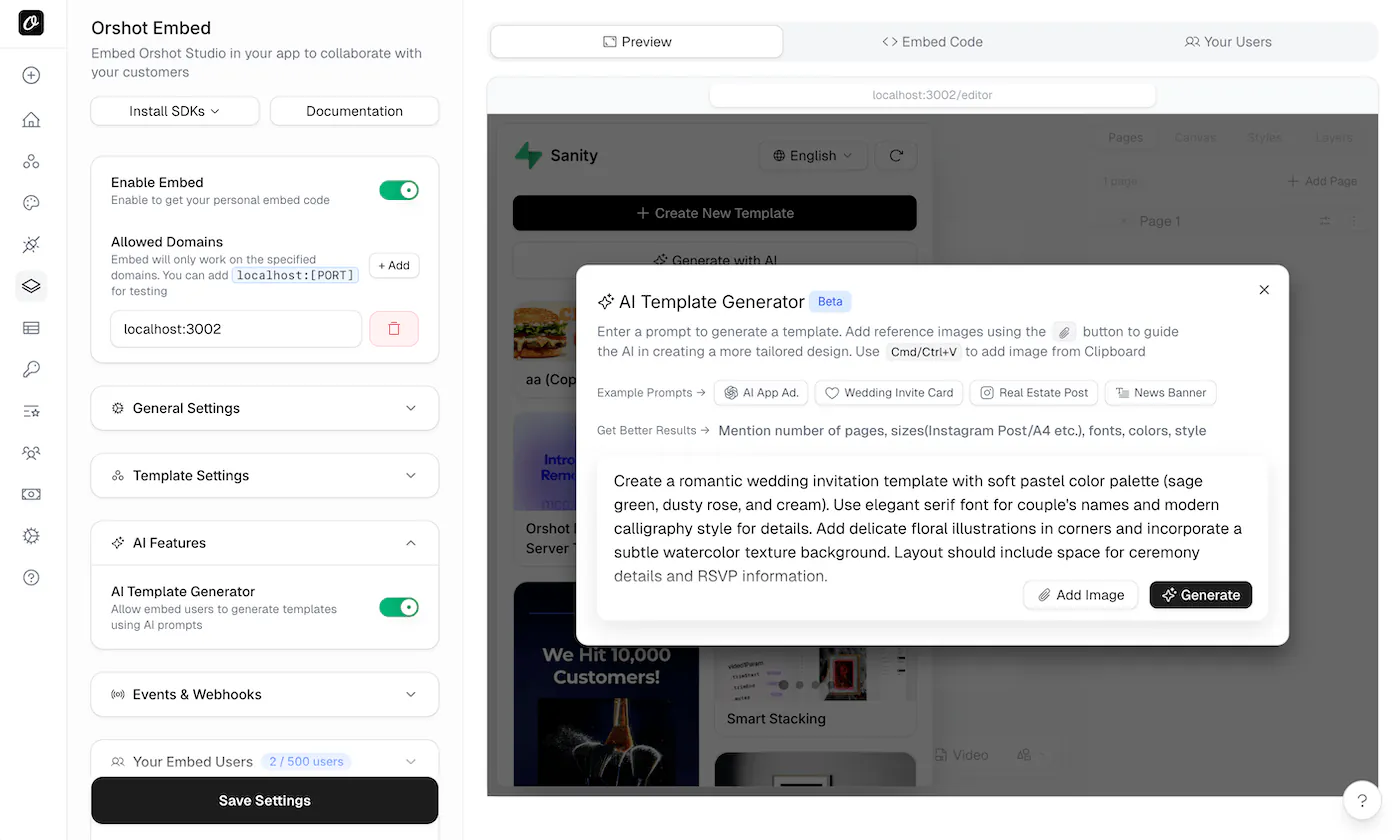
You can embed the Orshot editor directly into your own SaaS application. Your users get a design tool inside your product, with your branding.
<iframe
  src="https://orshot.com/templates/YOUR_TEMPLATE/embed?view=edit"
></iframe>
Perfect for:
- SaaS platforms that need user customization
- Marketing platforms offering design tools to clients
- Print-on-demand services
- Social media management tools
VistaCreate doesn't offer this. You can't white-label their editor or embed it in your app. Your users would have to leave your platform, sign up for VistaCreate separately, and work there.
Read more about Orshot Studio Embed and the Image Editor SDK.
4. Import from Anywhere
Don't want to start from scratch? Import existing designs:
- From Canva: Clone any Canva template directly into Orshot. Copy the share link, paste it, done.
- From Figma: Use the Figma plugin to import designs with one click.
- Using AI: Drop a screenshot into the AI Template Generator. It recreates the design automatically.
VistaCreate requires you to rebuild everything manually in their editor or use their templates.
Pricing Comparison
Different models, but here's how they compare:
| Feature | VistaCreate | Orshot |
|---|---|---|
| Model | Per-seat | Usage-based |
| Single User | ~$10-13/month | $39/month |
| What You Get | Unlimited downloads | 1,500 credits (1 credit = 1 image), Unlimited downloads |
| API Access | None | All plans |
| Bulk Generation | Manual only | Automated |
| Integrations | Limited | Zapier, Make, n8n |
| White-label Embed | Basic | Yes |
| Multi-page Support | No | Yes |
| Social Publishing | No | 15+ platforms |
| Free Trial | Free tier available | 30 free credits |
Bottom line:
- VistaCreate is better if you're a single designer making a few graphics per week manually.
- Orshot is better if you need volume, automation, or you're building a system.
For teams, Orshot is cheaper (no per-seat pricing). For automation, there's no comparison (Orshot has an API, VistaCreate doesn't). For scale, Orshot wins ($39 for 1,500 credits vs manual work in VistaCreate).
What You Can Do at Scale
This is where Orshot really shines. Once you have templates set up, you can:
Programmatic SEO Images
Generate unique OG images for every blog post automatically. Pull title, description, and author from your CMS, render an image, add it to the page.
// Generate blog post image automatically
const blogImage = await renderTemplate({
  title: post.title,
  author: post.author,
  category: post.category,
});
Thousands of blog posts? Thousands of unique images. No manual work.
Personalized Email Headers
Send personalized email images to each customer. Include their name, their stats, their achievements. Makes emails feel custom without manually creating each one.
const emailHeader = await renderTemplate({
  customerName: user.name,
  monthlyGoal: user.goalProgress,
  badgeIcon: user.currentBadge,
});
Automated Social Media Visuals
Turn tweets into shareable images. Turn blog posts into Instagram carousels. Turn product updates into LinkedIn graphics. All automated.
Check out Twitter Screenshot API as an example.
Multi-Language Variations (Geo Optimization)
Same banner, 20 languages, instantly. Perfect for international campaigns.
const languages = ["en", "es", "fr", "de", "ja", "pt", "it"];

for (const lang of languages) {
  await renderTemplate({
    title: translations[lang].title,
    description: translations[lang].description,
    ctaButton: translations[lang].cta,
  });
}
Generate all variations in seconds. VistaCreate would require manually creating 20 separate designs.
Product Catalog Automation
eCommerce with hundreds of products? Auto-generate product banners from your database. See eCommerce automation tutorial.
Certificate and Report Generation
Generate personalized certificates, invoices, reports. See automated invoice generation and Google Sheets certificates automation.
All of this is impossible with VistaCreate because it's a manual tool. With Orshot, it's a few API calls.
How It Works
The workflow:
- Create a template in Orshot Studio (or import from Canva/Figma, or use AI)
- Mark dynamic elements (which text/images should change)
- Get your API endpoint (each template becomes an API)
- Generate at scale via REST API, SDKs, Zapier, Make, n8n, or Dynamic URLs
No manual work after step 1. Change data, get new images. That simple.
Integrations
Orshot connects with tools you already use:
- Zapier - Connect to 5,000+ apps
- Make - Visual automation builder
- n8n - Self-hosted automation
- Dynamic URLs - Generate images via URL parameters (no API calls needed)
- REST API - Full API with SDKs for Node, Python, Ruby, PHP
- MCP Server - For AI agent integration
VistaCreate has some integrations, but nothing close to full automation capabilities.
Common Questions
Can I use VistaCreate templates in Orshot?
Is Orshot suitable for non-technical users?
How is pricing different from VistaCreate?
Can I embed Orshot in my own app?
Does Orshot support bulk generation like spreadsheets?
What file formats does Orshot support?
Can I automate social media posts with Orshot?
Is there a partner program for agencies?
The Bottom Line
VistaCreate is a solid manual design tool. If you need to create a few graphics per week and you don't need automation, it works fine. The templates are good, the interface is easy, and the price is reasonable for individuals.
But if you need to:
- Generate designs at scale
- Automate image creation
- Integrate design generation into your product or workflow
- Build systems, not individual graphics
- Work as a team without per-seat pricing
Then you need Orshot.
VistaCreate is for designers. Orshot is for developers, product teams, agencies, and anyone who needs design automation.
The switch takes about an hour to set up your first automated workflow. You can test everything free with 30 credits.
If you've outgrown VistaCreate but don't need full API-driven automation, it's worth looking at PosterMyWall too. It's an all-in-one AI-powered marketing and design tool. Generate designs, images, and marketing copy from a prompt, then schedule and publish directly to your social accounts, all from the same place. For teams that just want AI-assisted design and easy publishing without writing a line of code, PosterMyWall can do a better job than VistaCreate!
For Agencies
Building visual automation for multiple clients? Check out the Agency Partner Program — free to join, unlimited sandbox workspaces, pooled credits up to 100k/month, and client handoff tools.
Try Orshot Free
- Sign up - no card needed
- Create a template (or import from Canva/Figma)
- Make a test API call or use spreadsheet generation
- See if automation works for your use case
You get 30 free credits to experiment. If you get stuck, hit the chat button. I or someone from the team will help you out.
If you're also comparing other tools like Bannerbear, Placid, Abyssale, Canva Bulk Create, or weighing up free Canva alternatives, the same advantages apply - API-first approach, no feature gating, and multi-page support that most competitors lack.