PDFMonkey generates PDFs from templates you write in HTML, CSS and Liquid. Orshot does the same jobs from a visual template, so nobody on your team has to write HTML, and the same template can also render an image or a video.
I built Orshot, an API that turns your design templates into images, PDFs and videos. For this post I looked at what people actually automate with PDFMonkey, then rebuilt the top three jobs in Orshot with real code, real output and workflows you can copy.
- Switch if a designer or marketer edits the template, the PDF link has to work for more than an hour, or the same document also goes out as an image or a video.
- Stay if a developer owns HTML templates with long Liquid loops, or the lowest price per PDF matters most. At 1,000 PDFs a month PDFMonkey is €10 and Orshot is $39.
PDFMonkey vs Orshot at a Glance
PDFMonkey is a PDF generation API from Paris, running since 2019. You build a template in code (HTML, CSS and Liquid) or in its drag and drop Builder, then POST JSON to get a PDF or an image back. Orshot builds the template in a visual design editor where each layer you mark as dynamic becomes an API parameter.
| Feature | Orshot | PDFMonkey |
|---|---|---|
| Template editor | Orshot Studio, a Figma-like design editor with your brand kit | Code templates in HTML, CSS and Liquid, or a drag and drop Builder |
| Dynamic data | Each layer is a named parameter, plus inline placeholders inside any text | Liquid tags, filters, conditions and loops in Code templates. Vue-based logic in the Builder |
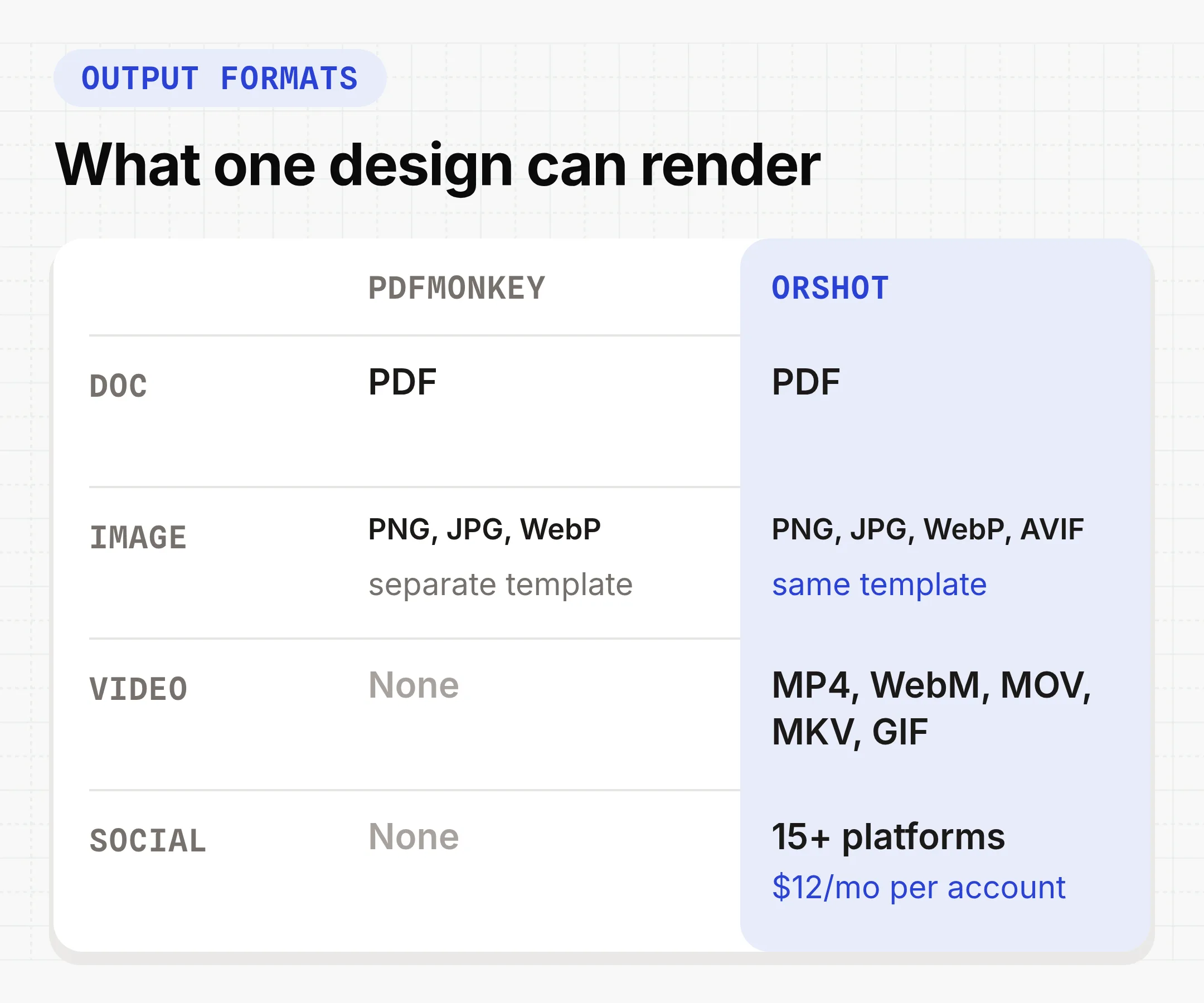
| Output formats | PDF, PNG, JPG, WebP, AVIF, MP4, WebM, MOV, MKV and GIF from the same template | PDF, or WebP, PNG and JPG from a separate image template. No video |
| Download link | A file URL kept for at least a year, or sent to your own storage on every paid plan | A signed URL that expires after 1 hour. Files kept 1 day on Free and Starter, 7 days on Pro |
| Billing unit | 1 credit per PDF page, image or second of video. Rendering pauses at your limit | 1 per document, whatever its page count. Pay as you go has no spending cap |
| No-code workflows | Built-in workflows from Google Sheets, Airtable, Google Forms, HubSpot or a webhook | None built in. Zapier, Make, n8n, Workato, Bubble and Glide |
| AI agents | Orshot for agents, a hosted MCP server that lists, renders and designs templates | A self-run MCP server with 11 tools to list templates and generate documents |
PDFMonkey details checked against pdfmonkey.io, its docs and its MCP server on GitHub on October 8, 2026.
Orshot vs PDFMonkey in Numbers
- File link stays live for
- Orshot1 yr+PDFMonkey1 hour
- Files kept on the free plan
- Orshot1 yr+PDFMonkey1 day
- Output formats
- Orshot10PDFMonkey4
What Teams Automate with PDFMonkey
Almost every PDFMonkey job has the same shape: a form, a sheet or an order comes in, a PDF comes out, and it lands in an inbox or a Drive folder. I pieced the list below together from PDFMonkey's use case page, its case studies, the Zapier, Make and n8n templates that use it, and the Glide and Bubble forums.
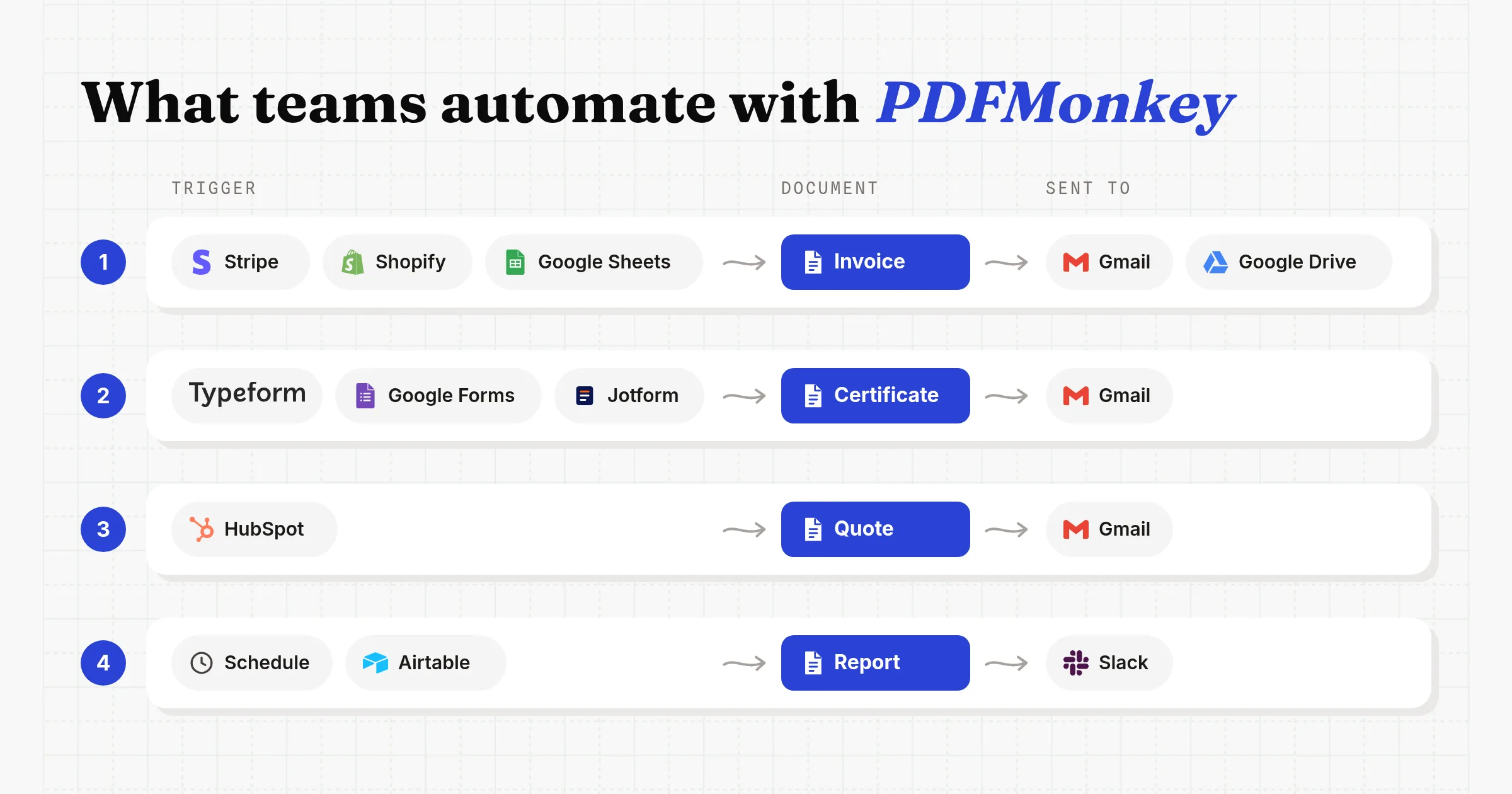
- Invoices and receipts with line items, from a Stripe charge, a Shopify or WooCommerce order, or a sheet row. By far the most common.
- Certificates and confirmations from a form response. Form tools like Tally, Typeform, Google Forms and Jotform top PDFMonkey's Zapier pairings.
- Quotes and proposals when a HubSpot deal moves stage, often with an AI step that drafts the copy.
- Reports, like inspection reports with photos, weekly client reports and daily cash flow summaries.
- Contracts, labels and tickets, usually printed or emailed in batches.
The first three cover most of what people build, so the three numbered parts below rebuild exactly those in Orshot.
Where PDFMonkey Workflows Get Stuck
The friction sits around the PDF, not in it. Most of these are written down in PDFMonkey's own docs, and the rest come up again and again on the Glide and Bubble forums.
- The 1 hour link. Every download URL returns a 403 after an hour. Their Make guide tells you to put an HTTP "Get a File" step right after PDFMonkey and store the file somewhere else before the link expires.
- Short retention. The file is deleted after 1 day on Free and Starter and 7 days on Pro. Keeping it longer starts on Pro+ at €60 a month.
- HTML for every change. A new logo spot or a moved total means editing HTML and CSS. Builder templates avoid that, but they can't be converted to Code templates when you outgrow them.
- Line items from no-code tools. Zapier sends every number as a string, custom JSON in Make and Zapier needs quotes and line breaks escaped, and Glide can't send arrays, so line items arrive as a string you parse in the template.
- Render time limits. A document has 30 seconds to render on Free and Starter and 2 minutes on Pro, which long reports with many images can hit.
- Free plan assets. The free plan can't load external images, fonts, CSS or JavaScript, so a logo URL or a Google Font fails until you pay.
How I Tested
I didn't open a PDFMonkey account for this post. Everything about PDFMonkey comes from its pricing page, its docs, its use case and case study pages, and its official MCP server, read between October 5 and October 8, 2026.
On the Orshot side I built and rendered each example end to end:
- Rebuilt the invoice from PDFMonkey's own Liquid example as an A4 Studio template, and ran the JavaScript below in Node
- Rendered the invoice with 2, 4 and 5 line items to check the total moves with the rows
- Built a course certificate and a two-page quote, rendered both as PDFs, and opened them with
pdfinfo - Priced 1,000, 5,000 and 20,000 PDFs a month on both pricing pages
1. Generate Invoices from Orders or Sheets
Pick this if you send invoices or receipts with line items from Stripe, Shopify, a database or a Google Sheet, and today a PDFMonkey Liquid template formats them.
Step 1: Turn the Liquid template into a visual one
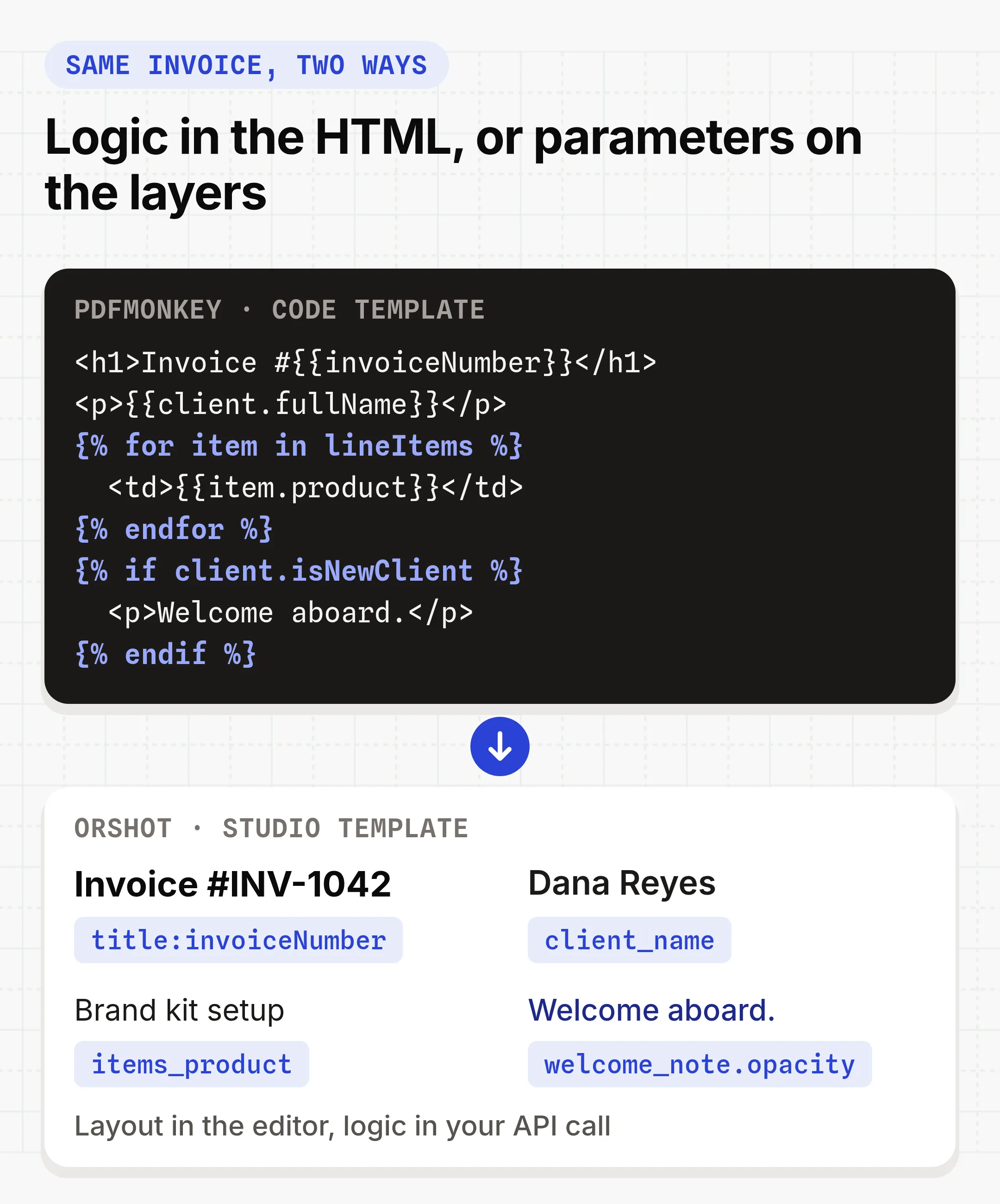
A PDFMonkey Code template keeps layout, data and logic in one HTML file. In Orshot the layout lives in a visual template and each dynamic layer gets a parameter ID like client_name. Filters, conditions and loops move into the code or automation step that calls the API.
You don't have to start from a blank page. The create template dialog has an Import from HTML option: paste your template's HTML and it becomes an editable Studio template. It works best with positioned layouts, and Liquid logic doesn't come along. To preview how your HTML renders first, the free HTML to PDF converter can turn it into a template too.
This is what each construct in PDFMonkey's own invoice example becomes:
{{invoiceNumber}}stays inside the text layer, because Orshot's inline parameters use the same double curly braces. Send"title:invoiceNumber": "INV-1042".{{client.fullName}}becomes one flat key,client_name.| date:and| times:filters run in your code. Send the finished text, like"$420.00".{% for item in lineItems %}becomes one text layer per column (items_product,items_qty,items_total) with one line per item. The total sits under them with Smart Stacking, so it moves with the item count.{% if client.isNewClient %}becomes"welcome_note.opacity"set to"1"or"0".
Step 2: Send the payload you already send
You keep the JSON you send to PDFMonkey today. A few lines turn it into Orshot modifications, and one POST to /v1/studio/render with format: "pdf" returns the file URL. This is the exact code I ran for the invoice below.
const payload = {
  invoiceNumber: "INV-1042",
  client: { fullName: "Dana Reyes", isNewClient: true },
  lineItems: [
    { product: "Brand kit setup", quantity: 1, price: 450 },
    { product: "Social templates", quantity: 12, price: 35 },
    { product: "Monthly report design", quantity: 1, price: 300 },
    { product: "Certificate template", quantity: 2, price: 80 },
  ],
};

const money = (n) =>
  "$" + n.toLocaleString("en-US", { minimumFractionDigits: 2, maximumFractionDigits: 2 });
const items = payload.lineItems;
const show = payload.client.isNewClient ? "1" : "0";

const modifications = {
  "title:invoiceNumber": payload.invoiceNumber,
  invoice_date: new Date().toLocaleDateString("en-US", {
    month: "long",
    day: "numeric",
    year: "numeric",
  }),
  client_name: payload.client.fullName,
  // One line per item. The total and the note are stacked below this column,
  // so they move up or down with the number of items.
  items_product: items.map((i) => i.product).join("\n"),
  items_qty: items.map((i) => String(i.quantity)).join("\n"),
  items_total: items.map((i) => money(i.price * i.quantity)).join("\n"),
  total: money(items.reduce((sum, i) => sum + i.price * i.quantity, 0)),
  "welcome_note.opacity": show,
  "note_bg.opacity": show,
};

const res = await fetch("https://api.orshot.com/v1/studio/render", {
  method: "POST",
  headers: {
    Authorization: `Bearer ${process.env.ORSHOT_API_KEY}`,
    "Content-Type": "application/json",
  },
  body: JSON.stringify({
    templateId: "YOUR_TEMPLATE_ID",
    modifications,
    response: { type: "url", format: "pdf", fileName: `invoice-${payload.invoiceNumber}` },
  }),
});

const { data } = await res.json();
console.log(data.content); // PDF URL, kept for at least a year
For a batch of orders, run renders in the background. Pass your own order ID as metadata and it comes back in the webhook.
body: JSON.stringify({
  templateId: "YOUR_TEMPLATE_ID",
  modifications,
  response: { mode: "async", type: "url", format: "pdf" },
  webhook_url: "https://acme.com/hooks/orshot",
  metadata: "invoice-INV-1042",
}),

// Your webhook receives:
// {
//   "event": "render_job.finished",
//   "job": { "id": 1204, "status": "succeeded", "result": { ... }, "metadata": "invoice-INV-1042" }
// }
The same document on PDFMonkey. Generation is asynchronous, so you poll the document card for the download URL, or call /documents/sync to wait for it.
curl https://api.pdfmonkey.io/api/v1/documents \
  -X POST \
  -H 'Authorization: Bearer YOUR_SECRET_KEY' \
  -H 'Content-Type: application/json' \
  -d '{
    "document": {
      "document_template_id": "YOUR-TEMPLATE-ID",
      "status": "pending",
      "payload": {
        "invoiceNumber": "INV-1042",
        "client": { "fullName": "Dana Reyes", "isNewClient": true },
        "lineItems": [{ "product": "Brand kit setup", "quantity": 1, "price": 450 }]
      }
    }
  }'

# Then GET /api/v1/document_cards/DOCUMENT_ID until status is "success".
# The download_url it returns expires after 1 hour.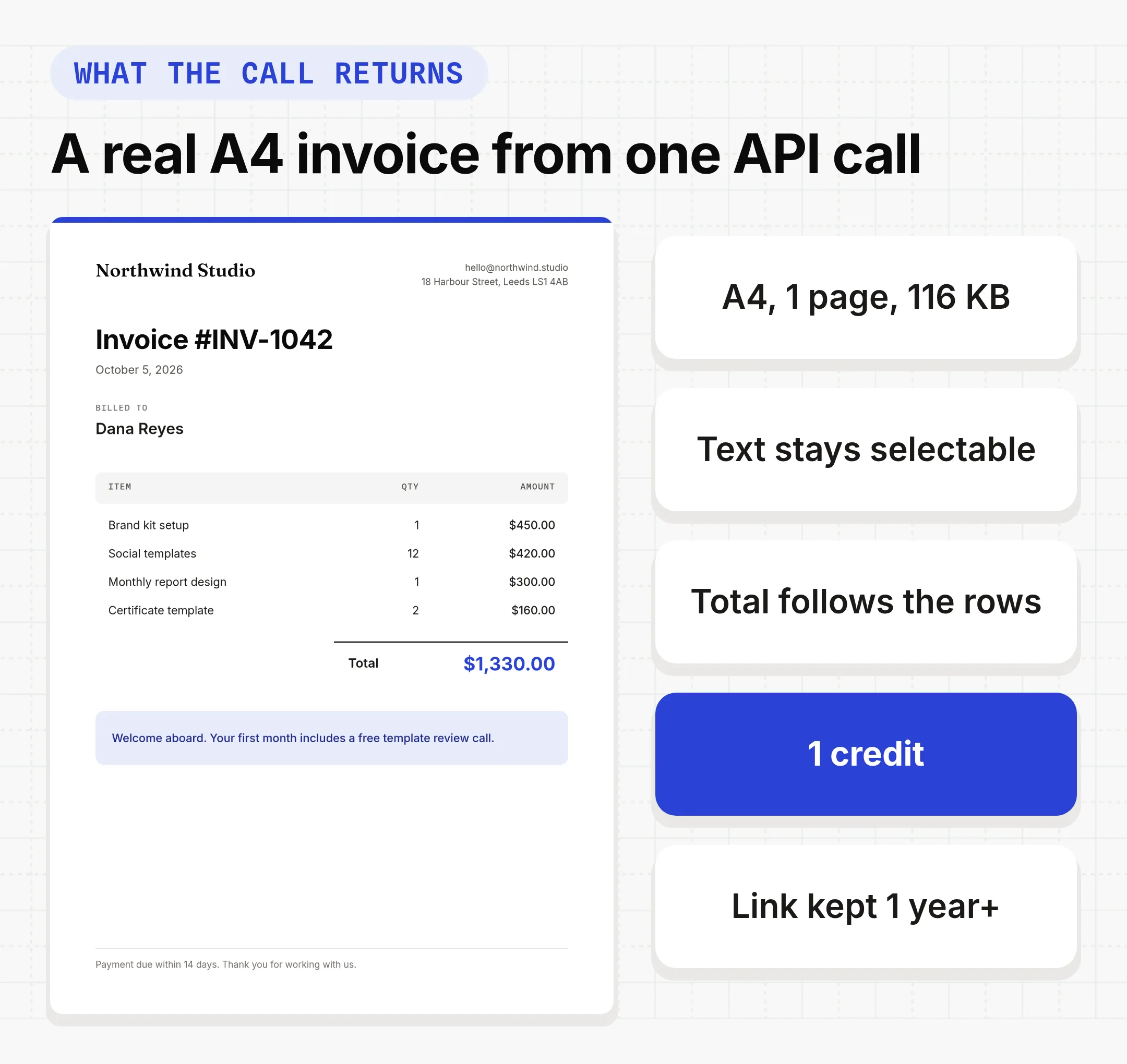
This is the same invoice template, live. Click any layer to see its parameter ID, change the line items, or hit "Copy This Template" to save it to your own workspace and render it with the code above.
Step 3: Or run it from a sheet without code
If your orders live in a Google Sheet, you can skip the code. This workflow reads new rows on a schedule, renders one invoice PDF per row and files it in Google Drive. Hit "Use this workflow" to copy it into your workspace, then swap in your own invoice template.
Orders in Airtable instead? The Airtable invoice workflow does the same from new records.
Things that bit me
- My first version left a gap. I started with six fixed row layers and hid the spare ones, so a 2-item invoice had a hole above the total. One text layer per column, joined with
\n, plus a stacked total fixed it. - Keep each item on one line. The three columns line up because every item is one line. A product name long enough to wrap pushes its qty and amount out of line, so size the column for your longest name.
- The PDF was titled "about:blank". Passing
fileNamefixed it, because it also becomes the PDF's title. Margins, CMYK and DPI go inpdfOptionson the same call.
2. Send a Certificate for Every Form Response
Pick this if someone fills in a form (a course, an event, a training) and should get a certificate PDF back, which is the second most common PDFMonkey job.
Step 1: Mark the four fields that change
A certificate has very little data: who, what, when, and an ID. In Studio I marked four layers as dynamic: recipient_name, course_name, completion_date and certificate_id. Everything else (the border, the logo, the signature) stays fixed in the design.
Step 2: Render it from the form's webhook
Point your form tool's webhook (or a Zapier or Make step) at a small function that maps the answers to those four keys. This is the call I used for the certificate below.
// `answer` holds the form response your webhook received
const modifications = {
  recipient_name: answer.fullName,
  course_name: "Automation Fundamentals",
  completion_date: new Date().toLocaleDateString("en-US", {
    month: "long",
    day: "numeric",
    year: "numeric",
  }),
  certificate_id: `CERT-2026-${String(answer.responseNumber).padStart(4, "0")}`,
};

const res = await fetch("https://api.orshot.com/v1/studio/render", {
  method: "POST",
  headers: {
    Authorization: `Bearer ${process.env.ORSHOT_API_KEY}`,
    "Content-Type": "application/json",
  },
  body: JSON.stringify({
    templateId: "YOUR_CERTIFICATE_TEMPLATE_ID",
    modifications,
    response: { type: "url", format: "pdf", fileName: modifications.certificate_id },
  }),
});

const { data } = await res.json(); // data.content is the certificate PDF URL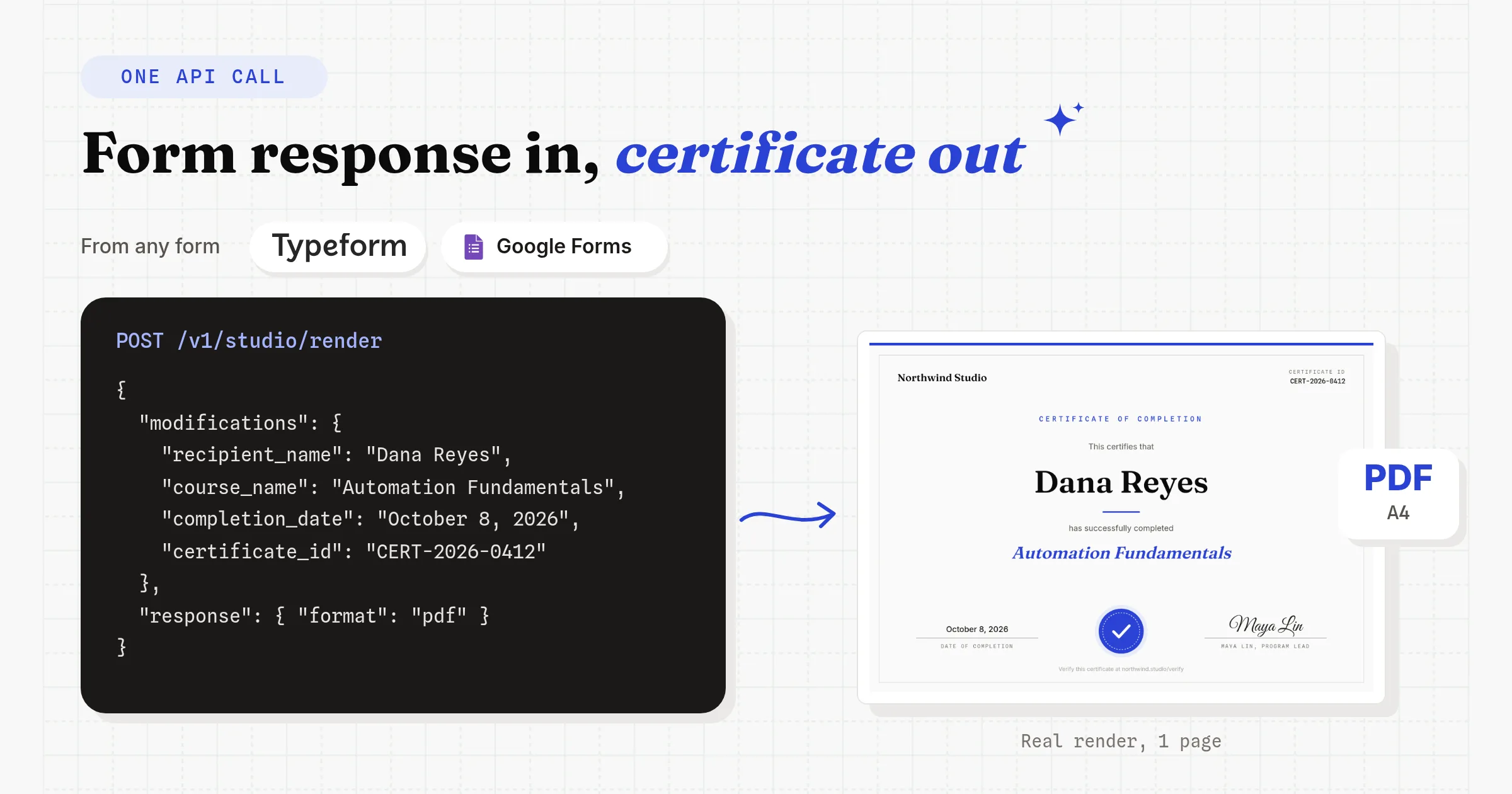
Because the link lasts at least a year, you can email it straight away or write it back to the form row, with no download step in between.
Step 3: Or use the Google Forms workflow
For Google Forms there's a ready workflow: every new response renders a certificate from your template and saves it to Google Drive. Copy it, connect your form, and map the questions to the four fields.
We're using Orshot as a template builder inside an existing workflow, and the speed of shipping features has been impressive.
3. Build a Two-Page Quote When a Deal Is Won
Pick this if sales sends quotes or proposals from a CRM like HubSpot, and the document runs over more than one page.
Step 1: Design both pages together
A quote usually has a priced first page and a second page with scope, terms and an acceptance block. In Orshot both pages live in the same template. Page 1 holds the client, the quote number and the line items, using the same column pattern as the invoice. Page 2 is mostly fixed text.
Step 2: Render both pages in one call
One render call returns one PDF with both pages. In a multi-page template each key starts with its page, like page1@client_name. Orshot bills 1 credit per page, so this quote costs 2 credits. On PDFMonkey it would be 1 document.
const items = [
  { product: "Template design", qty: 1, total: "$900.00" },
  { product: "Automation setup", qty: 1, total: "$600.00" },
  { product: "Monthly renders (5,000)", qty: 3, total: "$297.00" },
];

const modifications = {
  "page1@client_name": "Acme Logistics",
  "page1@quote_number": "Q-2087",
  "page1@valid_until": "November 7, 2026",
  "page1@items_product": items.map((i) => i.product).join("\n"),
  "page1@items_qty": items.map((i) => String(i.qty)).join("\n"),
  "page1@items_total": items.map((i) => i.total).join("\n"),
  "page1@total": "$1,797.00",
};

// Same POST /v1/studio/render call as the invoice, with format "pdf".
// The PDF comes back with both pages: A4, 176 KB, text selectable.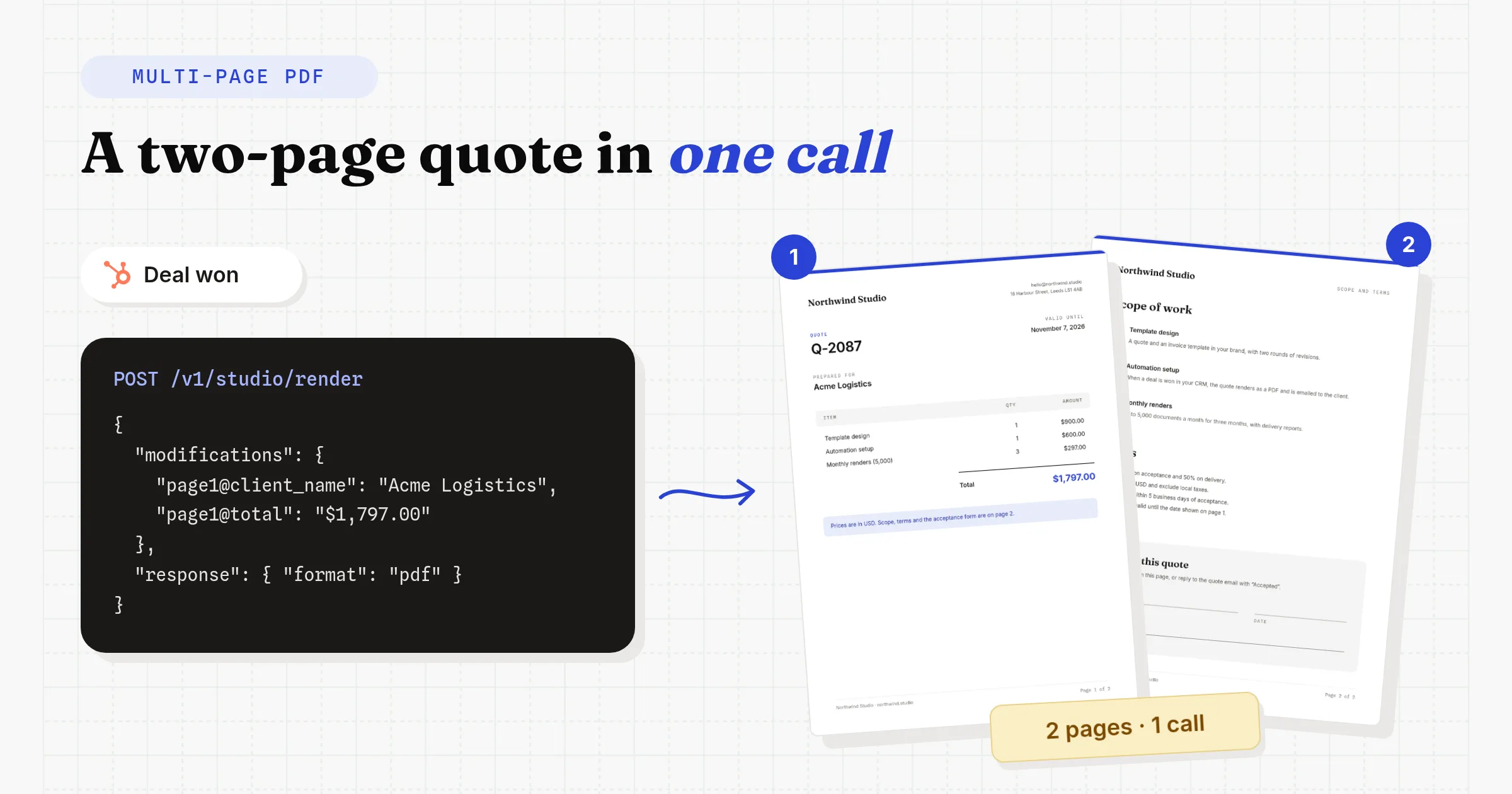
Step 3: Trigger it from HubSpot
Orshot workflows have a HubSpot trigger that runs on new or updated deals, on the Grow plan and above. If you only want quotes for one deal stage, like "Contract sent", put the filter in a Zapier or Make step and call the Orshot action from there.
4. Swap the PDFMonkey Step in n8n, Make and Zapier
If you keep your current automation, you replace one step: PDFMonkey's Generate Document with Orshot's Studio Template action, set to PDF. The trigger and field mapping stay the same. The download step after it usually goes away, because the Orshot URL still works days later.
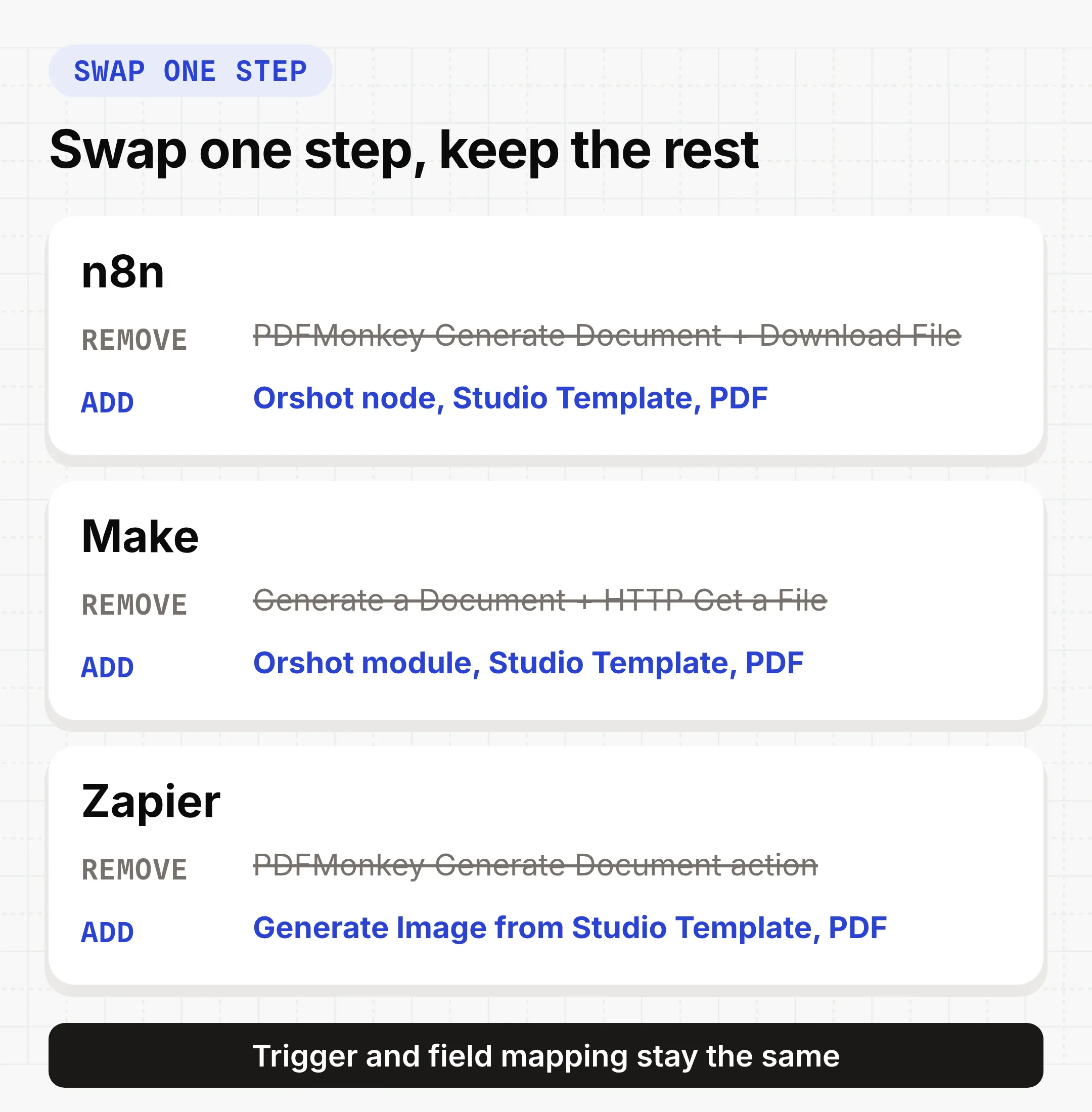
What changes in each tool once the new step is in:
- n8n: pick the template in the Orshot node, map each field to a parameter, and set Response Format to PDF and Response Type to URL. Margin, color mode and DPI are node options.
- Make: each value maps to its own parameter key, so there's no JSON to escape. Keep a download step only if the next module needs the file itself, like an email attachment.
- Zapier: set the format to PDF and map each line item column to
items_product,items_qtyanditems_total. The file URL still works in steps that run days later.
Name each Orshot parameter after the key you already send to PDFMonkey and the mapping is a one-to-one copy. The Orshot apps for all three are listed on the integrations page.

PDFMonkey Pricing and the Cost at 1,000 to 20,000 PDFs
PDFMonkey costs €0 to €300 a month, excluding VAT, for 20 to 60,000 documents. It costs less per PDF than Orshot at every volume I priced: 1,000 one-page PDFs a month are €10 on PDFMonkey and $39 on Orshot. The gap narrows once files have to stay longer than 7 days, because that needs PDFMonkey's Pro+ plan.
| Plan | Per month | Docs | Kept for |
|---|---|---|---|
| Free | €0 | 20 | 1 day |
| Starter | €5 | 300 | 1 day |
| Pro | €15 | 3,000 | 7 days |
| Pro+ | €60 | 5,000 | No limit |
| Premium | €300 | 60,000 | No limit |
Past your quota, pay as you go runs from €0.008 per document on Starter down to €0.005 on Premium, with no spending cap, or Boost Packs add 1,000 documents for €5. Yearly billing takes 10% off, and new accounts get a 30-day Pro trial with 300 documents. Checked on pdfmonkey.io/pricing on October 8, 2026.
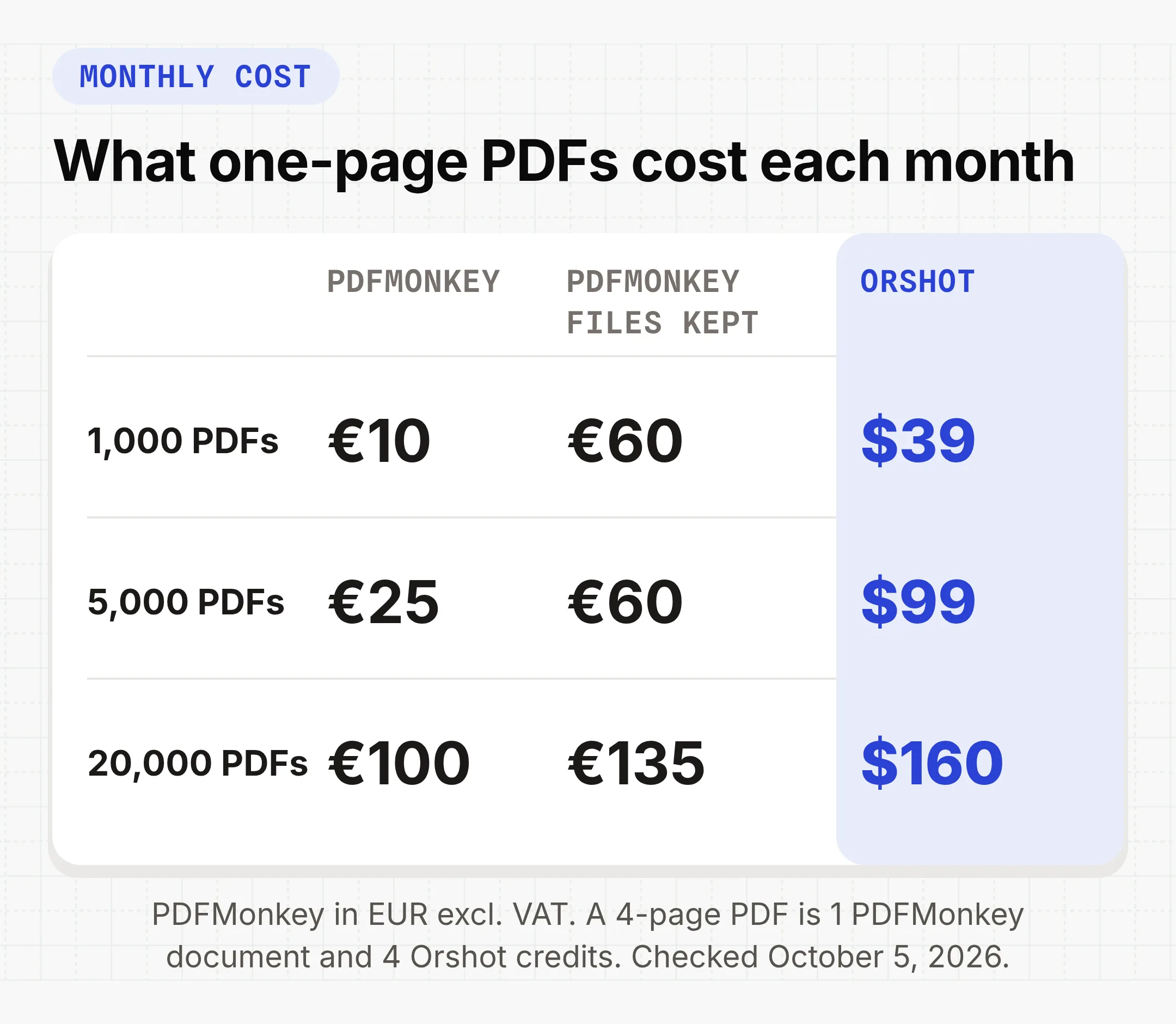
Orshot uses 1 credit for 1 PDF page, 1 image or 1 second of video. Every plan keeps files for at least a year, and annual billing gives 2 months free.
| Plan | Per month | Credits | Team members |
|---|---|---|---|
| Free | $0 | 100 | 1 |
| Launch | $39 | 1,500 | 2 |
| Launch | $99 | 5,000 | 2 |
| Grow | $160 | 20,000 | 6 |
| Scale | $349 | 75,000 | 14 |
The gap is bigger for multi-page PDFs, since the two-page quote above is 1 document on PDFMonkey and 2 credits on Orshot. What Orshot buys you for the difference is a predictable bill (rendering pauses at your limit), files that stay put without a Pro+ plan, and credits that also cover images and video. Orshot prices from orshot.com/pricing on October 8, 2026.
When PDFMonkey Fits Better
PDFMonkey fits when the document is really a web page and a developer owns it. Here is how it compares on its own terms:
- Full HTML and CSS on a Chrome 133 engine
- Liquid loops and conditions for tables that run over several pages
- Lower price per document, and a multi-page PDF still counts as 1
- Password-protected PDFs on every plan, plus fillable PDF forms
- Custom JavaScript, like Chart.js charts drawn at render time
- Every layout change is an HTML and CSS edit
- Download links expire after 1 hour, files go after 1 to 7 days below Pro+
- A PDF and an image of it need two separate templates
- No video output
- No e-signature fields, and no SOC 2 or ISO 27001 certification
Orshot fits when the PDF is designed rather than coded, when non-developers edit the template, or when the same design also goes out as an image, a video or a social post. The PDF generation API page has the full picture.
Render the Same Template as a PDF, Image or Video
On Orshot the image and the video come from the template that makes the PDF. You change response.format from pdf to png or mp4 and keep the same data. PDFMonkey needs a separate image template for PNG, JPG or WebP and has no video output.
That matters because the PDF is rarely the last file a workflow needs:
- A course certificate also needs a LinkedIn share image
- A real estate listing PDF also needs an Instagram post and a vertical video
- A monthly report also needs a cover graphic for the email
Smart Resize re-fits the layout to a square or story size in the same call. Add a publish object and Orshot posts the render to your connected accounts on 15+ platforms, or saves it as a draft, for $12 a month per account.
Other PDFMonkey Alternatives
Orshot isn't the only option. Which one fits depends on how you want to build the template:
- CraftMyPDF has a drag and drop PDF editor with an API. I compared it in the CraftMyPDF alternative post.
- APITemplate.io generates PDFs and images from visual or HTML templates. More in the APITemplate.io alternative post.
- DocsAutomator fills Google Docs, Word or PDF templates with data, and adds e-signatures.
- DocRaptor and Doppio render your own HTML to PDF, with no template editor.
The PDF generator API comparison prices eight of these tools at 1,000, 10,000 and 100,000 documents.
Switch from PDFMonkey in Four Steps
Moving a PDFMonkey template to Orshot is four steps. You rebuild or import the layout, move the Liquid logic into your API call, swap one automation step, and compare a few real documents side by side before you cut over.
- Rebuild the template. Import your HTML or recreate the layout in Studio. Name each dynamic layer after the payload key you already send.
- Move the logic out. Date formats, totals and
ifblocks go into the step that calls the API, as in the invoice code above. - Swap the step. Replace the PDFMonkey node, module or action with Orshot's, or use a built-in workflow. Drop the download step if the link only needs to live in a record or an email.
- Run both side by side on a few real payloads, adjust spacing in Studio, then cut over.
Stuck on a template? Hit the chat button and send it over. I'll help you move it.
PDFMonkey FAQ
What is PDFMonkey?
How much does PDFMonkey cost?
How long does PDFMonkey keep generated PDFs?
How do I convert Liquid variables to Orshot parameters?
Can I import my PDFMonkey HTML template into Orshot?
Can PDFMonkey generate images?
Can I generate PDFs from Google Sheets or Google Forms without Zapier?
Does PDFMonkey support e-signatures?
Is there a free PDFMonkey alternative?
What is Orshot?
Generate Your First PDF from a PDFMonkey Payload
Sign up, import or rebuild one PDFMonkey template in Studio, and render it from the payload you already send. You start with 100 free credits a month, unlimited templates and no card.
If something doesn't work the way you expect, hit the chat button. I'm usually the one on the other end.
Researched and drafted with Claude, tested and edited by Rishi. Visuals rendered with Orshot.