Dropbox
Automatically store rendered files in your Dropbox folders
Updated
The Orshot Dropbox integration allows you to automatically save generated files directly to your Dropbox account. When enabled, every render (images, PDFs, videos) via the API can be stored in a specified Dropbox folder, making it easy to organize, share, and access your generated content.
Connecting Dropbox#
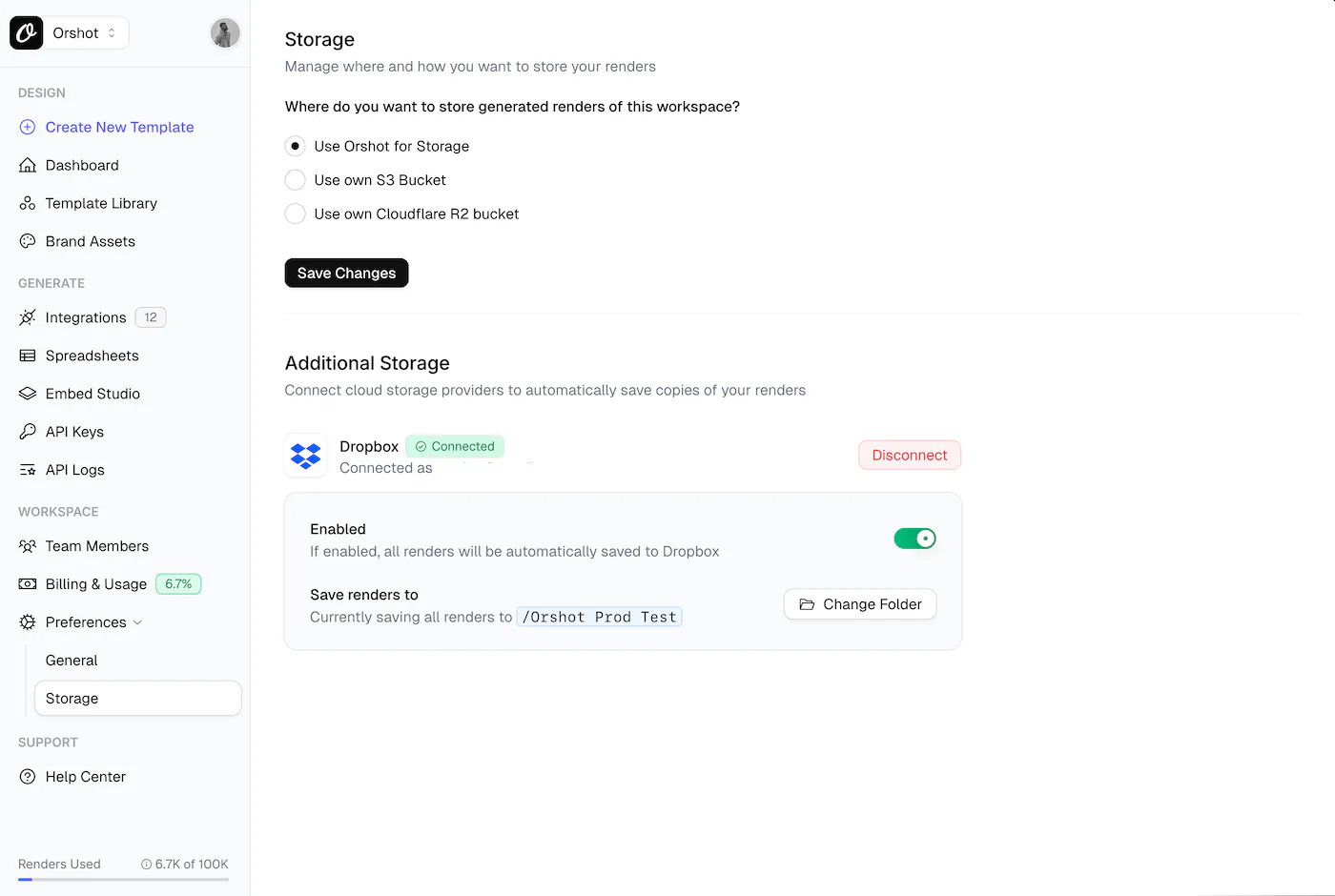
- Navigate to Workspace > Settings > Storage in your Orshot dashboard
- Click Connect Dropbox
- Authorize Orshot to access your Dropbox account
- Select or create a default folder for storing renders
Using Dropbox in API Requests#
If Dropbox is enabled on the Storage page, all your renders will automatically be uploaded to Dropbox — no need to add connections in your API request.
To explicitly control the upload or specify custom options, add the connections parameter to your render request:
{
  "templateId": 25,
  "modifications": {
    "headline": "Hello World"
  },
  "response": {
    "type": "url",
    "format": "png"
  },
  "connections": [
    {
      "type": "storage",
      "provider": "dropbox"
    }
  ]
}
Specifying a Custom Folder#
Override the default folder by specifying a folder path:
{
  "connections": [
    {
      "type": "storage",
      "provider": "dropbox",
      "folder": "/Marketing/Campaign-2024"
    }
  ]
}
Custom File Names#
Use response.fileName to set a custom name for the uploaded file:
{
  "templateId": 25,
  "modifications": { "headline": "Hello" },
  "response": {
    "type": "url",
    "format": "png",
    "fileName": "marketing-banner-001"
  },
  "connections": [
    {
      "type": "storage",
      "provider": "dropbox",
      "folder": "/Banners"
    }
  ]
}
API Response Examples#
Successful Upload#
{
  "data": {
    "content": "https://store.orshot.com/cloud/w-50/renders/images/abc123.png",
    "type": "url",
    "format": "png",
    "responseTime": "1.2s"
  },
  "connections": [
    {
      "type": "storage",
      "provider": "dropbox",
      "path": "/Marketing/Campaign-2024/abc123.png",
      "status": "success"
    }
  ]
}
Multi-Page Upload#
When rendering multi-page templates, each page is uploaded separately:
{
  "data": [
    {
      "page": 1,
      "pageId": "a1b2c3d4-5e6f-7890-abcd-ef1234567890",
      "content": "https://storage.orshot.com/cloud/w-50/renders/images/abc123.png"
    },
    {
      "page": 2,
      "pageId": "b2c3d4e5-6f78-9012-bcde-f23456789012",
      "content": "https://storage.orshot.com/cloud/w-50/renders/images/def456.png"
    }
  ],
  "format": "png",
  "type": "url",
  "responseTime": 3166.01,
  "totalPages": 2,
  "renderedPages": 2,
  "connections": [
    {
      "type": "storage",
      "provider": "dropbox",
      "path": [
        { "page": 1, "path": "/Renders/template_page_1.png" },
        { "page": 2, "path": "/Renders/template_page_2.png" }
      ],
      "status": "success"
    }
  ]
}
Upload Failed (with Warning)#
Connection issues return warnings but don't block the render:
{
  "data": {
    "content": "https://store.orshot.com/cloud/w-50/renders/images/abc123.png",
    "type": "url",
    "format": "png",
    "responseTime": "1.2s"
  },
  "warnings": [
    {
      "title": "Failed to upload to dropbox: Token expired",
      "details": ""
    }
  ],
  "connections": [
    {
      "type": "storage",
      "provider": "dropbox",
      "path": null,
      "status": "error",
      "error": "Token expired"
    }
  ]
}
Dropbox Not Connected#
{
  "data": {
    "content": "https://store.orshot.com/cloud/w-50/renders/images/abc123.png",
    "type": "url",
    "format": "png"
  },
  "warnings": [
    {
      "title": "Dropbox connection not found for this workspace",
      "details": ""
    }
  ]
}
Connection Parameters#
| Parameter | Type | Required | Description |
|---|---|---|---|
type | string | Yes | Must be "storage" |
provider | string | Yes | Must be "dropbox" |
folder | string | No | Custom folder path. Uses default folder if not specified |
Notes#
- Non-blocking: Dropbox upload failures won't block your render—you'll still get the image URL
- Automatic refresh: Access tokens are automatically refreshed when they expire
- Folder creation: Folders are created automatically if they don't exist
- Supported formats: PNG, JPG, JPEG, WebP, AVIF, PDF, MP4, WebM, MOV, MKV, GIF
Need Help?#
- Contact support at hi@orshot.com or use the chat button in your Orshot dashboard
Ready to automate?
Start rendering images, PDFs and videos from your templates in under 2 minutes. Free plan, no credit card.
Get your API key- Image, PDF and video generation via API
- Visual editor with AI and smart layouts
- Zapier, Make, MCP and 50+ integrations
- White-label embed for your own app
- 30 free credits — no credit card required