What happens when I run out of credits?
Renders keep working past your plan limit and bill as overage. Set a spending cap in Billing & Usage to control it.
Updated
Overage credits allow you to continue rendering beyond your plan's monthly or annual limit without interruption. When enabled, you'll be charged a small fee per additional credit instead of hitting a hard limit.
How It Works#
By default, when you reach your plan's credit limit, API requests will fail and rendering stops. With overage credits enabled, you can continue rendering seamlessly:
- Pay-per-credit: You're charged a small fee per additional credit beyond your plan limit
- Uninterrupted service: No downtime or failed API requests when you exceed your plan
- Flexible scaling: Perfect for handling traffic spikes or seasonal demand
Image vs Video Overage Rates#
Overage billing differs between image and video:
| Type | Overage Rate |
|---|---|
| Image/PDF | 1 credit per image / page |
| Video | 8 credits per second |
For example, generating a 10-second video during overage would consume 80 overage credits (10 × 8). This is higher than the standard in-plan rate of 1 credit per second because video generation requires more processing resources.
Enabling Overage Credits#
Navigate to Workspace Settings > Billing & Usage to configure overage settings:
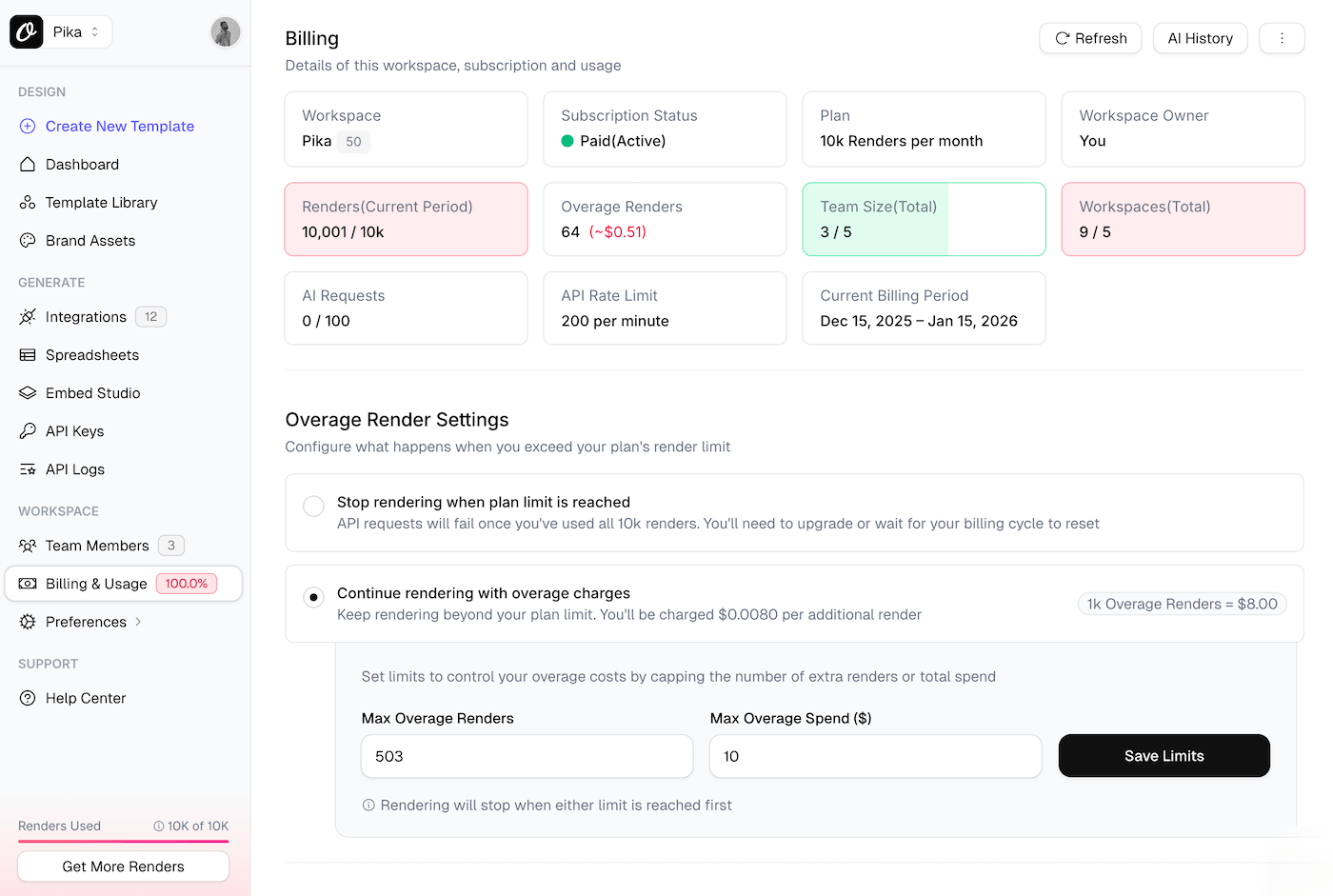
You'll see two options:
1. Stop Rendering (Default)#
API requests will fail once you've used all your monthly/annual credits. You'll need to upgrade your plan or wait for your billing cycle to reset.
2. Continue with Overage Charges#
Keep rendering beyond your plan limit. You'll be charged per additional credit based on your plan's overage rate.
Setting Spending Limits#
To control your overage costs, you can set two types of limits:
Max Overage Credits#
Set a cap on the number of additional credits allowed. For example, setting this to 2,500 means rendering will stop after 2,500 overage credits.
Max Overage Spend ($)#
Set a maximum dollar amount you're willing to spend on overages. For example, $50.00 limits your total overage charges to that amount.
Important: Rendering will stop when either limit is reached first. If you don't set any limits, overage charges can accumulate without restriction.
Overage Billing#
- Overage charges appear on your next invoice
- You can track current overage usage in real-time on the Billing & Usage page
- Quick increase buttons (+250, +500, +1k credits or +$10, +$50, +$100) let you adjust limits when reached
Use Cases#
Overage credits are ideal for:
- Traffic spikes: Handle unexpected increases in API usage
- Seasonal demand: Scale up during peak periods without upgrading
- Testing & development: Avoid interruptions while building integrations
- Cost control: Pay only for what you use instead of upgrading to a higher tier
Example Scenarios#
Scenario 1: Small Image Overage#
- Plan: 5,000 credits/month
- Overage rate: $0.036 per credit
- Usage: 6,000 images
- Overage cost: $36.00 (1,000 × $0.036)
Scenario 2: Video Overage#
- Plan: 5,000 credits/month
- Overage rate: $0.036 per credit
- Video overage rate: 8 credits per second
- Usage: 5,000 image credits + 30 seconds of video
- Video overage credits: 240 (30 × 8)
- Overage cost: $8.64 (240 × $0.036)
Scenario 3: With Spending Limit#
- Plan: 20,000 credits/month
- Overage rate: $0.030 per credit
- Max overage spend: $50.00
- Maximum additional credits: 1,666 (before hitting $50 limit)
- Total possible credits: 21,666
Scenario 4: Mixed Image & Video with Credit Limit#
- Plan: 40,000 credits/month
- Overage rate: $0.030 per credit
- Max overage credits: 5,000
- Usage: 40,000 in-plan + 2,500 image overages + 60 seconds video
- Video overage credits: 480 (60 × 8)
- Total overage credits: 2,980
- Overage cost: $89.40 (2,980 × $0.030)
- Remaining overage capacity: 2,020 credits
Managing Overage Settings#
Only workspace owners can configure overage settings. Team members and collaborators can view overage usage but cannot modify the settings.
To disable overage credits, simply switch back to "Stop rendering when plan limit is reached" in your Billing & Usage settings.
Ready to automate?
Start rendering images, PDFs and videos from your templates in under 2 minutes. Free plan, no credit card.
Get your API key- Image, PDF and video generation via API
- Visual editor with AI and smart layouts
- Zapier, Make, MCP and 40+ integrations
- White-label embed for your own app
- 100 free credits a month, no credit card required