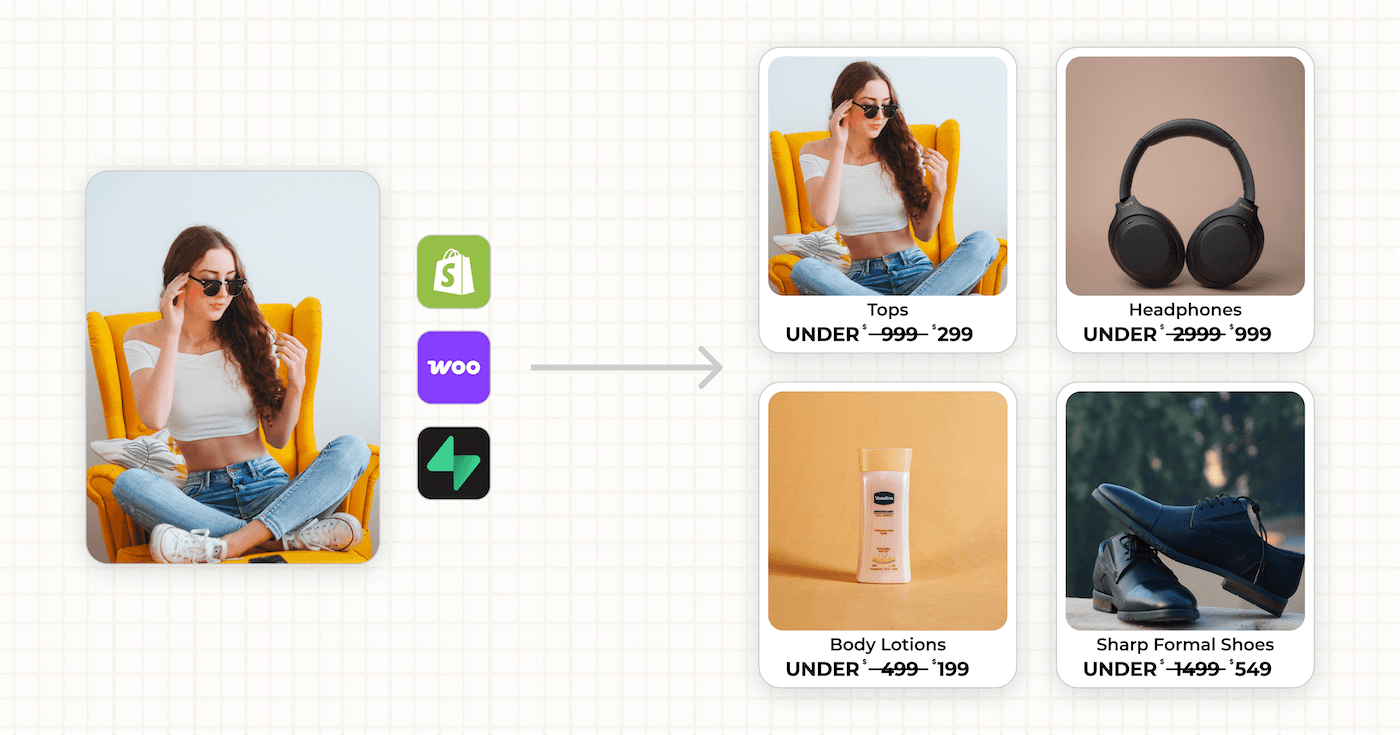
To customize Meta catalog ads, put the price, sale badge and logo into each product's image. Use Meta's free image templates, a paid tool like Confect or Marpipe, or generate the images from your feed with an API like Orshot.
Most brands skip it. I went through 26 big US advertisers in Meta's Ad Library on October 17, 2026, and 18 of them ran catalog ads with the bare product photo.
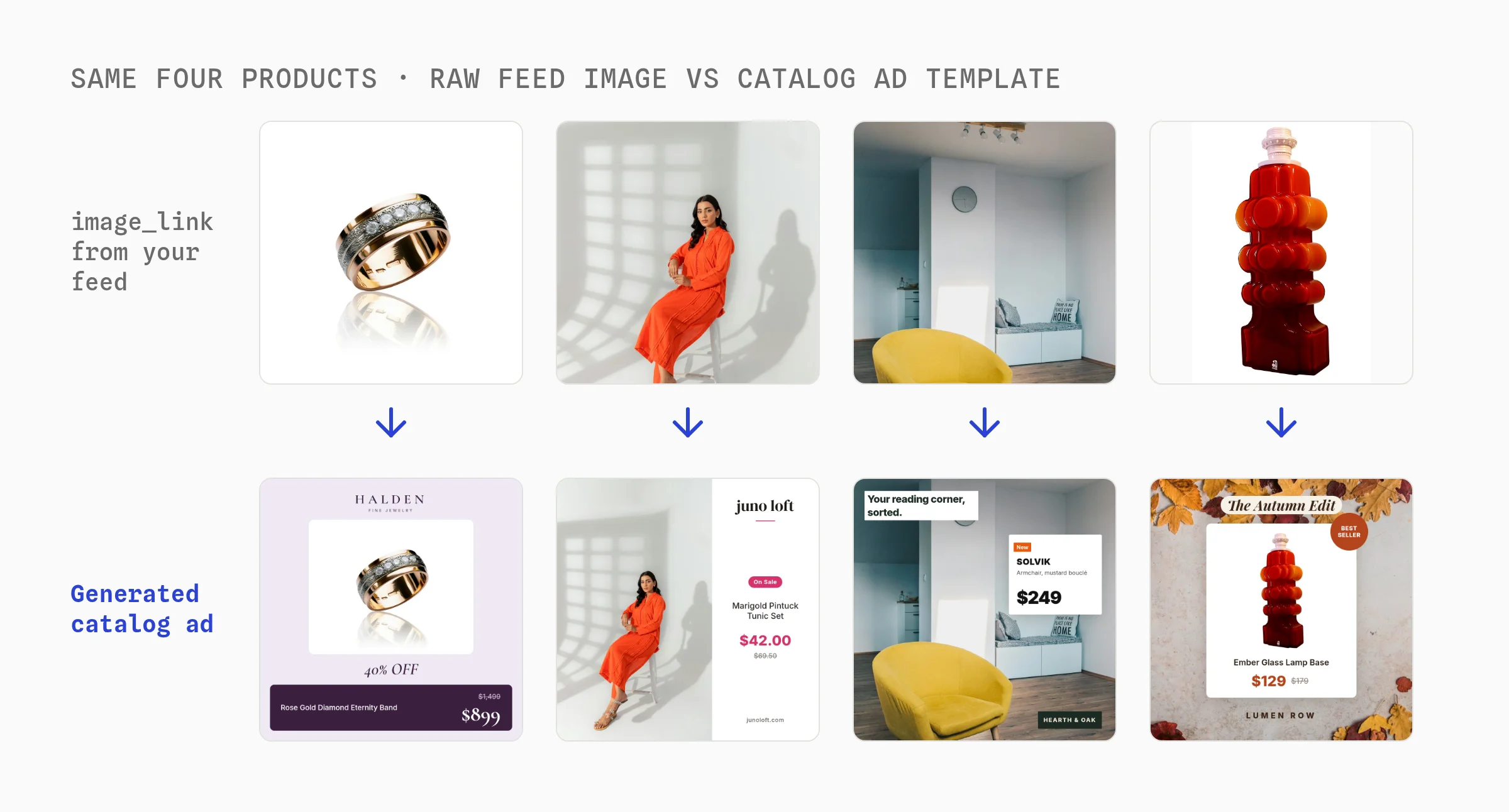
The other eight are the ones you remember. Below are the three ways to get there, and how to keep a sale badge from showing after the sale ends.
| Way to customize | Design lives in | Cost, October 2026 |
|---|---|---|
| 1. Meta image templates | Commerce Manager | Free |
| 2. Catalog creative tool | The vendor's editor | $199 to $1,100 a month |
| 3. Orshot API | Your own template | Free plan, then from $39 |
What Are Meta Catalog Ads?
Meta catalog ads, now called Advantage+ catalog ads, show each shopper products from your catalog feed that they are most likely to buy. They used to be called dynamic product ads, and both names mean the same ad.
Meta builds every ad from the feed's image_link, title and price. The image is usually a plain packshot, and it's the only part of the ad you get to design.
How to Set Up a Meta Catalog Ad
- Create a catalog in Commerce Manager and add products from Shopify, a data feed or a Google Sheet.
- Connect your pixel or Conversions API, so Meta knows who viewed which product.
- Create a Sales campaign in Ads Manager and turn on the catalog option.
- Pick a product set and an audience: past visitors for retargeting, or broad for prospecting.
- Choose single image, carousel or collection, then customize the images with one of the three ways below.
What the Best Catalog Ads Do
The eight advertisers that design their catalog images do it in similar ways:
- One fixed brand layout. Zales puts the logo on top and a plum price bar under every product.
- Badges driven by the data. Lulus shows "On Sale" only on sale items, and Sephora adds a seal only to tagged products.
- Extra photos from the feed. Lulus and Princess Polly turn a product's additional images into 2-up and 3-up collages.
- Seasonal backdrops. Lamps Plus adds a sale band, and Lulus swaps the background each season.
- A price tag on a lifestyle photo. IKEA floats a "New" tag with the price in the empty part of a room.
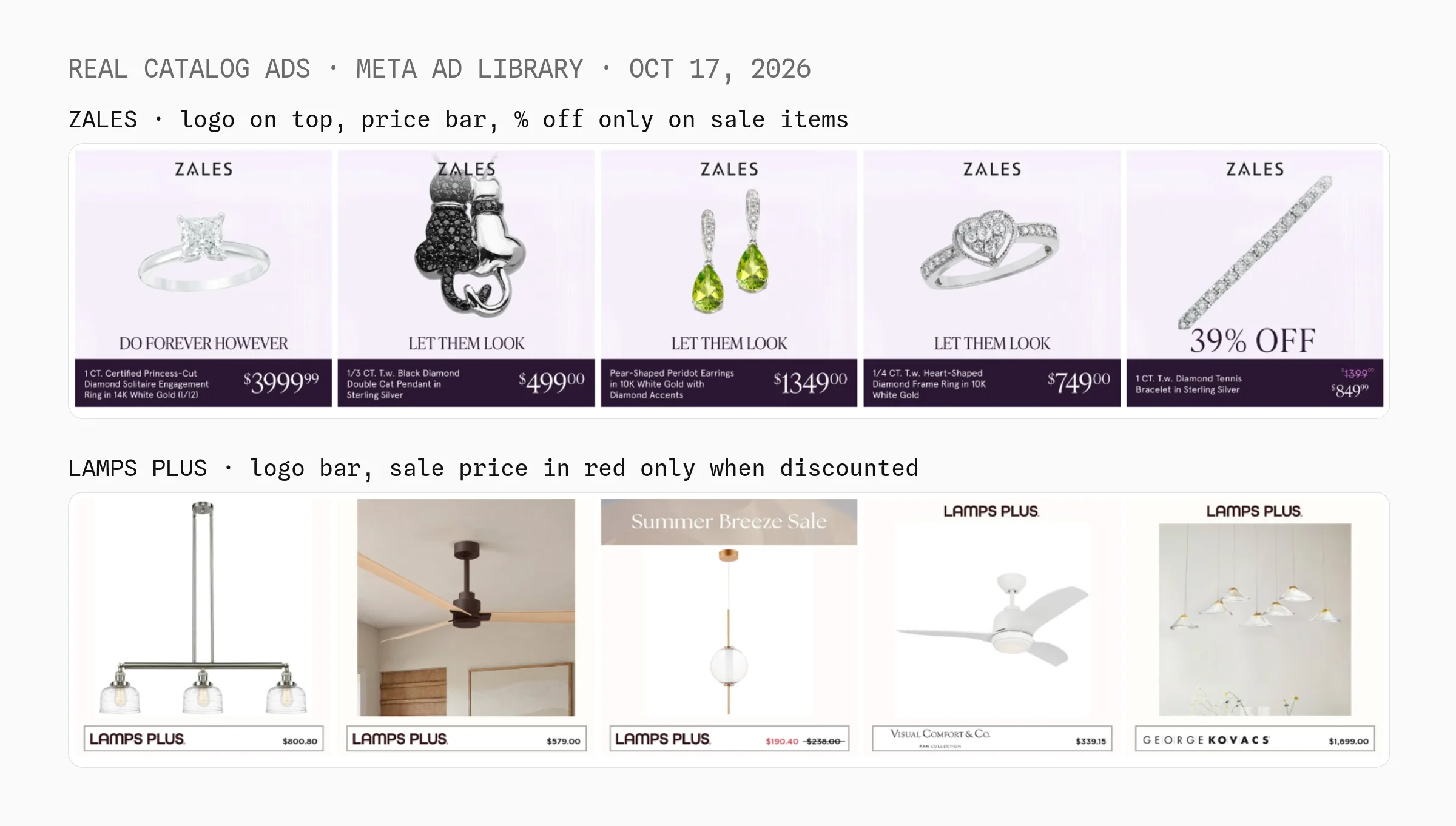
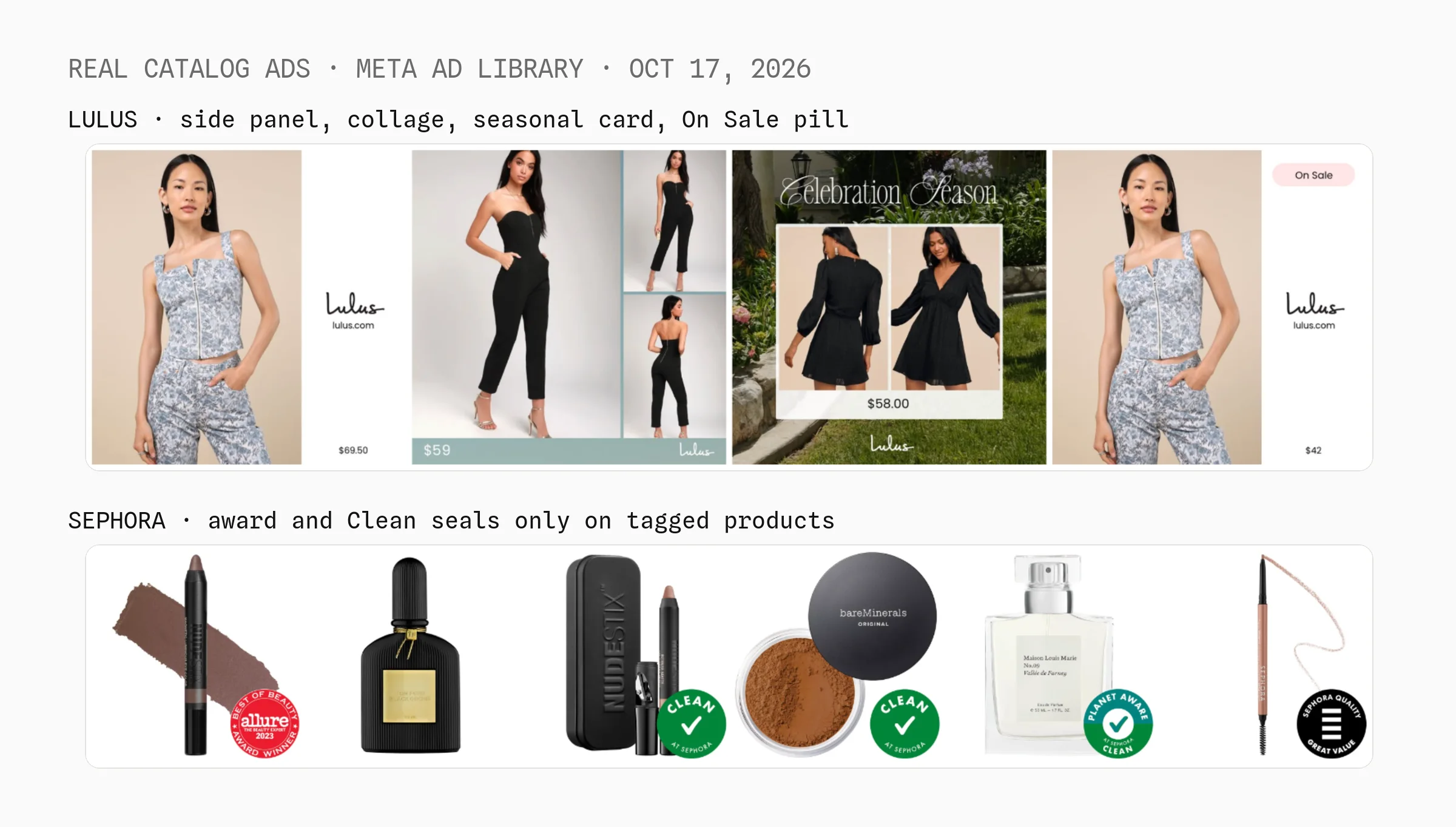
Look at the Zales bracelet: it's the only product on sale, and the only ad that says "39% OFF".
None of the eight put ratings, shipping or a "Shop now" button in the image, since Meta's text fields and button already do that.
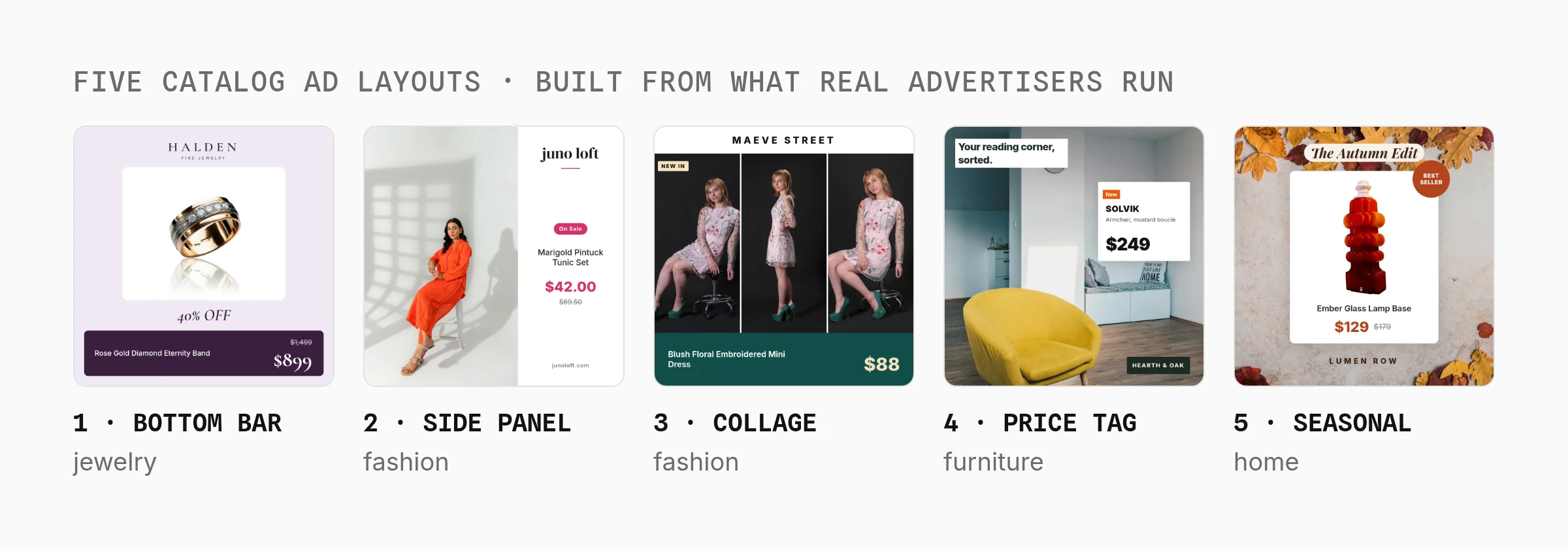
I rebuilt those five layouts as free templates with made-up brands:

1. Add a Price and Logo with Meta Image Templates
Meta image templates are free and built into Commerce Manager. There, open your catalog's Image templates tab, stack a product layer with your logo, text and a price field, and Meta applies it to every product in the ad.
Pick this if you only advertise on Meta and a logo plus a price or sale label is enough.
Meta's image templates page lists conditional display on text, image and price layers, so a sale label can show only on sale items. Templates come in 1:1, 4:5 and 9:16.
The limits, as of October 17, 2026:
- No collection ads. Image templates work with single image and carousel only.
- Meta only. The design can't follow you to Google Shopping, Pinterest or email.
- Frames end October 30, 2026. Meta's frames page says frames are replaced by image templates, and they never showed on Instagram.
Best for: Meta-only advertisers who want a logo and price label at no cost.
2. Use a Catalog Creative Tool Like Confect or Marpipe
Catalog creative tools connect to your feed, give you an editor with rules, and push designed images back to Meta. The monthly price also pays for feed sync, image versioning and reports on which design sold more.
Pick this if you want all of that managed and the price fits your ad budget.
| Tool | Entry price, October 17, 2026 | Entry plan covers |
|---|---|---|
| Marpipe | $199 a month | 500 products, 3 live designs |
| Confect | $299 a month | 3,000 products, 1 market |
| Bigatom | $299 | Up to 1,000 products |
| Socioh | $1,100 a month | Stores under $250k a month |
Marpipe also has a free plan for plain product ads, and Hunch shares prices only on a demo call.
Best for: brands and agencies that want catalog design, rules and testing in one paid tool.
3. Generate Catalog Ad Images from Your Feed with Orshot
Orshot is an API that turns a design template into images, PDFs and videos. For catalog ads, you design a layout, send your feed rows, and get an ad per product at every Meta size. (Disclosure: I built Orshot.)
Pick this if you want your own designs, the same images on Meta, Google and email, and a bill based on the images you generate.
I built this end to end on October 17, 2026, and every image below is a real output from that test.
Step 1: Copy a catalog ad template
Each layer that changes per product is a named field like image_link, title or price. Click a layer below to see its field name, or copy the template into your workspace.
The other four: side panel, 3-photo collage, price tag and seasonal backdrop.
Step 2: Map feed columns to template fields
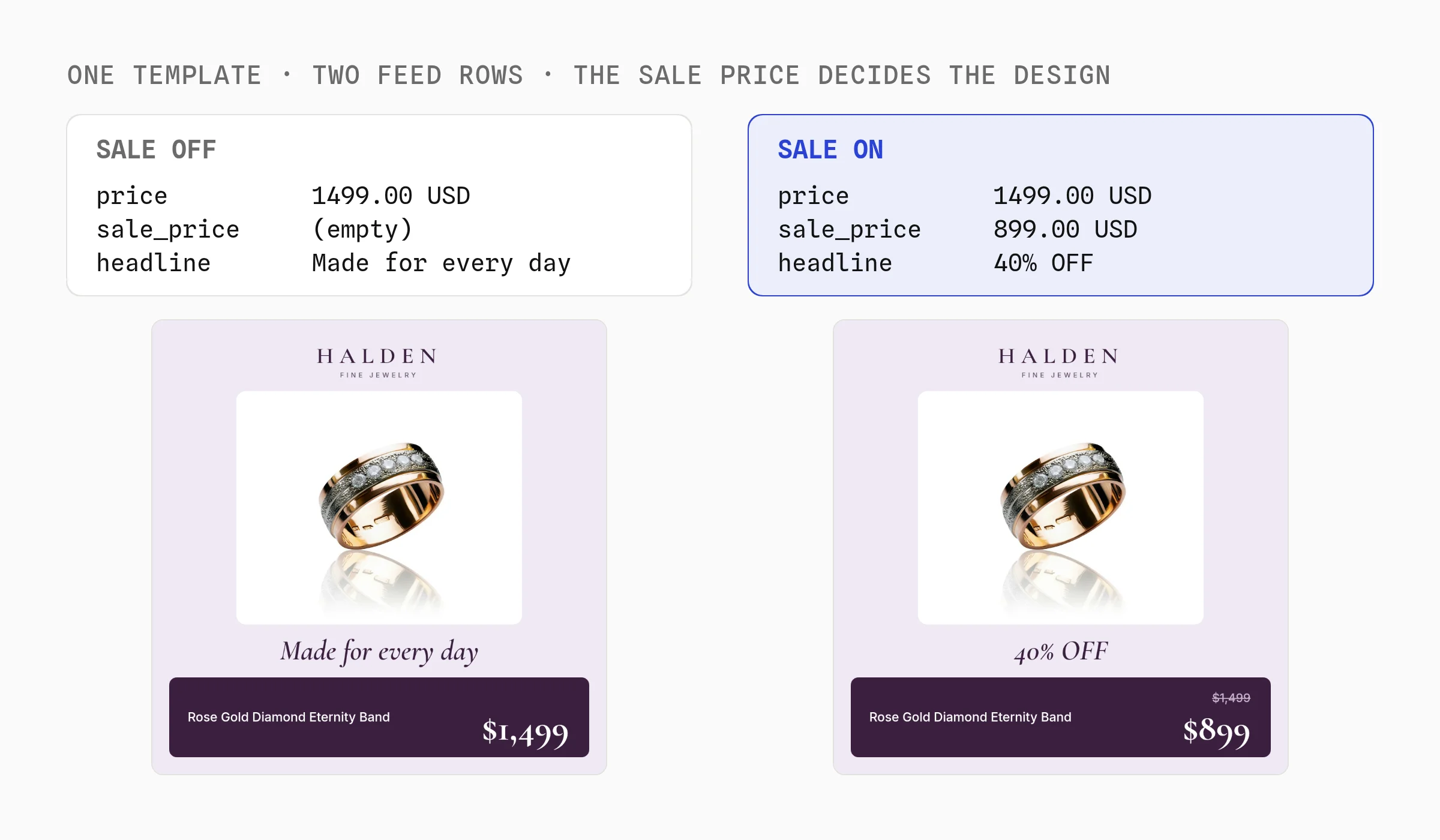
Most fields map straight across. The sale badge comes from one rule: when sale_price is lower than price, show the old price and the discount.
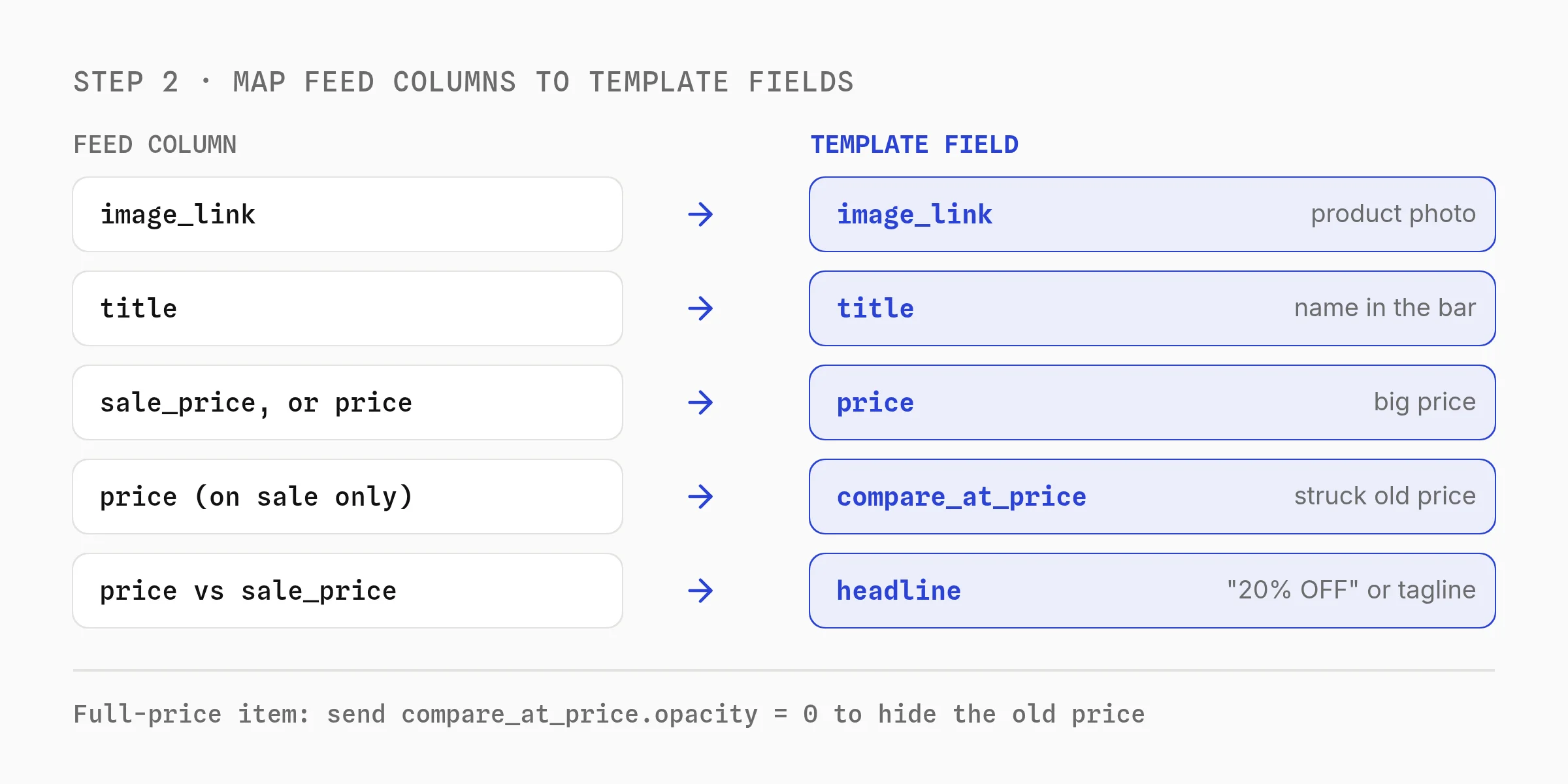
On full-price items, hide the old price with compare_at_price.opacity: 0. An empty string won't clear it.
Step 3: Generate an ad per product at every size
One render API call takes the row's values and returns the 1:1 ad plus 4:5 and 9:16 copies.
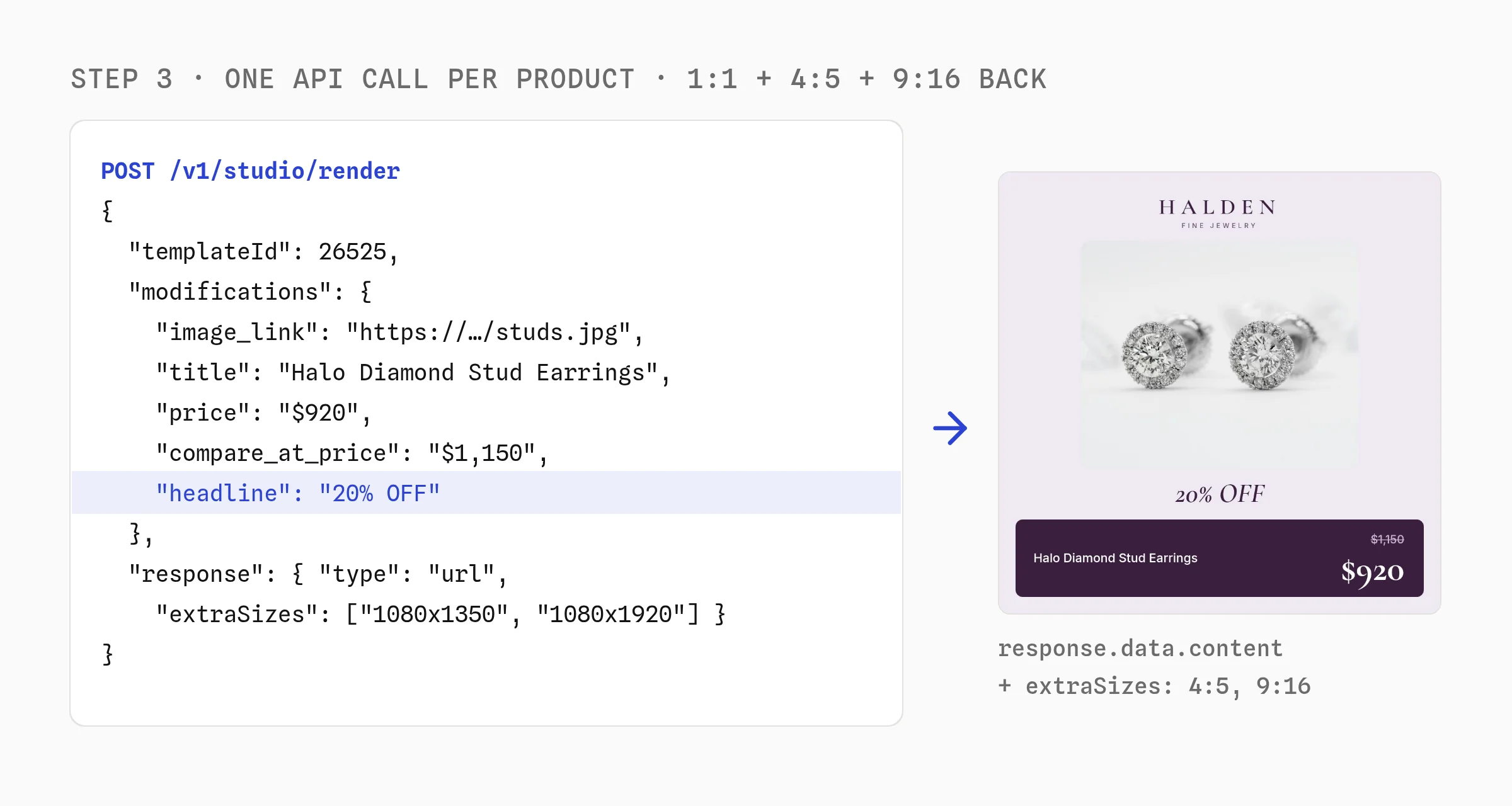
// p is one feed row with price labels already formatted, like "$899"
const onSale = p.sale_price && parseFloat(p.sale_price) < parseFloat(p.price);

const res = await fetch("https://api.orshot.com/v1/studio/render", {
  method: "POST",
  headers: {
    "Content-Type": "application/json",
    Authorization: `Bearer ${process.env.ORSHOT_API_KEY}`,
  },
  body: JSON.stringify({
    templateId: 12345, // your copy of the template
    modifications: {
      image_link: p.image_link,
      title: p.title,
      price: onSale ? p.sale_price_label : p.price_label,
      compare_at_price: p.price_label,
      "compare_at_price.opacity": onSale ? 1 : 0,
      headline: onSale ? `${p.pct_off}% OFF` : "Made for every day",
    },
    response: { type: "url", format: "jpg", extraSizes: ["1080x1350", "1080x1920"] },
  }),
});
const { data } = await res.json(); // data.content + data.extraSizes
I ran eight jewelry rows in one batch request and got eight finished ads back in about 5 seconds. Four were on sale and four weren't, and each one picked the right design on its own.
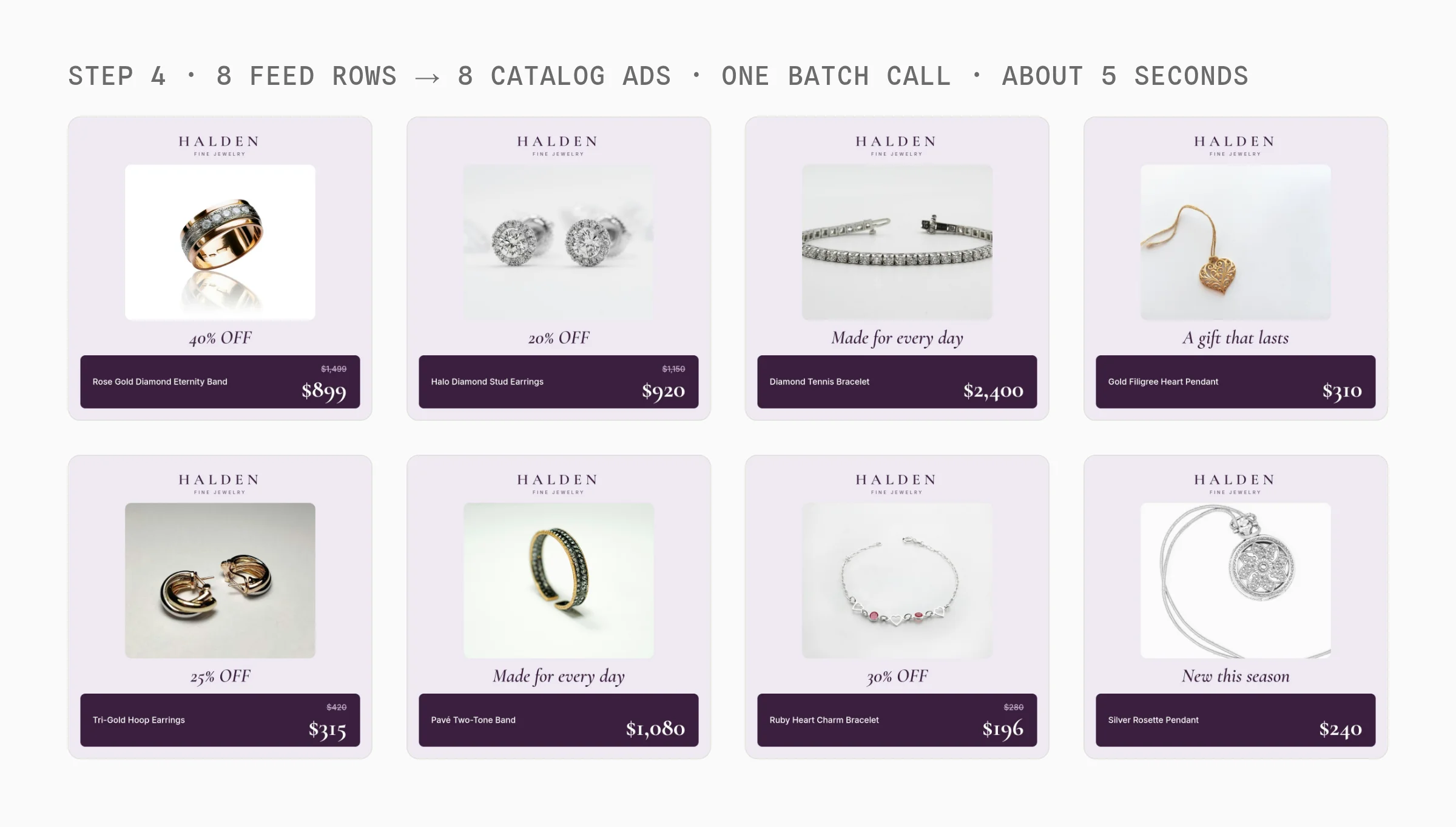
Smart Resize re-lays out the same design for Feed and Stories, so there's no second template to keep in sync.
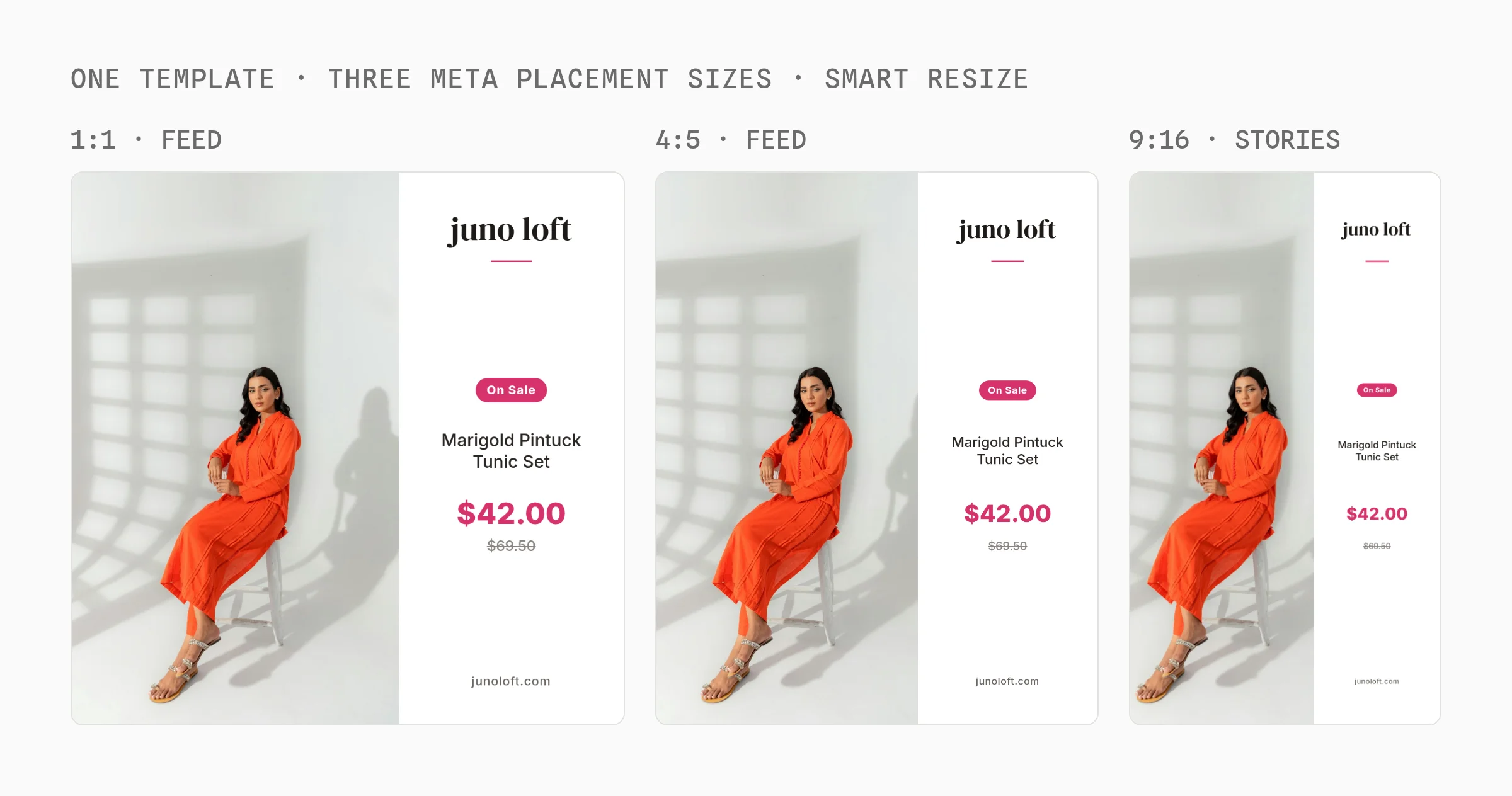
Step 4: Send the images to Meta with a supplementary feed
A supplementary feed swaps fields on products your main feed already lists. Meta's supplementary feed page lists image_link and additional_image_link among them.
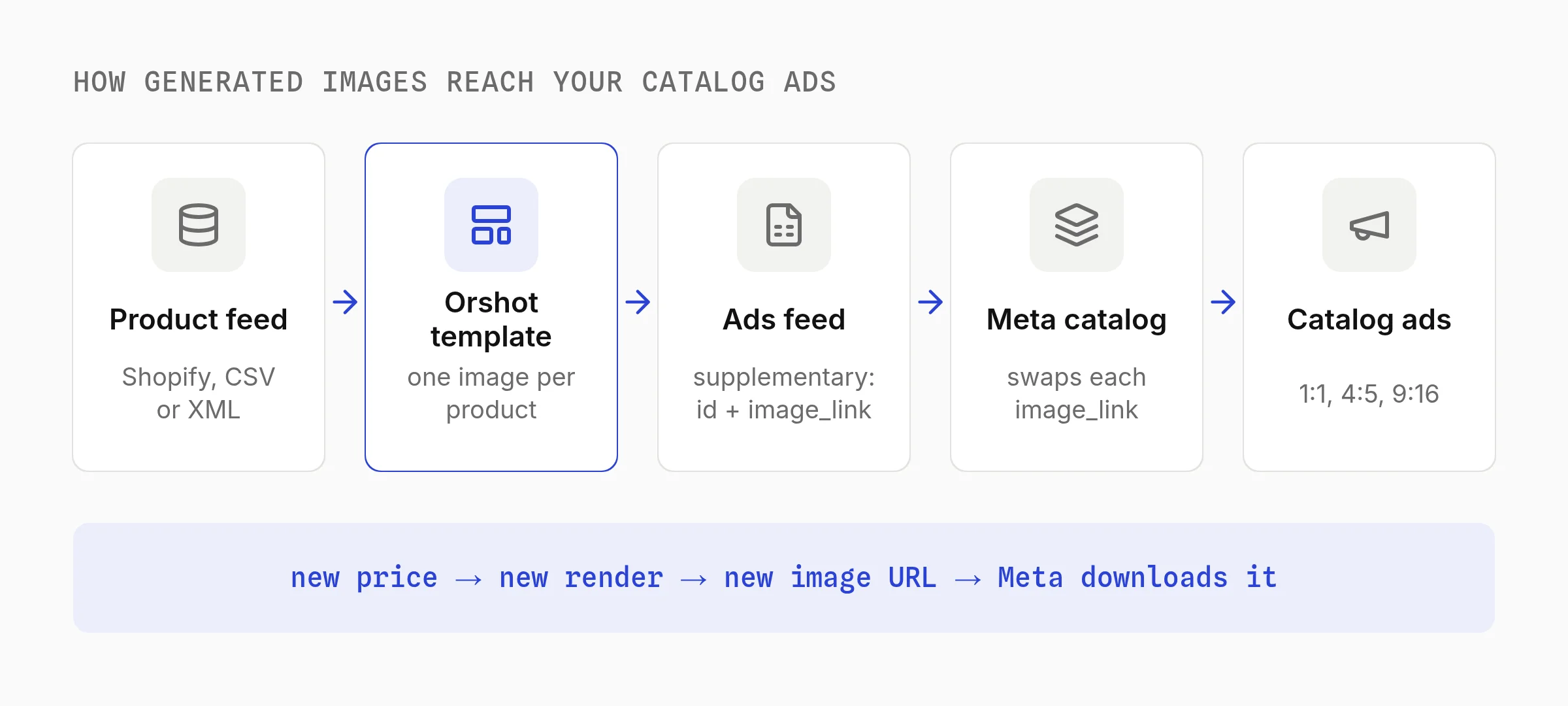
- Write each product's
id, newimage_linkand the 4:5 and 9:16 URLs inadditional_image_linkto a Google Sheet or CSV. - In Commerce Manager, open Data sources, add a supplementary feed linked to your main feed, and paste the sheet URL.
- Schedule it hourly or daily, and turn on Adapt to placement in the ad so Meta uses the 9:16 image in Stories and Reels.
Every Orshot render gets a new URL. That's what makes Meta pick up the change, since it only re-downloads an image when the link changes.
Step 5: Keep it running with n8n
Run it every hour with five n8n nodes: a Schedule Trigger, your feed (HTTP Request or Shopify), a Code node that keeps only changed products, the Orshot node, and Google Sheets. The n8n guide covers the Orshot node.
Only changed products get re-rendered, so you don't pay twice for the same image. Shopify stores will also be able to do this from Orshot's Shopify app, which is in App Store review as of October 17, 2026.
What It Costs Compared with Catalog Tools
Orshot costs less than the paid entry plans of catalog tools at every catalog size I priced. It charges 1 credit per image, so 1:1, 4:5 and 9:16 is 3 credits per product.
| Catalog size | Orshot, all 3 sizes | Catalog tool entry plan |
|---|---|---|
| 500 products | $39 | Marpipe $199 |
| 1,000 products | $99 | Bigatom $299 |
| 3,000 products | $160 | Confect $299 |
Monthly list prices, checked October 17, 2026. The catalog tools include feed sync and reports in that price. With Orshot you run the feed step yourself in n8n, Make, Zapier or code.
Run It for Every Client Catalog
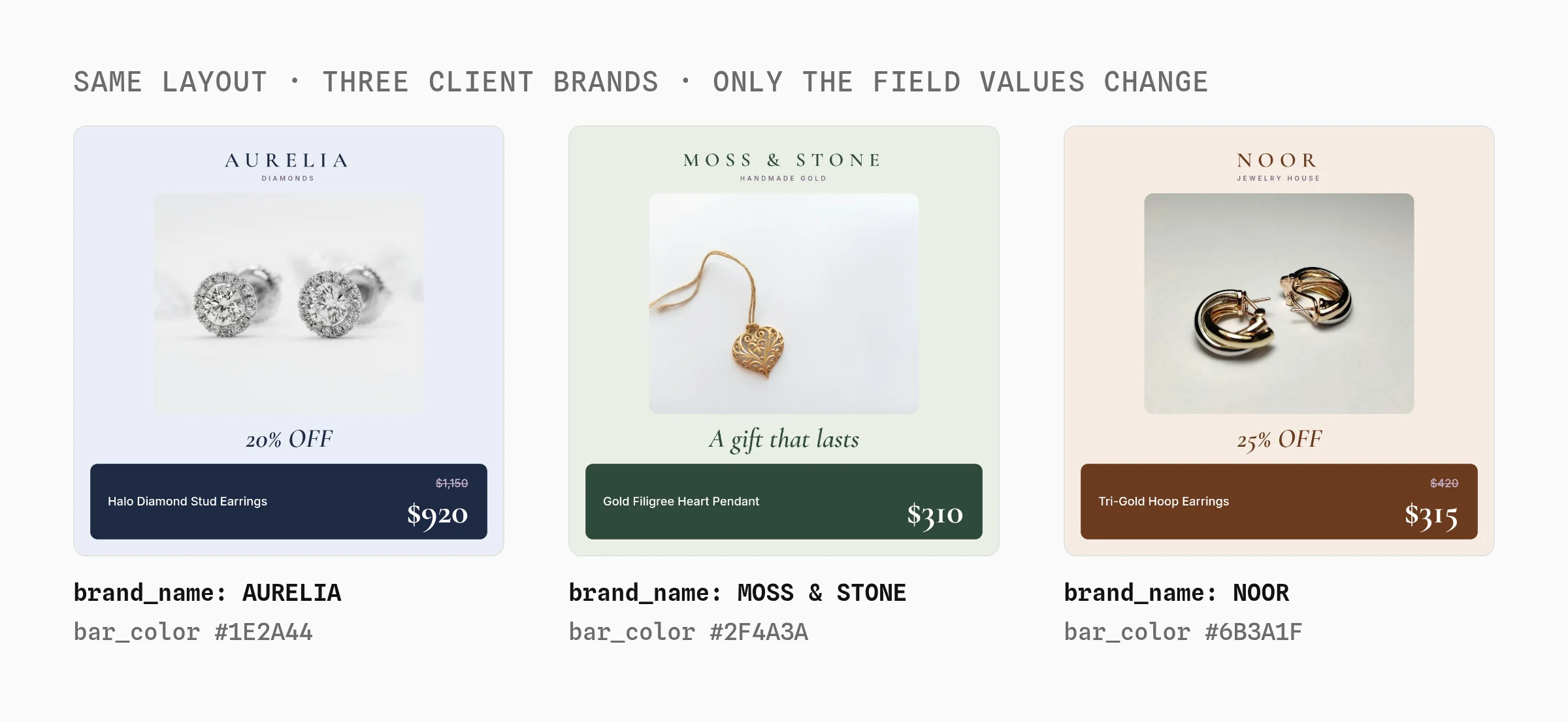
Agencies can reuse the same pipeline for every client. The logo, brand name and colors are fields too, so adding a client means new values and a new feed.
We're using Orshot as a template builder inside an existing workflow, and the speed of shipping features has been impressive.
 Michael OssendrijverCEO, Incubeta
Things That Bit Me
- Empty values don't hide layers. Use
layer.opacity: 0. - Feeds mix white and grey photos. A rounded photo tile keeps them consistent, where a multiply blend left hard grey boxes.
- Full-width bottom bars float at 9:16. Inset cards resize better.
- Any layout, including collages from extra feed photos
- 1:1, 4:5 and 9:16 from one design in one call
- Same images for Meta, Google Shopping, Pinterest and email
- Free plan, then priced by images made
- You run the feed step yourself
- Sale rules live in your feed step, not in the template
- No ad performance reports
Best for: brands and agencies that want their own catalog ad designs at every Meta size and can run a small feed automation.
Why Isn't My Catalog Ad Image Updating?
Meta only downloads a product image again when its URL changes. Its product image specs say a replaced image "must have a different URL so that we recognise the change".
So give every new version a new link. Don't add timestamps to unchanged images, though: Meta's developer blog warns that links changing on every upload can slow fetching down.
What Text Can You Put on Catalog Images?
Meta allows a logo, product name, price and sale label on catalog ads. Its own image templates add exactly those.
Meta's specs do recommend no text over the product and no temporary price drops on the raw catalog image. Keep branding beside the product, and re-render when a sale ends so a stale "40% OFF" never ships.
Which Catalog Ad Overlays Sell More?
Showing the saving and the price had the biggest effect on sales. Confect's study of 6.5 billion impressions from 568 advertisers, published September 26, 2024, found these ROAS changes:
| Element on the image | ROAS change |
|---|---|
| Savings shown | +57% |
| Price | +41% |
| Logo | +7% |
Confect sells catalog ad design, so treat these as vendor numbers. The same study found that showing the price cut clicks by 16% but raised conversion rate by 10%.
Meta Catalog Ads FAQ
Are catalog ads the same as dynamic product ads?
How do I show a sale badge only on discounted products?
What size should Meta catalog ad images be?
Can I use lifestyle photos in catalog ads?
What is Orshot?
How I Checked This
I scanned the Ad Library, checked every Meta help page and pricing page, and rendered every image here on October 17, 2026.
I didn't run these images in a live Meta catalog, so test the supplementary feed on a small product set first.
Generate Your First Catalog Ad Today
Your first catalog ad takes about ten minutes:
- Sign up free. 100 credits a month, no credit card.
- Copy one of the five templates and drop in your logo and colors.
- Paste three rows from your feed into the playground and generate the ads.
- Connect the feed with the code in step 3 or the n8n flow in step 5.
If something doesn't work the way you expect, hit the chat button. I'm usually the one on the other end.