To make personalized video at scale, pick one of three ways: record a clip per prospect (Sendspark, Loom), have an AI avatar read each script (HeyGen, Tavus), or render a template per row of data (Orshot, Idomoo, Plainly).
To render personalized videos from a spreadsheet, design the template once and send one API call per row. My 1080p test videos took 15 to 24 seconds per row, or about 4.5 minutes with an AI presenter speaking each name.
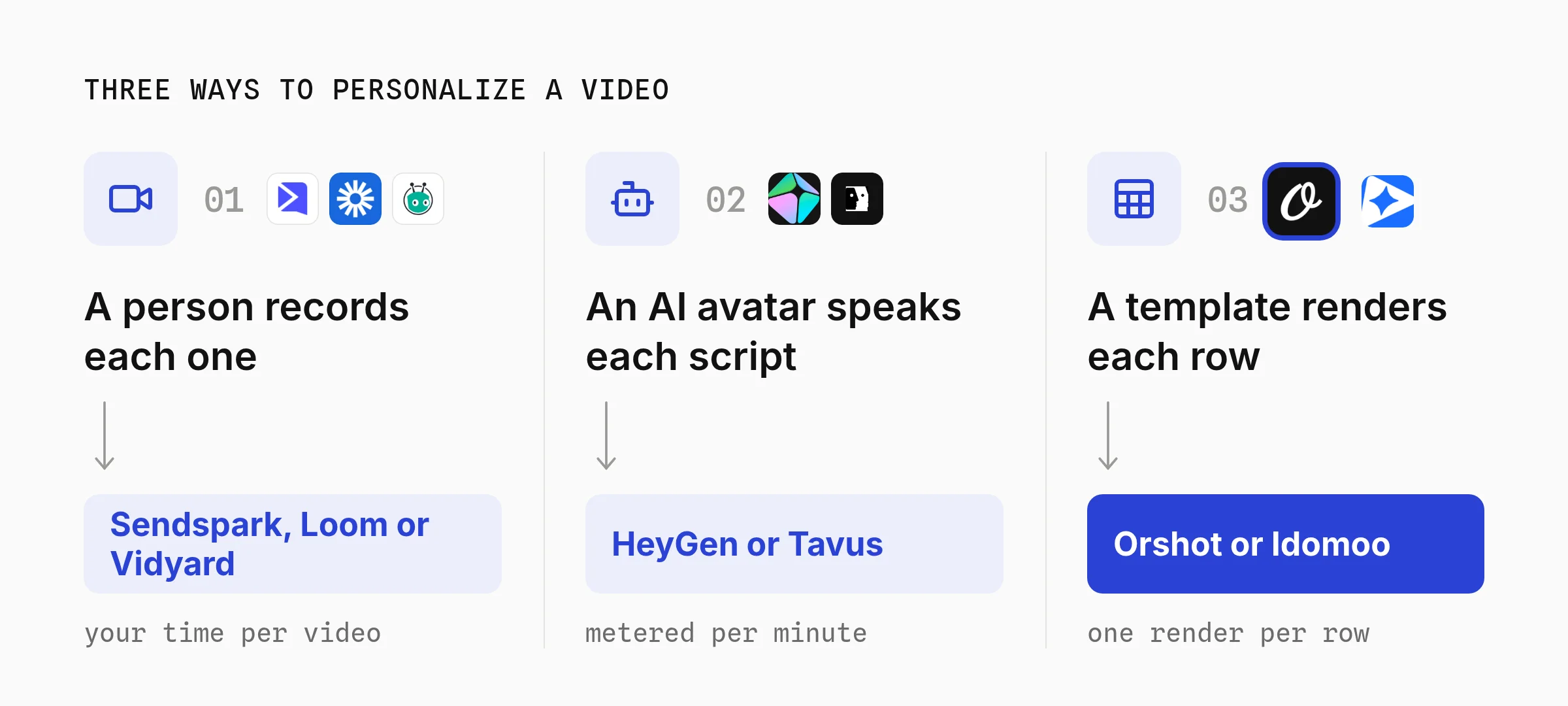
Only the third way puts each customer's own numbers, photos and plan on screen. The first two put a face on screen and change the name or the script.
| Way | What changes per video | Billed by |
|---|---|---|
| 1. Recorded (Sendspark, Loom) | Name, background page | Minutes of video |
| 2. AI avatar (HeyGen, Tavus) | Script, voice, language | Minutes of video |
| 3. Data template (Orshot, Plainly) | Any text, number, image or clip | Length rendered |
What Personalized Video at Scale Means
Personalized video at scale means every viewer gets a video made for them, without anyone editing each one. Personalized video software fills in the changing parts and renders a file per person from a CRM, a spreadsheet or a database.
Video personalization covers two very different products:
- Personal-looking video. A face on camera says your name. Sales teams use it for personalized video marketing, cold outreach and demos.
- Personal-data video. The video shows your account: orders, a renewal date, a claim status, your store photo. Banks, insurers, SaaS and ecommerce teams use it for welcome sequences, abandoned carts, renewal reminders, statements and yearly recaps.
Most "personalized video software" lists mix the two, so decide which one you need before comparing prices.
Compare Personalized Video Platforms by Cost
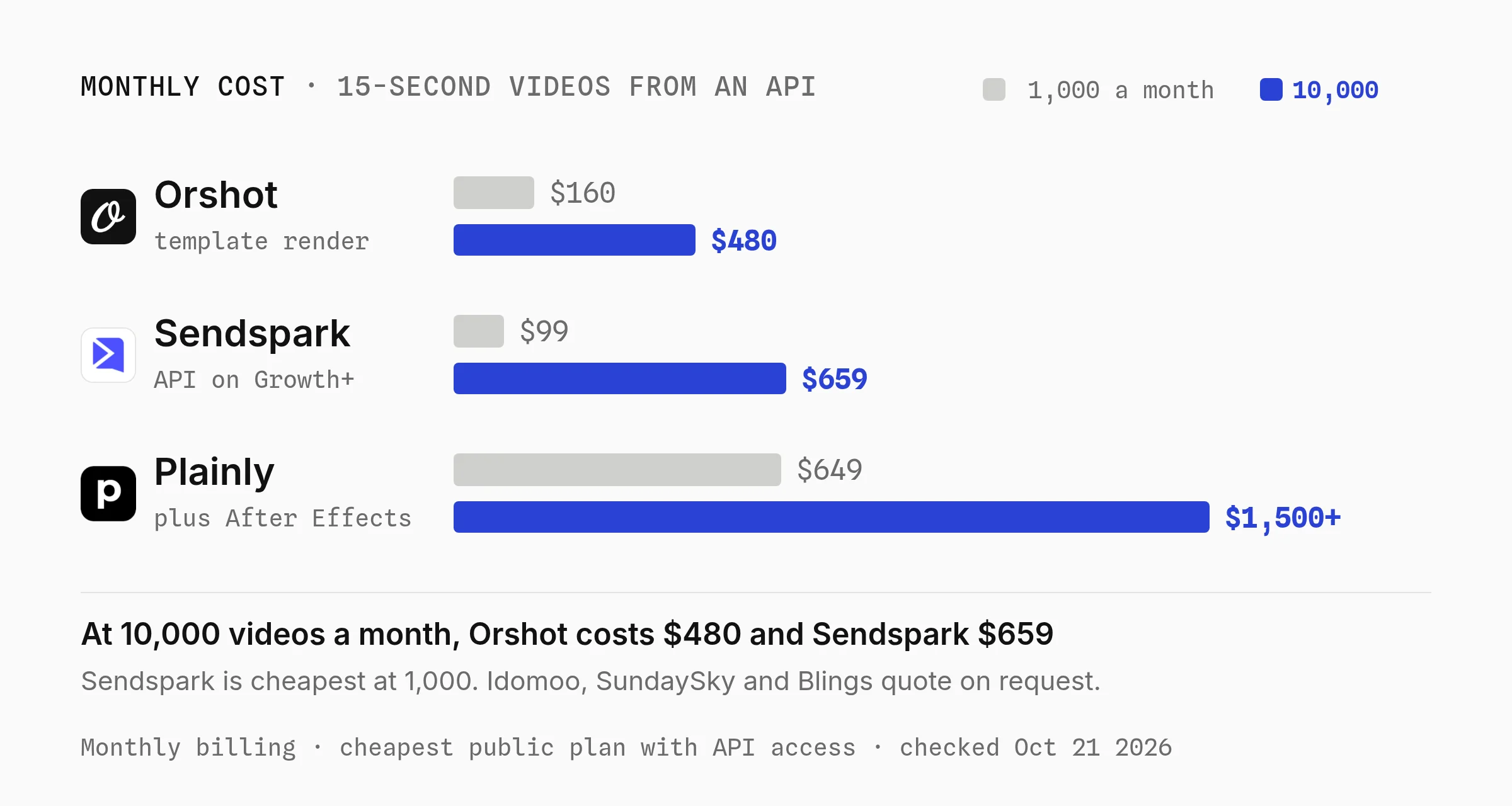
For 15-second personalized videos sent from an API, Orshot costs less than Sendspark and Plainly at 100 and at 10,000 videos a month, and Sendspark is the cheapest of the three at 1,000 (checked October 21, 2026).
Idomoo, SundaySky and Blings publish no prices.
Each cell shows a 15-second video first, then a 30-second one:
| Platform (kind) | 100 a month | 1,000 a month | 10,000 a month |
|---|---|---|---|
| Orshot (Studio template) | $39 / $99 | $160 / $280 | $480 / $600 |
| Sendspark (recorded + AI name) | $99 / $99 | $99 / $171.50 | $659 / $1,079 |
| Plainly (After Effects template) | $69 / $69 | $649 / $649 | $1,500+ / $1,500+ |
| Idomoo, SundaySky, Blings | Quote | Quote | Quote |
At 30 seconds, Sendspark costs less than Orshot at 1,000 videos a month, and Plainly's $69 Starter is the lowest price at 100. Orshot stays the cheapest at 10,000 at both lengths.
The prices also buy different things:
| Platform | API on | Where the video lives |
|---|---|---|
| Orshot | Every plan | A file URL kept at least a year |
| Sendspark | Growth ($99) and up | Sendspark video pages |
| Plainly | Every plan | Download within 24 hours to 7 days |
Orshot's credits also cover images and PDF pages, so the email thumbnail comes out of the same plan. Plainly needs After Effects to build each template, $22.99 a month for one license on Adobe's annual plan.
Video rendering APIs cost less per video than all three. Shotstack charges $39 a month for 250 render minutes, enough for 1,000 fifteen-second videos, and about $249 for 10,000 (checked October 21, 2026).
Shotstack renders video and images but no PDFs, and it bills render minutes rather than one credit pool. I compared the two in the Shotstack alternative post.
How I Priced It
I opened every pricing page on October 15, 2026, and rechecked them on October 21.
I picked the cheapest public plan on monthly billing that covers each volume with API access. Personalized videos are short, so I priced 15 and 30 seconds.
- Sendspark puts API and webhook access on Growth ($99, 3 seats) and up. Its help center says minutes used equal video length times contacts. 10,000 fifteen-second videos is 2,500 minutes: Team ($299, 1,000 minutes) plus 1,500 at $0.24. Business is $699 for 3,000 minutes.
- Plainly counts each exported second. Starter is $69 for 50 minutes, Explorer $134 for 100, Team $259 for 200, Pro $649 for 600, and Unlimited starts at $1,500. After Effects is extra.
- Orshot bills 1 credit per second of video. The $39 Launch tier has 1,500 credits, Grow is $160 for 20,000 or $280 for 40,000, and Scale is $480 for 150,000 or $600 for 300,000.
- Idomoo, SundaySky and Blings quote per customer. Idomoo's pricing page says it is "based on volumes and level of support".
AI avatar platforms and Orshot's AI presenter are left out of the table. Their cost depends on how long each speaking clip runs, so part 2 and part 3 cover them per clip.
1. Record Personalized Sales Videos with Sendspark or Loom
Recorded personalized video is a real person on camera, either filmed once per prospect or filmed once and personalized with AI. Sendspark, Loom and Vidyard are the common picks for sales teams.
Pick this if your video is a sales or success message where the viewer should see you, and only the recipient changes.
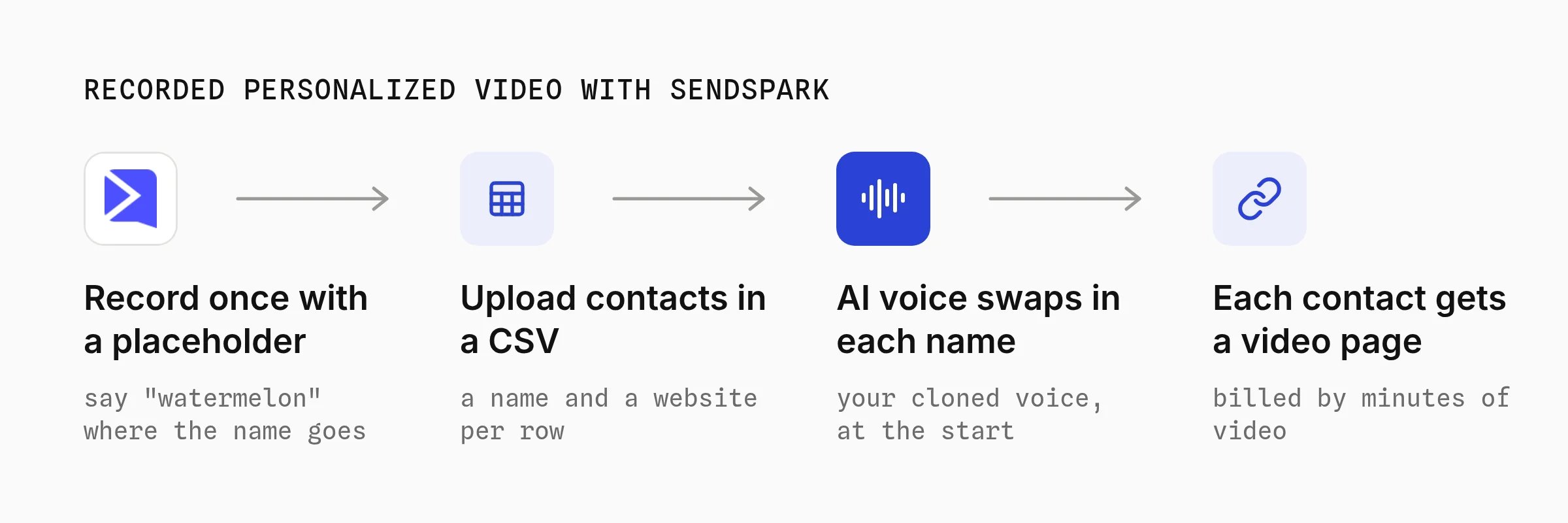
Step 1: Record once with a placeholder name
In Sendspark's Dynamic Videos, you record one video and say a placeholder word like "watermelon" where the name goes. Sendspark clones your voice and swaps that word for each contact's first name.
Step 2: Upload contacts and a background page
You upload a CSV, or send contacts through Zapier or the API. Each row can set a website or LinkedIn profile as the scrolling background behind you.
What to Know Before You Pick It
- The voice says the first name only. Sendspark's variables page says voice cloning covers the first name, once, at the start. A beta on Growth and up adds company and job title, capped at 250 videos per campaign (checked October 21, 2026).
- Length drives cost. A 30-second video for 1,000 contacts uses 500 minutes. Sendspark recommends 20 to 40 seconds.
- Loom is manual. You record each clip yourself, which caps you at what one person can film in a day.
- Vidyard's personalized video is now a legacy feature. Vidyard's help center says it is available only to some accounts with contracts from before January 2022.
- The viewer sees a real person, which suits cold outreach
- Record once, personalize a name for thousands of contacts
- Cheapest public price at 1,000 videos a month
- Only spoken names and a background change, not account data
- Every new script means filming again
- Not built for onboarding, renewals or statements
Best for: Sendspark suits sales reps who want one recorded pitch to greet each prospect by name.
2. Generate AI Avatar Videos per Contact with HeyGen or Tavus
AI avatar video uses a digital twin trained on your footage to read a different script for each contact. HeyGen and Tavus both offer APIs for it, so a CRM row can become a talking-head video without filming.
Pick this if the script itself changes per contact, or you need the same message in many languages.
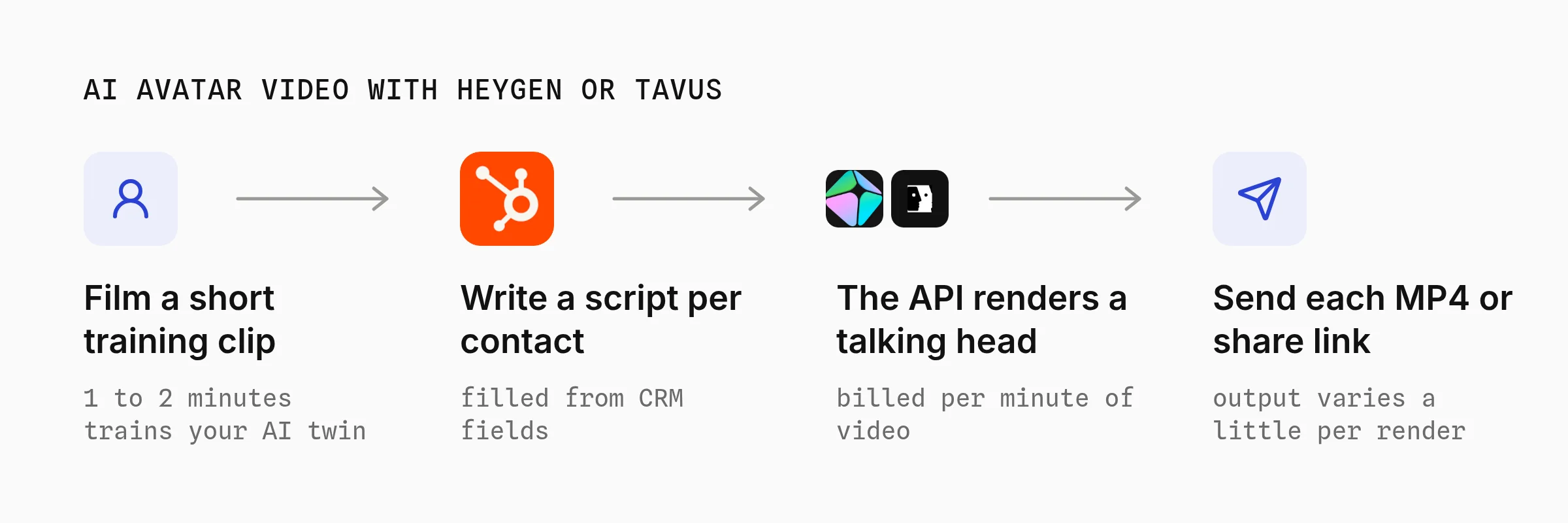
Step 1: Train an avatar from your footage
Tavus says a custom replica needs one to two minutes of video. HeyGen's free plan includes stock avatars and one custom video avatar.
Step 2: Send one script per contact
Your code fills a script with each contact's details and calls the API. Tavus's video docs say output "can vary slightly even with the same script and face".
What It Costs
- HeyGen lists Creator at $29, Pro at $49 and Business at $149 a month on its pricing page. Its API pricing link opened a signed-in page when I checked on October 21, 2026.
- Tavus lists developer plans from $22 to $975 a month on its pricing page, plus $0.90 to $1 per extra minute of generated video. The page showed two different plan tables on October 21, 2026, so confirm before you budget.
- A different script per contact, with no filming per video
- Many languages from the same avatar
- APIs for CRM and workflow triggers
- Billed per minute of talking head, so long scripts add up
- Output varies slightly between renders
- Account data on screen still needs editing on top
Best for: HeyGen and Tavus suit teams that need a presenter speaking a custom script to each contact.
Orshot can also put a speaking AI presenter inside a template, as part 3 shows. That presenter is one layer made from a photo and a script, not an avatar trained on your footage.
3. Render Personalized Videos from Your Data with a Template
Data-driven personalized video starts from a designed template with dynamic layers, then renders one finished MP4 per row of data. Orshot, Idomoo, SundaySky, Plainly and Blings all work this way.
Pick this if the video shows each customer's own data: a recap, a renewal, an onboarding walkthrough, a claim update or a product they viewed.
A template layer can be an AI clip too. To show it, I built the most common job here, a sales outreach video for a made-up company called Northwind.
An AI presenter, Nina, says each prospect's name and company while their own numbers and a booking link fill the screen. Nina's portrait is AI-generated, so nobody's real likeness is used.
Step 1: Design the video template
Orshot is an API that turns design templates into images, PDFs and videos. You design in Orshot Studio, which works like Figma with a timeline. (Disclosure: I built Orshot.)
Each layer you mark as dynamic becomes an API parameter, like headline or cta_link. The presenter is a video layer, so the render call can generate its clip from a photo and a script.
Press play below to hear Nina speak to Dana at Brightline, click a layer to see its name, or copy the template into your workspace.
The on-screen copy builds up while Nina talks, so the last frame doubles as the email thumbnail.
Step 2: Render one video per prospect with the API
Your code sends the template ID, the prospect's script and values, and gets an MP4 link back. The presenter clip is made inside the render, so run it as a background job.
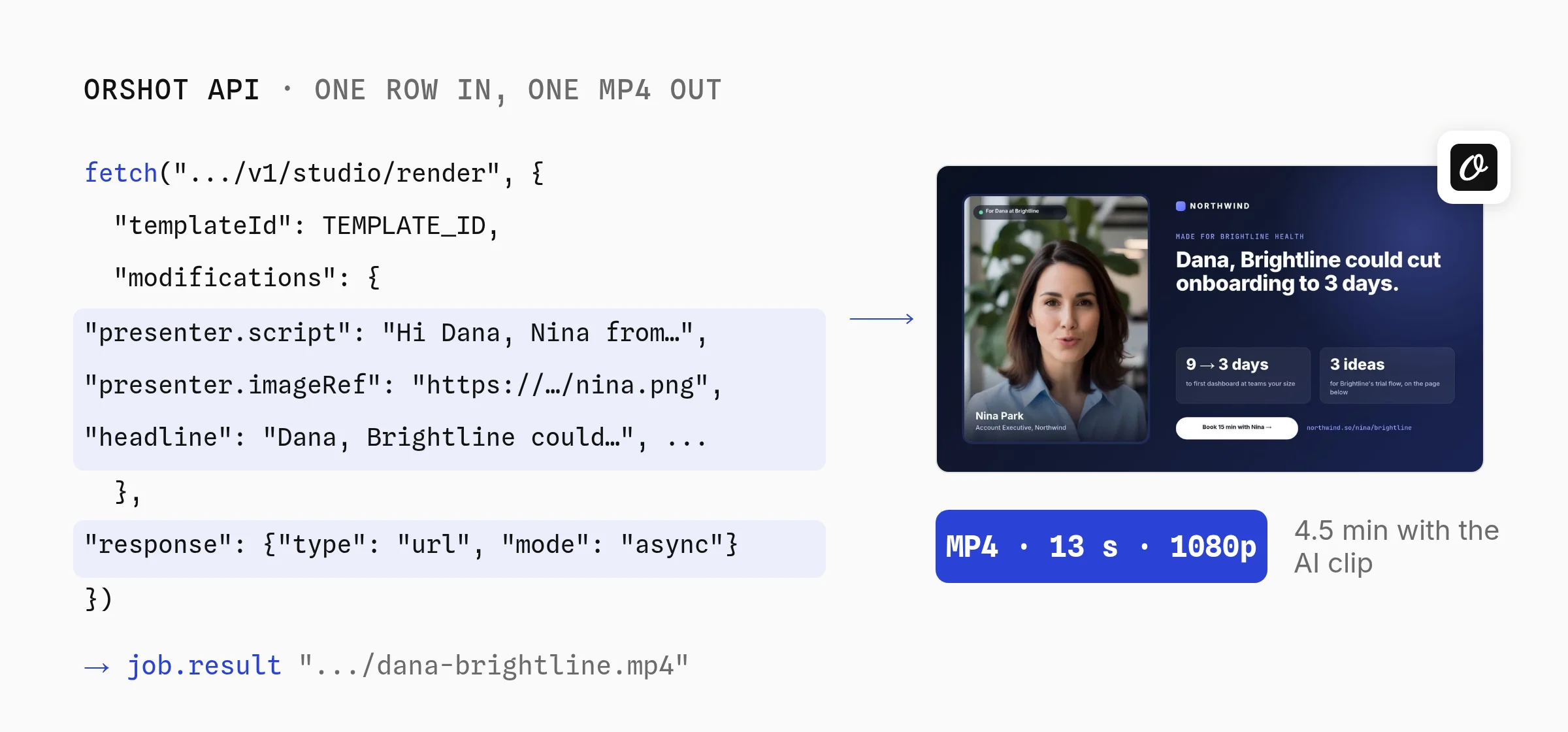
The presenter. keys ask Orshot to make the clip during the render: imageRef is the face, script is what it says, and consent confirms you may use that likeness. The other keys are layer names from step 1.
const headers = {
  Authorization: `Bearer ${process.env.ORSHOT_API_KEY}`,
  "Content-Type": "application/json",
};

const row = {
  first_name: "Dana",
  company: "Brightline",
  headline: "Dana, Brightline could cut onboarding to 3 days.",
  stat_1_value: "9 → 3 days",
  cta_link: "northwind.so/nina/brightline",
};

const start = await fetch("https://api.orshot.com/v1/studio/render", {
  method: "POST",
  headers,
  body: JSON.stringify({
    templateId: "YOUR_TEMPLATE_ID",
    modifications: {
      headline: row.headline,
      stat_1_value: row.stat_1_value,
      cta_link: row.cta_link,
      "presenter.imageRef": "https://cdn.example.com/presenter.png",
      "presenter.script": `Hi ${row.first_name}, Nina from Northwind here. I made this for the ${row.company} team.`,
      "presenter.consent": true,
      "presenter.preset": "portrait-speak",
    },
    response: { type: "url", format: "mp4", mode: "async" },
  }),
});
const job = await start.json();

// Poll the job (or pass webhook_url and skip this loop)
let result;
do {
  await new Promise((r) => setTimeout(r, 10000));
  const res = await fetch(
    `https://api.orshot.com/v1/studio/render-jobs/${job.id}`,
    { headers },
  );
  result = await res.json();
} while (!result.finished);

console.log(result.result.data.content); // MP4 URL for Dana
For a list of prospects, start each render as a background job. Orshot posts the finished video to your webhook with your own ID echoed back.
for (const row of prospects) {
  await fetch("https://api.orshot.com/v1/studio/render", {
    method: "POST",
    headers: {
      Authorization: `Bearer ${process.env.ORSHOT_API_KEY}`,
      "Content-Type": "application/json",
    },
    body: JSON.stringify({
      templateId: "YOUR_TEMPLATE_ID",
      modifications: {
        headline: row.headline,
        cta_link: row.cta_link,
        "presenter.imageRef": "https://cdn.example.com/presenter.png",
        "presenter.script": row.script,
        "presenter.consent": true,
        "presenter.preset": "portrait-speak",
      },
      response: { mode: "async", type: "url", format: "mp4" },
      webhook_url: "https://acme.com/hooks/orshot",
      metadata: row.contact_id, // comes back in the webhook
    }),
  });
}
// Webhook body: { "event": "render_job.finished",
//   "job": { "status": "succeeded", "result": {...}, "metadata": "con_8412" } }
The async render docs cover polling, webhook retries and the 15-minute limit per job.
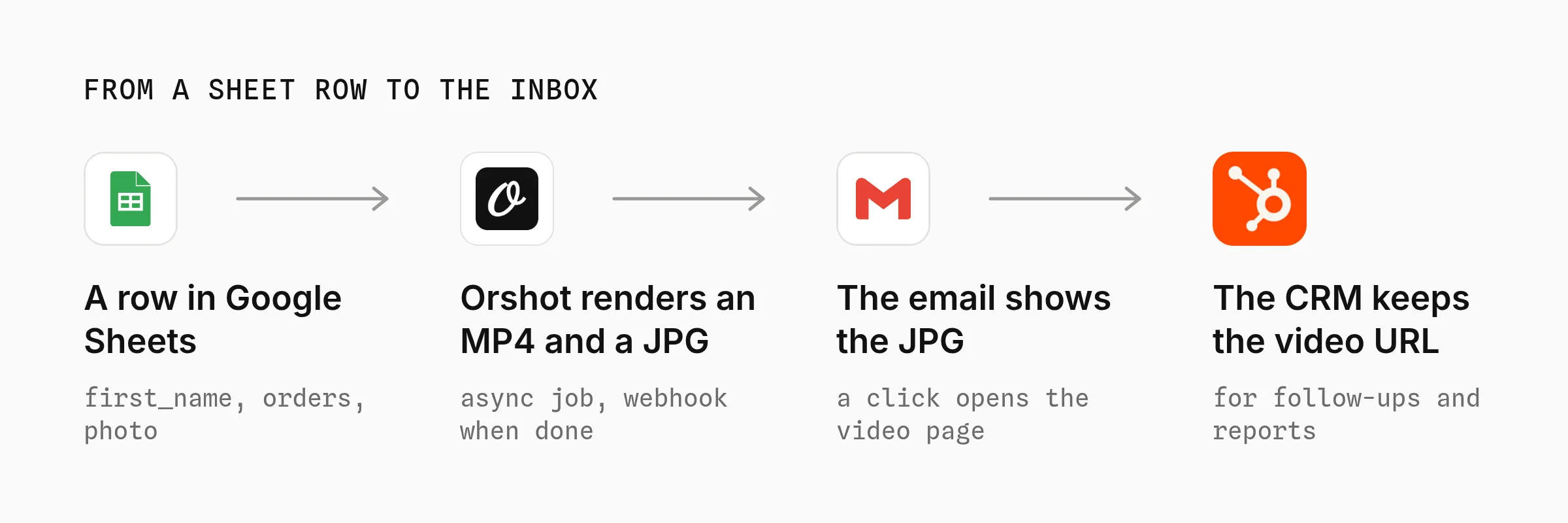
Step 3: Run it from Google Sheets without code
If your prospect list lives in a sheet, the spreadsheet to video workflow renders a video for each row with no code. Each column maps to a template parameter.
In n8n, Make or Zapier, the same flow takes three steps:
- Trigger on a new or updated row in Google Sheets, Airtable or your CRM.
- Render with an HTTP request to the endpoint above in async mode, with the
presenter.keys inmodifications. - Write back the video URL to a column, so your email or sequencing tool can use it.
Run five rows first and watch each video before you send the whole sheet. Long names, blank cells and wrong photos show up in those five.
What Rendering Each Prospect Cost
Without a presenter, a 12-second 1080p data video rendered in 15 to 24 seconds. With a speaking presenter, each 13-second video took 4.5 to 4.8 minutes on October 15, 2026, mostly to make the AI clip.
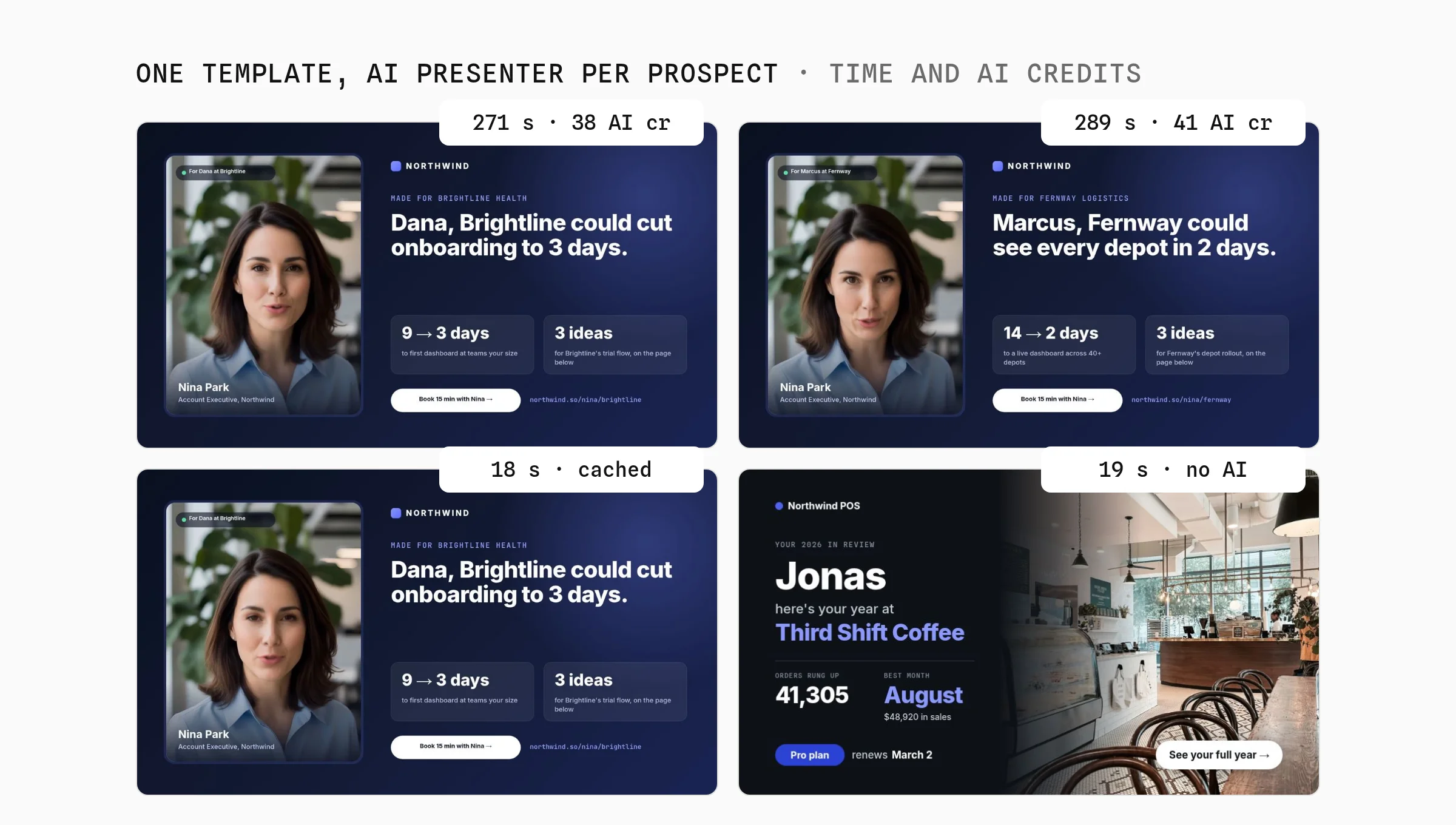
| Render | Time | AI credits |
|---|---|---|
| Dana at Brightline | 271 s | 38 |
| Marcus at Fernway | 289 s | 41 |
| Dana again, same script | 18 s | 0 (cached) |
| Year-in-review, no presenter | 19 s | 0 |
Every new script is a new clip, so speech can't be cached across prospects. Re-rendering the same script reuses the clip for free, and each video also used 13 render credits.
What the AI Presenter Costs per Video
A speaking presenter adds about 40 AI credits per 13-second video, roughly $2.20 at Orshot's add-on price of $11 for 200.
Plans include 300 to 3,600 AI credits a month, and add-ons stretch that to about 215 presenter videos a month before you need an Enterprise plan.
Per clip, a dedicated avatar API costs less: Tavus lists $0.90 to $1 per extra minute.
Orshot's presenter earns its price when the same video also needs the prospect's own numbers and links on screen, because that part comes from the template with no editing step.
Things That Bit Me
- The clip outlasted the page. Dana's spoken clip ran 12.3 seconds on a 12-second page, so its end got trimmed. Set the page a second longer than your longest script.
- Long names overflow. "For Marcus at Fernway" is far longer than "For Dana at Brightline". Set every dynamic text layer to fit its box, so long values shrink instead of spilling.
- Blank cells need a default. Leave a key out of the request and that layer keeps the template's own text, so write template text that reads fine for anyone.
- Use a face you have rights to. Orshot asks for
consent: truebefore a photo speaks, so use a synthetic portrait or a teammate who agreed.
How Teams Use This in Production
Orshot customers have rendered more than 5,800 videos since January 2026, and 99% came from automated jobs rather than the editor. The API sent 89%, AI agents through MCP 9% and workflows about 1%.
The median video took 18 seconds to render. These counts come from Orshot's render logs on October 15, 2026, customers only, with our own accounts left out.

Other Template Platforms
- Creatomate and Shotstack are video rendering APIs that fill a template from JSON, much like Orshot. The Creatomate alternative post compares the editors and pricing.
- Plainly renders After Effects templates, so it fits teams whose motion designers already work in After Effects. I compared the two in the Plainly alternative post.
- Idomoo and SundaySky sell enterprise personalized video with sales-led pricing and demos.
- Blings makes interactive personalized videos and says its pricing is "unique to each client".
- Each customer's own numbers, photos and dates on screen
- A designer changes the template without touching your code
- The same template renders the email thumbnail too
- An AI presenter can speak each prospect's name in the same template
- You design the template before the first video
- Video needs a paid plan, from $39 a month
- Length caps per plan: 3, 5 or 10 minutes per video
- A speaking AI presenter adds about 40 AI credits and 4 minutes per video
Best for: Orshot suits recurring personalized videos built from data, sent from an API, n8n, Make, Zapier or an AI agent.
Deliver Personalized Videos by Email and on Landing Pages
Email clients don't play MP4s inline, so personalized video emails send a still image that links to the video. Render that still from the same template as a JPG, and every customer sees their own frame before they click.
Step 1: Render a thumbnail from the same template
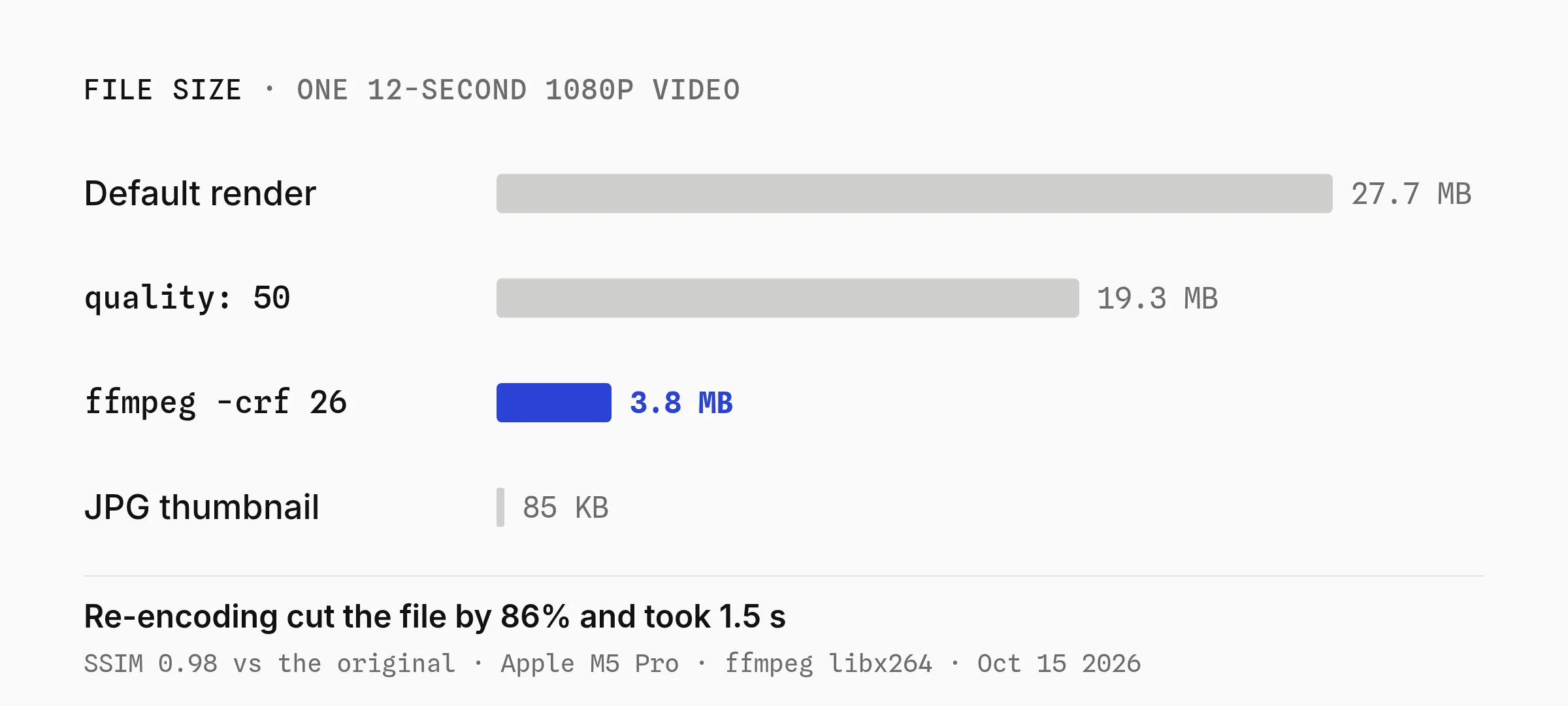
Change format to jpg and the same row renders the final frame as an image. My 960 × 540 thumbnail came out at 85 KB, small enough for any email.
Step 2: Shrink the video before you host it
The default render favors quality over file size. Two ways to cut it:
- Pass
videoOptions.quality. Quality 50 took my largest year-in-review file from 27.7 MB to 19.3 MB. The presenter videos were already about 7 MB. - Re-encode with ffmpeg.
ffmpeg -i in.mp4 -c:v libx264 -crf 26 -preset slow -movflags +faststart out.mp4made it 3.8 MB in 1.5 seconds, at an SSIM of 0.98 against the original.
The video options docs list every render setting, including fps and trimming.
Step 3: Link to a page, not the raw file
Put each video on a landing page that loads it by an opaque ID, like /recap/8f3k2. Never put an email address or a name in the URL, since links get forwarded and logged.
Step 4: Write the video URL back to the CRM
Save the MP4 and thumbnail URLs on the contact record. Your email tool then merges them like any other field, and you can resend later without rendering again. Orshot keeps files for at least a year.
Step 5: Track plays and clicks per contact
Log a play, a finish and a click on the landing page against the same opaque ID, then write those counts back to the CRM.
Orshot renders the files but doesn't track who watched them, so this part lives on your page.
When a Recorded or Avatar Tool Is the Better Choice
A template platform is the wrong pick when the viewer needs to see a real person. Outreach from a rep's own face, a founder's thank-you or a demo walkthrough land better recorded, so Sendspark or Loom fit those jobs better.
An AI presenter in a template is a stand-in for that person, and it costs more per video than Sendspark's name swap. Use it when the prospect's own numbers on screen matter as much as the face.
A template is also overkill for a few dozen videos a rep sends by hand. Sendspark's $49 Solo plan or recording each clip in Loom is quicker than designing a template first.
Personalized Video FAQ
How much does a personalized video cost?
What is the best personalized video software?
How do I create a personalized video for every customer?
How long does a personalized video take to render?
Can an AI presenter say each customer's name?
Can I make personalized videos without a developer?
Can personalized videos be made in other languages?
What is Orshot?
Make Your First Personalized Video
Sign up, copy the sales video template above and send it your first prospect with the Node.js example in part 3. Video starts on the Launch plan at $39 a month.
If something doesn't work the way you expect, hit the chat button. I'm usually the one on the other end.