Last week Albert, a trial user building a 20-page report template, wrote to me that a day of parameter naming had disappeared.
I went through his session recordings and our backups. Everything he typed was still in the template. But two batches of edits from a second tab had been dropped before they were saved, and he had retyped them without knowing.
I fixed the save bug the same day. What bothered me was the other half: even with the bug gone, Albert had no way to open his template as it was the evening before and say "give me that one back".
Now he does. So do you.
What it does
Open any template in Studio and choose File → Version history.
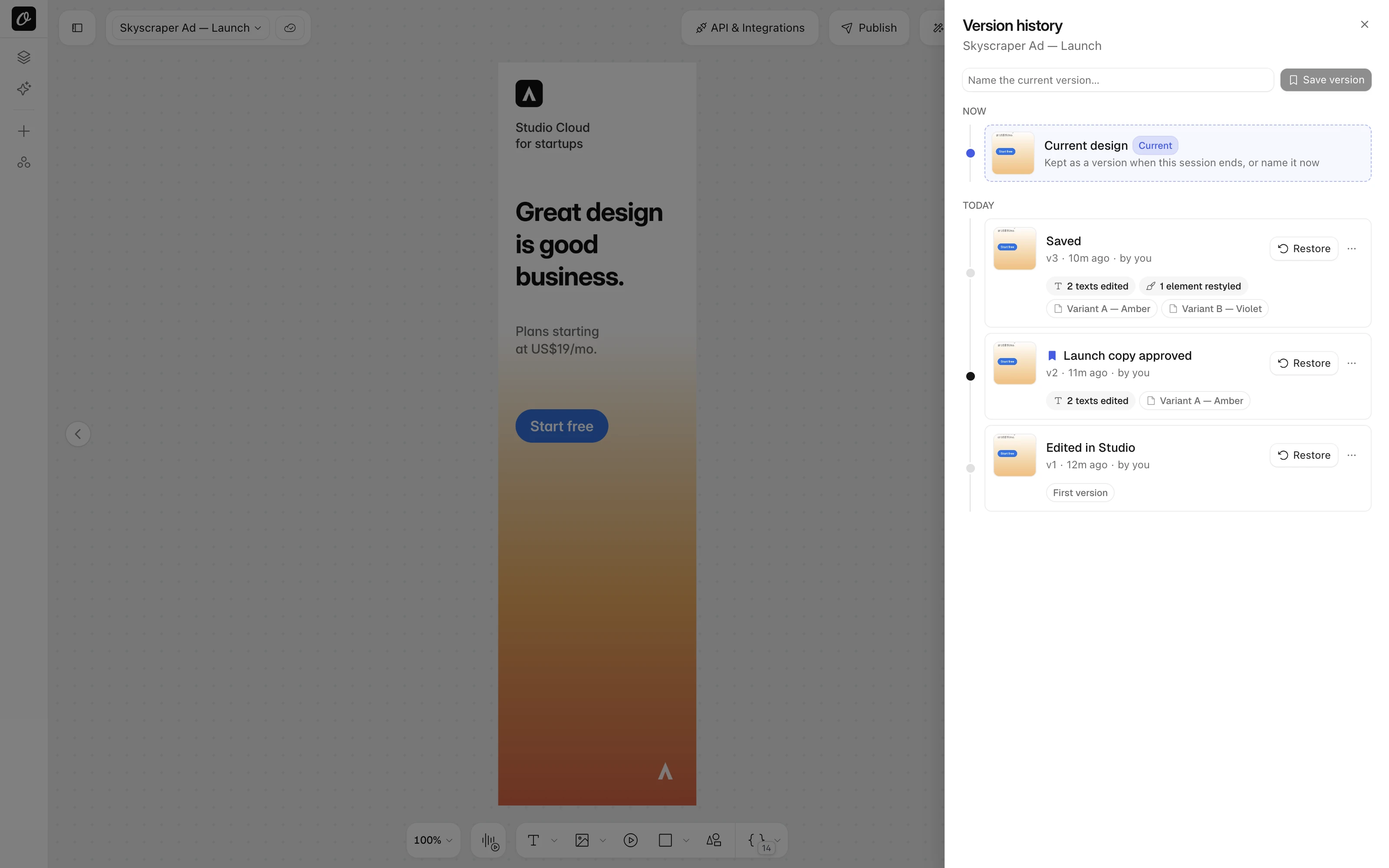
You get a timeline of the template's states, newest first:
- Editing sessions. Close the tab or open another template and the design as you left it is kept. Saving as you go adds nothing to the list, so a morning of work reads as one version, not forty.
- API and agent changes. When an API call, Claude, Cursor or ChatGPT changes a template, the design before that change is kept and labelled with who did it.
- Named versions. Type a name and press Save version. Named versions are never removed.
Each row says what changed ("2 texts edited", "1 image replaced", "+1 page"), shows the pages that changed, and who made the change and when.
While you edit, a safety copy is refreshed every ten minutes. A crash never costs more than that.
Restoring never loses anything
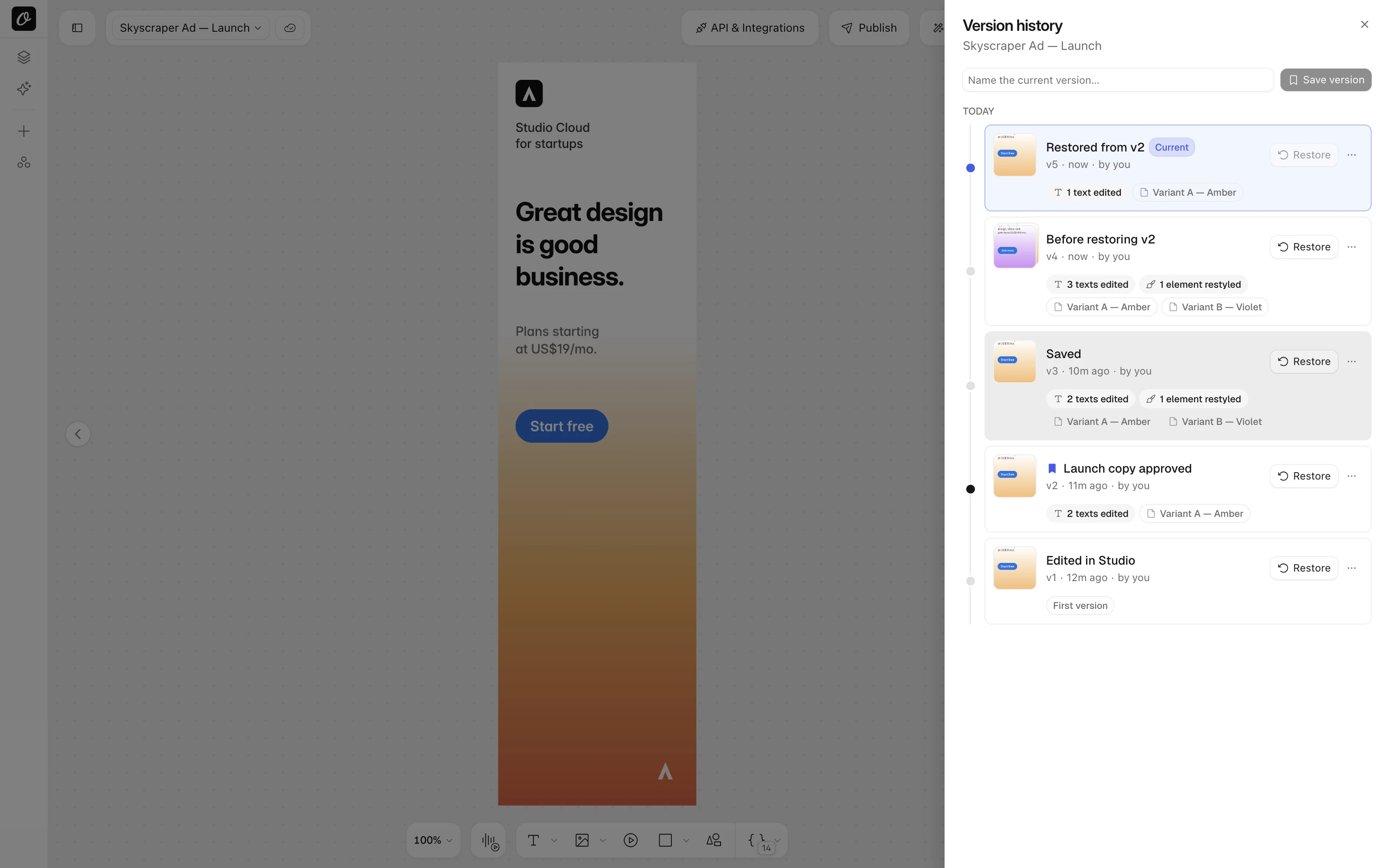
Click Restore on any version and the design is back on the canvas.
The state you were on is kept as "Before restoring v6". The result is added as "Restored from v6". The timeline only grows.
Restored the wrong one? Press Undo, or restore again. Unsaved edits are saved first, so a restore cannot lose work.
Name, description, tags, folder and sharing settings stay as they are. Want the old design as a separate template? Make a copy does that.
Nothing to switch on
Versions are kept for every template on every plan, from the first edit, including Free.
Your plan decides how far back you can restore and how many named versions a template holds. The details are on the pricing page. Upgrade and the history you already have is restorable straight away.
For teams that automate
Enterprise workspaces and first party agents get the same timeline through the API, under /v1/studio/templates/:templateId:
| Endpoint | What it does |
|---|---|
GET /versions | List versions with what each changed |
GET /versions/:versionId | Get one version, optionally with its design |
POST /versions | Name the current design |
PATCH /versions/:versionId | Name or rename a version |
DELETE /versions/:versionId | Delete a version |
POST /versions/:versionId/restore | Restore it, as a new timeline step |
POST /versions/:versionId/duplicate | Copy it into a new template |
Every call uses your API key and the same plan rules as the studio. The error reference lists the codes.
The same tools are coming to Orshot for Agents next, so Claude, Cursor and ChatGPT can list a template's versions and put one back for you.
Under the hood
Every design write stores the state it replaced, compressed and keyed on the template's own version token. Two tabs racing to save can never store the same state twice or overwrite each other's history.
Repeated states are stored once. Restores extend the timeline instead of rewriting it. Older versions thin out over time, named versions stay forever.
The full guide is in the docs: Version history. Tell me what you would like next.