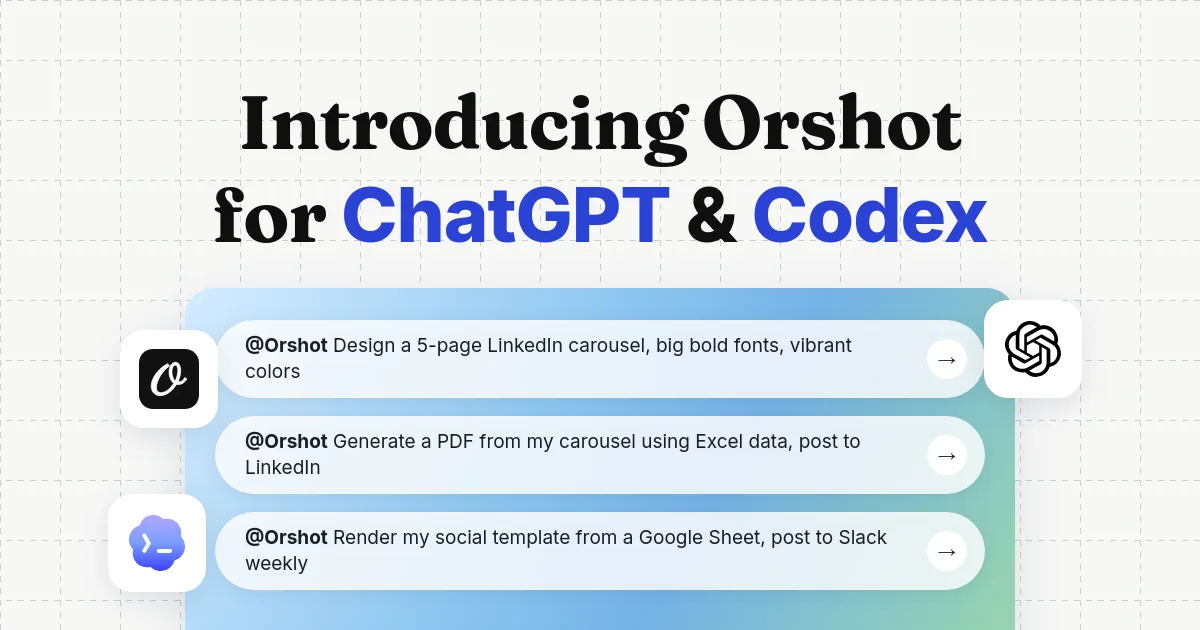
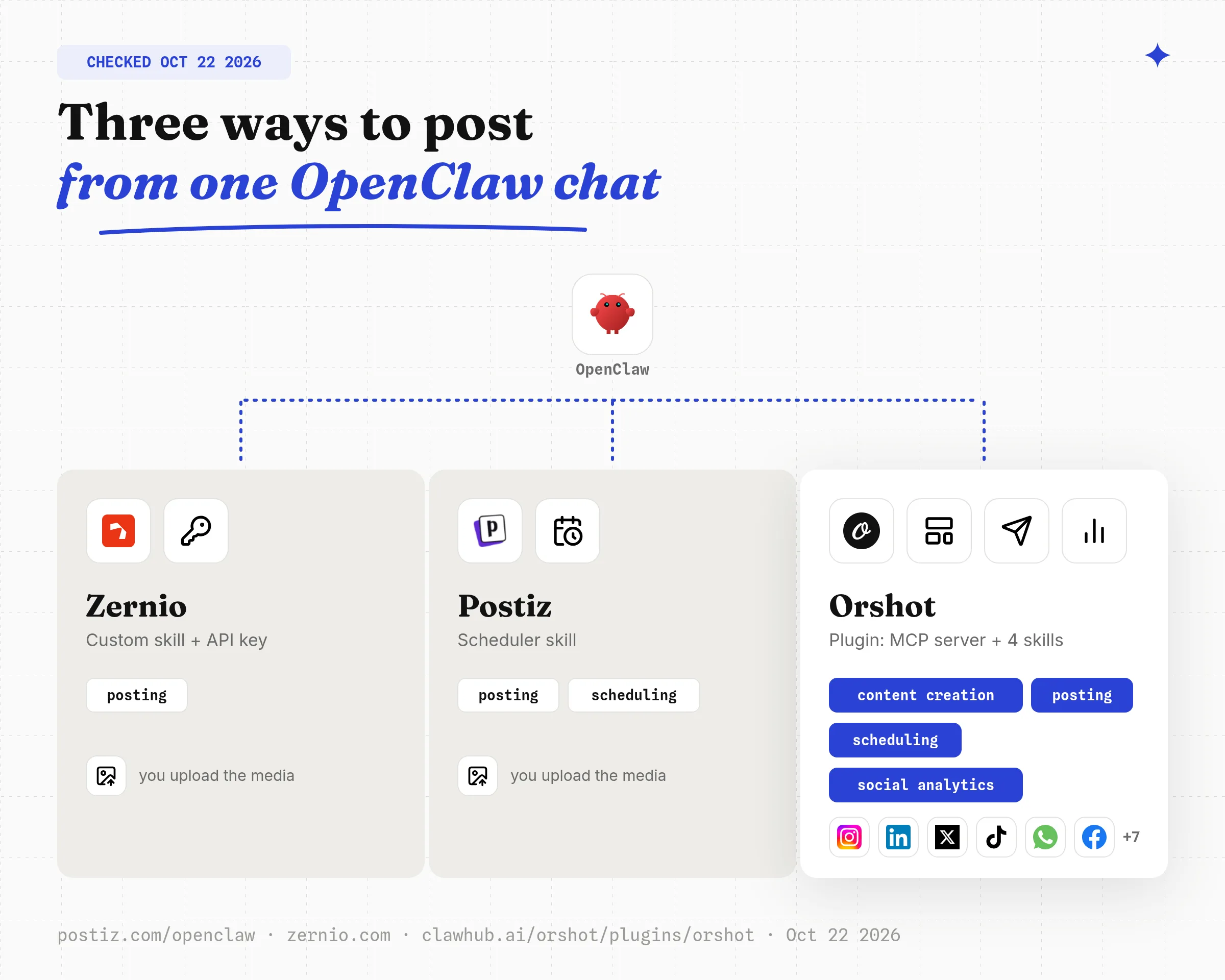
To automate social media posting with OpenClaw, install a posting route and connect your accounts. The Orshot plugin covers the whole loop: content creation, posting and scheduling, and social analytics, from one chat.
Scheduler skills (Postiz, ContentStudio, Zernio) post text you already have, and a custom skill talks to one platform API.
Already on OpenClaw and want to post today? Three steps, about ten minutes:
- Run the two commands below (install the plugin, log in through your browser).
- Connect one social account in your free Orshot account.
- Send the prompt in step 3 to make your first post design.
openclaw plugins install clawhub:orshot
openclaw mcp login orshot
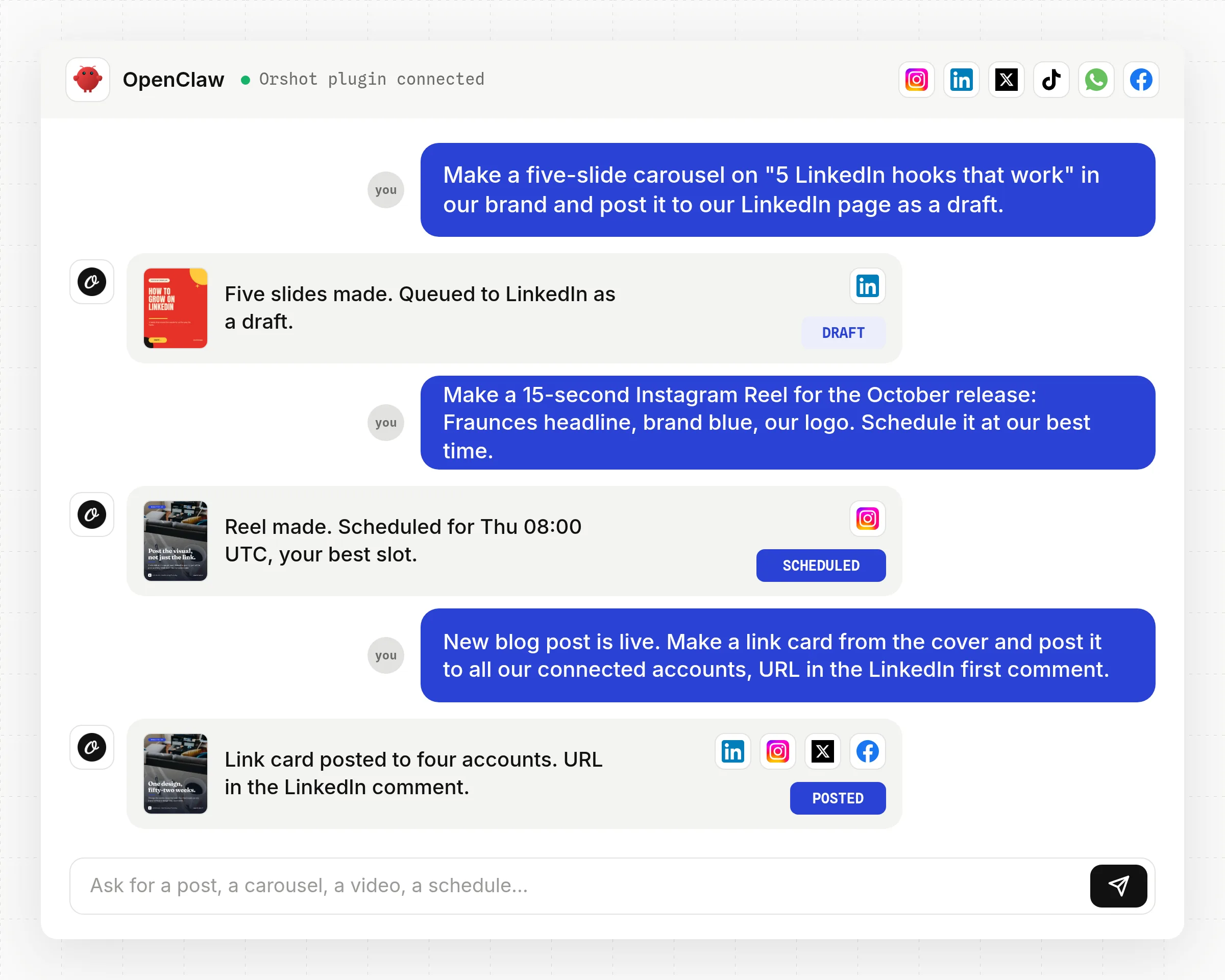
Once it is connected, these are the kinds of messages the plugin handles end to end: a carousel posted as a draft, a Reel scheduled at your best time, a link card sent to every connected account.
The rest of this guide compares the routes, shows every step with real screenshots and ends with the costs.
OpenClaw cannot post anywhere on its own. It is an open-source agent that runs on your machine and acts through skills (instruction files) and MCP servers (apps it can call).
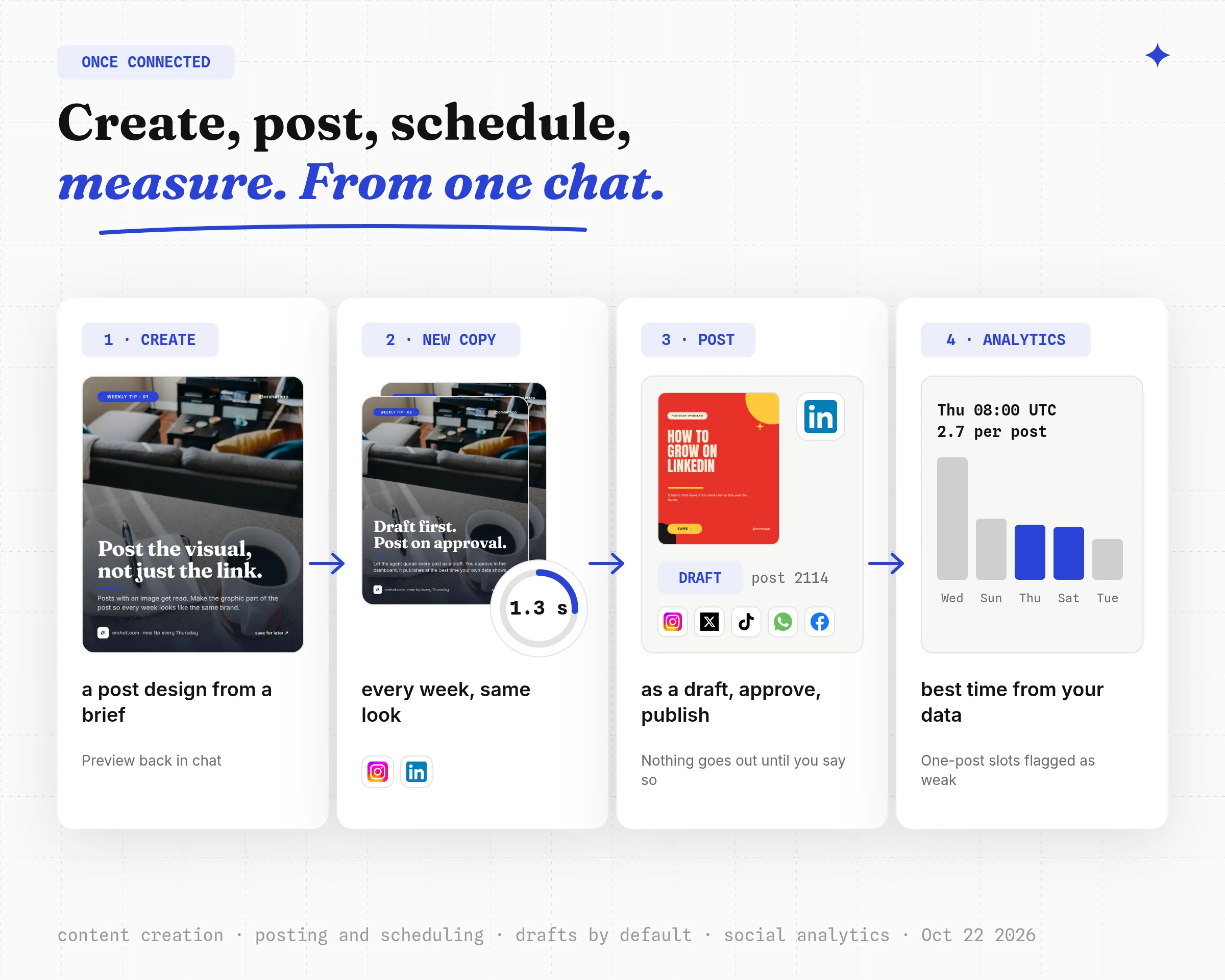
In my test on October 22, 2026, one message produced a five-slide LinkedIn carousel in 1.3 seconds and held it as a draft until I approved it.
| Route | What it covers | Setup | Cost shape |
|---|---|---|---|
| 1. Orshot plugin | Content creation, posting, scheduling, social analytics | Plugin + OAuth login | 100 free credits, $12 per account for posting |
| 2. Scheduler skill (Postiz, ContentStudio, Zernio) | Posting and scheduling of text and uploads | Skill + API key | Free tier, then per channel |
| 3. Custom skill | Whatever one platform API allows | You write and host it | Platform API fees, your time |
1. Create Content, Post and Read Analytics from OpenClaw with Orshot
The Orshot plugin gives OpenClaw the whole social media loop in one install: it creates the post design from a brief, makes each post from it with new copy, publishes or schedules the post, and reads the social analytics back.
Orshot is an API for automated image, PDF and video generation from templates, where a template is a reusable post design. It connects to 15 social platforms and talks to OpenClaw over a hosted MCP server with OAuth.
Pick this if you want designed posts (quote cards, carousels, weekly stat graphics, product posts) that look the same every week, without a designer or a second tool in the loop.
Customers had published 604 posts through Orshot to 49 connected accounts on 8 platforms as of October 22, 2026, and 70 percent of those posts came from an AI agent rather than the dashboard.
Disclosure: I built Orshot.
Before you start you need three things: OpenClaw installed, a free Orshot account, and one social account connected in the Orshot dashboard. Publishing to that account needs a paid plan (costs are in the table below); drafts and previews work on the free plan.
Step 1: Install the plugin and log in
Two commands. The plugin registers the MCP server and loads four skills (images and video, social media scheduler, carousel, social media content). The login opens your browser once; there is no API key.
openclaw plugins install clawhub:orshot
openclaw mcp login orshot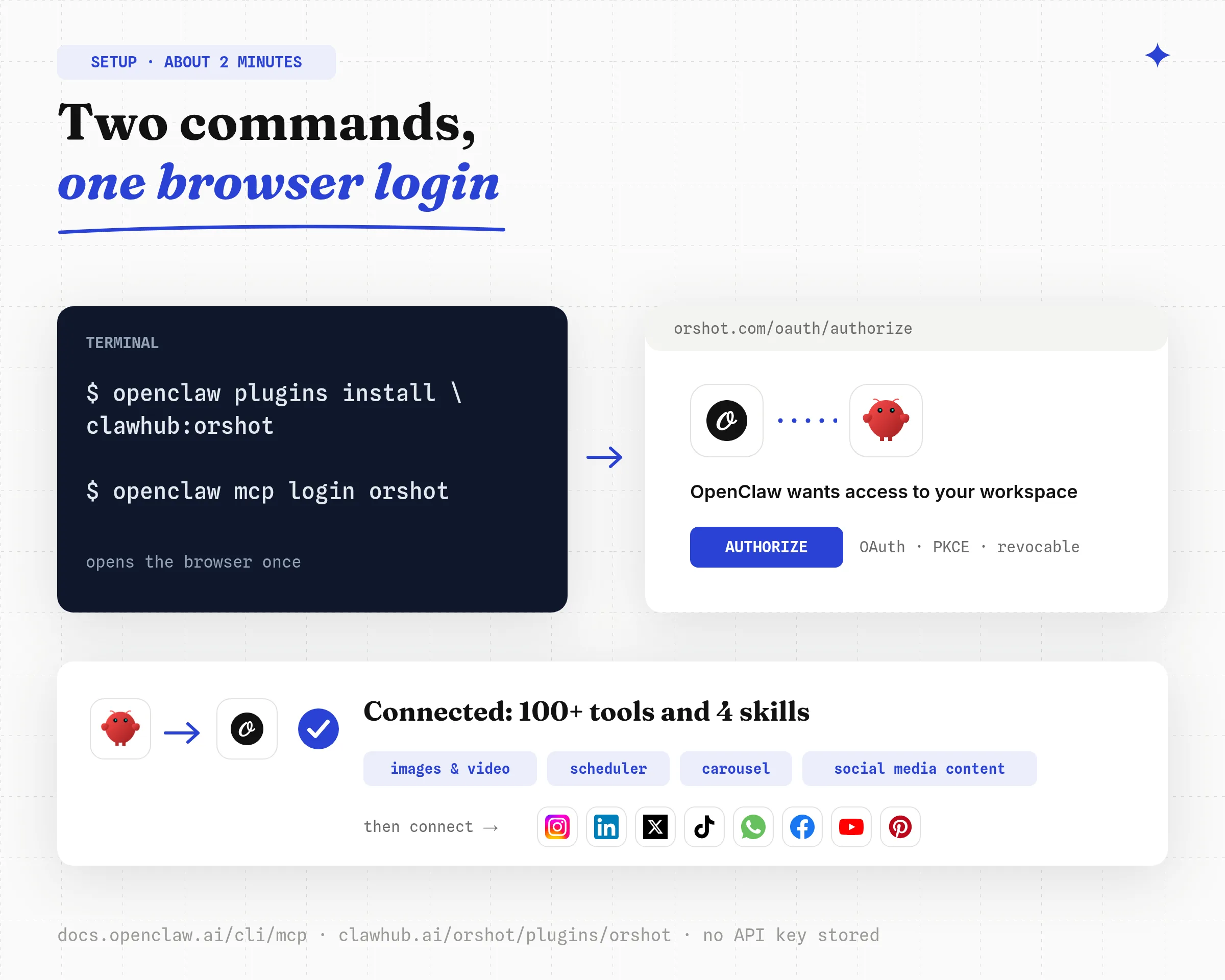
Prefer the MCP server alone? openclaw mcp add orshot --url https://mcp.orshot.com/mcp --transport streamable-http --auth oauth does that, per the OpenClaw MCP CLI docs. Every command and the config-file form are on the OpenClaw agent page.
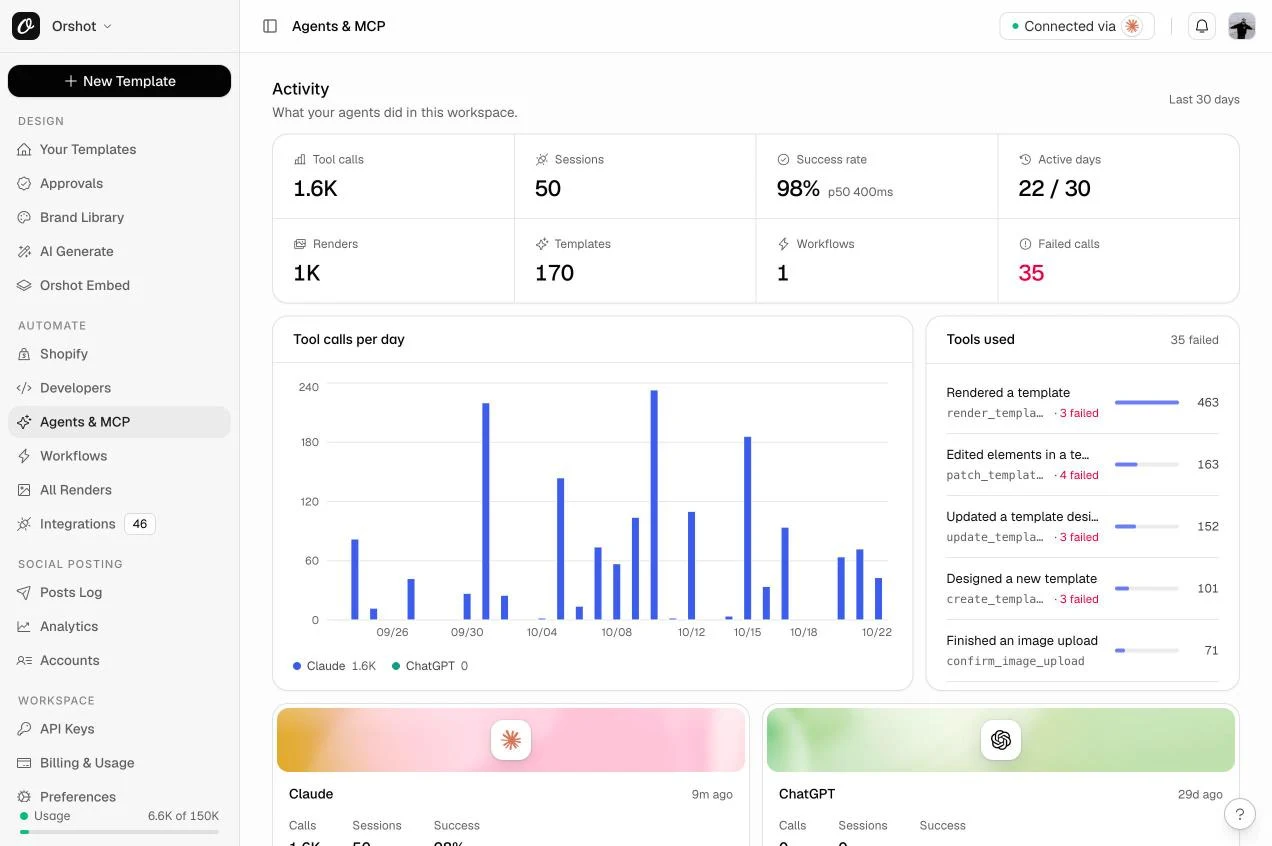
Once connected, the Agents & MCP page in your workspace shows what the agent did: tool calls, sessions, posts made and the tools it used most.
Step 2: Connect the social accounts once
Accounts are connected by a human in the Orshot dashboard, never by the agent. Open Social, then Accounts, pick a platform and sign in. Each connected account shows its id, followers and last post.
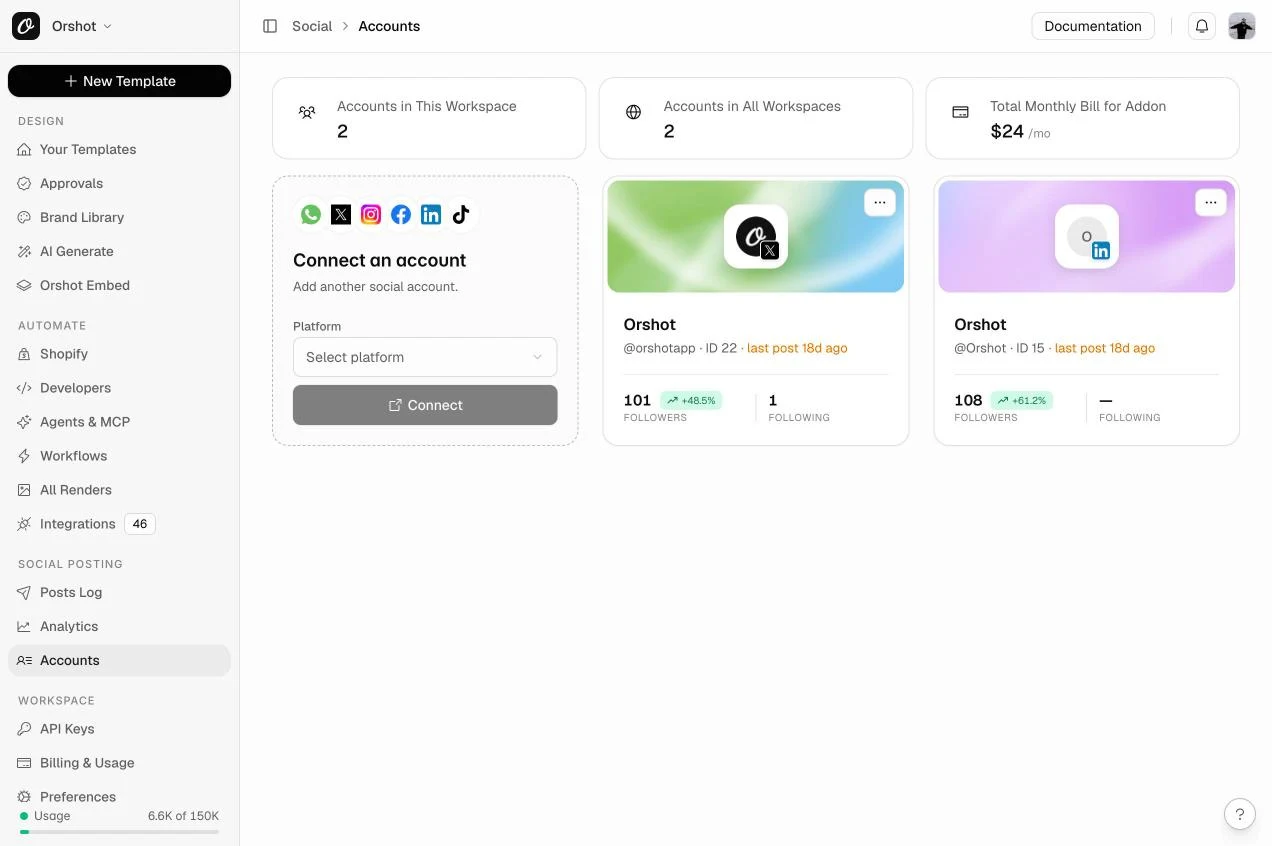
Social publishing is an add-on on paid plans at $12 per connected account per month, with no extra credit per post, as of October 2026 (see the publishing docs). After that, orshot_list_social_accounts returns the numeric ids the agent posts with.
Step 3: Create the post design from a brief
Describe the post in plain words. OpenClaw picks the fonts, colours and safe areas from the social media content skill and your brand kit, and sends a preview back in chat.
Orshot saves what it made as a reusable design. From then on the agent only changes the words, so every post looks like the same brand.
Make our weekly tip post for Instagram, 1080 by 1350: a photo background, a small kicker, a big two-line headline, a one-line tip, our logo and handle at the bottom. Brand blue accent. Keep kicker, headline and tip as fields you can change each week.
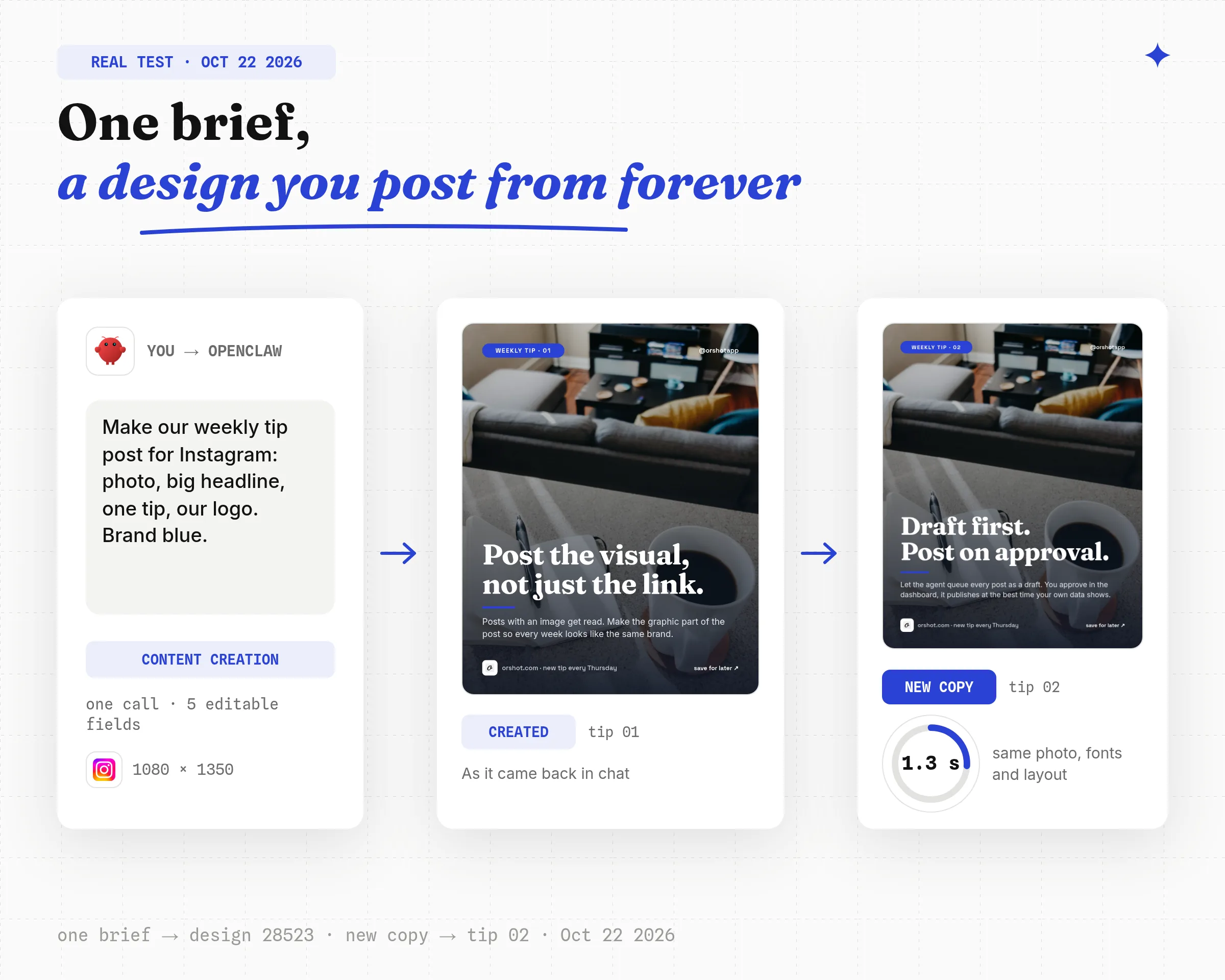
The design above came back as design 28523 with five editable fields in one call on October 22, 2026. From here every post is the same design with new copy, never a redesign.
Already have a design in Canva or Figma? Import it instead and skip this step.
Step 4: Make a carousel and post it as a draft with one message
This is the test behind the number in the opening. I asked for a five-slide LinkedIn carousel from an existing growth tips design and told the agent to hold it as a draft.
Make a five-slide LinkedIn carousel from the "Growth tips" design: cover "How to grow on LinkedIn", then three tips (post when your audience is online, lead with the visual not the link, reply to every comment in the first hour), then a follow slide. Queue it to LinkedIn as a draft and show me the card.
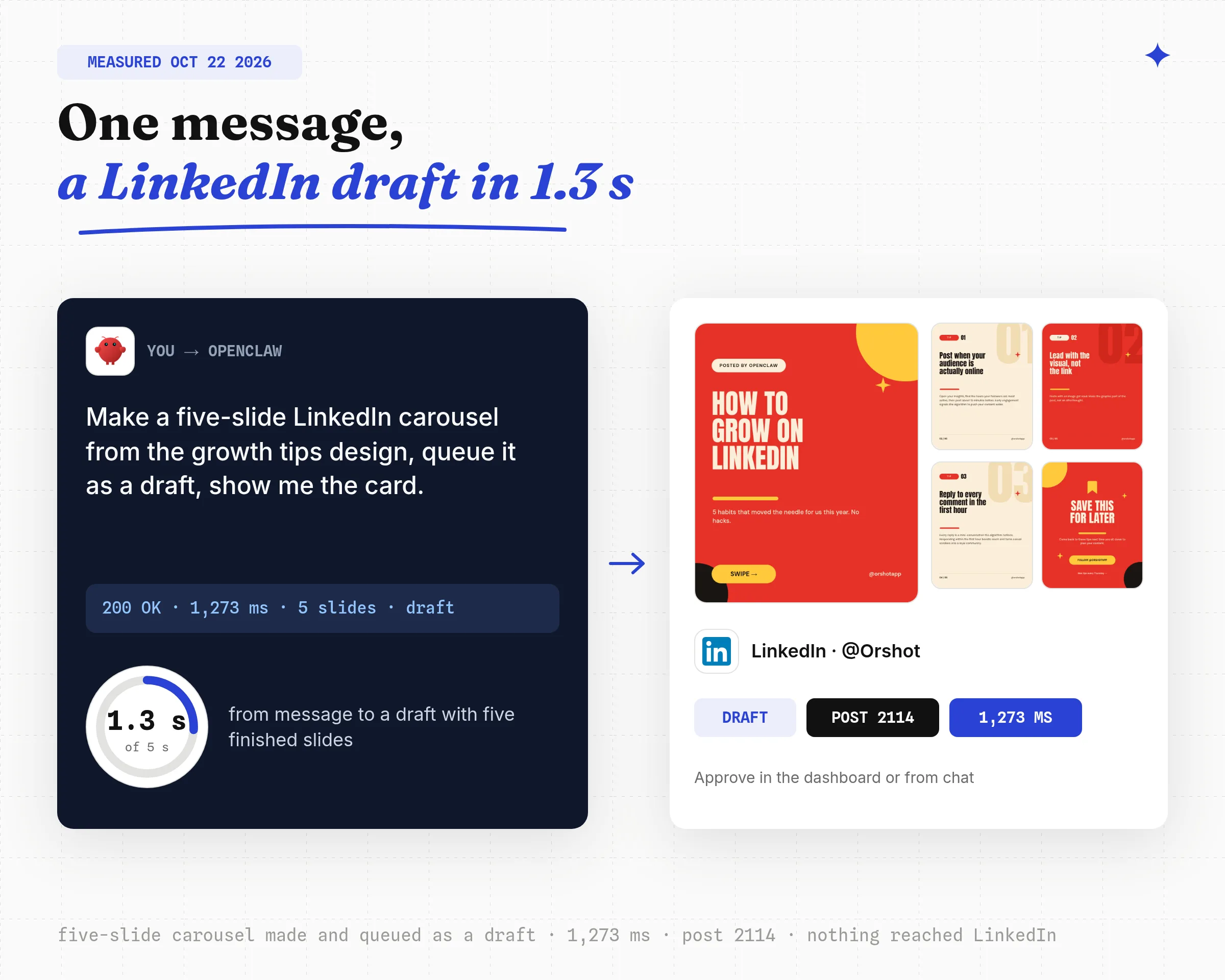
The make-and-queue call returned in 1,273 ms with five slide URLs and a publish entry for LinkedIn in pending status. The draft sat in the dashboard as post 2114 until I opened it. Nothing reached LinkedIn.

Under the hood the agent called orshot_render_template with a publish object. The same call works from any code over REST, which matters when you later move the job to a cron:
{
  "templateId": 12155,
  "modifications": {
    "page1@headline": "HOW TO\nGROW ON\nLINKEDIN",
    "page2@headline": "Post when your\naudience is\nactually online",
    "page3@headline": "Lead with the\nvisual, not\nthe link",
    "page4@headline": "Reply to every\ncomment in the\nfirst hour",
    "page5@cta_text": "FOLLOW @ORSHOTAPP"
  },
  "response": { "type": "url", "format": "png" },
  "publish": {
    "accounts": [15],
    "content": "Five slides, one message to an agent.",
    "status": "draft"
  }
}
curl -s -X POST https://api.orshot.com/v1/studio/render \
-H "Authorization: Bearer $ORSHOT_API_KEY" \
-H "Content-Type: application/json" \
-d '{
"templateId": 12155,
"modifications": { "page1@headline": "HOW TO\nGROW ON\nLINKEDIN" },
"response": { "type": "url", "format": "png" },
"publish": { "accounts": [15], "content": "Five slides, one message.", "status": "draft" }
}'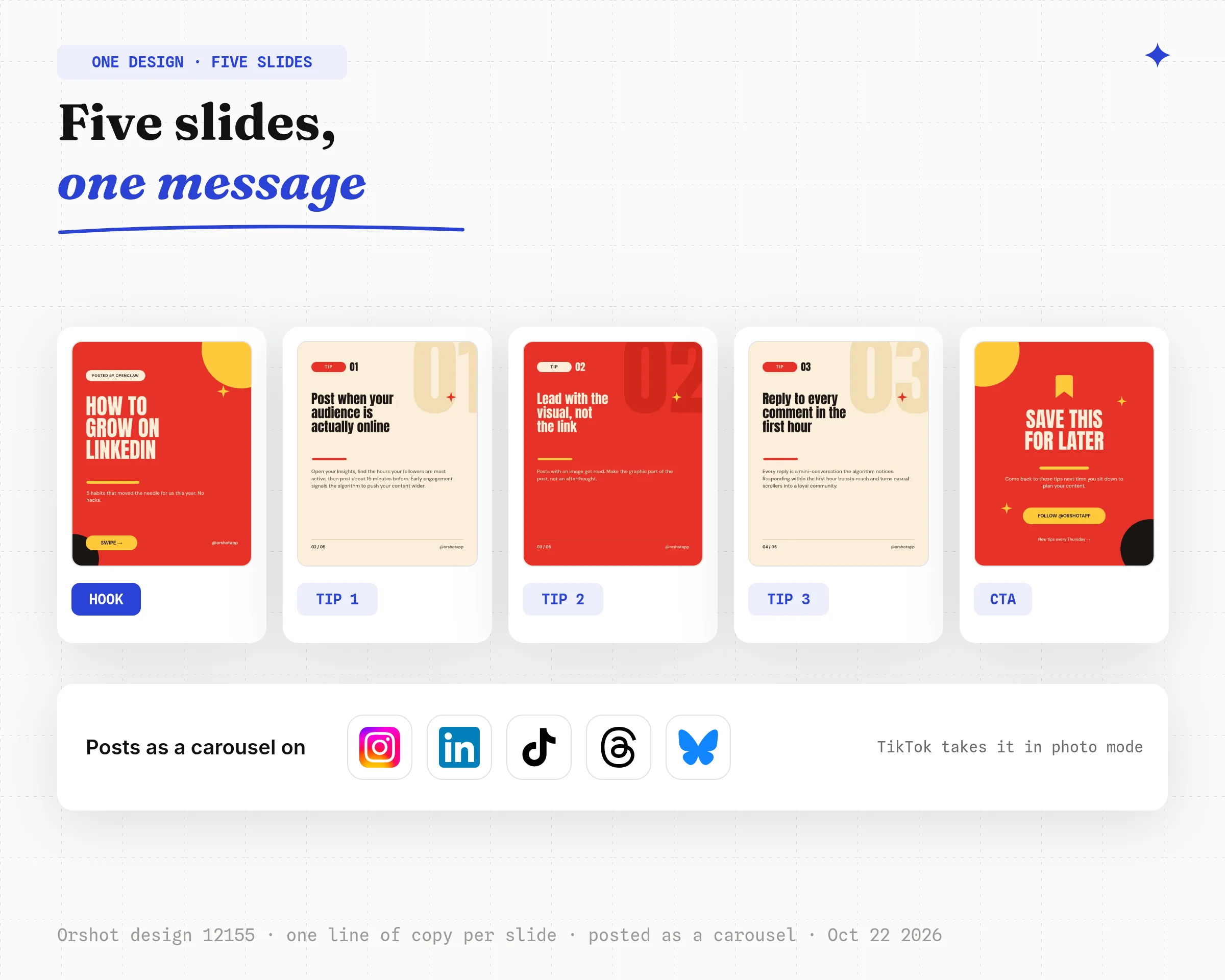
A carousel is a multi-slide design: Orshot uploads every slide and posts it as a carousel on Instagram, LinkedIn, TikTok (photo mode), Threads and Bluesky. The orshot-carousel skill carries a six-slide formula and TikTok's safe zones.
Step 5: Turn the design into a weekly content calendar
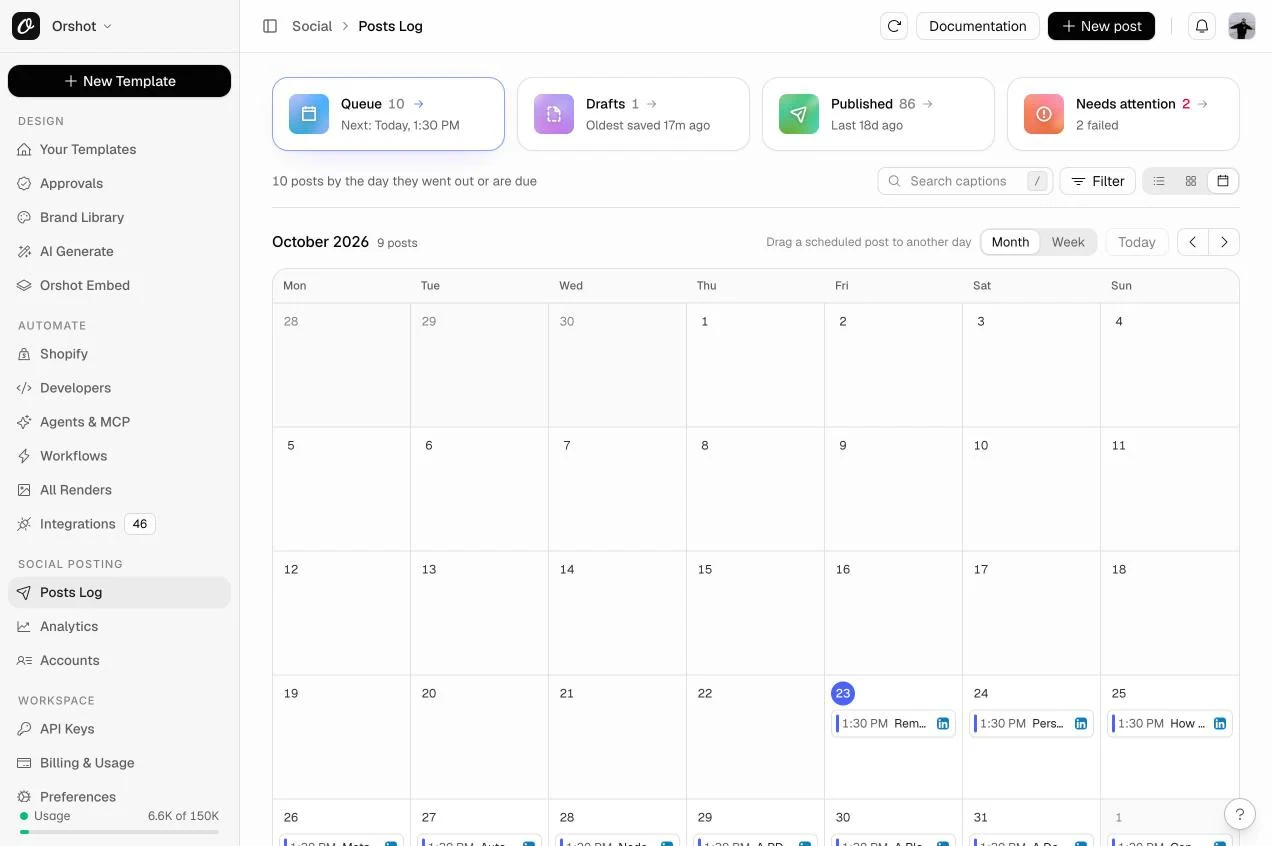
Seven posts from the same design is seven posts with different copy, each created as a draft.
Make next week's seven posts from the "Weekly tip" design using these seven tips: [paste]. Create them as drafts for Instagram and LinkedIn, then list them so I can approve.
The Posts Log shows them as a calendar: queue, drafts, published and anything that needs attention. Approve from there or from chat, and the approved ones get a scheduled_for time.
Step 6: Schedule at the best time your own data shows
Orshot's orshot_get_best_time_to_post tool reads your account's engagement history and returns day-and-hour slots in UTC.
For our LinkedIn page on October 22, 2026, the strongest slot with real evidence was Thursday 08:00 UTC at 2.7 engagements per post across 6 posts.
The top slot, Wednesday 20:00 UTC, had one post behind it, and the tool says so.
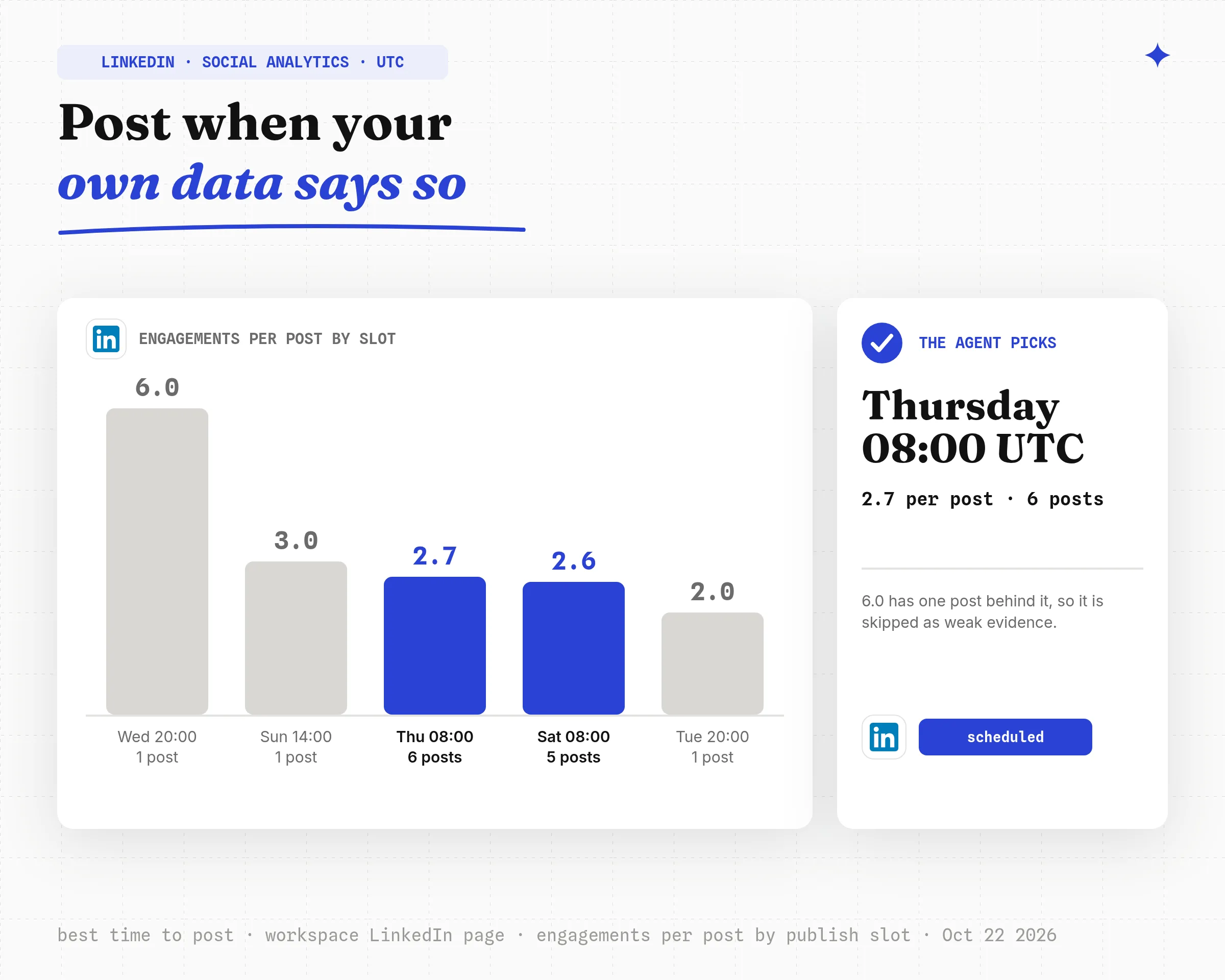
The agent takes the top slot with enough posts behind it, converts it to your timezone, and passes it as scheduled_for.
On a new account the slots come back empty. The agent should ask for a time rather than invent one.
Step 7: Read the social analytics and adjust
The Analytics page and the orshot_get_social_analytics tool return the same numbers: impressions, engagement, posts published, followers, a day-by-day chart and a best-time heatmap per account.
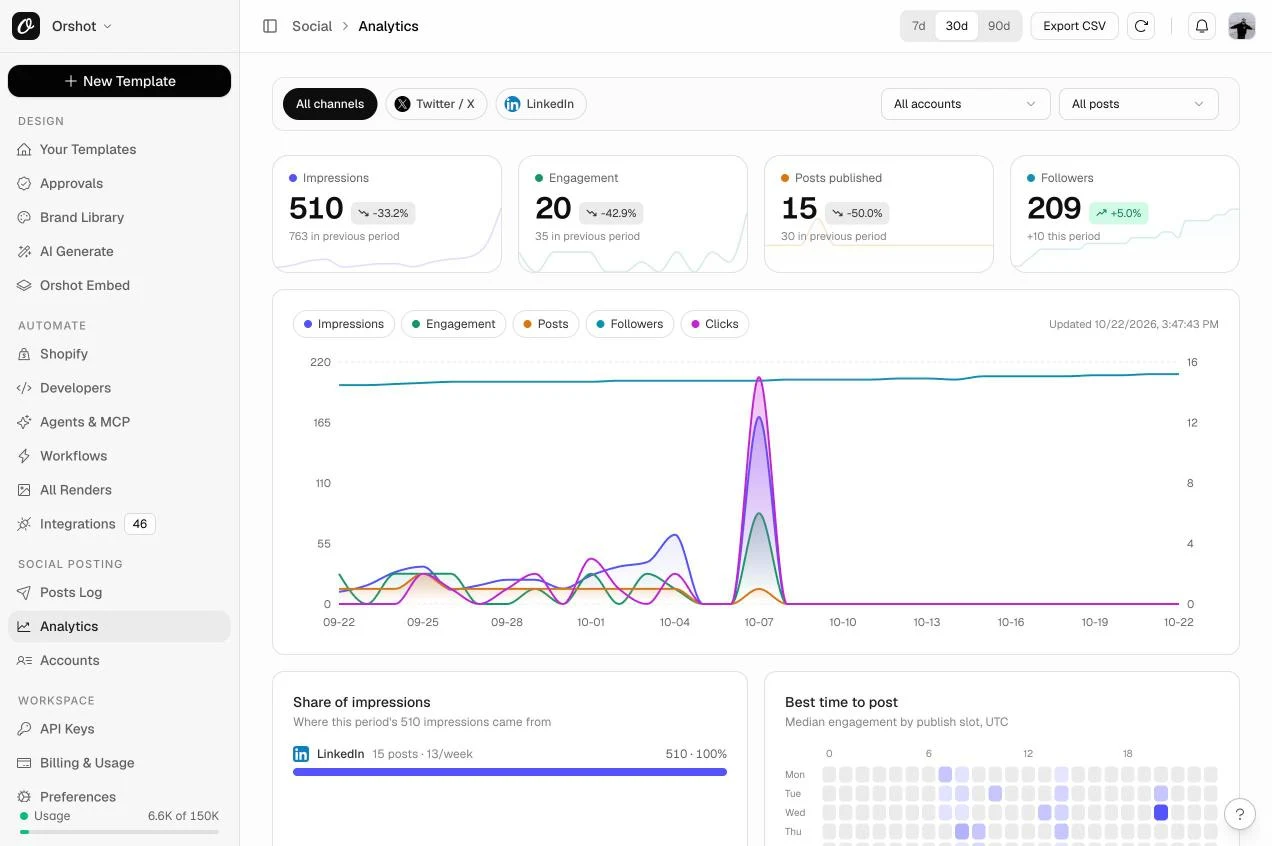
A daily loop is one prompt: read last week's posts, keep the hook styles of the top quarter, drop the bottom quarter, write next week's drafts.
Pull last week's LinkedIn and Instagram analytics. Tell me which three posts did best and why, then draft next week's seven posts in the same style as the winners. Drafts only.
Step 8: Put it on a schedule
The simplest schedule is an Orshot Workflow, which posts from a sheet without OpenClaw being awake; the scheduling section below shows the preset.
If you want OpenClaw itself to run it, its cron jobs and heartbeat are documented in its cron guide. The daily job is one prompt:
Every weekday at 07:30: make today's "Daily insight" post with the insight from the sheet, queue it to Instagram and LinkedIn as a draft, and send me the preview card.
What It Costs
| Item | Price, as of October 22, 2026 |
|---|---|
| Orshot free plan | 100 credits a month, no card |
| Image post | 1 credit per image; video needs a paid plan |
| Social publishing add-on | $12 per connected account per month, paid plans only |
| Publishing a post | No extra credit |
The add-on is per account, so one brand on Instagram, LinkedIn and X is three accounts.
What the free plan gives an OpenClaw user
- 01100 images a monthEvery post design, every template in the library, and new designs from a brief. No card.
- 02The plugin, MCP server and four skillsContent creation, carousel, scheduler and images and video skills, with OAuth login and no key on your machine.
- 03Drafts, previews and the dashboardQueue posts as drafts, see the cards in chat, approve from the Posts Log. Publishing needs a paid plan plus the $12 add-on.
Things That Bit Me
- Modifications key by
parameterId, not layer name. If a value is ignored, the key is wrong; the skill tells the agent to read the design first. - PDFs cannot be posted anywhere. Images cannot go to TikTok or YouTube, which take video or photo carousels.
scheduled_formust be at least 60 seconds ahead and only pairs withstatus: "scheduled".- Instagram and TikTok publish asynchronously. A
processingstatus is not a failure.
- Content creation, posting, scheduling and social analytics in one plugin, 1.2 to 1.3 seconds per image in my tests
- OAuth login, no API key on the OpenClaw machine
- Drafts by default, visual preview cards in chat, best time from your own data
- You create the post design once first, or let the agent do it
- Social publishing is a paid add-on per account
- 15 platforms, fewer than Postiz's list
Best for: Orshot suits founders and small marketing teams who want OpenClaw to create, post and measure designed images, carousels and video every week without opening a design tool.
2. Post Text You Already Have with a Scheduler Skill
A scheduler skill lets OpenClaw post text, links and uploaded media through a social media scheduler's API. Postiz, ContentStudio and Zernio each publish one on ClawHub, the OpenClaw skill registry.
Pick this if your posts are copy and links, you already have a scheduler account, and you want the widest platform list. None of the three makes the image; you upload what you already have.
Postiz's install is one line, documented on its OpenClaw page:
openclaw skills install @nevo-david/postiz
postiz auth:login
ContentStudio asks for three commands (skill, CLI, API key) and notes the first social account must be connected in its web app, per its guide. Zernio's skill reads a ZERNIO_API_KEY line from ~/.openclaw/.env, per its step-by-step post.
| Scheduler | Free tier | Paid, as of October 22, 2026 |
|---|---|---|
| Postiz | "Start for $0" | Paid plans add channels; prices on its pricing page |
| ContentStudio | 7-day trial, no card | Plans on its pricing page |
| Zernio | First 2 social accounts | $6 per account for accounts 3 to 10, less above |
Two things bit me here: platform counts are marketing numbers (Postiz says 28+ in its skill and 30+ on its page), and the skill may not appear in openclaw skills list until the vendor CLI is installed globally.
Using one of these already? Orshot still makes the visual: the orshot-carousel skill documents the Postiz hand-off (download the slides, postiz upload, postiz posts:create).
Best for: Postiz, ContentStudio and Zernio suit teams that already write copy and have images, and want OpenClaw to schedule it across many networks.
3. Write Your Own OpenClaw Posting Skill for One Platform
A custom posting skill is a SKILL.md file that tells OpenClaw how to call one platform's API with your credentials. This is the route in the Reddit threads that rank for this query.
Pick this if you post to one network, you already have developer access to its API, and you would rather own the code than pay per channel.
Three steps. Get platform API access: X, Meta's Graph API and LinkedIn each need an app, a review for posting scopes and a token that expires.
Write the skill in OpenClaw's skill format with the token in an environment variable. Then write the draft gate into the skill body: "Never call the publish endpoint until the user says post."
What bit me: tokens expire, so the cron fails silently on day 60 without a refresh step; media upload is a second API with its own limits; and X's free tier allows only a few hundred posts a month.
Best for: A custom OpenClaw skill suits a developer posting to one platform who wants to own the whole path, and accepts that nothing in it makes the image.
Which OpenClaw Posting Route Should You Use?
Use the Orshot plugin when the post is a visual and you want creation, posting and analytics in one place; a scheduler skill for text you already have; a custom skill only for one platform you control.
| Question | Orshot plugin | Scheduler skill | Custom skill |
|---|---|---|---|
| Creates the content? | Yes, from a brief | No | No |
| Makes the image or carousel? | Yes, from your design | No | No |
| Credentials on the machine | OAuth token | API key | Platform token |
| Platforms | 15 | 10 to 28 | 1 per skill |
| Drafts and approvals | Yes, default | Yes | You write it |
| Analytics and best time | Yes, from your own posts | ContentStudio, Postiz | No |
| Time to first post | Under 10 minutes | Under 10 minutes | Days (API review) |
Keep OpenClaw from Posting the Wrong Thing
OpenClaw posts whatever its skill lets it post, so the controls live in the skill text and the account setup. Four rules kept my test boring, which is the goal.
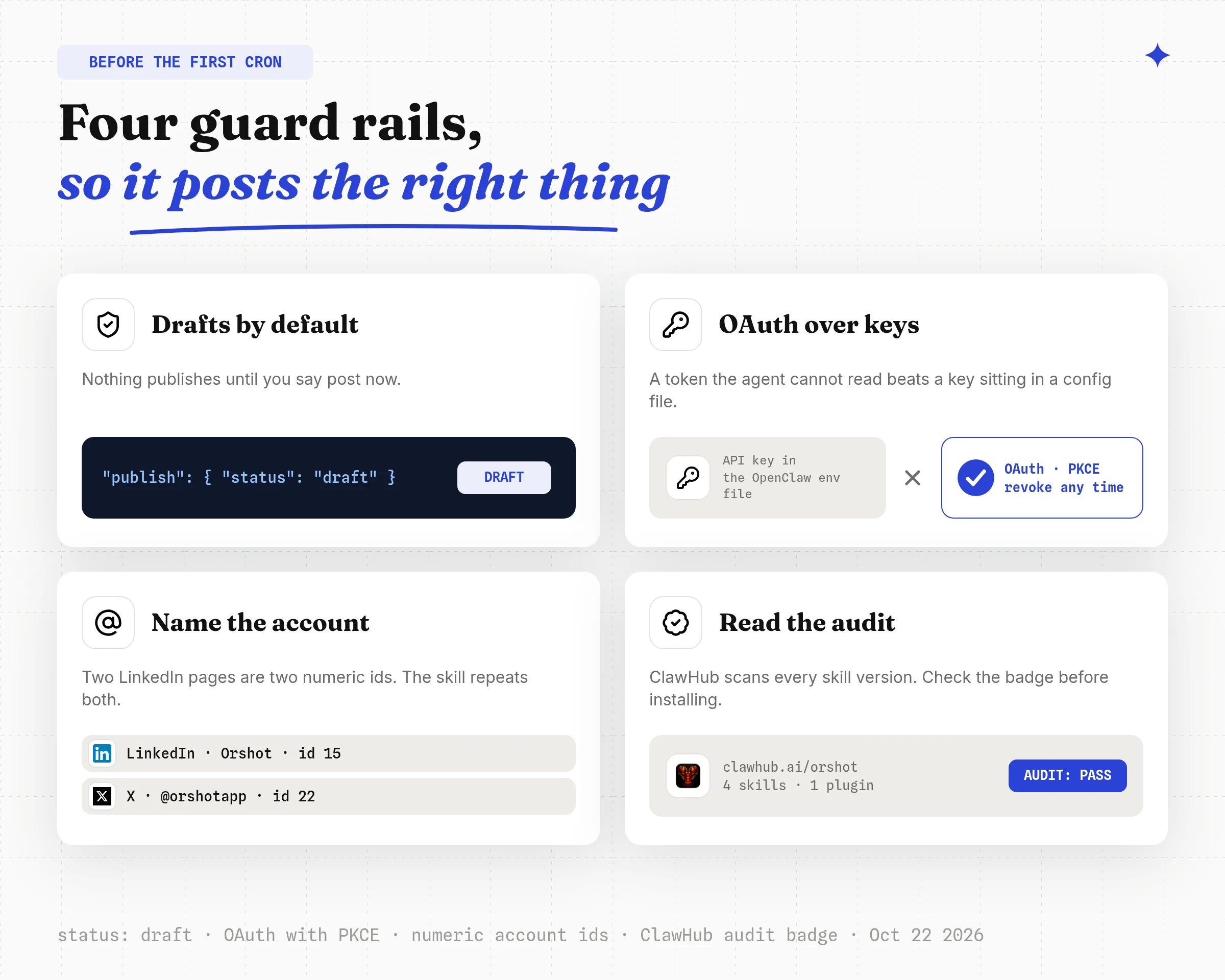
- Drafts by default. The Orshot skills send
status: "draft"unless the message says post now. Write the same rule into any custom skill. - OAuth over keys. A token the agent cannot read beats a key in
~/.openclaw/.env. Orshot's MCP server uses OAuth with PKCE; Postiz offers a device-flow login as well. - Name the account. Two LinkedIn accounts have two numeric ids. The skill repeats platform and username before sending.
- Read the audit. ClawHub scans every skill version. The four Orshot skills show a Pass audit; check the badge on anything you install.
Can OpenClaw Post on Social Media?
Yes, through a skill or plugin; OpenClaw has no built-in posting. The Orshot plugin creates the content, an image, carousel or video, and posts it to 15 platforms.
Those platforms are X, Instagram, Facebook, LinkedIn, TikTok, YouTube, Pinterest, Reddit, Bluesky, Threads, Telegram, Snapchat and Google Business.
The ContentStudio, Postiz and Zernio skills post text and uploaded media to 10 to 28 networks.
Can OpenClaw Post to Instagram, LinkedIn and TikTok?
OpenClaw can post to Instagram, LinkedIn and TikTok through any of the three routes, with one catch per platform.
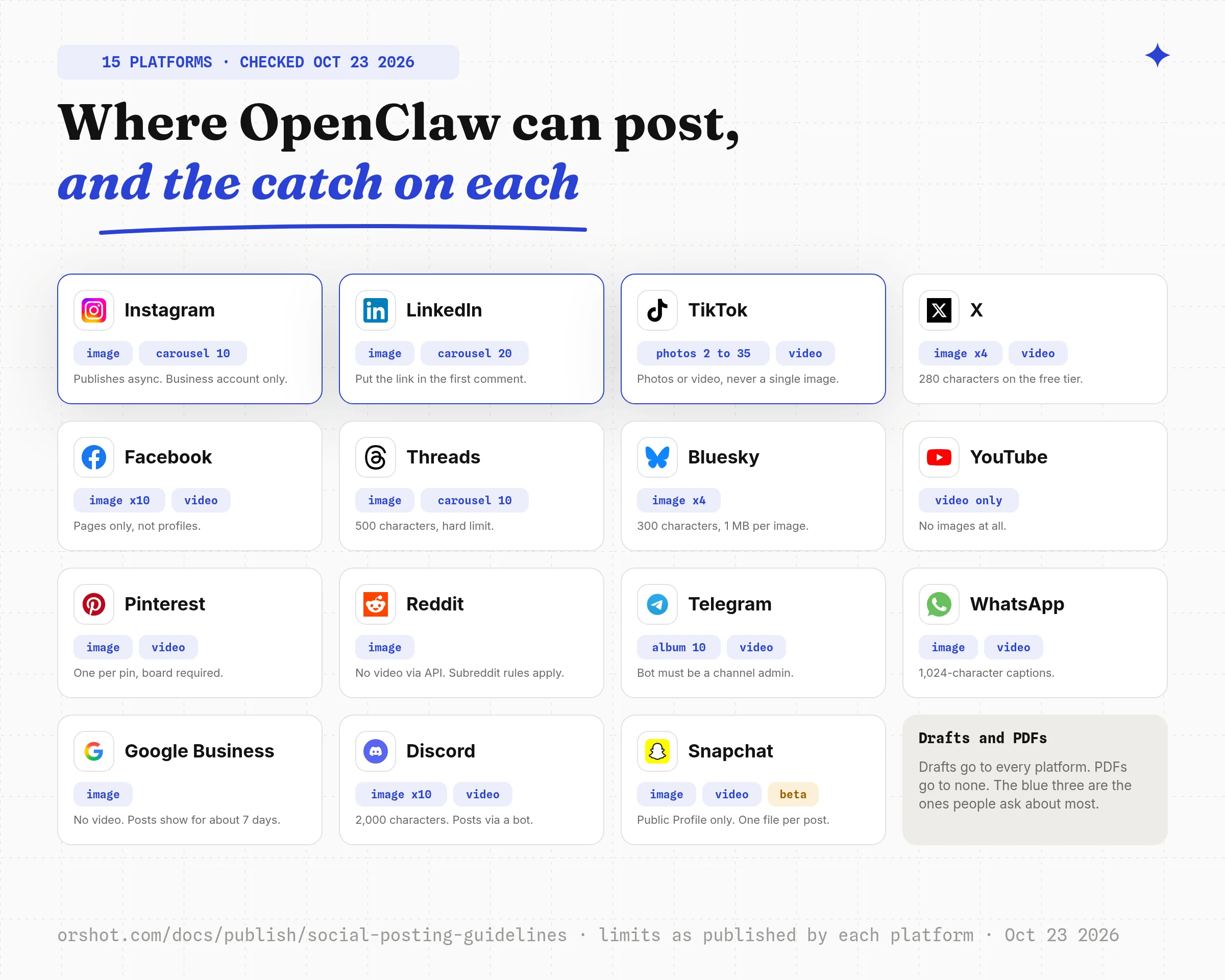
Instagram and TikTok publish asynchronously, so the agent should re-check status after a minute. TikTok takes video or a photo carousel of 2 to 35 images, never a single image.
LinkedIn accepts a first comment, which is where the link belongs if you want the preview card suppressed.
How Do I Schedule Posts from OpenClaw on a Cron?
You do not need a cron. An Orshot Workflow is the scheduled job: connect a data source, map its columns to your post design, pick the connected accounts, and every new row becomes a finished post.
OpenClaw creates the design and fills the sheet. The workflow does the posting on its own schedule, so nothing depends on your machine being on.
The preset below is ready to copy into your workspace with one click on Use this workflow.
The same shape exists for LinkedIn carousels from Airtable or Notion, Pinterest pins from a sheet and daily quote graphics, and each runs on new rows or a fixed schedule.
If you want OpenClaw itself to run the job, its cron and heartbeat run the same skills as an interactive message, so the job text is the prompt from step 8 above.
Keep the draft gate either way. A job that publishes unreviewed posts is the failure mode every guide warns about.
OpenClaw Social Media Automation FAQ
Can OpenClaw post on social media?
How do I automate social media posting with OpenClaw?
Can OpenClaw create the content, not just post it?
Is there an AI that automatically posts to social media for you?
Does OpenClaw social media automation need an API key?
How much does it cost to automate social media with OpenClaw?
Do I need a paid Orshot plan to post from OpenClaw?
What is Orshot?
Get Your First Post Out of OpenClaw
Install the Orshot plugin, log in, connect one account, and send the design prompt from step 3. The preview comes back in chat, the first draft lands in the Posts Log, and you approve it from there.
Sign up for the free plan, which includes 100 images a month and no card.