No. Claude can't make a video file on its own. Every Claude model today takes in text and images and writes back text, per Anthropic's models overview (checked October 2026).
Claude can still get you an MP4. How depends on what you want to make: AI footage, a one-time animation, or bulk videos from your data.
I built Orshot, an API that turns your design templates into images, PDFs and videos. It's the answer for bulk videos from data. I tested the other two routes as well, and I'll say where each one wins.
What Do You Want to Make?
Pick the goal first. The tool follows from it.
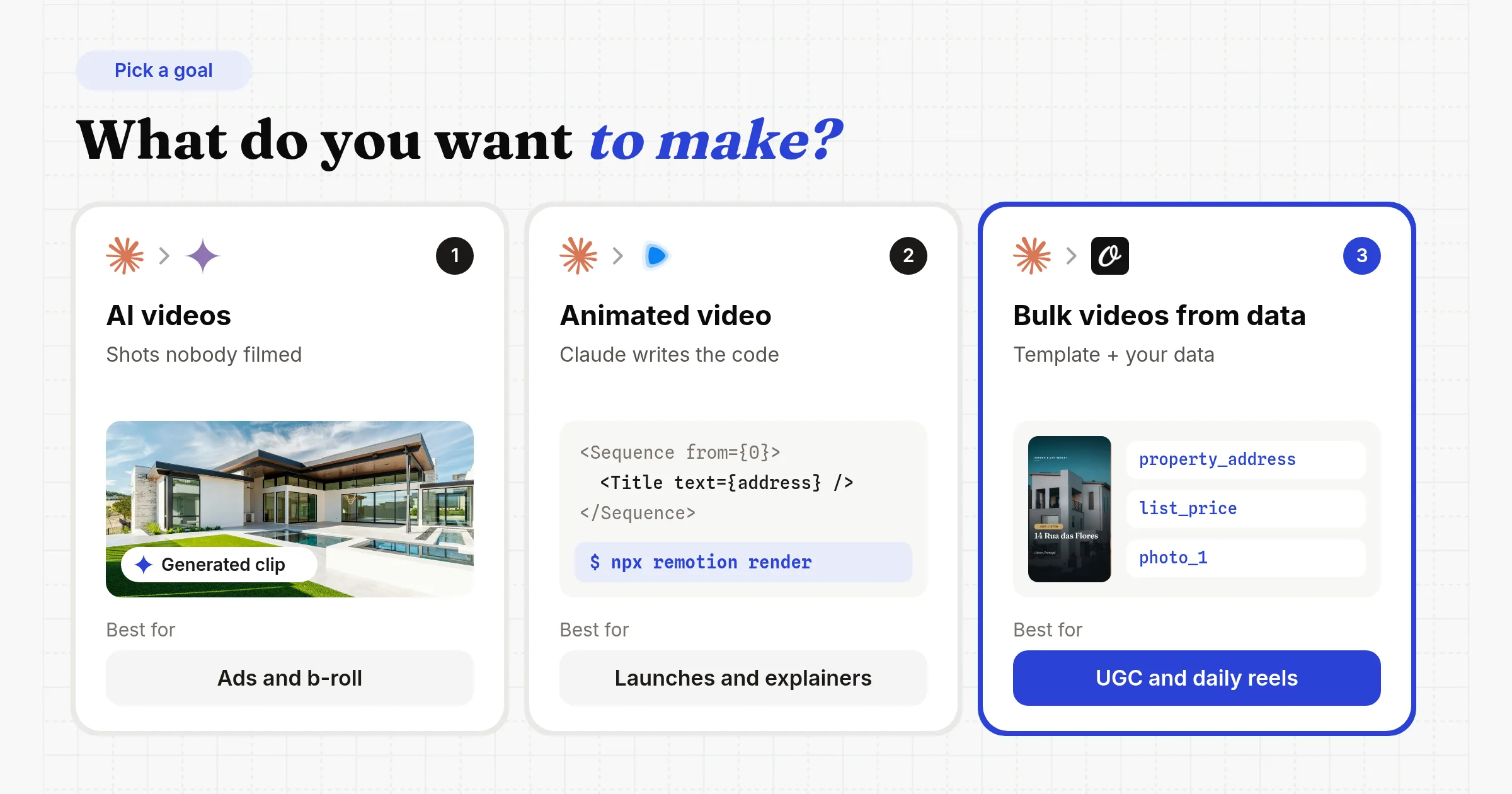
The three side by side:
| 1. AI videos | 2. Animated video | 3. Bulk videos from data | |
|---|---|---|---|
| Tool | Higgsfield, Veo, Kling | Remotion, HyperFrames | Orshot |
| Edit it later? | No, you regenerate | Yes, in code | Yes, in a browser editor |
| Uses your data? | No | Yes, if you build the pipeline | Yes, every render |
| Repeat at volume? | Costly, and takes vary | Yes, if you host it | Built for it |
| Cost shape | Per second of footage | Free for small teams | 1 credit per second |
Why Can't Claude make the Video Itself?
Claude writes text, code, HTML, SVG and tool calls. It never outputs video, audio or photos.
Claude can read text, images and PDFs. Anthropic's help center says it doesn't make photos or illustrations the way image tools do.
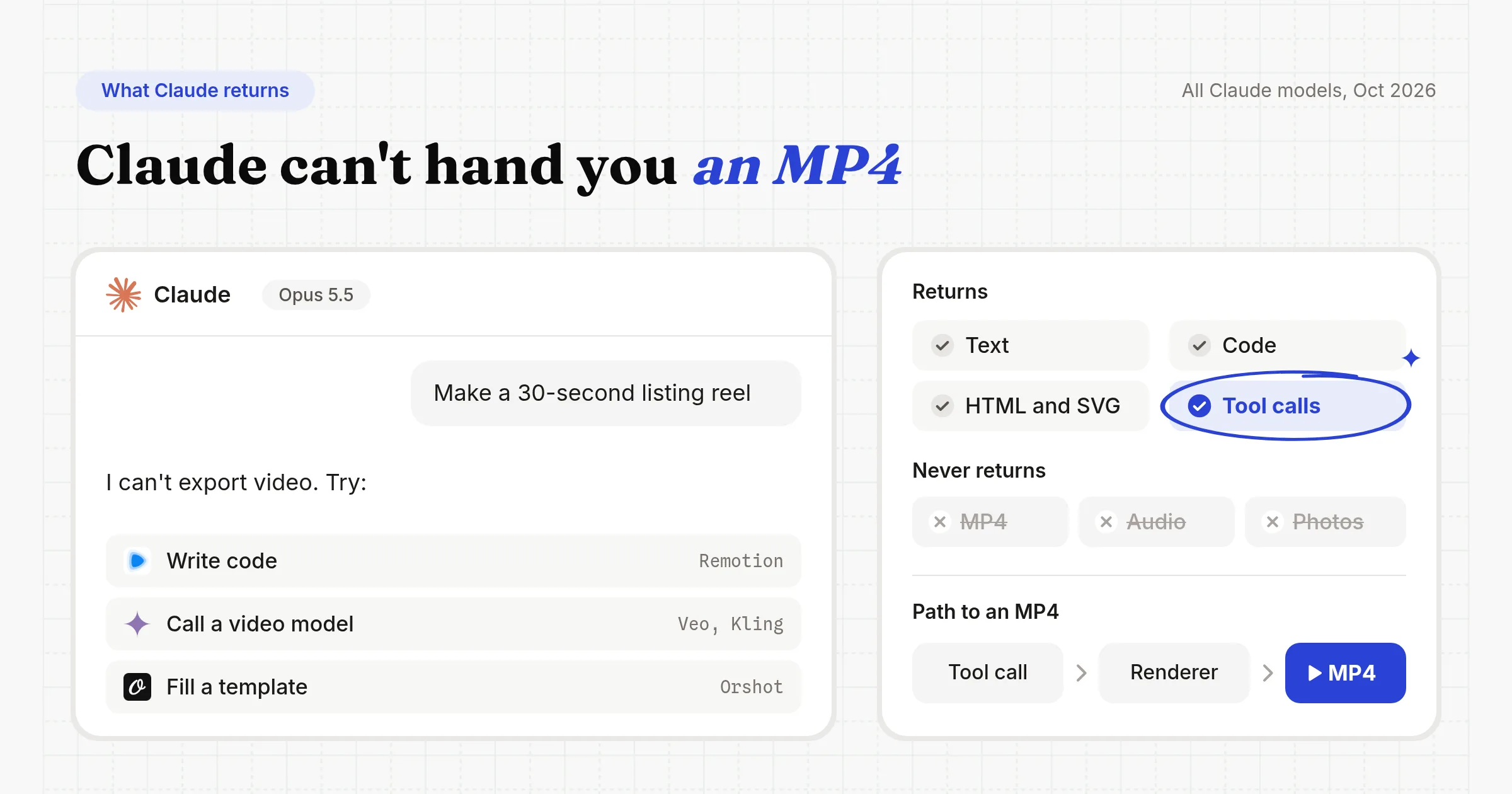
The tool call is the key. It's Claude asking another app to do a job for it, like rendering an MP4. Each part below hands that job to a different app.
1. Generate AI Videos with Claude and Higgsfield
Pick this if you need footage of something nobody filmed: a drone shot, a product in a new scene, b-roll for an ad.
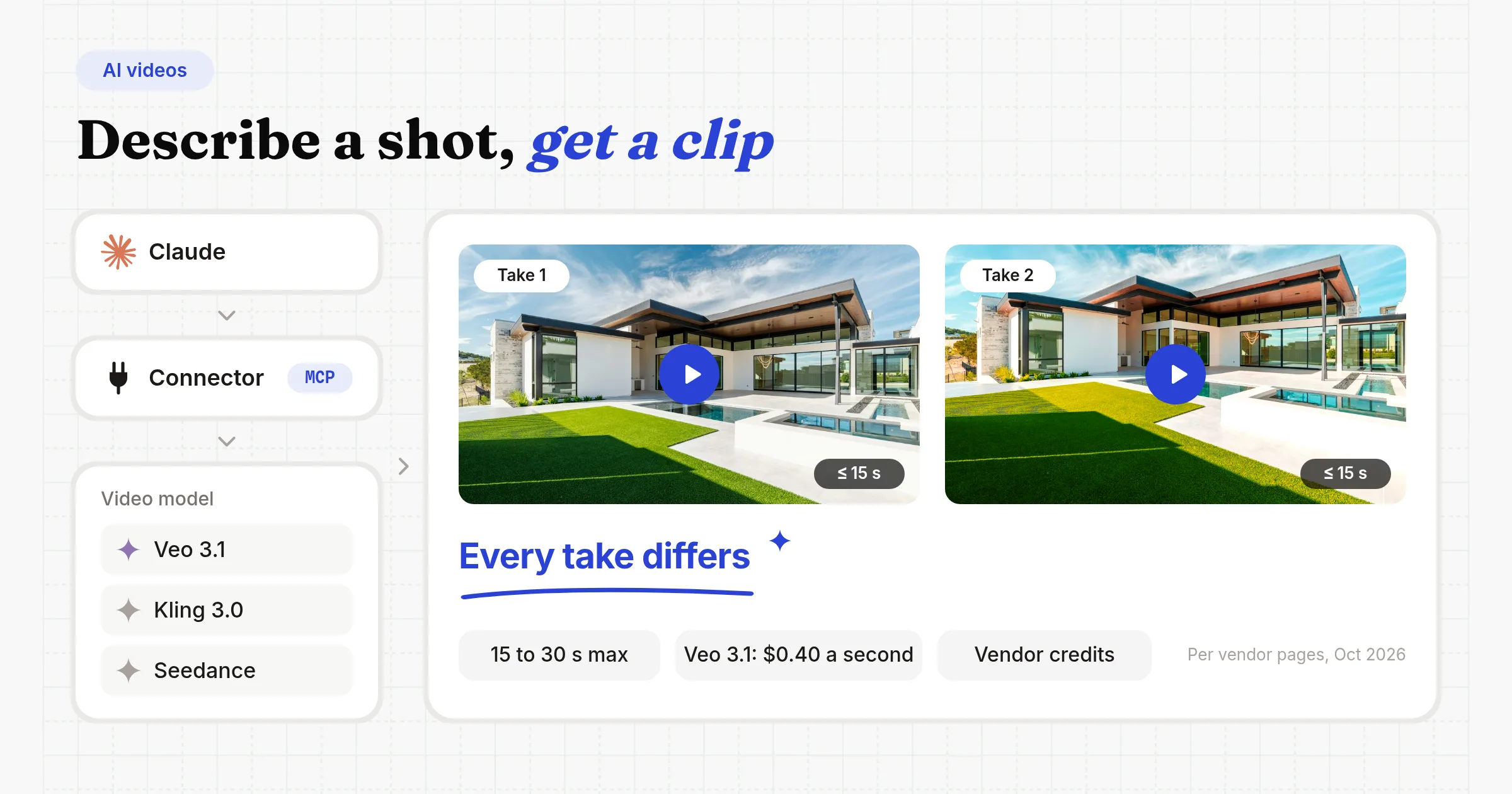
Claude can't run a video model itself, but it can call one through a connector. A connector uses MCP (Model Context Protocol), a standard way for Claude to use other apps.
Higgsfield's connector gives Claude one door to many models: Veo 3.1, Sora 2, Kling 3.0, Seedance 2.0, Wan 2.6, MiniMax Hailuo and Higgsfield's own. I didn't test this route for this post. Everything here comes from vendor pages, checked October 2026.
Step 1: Connect Higgsfield to Claude
- In Claude, open Settings, then Connectors
- Add a custom connector named Higgsfield
- Paste
https://mcp.higgsfield.ai - Sign in to Higgsfield with OAuth (a normal login). No API key needed.
Higgsfield's guide says it works in Claude on the web, desktop, mobile and Claude Code.
Step 2: Describe the shot
Say what's in it, how the camera moves, how long it runs and its shape, like 16:9 or 9:16.
Step 3: Download or join the clips
Download the clip. For anything longer, make several clips and join them.
Or use Veo or Seedance another way
Renoise ships a Claude Code plugin and an MCP server for Seedance 2.5. Or skip the middleman: Claude Code can write a short script that calls Veo on Google's Gemini API, and you pay Google per second.
Check clip length and cost
- Higgsfield: clips up to 15 seconds, free starter credits for new accounts, paid plans for more
- Renoise: Seedance 2.5 clips of 4 to 30 seconds, from $20 a month ($14 billed annually with a new-user discount)
- Veo direct: Google lists Veo 3.1 on the Gemini API at $0.40 a second at 1080p, and Veo 3.1 Fast at $0.12. So 30 seconds of footage costs $12 or $3.60.
Weigh the pros and cons
- Footage of things that were never filmed
- Fast: a prompt in, a clip back in your chat
- One connector reaches many models
- You can't fix one layer, like the text, logo or price, after it's generated
- No editor to open and tweak the clip
- Every take differs, even with the same prompt
- Costly per second: $12 for 30 seconds of Veo 3.1 at 1080p
- Clips cap at 15 to 30 seconds, so longer videos are joined
I compared AI video models and template renderers in more depth in the best AI video generation APIs.
2. Make an Animated Video with Claude and Remotion
Pick this if you need one video, made once: a launch video, a product demo, an explainer with animated charts.
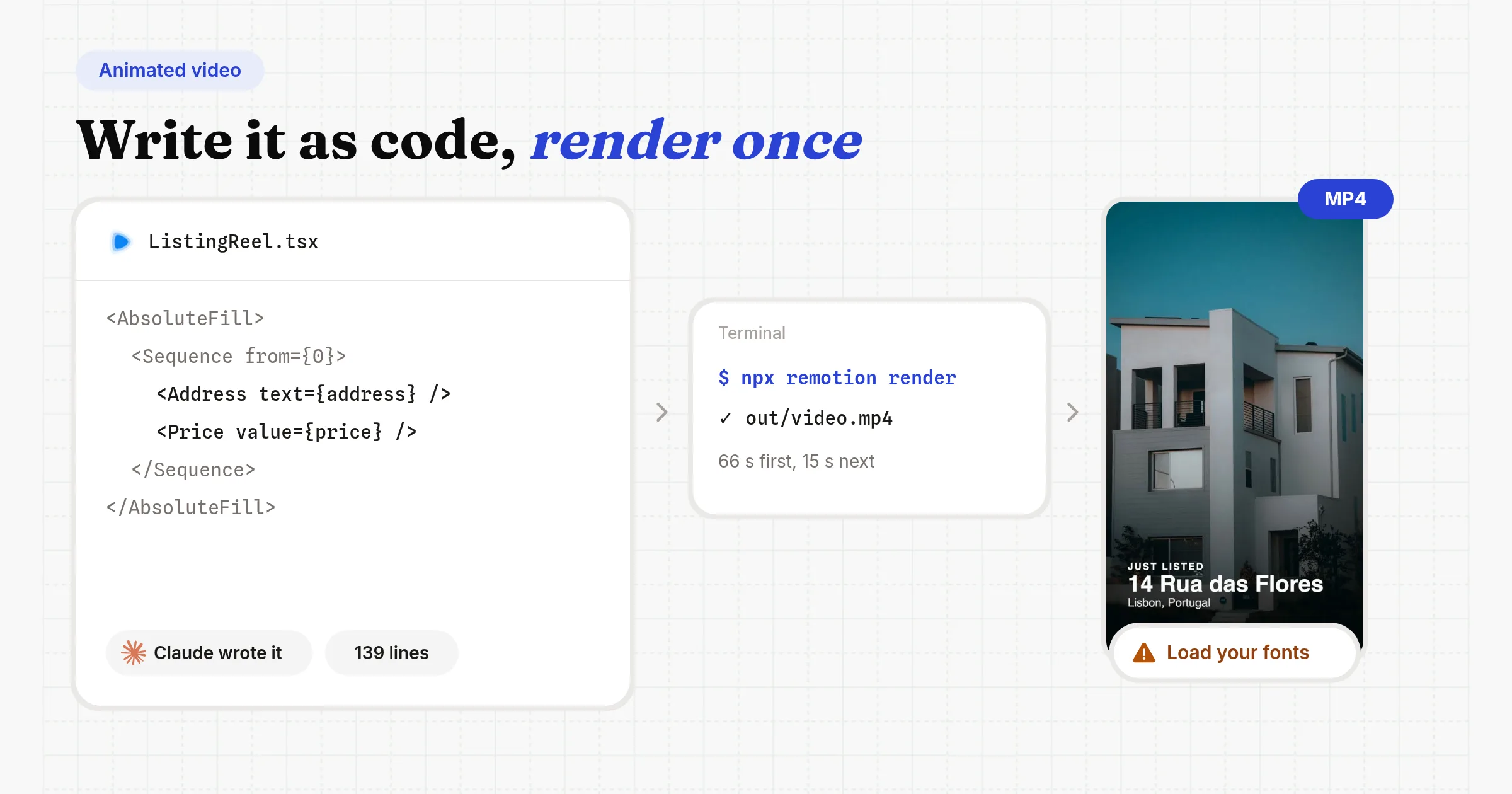
Claude Code writes the video as code. Then it runs a command that turns the code into an MP4 on your computer. Two free tools do the rendering (checked October 2026):
- Remotion builds videos with React, a popular web framework. It has 62.0k GitHub stars and 7.3 million npm downloads from September 5 to October 4.
- HyperFrames is the alternative, from HeyGen. It builds videos from plain HTML plus GSAP, an animation library. It's Apache 2.0 with no per-render fees, has 57.1k stars, needs Node.js 22+ and FFmpeg (a video encoder), and installs as a Claude Code plugin.
Rendering on your computer is free. Claude Code itself needs a paid Claude plan, from $20 a month.
Anthropic doesn't ship its own video skill. Its public skills repo has 19 skills, and the only motion one, slack-gif-creator, makes GIFs. Claude Design exports PDF, PPTX and HTML and can pass a design to HyperFrames, but it can't export an MP4.
Step 1: Install the Remotion skill
Create a project and add Remotion's skills, or the HyperFrames plugin. The whole setup:
npx create-video@latest --yes --blank my-video
cd my-video
npx skills add remotion-dev/skills
claude
# "Make a 30-second 1080x1920 listing reel: address, price,
#  four features, a closing card. Use our brand colors."
npx remotion render
claude plugin marketplace add heygen-com/hyperframes
claude plugin install hyperframes@hyperframes
npx hyperframes init my-video
cd my-video
claude
# "/hyperframes make a 30-second launch video from our changelog"
npx hyperframes renderStep 2: Ask for a 30-second reel
Start claude in the project folder. Describe the video: length, size, scenes, colors and text.
Step 3: Preview it and ask for fixes
Run npm run dev (or npx hyperframes preview) to watch it in your browser. Tell Claude what to change.
Step 4: Render the MP4
Run npx remotion render. My first render took 66 seconds and the second took 15. The first is slower because Remotion downloads a headless Chrome (a browser with no window) once.
Step 5: Fix the font fallback
Claude set Inter in the CSS but never loaded it, so my video came out in Helvetica. Load your brand fonts in the project before the first render.
Render the next version
Keep the code and pass new data: npx remotion render ListingReel out.mp4 --props=listing.json. Or ask Claude again, and check its work again.
Weigh the pros and cons
- Full creative control, in code
- Free for individuals and small teams
- Any length, and charts and UI motion stay exact
- Takes input data as props, and can render in the cloud on Remotion Lambda
- No built-in data connections or triggers like Sheets, Airtable or webhooks
- You build and host the data pipeline and render queue yourself
- Every new version means a developer re-runs or maintains that setup
- Fonts and assets are on you
- Companies above 3 people need a Remotion license: $0.01 a render, $100 a month minimum
Remotion's license terms are on GitHub.
One Video or Bulk Videos? I Tested Both
If you need one video, the code route works. If you need one a day, the template route wins on the second video.
How did I test them?
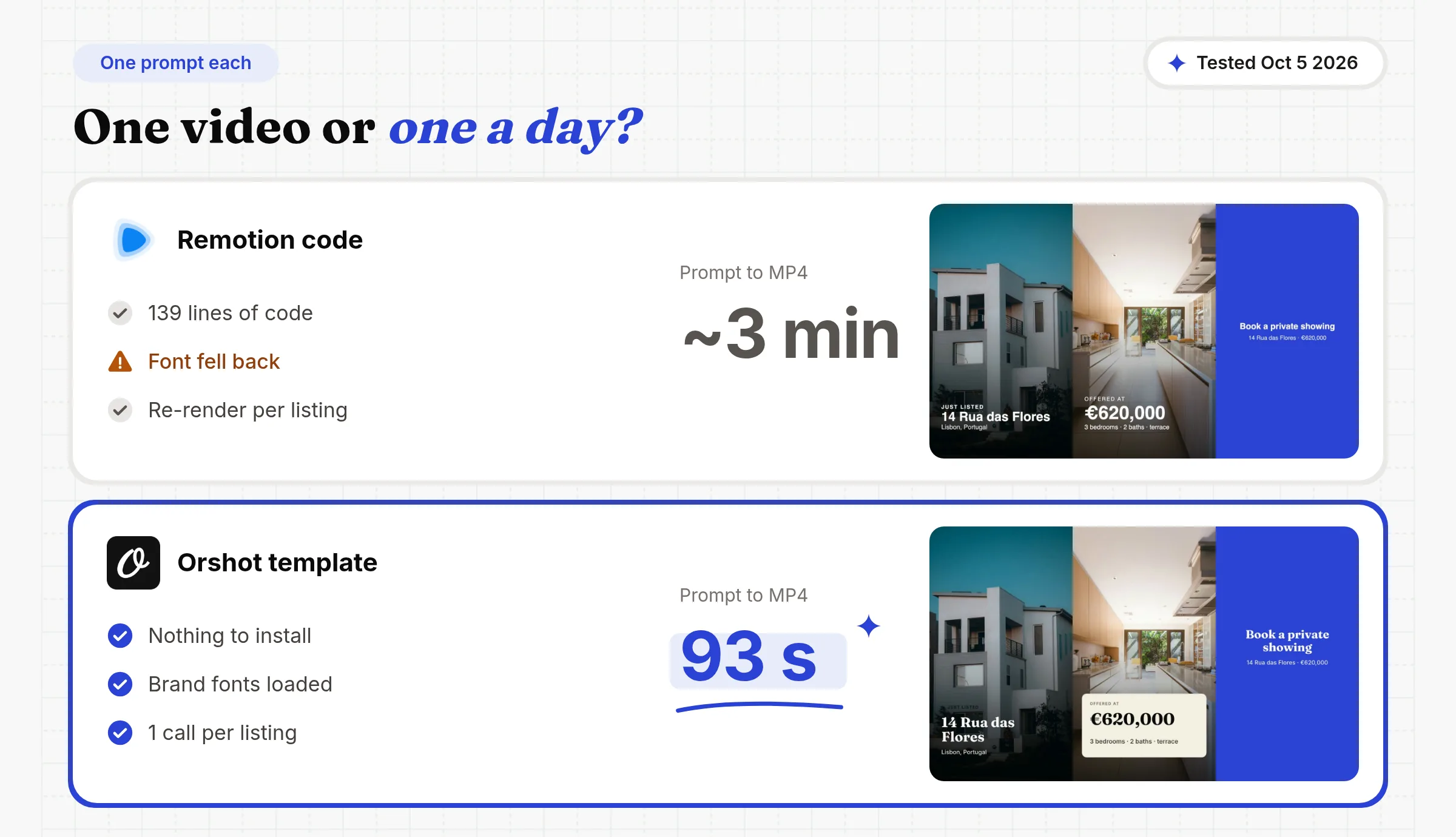
On October 5, 2026, I gave Claude Code the same brief two ways, from one session on my M5 Pro laptop: a 30-second vertical reel (1080×1920) for 14 Rua das Flores, Lisbon, €620,000. One prompt each, no designer. I timed each one to the first MP4.
| Remotion code | Orshot template | |
|---|---|---|
| What Claude made | 139 lines of TSX | A 20-layer video template |
| Setup | 89 s to scaffold and install | Nothing to install |
| First render | 66 s (downloads a headless Chrome) | Under a minute, in the cloud |
| Prompt to first MP4 | About 3 minutes | 93 seconds |
| Fonts | Fell back to Helvetica | Fraunces and Inter loaded |
| Next listing | 15 s re-render with new props | One render call with new fields |
What happens on the second video?
The first drafts looked close. The real difference is the next video.
The template stays in your workspace. So anyone, or any scheduled job, can render the next listing. No code project needed.
3. Make Bulk Videos from Data with Claude and Orshot
Pick this if you need bulk videos from data: UGC-style and social videos per product, listing or post, a daily reel, or a personalized video per customer.
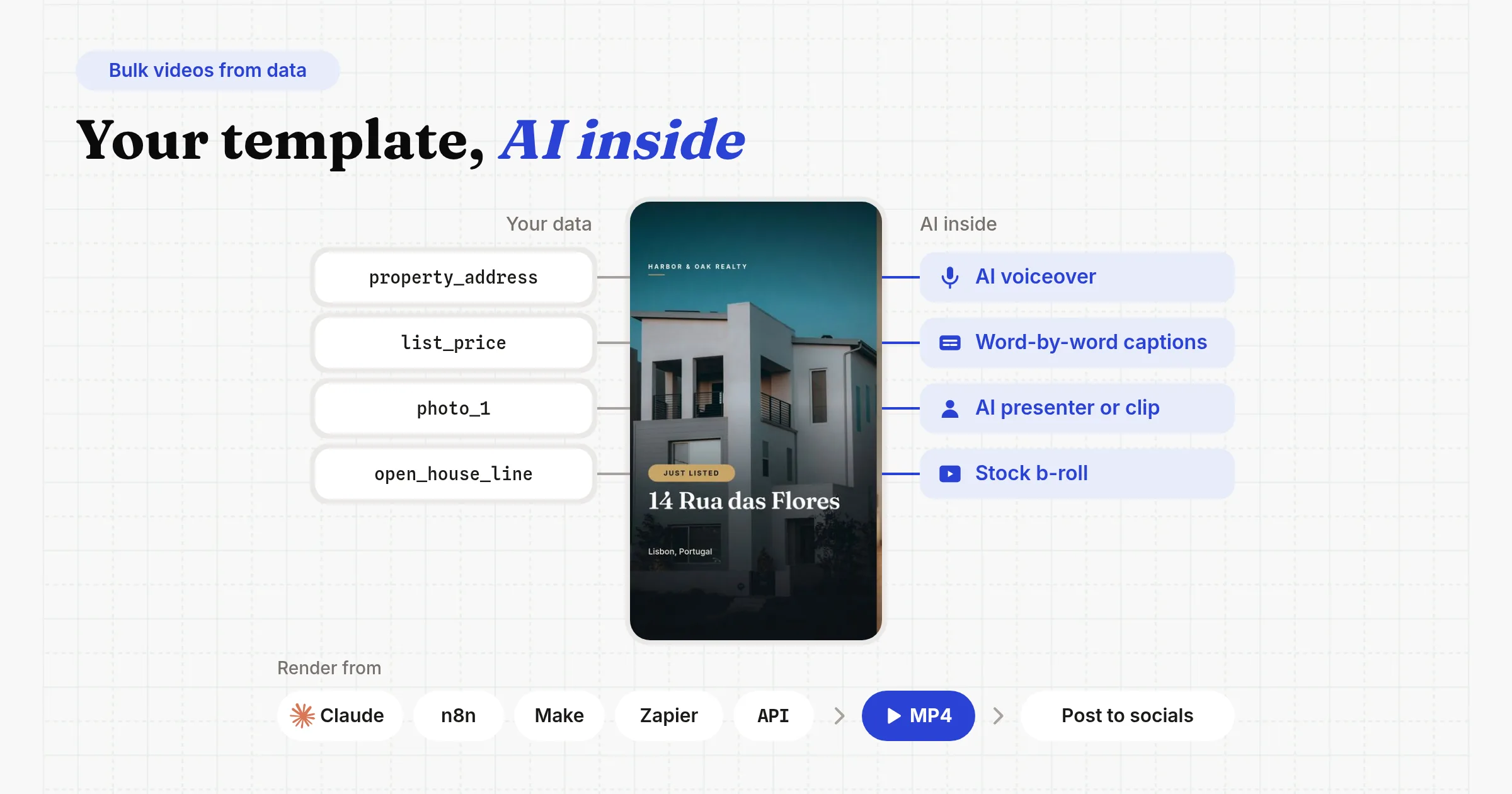
You design a branded video template once. Each render fills it with your data, and the AI parts live inside the template:
- AI voiceover from a script, and the script can change per render
- Word-by-word captions made from the voiceover, in your brand font
- AI clips of 3 to 15 seconds as one layer: b-roll from a prompt, an animated photo, or a lip-synced presenter speaking your script (more on AI clips)
- Stock photos and videos from Pixabay and Unsplash, which Claude can search and drop in
- Your data in every text, image and video field
Video costs 1 credit a second. A 30-second video is 30 credits, or $0.78 on the $39 plan.
Step 1: Design the template
Design it in Orshot Studio, a browser editor with layers, a video timeline, voiceover and captions. Or ask Claude to design it from a brief.
Every layer you mark as dynamic becomes a field you can fill per video, like property_address, list_price or photo_1.
Step 2: Connect Orshot to Claude
Orshot for agents is in the Claude connectors directory, so it's one click in claude.ai or Claude Desktop. In Claude Code it's one command:
claude mcp add orshot --transport http https://mcp.orshot.com/mcpStep 3: Ask for the video
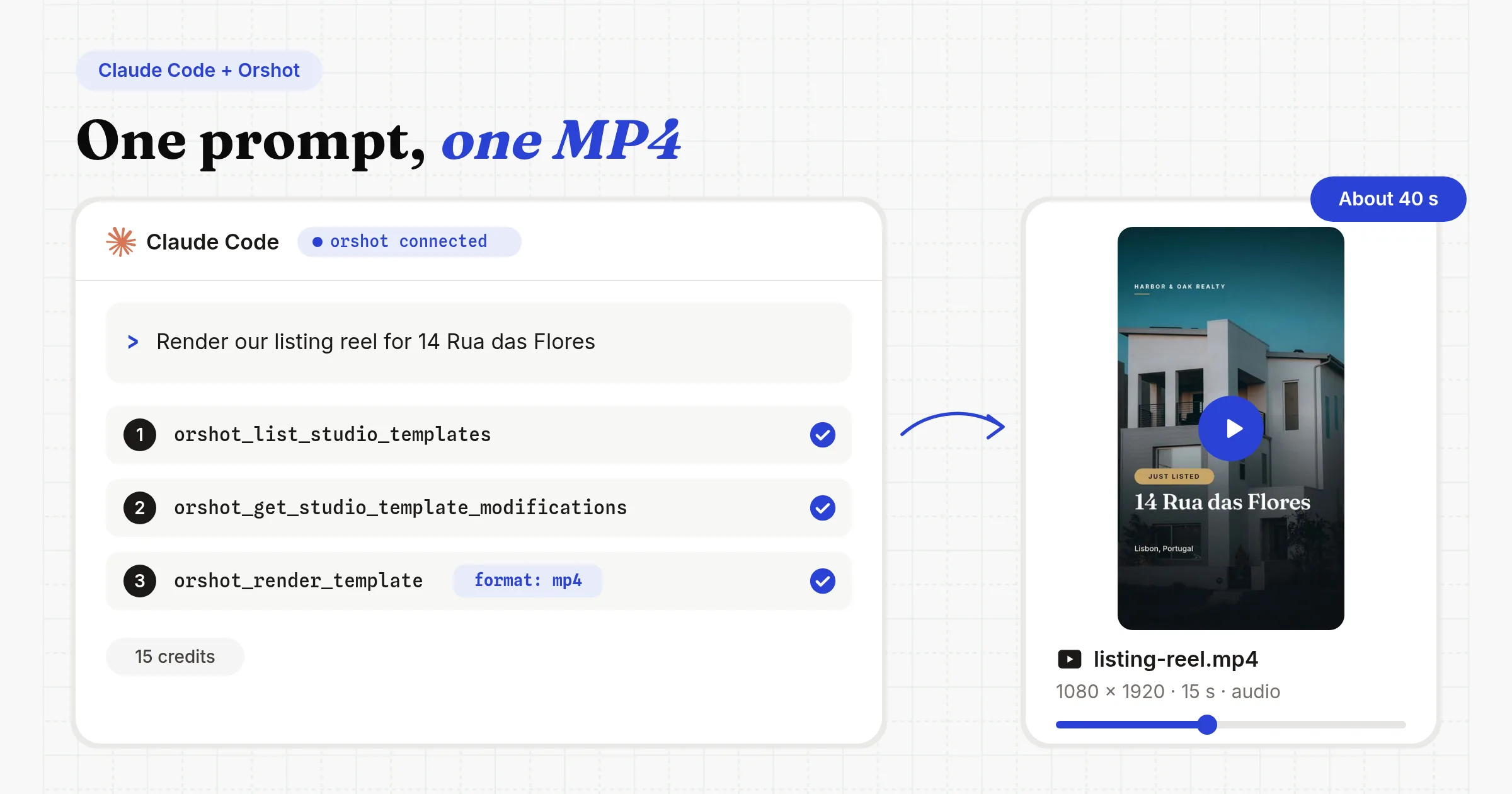
Render our listing reel for 14 Rua das Flores, Lisbon, €620,000.
Step 4: Get the MP4 back
Claude sends back the link. It can also post it, schedule it or save it as a draft on your connected social accounts.
Step 5: Run it in bulk from n8n, Make, Zapier or your code
You don't need Claude in the loop every time. Here's what Claude sent, the same call from your own code, and how to make it run every day:
The arguments from my session, trimmed to 8 of the 15 changed fields. Everything else came from the template.
{
  "templateId": "21465",
  "format": "mp4",
  "modifications": {
    "property_address": "14 Rua das Flores",
    "city": "Lisbon, Portugal",
    "list_price": "€620,000",
    "stat_1_value": "3",
    "stat_2_value": "2",
    "feature_1": "Sunny south-facing terrace",
    "feature_4": "Ten minutes to Baixa",
    "open_house_line": "Saturday, Oct 11 · 2 to 5 PM"
  }
}
The same render from a cron job, n8n or your backend, no Claude involved. It's the video generation API the MCP tool calls.
const res = await fetch("https://api.orshot.com/v1/studio/render", {
  method: "POST",
  headers: {
    Authorization: "Bearer YOUR_ORSHOT_API_KEY",
    "Content-Type": "application/json",
  },
  body: JSON.stringify({
    templateId: 21465,
    modifications: {
      property_address: "14 Rua das Flores",
      list_price: "€620,000",
    },
    response: { type: "url", format: "mp4" },
  }),
});
Ask Claude once and it builds a workflow that keeps running after the chat ends:
Every weekday at 9 am, take the newest row from my Listings sheet, render the listing reel, and save it as an Instagram draft for me to review.
Claude calls orshot_create_workflow with a schedule trigger, the Google Sheets source, the template and the Instagram destination, then orshot_validate_workflow before it goes live.
Orshot also connects to Google Sheets, Airtable and webhooks, so a new row can trigger a new video.
Check these before you scale it
- Check a template Claude designed. In my test its "Just listed" pill rendered without a background. It's a quick fix in Studio, and it stays fixed for every render after.
- Test the layout with a still image first. A PNG of the template costs 1 credit and shows if a long address fits. A video costs 15 to 30 credits.
- The template sets the length. Mine runs 15 seconds. For 30 seconds you need a longer template or a
durationoverride, not a longer prompt. - Add captions from the voiceover. They can show word by word in your brand font. See the docs on adding subtitles.
Weigh the pros and cons
- Design in a browser editor, change any layer later
- New data in every render, from Claude, n8n, Make, Zapier, Sheets, Airtable or your code
- AI voiceover, captions, clips and presenters inside the template
- Render and post to social accounts in one step
- The same template can also output images and PDFs
- You design the template once before the first video
- Video needs a paid plan, from $39 a month
- Length caps by plan: 3, 5 or 10 minutes per video
- Not meant for cinematic one-off footage. That's what AI video models are for.
Cashew.sg, a mortgage advisory in Singapore, runs this loop for daily carousels. In their first seven weeks, Claude requested 871 of their 875 renders. Their posts are images, but the loop is the same for video. It's written up in how Cashew.sg posts a carousel a day with Claude.
Orshot turned content production from an hour-a-piece design exercise into something that runs off our existing workflow.
Consistent, on-brand, and fast enough that we actually ship daily.
 Roshni MahbubaniGrowth Marketer, Cashew.sg
How Long Can a Video Made with Claude Be?
Claude sets no limit, because it doesn't make the video. The tool that renders it does:
- AI video models: clips of up to 15 to 30 seconds
- Remotion or HyperFrames code: any length you write
- Orshot: up to 3, 5 or 10 minutes per video, by plan
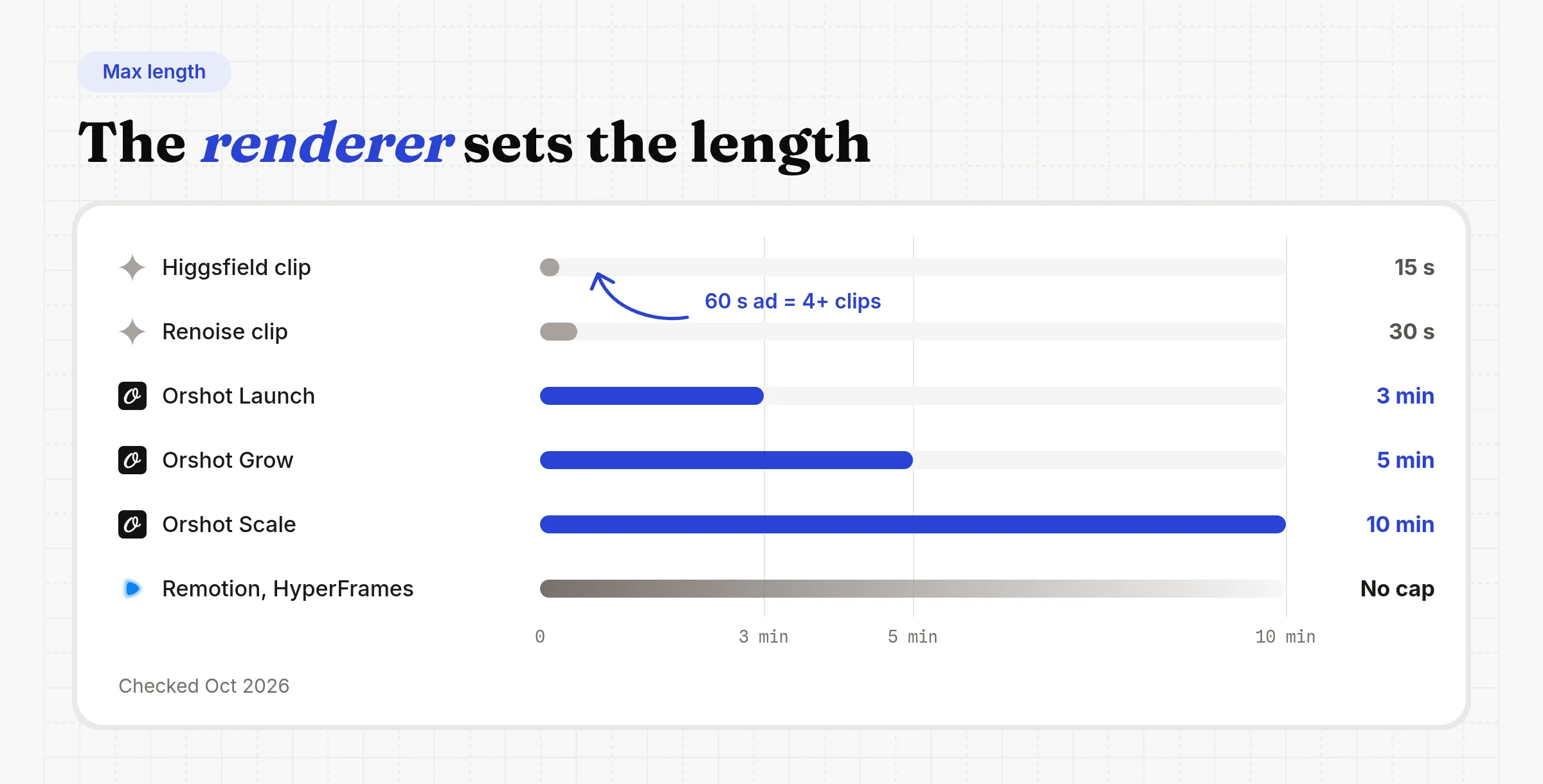
So a 60-second ad from an AI model means joining four or more clips, each a little different.
Faceless shorts mix AI and templates: How to Automate Faceless Videos with n8n puts a lip-synced AI presenter clip inside a branded template.
Common Questions
Can Claude generate videos?
How long can videos made with Claude be?
Does Claude generate pictures and videos?
Which AI is best for producing videos?
Is it illegal to use AI to make videos?
Can Claude Code make videos?
Is making videos with Claude free?
Can Claude edit a video I already have?
What is Orshot?
Get Your First MP4 from Claude
Sign up, build a video template in Studio or ask Claude to design it, then connect Orshot to Claude and ask for the MP4. The free plan's 100 credits a month cover images and PDFs. Video renders start on paid plans from $39.
If something doesn't work the way you expect, hit the chat button. I'm usually the one on the other end.
Researched, tested and drafted with Claude Code on my machine, then edited by me. Visuals rendered with the Orshot MCP.