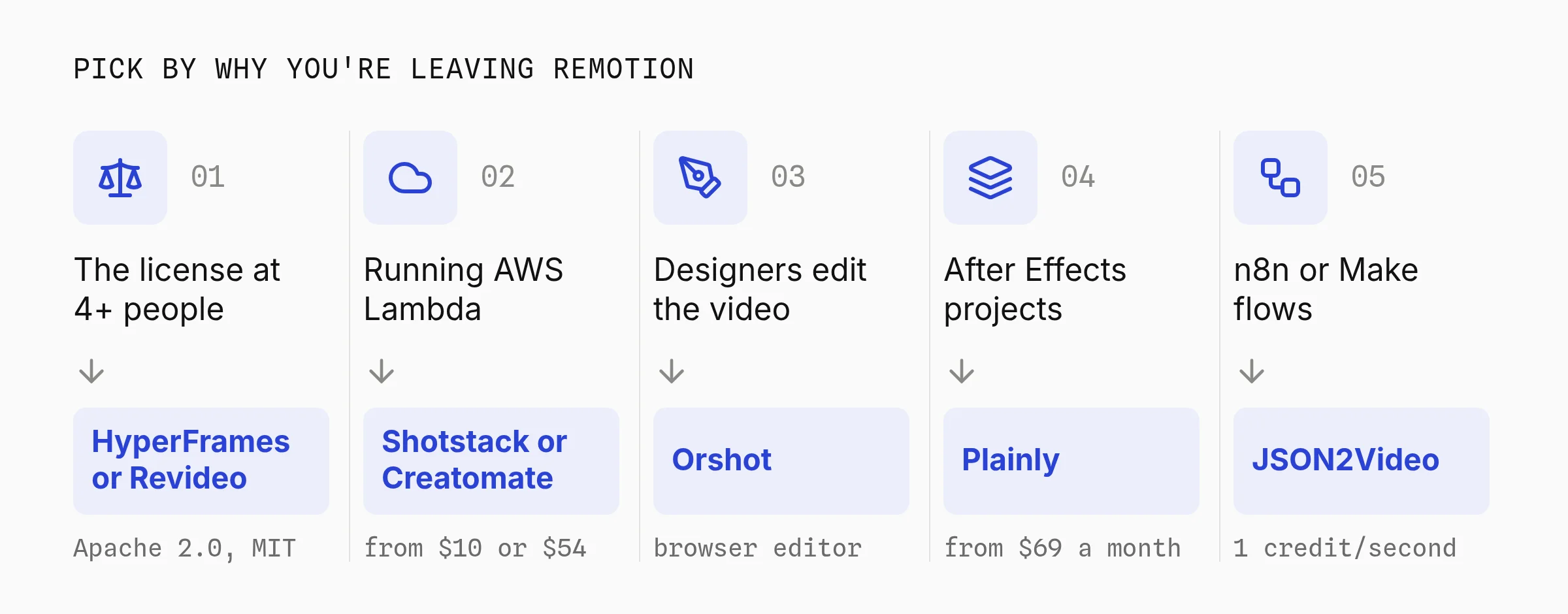
If designers need to edit animated, template-based videos that your data fills in, the best Remotion alternative is Orshot. If Remotion's license is the problem, switch to HyperFrames: plain HTML and GSAP under Apache 2.0.
Only tired of running AWS Lambda? Shotstack and Creatomate render JSON timelines in their own cloud.
I rendered the same 10-second 1080p video with Remotion, HyperFrames and Orshot on October 15, 2026. From a clean machine, Orshot returned the first MP4 fastest: 15.7 seconds, against 17.5 for HyperFrames and 29.5 for Remotion.
Once installed, the two local tools re-render faster (3.2 and 8.5 seconds), because Orshot's cloud time includes the network and the upload.
Remotion is still the cheapest way to render at volume. A team of three or fewer pays only AWS, about $21 a month for 1,000 thirty-second videos. Every hosted option here charges for the setup you skip.
Why Teams Look for a Remotion Alternative
Remotion is a React library for making videos in code. You write each video as React components, and Remotion renders real MP4s on your machine, your servers or AWS Lambda.
Remotion is popular and actively shipped: 64,316 GitHub stars, 2.26 million npm downloads a week and v4.0.535 on October 12, 2026. So most people leaving aren't unhappy with the renderer. They hit one of these:
- The license. Remotion is free up to 3 people; the fourth means a company license.
- Lambda. Rendering at volume means running Remotion Lambda in your own AWS account, with an 11-step setup.
- React. Every template change is a code change and a redeploy, so designers wait on a developer.
- Agents. Coding agents now write video code, and HyperFrames, built for agents in March 2026, already matches Remotion's GitHub stars.
Remotion Alternatives at a Glance
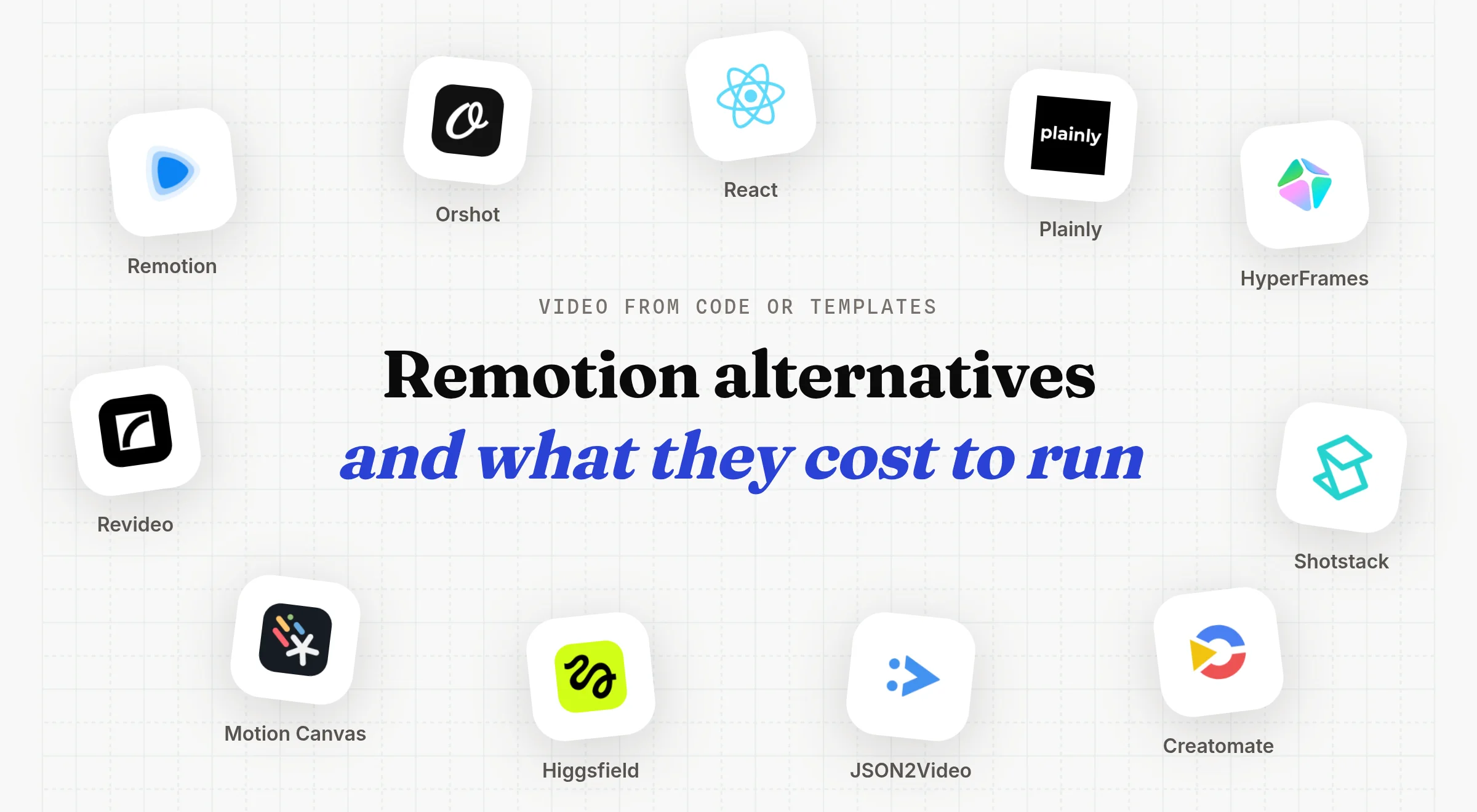
The nine alternatives fall into three groups: frameworks you run yourself, hosted render APIs, and AI routes. I checked every license and pricing page on October 15, 2026.
| Tool | You build with | Pricing |
|---|---|---|
| Remotion | React components | Free to 3 people, then $0.01 a render |
| HyperFrames | HTML, CSS and GSAP | Free, Apache 2.0 |
| Revideo | TypeScript scenes | Free, MIT |
| Motion Canvas | TypeScript and an editor | Free, MIT |
| Orshot | Templates in a browser editor | From $39 a month |
| Shotstack | JSON timeline | From $10 for 50 minutes |
| Creatomate | Template editor and JSON | From $54 a month |
| JSON2Video | JSON scenes | From $16.63 a month |
| Plainly | After Effects projects | From $69 a month |
| Higgsfield API | Prompts to AI models | Per generation |
The Same Video in Remotion, HyperFrames and Orshot
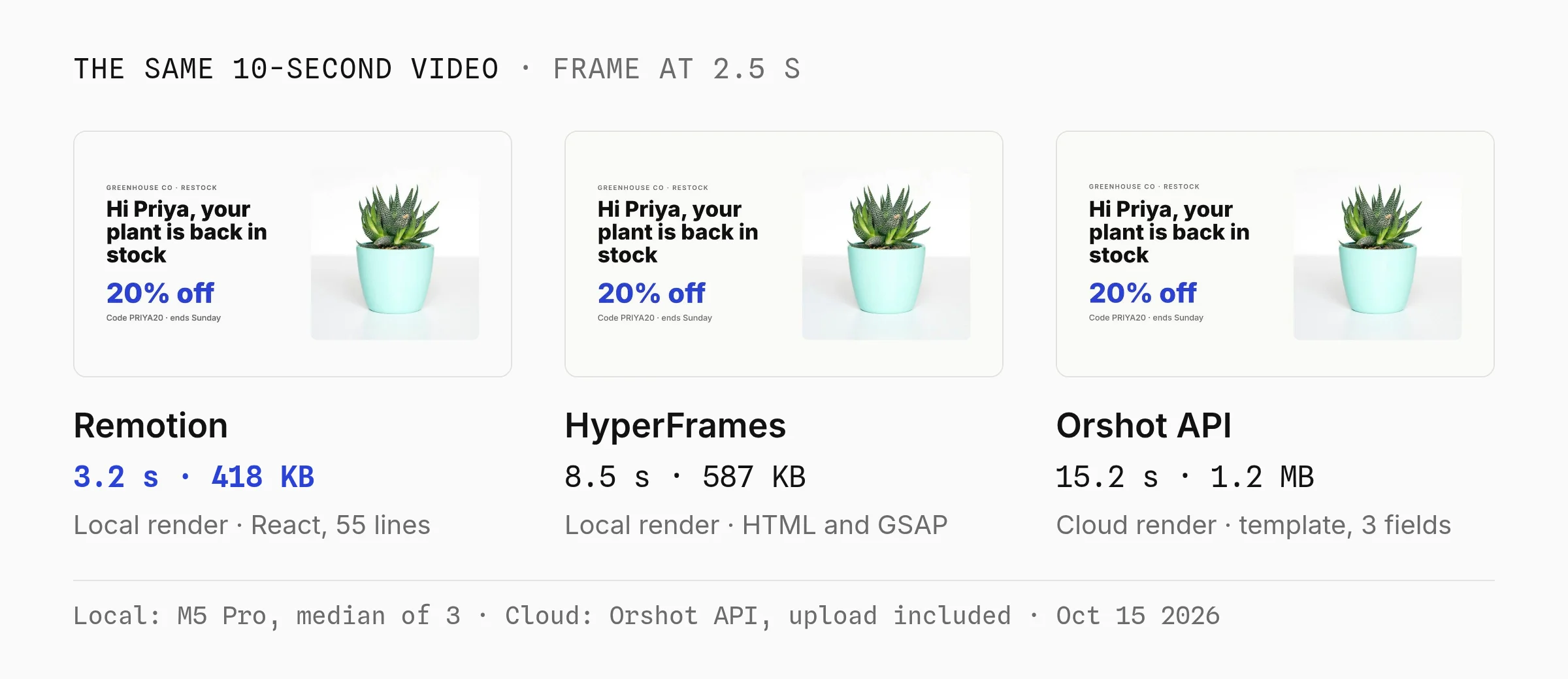
Remotion, HyperFrames and Orshot all rendered the same 10-second 1080p promo to near-identical frames. Orshot needed no install and was first to a finished MP4, while Remotion re-rendered fastest once set up.
How I Tested
I built one composition three times on October 15, 2026: a "Hi Priya, your plant is back in stock" restock promo with a name, an offer, a product photo and four timed fades.
- Remotion 4.0.535: 55 lines of React across 3 files, Inter from
@remotion/google-fonts, rendered withnpx remotion renderand default settings (H.264, CRF 18). - HyperFrames 0.8.162: 45 lines in one HTML file with GSAP, rendered with
npx hyperframes render --crf 18so the quality setting matched. - Orshot: the same layout as a Studio template with 3 dynamic fields, rendered through the API at 30 fps.
Remotion and HyperFrames ran locally on an Apple M5 Pro with 48 GB of RAM, Node 24 and FFmpeg 8.1, median of 3 runs, so their times include no network.
Orshot ran in the cloud. Its time is the mean of 2 calls from my machine and covers the request, the render and the upload to storage.
Render Times and Install Size
From an empty folder, Orshot was first to a finished MP4 at 15.7 seconds, because there was nothing to install. HyperFrames took 17.5 seconds and Remotion 29.5.
On a repeat render the local tools pull ahead: Remotion 3.2 seconds and HyperFrames 8.5, against 15.2 for Orshot's cloud round trip.
| Tool | On disk | First MP4 | Repeat |
|---|---|---|---|
| Remotion (local) | 870 MB | 29.5 s | 3.2 s |
| HyperFrames (local) | 311 MB | 17.5 s | 8.5 s |
| Orshot API (cloud) | Nothing | 15.7 s | 15.2 s |
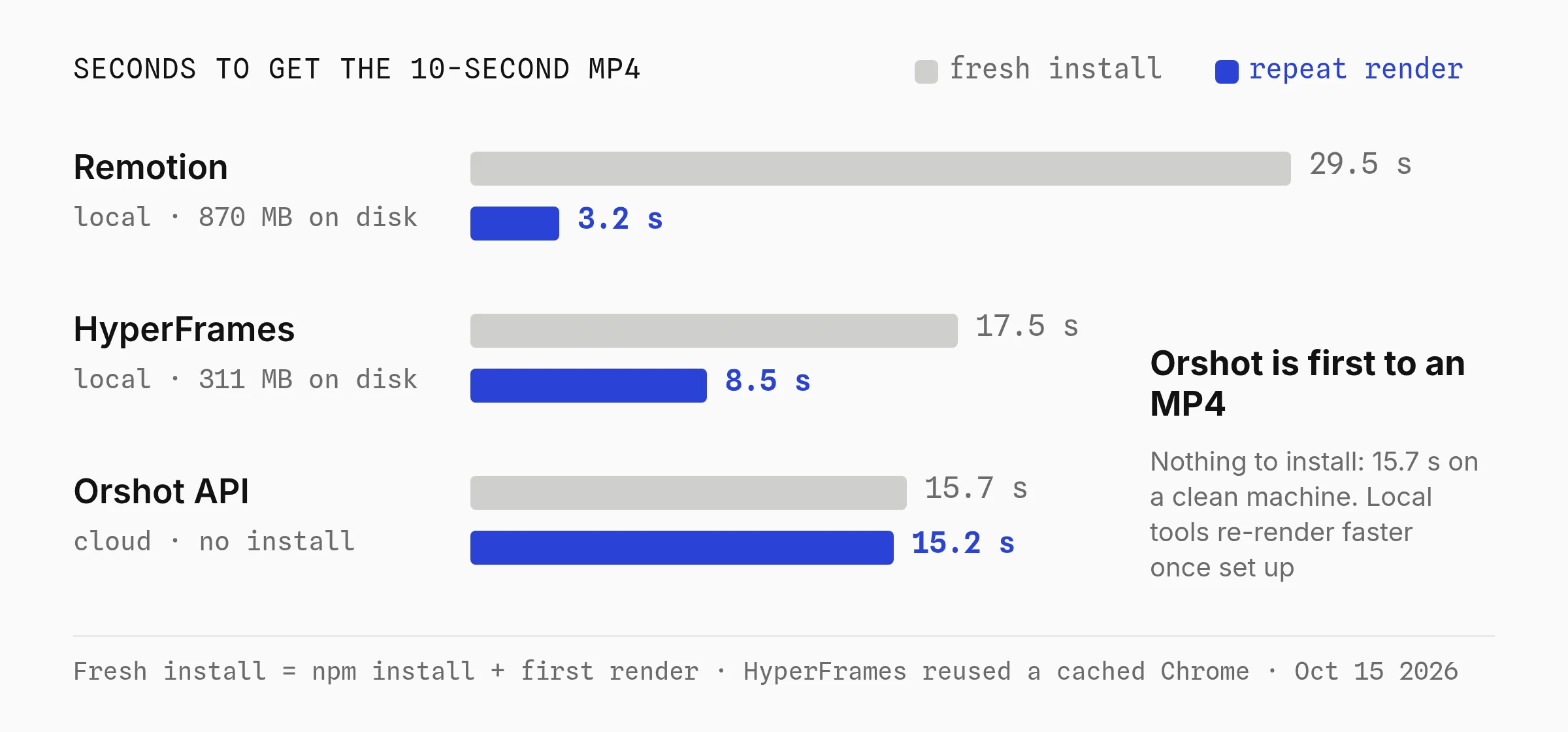
First MP4 is the time from npm install in an empty folder to the first finished video. Repeat is a second render with everything installed.
Remotion's 870 MB includes a 570 MB Chrome Headless Shell downloaded on the first render. HyperFrames reused a cached Chrome (201 MB), so a clean server would add that download.
What the Test Shows
- Orshot is the fastest to a first video. With nothing to install, a new machine or server gets a hosted MP4 in 15.7 seconds, with no browser, fonts or FFmpeg to manage.
- Remotion is the fastest renderer once it's set up. It renders locally, so 3.2 seconds for 300 frames has no network or upload in it.
- HyperFrames is lighter to install than Remotion and slower to re-render.
Remotion Lambda changes the picture again: it splits a render across many functions in the cloud, but only after an 11-step setup.
Verdict: if you render on a machine you already set up, Remotion and HyperFrames re-render faster locally. If you'd rather not install or host anything, Orshot gets you a hosted MP4 first.
Remotion Pricing and Lambda Costs
Remotion has two bills: the license, paid to Remotion, and the compute, paid to AWS or whoever runs your servers.
The Remotion License
The free Remotion license covers individuals, for-profit companies with up to 3 employees, non-profits, and anyone still evaluating it. Everyone else buys a company license on remotion.pro:
| Remotion license | Price | Who it's for |
|---|---|---|
| Free | $0 | Individuals, companies of up to 3 people, non-profits |
| Creators | $25 a month per seat | Low-volume videos made by coding and prompting |
| Automators | $0.01 per render, $100 a month minimum | Apps, editors and automated video |
| Enterprise | From $500 a month | Custom terms, billing and support |
A few details matter for automation, from the Remotion license FAQ:
- One render is any successful output, a 10-second clip or a 1-hour film. The $100 minimum covers 10,000 renders.
- Tracking is on you. Remotion 5.0 will make telemetry mandatory for Automators customers.
License terms checked against remotion.pro and the license FAQ on October 15, 2026.
Remotion Lambda Costs
Remotion Lambda splits a render across many AWS Lambda functions in your account. Remotion's own cost examples (2048 MB, us-east-1) put a 1-minute video at $0.017 to $0.021 and a 10-minute HD video at about $0.10.
Those numbers only count Lambda compute. S3 storage, bandwidth and CloudWatch logs are billed on top, and Remotion notes that a video inside your video "increases the cost significantly".
Before the first render, the Lambda setup guide walks through 11 steps, from IAM roles to deploying the function and the site. AWS allows 1,000 concurrent Lambdas per region, and Remotion warns new accounts can start as low as 10.
What You Maintain on Lambda
The Lambda bill leaves out time. Here's what the Remotion docs ask you to own, against what's left on your side with a hosted API like Orshot.
| You maintain | Remotion on Lambda | Orshot |
|---|---|---|
| Render setup | A Lambda function, an S3 site, an IAM role and user, access keys | An API key |
| Chromium and fonts | Chrome Headless Shell pinned per release, fonts loaded in code | Nothing; fonts live in the brand kit |
| Upgrades | Redeploy the function and the site | Nothing |
| Template changes | A React code change and a redeploy | A designer saves in Studio |
| Output files | Your S3 bucket and its bill | A URL kept for at least a year |
Checked against remotion.dev/docs (Lambda setup, upgrading, fonts) on October 15, 2026.
HyperFrames vs Remotion
HyperFrames vs Remotion comes down to HTML versus React. HyperFrames renders an HTML file with seekable animations under Apache 2.0, while Remotion renders React components under a license that turns paid at the fourth person.
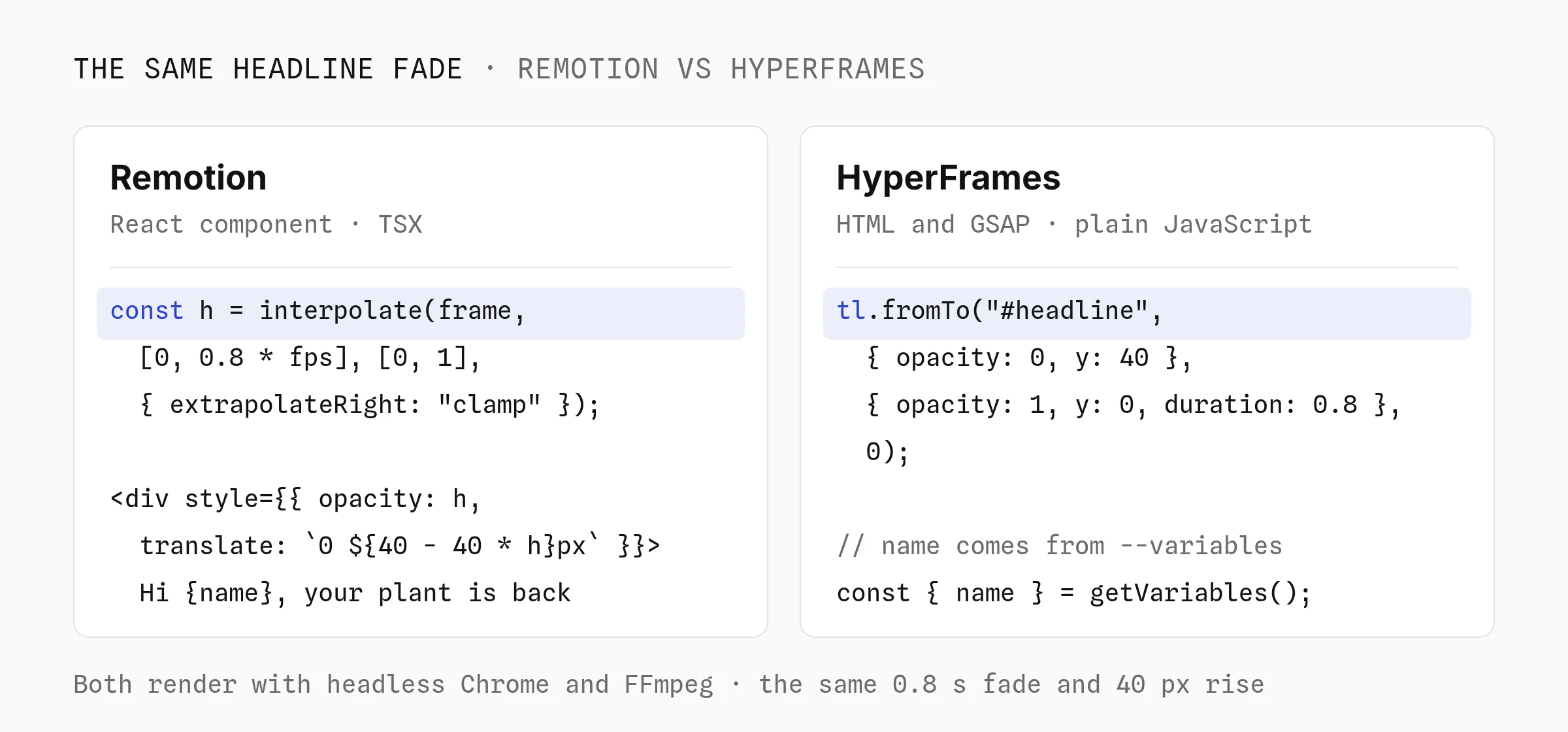
In my test the two rendered visually identical frames. The differences were elsewhere:
| Remotion | HyperFrames | |
|---|---|---|
| You write | React and TypeScript | HTML, CSS and GSAP |
| License | Free up to 3 people, then paid | Apache 2.0 |
| Repeat render in my test | 3.2 s | 8.5 s |
| Installed size | 870 MB | 311 MB |
| Data in | --props JSON, typed with Zod | --variables JSON, or --batch for one video per row |
The HyperFrames comparison guide is fair about it: Remotion has more templates, tutorials and production history, and a React team keeps its components by staying.
HyperFrames also ships a remotion-to-hyperframes agent skill, which HeyGen says ports about 80% of a typical composition mechanically. HyperFrames renders through its CLI, Docker, AWS Lambda, Google Cloud Run or HeyGen's hosted cloud.
- Apache 2.0, free at any company size
- Plain HTML, so existing web animations move over with few changes
- 311 MB installed in my test, against 870 MB for Remotion
- 8.5 s per render in my test, against 3.2 s for Remotion
- Pre-1.0, and its Lambda path is newer than Remotion's
- Breaks quietly if a timeline uses wall-clock time or unseeded randomness
Best for: teams leaving Remotion over the license, or whose coding agent writes the video.
Verdict: pick HyperFrames if the license or React is the blocker and you're happy on a pre-1.0 tool. Stay on Remotion if your team writes React and you want the faster renderer with five more years of production use.
Code-First Remotion Alternatives
Code-first alternatives keep the video in code the way Remotion does. HyperFrames is covered above; two more keep the TypeScript model.
Revideo
Revideo renders TypeScript scenes to video under MIT, with a headless renderVideo() function and a CLI render endpoint.
- Activity: 4,110 GitHub stars; the repo moved to the
midrenderorganization, and the last npm release is v0.11.0 from July 10, 2026. - Telemetry: on by default through PostHog. Set
DISABLE_TELEMETRY=trueto turn it off.
Best for: developers who want Remotion's model with an MIT license and will run the infrastructure.
Motion Canvas
Motion Canvas is an MIT TypeScript library plus an editor with a live preview, built for "informative vector animations" synced to voiceovers.
It has 19,343 GitHub stars, its latest stable release is still 3.17.2, and it isn't built as a server-side render API.
Best for: one-off explainer animations, not data-driven video at volume.
Hosted Render APIs with No Lambda to Run
Hosted render APIs replace the renderer and the AWS account with an API call. You pay more per video, and you stop maintaining Chromium, fonts and Lambda deploys.
Shotstack, Creatomate, JSON2Video and Orshot all have a browser editor, n8n, Make and Zapier connections, and billing by video length.
They differ on outputs, AI footage and how long files stay up:
| Tool | Outputs from a template | AI footage in the render | Files hosted for |
|---|---|---|---|
| Orshot | MP4, PNG, JPG and multi-page PDF | Built in, per layer | At least a year |
| Shotstack | MP4, GIF, JPG, PNG | Built in | Kept on its CDN |
| Creatomate | MP4, GIF, JPG, PNG | With your own OpenAI or Stability key | 30 days |
| JSON2Video | MP4 | Not built in | 7 days |
Checked October 15, 2026 in the Shotstack docs, Creatomate's file retention and format docs, and JSON2Video's pricing and retention docs.
Shotstack matches Orshot on AI footage and hosting. Only Orshot renders a PDF from the same template.
Orshot
Orshot is an API for automated image, PDF and video generation from templates. You design the template in Orshot Studio, a Figma-like editor in the browser with a timeline, layer animations, voiceover and captions. (Disclosure: I built Orshot.)
Each layer you mark as dynamic becomes an API parameter, the same way a Remotion composition takes inputProps.
The same-video test kept Orshot to plain text and a photo so the comparison stayed fair. A real Orshot video template usually carries more: an AI-generated clip as one layer, plus your data on top.
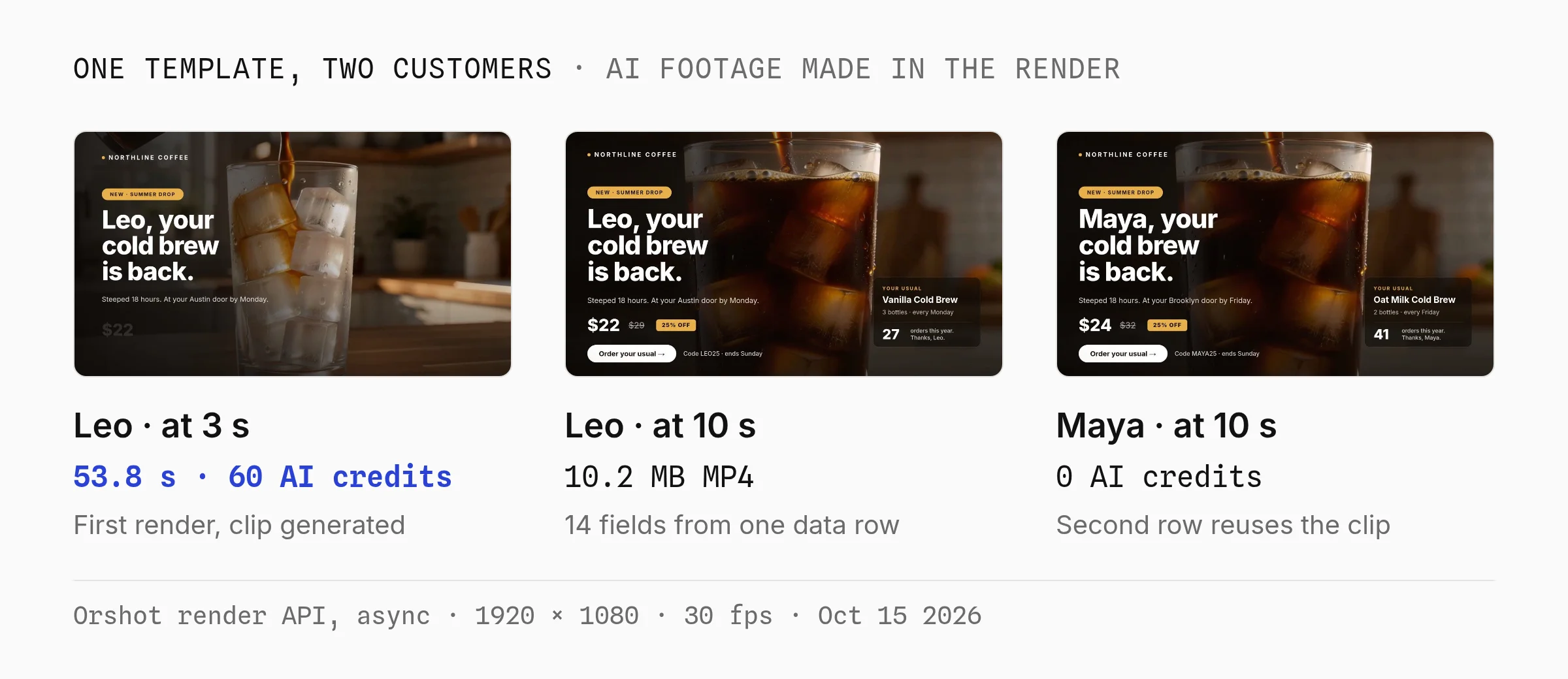
Here is the ad I built to show that, a personalized cold brew drop. The background footage is AI-generated from a prompt in the same render call.
The name, usual order, price, code and order count come from one row of data.
Press play below, click a layer to see its parameter name, or copy the template into your own workspace.
What changes compared to Remotion:
- No React and no Lambda. A designer edits the template in Studio, and one POST returns a file URL kept for at least a year.
- AI footage as a layer. Any video layer can take a
promptat render time. Identical inputs reuse the cached clip for free. - Images and PDFs from the same template. Change
formattopngorpdf, and Smart Resize adds 9:16, 1:1 and 16:9 versions. - Render and post in one call. Social publishing sends the video to TikTok, Instagram, YouTube and 12 more platforms.
- Automation tools. A first-party n8n node, Make and Zapier apps, and built-in workflows.
In production: customers have rendered 5,800+ videos with Orshot since January 2026, and the median render took 18 seconds. 99% came from automated jobs: the API 89%, AI agents through MCP 9%, workflows under 1%.
From Orshot's logs on October 15, 2026, customer accounts only.
Orshot turned content production from an hour-a-piece design exercise into something that runs off our existing workflow.
Consistent, on-brand, and fast enough that we actually ship daily.
 Roshni MahbubaniGrowth Marketer, Cashew.sg
- Designers change the video in a browser, no deploy
- Nothing to install or host, the call returns a hosted URL
- The same template renders MP4, PNG and PDF
- AI footage per render, cached when the prompt repeats
- Re-renders slower than a warm local install, 15.2 s vs 3.2 s
- Not the cheapest per video: $280 a month for 1,000 thirty-second videos
- Video needs a paid plan and caps at 3 to 10 minutes by plan
- AI clips cost extra AI credits, 3 to 6 per second
Pricing: Orshot video bills 1 credit per second on every paid plan, from $39 a month for 1,500 credits. The longest video is 3 minutes on Launch, 5 on Grow and 10 on Scale. The free plan's 100 credits a month cover images and PDFs, not video. AI footage is billed separately in AI credits: 3 a second in HD, 6 in 1080p, charged only on delivery.
Orshot vs Remotion in Numbers
Three numbers you can check in Remotion's docs and ours.
- Setup before the first cloud render
- Orshot1Remotion Lambda11
- AWS services to configure
- Orshot0Remotion Lambda4
- Social platforms to post to from the render call
- Orshot15Remotion0

Shotstack
Shotstack renders a JSON timeline of tracks and clips, with merge fields, a Studio editor and a white-label editor SDK. It bills by the second, rounded down.
- Pricing: pay as you go is $10 for 50 minutes. Plans run $39 for 250 minutes, $99 for 750, $199 for 2,000 and $499 for 10,000 a month. 4K starts on Pro.
Prices checked on shotstack.io/pricing on October 15, 2026. More in the Shotstack alternative post.
Best for: developers who want a timeline API with the lowest hosted price per minute.
Creatomate
Creatomate generates video and images from templates built in its editor, with a JSON format underneath. Video credits follow pixels, frame rate and length: a 30-second 1080p video is about 18.7 credits.
- Pricing (monthly): Essential $54 for 2,000 credits, Growth $129 to $279, Beyond $329 to $1,209 for up to 200,000.
Prices checked on creatomate.com/pricing on October 15, 2026. More in the Creatomate alternative breakdown.
Best for: multi-track compositing from a visual editor, at short lengths and modest resolution.
JSON2Video
JSON2Video builds each video from a JSON movie of scenes and elements, and it's common in n8n and Make workflows.
- Pricing: 1 credit per second, 4x for 4K. Hobby is 3,000 credits for $16.63 a month billed yearly, Professional $49.95 for 12,000, Startup $99.95 for 30,000.
Prices checked on json2video.com/pricing on October 15, 2026. The JSON2Video alternative post shows an n8n workflow on each.
Best for: no-code builders who want per-second pricing and a JSON format an n8n node can fill.
Plainly
Plainly renders After Effects projects you upload with a plugin, filled from a data source like Google Sheets.
- Pricing: Starter $69 a month for 50 render minutes up to Pro $649 for 600; files kept 24 hours to 7 days by plan.
Prices checked on plainlyvideos.com/pricing on October 15, 2026. The Plainly alternative post covers rebuilding an After Effects template in the browser.
Best for: teams whose motion designers already work in After Effects.
What 30-Second Videos Cost per Month
Remotion is the cheapest way to render 30-second videos at every volume, and a team of 3 or fewer pays only AWS.
Each column below is a month of 30-second, 1080p, 30 fps videos on the cheapest public plan that covers it.
| Videos a month | 100 | 1,000 | 10,000 |
|---|---|---|---|
| Remotion, team of 3 or fewer (Lambda only) | $2 | $21 | $210 |
| Remotion, team of 4+ (Automators + Lambda) | $102 | $121 | $310 |
| Shotstack | $10 | $78 | $499 |
| JSON2Video | $16.63 (yearly) | $99.95 | Custom |
| Creatomate | $54 | $179 | $1,209 |
| Plainly | $69 | $649 | From $1,500 |
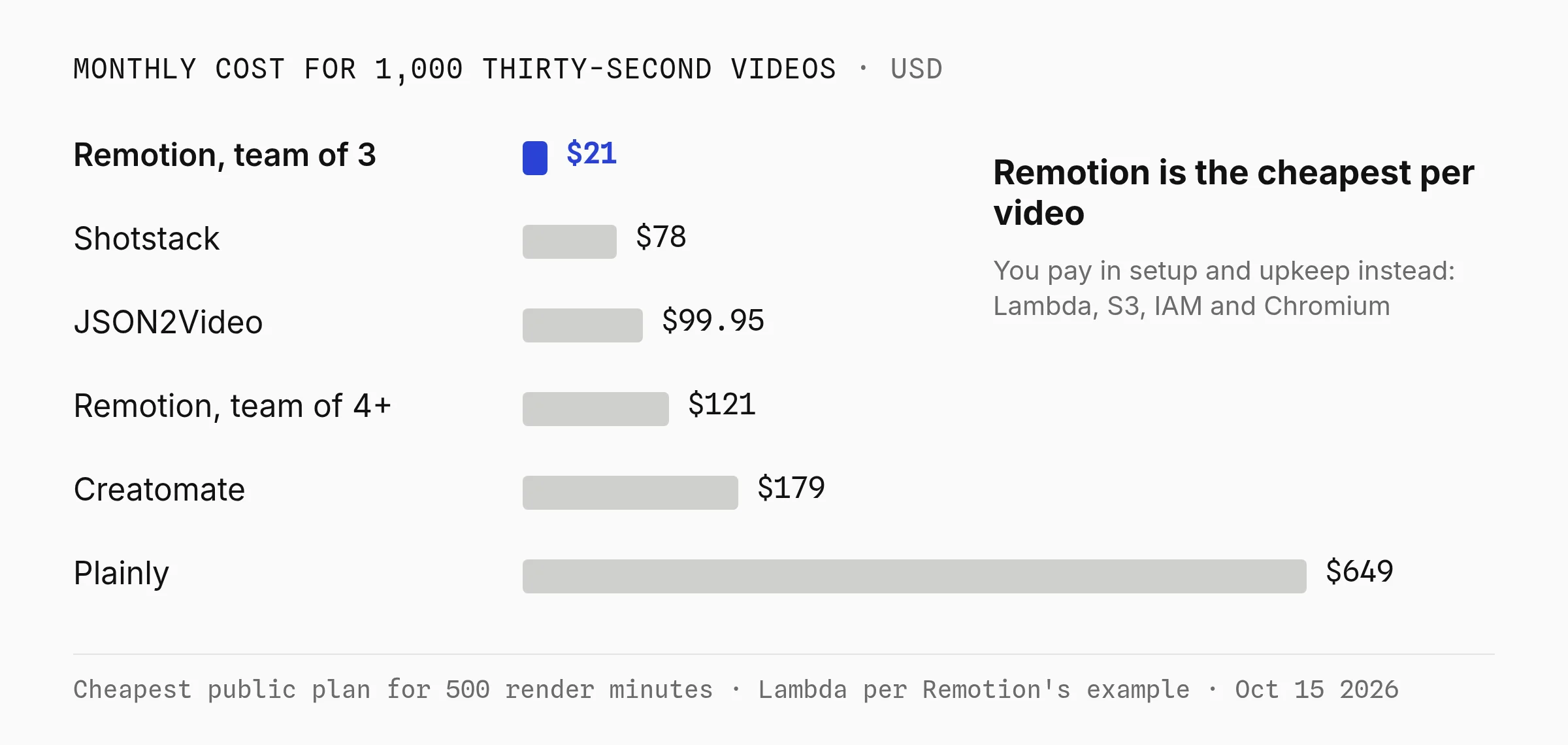
How each row is built, checked October 15, 2026:
- Remotion: Remotion's 1-minute cold Lambda example ($0.021) per 30-second video, so it errs high, plus the $100 Automators minimum for teams of 4+. S3 and CloudWatch are extra.
- Shotstack: the plan plus extra minutes at the plan's rate. Creatomate: 18.7 credits a video, rounded up to the next tier.
- JSON2Video: Hobby is yearly only, and above 30,000 credits it's a custom plan. Plainly: half a render minute per video.
Orshot isn't in the table because it doesn't win on price per video. 1,000 thirty-second videos are 30,000 credits, the $280 Grow plan.
That price includes the browser editor, images and PDFs from the same credits, files hosted for at least a year, and posting to 15 social platforms from the render call.
Verdict: if your developers' time is free, Remotion wins on cost. What the hosted APIs charge for is the setup, upgrades and template edits you no longer do.
Render a Template on Orshot Instead of Lambda
An Orshot render is one POST with the template ID and the values that change, and the response holds the MP4 URL. This is the exact call that rendered Leo's version of the cold brew ad, AI background included.
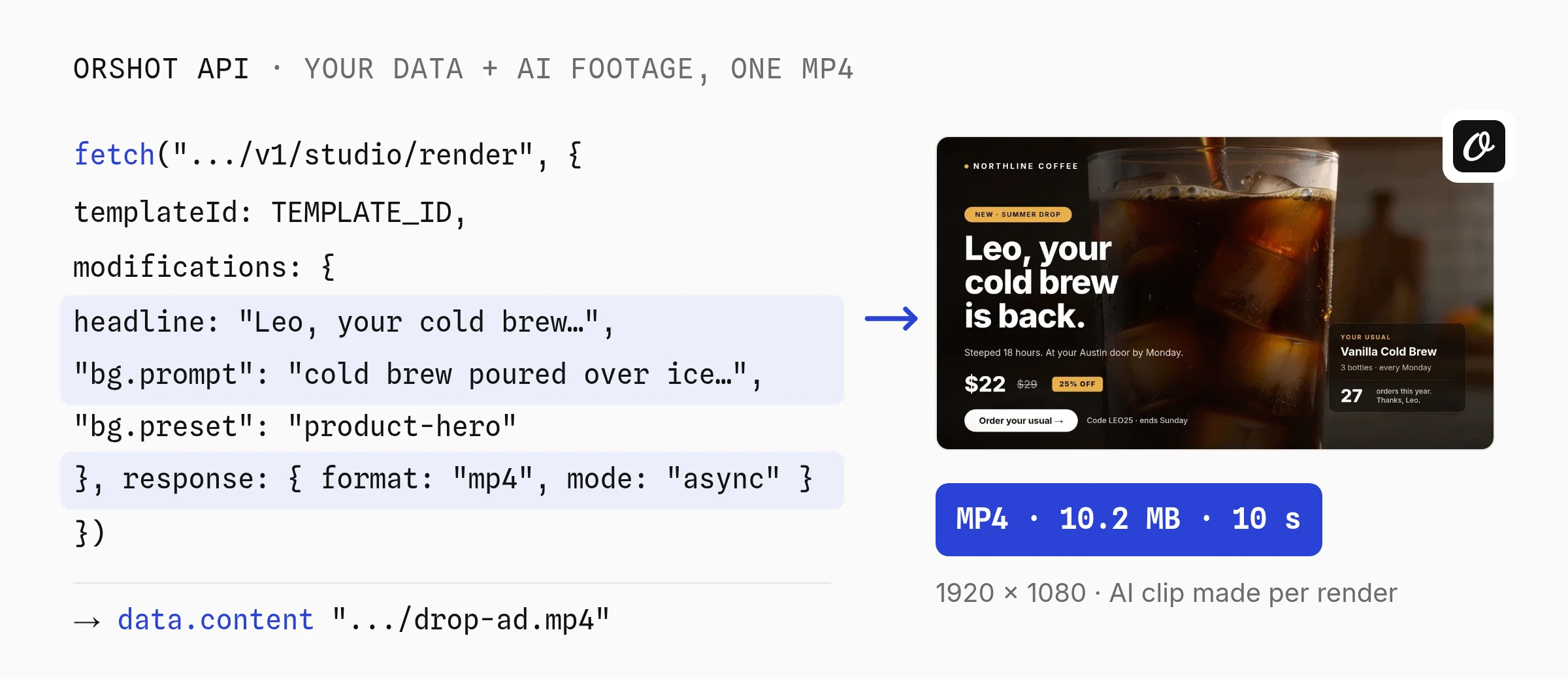
Leo's render took 53.8 seconds, most of it generating the 10-second clip, for 60 AI credits plus 10 render credits. Maya's render with the same prompt reused the clip, spent no AI credits and finished in about 38 seconds.
Already have footage? Pass its URL as the bg value and no AI credits are used.
Each key in modifications is a layer you marked as dynamic in Studio. The bg. keys ask Orshot to generate the background clip in the same render, so run it in async mode and poll the job.
const headers = {
  Authorization: "Bearer YOUR_ORSHOT_API_KEY",
  "Content-Type": "application/json",
};

const start = await fetch("https://api.orshot.com/v1/studio/render", {
  method: "POST",
  headers,
  body: JSON.stringify({
    templateId: "YOUR_TEMPLATE_ID",
    modifications: {
      headline: "Leo, your\ncold brew\nis back.",
      usual_item: "Vanilla Cold Brew",
      price: "$22",
      code_line: "Code LEO25 · ends Sunday",
      "bg.prompt": "slow motion cold brew poured over ice in a tall glass, warm morning light",
      "bg.preset": "product-hero",
      "bg.look": "product-commercial",
      "bg.duration": 10,
      "bg.fullHd": true,
    },
    response: { type: "url", format: "mp4", mode: "async" },
  }),
});
const job = await start.json();

// Poll the job (or pass webhook_url and skip this loop)
let result;
do {
  await new Promise((r) => setTimeout(r, 5000));
  const res = await fetch(
    `https://api.orshot.com/v1/studio/render-jobs/${job.id}`,
    { headers },
  );
  result = await res.json();
} while (!result.finished);

console.log(result.result.data.content); // video URL
The same template and data as a one-page PDF. Only format changes.
body: JSON.stringify({
  templateId: "YOUR_TEMPLATE_ID",
  modifications: { headline: "Leo, your\ncold brew\nis back." },
  response: { type: "url", format: "pdf" },
}),
For comparison, starting a render on Remotion Lambda. The call returns a render ID, and you poll getRenderProgress() until the file lands in S3.
import { renderMediaOnLambda } from "@remotion/lambda/client";

const { renderId, bucketName } = await renderMediaOnLambda({
  region: "us-east-1",
  functionName: "YOUR_REMOTION_FUNCTION_NAME",
  serveUrl: "https://YOUR_BUCKET.s3.us-east-1.amazonaws.com/sites/promo/index.html",
  composition: "Promo",
  inputProps: { name: "Leo", offer: "25% off" },
  codec: "h264",
});
Captions can be generated from the voiceover per render, including word-by-word styles, as the subtitles docs show. The same video layer can also take a portrait and a script to make a talking presenter for UGC-style ads, with consent: true.
When Remotion Fits Better
Remotion makes more sense than any alternative here when:
- Your team is 3 people or fewer. The license is free and you pay only AWS, about 2 cents a minute by Remotion's own numbers.
- The video is the product. Data visualizations, code walkthroughs and custom 3D that need React, npm packages or Three.js.
- Repeat render speed matters most. Remotion re-rendered my test video locally in 3.2 seconds.
- Videos run long. Orshot caps a video at 3 to 10 minutes by plan; Remotion has no cap.
- You render tens of thousands a month and a developer already owns AWS.
Orshot fits better when the people who change the video aren't React developers, when a campaign needs images and PDFs from the same template, or when you'd rather not own a Lambda deploy, Chromium and fonts.
Switch from Remotion to Orshot in 4 Steps
Orshot can't import React code, so a Remotion composition is rebuilt as a template. Most automated videos are a few text, image and clip layers with timed animations.
- Rebuild the layout in Studio with the same layers, timeline and brand fonts.
- Name dynamic layers after your
inputProps, so your calling code keeps the same keys. - Swap the call. Replace
renderMediaOnLambda()with one POST. For batches, async renders call your webhook when each video is done. - Compare a few renders, then shut down the Lambda function and the S3 site.
Have a composition you want rebuilt? Hit the chat button and send it over.
Remotion Alternatives FAQ
Can you use Remotion for free?
What exactly is Remotion?
What is the closest open-source alternative to Remotion?
What is the difference between HyperFrames and Remotion?
What is the best no-code alternative to Remotion?
What is the difference between Remotion and Higgsfield?
What is the cheapest way to render video at scale?
What is Orshot?
Pick Your Remotion Alternative
For the license, try HyperFrames on one composition with the port skill. To stop running Lambda, price your monthly minutes on Shotstack or Creatomate.
If designers should own the video, open the cold brew template above, click Copy This Template, and swap in your own data and footage prompt.
Sign up free to design and test templates with 100 credits a month for images and PDFs. When the first video template is ready, video renders start at $39 a month, with no Lambda, React or Chromium to maintain.
If something doesn't work the way you expect, hit the chat button. I'm usually the one on the other end.