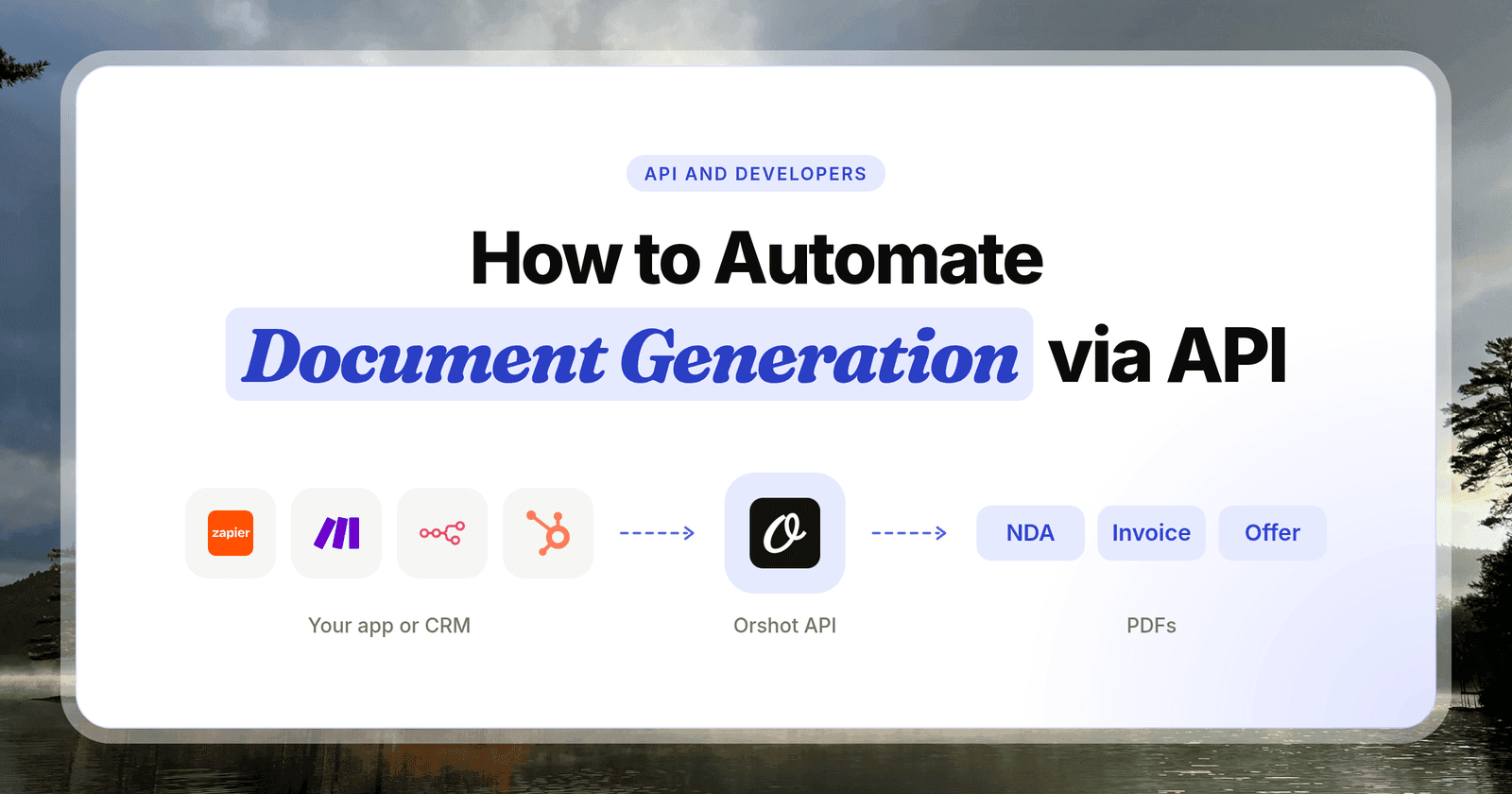
The TikTok Content Posting API lets your code publish videos and photo carousels to TikTok, but every post stays private until TikTok audits your app. And TikTok won't audit an app that only posts to your own accounts.
To post to your own accounts on a schedule, use a service that already passed the audit. Orshot also makes the media: one API call renders a TikTok video from your template and data, then posts it.
Below is every screen from my run on November 13, 2026: connecting TikTok, building the render request in Orshot's API playground, and the TikTok draft it saved.
The whole run, from connecting TikTok to a rendered video saved as a TikTok draft, in under 2 minutes, click by click.
What Orshot does for a TikTok posting job:
- Design once. Build a TikTok video or carousel template in the editor, or ask Claude to make it.
- Render from data. Send the text, prices and clips, and get an MP4 or the slides back.
- Post in the same call. Publish to your own TikTok accounts now, on a schedule or as a draft, with no TikTok audit.
| Goal | Tool | Public from day 1? | Makes the media? |
|---|---|---|---|
| A TikTok app for many creators | TikTok Content Posting API | No, after the audit | No |
| Post files you already made | A posting API | Yes | No |
| Videos and carousels from data | Orshot | Yes | Yes, from your template |
What the TikTok Content Posting API Does
The TikTok Content Posting API is TikTok's official, free API for publishing to a TikTok account from your own app. It has two posting modes and two content types.
- Direct Post publishes straight to the creator's profile with a caption, privacy level and comment settings.
- Upload sends the media to the creator's TikTok inbox as a draft. The creator finishes and posts it in the app.
- Video posts take MP4, MOV or WebM files.
- Photo posts take up to 35 images and show as a swipeable carousel, also called photo mode or a slideshow.
| Endpoint | What it does |
|---|---|
creator_info/query/ | Reads the creator's allowed privacy levels. Required before each post |
video/init/ | Starts a video Direct Post |
inbox/video/init/ | Uploads a video to the creator's inbox as a draft |
content/init/ | Starts a photo post, as a Direct Post or a draft |
status/fetch/ | Checks whether the post went through |
All five sit under /v2/post/publish/ on open.tiktokapis.com and take a user access token from TikTok's OAuth login. They come from TikTok's Content Posting API docs, checked November 13, 2026.
1. Build on the TikTok Content Posting API Yourself
Pick this if you are building a product where many TikTok creators connect their own accounts, like a scheduler or an editing app.
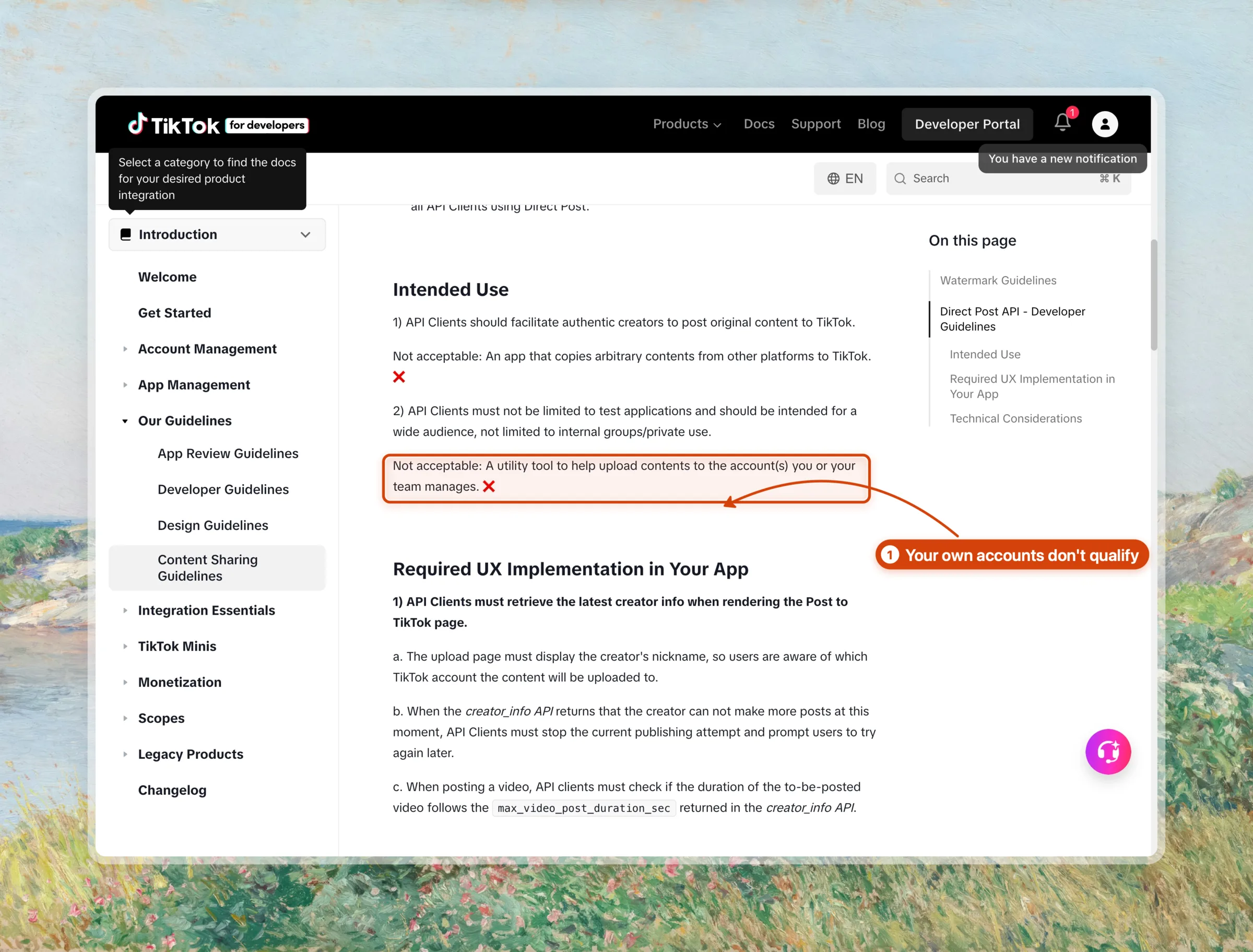
TikTok built the Content Posting API for apps with a wide audience. Its content sharing guidelines list this as not acceptable: "A utility tool to help upload contents to the account(s) you or your team manages."
Step 1: Register the app and request scopes
Create an app at developers.tiktok.com, add the Content Posting API product and turn on Direct Post. Request the video.publish scope to post to profiles, or video.upload to send drafts.
Step 2: Verify the domain that hosts your media
TikTok pulls photos from a URL, and only from a domain or URL prefix you verified in the app settings. A photo URL from anywhere else fails with url_ownership_unverified. Videos can be sent as a file upload instead.
Step 3: Log each creator in with OAuth
Each creator signs in with TikTok and approves your scopes. TikTok's token docs give the access token 2 hours and the refresh token 180 days, so a recurring job needs a refresh step.
Step 4: Build the posting screen TikTok asks for
TikTok's guidelines require a posting screen in front of every Direct Post. On that screen your app has to:
- show the creator's nickname from a fresh creator info call
- let the creator pick the privacy level from a dropdown with no default
- show a consent line before the publish button, and send media only after the creator agrees
- offer the commercial content disclosure toggle, off by default
Step 5: Post a photo carousel
With a token and a verified domain, a photo post is one request. TikTok then pulls each image from your URLs.
const res = await fetch(
  "https://open.tiktokapis.com/v2/post/publish/content/init/",
  {
    method: "POST",
    headers: {
      Authorization: `Bearer ${accessToken}`,
      "Content-Type": "application/json; charset=UTF-8",
    },
    body: JSON.stringify({
      post_info: {
        title: "5 cheap weekend trips from Lisbon",
        description: "Save this for your next long weekend",
        privacy_level: "PUBLIC_TO_EVERYONE",
        auto_add_music: true,
      },
      source_info: {
        source: "PULL_FROM_URL",
        photo_cover_index: 0,
        photo_images: [
          "https://media.yourdomain.com/trips/slide-1.webp",
          "https://media.yourdomain.com/trips/slide-2.webp",
        ],
      },
      post_mode: "DIRECT_POST",
      media_type: "PHOTO",
    }),
  }
);
Step 6: Pass the audit
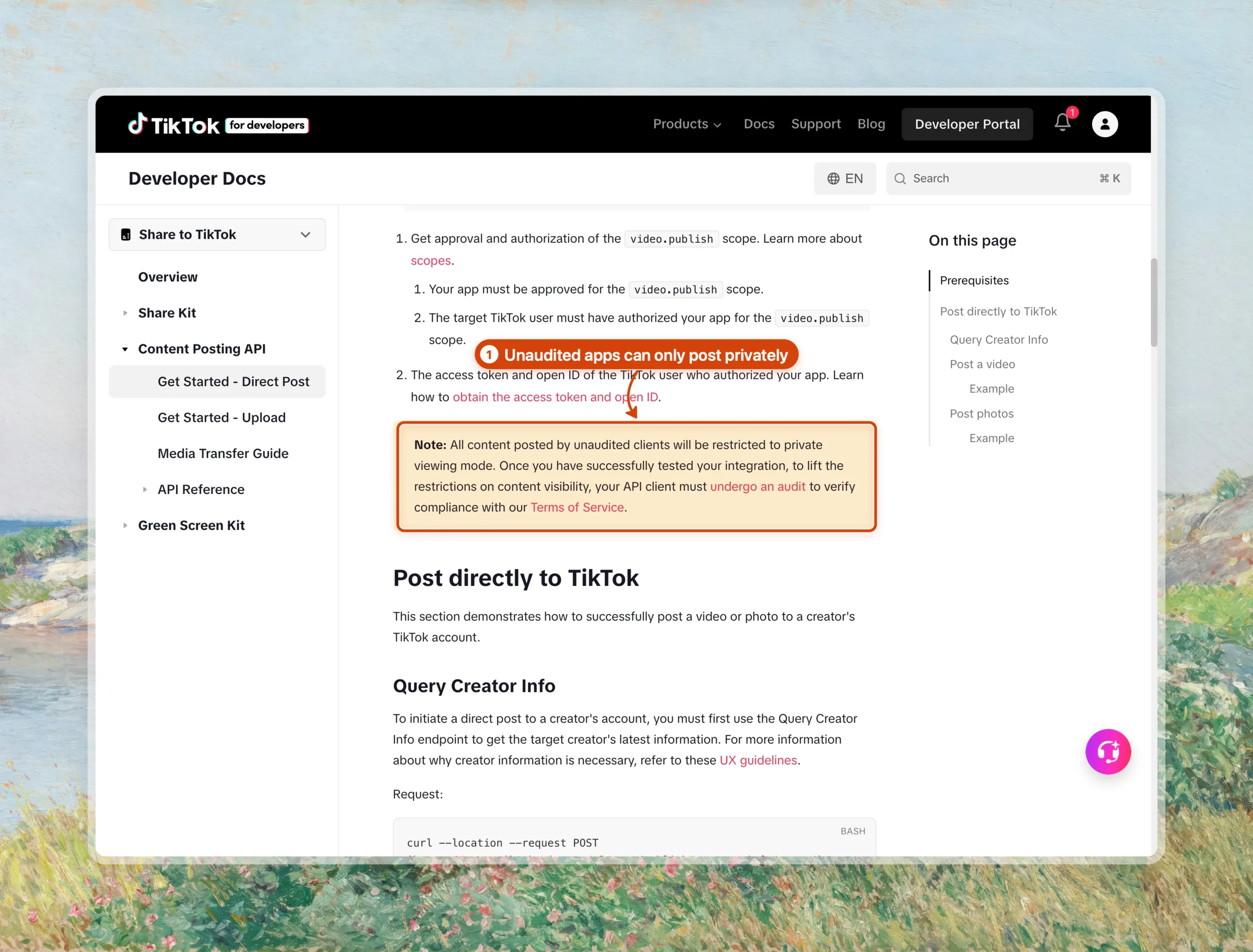
Until the audit passes, TikTok forces every post to private (SELF_ONLY) and lets at most 5 users post in a 24-hour window. The audit reviews a working demo of your app against the guidelines above.
One founder on r/buildinpublic reported approval in 10 hours in May 2026. That speed assumes the product and its posting screen already work.
TikTok Content Posting API Limits
| Limit | TikTok Content Posting API |
|---|---|
| Rate limit | 6 requests a minute per access token |
| Photos per post | Up to 35 |
| Photo post title | 90 characters |
| Photo post description | 4,000 characters |
| Before the audit | Private posts only, up to 5 users a day |
Limits are from TikTok's photo post reference and content sharing guidelines, checked November 13, 2026.
- Free, with no per-post fee
- Full control of every post setting
- Works for any number of creators once audited
- Posts stay private until the audit passes
- Apps that post only to your own accounts don't qualify
- You build OAuth, token refresh, the posting screen and domain checks
- You still have to make the videos and slides
Verdict: The TikTok Content Posting API fits teams building a TikTok product for other creators. To post to your own accounts, the audit rules point you to a service that already passed it.
2. Post Media You Already Have Through a Posting API
Pick this if your videos or slides already exist and you only need them to go out on TikTok, often next to other platforms.
A posting API is a service whose TikTok app already passed the audit. Your accounts connect through its OAuth screen, and your code sends a media URL and a caption to one endpoint.
| Posting API | Free plan | Paid from | Billed by |
|---|---|---|---|
| Zernio | 2 accounts | $6 per account | Connected account |
| Upload-Post | 2 profiles, no TikTok | $24 | Plan and profiles |
| Blotato | No | $29 | Plan |
| PostPeer | 20 posts | $23.10 | Post credits |
| Outstand | No | $19 | Posts after 3,000 |
| bundle.social | 3 accounts, 20 posts | $100 | Plan and posts |
Prices are monthly list prices from each pricing page, checked November 13, 2026.
Orshot publishes through Zernio itself, and Zernio has been solid for us. Its TikTok API covers direct posts, drafts, scheduling and analytics, and the first 2 accounts are free.
- Public posts from the first call, with no audit on your side
- One request format for TikTok, Instagram, YouTube and more
- OAuth and token refresh handled for you
- You still render the video or slides somewhere else first
- One more service between your code and TikTok
- TikTok's own limits still apply, such as the 90-character photo title
Best for: teams whose media pipeline already exists and who only need the posting step.
3. Render and Post TikTok Videos from Data with Orshot
Pick this if you post TikTok videos or carousels on a schedule and each post comes from data: a sheet row, a product, a quote or a listing.
Orshot is an API that turns your design templates into images, PDFs and videos. Add a publish object to a render request and Orshot posts the result to TikTok in the same call, publicly, through its audited posting provider.
Step 1: Design the video template once
The demo is a 5-scene TikTok video for a made-up travel newsletter, Slow Saturdays. A split-screen hook opens it, each day trip gets its own scene, and a "save this" card closes it.
Scenes cut with grow and whip transitions, price stickers land with a coin sound, and a music bed runs under the whole video. Every text, price and clip is a dynamic field, 23 in all.
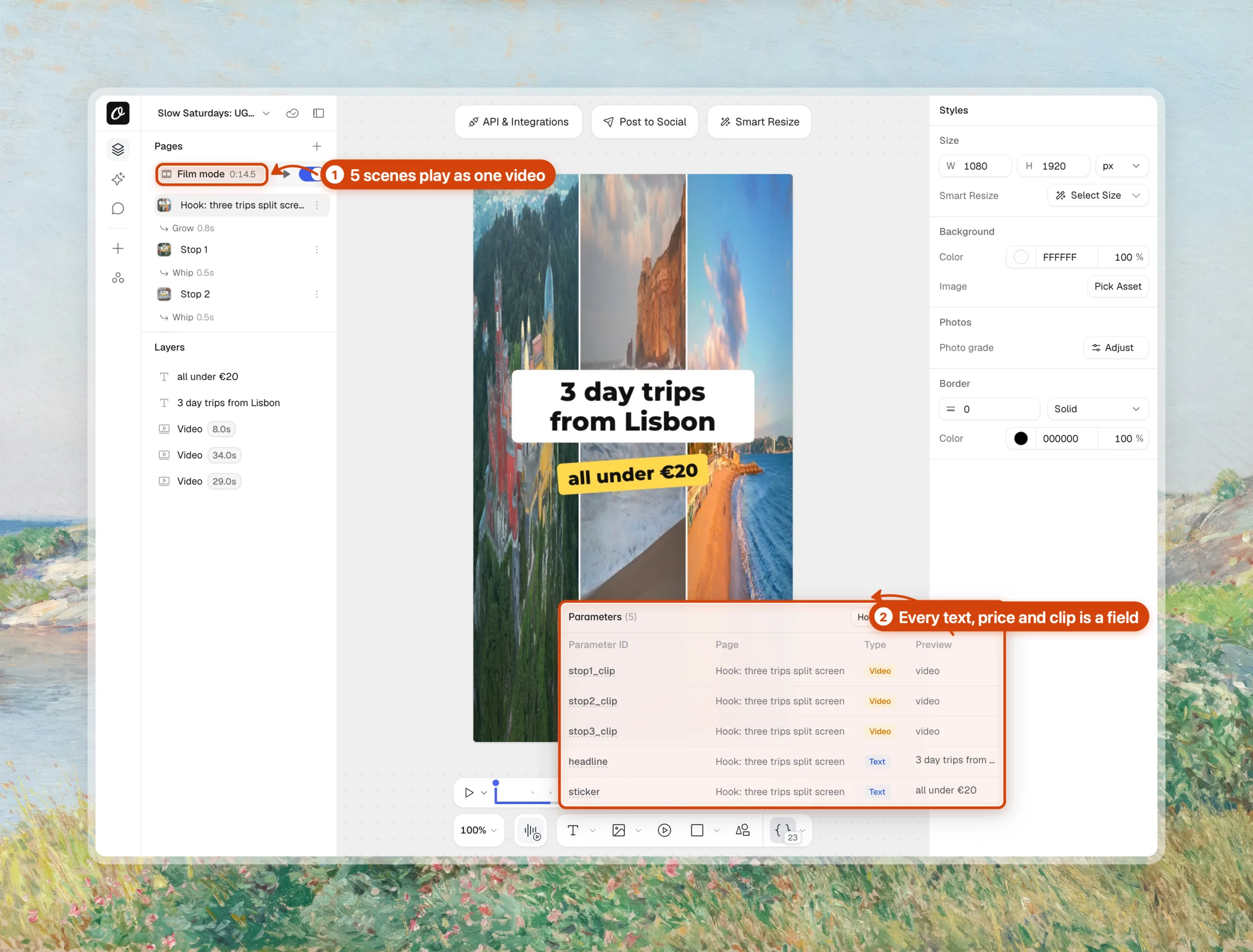
Play the template below, change a price or a place, then duplicate it into your own workspace.
Step 2: Connect your TikTok account
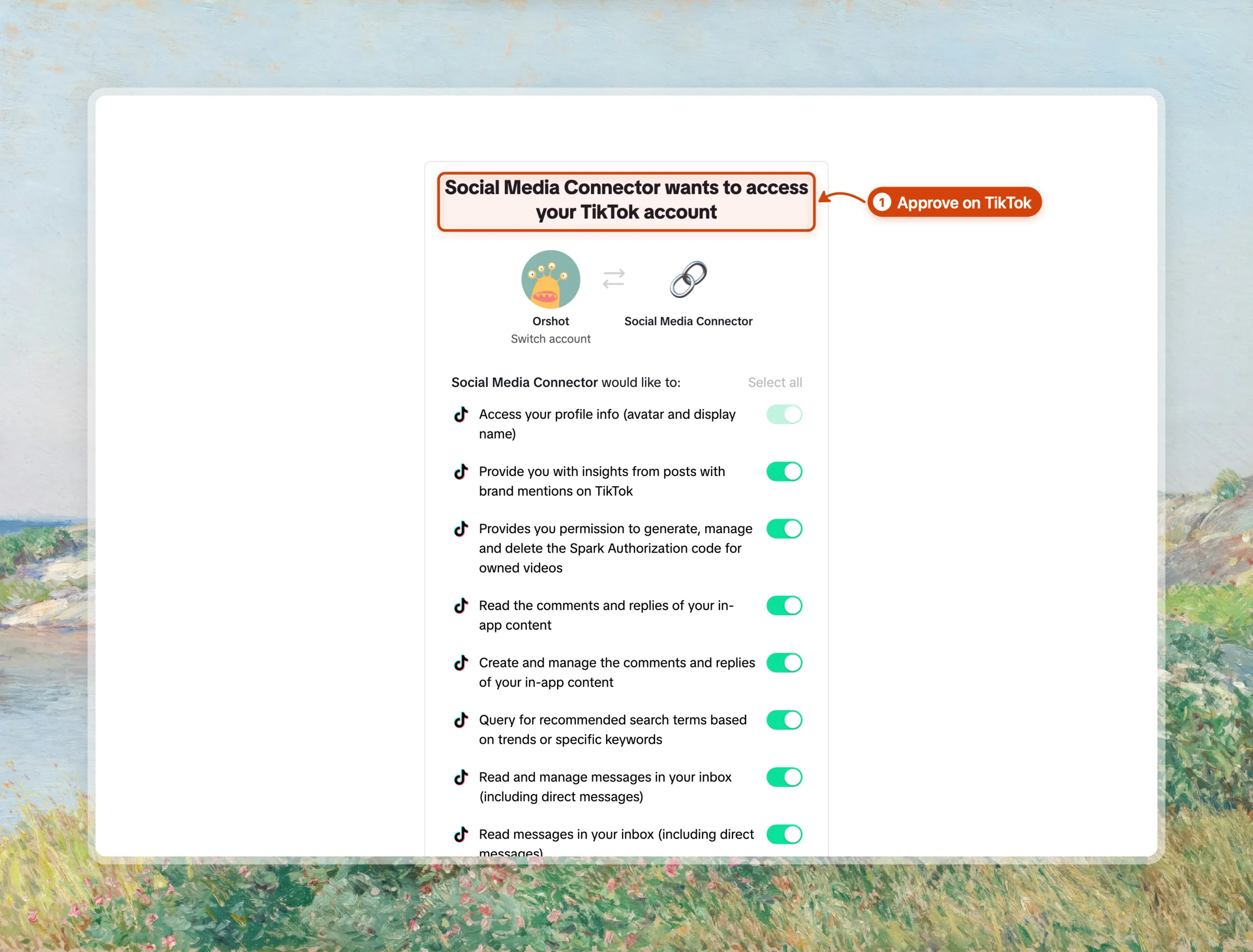
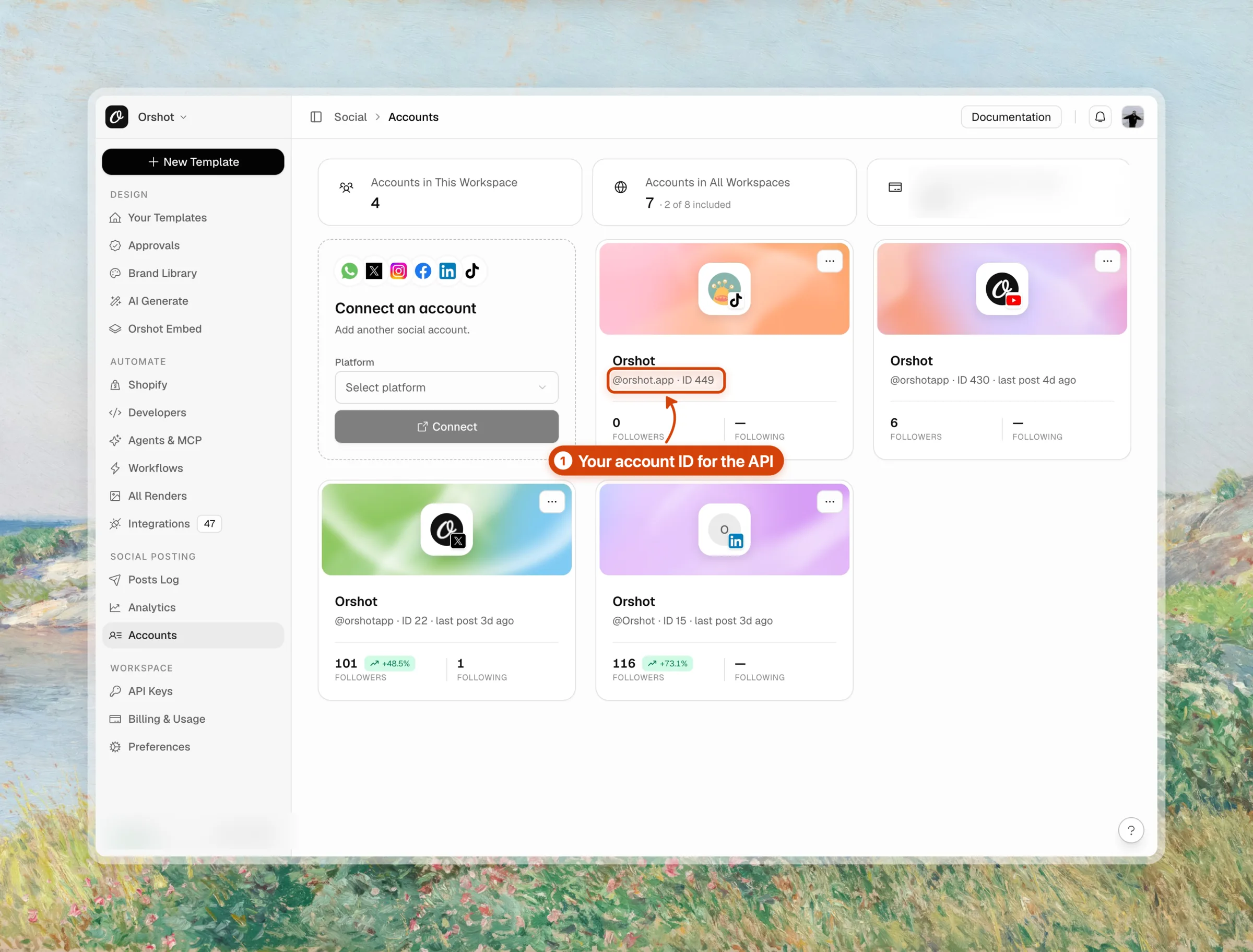
Open Social Posting, then Accounts. In the Connect an account card, pick TikTok as the platform and click Connect.
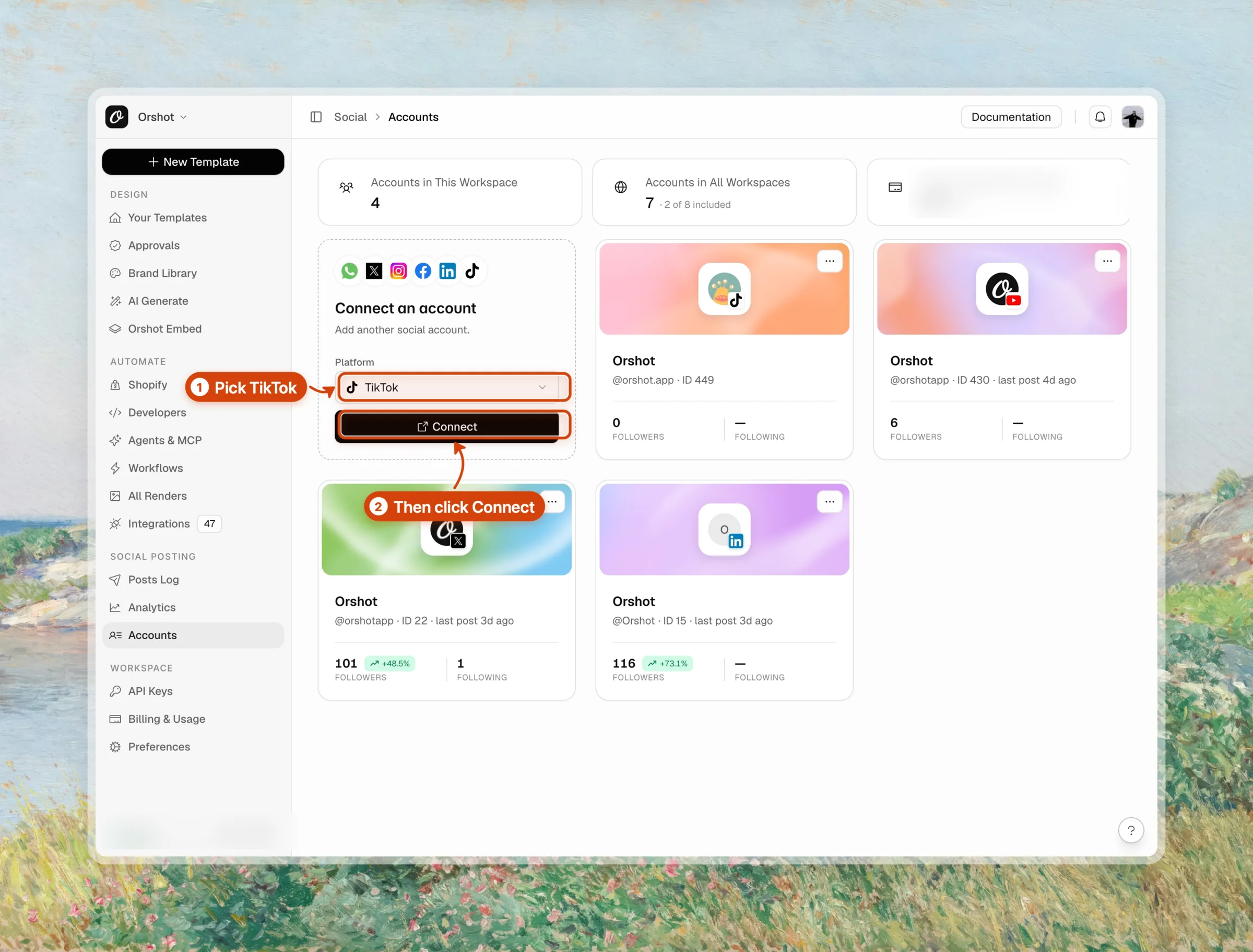
TikTok opens its login and asks you to approve access for the account you want to post to.
Back in Orshot, the account card shows the account ID. That number goes in publish.accounts.
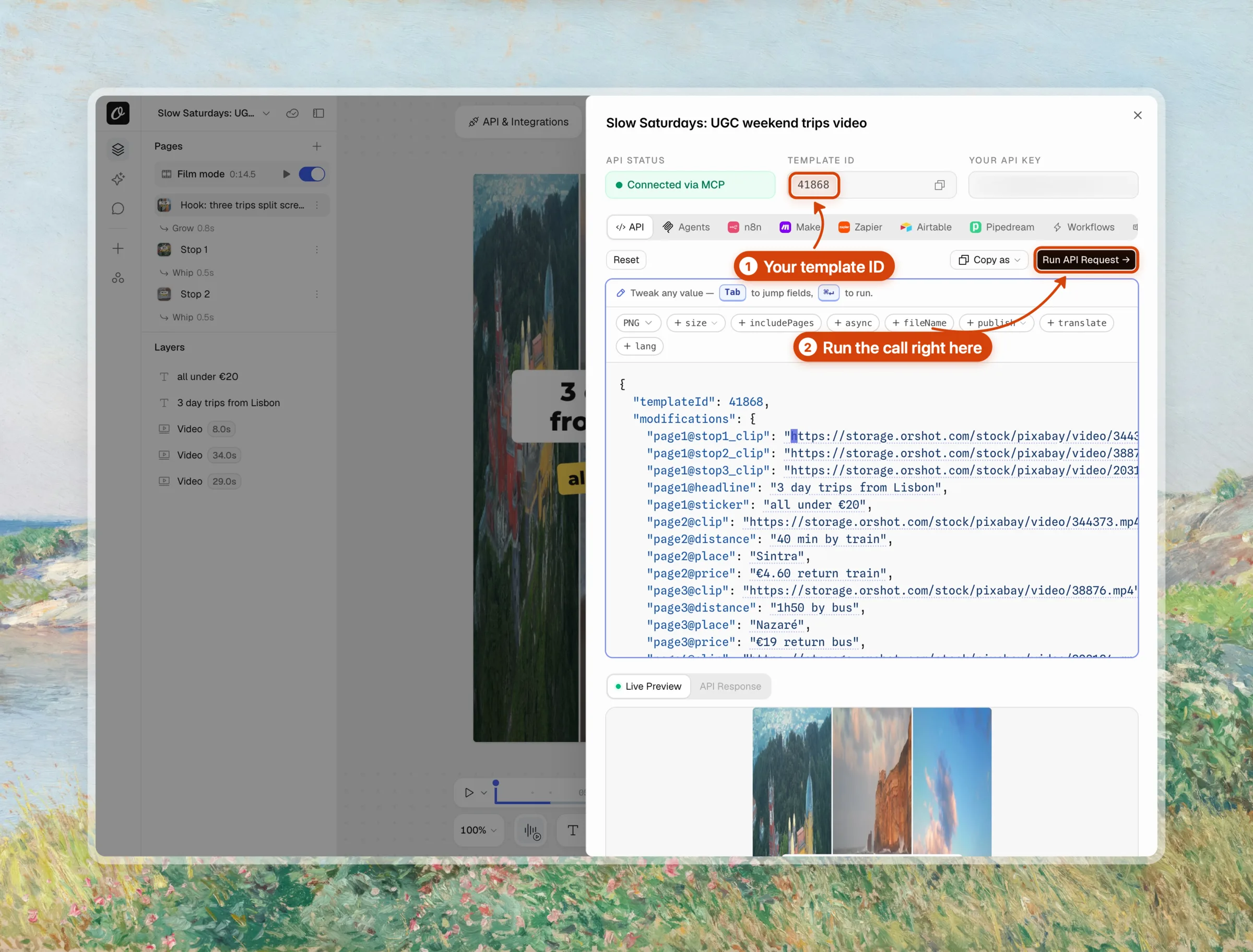
Step 3: Open the API playground for your template
In Studio, click API & Integrations. The panel fills in the template ID and your API key, and builds a request from the template's fields.
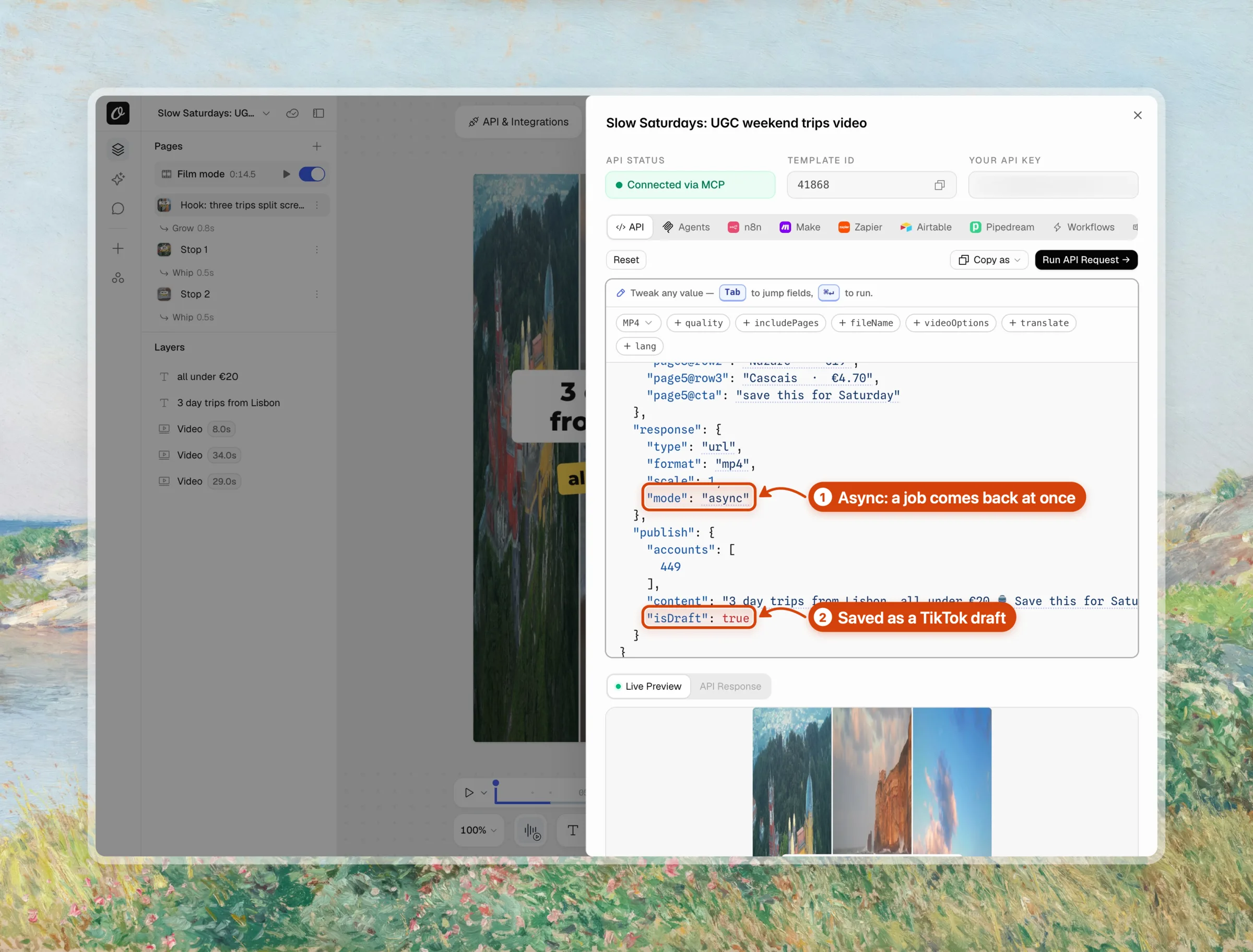
Step 4: Set MP4 and add your TikTok account
Set the format chip to MP4. Then add publish, tick your TikTok account and click Add 1 account.
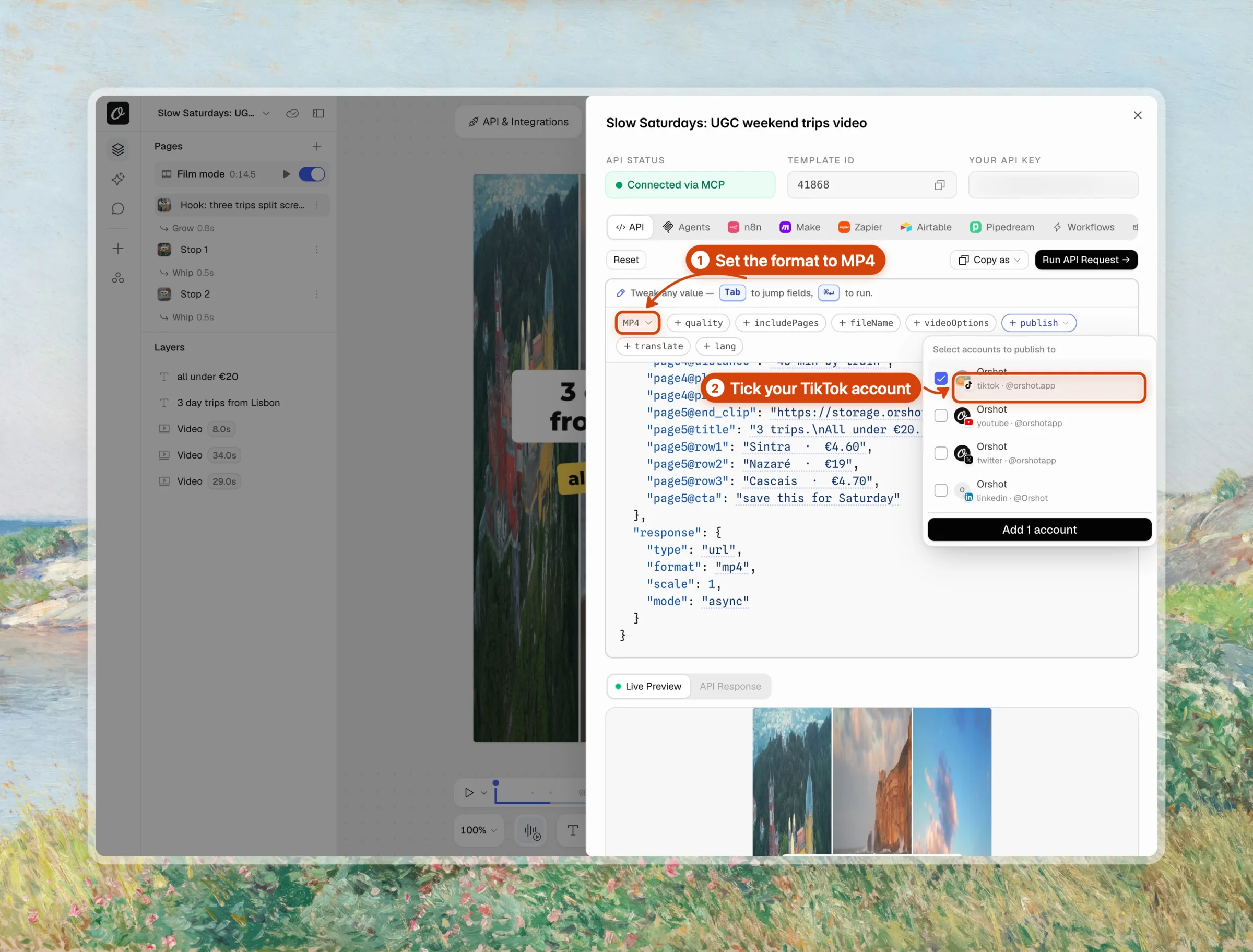
The request now has "mode": "async" and a publish block with your account, the caption and "isDraft": true.
Step 5: Run the render and post request
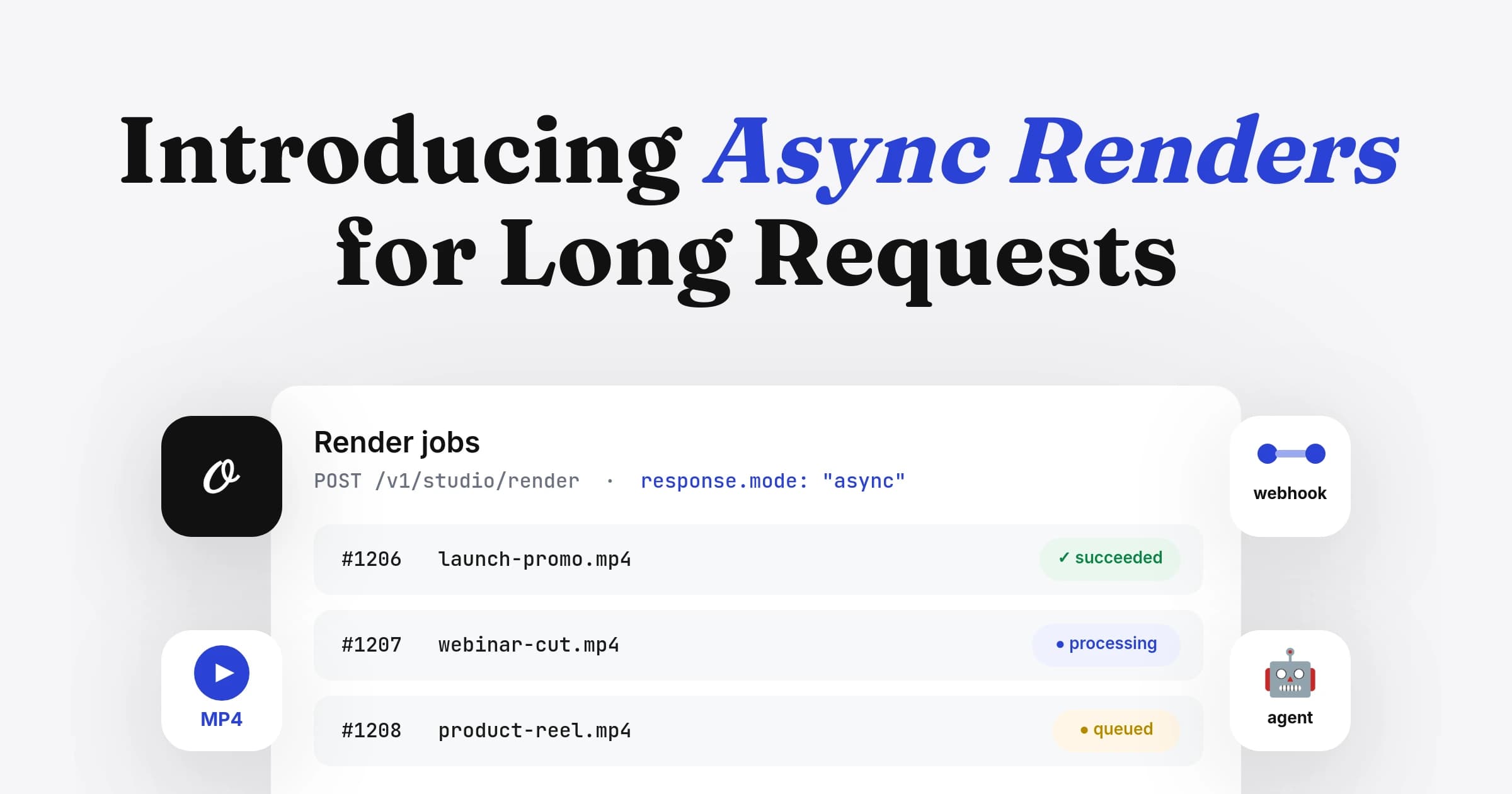
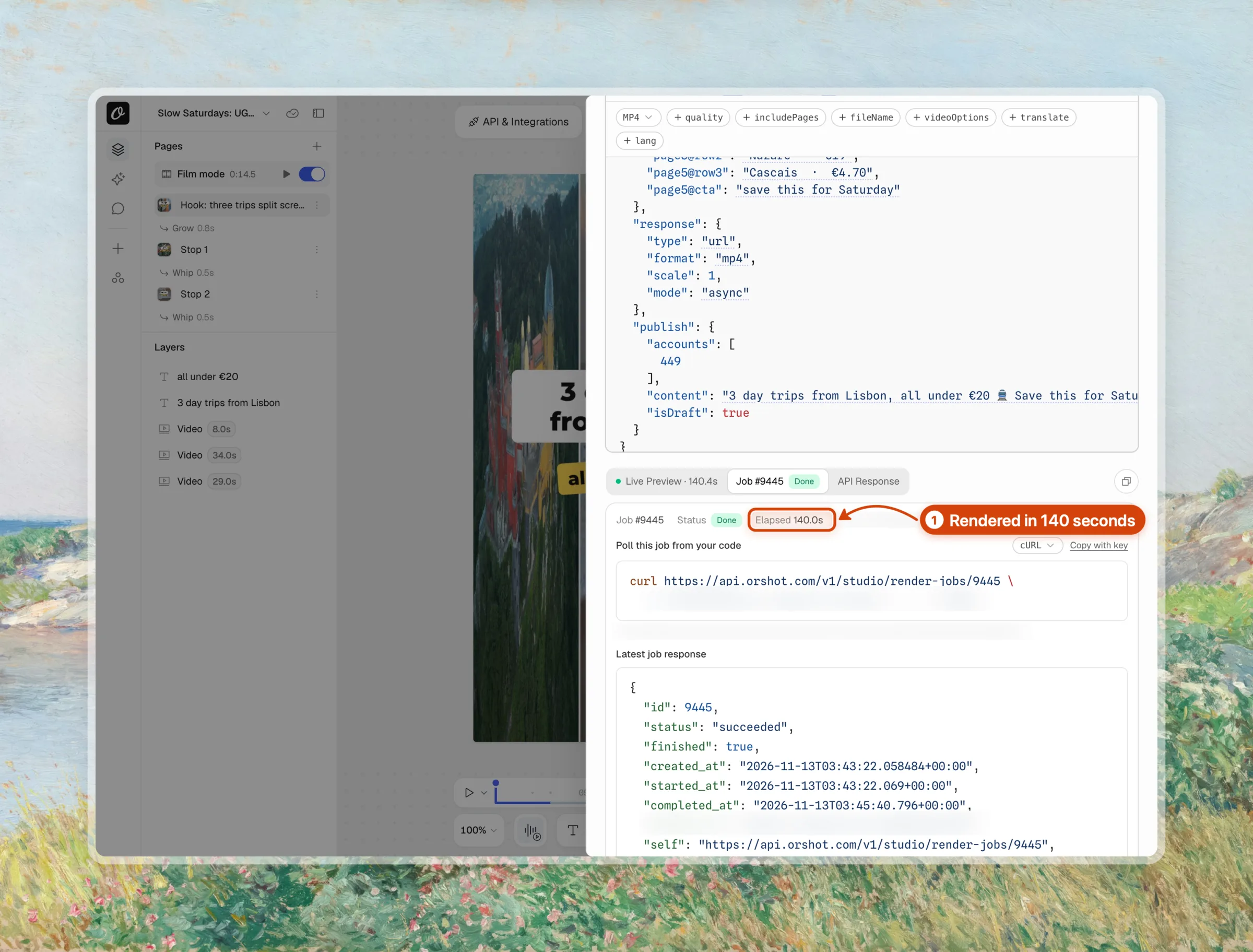
Click Run API Request. A video render takes minutes, so async mode returns a job right away. The Job tab shows its status and the URL to poll from your code.
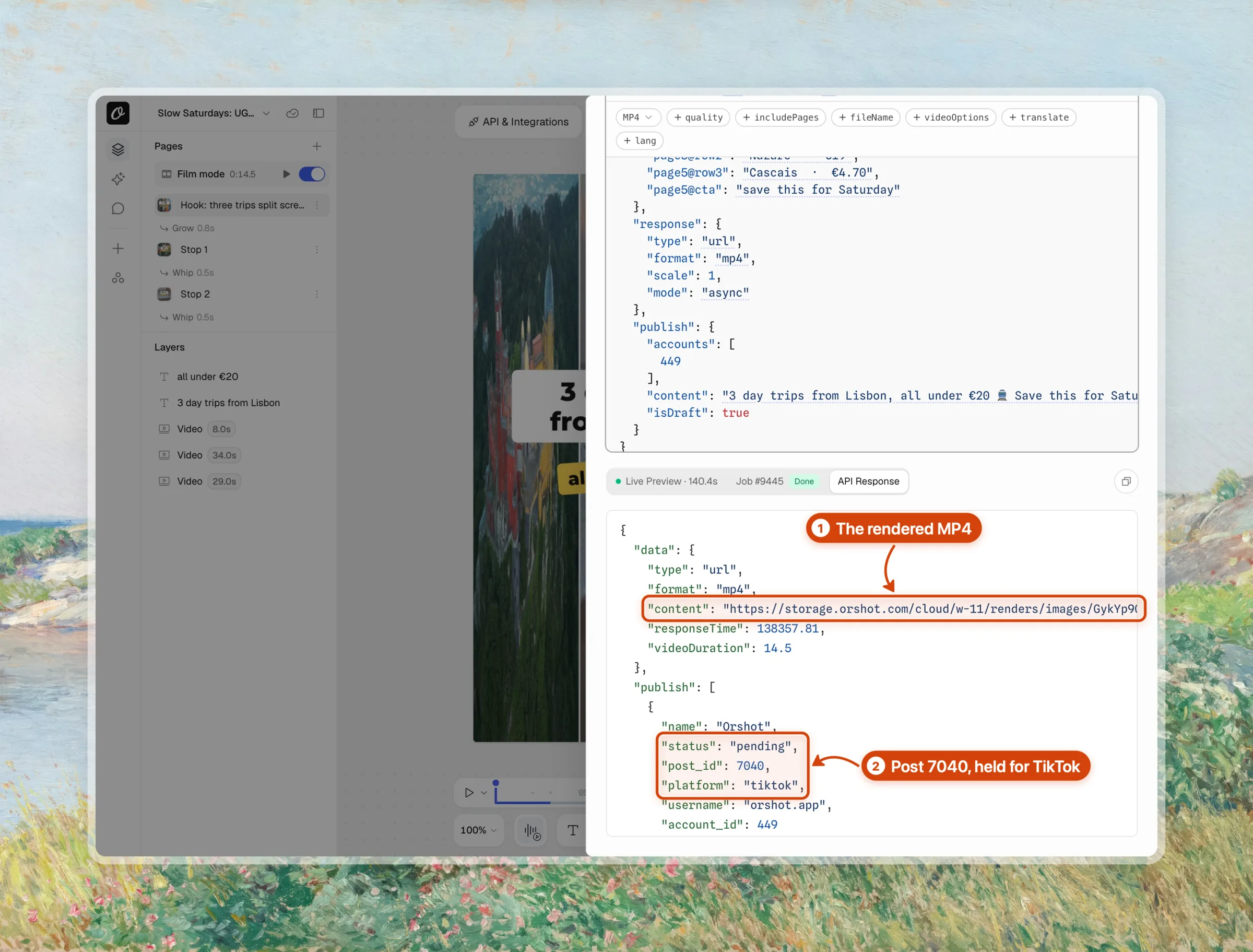
When the job finishes, API Response holds the MP4 link and one publish entry per account. Ours came back as post 7040, saved for TikTok.
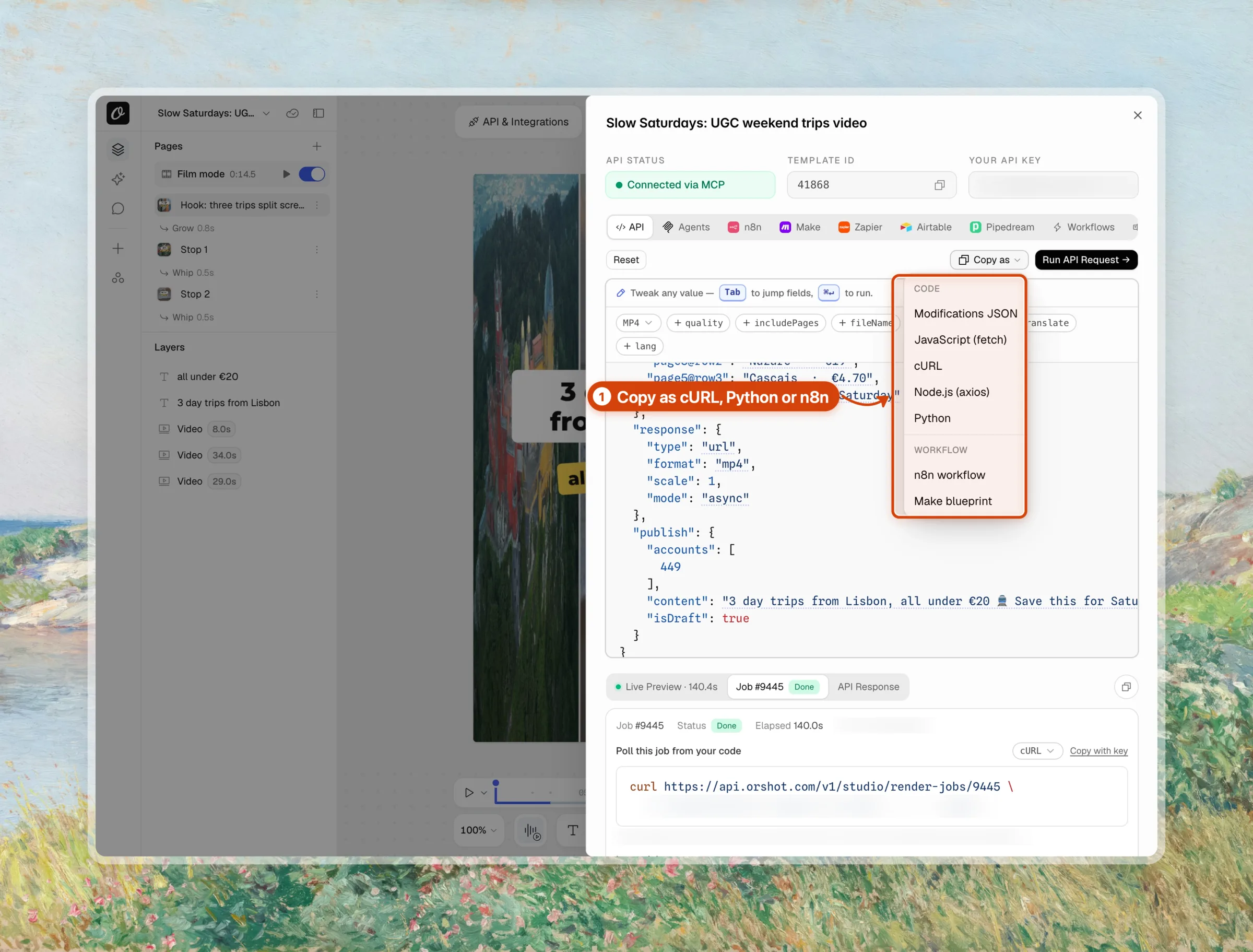
Step 6: Copy the same request into your code
Copy as turns the request into cURL, JavaScript, Python or an n8n workflow. Below it is in code, with placeholder IDs. New trips go in modifications with a page2@ style prefix per scene, and the loop polls the job until the post is saved.
curl -X POST https://api.orshot.com/v1/studio/render \
  -H "Authorization: Bearer $ORSHOT_API_KEY" \
  -H "Content-Type: application/json" \
  -d '{
    "templateId": 12345,
    "modifications": {
      "page1@headline": "3 day trips from Porto",
      "page1@sticker": "all under €15",
      "page2@place": "Braga",
      "page2@price": "€7.50 return train",
      "page2@clip": "https://cdn.example.com/clips/braga.mp4"
    },
    "response": { "mode": "async", "type": "url", "format": "mp4" },
    "publish": {
      "accounts": [101],
      "content": "3 day trips from Porto, all under €15. Save this for Saturday #porto #daytrip",
      "isDraft": true
    },
    "webhook_url": "https://yourapp.com/hooks/orshot"
  }'
const headers = {
Authorization: `Bearer ${process.env.ORSHOT_API_KEY}`,
"Content-Type": "application/json",
};
const res = await fetch("https://api.orshot.com/v1/studio/render", {
method: "POST",
headers,
body: JSON.stringify({
templateId: 12345,
modifications: {
"page1@headline": "3 day trips from Porto",
"page1@sticker": "all under €15",
"page2@place": "Braga",
"page2@price": "€7.50 return train",
"page2@clip": "https://cdn.example.com/clips/braga.mp4",
},
response: { mode: "async", type: "url", format: "mp4" },
publish: {
accounts: [101],
content: "3 day trips from Porto, all under €15. Save this for Saturday #porto #daytrip",
isDraft: true,
},
}),
});
let job = await res.json(); // { id, status: "queued", self }
while (!job.finished) {
await new Promise((r) => setTimeout(r, 10000));
job = await (await fetch(job.self, { headers })).json();
}
console.log(job.result?.publish ?? job.error); // one entry per accountimport os
import time
import requests
headers = {"Authorization": f"Bearer {os.environ['ORSHOT_API_KEY']}"}
job = requests.post(
"https://api.orshot.com/v1/studio/render",
headers=headers,
json={
"templateId": 12345,
"modifications": {
"page1@headline": "3 day trips from Porto",
"page1@sticker": "all under €15",
"page2@place": "Braga",
"page2@price": "€7.50 return train",
"page2@clip": "https://cdn.example.com/clips/braga.mp4",
},
"response": {"mode": "async", "type": "url", "format": "mp4"},
"publish": {
"accounts": [101],
"content": "3 day trips from Porto, all under €15. Save this for Saturday #porto #daytrip",
"isDraft": True,
},
},
).json()
while not job["finished"]:
time.sleep(10)
job = requests.get(job["self"], headers=headers).json()
print(job.get("result", {}).get("publish") or job.get("error"))publish.content becomes the TikTok caption, up to 2,200 characters for a video. isDraft: true saves the post for review, and leaving it out posts right away. Every field is in the publish from API and async render docs.
Step 7: Review the draft and publish
Open Posts Log and filter to Drafts. The video from the API call waits there with its caption and TikTok account.
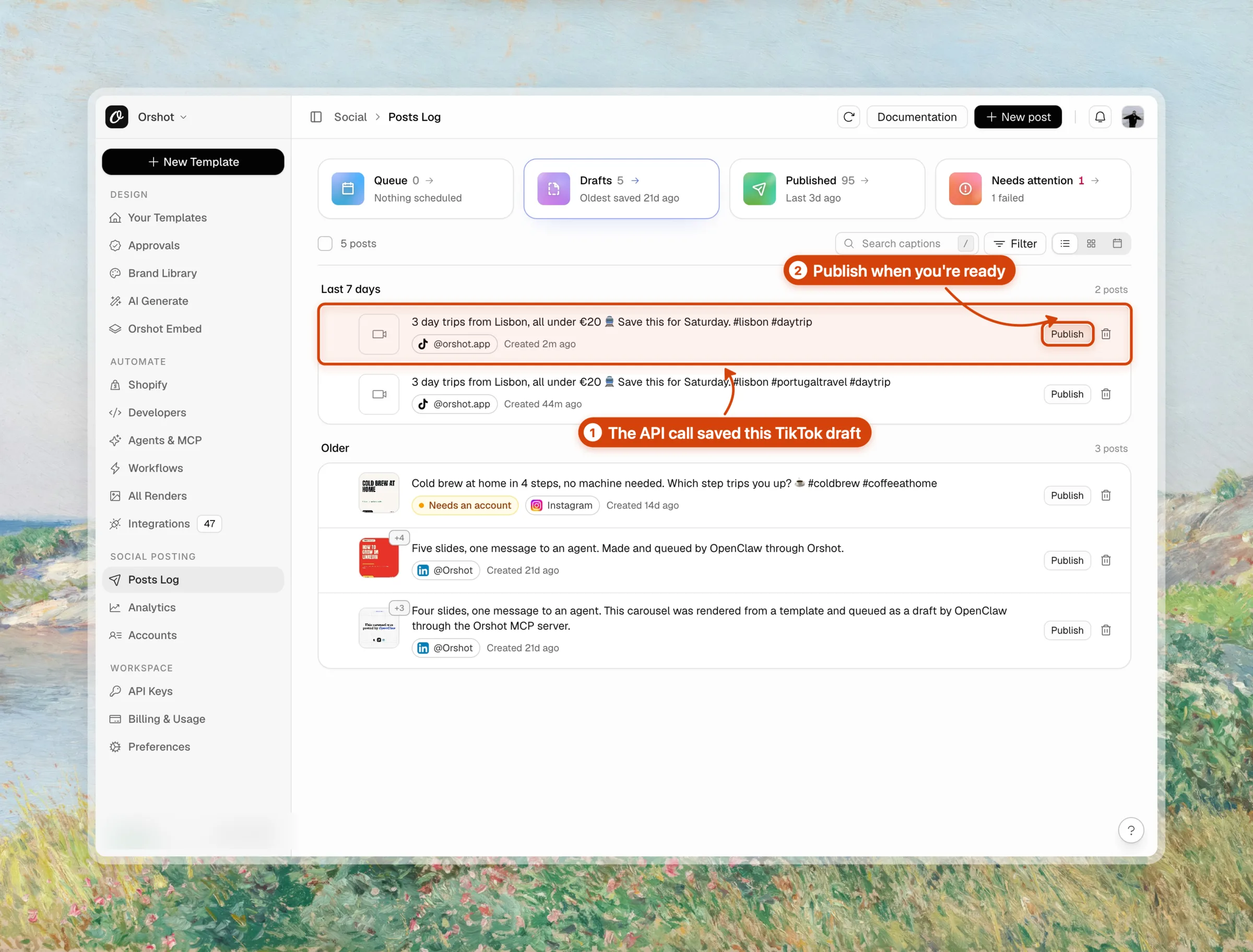
That is the render from my run on November 13, 2026, saved to our TikTok account as a draft. It goes out only when I click Publish or send the draft from the API.

Step 8: Schedule it or run it every day
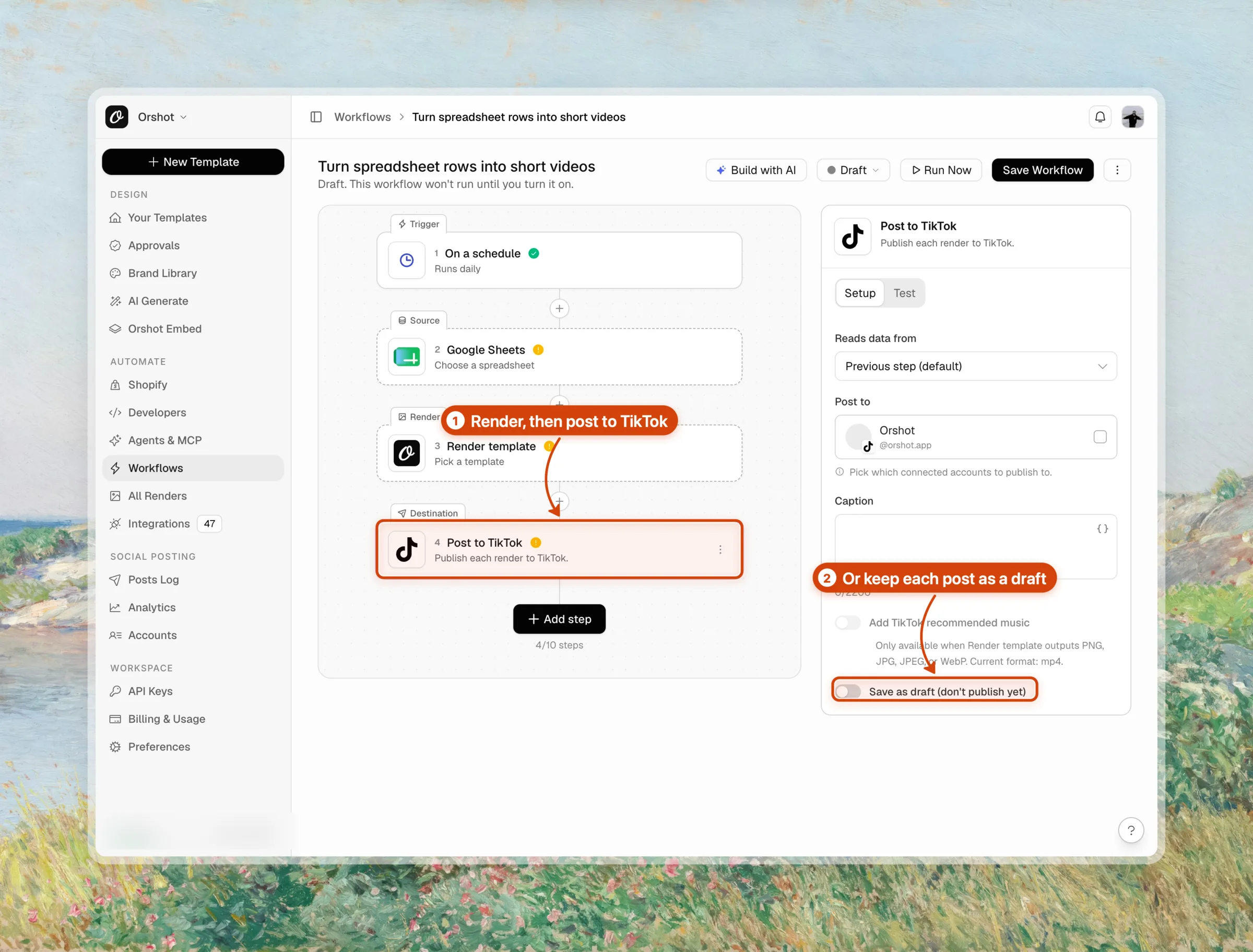
Add schedule.scheduledFor with an ISO date to queue the post, or isDraft: true to review it first. For a daily job, call the endpoint from a cron job, n8n, Make or Zapier with the next row of data.
Without code, an Orshot workflow does the same from a Google Sheet or a Drive folder. The quote videos to TikTok workflow renders a video from each new row and posts it.
Step 9: Post TikTok carousels the same way
A multi-page image template at 1080x1920 renders one slide per page with "format": "png". Orshot posts every page as one TikTok photo carousel.
"response": { "type": "url", "format": "png" },
"publish": {
  "accounts": [101],
  "content": "5 cheap weekend trips from Lisbon",
  "tiktokSettings": { "autoAddMusic": true, "photoCoverIndex": 0 }
}
autoAddMusic asks TikTok to add recommended music, and photoCoverIndex picks the cover slide. The caption becomes the photo post's title, so keep it under 90 characters. The random Drive photos to TikTok workflow is a ready example.
Step 10: Post to TikTok from Claude or Any AI Agent
Orshot's MCP server gives Claude, ChatGPT and other AI agents the same render and publish tools as the API. In Claude Code, one command adds it:
claude mcp add orshot --transport http https://mcp.orshot.com/fullThen ask in plain words: "Make a 15-second TikTok video about 3 cheap day trips from Lisbon and save it as a TikTok draft."
The agent designs the template, renders the video and saves the post. The Orshot agents page lists every client it works with.
Things That Bit Me
- A video render takes minutes, longer than most HTTP client timeouts. Use
mode: "async"with polling or awebhook_url. - A TikTok post holds photos or a video, never both. Orshot refuses a mixed post before it reaches TikTok.
- TikTok photo posts refuse AVIF. Render PNG, JPEG or WebP.
- A long caption on a photo post fails, because TikTok uses it as the 90-character title.
tiktokSettingsapplies to every TikTok account in the request, so one call can't give two accounts different music settings.
- Public TikTok posts from the first call, no audit
- Renders the video or carousel and posts it in one request
- The same template feeds Instagram, LinkedIn and more
- Draft, schedule or post now from the API, n8n or a workflow
- You design the template once before the first post
- Connecting a TikTok account needs a paid plan
- No per-post privacy or disclosure setting in the request yet
- Built for posting to your own accounts, not a white-label TikTok app
Pricing: Orshot's Free plan includes 100 credits a month for rendering. Connecting social accounts takes a paid plan, and publishing costs no extra credits, as of November 2026.
How Long Does a TikTok Video Render Take?
The 14.5-second Slow Saturdays video took 140 seconds to render through the API on November 13, 2026 (job 9445). The video has 3 trip clips, 4 scene cuts, sound effects and a music bed at 1080x1920.
| Render (Orshot cloud, November 13, 2026) | Length | Wall time |
|---|---|---|
| 5-scene film through the API, async (job 9445) | 14.5 s | 140 s |
| Same film, an earlier render the same day | 14.5 s | about 5.5 min |
| Single-scene version of the same video | 10.5 s | about 2.5 min |
Render time moves with the queue, so plan for minutes, not seconds. The post step waits for the render, then saves the draft or publishes it.
Async mode leaves your code free until the job result or the webhook arrives.
How I Checked This
I read TikTok's Content Posting API docs and content sharing guidelines on November 13, 2026, and opened each posting API's pricing page the same day.
The Orshot steps are from one real run on our own TikTok account. Job 9445 and post 7040 in the screenshots and the film come from that run.
Is the TikTok Content Posting API Free?
Yes. TikTok charges nothing for the Content Posting API, and there is no paid tier. The cost is the build and the audit: until TikTok approves your app, every post is private.
Can I Automate TikTok Posting?
Yes. TikTok allows automated posting through the Content Posting API, and posting APIs and Orshot do it for your own accounts without an audit on your side. TikTok's rate limits, daily caps and community guidelines still apply.
Does TikTok have an API for posting?
Why are my TikTok API posts private?
Can I post a TikTok carousel through the API?
How many TikTok posts can I make through the API?
Can I use the TikTok Content Posting API with Python?
Do I need a TikTok developer account to post through Orshot?
What is Orshot?
Post Your First TikTok Video from the API
Duplicate the Slow Saturdays template above, connect TikTok and send one render request with publish. To post the same render to more platforms, the Ayrshare alternative post shows that flow, and the social publishing page lists every platform.
Sign up free to render your first TikTok video, then connect TikTok when you're ready to post.