Buffer is a good scheduler. The queue is simple, the apps are clean, and if all you need is "post this at 9am tomorrow", it does the job.
But scheduling was never the hard part. Every Buffer alternative thread on Reddit repeats the same complaints: per-channel pricing that compounds, hitting a wall with multiple brands, and still having to make the content somewhere else. As one commenter put it, a design tool matters because then "scheduling becomes the easy part" (r/MarketersSuccessClub).
Meet Orshot, create content + automate to 15+ platforms
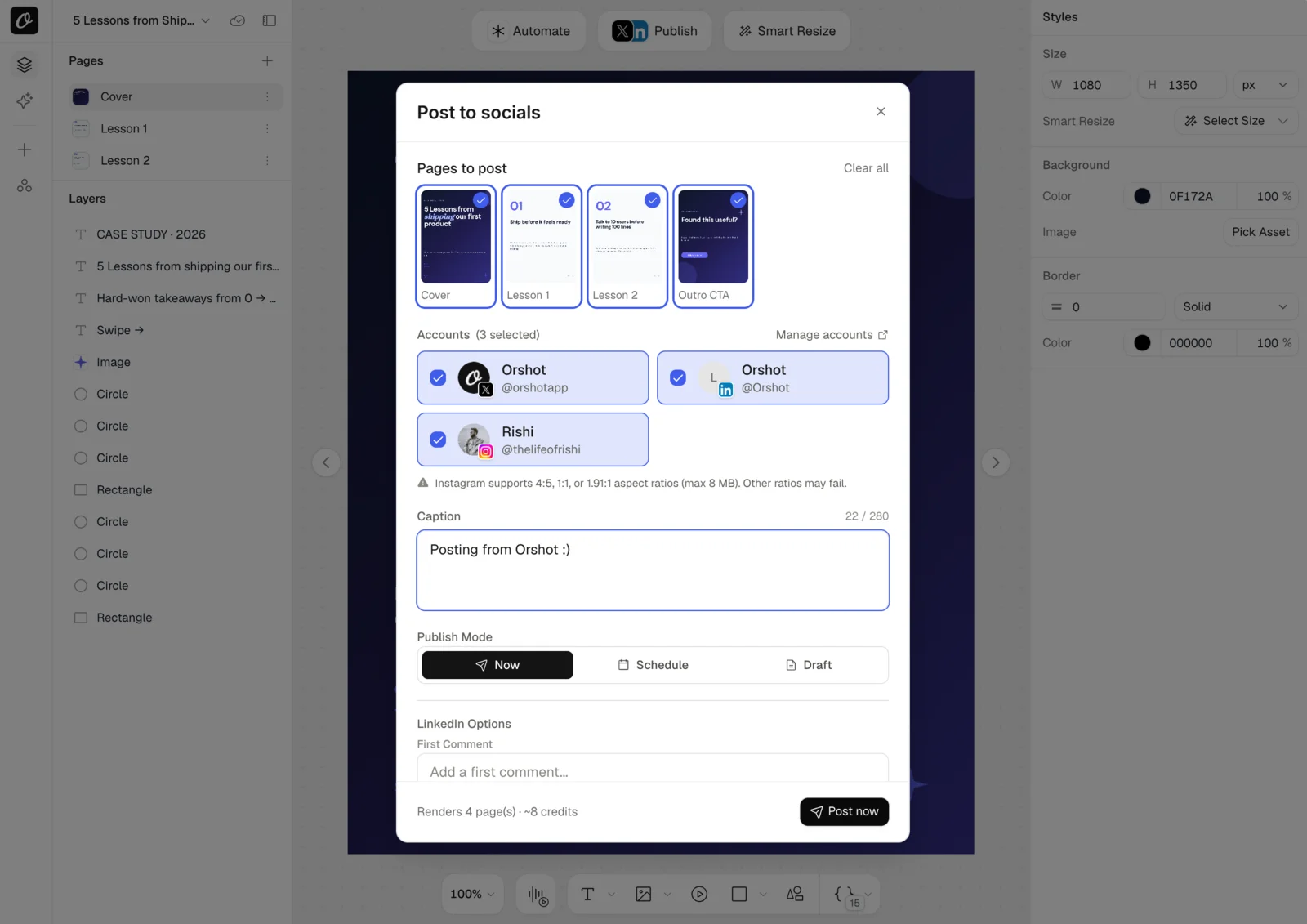
I built Orshot to make the rest of the pipeline that easy too. It does three things:
- Visual content from templates. Design your posts, carousels, and reels once in a Canva-like editor (or import straight from Canva), then generate every variation by swapping text and images.
- Automated posting via API and MCP. One request renders the visual and publishes it to 15+ platforms. Call it from your code, your no-code stack, or ask Claude over MCP.
- Workflows that connect all of it. Template + data source (Google Sheets, Airtable, a webhook) + your social accounts, and posts ship themselves on a schedule.
What's different
| Feature | Orshot | Buffer |
|---|---|---|
| Publishing platforms | 15+ (Instagram, X, LinkedIn, TikTok, YouTube, Pinterest, and more) | ~11 channels |
| Publish from | Dashboard, API, scheduled workflows, MCP (Claude, Cursor) | Dashboard and apps, rate-capped API |
| Posting modes | Instant, draft, scheduled, recurring | Queue-based scheduling |
| Content creation | Design studio, 1,000+ templates, AI Design Agent, auto-resize per platform | Canva import, AI caption assistant |
| Carousels | Rendered and posted automatically | Manual upload |
| Automation | Workflows (Sheets, Airtable, webhooks), Zapier, Make, n8n | Publish-only API with request caps |
| Multi-brand | Separate workspace per brand: templates, brand kit, accounts, billing | Channel groups |
| Social inbox & analytics | No, Orshot is creation + publishing | Yes |
| Pricing | From $39/mo (1,500 credits) + $12/mo per account, unlimited posts | $5 to $10 per channel per month |
If your main need is replying to comments and DMs from one inbox, Buffer is the right category of tool. Orshot replaces the creation and posting half of your stack, not community management.
Where Buffer falls short
- It only schedules. The banner, carousel, or product graphic still has to be made somewhere else. Orshot generates it from a template, AI, or a spreadsheet, then posts it.
- Per-channel pricing compounds. Six accounts on Buffer Team is $60/mo, and you still haven't created a single graphic.
- Automation is publish-only. Buffer's API can't generate an image from data, and it's capped by monthly request limits.
- Multiple brands strain it. "You hit a wall pretty fast" (r/MarketersSuccessClub). Orshot gives each brand its own workspace.
- The free plan is a trial in practice. 3 channels, 10 scheduled posts per channel.
Publish from wherever you work
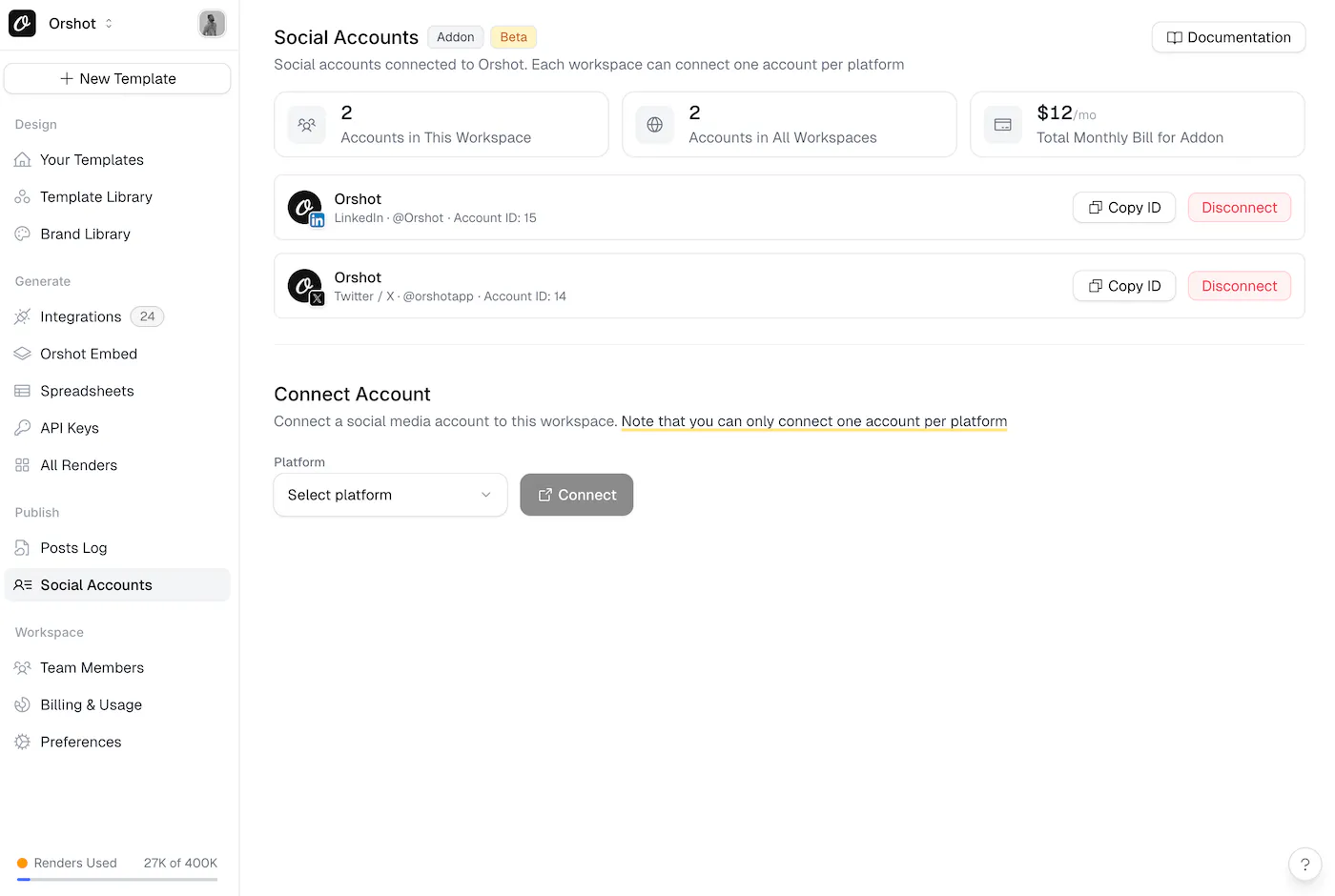
Anything Orshot can render, it can post: instantly, as a draft, or scheduled in any timezone.
From the dashboard
Pick a template, edit the content, choose accounts, post. No code. Everything (published, scheduled, failed) shows up in the Posts Log, so you keep the visibility you're used to from Buffer's queue.
From the API
One request creates the visual from your data and publishes it. This is the part Buffer can't do:
await fetch("https://api.orshot.com/v1/studio/render", {
  method: "POST",
  headers: {
    Authorization: "Bearer YOUR_ORSHOT_API_KEY",
    "Content-Type": "application/json",
  },
  body: JSON.stringify({
    templateId: "your_template_id",
    modifications: {
      title: "Summer sale: 40% off everything",
      image: "https://example.com/product.jpg",
    },
    response: { type: "url", format: "png" },
    publish: {
      accounts: [1, 2],
      content: "Our summer sale is live! 🌞",
      schedule: { scheduledFor: "2026-07-20T14:00:00Z" },
    },
  }),
});
Multi-page templates post as carousels automatically. Under the hood, publishing runs on Zernio's unified social media APIs, which take care of the platform-specific plumbing (carousel uploads, per-platform settings, token refreshes) so posts don't quietly fail. See the publish API docs for drafts, scheduling, and platform options.
From a workflow
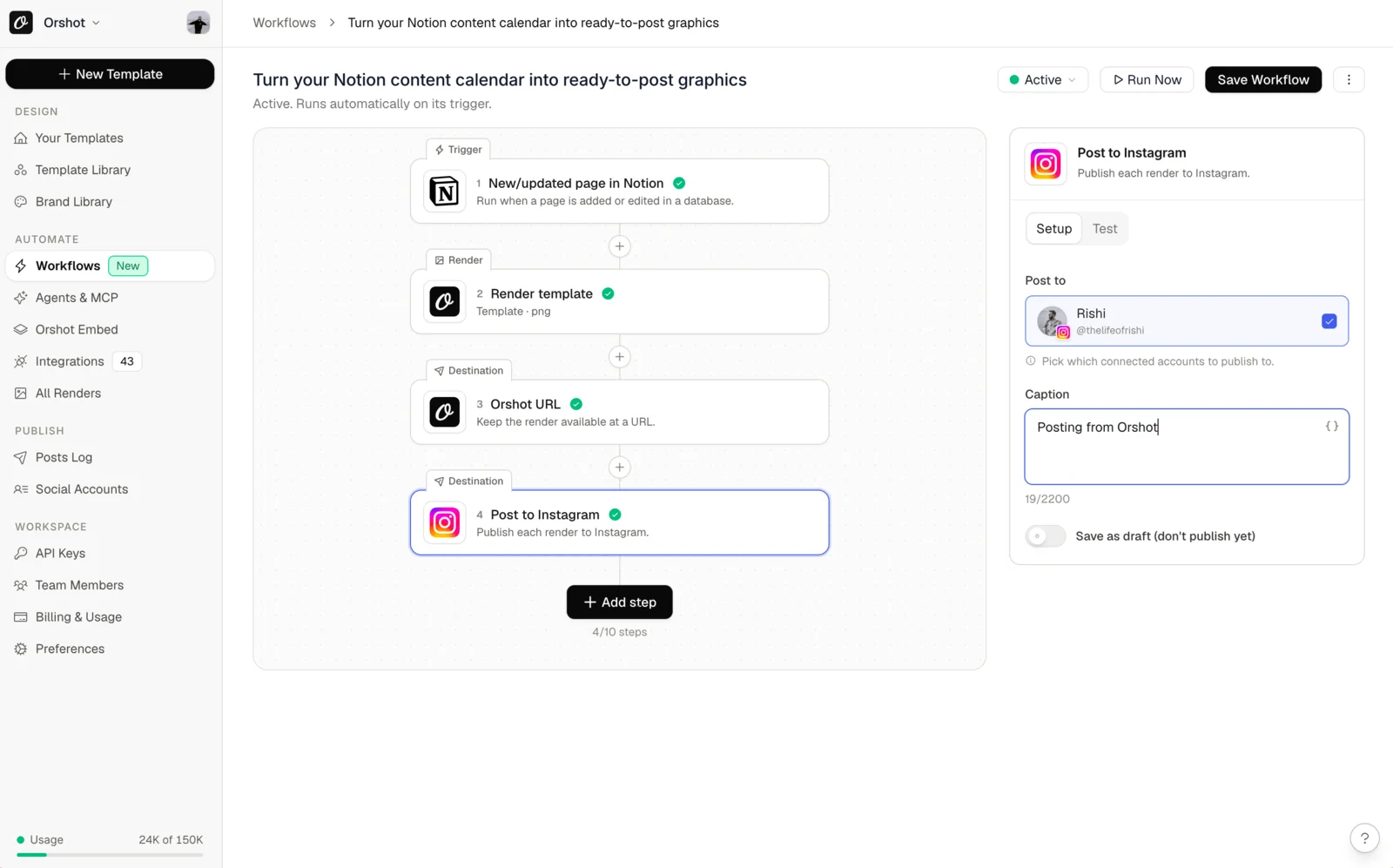
Workflows run the loop on autopilot: trigger, data, template, post. Copy one into your workspace and turn it on. This one turns Google Sheets rows into Instagram carousels:
And this one posts a random Google Drive photo to TikTok on a schedule:
More ready-made setups: real estate listings to Instagram and Facebook, product images from your catalog, and daily quote graphics.
From Claude, via MCP
Connect the Orshot MCP server to Claude, Cursor, or Windsurf and publishing becomes a prompt: "Render the weekly promo template with this headline and post it to Instagram and LinkedIn tomorrow at 9am."
The honest math
If all you do is schedule posts you already have, Buffer is cheaper. Full stop. Three channels on Buffer Essentials is $15/mo; Orshot with three connected accounts starts at $75/mo ($39 plan + 3 x $12).
The math flips when you count the whole stack Orshot replaces:
| Your stack today | Cost | With Orshot |
|---|---|---|
| Buffer Team, 3 channels | $30/mo | Included ($12/account, unlimited posts) |
| Canva Pro for the actual designs | $15/mo | Included (studio, 1,000+ templates, AI) |
| Zapier for the automation glue | $20 to $50/mo | Included (workflows, API, integrations) |
| Your time designing + resizing + exporting | Hours every week | Automated |
Publishing doesn't cost extra credits, and every paid plan has unlimited templates and team members. See full pricing.
Switching from Buffer
Most people are set up in an afternoon.
1. Bring your templates. Describe your post style to the AI Design Agent, import from Canva or Figma, or start from the template library. Have a Canva design handy? Paste a public share link:


In Canva: Share → “Public View Link” → copy the link.
2. Connect your social accounts. OAuth from the dashboard. Each account is $12/mo, unlimited posts.
3. Post something real. From the dashboard, the API, or a workflow. Check the Posts Log before switching anything off on the Buffer side.
When Buffer is still the right call
- You only schedule content that's already made, and the per-channel price works for you
- You need a social inbox or engagement analytics in the same tool
- You love the queue model and don't want to change how you plan
But if making the visuals is where your time goes, or you're gluing Canva to Buffer with Zapier, a scheduler swap won't fix that.
Other Buffer alternatives, honestly sorted
Orshot only makes sense as a Buffer alternative if content creation is your bottleneck. If it isn't, one of these is probably the better swap:
- Hootsuite — the enterprise pick: social listening, team roles, dozens of accounts. From $99/mo (Standard).
- Later — visual-first planning with an Instagram grid preview. No free plan anymore (14-day trial); from $18.75/mo billed yearly.
- SocialBee — category-based queues that recycle evergreen posts automatically. From $29/mo.
- Pallyy — the budget pick; most of the scheduler feature set from $15/mo.
- Postiz — the open source Buffer alternative: self-host it and scheduling costs nothing, or take their cloud from $29/mo. Pair it with Orshot's API if you want generated visuals in the same pipeline.
- Predis.ai — writes the caption and designs the post from a prompt, then schedules it. Good if you don't know what to post; the catch is you can't lock the layout. From $19/mo, though auto-posting starts at $40.
Full breakdowns, verified pricing and free-tier details for all of these are in our 11 best social media automation tools comparison.
Common questions
Is Orshot a cheaper alternative to Buffer?
Can Orshot schedule posts like Buffer?
Can I publish without writing code?
Does Orshot have a social inbox or analytics?
Which platforms can Orshot publish to?
Is there a free plan?
What about an AI alternative to Buffer?
See it in action
Publishing to your social accounts from Orshot
Auto-posting tweets to Instagram
Designing carousel templates
Bottom line
Buffer schedules content you've already made. Orshot makes the content and posts it to 15+ platforms, on one bill. Sign up, recreate one recurring post as a template, connect an account, and publish something real with your 100 free credits for the month.
Comparing more tools? See 11 social media automation tools.
If you need help migrating, hit the chat button. I'll generally be the one on the other end.