How to submit a template for review
Click Submit for review on the board or in the studio to send a template to its approvers. Changed your mind? Move it back to Draft.
Published Sep 29, 2026
When your design is ready, Submit for review moves it from Draft to the next review stage and tells its approvers. You can do it from the Approvals board or from the template in the studio.
Owners, admins and members can submit. Reviewers can't move templates, so they don't submit. In the presets, review stages don't allow edits, so finish your changes and save first.
From the board#
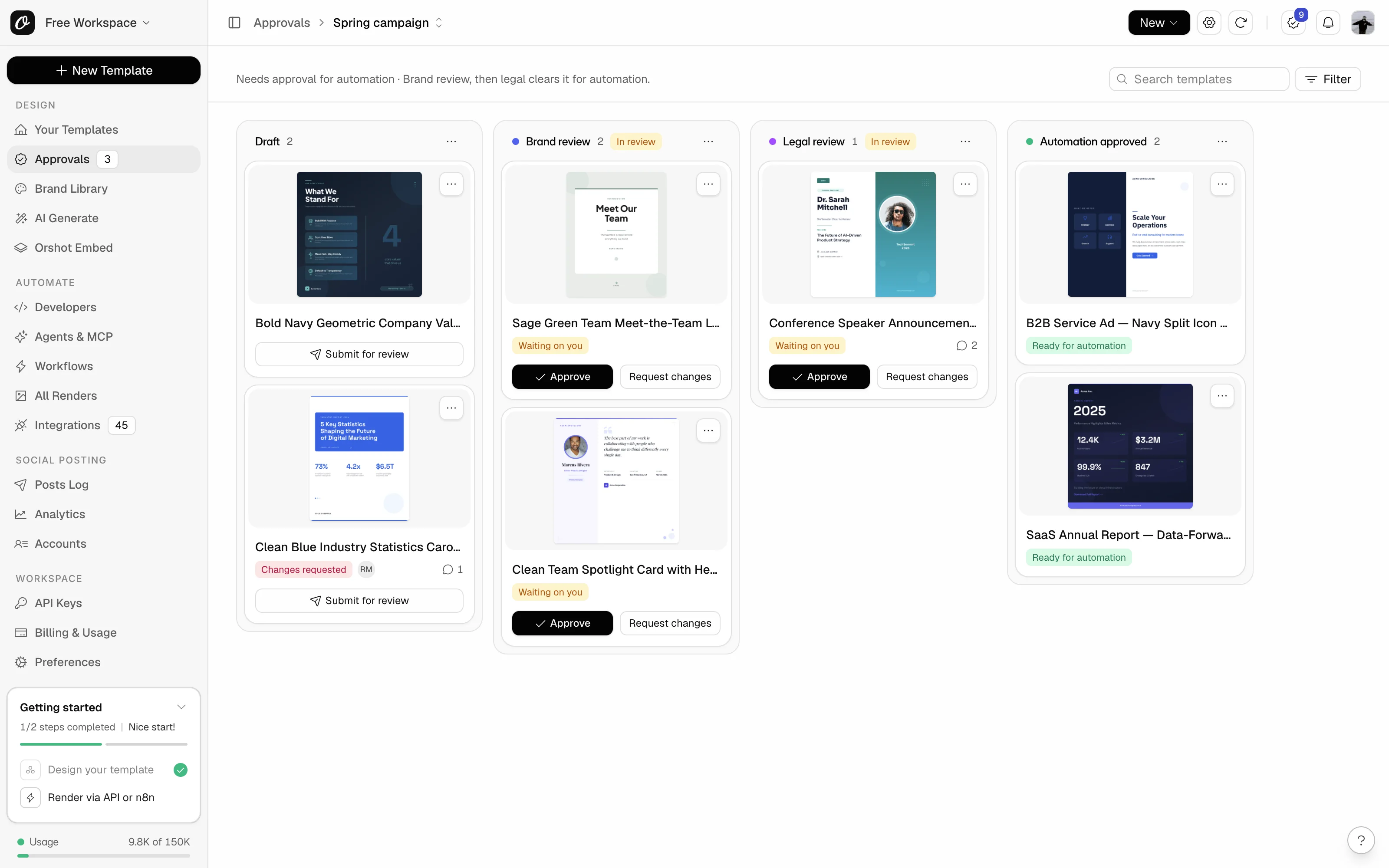
Open Approvals, find the template's card in Draft (use Search templates on a busy flow) and click Submit for review. The card moves to the next review stage, and you see "Moved to 'Brand review'."
From the studio#
- 1
Save your changes
Open the template in the studio and save it.
- 2
Open the Approvals menu
Click the Approvals icon (a seal with a check mark) on the left rail, below Comments.
- 3
Click Submit for review
The line under it names where it goes, like "To 'Brand review'".
Some stages ask for a comment on every template that moves in. A dialog opens: add your comment, then click Move.
What happens next#
- The card shows who it's waiting on, like "Waiting on Maya and Legal", and the approvers get a "Review needed" email.
- In the studio, the template is Locked while it's in review.
- If someone asks for changes, the card comes back to Draft marked Changes requested. Click the comment count on the card to read what they said, fix the design and submit again.
Move it back to Draft#
Spotted a mistake after submitting? On the board, open the card menu (the three dots) and pick Move back to Draft…. In the studio, pick Move back to Draft… in the Approvals menu. Add a short comment saying why: the approvers of that review stage get notified, so nobody waits on a template that has left. Nothing is recorded as a change request, and you can edit the design again.
Common problems#
| You see | Why, and what to do |
|---|---|
| No Submit for review on the card | The template isn't in a Draft-like stage, or the next review stage doesn't take templates from here. Use Move to in the card menu. |
| Submit for review is greyed out | Hover it to see why, like "You can't move templates in this approval flow." Ask an owner or admin for Add and move access. Reviewers never submit, whatever their access. |
| "This approval flow is over your plan's limit of 3. Archive a flow or upgrade to use it." | Nothing in this flow can move after a downgrade. See what happens after a downgrade. |
| "Nobody can approve yet" on the card | The review stage has no approver. Ask an owner or admin to add one on the Access tab. |
| You can't edit the template anymore | It's in a review stage, which doesn't allow edits. Move it back to Draft first. |
Related#
More in Approval flows
Ready to automate?
Start rendering images, PDFs and videos from your templates in under 2 minutes. Free plan, no credit card.
Get your API key- Image, PDF and video generation via API
- Visual editor with AI and smart layouts
- Zapier, Make, MCP and 50+ integrations
- White-label embed for your own app
- 100 free credits a month, no credit card required