How to invite your team to a workspace
Invite people from the Team Members tab in Preferences, then change roles, cancel invites or transfer ownership from the menu on each row.
Published Jun 7, 2026·Updated Sep 29, 2026
A workspace is shared by everyone in it. Invite teammates to design templates, manage brand assets and run your renders and automations together.
Invite a team member#
- Click Preferences in the sidebar, then the Team Members tab.
- Under Invite a member, enter their email and pick a Role. Click Add member to invite several people at once.
- Click Send Invite. They get an email with a link to join.
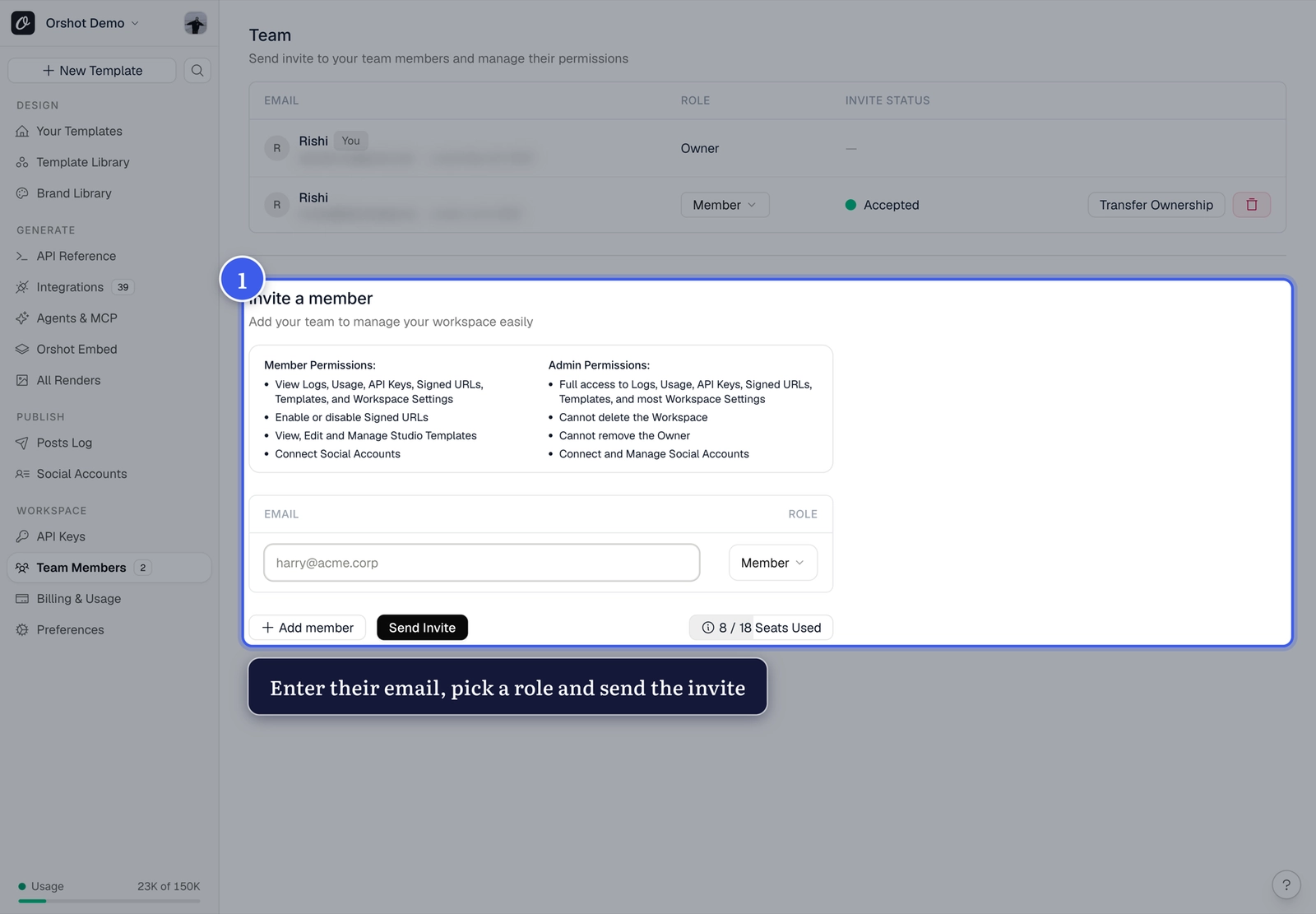
The workspace owner and admins see the invite form. Members and reviewers don't.
Roles and access#
The Roles and access panel beside the form (under it on a phone) says what each role can do. It opens on the role you just picked.
| Role | What they can do |
|---|---|
| Admin | Full access to templates, API keys, logs, usage and most settings. Changes roles and removes people. Can't delete the workspace or remove the owner |
| Member | Designs, edits and renders templates. Sees logs, usage, API keys and settings |
| Reviewer | Views templates, comments, and approves in approval flows. No API keys, renders, billing or settings |
Reviewer is in the Role menu when your plan includes approval flows (Scale and Enterprise). Every role takes a seat, reviewers included.
Manage your team#
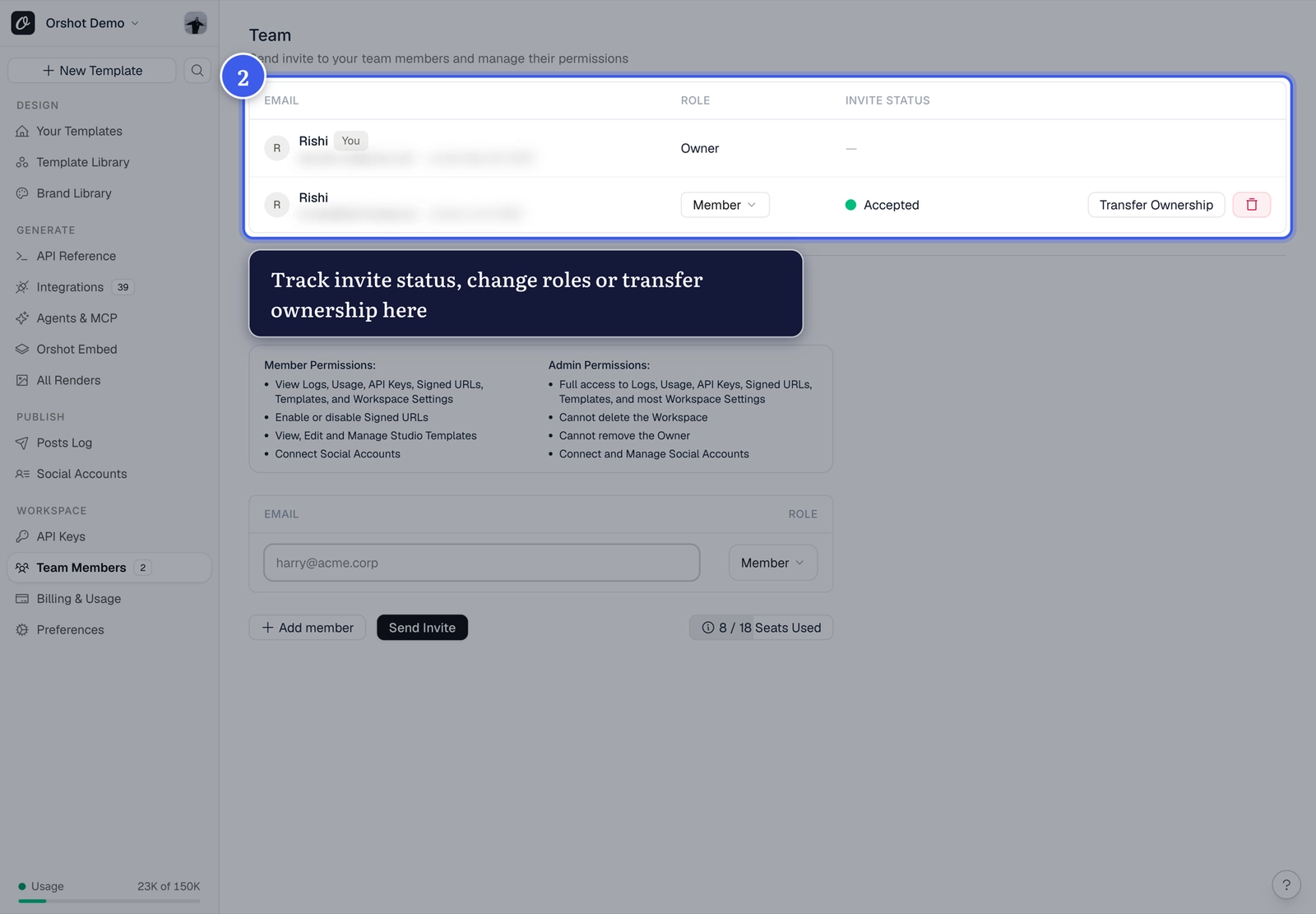
The list shows each person's role and invite status. Owners and admins change a role from its dropdown. A reviewer's row has a second dropdown for Whole workspace or Selected approval flows.
Everything else is in the ... menu at the end of a row:
| Menu item | On | Who sees it |
|---|---|---|
| Transfer ownership | Admins and members who joined | The owner |
| Copy invite link | Pending invites | Everyone on the page |
| Cancel invite | Pending invites | Owners and admins |
| Remove from workspace | People who joined | Owners and admins |
| Leave workspace | Your own row | Everyone but the owner |
Removing someone also removes their access to approval flows. If you invite them back, they start with none.
Transfer the workspace#
The owner picks Transfer ownership in an admin's or member's row menu, or starts a transfer from the General tab in Preferences. The recipient must be on a paid plan.
In the dialog, Include team members in transfer keeps everyone in the workspace. Leave it off and the team is removed, and pending invites are cancelled too, so nobody joins through an old invite after the handover. See workspace transfer for every option.
Reviewers can't own a workspace, so Transfer ownership isn't on their rows. Change their role to Member or Admin first.
Available on paid plans
Team collaboration is on paid plans. Your seat count is shown next to Send Invite, and a pending reviewer invite holds its seat until it's accepted or cancelled.
Common problems#
| You see | Why, and what to do |
|---|---|
| No Invite a member form | Only the owner and admins send invites. Ask one of them. |
| "Free plan includes only 1 user" | Subscribe to a paid plan to invite your team. |
| "You can send up to 30 invites an hour. Invite fewer people at a time." | One Send Invite takes up to 30 people. Split the list. |
| "This workspace has sent a lot of invites in the last hour. Try again in about 12 minutes." | A workspace, and each person sending, can send 30 invite emails an hour and 100 a day. Try again after the time it names. |
| You're out of seats | Cancel a pending reviewer invite or remove someone you no longer need, or upgrade on pricing. |
Related#
More in Account & Billing
Ready to automate?
Start rendering images, PDFs and videos from your templates in under 2 minutes. Free plan, no credit card.
Get your API key- Image, PDF and video generation via API
- Visual editor with AI and smart layouts
- Zapier, Make, MCP and 40+ integrations
- White-label embed for your own app
- 100 free credits a month, no credit card required